AI Appointment Setting in 2026: The Complete Sales Guide
AI appointment setting promises more booked meetings with fewer reps. Here's how it actually works in 2026, what it costs, and where it still needs a human.
TL;DR
- AI appointment setting uses software to research prospects, send personalized outreach, handle replies, and book meetings on a rep's calendar with little or no human touch.
- It works best on top-of-funnel volume work — qualifying, follow-up, and scheduling — not on closing or complex discovery.
- Accuracy depends entirely on data quality. Bad contact data means bots email the wrong people, so a verified source list matters more than the AI itself.
- Expect to layer three things: clean B2B data, an outreach engine, and a booking/qualification layer. No single tool does all three well.
- Budget realistically: usable stacks start around $100–$300/mo for SMB teams and scale into thousands for enterprise seat-based platforms.
What is AI appointment setting?#
AI appointment setting is the use of software — usually large language models plus automation — to do the repetitive parts of booking sales meetings: finding prospects, writing the first message, replying to objections, and dropping a calendar link at the right moment.
Think of it like a tireless junior SDR who never forgets a follow-up. A human SDR spends most of their day on low-judgment tasks: copying names into a sequence, sending the third reminder, and answering "what's the price?" for the hundredth time. AI handles that volume so your humans spend their hours on the conversations that actually need a person.
Technically, an AI appointment setter strings together four jobs: source a contact, personalize an opener, manage the back-and-forth, and schedule. Some platforms do this over email, some over LinkedIn, some by SMS, and a growing number by voice. The output you care about is the same — a qualified meeting on a rep's calendar that they didn't have to chase.
The thing most buyers miss: the AI is the cheap part. The expensive, fragile part is the data feeding it. An AI that confidently emails a prospect who left the company eight months ago doesn't save you time — it burns your domain reputation. That's why this guide spends as much time on data as on the bots.
How does AI appointment setting actually work?#
A typical pipeline has five stages, and a weakness in any one of them caps the whole system.
1. Sourcing. The system pulls a list of target accounts and contacts — by title, industry, headcount, tech stack, or intent signal. This is where a tool like the Tomba Email Finder or a broader B2B database feeds the machine. Garbage in, garbage out applies here more than anywhere.
2. Enrichment and verification. Before a single message goes out, contacts get enriched (role, company, recent activity) and emails get verified so you're not blasting dead inboxes. Skipping this step is the single most common reason AI outreach tanks deliverability.
3. Personalization and outreach. The model drafts an opener referencing something real — a funding round, a job change, a published article. Then it sends across the chosen channel and waits.
4. Reply handling. When a prospect responds, the AI classifies the intent (interested, not now, wrong person, unsubscribe) and either books, nurtures, or routes to a human. The better systems know when they're out of their depth and hand off.
5. Scheduling. The AI proposes times, syncs to the rep's calendar, sends confirmations, and chases no-shows. This is the part that feels like magic to prospects because it's instant.
The reason it's worth automating is purely mathematical. A human SDR realistically books a handful of meetings a day across hundreds of touches. An AI layer can run thousands of touches in parallel and never skip the boring fifth follow-up — which, in most pipelines, is exactly where the meetings hide.
Is AI appointment setting better than human SDRs?#
Better at some things, worse at others. The honest answer is that they're complementary, not interchangeable.
AI wins on volume, consistency, speed-to-lead, and cost per touch. It replies in seconds at 2 a.m., never gets discouraged after ten "no"s, and runs A/B tests across thousands of sends without ego. For top-of-funnel qualification and scheduling, that's a decisive edge.
Humans win on nuance, multi-threaded enterprise deals, reading a prospect's tone, and anything requiring genuine domain credibility. When a CTO replies with a sharp technical objection, an AI that fumbles it costs you the deal. A good rep turns that objection into a meeting.
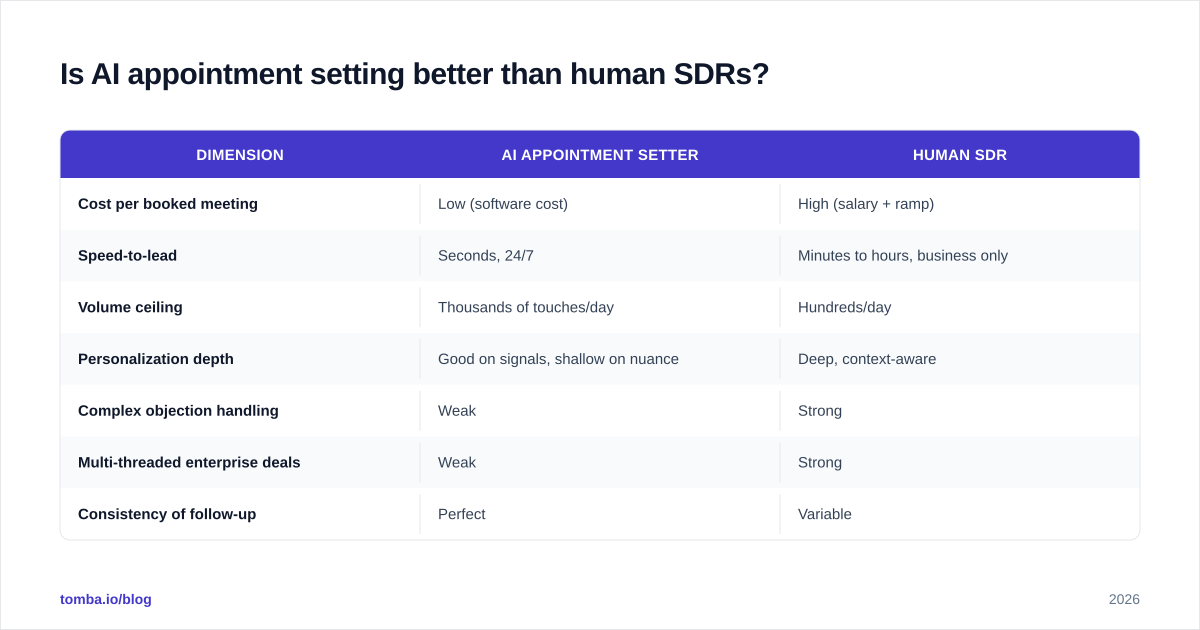
Here's a clear way to think about the split:
| Dimension | AI appointment setter | Human SDR |
|---|---|---|
| Cost per booked meeting | Low (software cost) | High (salary + ramp) |
| Speed-to-lead | Seconds, 24/7 | Minutes to hours, business only |
| Volume ceiling | Thousands of touches/day | Hundreds/day |
| Personalization depth | Good on signals, shallow on nuance | Deep, context-aware |
| Complex objection handling | Weak | Strong |
| Multi-threaded enterprise deals | Weak | Strong |
| Consistency of follow-up | Perfect | Variable |
| Ramp time | Days | Weeks to months |
The teams getting real results in 2026 don't pick one. They put AI on the top of the funnel — qualifying and booking — and reserve humans for the meetings AI books and the deals too complex for a script. Research from sales orgs tracked by Gartner consistently shows buyers want fast, relevant responses; AI delivers the speed, humans deliver the relevance on the hard ones.
What does AI appointment setting cost in 2026?#
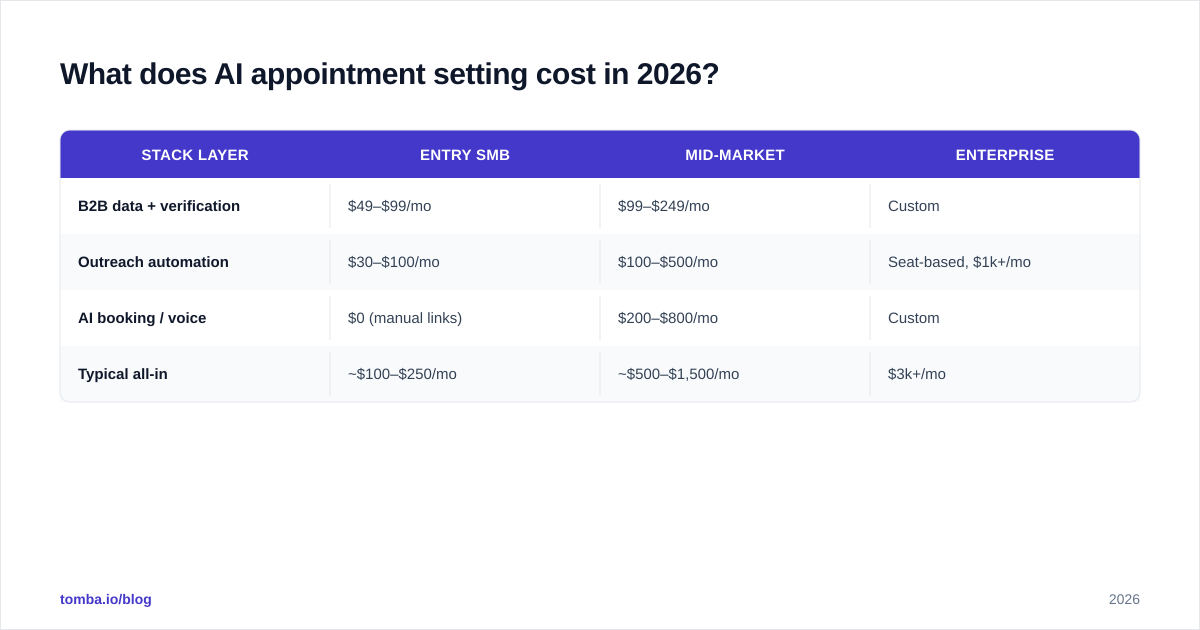
Pricing splits into three layers, and you'll usually pay for each separately.
The data layer (finding and verifying contacts) is often the most overlooked budget line. The outreach layer (the sending engine) is what most people picture when they say "AI SDR." The booking/qualification layer is sometimes bundled, sometimes a standalone AI voice or chat product.
Here's a realistic look at how the layers and price points compare:
| Stack layer | Entry SMB | Mid-market | Enterprise |
|---|---|---|---|
| B2B data + verification | $49–$99/mo | $99–$249/mo | Custom |
| Outreach automation | $30–$100/mo | $100–$500/mo | Seat-based, $1k+/mo |
| AI booking / voice | $0 (manual links) | $200–$800/mo | Custom |
| Typical all-in | ~$100–$250/mo | ~$500–$1,500/mo | $3k+/mo |
For the data layer specifically, Tomba is on the affordable end: a free tier with 25 searches/mo, Starter at $49/mo, Growth at $99/mo, and Pro at $249/mo. You can see the full breakdown on the Tomba pricing page. The point isn't that cheaper is always better — it's that you should not pay enterprise data prices to feed an entry-level outreach experiment.
A common mistake: buying a $1,000/mo "AI SDR" platform and feeding it a stale, unverified list. You'd get better ROI spending $99 on clean data and $100 on a simple sequencer. Fix the input before you buy the expensive engine.
What makes AI appointment setting succeed or fail?#
It comes down to data quality, deliverability, and knowing where to put the human.
Data quality is the whole ballgame. If your contact list is 30% wrong, your AI sends 30% of its volume to bounces and wrong people. That destroys sender reputation and gets you flagged as spam. Run every list through an email verifier before the first send, and use a catch-all verifier for domains that accept everything. This isn't optional hygiene — it's the difference between landing in the inbox and landing in spam.
Deliverability protects the channel. AI lets you send more, which means you can damage your domain faster than ever. Warm up new sending domains, keep volume gradual, authenticate with SPF and DKIM, and monitor reply and bounce rates. If you want the fundamentals, our guide to email deliverability covers the controls that keep AI volume from torching your reputation.
The human handoff has to be clean. Define exactly when the AI stops and a person takes over — usually at "interested," at any pricing negotiation, or at a technical question outside the script. A vague handoff means hot leads cool down waiting in a queue.

Compliance is non-negotiable. Honor unsubscribes instantly, respect regional rules (GDPR, CAN-SPAM), and don't let an AI scrape and message people it has no business contacting. The platforms that survive are the ones that treat consent as a feature, not a loophole.
How do you build an AI appointment setting stack?#
Start with the workflow you already run, then automate the boring stages one at a time. Don't buy an all-in-one and hope it fits your motion.
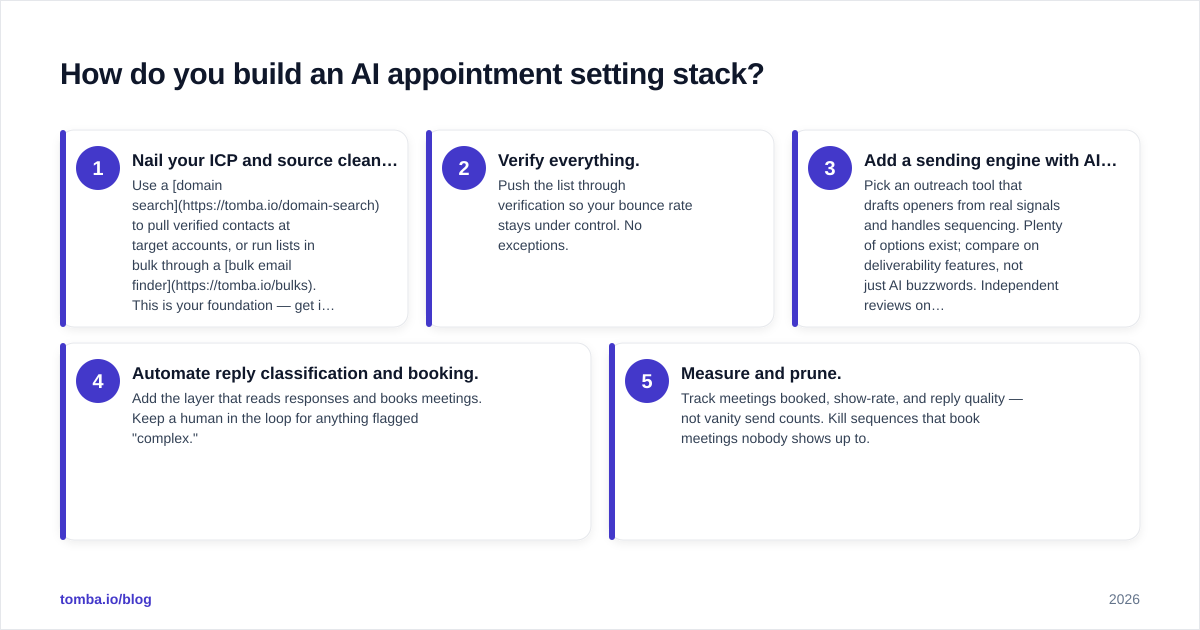
A practical build order:
- Nail your ICP and source clean contacts. Use a domain search to pull verified contacts at target accounts, or run lists in bulk through a bulk email finder. This is your foundation — get it right before anything else.
- Verify everything. Push the list through verification so your bounce rate stays under control. No exceptions.
- Add a sending engine with AI personalization. Pick an outreach tool that drafts openers from real signals and handles sequencing. Plenty of options exist; compare on deliverability features, not just AI buzzwords. Independent reviews on G2 are a decent sanity check before committing.
- Automate reply classification and booking. Add the layer that reads responses and books meetings. Keep a human in the loop for anything flagged "complex."
- Measure and prune. Track meetings booked, show-rate, and reply quality — not vanity send counts. Kill sequences that book meetings nobody shows up to.
The reason this order matters: each layer amplifies the one before it. A brilliant AI sequencer on top of bad data just fails faster and louder. Clean data with a mediocre sequencer still books meetings. Build from the foundation up.
If you run your prospecting inside a CRM, wire the stack into it so booked meetings and enriched contacts flow back automatically — most teams connect via a HubSpot integration or push data through [
Zapier](https://tomba.io/integrations/zapier) so nothing lives in a silo.
Where does AI appointment setting still fall short?#
Three places, and pretending otherwise will cost you.
Genuine conversation. AI handles scripted objections fine. It falls apart on the unscripted, emotional, or highly technical exchange — exactly the moments that win competitive deals. Treat AI replies as a triage layer, not a closer.
Brand risk at scale. One badly personalized message is forgettable. Ten thousand of them, with the wrong merge field or a tone-deaf opener, becomes a reputation problem. Audit AI output regularly; don't set it and forget it.
Data decay. Contacts change jobs constantly. Even a great list rots — a meaningful share of B2B contacts go stale within a year. Refresh and re-verify on a schedule, and lean on data enrichment to keep records current rather than re-buying lists.
The teams that win with AI appointment setting in 2026 are clear-eyed about this. They automate the volume, supervise the output, keep the data fresh, and put their best humans on the meetings the AI books. The goal isn't to remove people from sales — it's to stop wasting people on work a machine does better.
The bottom line#
AI appointment setting is no longer a novelty; it's a standard layer in any serious outbound motion. But the AI is only as good as the contact data underneath it. The single highest-leverage move you can make is fixing your data foundation before you spend a dollar on fancy automation.
That's where Tomba fits. Before your AI sends a single message, use the Tomba Email Finder to source accurate, verified professional emails by name, domain, or company — then let your outreach and booking layers do their work on a list that actually lands. Start free with 25 searches, and only scale the spend once the meetings start showing up on the calendar.
Ready to find emails that actually work?
Join 150,000+ professionals who stopped guessing and started sending. Free credits on signup — no credit card required.
Get the Tomba newsletter
Practical outbound tactics and product updates — once every two weeks.
About the author