AI CRM in 2026: How AI Is Rewriting Sales Pipelines
An AI CRM doesn't just store contacts — it scores leads, drafts replies, and predicts which deals will close. Here's how the tech works in 2026 and how to pick one that earns its seat.
TL;DR
- An AI CRM is a customer relationship management system with machine learning baked into the core workflow: lead scoring, deal forecasting, auto-drafted emails, and data enrichment happen automatically instead of being manual chores.
- The value isn't the chatbot bolted on top. It's the quiet automation — clean data, prioritized pipelines, and next-best-action prompts that save reps 5–10 hours a week.
- HubSpot, Salesforce (Einstein), Pipedrive, and Zoho all ship native AI now; the real differentiator in 2026 is data quality, not model quality.
- An AI CRM is only as smart as the contact data feeding it. Garbage emails and stale records poison lead scores and break automated sequences.
- Pair your AI CRM with a dedicated email finder and verification layer so the AI is reasoning over accurate records — not guessing on bounced addresses.
What is an AI CRM?#
An AI CRM is a customer relationship management platform where machine learning runs the busywork a human used to do by hand. Think of a regular CRM as a filing cabinet — it stores who you talked to and when. An AI CRM is the filing cabinet that also reads every file, tells you which three deals to call today, and writes the first draft of the email for you.
Concretely, "AI" inside a modern CRM shows up as a handful of features working together:
- Predictive lead scoring — ranking contacts by likelihood to convert, based on firmographics and behavior.
- Deal forecasting — estimating which open opportunities will actually close this quarter.
- Conversation intelligence — transcribing and summarizing sales calls, flagging risk language.
- Generative drafting — writing email replies, follow-ups, and call summaries in your voice.
- Auto-enrichment — filling in missing job titles, company size, and contact details without a rep typing them.
The category has matured fast. According to Gartner, the majority of B2B sales organizations now expect AI-assisted guidance inside their system of record rather than as a separate tool. The CRM stopped being a passive database and became an active co-pilot.
How does an AI CRM actually work?#
Three layers, stacked. Understanding them tells you where AI CRMs win and where they quietly fail.
1. The data layer. Everything starts with records: contacts, companies, emails, call logs, deal stages. This is the fuel. An AI model forecasting your Q3 pipeline is doing math on this data — and if 18% of your contact emails are invalid or duplicated, the math is wrong before it starts.
2. The intelligence layer. Here the models run. Lead scoring uses gradient-boosted trees or logistic regression over historical win/loss patterns. Generative features call an LLM (often GPT-4-class or Claude-class) to draft text. Conversation intelligence runs speech-to-text plus classification.
3. The action layer. The output surfaces where reps work: a "call this lead next" badge, a drafted reply in the inbox, an auto-logged activity, a deal-risk alert in Slack. This is where time actually gets saved.
The trap most teams fall into: they buy for the flashy action layer (the AI that writes emails) and neglect the data layer that makes any of it trustworthy. An AI CRM trained on dirty data confidently recommends the wrong actions. That's worse than no recommendation, because reps trust it.
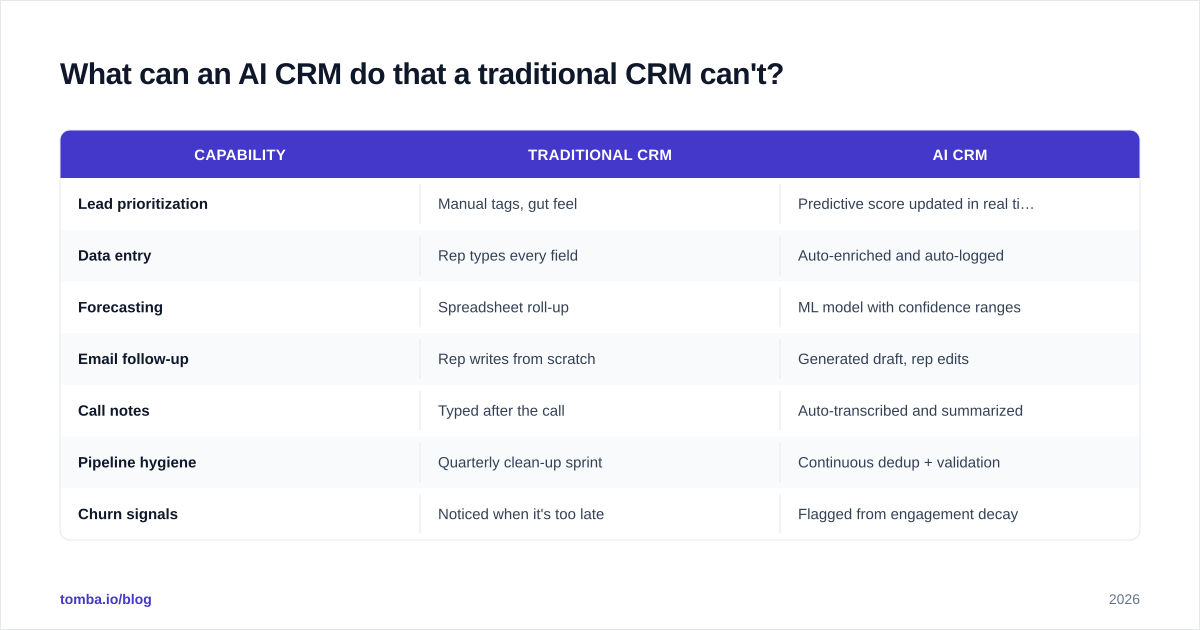
What can an AI CRM do that a traditional CRM can't?#
A traditional CRM records the past. An AI CRM acts on the present and predicts the future. The practical differences:
| Capability | Traditional CRM | AI CRM |
|---|---|---|
| Lead prioritization | Manual tags, gut feel | Predictive score updated in real time |
| Data entry | Rep types every field | Auto-enriched and auto-logged |
| Forecasting | Spreadsheet roll-up | ML model with confidence ranges |
| Email follow-up | Rep writes from scratch | Generated draft, rep edits |
| Call notes | Typed after the call | Auto-transcribed and summarized |
| Pipeline hygiene | Quarterly clean-up sprint | Continuous dedup + validation |
| Churn signals | Noticed when it's too late | Flagged from engagement decay |
The headline isn't any single row. It's the compounding effect: a rep who isn't typing notes, hunting for the next call, or rewriting the same follow-up has hours back every week to actually sell. Most teams report 5–10 hours saved per rep per week once an AI CRM is fully adopted — and adoption, not features, is the hard part.
One honest caveat: AI forecasting is probabilistic, not magic. It's directionally excellent at the portfolio level ("you'll close roughly $1.2M ± $200K") and noisier on any single deal. Use it to allocate attention, not to fire a rep who missed one call the model loved.
Which AI CRM is best in 2026?#
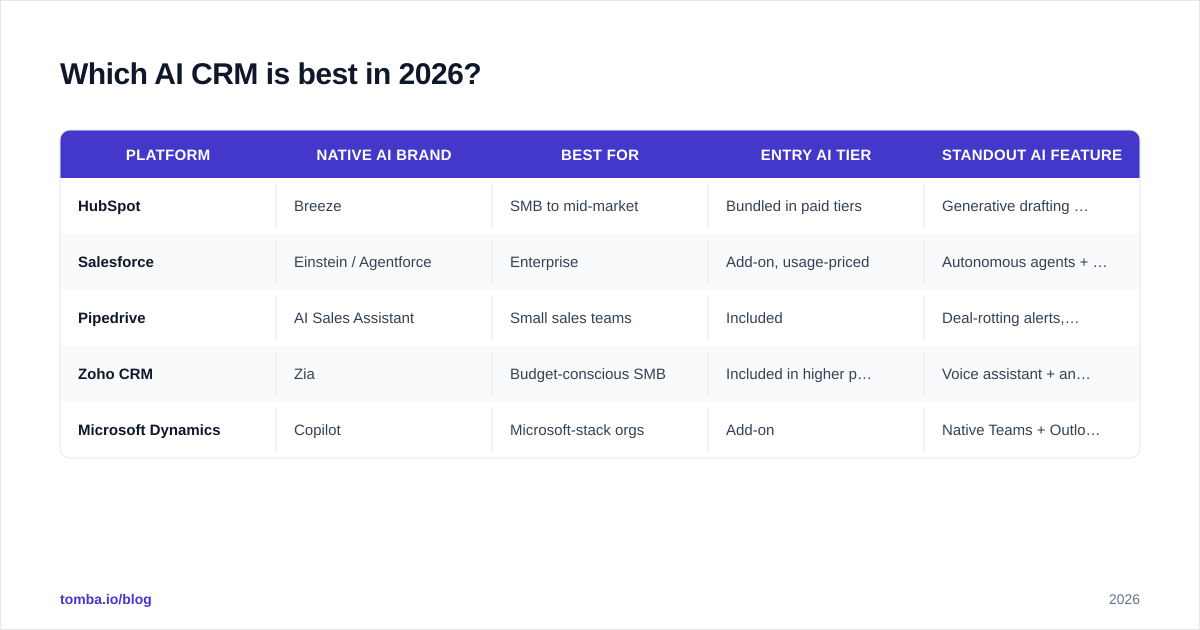
There's no universal winner — there's a best fit for your team size, stack, and data maturity. Here's how the major players compare on their AI capabilities specifically.
| Platform | Native AI brand | Best for | Entry AI tier | Standout AI feature |
|---|---|---|---|---|
| HubSpot | Breeze | SMB to mid-market | Bundled in paid tiers | Generative drafting + content assistant |
| Salesforce | Einstein / Agentforce | Enterprise | Add-on, usage-priced | Autonomous agents + deep customization |
| Pipedrive | AI Sales Assistant | Small sales teams | Included | Deal-rotting alerts, simple and fast |
| Zoho CRM | Zia | Budget-conscious SMB | Included in higher plans | Voice assistant + anomaly detection |
| Microsoft Dynamics | Copilot | Microsoft-stack orgs | Add-on | Native Teams + Outlook integration |
A few buying notes that don't show up on the pricing page:
- HubSpot is the smoothest on-ramp. If your team has never used AI features, Breeze surfaces them without a consultant. Verify scope on the HubSpot product pages — the AI is spread across hubs.
- Salesforce is the most powerful and the most expensive to operationalize. Salesforce Einstein and Agentforce can do almost anything, but you'll likely need an admin or partner to configure it well.
- Pipedrive and Zoho punch above their weight for small teams who want practical AI (alerts, scoring) without enterprise overhead.
Before you commit, read independent reviews on G2 for your exact segment — enterprise reviews of a tool tell you little about its SMB experience, and vice versa.
Why does data quality decide whether your AI CRM succeeds?#
Because every AI feature is downstream of your data, and most CRM data is quietly broken.
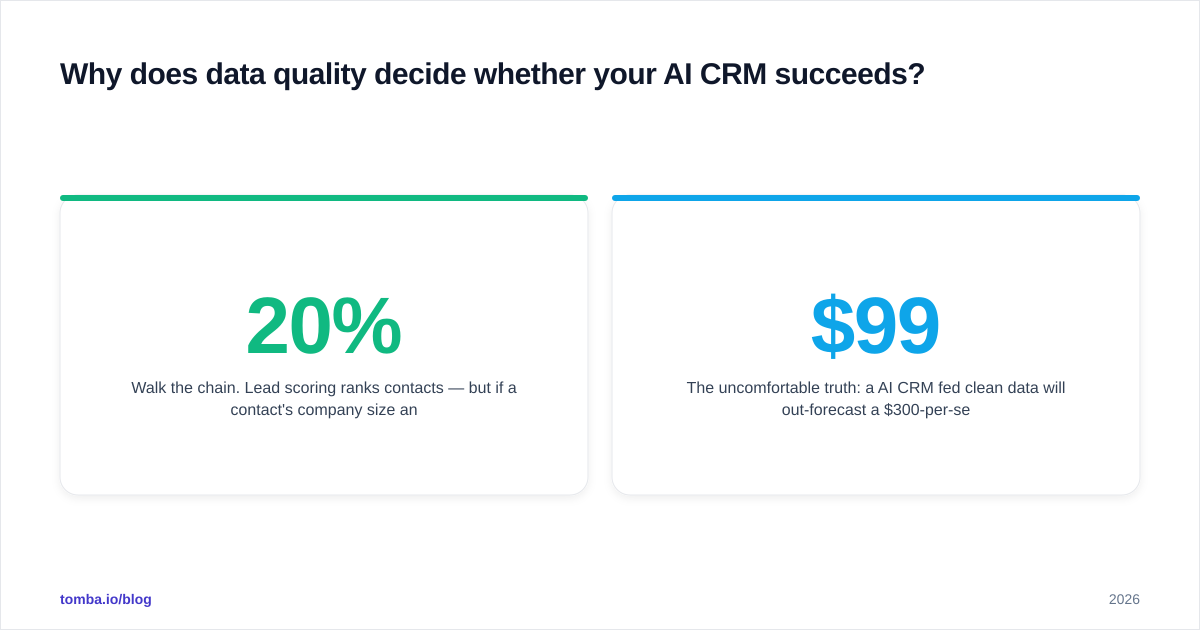
Walk the chain. Lead scoring ranks contacts — but if a contact's company size and title are blank, the model scores it as low-value and your reps never call a perfect-fit buyer. Automated sequences fire emails — but if 20% of addresses are invalid, your bounce rate spikes, your sender reputation tanks, and your deliverable emails start landing in spam too. Forecasting models weigh deal activity — but duplicate records split one account into three half-deals and the math breaks.
This is why the teams getting real ROI from AI CRMs treat contact data as infrastructure, not an afterthought:
- Enrich on entry. When a lead enters the CRM, auto-fill the missing firmographic and contact fields. Tools like Tomba's data enrichment push verified company and role data straight into the record so the scoring model has something real to chew on.
- Verify before you send. Run every email through an email verifier before it enters an automated sequence. Valid-only lists protect the deliverability that all your AI outreach depends on.
- Dedupe continuously. Merge duplicate contacts and accounts so forecasting isn't double-counting.
- Refresh stale records. People change jobs. A 2-year-old contact is a future bounce. Re-verify periodically.
The uncomfortable truth: a $99/mo AI CRM fed clean data will out-forecast a $300-per-seat enterprise AI CRM fed garbage. Spend on data hygiene before you spend on a fancier model. If you want the deeper mechanics, our glossary entry on CRM and the piece on email deliverability cover the fundamentals the vendors gloss over.
How do you roll out an AI CRM without wasting six months?#
The failure mode is buying the platform, flipping every AI switch, and watching reps ignore all of it. Here's a sequence that actually sticks.
Phase 1 — Clean the foundation (weeks 1–3). Before turning on a single AI feature, audit your existing records. Dedupe, verify emails, enrich missing fields. The AI you turn on next week will only be as good as what it learns from now.
Phase 2 — Turn on one feature (weeks 3–6). Pick the single highest-leverage AI feature for your team — usually predictive lead scoring or auto-logging — and roll out only that. Let reps build trust with one win before you flood them.
Phase 3 — Add generative drafting (weeks 6–10). Once scoring is trusted, introduce AI-drafted emails and call summaries. Keep humans in the loop — reps edit, they don't blind-send. The AI writes the 80%; the rep adds the 20% that closes.
Phase 4 — Connect your data pipeline (ongoing). Wire enrichment and verification into your intake so new leads arrive clean. Connect Tomba to your stack via the HubSpot integration or Salesforce integration so finding and verifying contacts happens inside the CRM you already live in.
A measure-as-you-go rule: track one number per phase (time-to-first-call, email bounce rate, forecast accuracy). If a phase doesn't move its number, fix it before adding the next layer.
What does an AI CRM cost in 2026?#
AI pricing splits into two models: bundled (AI included in the plan) and metered (you pay per AI action or per credit). Roughly:
| Tier | Typical monthly cost | What you get |
|---|---|---|
| SMB bundled (Pipedrive,Zoho) | $20–$50 per seat | Scoring, alerts, basic drafting |
| Mid-market (HubSpot) | $90–$150 per seat | Full generative + content tools |
| Enterprise (Salesforce, Dynamics) | $165+ per seat + AI add-ons | Autonomous agents, deep customization |
| Data layer (enrichment + verification) | From $49/mo flat | Clean contacts feeding all of the above |
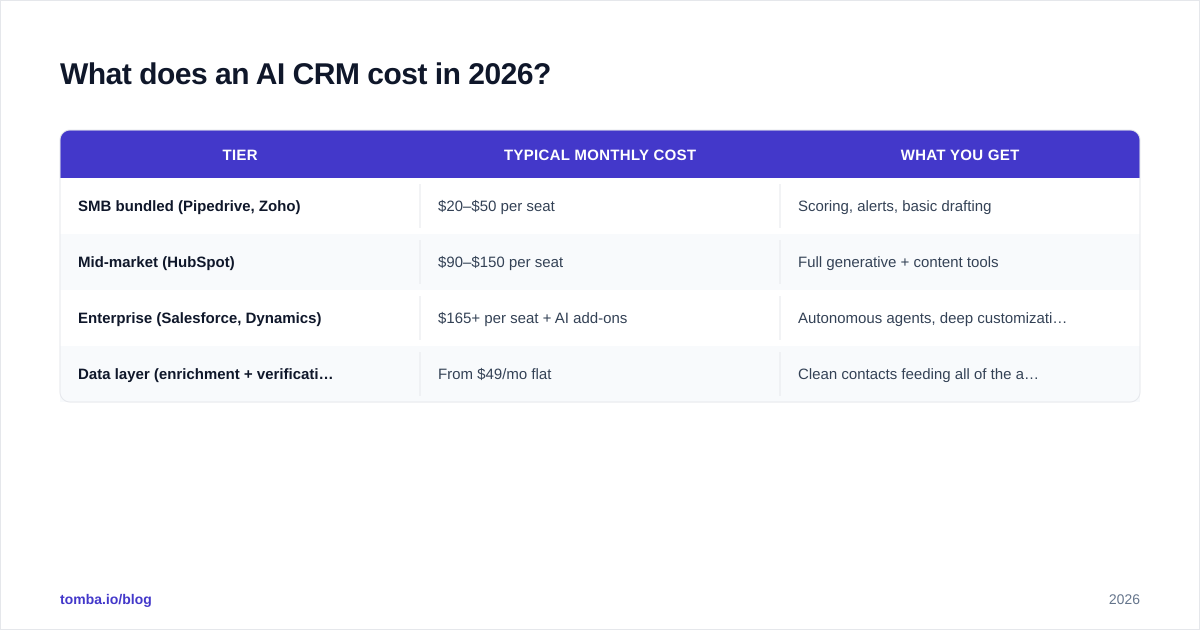
That last row is the one teams forget to budget. The data layer isn't per-seat — it's a flat platform cost, and it's the cheapest line item with the highest leverage. Tomba's plans start with a free tier of 25 searches a month, then $49/mo for Starter, $99/mo for Growth, and $249/mo for Pro; full Tomba pricing is public. Compare that to the marginal cost of one enterprise CRM seat and the ROI math is obvious: you're protecting a $165/seat investment with a $49 flat insurance policy.
Is an AI CRM worth it for a small team?#
Yes — arguably more than for a large one, with one condition: you have to feed it clean data.
A 3-person sales team can't afford a dedicated ops person to prioritize leads and clean records. That's exactly the work an AI CRM automates. Predictive scoring becomes your missing sales manager. Auto-logging becomes your missing assistant. For a small team, the AI isn't a luxury — it's the headcount you can't hire.
The condition stands, though. A small team with messy data gets confidently wrong automation, which is worse than manual work because nobody catches the mistakes. Start with the foundation: find the right contacts, verify they're reachable, enrich the records, then let the AI loose. Get the data right and even the cheapest AI CRM tier outperforms an enterprise rollout running on guesswork.
The bottom line#
An AI CRM in 2026 is no longer a differentiator — it's table stakes. Every major platform ships predictive scoring, generative drafting, and forecasting. The teams that win aren't the ones with the fanciest model. They're the ones feeding their model accurate, verified, enriched contact data so its recommendations are worth trusting.
That foundation is exactly what Tomba is built for. Start by finding and verifying the contacts that enter your CRM with the Tomba Email Finder — locate professional emails by name, domain, or company, verify them before they hit your automated sequences, and push clean records straight into HubSpot or Salesforce. Your AI CRM will only ever be as smart as the data you give it. Give it good data, and let the machine do the rest.
// get started
Find, verify and enrich your first contacts today
Start on the free plan with 25 searches a month, then scale when your team is ready.
Free plan · No credit card required · GDPR & CCPA
// about the author