Best AI Data Enrichment Tools in 2026: A Buyer's Guide
AI data enrichment tools fill the gaps in your CRM automatically. Here's how they work, what to compare, and how to pick one that won't bloat your stack.
TL;DR
AI data enrichment tools automatically append missing firmographic, contact, and intent data to your records — so reps stop copy-pasting from LinkedIn.
The "AI" part matters most for entity resolution (matching messy records to the right company/person) and for inferring fields that aren't published anywhere.
Accuracy, freshness, and coverage beat raw field count. A tool with 200 fields that are 60% stale is worse than one with 30 fields at 95% accuracy.
Watch for credit-based pricing traps: enrichment that re-charges you for records it already knows.
Match the tool to the job — bulk CRM cleanup, real-time form enrichment, and outbound list-building have different best-fit products.
What are AI data enrichment tools?#
AI data enrichment tools take a thin record — sometimes just an email or a company domain — and fill in the rest: job title, seniority, company size, industry, tech stack, location, social profiles, and phone numbers. Think of it like a librarian who takes a half-remembered book title and returns the full citation, edition, and shelf location. You hand over a fragment; the tool returns a complete, structured record.
The traditional version of this was a static database lookup: match an email to a row, copy the row's columns into your CRM. The "AI" layer changes two things. First, entity resolution — deciding that "Bob Smith, Acme" in your CRM and "Robert Smith, Acme Corp Inc." in the source are the same person, even when nothing matches exactly. Second, inference — predicting fields that no database lists outright, like estimated revenue band or buying intent, from signals across many sources.
If you're new to the category, our B2B glossary breaks down adjacent terms like firmographics and intent data. For a deeper definition of the discipline itself, see what is data enrichment on the Tomba product side.
Why does AI matter for data enrichment?#
Conclusion first: AI matters because the bottleneck in enrichment was never storage — it was matching and gap-filling. Databases have always been big. The hard part is connecting your messy input to the right record and producing fields that aren't sitting in a table somewhere.
Here's the everyday version. Imagine you run a hotel and a guest checks in with a reservation under "J. Martinez." Your old system needs an exact match or it gives up. A good concierge recognizes that "J. Martinez" booked through a travel agent as "Jose Martinez-Lopez," remembers he stayed last spring, and knows he prefers a high floor. AI enrichment is that concierge: probabilistic matching plus context.
Technically, modern AI data enrichment tools lean on three capabilities:
Fuzzy entity matching across name variants, domain redirects, and acquired companies.
Multi-source reconciliation — when three sources disagree on a job title, the model weighs recency and source reliability instead of picking the first hit.
Field inference — estimating headcount growth, department size, or likely tech stack from public signals when no source states it directly.
The payoff is coverage on records that pure lookup tools return blank on. The risk is confidence: an inferred field is a prediction, not a fact, and good tools label it as such.
What should you compare in AI data enrichment tools?#
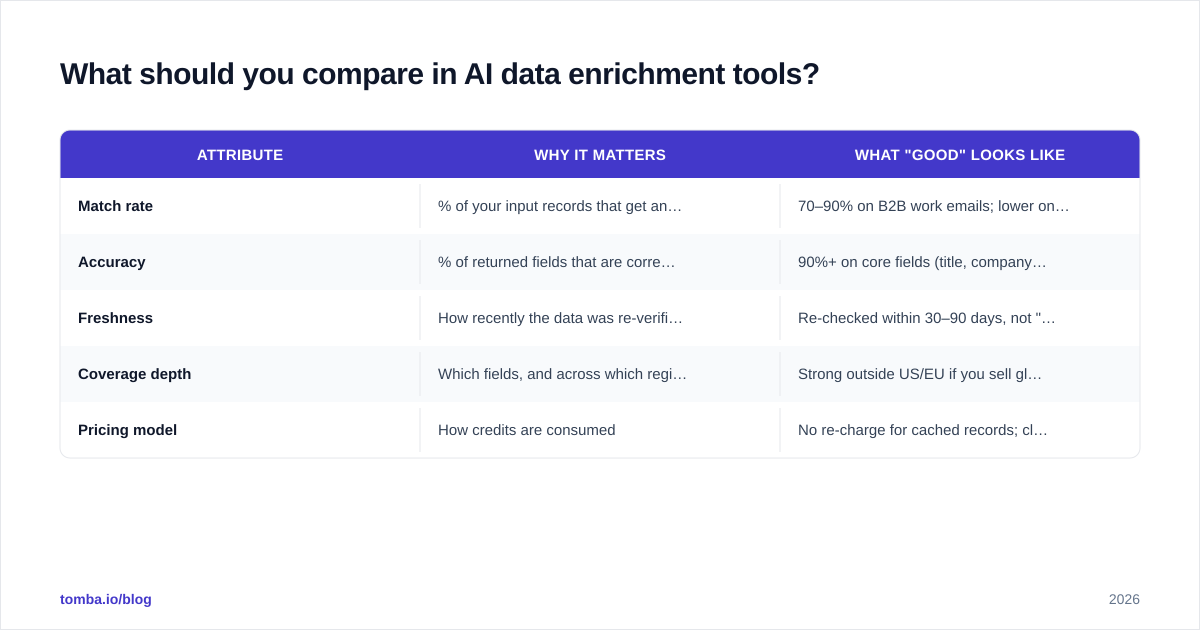
Don't start with field count. Start with the five attributes that actually determine whether the enriched data helps you book meetings.
Attribute
Why it matters
What "good" looks like
Match rate
% of your input records that get any enrichment
70–90% on B2B work emails; lower on personal domains
Accuracy
% of returned fields that are correct
90%+ on core fields (title, company, email)
Freshness
How recently the data was re-verified
Re-checked within 30–90 days, not "last seen 2022"
Coverage depth
Which fields, and across which regions
Strong outside US/EU if you sell globally
Pricing model
How credits are consumed
No re-charge for cached records; clear bulk rates
A few practical notes on reading vendor claims. "Database of 700M contacts" tells you almost nothing — what matters is the overlap between their database and your target accounts. Run a sample of 200 real records through a trial before believing any headline accuracy number. And treat catch-all and role-based addresses carefully; verifying those is its own problem, which is why a separate email verifier step often sits downstream of enrichment.
For independent reviews and side-by-side user ratings, G2's data enrichment category is a reasonable starting point before you trust any single vendor's marketing.
Which AI data enrichment tools fit which job?#
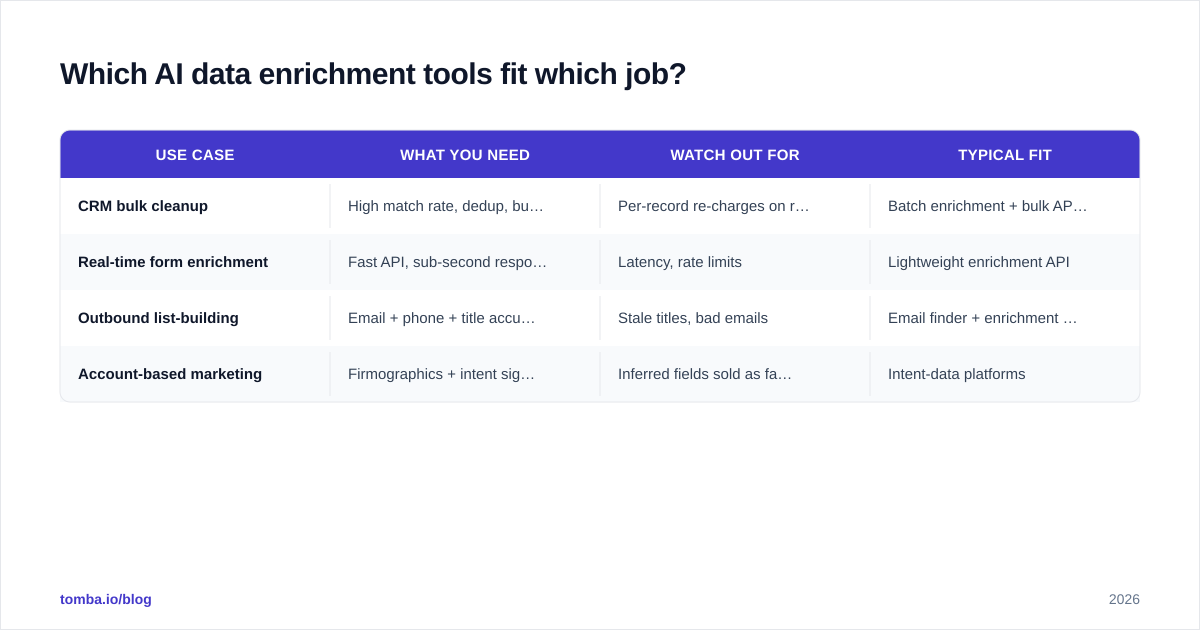
There's no single best tool — there's a best tool for a specific workflow. Below is a comparison of the three common buying scenarios and the trade-offs in each.
Use case
What you need
Watch out for
Typical fit
CRM bulk cleanup
High match rate, dedup, bulk pricing
Per-record re-charges on re-runs
Batch enrichment + bulk APIs
Real-time form enrichment
Fast API, sub-second response
Latency, rate limits
Lightweight enrichment API
Outbound list-building
Email + phone + title accuracy
Stale titles, bad emails
Email finder + enrichment combo
Account-based marketing
Firmographics + intent signals
Inferred fields sold as facts
Intent-data platforms
If your main pain is a CRM full of half-empty records, you want a tool with strong batch processing and dedup — a bulk email finder and enrichment run that you schedule monthly. If you're enriching inbound form fills in real time, response latency and uptime matter more than database size; you'll lean on the Tomba API or a similar low-latency endpoint. And if you're building outbound lists from scratch, contact-level accuracy (working email, current title) outranks everything, because a wrong email tanks your sender reputation before the campaign even warms up.

How accurate is AI-enriched data, really?#
Honest answer: accuracy varies by field type, and you should expect a gradient, not a single number.
Identity fields (name, company, work email): the most reliable, often 90%+ on B2B domains, because they're verifiable against live signals like mail-server responses.
Role fields (title, seniority, department): moderately reliable but decay fast — people change jobs, and a title that was right in January is wrong by June. Freshness is the whole game here.
Inferred fields (revenue band, intent score, growth signals): least reliable and most valuable. Treat these as directional. They're great for prioritization, dangerous as hard filters.
The practical move is to layer verification on top of enrichment rather than trusting a single pass. Enrich to get the candidate email, then verify deliverability before you send. This two-step pattern — find, then verify — is why enrichment and email verification are usually adjacent products rather than one black box. Where your data originates also matters; transparency about data sources is a reasonable proxy for how defensible the accuracy claims are.
One more caution on compliance: AI enrichment touches personal data, so your process has to respect GDPR and CCPA. HubSpot's overview of data enrichment is a useful primer on doing this without stepping on privacy rules, and your legal team should sign off on lawful basis before you enrich at scale.
How do you roll out an AI data enrichment tool without breaking your stack?#
Conclusion first: pilot on a slice, measure against ground truth, then scale — never enrich your entire database on day one.
A sane rollout looks like this:
Define ground truth. Pull 200 records you know are correct. This is your scorecard. Without it, you're grading the vendor on the vendor's own homework.
Run a trial pass. Enrich the 200 and score match rate and accuracy by field type. Anything below 85% on identity fields is a yellow flag.
Map fields carefully. Decide which CRM fields the tool is allowed to overwrite versus only fill-when-empty. Overwriting good data with an inferred guess is the most common self-inflicted wound.
Set a refresh cadence. Titles decay; schedule re-enrichment quarterly rather than treating enrichment as a one-time event.
Wire it into one workflow. Start with a single trigger — new lead created, or form submitted — through your integrations layer (
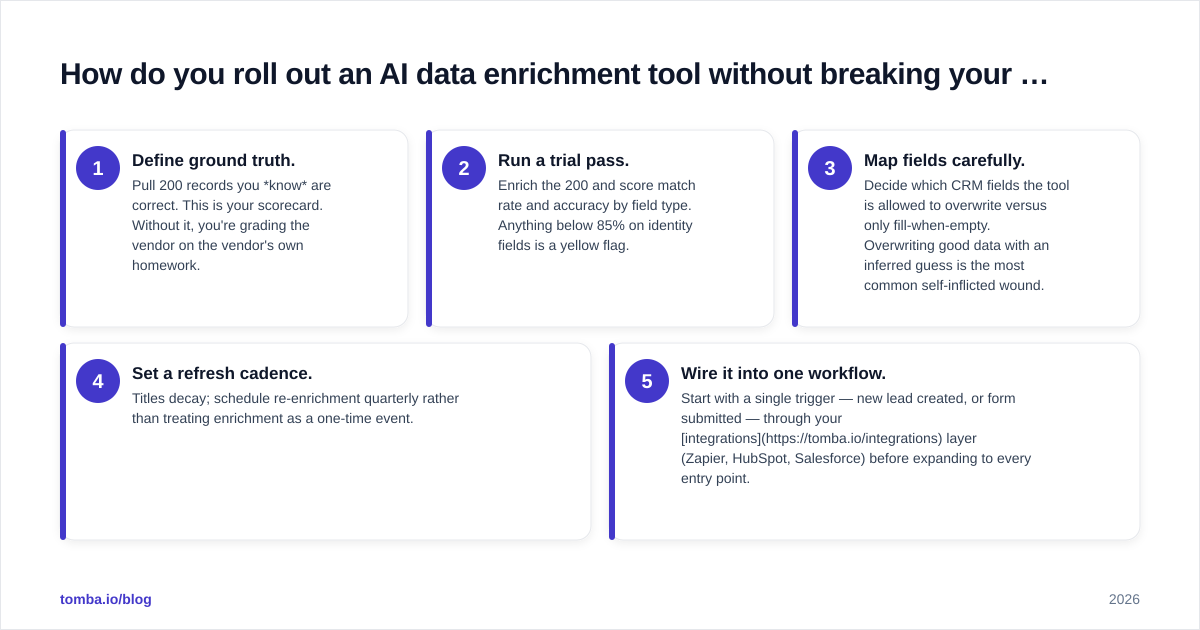
Zapier, HubSpot, Salesforce) before expanding to every entry point.
The teams that get burned are the ones that bulk-enrich 100,000 records, overwrite existing fields, and discover three weeks later that the new titles are worse than the old ones. Immutable-by-default is the safer posture: append and flag, don't silently replace.
What does AI data enrichment cost in 2026?#
Most AI data enrichment tools price on credits, where one credit roughly equals one enriched record or one field bundle. The traps are in the fine print: some vendors re-charge you when you re-enrich a record they've already returned, and some count a failed match against your credit balance.
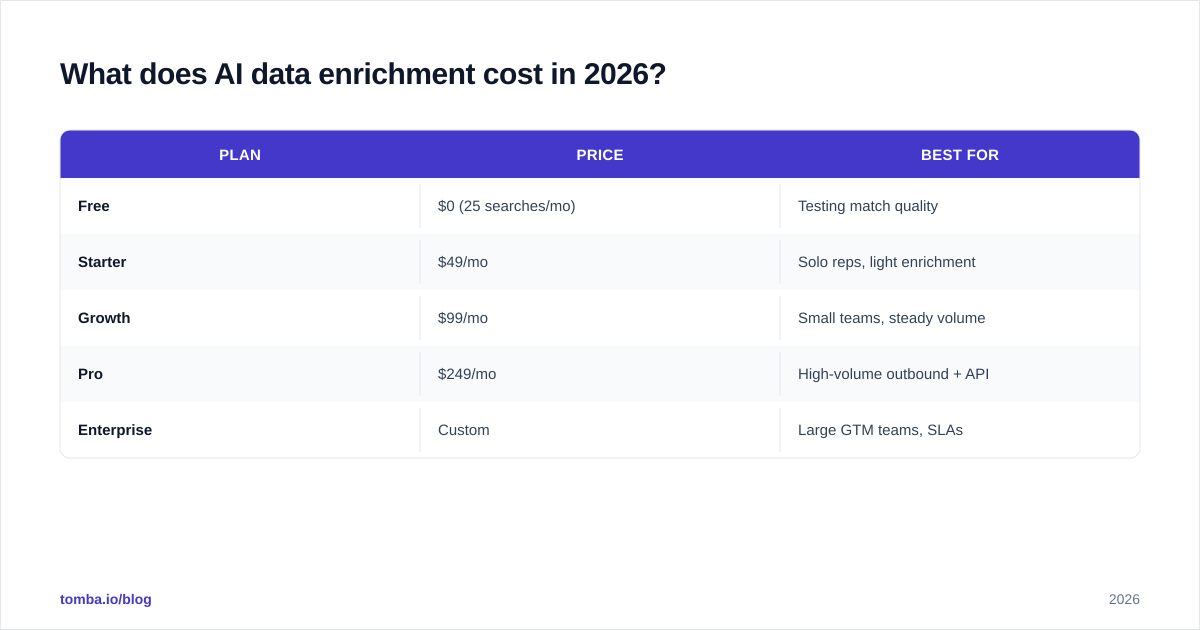
For reference, Tomba pricing follows a transparent tier structure:
Plan
Price
Best for
Free
$0 (25 searches/mo)
Testing match quality
Starter
$49/mo
Solo reps, light enrichment
Growth
$99/mo
Small teams, steady volume
Pro
$249/mo
High-volume outbound + API
Enterprise
Custom
Large GTM teams, SLAs
When you compare any two vendors, normalize to cost per successful, accurate record, not cost per credit. A cheaper credit that matches 50% of the time and is stale half of that is more expensive in practice than a pricier credit that lands a fresh, correct record 85% of the time. Run the trial, count the wins, divide the spend. That number — not the sticker price — is the one that matters. Analyst frameworks from firms like Gartner on sales-intelligence buying echo the same point: total cost of ownership beats per-unit price.
Common mistakes to avoid#
Buying on database size. Coverage of your accounts is what counts, not a global total.
Skipping verification. Enrichment finds candidates; verification confirms them. Don't send to an unverified enriched email.
Overwriting good data. Default to fill-when-empty. Flag inferred fields as low-confidence.
Ignoring freshness. A tool that never re-checks is a decaying asset. Ask how often records are re-verified.
No ground-truth test. If you can't measure accuracy against records you trust, you can't compare vendors honestly.
Bottom line: how to choose#
Pick the tool that wins on your sample data, not the one with the biggest headline numbers. Run 200 known records through a free trial, score match rate and accuracy by field type, normalize pricing to cost-per-correct-record, and confirm the vendor re-verifies data on a real cadence. Layer verification after enrichment, append rather than overwrite, and roll out one workflow at a time.
If your enrichment need centers on finding and confirming the right professional contacts — the email and the person behind a domain — start with the Tomba Email Finder. It pairs domain-level discovery with built-in verification, transparent credit pricing from a free tier through $249/mo Pro, and a clean API for real-time enrichment. Run your 200-record test on the free plan first; let the match rate make the decision for you.
// get started
Find, verify and enrich your first contacts today
Start on the free plan with 25 searches a month, then scale when your team is ready.
Free plan · No credit card required · GDPR & CCPA
// about the author