AI Email Agent in 2026: How They Work and Which to Use
An AI email agent reads, drafts, and sends email on your behalf. Here's how they work in 2026, where they win, and how to wire one into a real sales stack.
TL;DR
- An AI email agent is software that reads incoming email, understands intent, and takes action — drafting replies, routing messages, enriching contacts, or sending sequences — with minimal human input.
- It is not the same as a mail-merge or a rules-based autoresponder. Agents reason over context; automation follows fixed if-then logic.
- The best fit depends on the job: inbox triage, sales outreach, customer support, or internal ops each reward a different tool.
- Accuracy of your underlying data decides everything. An agent that emails the wrong address fast is worse than no agent at all.
- Start narrow (one workflow, human-in-the-loop), measure reply and error rates, then widen autonomy.
What is an AI email agent?#
An AI email agent is a program that handles email tasks the way a competent assistant would: it reads a message, works out what it means, and does something useful about it. Think of it as the difference between a vending machine and a barista. A vending machine (classic automation) gives you exactly what the button maps to. A barista (an agent) hears "something warm, not too sweet" and makes a judgment call.
Technically, these agents pair a large language model with tools — calendar access, a CRM, an email-sending API, a contact database — and a loop that lets the model decide which tool to call next. The model plans, acts, observes the result, and repeats until the task is done. That planning loop is what separates a 2026 agent from the "smart templates" of a few years ago.
You will see AI email agents marketed under several names: AI SDR, autonomous inbox assistant, AI reply generator, email copilot. Underneath, they share the same anatomy: an LLM brain, a set of connected tools, memory of past interactions, and guardrails that decide when a human must approve an action.
How does an AI email agent work?#
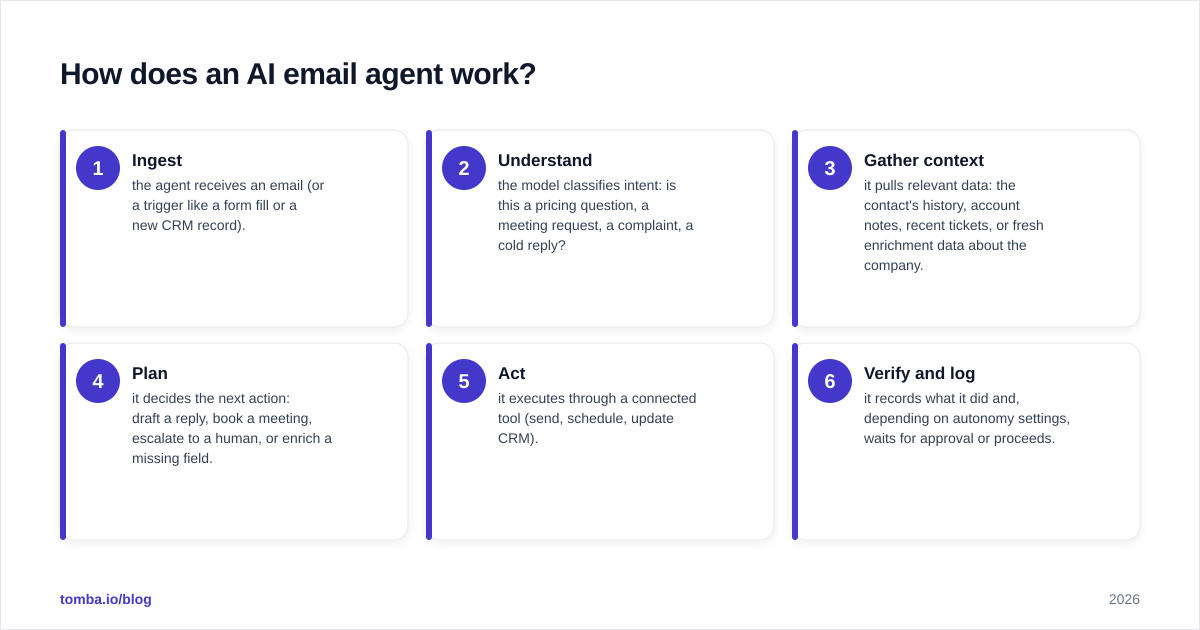
The loop is simpler than the hype suggests. Here is the typical cycle for an inbound message:
- Ingest — the agent receives an email (or a trigger like a form fill or a new CRM record).
- Understand — the model classifies intent: is this a pricing question, a meeting request, a complaint, a cold reply?
- Gather context — it pulls relevant data: the contact's history, account notes, recent tickets, or fresh enrichment data about the company.
- Plan — it decides the next action: draft a reply, book a meeting, escalate to a human, or enrich a missing field.
- Act — it executes through a connected tool (send, schedule, update CRM).
- Verify and log — it records what it did and, depending on autonomy settings, waits for approval or proceeds.
The "gather context" step is where most agents quietly succeed or fail. An agent replying to a cold prospect needs to know who that person is, what company they work at, and how to reach the right inbox. That is why serious deployments wire an agent into a verified contact source — for example, calling an email finder or data enrichment API before composing outreach, so the agent never builds a confident message on top of a stale or guessed address.
Modern agents expose this through standard connectors. Many now speak the Model Context Protocol, so you can attach data tools without custom glue code — see how a Tomba MCP server lets an agent pull verified contacts on demand mid-task.
What can an AI email agent actually do?#
Useful agents tend to specialize. The four most common production jobs in 2026:
- Inbox triage. Sort, label, summarize, and draft first-pass replies so a human only touches what matters. Best for founders and busy execs drowning in mail.
- Sales outreach (AI SDR). Research a lead, find the right contact, personalize a first touch, and run a follow-up cadence. This is the highest-ROI and highest-risk category, because a sloppy agent can torch your sending domain.
- Customer support. Answer common questions from a knowledge base, escalate edge cases, and keep tickets tidy. Strong when paired with deflection metrics.
- Internal operations. Chase approvals, route invoices, summarize threads into your project tool, and schedule across calendars.
A practical rule: the more an agent's output touches strangers (cold prospects, customers), the more you want a human checkpoint and verified data behind it. The more it touches your own team, the more autonomy you can safely grant.
AI email agent vs. email automation: what's the difference?#
People use the terms interchangeably, and that costs them money. They are not the same thing.
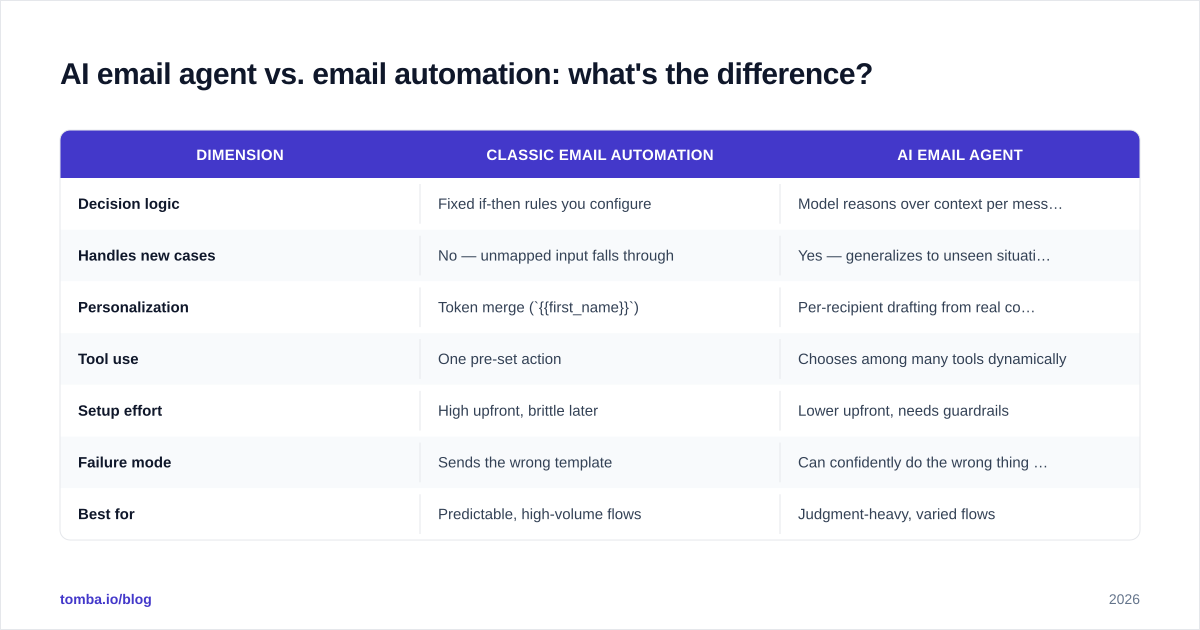
| Dimension | Classic email automation | AI email agent |
|---|---|---|
| Decision logic | Fixed if-then rules you configure | Model reasons over context per message |
| Handles new cases | No — unmapped input falls through | Yes — generalizes to unseen situations |
| Personalization | Token merge ({{first_name}}) |
Per-recipient drafting from real context |
| Tool use | One pre-set action | Chooses among many tools dynamically |
| Setup effort | High upfront, brittle later | Lower upfront, needs guardrails |
| Failure mode | Sends the wrong template | Can confidently do the wrong thing fast |
| Best for | Predictable, high-volume flows | Judgment-heavy, varied flows |
The honest takeaway: automation is more predictable, agents are more capable. A mature stack uses both — deterministic automation for the steps that must never deviate (unsubscribe handling, compliance footers) and an agent for the steps that benefit from judgment (what to say, who to follow up with, when to escalate). If your workflow is genuinely fixed and high-volume, a rules engine is cheaper and safer than an agent. Don't reach for AI because it's fashionable.
Which AI email agent should you use in 2026?#
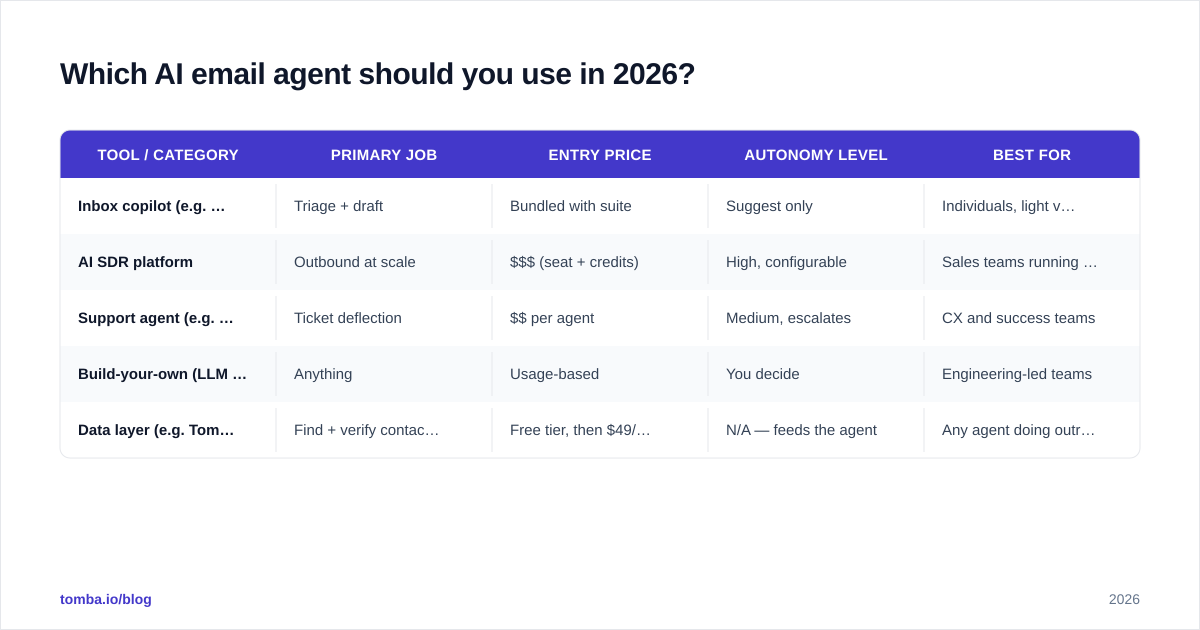
There is no single winner; there is a best fit per job. Below is a neutral comparison of the categories you'll evaluate, with representative tools and where each shines. Pricing reflects entry tiers and shifts often — confirm on each vendor's site before you buy.
| Tool / category | Primary job | Entry price | Autonomy level | Best for |
|---|---|---|---|---|
| Inbox copilot (e.g. Gmail/Outlook AI) | Triage + draft | Bundled with suite | Suggest only | Individuals, light volume |
| AI SDR platform | Outbound at scale | $$$ (seat + credits) | High, configurable | Sales teams running cadences |
| Support agent (e.g. helpdesk AI) | Ticket deflection | $$ per agent | Medium, escalates | CX and success teams |
| Build-your-own (LLM API + tools) | Anything | Usage-based | You decide | Engineering-led teams |
| Data layer (e.g. Tomba) | Find + verify contacts | Free tier, then $49/mo | N/A — feeds the agent | Any agent doing outreach |
Two notes worth internalizing. First, the most expensive line item in an AI SDR stack is rarely the agent — it's the wasted sends and damaged sender reputation when the agent emails bad addresses. Second, the "build-your-own" path is more accessible than it looks: a few hundred lines wired to an LLM and a Tomba API call for verified contacts gets you a working outbound agent. For neutral, crowd-sourced reviews of specific vendors, G2's sales AI category and HubSpot's research on AI in sales are reasonable starting points.
How do you wire an AI email agent into your sales stack?#
Treat deployment as a staged rollout, not a switch you flip. The sequence that keeps you out of trouble:
Stage 1 — Pick one workflow. Choose a single, measurable job. "Draft replies to inbound demo requests" beats "handle all email." Narrow scope makes failures visible and cheap.
Stage 2 — Connect verified data. Before the agent writes a word of outreach, it needs the right person and a deliverable address. Plug in an email finder and an email verifier so every send is validated. This is the single highest-leverage step for outbound agents, because it prevents the bounce-driven reputation damage that quietly kills cold campaigns.
Stage 3 — Keep a human in the loop. Run the agent in "draft, don't send" mode first. Review a few hundred outputs. Track edit rate — how often you change what it wrote. When edit rate drops below your comfort threshold, graduate to supervised auto-send.
Stage 4 — Set guardrails. Cap daily sends, block certain domains, force a human approval for anything flagged as high-stakes (legal, refunds, executive contacts). Add a deterministic compliance footer outside the agent's control.
Stage 5 — Measure and widen. Watch reply rate, bounce rate, response rate, and complaint rate. If deliverability holds and replies climb, expand autonomy one notch. If complaints rise, pull back immediately.
If you want the drafting half handled fast, a focused tool like Tomba's cold email AI writer or AI email response generator covers composition while your agent handles routing and data — a sensible split for teams that don't want to build everything from scratch.
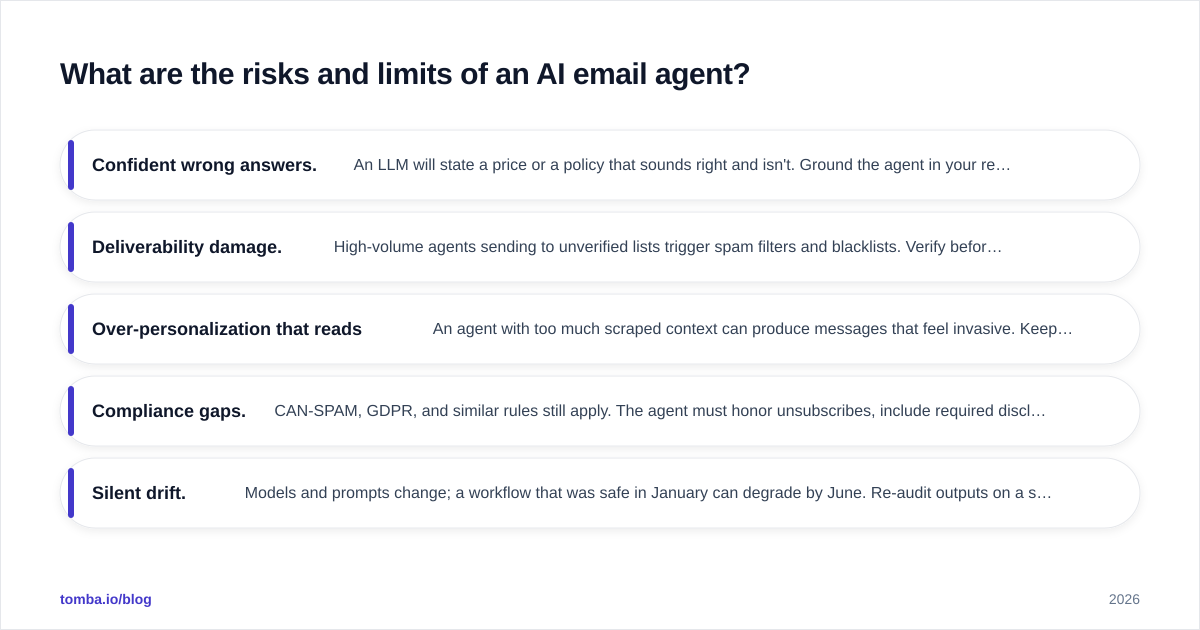
What are the risks and limits of an AI email agent?#
Agents fail in specific, predictable ways. Knowing them is the difference between a tool that compounds and one that embarrasses you.
- Confident wrong answers. An LLM will state a price or a policy that sounds right and isn't. Ground the agent in your real docs and require approval on anything it can't cite.
- Deliverability damage. High-volume agents sending to unverified lists trigger spam filters and blacklists. Verify before you send, every time, and warm up new sending domains.
- Over-personalization that reads creepy. An agent with too much scraped context can produce messages that feel invasive. Keep personalization relevant, not surveillance-grade.
- Compliance gaps. CAN-SPAM, GDPR, and similar rules still apply. The agent must honor unsubscribes, include required disclosures, and respect consent. Per Salesforce's guidance on responsible AI, a human accountable owner is non-negotiable.
- Silent drift. Models and prompts change; a workflow that was safe in January can degrade by June. Re-audit outputs on a schedule.
The honest framing: an AI email agent amplifies whatever you point it at. Point it at clean, verified data and a tight workflow, and it scales your best behavior. Point it at a messy list and loose rules, and it scales your mistakes just as efficiently.
Frequently asked questions#
Is an AI email agent the same as ChatGPT writing my emails? No. A chatbot drafts text when you ask. An agent runs on its own trigger, gathers context, chooses a tool, and acts — often without you opening it. Drafting is one capability inside an agent, not the whole thing.
Will an AI email agent get my domain flagged as spam? Only if you let it send to unverified or irrelevant contacts at volume. Pair the agent with verification, sensible daily caps, and proper authentication (SPF, DKIM, DMARC), and it behaves no worse than a careful human. The data layer matters more than the model here.
Can a small team afford one? Yes. Inbox copilots are bundled into email suites, and the data layer that makes outreach safe starts free — see Tomba pricing, which begins at a free tier and moves to $49/mo for the Starter plan. The build-your-own route is usage-based, so you pay for what you send.
How much autonomy should I give it? Start at zero — draft only. Earn autonomy with evidence. When your edit rate and bounce rate are both low for a sustained period, move to supervised auto-send, then to full autonomy for low-stakes workflows. Never auto-send high-stakes messages without a human gate.
The bottom line#
An AI email agent is the most leverage you can add to email work in 2026 — and the fastest way to damage your sender reputation if the data underneath it is wrong. The model is now the easy part. The hard part, and the part that determines whether the agent helps or hurts, is feeding it verified, current contact data and wrapping it in guardrails.
Get the foundation right first. Use the Tomba Email Finder to source and verify the contacts your agent reaches out to, so every message your AI sends lands in a real inbox that belongs to the right person. Start on the free tier, wire it into your agent through the API, and let the agent scale outreach that actually connects — not outreach that bounces.
// get started
Find, verify and enrich your first contacts today
Start on the free plan with 25 searches a month, then scale when your team is ready.
Free plan · No credit card required · GDPR & CCPA
// about the author