AI Email Copywriting in 2026: Tools, Prompts & Workflows
AI email copywriting can draft cold emails, subject lines, and follow-ups in seconds—but only if you feed it the right inputs. Here's the workflow, the tools, and the prompts that actually convert.
TL;DR
AI email copywriting means using large language models to draft, rewrite, personalize, and A/B test outreach emails—it's a speed multiplier, not a replacement for strategy.
The biggest wins are first drafts, subject-line variants, and follow-up sequences; the biggest risks are generic "Dear [First Name]" sludge and deliverability damage.
Output quality is downstream of input quality: give the model a real prospect, a real offer, and a real constraint, and it writes well. Give it nothing and it writes filler.
A working stack pairs an AI writer (drafting), clean prospect data (personalization), and a verification layer (so your sends don't bounce).
Below: a comparison of popular AI email tools, a four-step workflow, copy-paste prompts, and the guardrails that keep you out of the spam folder.
What is AI email copywriting?#
AI email copywriting is the use of large language models—the same family of tech behind ChatGPT—to write and refine the emails you send to prospects, leads, and customers. Think cold outreach, follow-ups, subject lines, re-engagement, and nurture sequences.
Here's the everyday analogy: AI is a fast junior copywriter who has read the entire internet but has never met your customer. It can produce a clean draft in seconds, mimic a tone, and spin out ten variations of a subject line without complaining. What it can't do is know that your prospect just raised a Series B, hates jargon, and already churned from your competitor. That context is your job.
Technically, the model predicts the most probable next words given your prompt. So the prompt—your instructions plus the data you paste in—is the entire ballgame. A vague prompt produces a vague, interchangeable email. A specific prompt produces something a human would actually reply to.
That distinction matters more in 2026 than it did two years ago, because inboxes are now flooded with obviously AI-generated outreach. The novelty is gone. What separates a 2% reply rate from a 12% reply rate isn't "using AI"—almost everyone is. It's using AI with real inputs and human editing.
Why use AI for email copy at all?#
The honest answer: speed and volume, with a quality floor you control.
A rep writing cold emails by hand might produce 15–20 thoughtful messages an hour. With AI handling the first draft and the variations, that same rep can review and personalize 60–80 in the same window—if the data feeding the personalization is clean. The bottleneck shifts from writing to editing and targeting, which is exactly where a human should be spending time.
There are three jobs AI does genuinely well:
Beating the blank page. The first draft is the slowest part of writing. AI removes it.
Generating variants. Ten subject lines, three opener angles, two CTA phrasings—instantly, for A/B testing.
Rewriting for tone and length. "Make this 40% shorter and less salesy" is a one-line instruction that used to be a 20-minute edit.
What AI does not do well is invent the strategic substance—the offer, the segment, the reason this person should care today. If your campaign is built on a weak premise, AI will help you send that weak premise faster and to more people. Garbage in, garbage out, at scale.
)
Which AI email copywriting tools should you compare?#
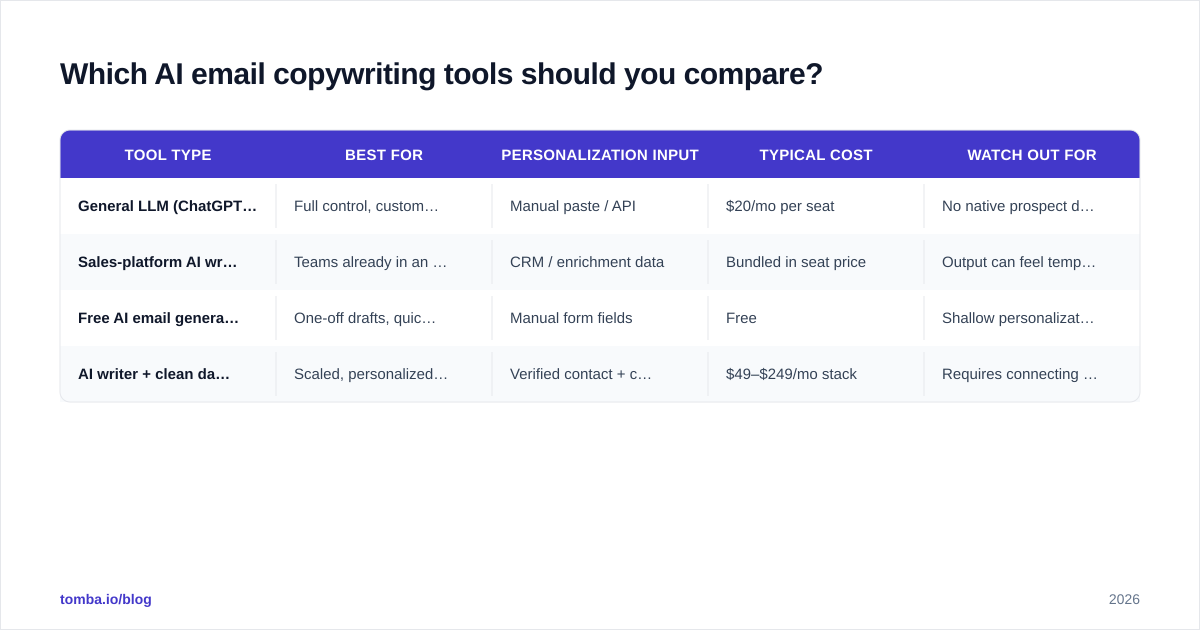
The market splits into three rough categories: general-purpose assistants (ChatGPT, Claude, Gemini), dedicated cold-email AI writers built into sales platforms, and lightweight free generators for one-off drafts. Each trades flexibility for convenience differently.
Tool type
Best for
Personalization input
Typical cost
Watch out for
General LLM (ChatGPT, Claude)
Full control, custom prompts, sequences
Manual paste / API
$20/mo per seat
No native prospect data; you supply everything
Sales-platform AI writer
Teams already in an outreach tool
CRM / enrichment data
Bundled in seat price
Output can feel templated across users
Free AI email generator
One-off drafts, quick tests
Manual form fields
Free
Shallow personalization, no sequencing
AI writer + clean data layer
Scaled, personalized outbound
Verified contact + company data
$49–$249/mo stack
Requires connecting two systems
If you want to skip the setup, a focused tool like Tomba's cold email AI writer drafts outreach from a few inputs, and the email templates library gives you proven structures to build on. For subject lines specifically, a dedicated subject line generator will out-iterate a general chatbot because it's tuned for the format.
When you're evaluating any of these, don't trust marketing pages—read the verified reviews on G2 and check how each tool handles your actual use case. A tool that's great for nurture emails may be useless for cold outbound.
How do you write a prompt that produces a good email?#
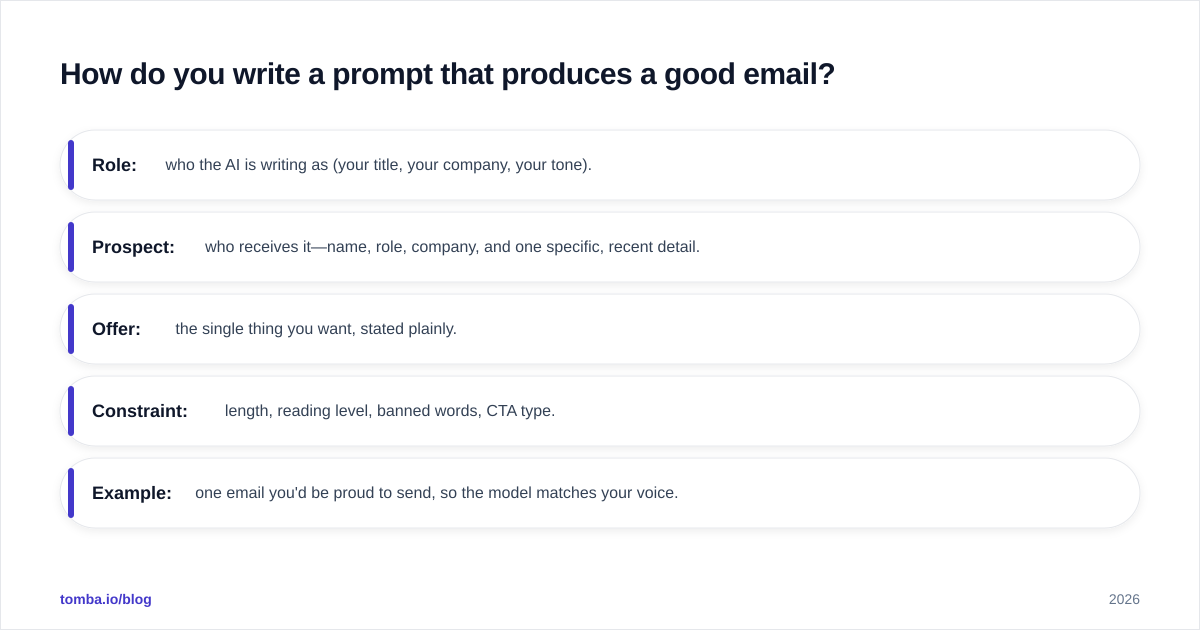
Conclusion first: a good prompt has five parts—role, prospect, offer, constraint, and example. Drop any one and quality falls off a cliff.
Here's the structure, then a fill-in template:
Role: who the AI is writing as (your title, your company, your tone).
Prospect: who receives it—name, role, company, and one specific, recent detail.
Offer: the single thing you want, stated plainly.
Constraint: length, reading level, banned words, CTA type.
Example: one email you'd be proud to send, so the model matches your voice.
A copy-paste prompt that works:
You are an SDR at [your company], which helps [one-line value prop]. Write a cold email to [name], the [role] at [company]. Reference this specific detail: [recent funding / launch / hiring signal / podcast quote]. The single goal is to book a 15-minute call. Constraints: under 90 words, 6th-grade reading level, no "I hope this email finds you well," no more than one question, one clear CTA. Match the tone of this email I like: [paste a sample].
Notice what's doing the heavy lifting: the specific detail. "I saw you're hiring three AEs" beats "I came across your company" every time, and no amount of clever phrasing rescues an email with no real reason to exist. This is why your data layer matters as much as your prompt—you can't reference a buying signal you never captured.
After the draft, run two cleanup passes: one for tone ("make this sound like a busy human, not a brochure") and one for compliance—paste it into a spam checker to catch trigger words before they tank your deliverability. HubSpot's research on cold email best practices is a solid reference for the structural conventions buyers expect.
How do you keep AI emails out of the spam folder?#
Great copy means nothing if it never lands. AI changes the deliverability math in two ways—one good, one dangerous.
The good: AI can scrub the spam-trigger language ("free," "guarantee," "act now," excessive exclamation points) that filters punish. Ask it to rewrite for a low spam score and it will.
The dangerous: AI makes it trivially easy to send more, and volume plus repetition is exactly what spam filters hunt. If 500 prospects get a near-identical "AI-templated" email from your domain in an hour, your sender reputation takes the hit, and even your good emails start landing in spam.
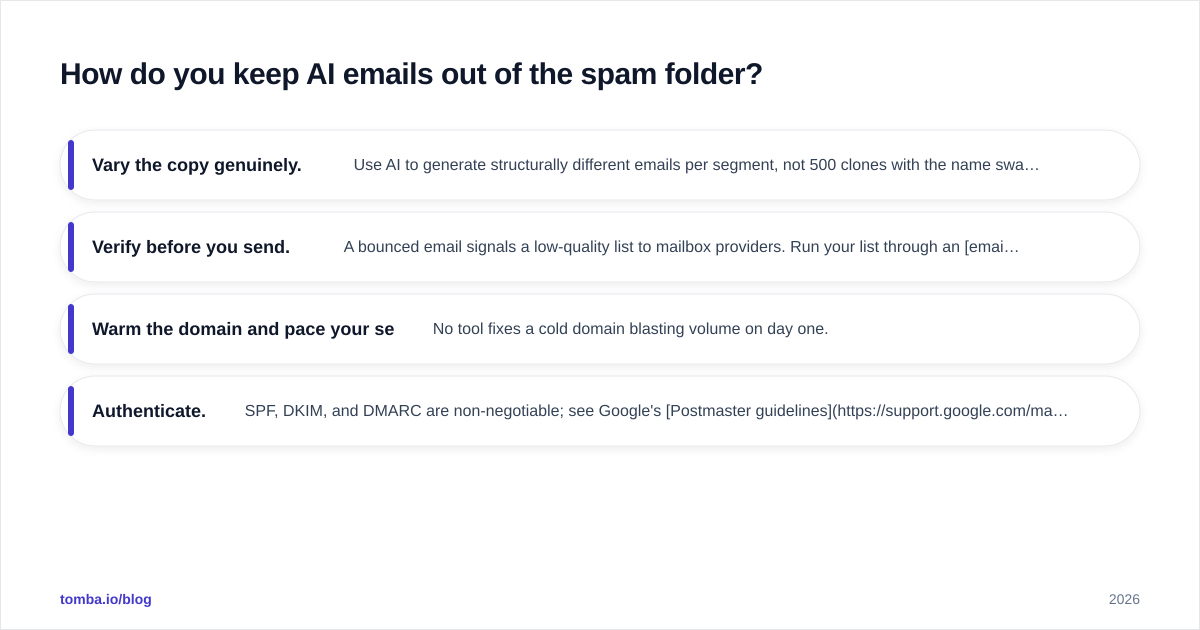
Guardrails that matter:
Vary the copy genuinely. Use AI to generate structurally different emails per segment, not 500 clones with the name swapped.
Verify before you send. A bounced email signals a low-quality list to mailbox providers. Run your list through an email verifier so you're not emailing dead addresses.
Warm the domain and pace your sends. No tool fixes a cold domain blasting volume on day one.
Authenticate. SPF, DKIM, and DMARC are non-negotiable; see Google's Postmaster guidelines for the current bar.
)
The pattern to internalize: AI handles the words, but deliverability is a separate discipline. Treat them as two systems and you'll outperform teams that assume good copy alone gets read.
What does a real AI email copywriting workflow look like?#
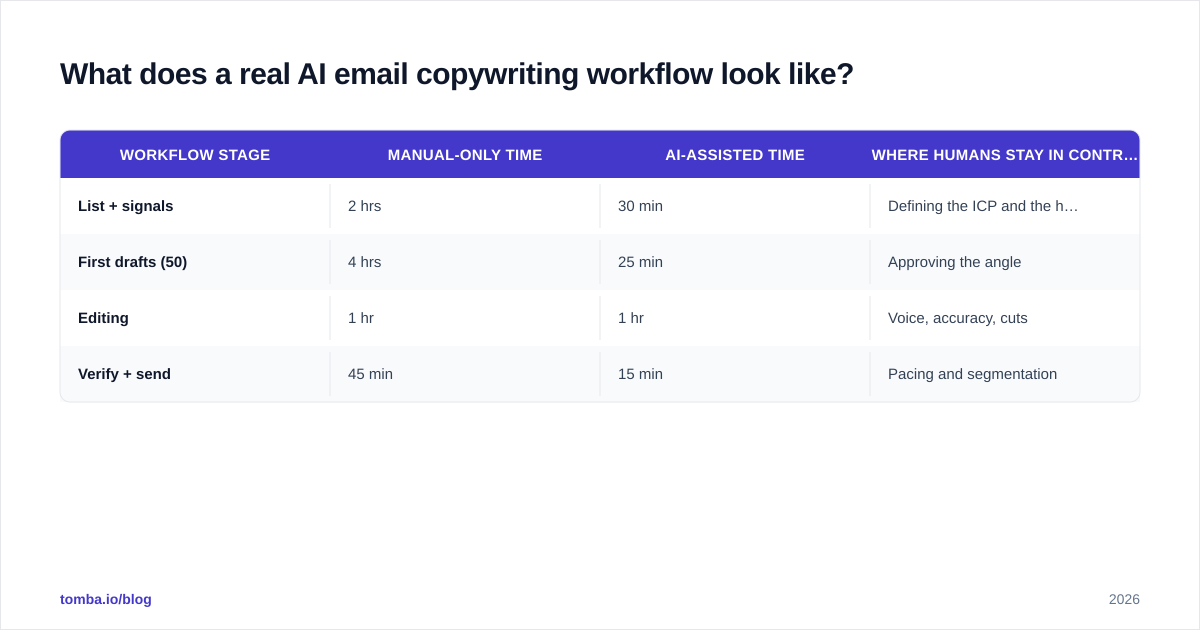
Here's the end-to-end flow that ties drafting, data, and verification together. It's four steps, and the order is deliberate.
Step 1 — Build the target list with real signals. Start from a defined segment, not "anyone with an email." Use a domain search to pull contacts at the companies that fit your ICP, and capture a personalization hook for each (role, recent news, tech stack). This is the input quality your whole campaign rides on.
Step 2 — Draft with a structured prompt. Feed each prospect's hook into the five-part prompt above. Generate the opener, body, and CTA. For sequences, prompt the model to write a 3-email arc where each message adds a new angle instead of "just following up."
Step 3 — Edit like a human. Read every email out loud. Cut the AI tells: the throat-clearing intro, the rule-of-three lists, the over-eager enthusiasm. If it sounds like a brochure, it is one. This step is non-negotiable and it's where your reply rate is won.
Step 4 — Verify, then send in waves. Confirm addresses are deliverable, check the spam score, and send in paced batches rather than one blast. Track replies by variant so your next round of prompts is informed by what actually worked.
Workflow stage
Manual-only time
AI-assisted time
Where humans stay in control
List + signals
2 hrs
30 min
Defining the ICP and the hook
First drafts (50)
4 hrs
25 min
Approving the angle
Editing
1 hr
1 hr
Voice, accuracy, cuts
Verify + send
45 min
15 min
Pacing and segmentation
The time savings are real, but notice the editing row barely moves. That's the point: AI compresses the mechanical work so you can spend the same hour making the copy genuinely good.
Is AI-written email copy actually effective?#
Sometimes—and the variable is almost never the model. It's the input and the edit.
Generic AI outreach (no real personalization, no human pass) tends to underperform even old-school templates, because recipients now pattern-match it instantly and delete on sight. AI plus a specific buying signal plus a human edit consistently beats both hand-written-from-scratch (too slow to scale) and raw AI (too generic to convert).
Be honest about the limits. AI will confidently invent details if you let it—a fake statistic, a misremembered product feature, a "congrats on your recent acquisition" to a company that was never acquired. Every factual claim in an outbound email is your reputation on the line, so verify anything the model asserts about the prospect or your own product. When in doubt, check it against a source like the company's own site or a reference such as Wikipedia for general claims, never the model's memory.
The teams winning with AI email copywriting in 2026 treat it as one component in a system: clean data in, structured prompts in the middle, human judgment and verification on the way out. The teams losing with it bought a writer, pointed it at a junk list, and wondered why the replies dried up.
Putting it together#
AI email copywriting earns its keep when you stop asking it to do your thinking and start asking it to do your typing. Define the segment, capture the signal, prompt with specifics, edit ruthlessly, and verify before you send. Do that and you'll write more emails, better emails, and emails that actually land—without sounding like a robot wrote them, even though one helped.
If you're ready to plug the data half of that equation in, start with the Tomba Email Finder. It surfaces accurate, verified professional emails by name, domain, or company—so the personalization hooks your AI writer needs are already in hand before you draft a single line. Pair it with a quick run through the email verifier, and your AI-written outreach reaches real inboxes instead of bouncing into the void. Check current Tomba pricing—including a free tier with 25 searches a month—to see which plan fits your sending volume.
// get started
Find, verify and enrich your first contacts today
Start on the free plan with 25 searches a month, then scale when your team is ready.
Free plan · No credit card required · GDPR & CCPA
// about the author