AI Email Personalization in 2026: A Practical Playbook
AI email personalization promises one-to-one relevance at scale — but most teams ship robotic mail merge. Here's the 2026 framework that actually lifts reply rates, plus the data layer that makes it work.
TL;DR
- AI email personalization means using machine-generated research and copy to make each email genuinely relevant — not just swapping
{{first_name}}into a template. - The teams winning in 2026 treat personalization as a data problem first, copy problem second. Bad inputs produce confident, well-written nonsense.
- A repeatable framework — Trigger → Insight → Angle → Ask — beats "let the AI write something" every time.
- Reply lifts of 2–3x are realistic, but only when AI handles the research and a human owns the offer.
- Accurate contact data is the unglamorous foundation: you cannot personalize an email you never deliver.
What is AI email personalization, really?#
AI email personalization is the use of large language models and enrichment data to tailor the substance of an outreach email to a specific person — their role, company, recent activity, and likely priorities — at a volume no human team could match by hand.
Think of it like the difference between a chain restaurant and a good private chef. Mail merge is the chain: every plate is identical except the name printed on the menu. True personalization is the chef who asks what you're allergic to, notices you ordered fish last time, and adjusts. Both can serve a hundred covers a night. Only one makes you feel seen.
Technically, modern personalization stacks combine three layers: a data layer (who the person is and what's happening at their company), a reasoning layer (an LLM that turns raw facts into a relevant angle), and a delivery layer (your sending tool and deliverability setup). Most teams obsess over the middle layer and neglect the other two — which is exactly why their "AI personalized" campaigns read like a robot doing an impression of a human.
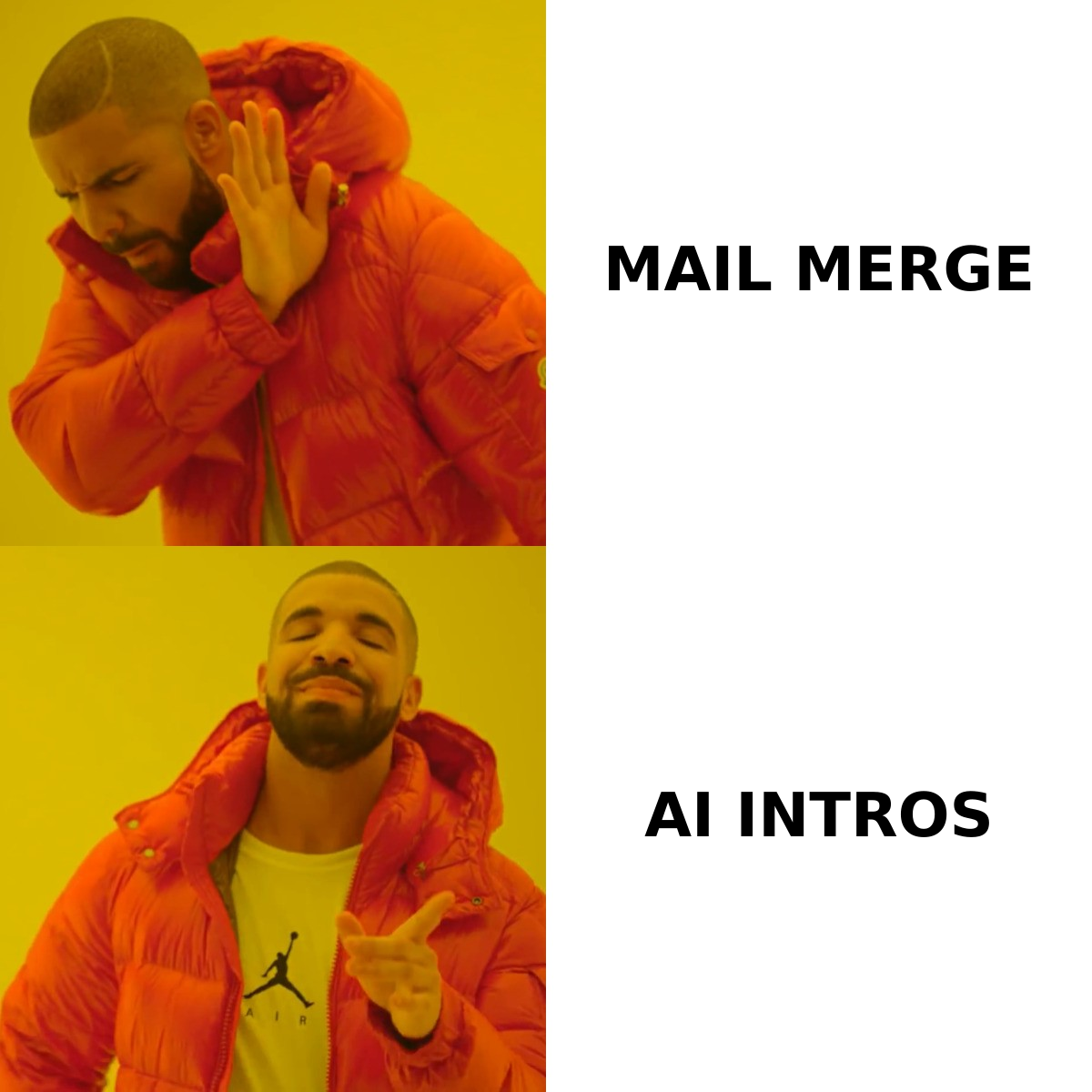
The distinction matters because "personalization" has been quietly redefined down. When a vendor says their tool personalizes at scale, ask what changes between two emails. If the answer is the first name, the company name, and a generated compliment about the company's "impressive growth," that is not personalization. That is a template with extra steps and a higher chance of hallucination.
Why does most AI email personalization fail?#
Most AI personalization fails because teams point a powerful writer at empty or wrong inputs. The model has nothing real to say, so it invents something plausible — and plausible-but-fabricated is worse than generic.
Here are the failure modes you will actually hit:
- The hallucinated compliment. "Loved your recent post on supply-chain resilience" — when the prospect never wrote it. One fabricated detail and your credibility is gone for the entire thread.
- Personalization theater. The opening line is custom; the rest is a wall of pitch. Prospects read the first sentence, recognize the trick, and delete.
- The wrong angle at the right person. Accurate data, but the AI latched onto a funding round when the prospect cares about a hiring freeze. Relevance is about priority, not just fact.
- Deliverability collapse. You personalized 5,000 emails beautifully and sent them from a cold domain into spam. Nobody read a single one.
The common root cause: treating the LLM as the product. The LLM is a transformer of inputs. Garbage in, confident garbage out. The fix is to invest upstream — in the trigger data and the contact accuracy — before you spend a token on copy. If you want the deeper mechanics of why messages land in spam, our primer on email deliverability covers the sending side that no amount of clever copy can rescue.
What does a personalization framework look like?#
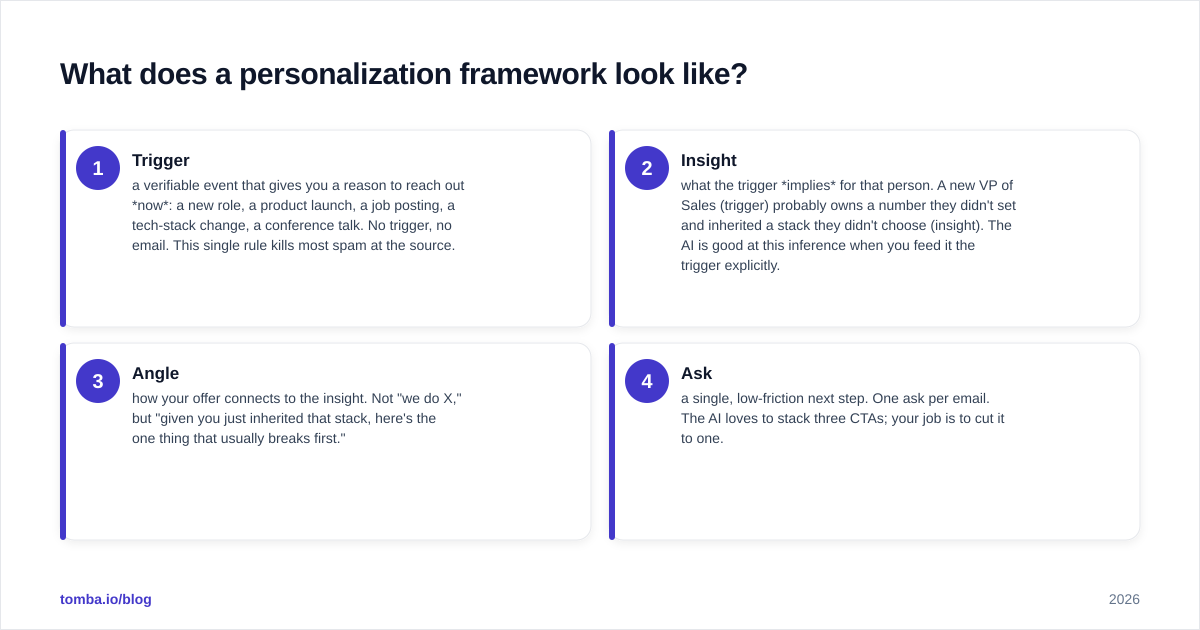
Use a four-step framework — Trigger → Insight → Angle → Ask — so the AI assembles relevance instead of guessing at it. Each step constrains the next, which is what keeps the model honest.
- Trigger — a verifiable event that gives you a reason to reach out now: a new role, a product launch, a job posting, a tech-stack change, a conference talk. No trigger, no email. This single rule kills most spam at the source.
- Insight — what the trigger implies for that person. A new VP of Sales (trigger) probably owns a number they didn't set and inherited a stack they didn't choose (insight). The AI is good at this inference when you feed it the trigger explicitly.
- Angle — how your offer connects to the insight. Not "we do X," but "given you just inherited that stack, here's the one thing that usually breaks first."
- Ask — a single, low-friction next step. One ask per email. The AI loves to stack three CTAs; your job is to cut it to one.
The reason this works is that you give the model structure to fill, not a blank page to invent on. You supply the trigger from real data; the AI does the inference and phrasing. That division of labor — human owns truth and offer, AI owns research synthesis and drafting — is the whole game in 2026.
A practical way to operationalize this is to map your triggers to data sources before you write a single prompt. Job changes and new hires come from enrichment feeds; tech-stack signals from site scrapers; content triggers from author and post data. Tools like the author finder help you tie a real article to a real person's email, so "I read your piece on X" is true rather than hopeful.
How do the AI personalization tools compare?#
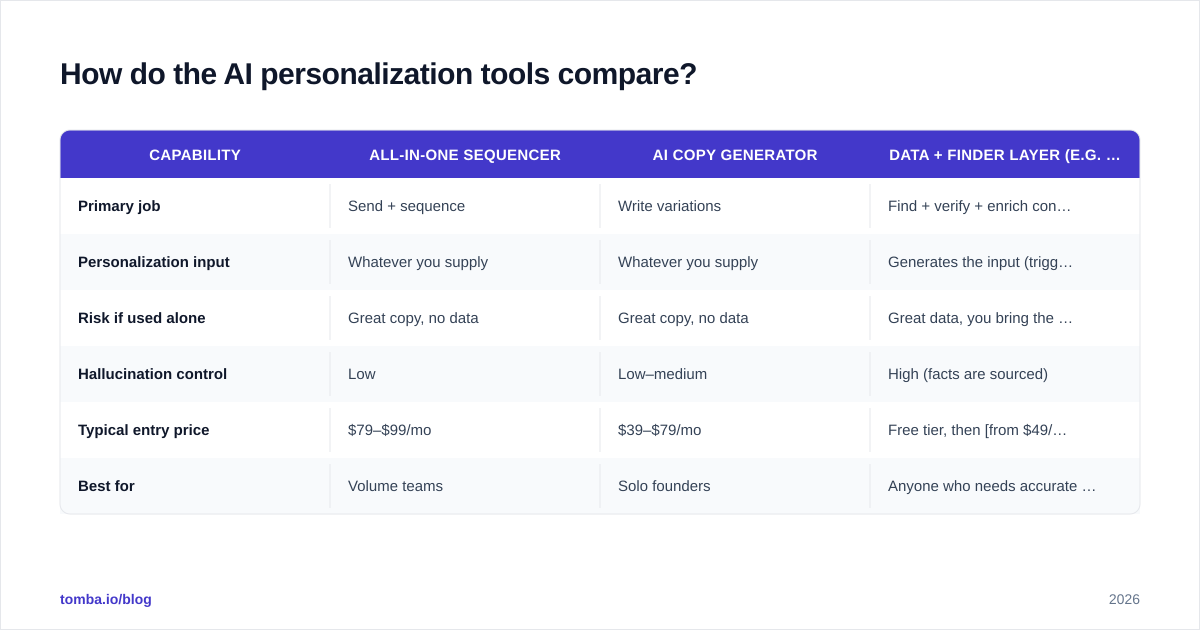
The market splits into three rough categories: all-in-one sequencers with AI bolted on, dedicated AI-copy generators, and the data-and-finder layer that feeds them. They solve different problems, and the mistake is buying one expecting it to do another's job.
| Capability | All-in-one sequencer | AI copy generator | Data + finder layer (e.g. Tomba) |
|---|---|---|---|
| Primary job | Send + sequence | Write variations | Find + verify + enrich contacts |
| Personalization input | Whatever you supply | Whatever you supply | Generates the input (triggers, roles, emails) |
| Risk if used alone | Great copy, no data | Great copy, no data | Great data, you bring the copy |
| Hallucination control | Low | Low–medium | High (facts are sourced) |
| Typical entry price | $79–$99/mo | $39–$79/mo | Free tier, then from $49/mo |
| Best for | Volume teams | Solo founders | Anyone who needs accurate targets first |
The takeaway is not "buy Tomba instead of a sequencer." It's that personalization quality is capped by your data quality, and the data layer is the cheapest place to win. A $99/mo sequencer writing brilliant emails to a list that's 40% bounces and wrong titles will lose to a modest stack with clean, enriched, verified contacts. Independent reviews on G2 make the same point repeatedly in the comments: accuracy complaints outrank copy complaints.
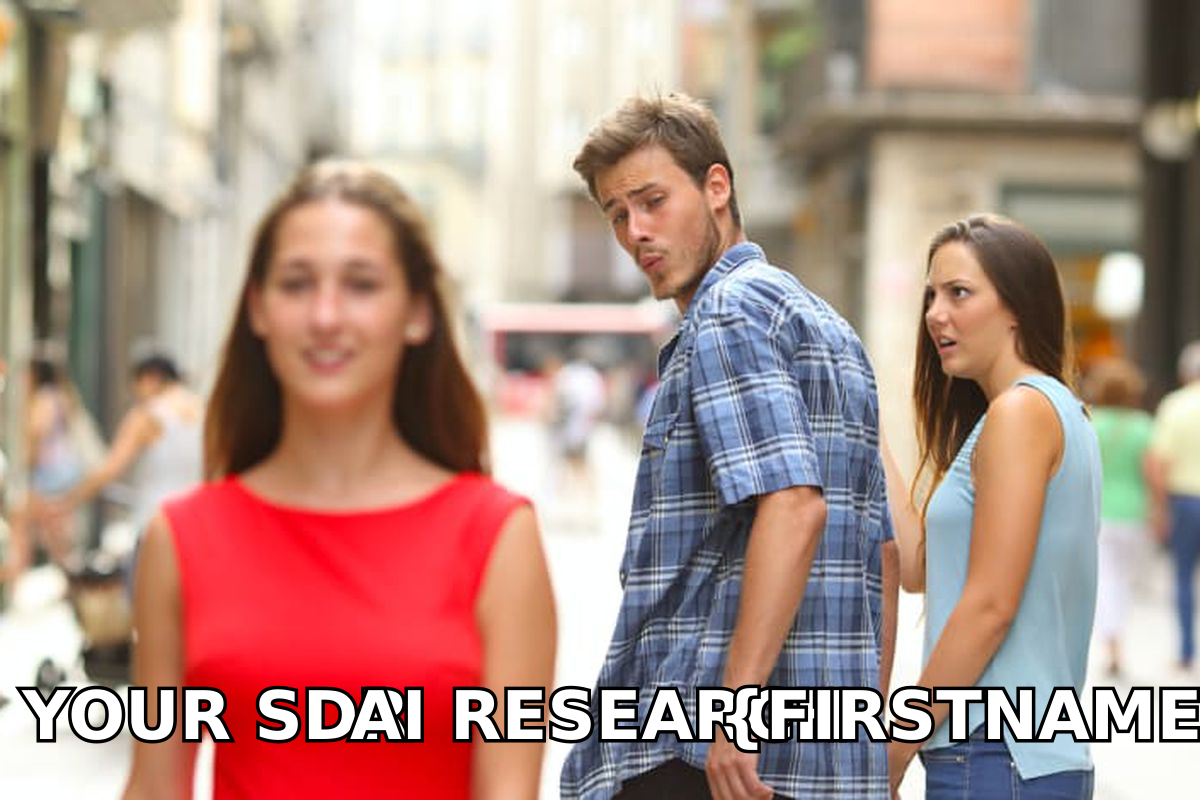
When you evaluate any tool's "AI personalization," run one test: feed it a real prospect and read the output line by line. Highlight every claim. Then check whether each claim is sourced or invented. The ratio tells you everything the pricing page won't.
How do you write the AI prompt so it doesn't sound like AI?#
Constrain the model hard, feed it real facts, and ban the tells. A loose prompt produces the beige "I hope this email finds you well" register everyone now recognizes as machine-written.
A workable prompt structure:
ROLE: You write concise B2B cold emails. 70 words max.
INPUTS:
  - Prospect: {{name}}, {{title}} at {{company}}
  - Trigger (verified): {{trigger}}
  - Our offer: {{one_sentence_offer}}
RULES:
  - Open with the trigger, not a compliment.
  - One ask only.
  - No adjectives like "impressive", "exciting", "innovative".
  - No "I hope this finds you well" / "I wanted to reach out".
  - If you lack a real detail, say less. Never invent.
OUTPUT: subject line (≤ 6 words) + body.
Two rules carry most of the weight. First, ban the AI vocabulary — the words and openers that pattern-match as generated. Second, forbid invention explicitly, because the default behavior of a helpful model is to fill gaps. "Say less" is a permission the model needs to be given.
For subject lines specifically, generate several and test them rather than trusting the first — a free subject line tester will catch spam-trigger words and length problems before you send. And keep a human in the loop for the offer itself: AI is excellent at phrasing a value proposition and terrible at deciding what the value proposition should be for this segment.
One more discipline: measure against a real baseline. Track response rate on AI-assisted sends versus your control template. If the AI version isn't beating control, the problem is almost always the input data or the angle — not the wording.
What does the personalization workflow look like end to end?#
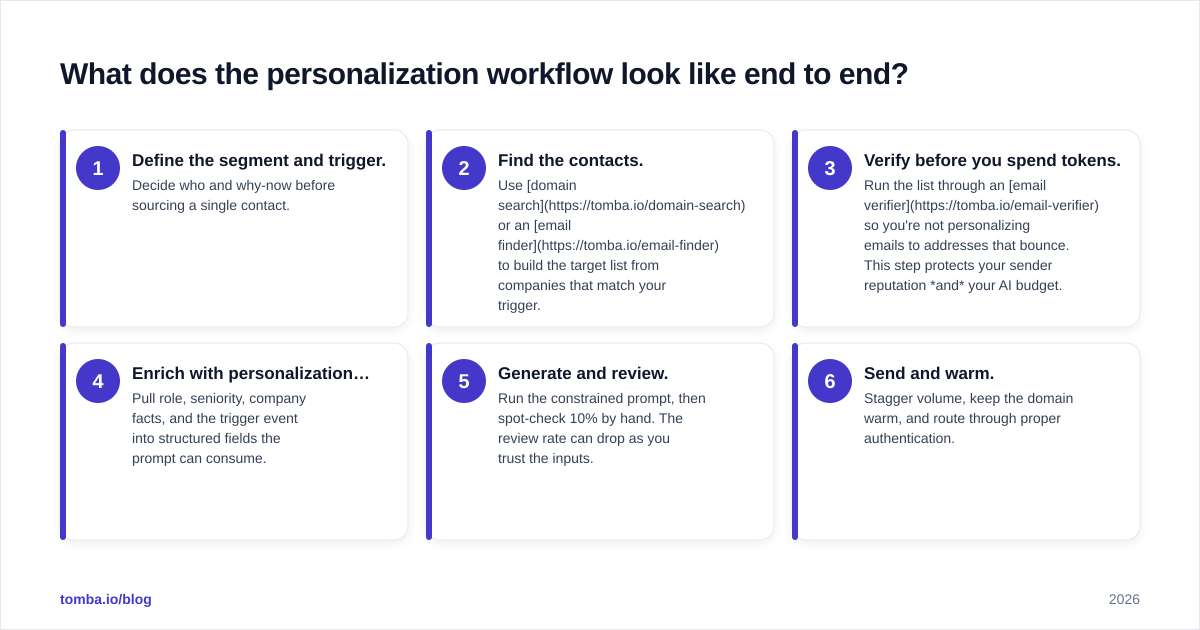
The end-to-end flow is a pipeline, not a single button: find the right people, verify they're reachable, enrich them with triggers, generate copy, then send from a warmed domain.
Here's the sequence most high-performing teams settle on:
- Define the segment and trigger. Decide who and why-now before sourcing a single contact.
- Find the contacts. Use domain search or an email finder to build the target list from companies that match your trigger.
- Verify before you spend tokens. Run the list through an email verifier so you're not personalizing emails to addresses that bounce. This step protects your sender reputation and your AI budget.
- Enrich with personalization fuel. Pull role, seniority, company facts, and the trigger event into structured fields the prompt can consume.
- Generate and review. Run the constrained prompt, then spot-check 10% by hand. The review rate can drop as you trust the inputs.
- Send and warm. Stagger volume, keep the domain warm, and route through proper authentication.
The order is deliberate. Verification comes before generation because generating personalized copy for undeliverable addresses is pure waste — and because bounce-heavy sends quietly destroy the sender reputation that determines whether your beautifully personalized emails reach the inbox at all.
For teams running this at scale, the bottleneck is rarely the writing anymore — LLMs made copy nearly free. The bottleneck is feeding the pipeline with accurate, enriched, verified contacts fast enough to keep the AI busy with real facts. That's a data-operations problem, and it's where most of the durable advantage now lives.
How do you measure whether it's actually working?#
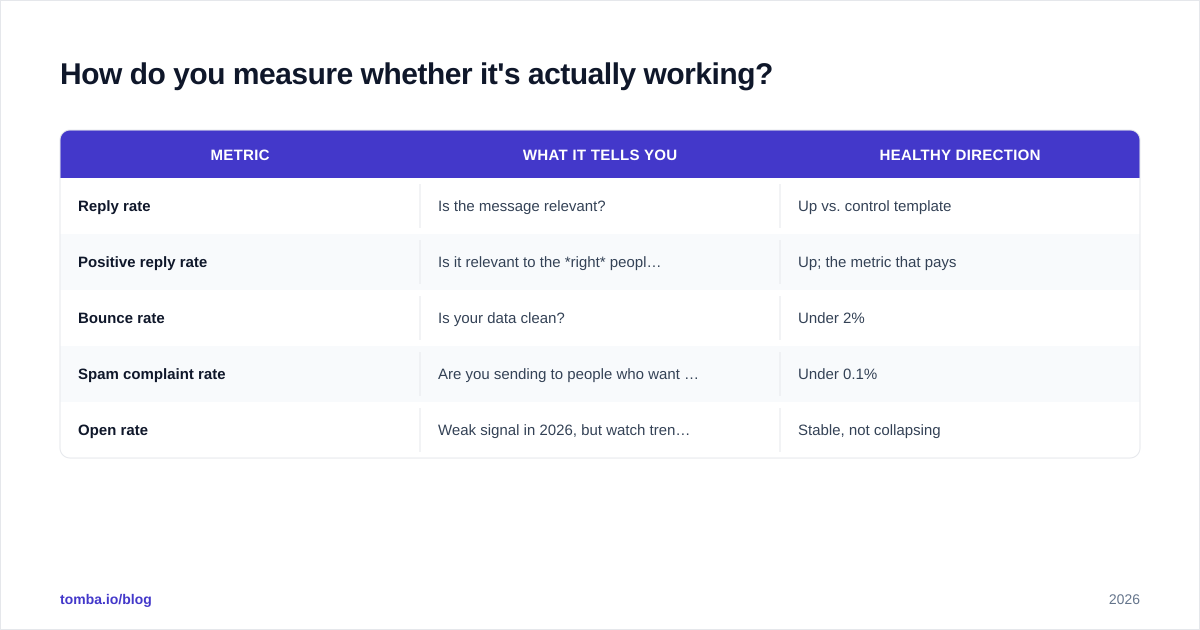
Measure reply rate and positive-reply rate against a non-AI control, and watch deliverability metrics like a hawk — a personalization win that tanks your domain reputation is a net loss.
| Metric | What it tells you | Healthy direction |
|---|---|---|
| Reply rate | Is the message relevant? | Up vs. control template |
| Positive reply rate | Is it relevant to the right people? | Up; the metric that pays |
| Bounce rate | Is your data clean? | Under 2% |
| Spam complaint rate | Are you sending to people who want it? | Under 0.1% |
| Open rate | Weak signal in 2026, but watch trends | Stable, not collapsing |
Two warnings. First, open rate is a degraded metric now that mail clients pre-fetch images — use it for trend-spotting, not as a primary KPI. Second, a campaign can show a great reply rate while quietly raising spam complaints; that's a sign your "personalization" reads as manipulation rather than relevance. The fix is almost always tightening the trigger so you only email people with a real reason to hear from you.
If you want to benchmark your funnel against norms, HubSpot publishes recurring sales and email statistics worth reading skeptically — treat them as a directional baseline, not gospel, since they pool wildly different industries.
Where should you start?#
Start with the data, because it's the cheapest fix with the highest ceiling. You can A/B test copy forever, but if your list is wrong, no prompt will save you. Get the targeting and contact accuracy right first, then layer AI copy on a foundation that can actually carry it.
The realistic 2026 setup for most teams: a verified, enriched contact list as fuel; a constrained LLM prompt that turns real triggers into relevant angles; one ask per email; and a warmed sending domain. Keep a human on the offer and the spot-check, let the machine do the research synthesis and drafting, and measure everything against a control.
Personalization isn't a feature you buy — it's a discipline you run. The tools just make the discipline cheaper.
Get the data layer right first#
AI can write the email. It cannot find the person, confirm the address is real, or tell you why now is the right moment — and those are the parts that decide whether your personalization lands or bounces. That's the job of the Tomba Email Finder: find professional email addresses by domain, name, or company, then verify and enrich them so every AI-generated message is built on a fact instead of a guess. Start on the free tier (25 searches a month), and when you're ready to feed a real pipeline, Tomba's plans scale from $49/mo. Give your AI something true to say.
// get started
Find, verify and enrich your first contacts today
Start on the free plan with 25 searches a month, then scale when your team is ready.
Free plan · No credit card required · GDPR & CCPA
// about the author