AI for RevOps in 2026: How to Automate Your Revenue Engine
AI for RevOps is shifting from hype to plumbing. Here's where it actually moves pipeline, what to automate first, and the stack that pays for itself.
TL;DR
- AI for RevOps is no longer a slide in a vendor deck — it's the layer that cleans data, scores pipeline, forecasts revenue, and routes leads while your team sleeps.
- The fastest ROI comes from unglamorous work: deduping records, enriching contacts, and flagging deals that are slipping. Start there, not with a chatbot.
- Forecasting and lead scoring are where AI quietly beats spreadsheets — but only if your underlying data is clean. Garbage in, confident garbage out.
- A practical stack pairs a CRM, an enrichment/data source, and an AI orchestration layer. You don't need ten tools; you need three that talk to each other.
- Rollout fails when it's a science project. Pick one workflow, prove lift in 30 days, then expand.
What is AI for RevOps, really?#
AI for RevOps is using machine learning and large language models to run the unglamorous machinery behind revenue — data hygiene, lead routing, forecasting, deal inspection, and reporting — so humans spend their time on judgment calls instead of data entry.
Think of revenue operations as the plumbing of a building. Most of the time nobody notices it. But when a pipe bursts — a stale CRM, a forecast that's off by 40%, leads sitting unrouted for three days — the whole building floods. AI is the sensor network on those pipes: it catches leaks early, predicts where the next one will happen, and shuts the valve automatically.
Technically, "AI for RevOps" spans three capability layers:
- Predictive models — lead scoring, churn risk, deal-win probability, forecast modeling.
- Generative models — drafting outreach, summarizing calls, writing CRM notes, answering "why is this number down?" in plain English.
- Automation/orchestration — triggering the right action when a model fires (route the lead, alert the AE, enrich the record).
The mistake teams make is buying layer 2 (the shiny chatbot) before fixing layer 1 (the data it reads from). We'll come back to that.
Why does RevOps need AI now?#
Because the volume of revenue data has outrun the humans assigned to manage it. A mid-market GTM team now juggles a CRM, a sales engagement tool, a CDP, intent data, product usage signals, and a dozen spreadsheets. According to Gartner, RevOps adoption keeps climbing precisely because revenue tech stacks have become too complex to coordinate manually.
Three pressures make 2026 the tipping point:
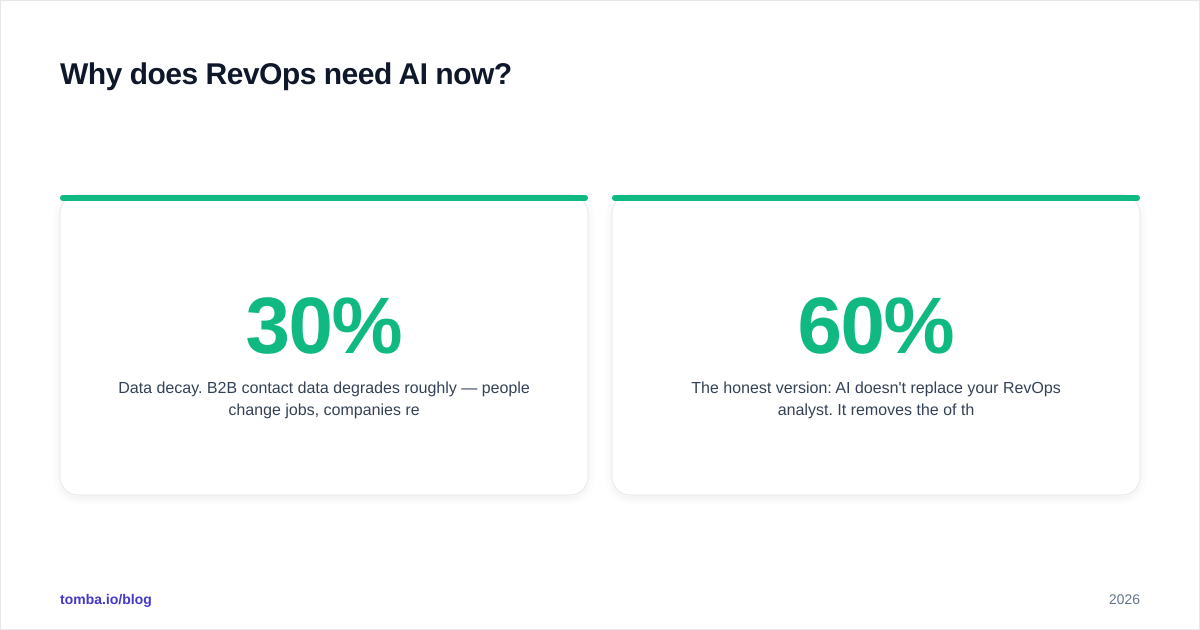
- Data decay. B2B contact data degrades roughly 30% per year — people change jobs, companies rebrand, domains move. Manual cleanup can't keep up.
- Forecast accuracy expectations. Boards no longer accept "gut feel" calls. They want probabilistic forecasts with explainable drivers.
- Headcount pressure. Teams are asked to grow pipeline without growing the ops team. AI is the only lever that scales output without scaling salaries.
The honest version: AI doesn't replace your RevOps analyst. It removes the 60% of their week spent reconciling records so the other 40% — strategy, modeling, enablement — actually happens.
Where does AI move the needle in RevOps?#
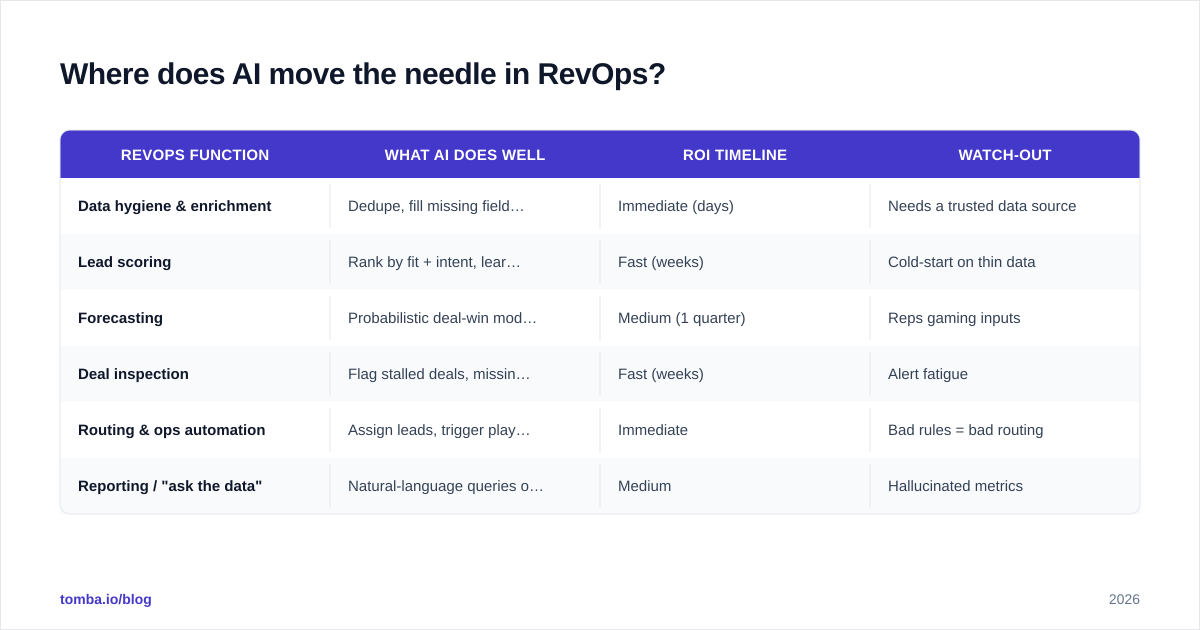
Not everywhere equally. Here's where the lift is real versus where it's mostly marketing.
| RevOps function | What AI does well | ROI timeline | Watch-out |
|---|---|---|---|
| Data hygiene & enrichment | Dedupe, fill missing fields, validate emails/phones | Immediate (days) | Needs a trusted data source |
| Lead scoring | Rank by fit + intent, learn from closed-won | Fast (weeks) | Cold-start on thin data |
| Forecasting | Probabilistic deal-win modeling | Medium (1 quarter) | Reps gaming inputs |
| Deal inspection | Flag stalled deals, missing next steps | Fast (weeks) | Alert fatigue |
| Routing & ops automation | Assign leads, trigger plays instantly | Immediate | Bad rules = bad routing |
| Reporting / "ask the data" | Natural-language queries on revenue data | Medium | Hallucinated metrics |
The pattern: AI pays off fastest where the task is high-volume, rules-based, and currently done by hand. Data hygiene and routing are boring and immediate. Forecasting and "ask your data" are higher-value but demand clean inputs and governance first.
Start with the data layer#
Every downstream model — scoring, forecasting, routing — inherits the quality of your contact and account data. If 30% of your records have a missing or invalid email, your lead scoring is guessing and your sequences bounce.
This is the least glamorous and highest-leverage place to apply AI. Before a record enters a scoring model, it should be enriched and validated: is the email deliverable, is the title current, does the company still exist at that domain? Tools like an email verifier and automated data enrichment close that gap so the rest of your stack isn't building on sand.
A clean enrichment step typically does three things automatically:
- Validate — confirm the email is real and deliverable, not a catch-all guess.
- Fill — add missing firmographics, job title, LinkedIn, direct phone.
- Dedupe — merge the three "Acme Corp" records into one source of truth.
How do you build an AI-ready RevOps stack?#
You need three things that talk to each other, not a museum of point solutions. Here's a comparison of the common build approaches.
| Approach | Best for | Pros | Cons | Rough cost |
|---|---|---|---|---|
| All-in-one platform (e.g. HubSpot/Salesforce + native AI) | Teams wanting one vendor | Tight integration, less glue code | AI features lag specialists; lock-in | $$$ |
| Best-of-breed + orchestration | Teams with an ops engineer | Pick the best at each layer | You own the integrations | $$ |
| API-first / build internally | Data-mature orgs | Full control, custom models | Needs eng resources | $ + eng time |
For most teams the middle path wins: a CRM of record (HubSpot or Salesforce), a reliable data/enrichment source feeding it, and an orchestration layer (native workflows,
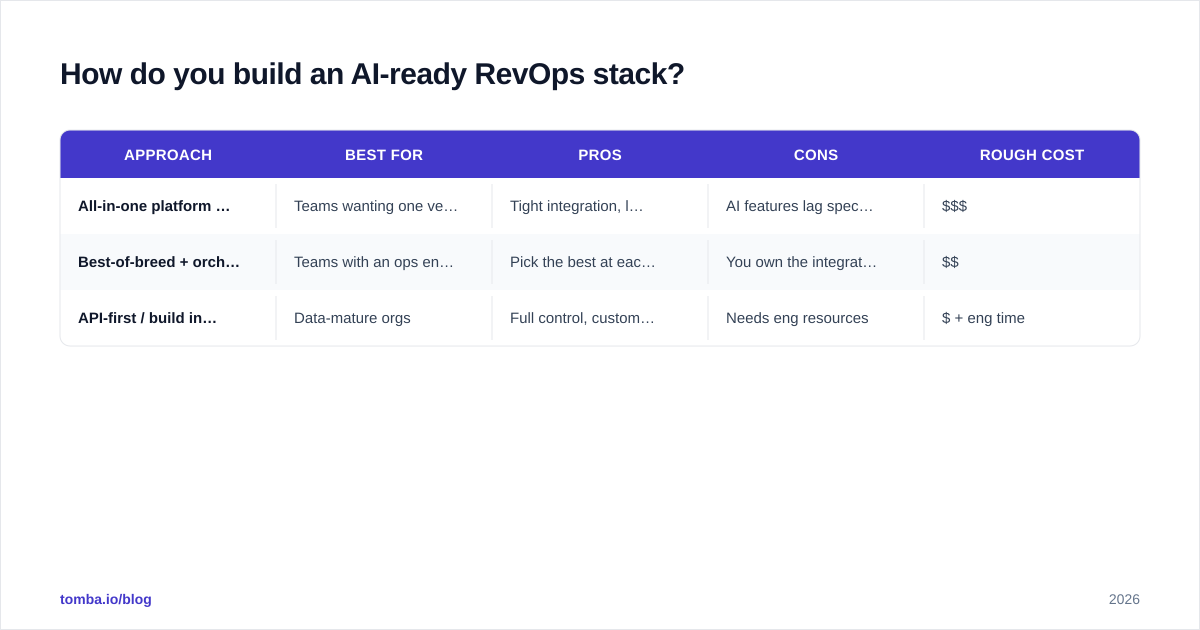
Zapier/Make, or a RevOps platform) that fires actions when models trigger.
A concrete data-layer example: piping a bulk email finder and verifier into your CRM via the Tomba API means every inbound lead gets validated and enriched before it ever reaches a scoring model or an AE's queue. The HubSpot integration and Salesforce integration handle that handoff without custom code.
The non-negotiable: a governance layer#
AI that writes to your CRM unsupervised is how you get 4,000 records "enriched" with confident nonsense. Before you automate writes:
- Set confidence thresholds — only auto-update fields above, say, 90% match confidence; queue the rest for review.
- Log every AI-driven change so you can audit and roll back.
- Keep a human in the loop for anything customer-facing until the model earns trust.
Is AI forecasting actually better than a spreadsheet?#
Yes — but conditionally. AI forecasting beats a rep-rolled-up spreadsheet when you have enough historical deal data for the model to learn patterns, and when reps actually log activity. It loses when your pipeline data is sparse or reps sandbag their inputs.
The advantage isn't a single magic number. It's that a good model gives you a probability distribution and explainable drivers: "This deal dropped from 70% to 45% because there's been no buyer activity in 14 days and no economic buyer identified." That's something a spreadsheet can't tell you, and it's actionable in your next pipeline review.
Practical guidance:
- If you close fewer than ~50 deals a quarter, AI forecasting will be noisy — use it as a sanity check, not gospel.
- Feed it activity signals (emails, calls, meetings), not just stage and close date.
- Always pair the model's number with the human commit. The gap between them is itself a signal worth discussing.
What should you automate first? A 30-day rollout framework#
The biggest failure mode in AI for RevOps is treating it as a moonshot. Pick one workflow, prove lift, expand. Here's a sequence that consistently works.
Week 1 — Fix the foundation. Run your existing database through enrichment and verification. Measure: what percent of contacts had a missing/invalid email or stale title? This number alone usually justifies the project to your CFO.
Week 2 — Automate routing. Connect lead intake to instant enrichment + scoring + assignment. Target: speed-to-lead under five minutes. This is the single most reliable conversion lever in B2B and it's pure automation.
Week 3 — Deploy lead scoring. Train a fit+intent model on your closed-won history. Don't over-engineer; even a simple model beats round-robin. Watch your response rate on AI-prioritized leads versus the old way.
Week 4 — Add deal inspection. Layer AI alerts for stalled deals and missing next steps into your pipeline review. Tune aggressively to avoid alert fatigue.
Only after these four are humming should you reach for generative "ask your data" reporting and AI forecasting. They're higher-value but they depend on everything above being trustworthy.
How do you measure that it's working?#
Tie every AI workflow to a number that existed before AI, so the comparison is honest:
- Data layer → % records valid/enriched, bounce rate on sends.
- Routing → speed-to-lead, lead-to-meeting rate.
- Scoring → win rate on AI-prioritized leads.
- Forecasting → forecast accuracy vs. actuals, quarter over quarter.
If you can't draw a line from the tool to one of these, you bought a toy.
What are the risks and limits of AI in RevOps?#
Three to keep on your radar:
- Confident hallucination. LLMs will happily invent a metric or a contact detail. Never let generative output write to the system of record without verification. This is exactly why your data layer should rely on a real data source with transparent data sourcing, not a model's best guess.
- Model drift. A scoring model trained on last year's buyers degrades as your market shifts. Schedule quarterly retraining and monitor for accuracy decay.
- Over-automation. Automating a broken process just breaks it faster. Map the workflow by hand first; automate only once it's actually good.
Reviewers at G2 consistently flag the same thing across RevOps AI tools: the software is rarely the bottleneck — adoption and data quality are. The teams that win treat AI as a discipline, not a purchase.
The bottom line#
AI for RevOps in 2026 is mostly about doing the boring things perfectly at scale: clean data, instant routing, honest forecasts. The flashy generative features matter, but they sit on top of a foundation that has to be solid first. Start with your data layer, prove a single workflow in 30 days, and expand from evidence rather than enthusiasm.
If your foundation is shaky — bounced sends, stale titles, duplicate accounts — start where every model starts: the contact data. Tomba's Email Finder and verifier give your RevOps stack accurate, validated records to build on, with a free tier (25 searches/mo) to test it and plans from $49/mo as you scale. Clean inputs, honest outputs — see the full Tomba pricing and feed your revenue engine data it can actually trust.
// get started
Find, verify and enrich your first contacts today
Start on the free plan with 25 searches a month, then scale when your team is ready.
Free plan · No credit card required · GDPR & CCPA
// about the author