AI for Sales Emails in 2026: A Practical Playbook & Tools
AI can draft a sales email in seconds, but volume without relevance just trains spam filters. Here's how to use AI for sales emails the right way in 2026 — with the data, prompts, and workflow that actually book meetings.
TL;DR
- AI for sales emails is no longer about generating more copy — it's about turning verified data into relevant, one-to-one messages at scale.
- The reps winning in 2026 use AI for the parts machines do well (research synthesis, variant testing, drafting) and keep humans on strategy, judgment, and the "why now."
- AI-written emails fail when they're built on bad inputs: wrong contact, generic context, no signal. Garbage in, garbage in someone's spam folder.
- A simple four-layer framework — data, signal, draft, review — keeps AI outreach personal without burning hours per prospect.
- Pair an AI writer with an accurate email finder and verifier so your clever copy actually reaches a real person.
What does "AI for sales emails" actually mean in 2026?#
Short answer: it means using machine assistance across the whole email lifecycle — not just the writing step.
A few years ago "AI for sales emails" meant pasting a prompt into a chatbot and getting a paragraph back. That's the smallest, least valuable slice of what's now possible. Today the term covers research summarization, prospect scoring, subject-line generation, send-time optimization, reply classification, and follow-up sequencing. The drafting is the easy part. The hard part — and where AI earns its keep — is connecting good data to the right message at the right moment.
Think of AI here like a sous-chef, not the head chef. It preps ingredients, chops the onions, and reduces the sauce so you move faster. But you still decide what's on the menu, who you're cooking for, and whether the dish is good enough to serve. Reps who hand the whole kitchen to the AI end up shipping bland, identical plates to everyone on the list.
Why do most AI sales emails fail?#
They fail because they optimize for volume instead of relevance, and because they're built on weak inputs.
Here's the trap. AI makes it trivial to send 500 emails instead of 50. So teams crank the volume dial, send near-identical messages, and watch reply rates crater while their domain reputation takes a beating. According to HubSpot's sales research, personalization and relevance consistently outperform raw send volume — and AI that ignores that just helps you fail faster.
The three most common failure modes:
- Wrong or unverified contact. The most beautifully written email is worthless if it bounces or lands in a shared inbox nobody checks. Bounces also damage your sender reputation, which hurts every future send.
- Generic "personalization." "I loved your work at {{company}}" is not personalization — it's a mail merge wearing a costume. Recipients spot it instantly.
- No trigger or timing. AI can write a relevant message, but if there's no reason to reach out now, even a good email feels random.

The fix isn't to abandon AI. It's to feed it better fuel and keep a human in the loop for judgment. That's what the rest of this playbook is about.
What's the right framework for using AI in cold email?#
Use a four-layer model: data → signal → draft → review. Each layer feeds the next, and skipping any one is where AI outreach goes wrong.
Layer 1: Data (who, and is it real?)#
Everything starts with an accurate contact. Before a single word gets written, you need the right person, a verified email, and reliable firmographic context. This is the layer AI writers quietly assume is already handled — and it usually isn't. Tools like data enrichment and a verified email verifier step belong here so you're not building on sand.
Layer 2: Signal (why now?)#
A signal is the reason for the outreach: a funding round, a new hire in a relevant role, a job posting that exposes a pain point, a product launch, expansion into a new market. AI is excellent at scanning and summarizing these signals across many accounts. No signal, no send — or at least, a much weaker one.
Layer 3: Draft (what do we say?)#
Now AI writes. With a verified contact and a real signal in the prompt, the model has enough to produce a genuinely relevant first draft. This is where tools like a cold email AI writer and a subject line generator do their best work — they have something true to say.
Layer 4: Review (is this good enough to send?)#
A human reads it, cuts the fluff, checks the claim, and decides whether the "why now" actually holds up. This takes 20 seconds per email and is the single biggest quality lever you have.
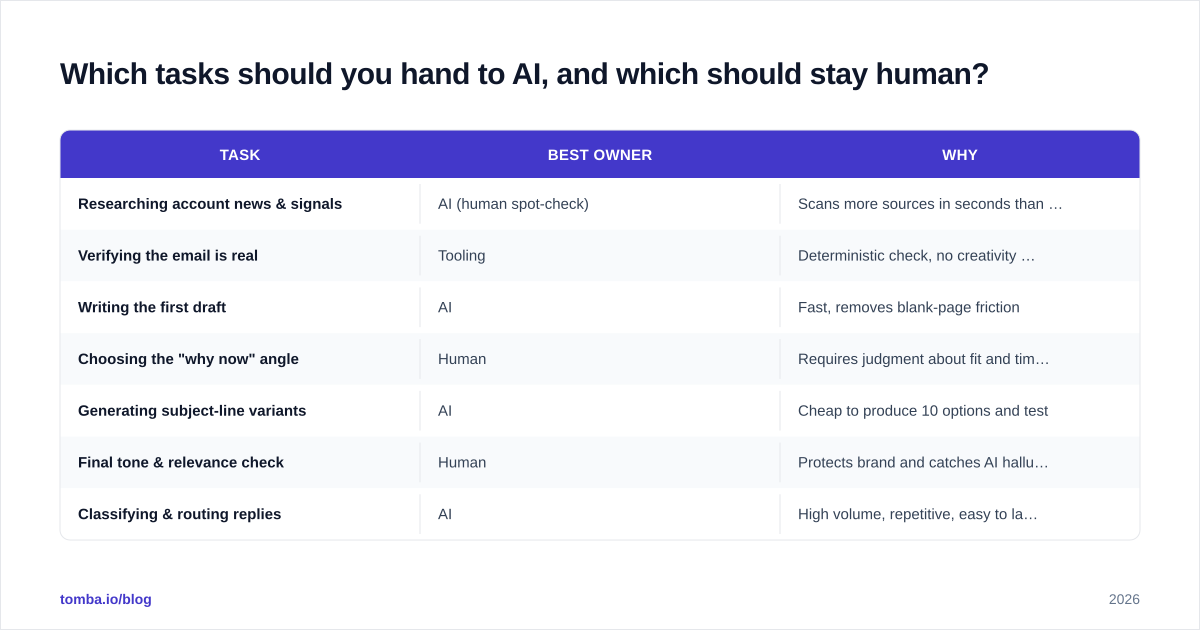
Which tasks should you hand to AI, and which should stay human?#
Hand AI the high-volume, pattern-based work. Keep humans on judgment, strategy, and relationship calls.

| Task | Best owner | Why |
|---|---|---|
| Researching account news & signals | AI (human spot-check) | Scans more sources in seconds than a rep can in an hour |
| Verifying the email is real | Tooling | Deterministic check, no creativity needed |
| Writing the first draft | AI | Fast, removes blank-page friction |
| Choosing the "why now" angle | Human | Requires judgment about fit and timing |
| Generating subject-line variants | AI | Cheap to produce 10 options and test |
| Final tone & relevance check | Human | Protects brand and catches AI hallucinations |
| Classifying & routing replies | AI | High volume, repetitive, easy to label |
| Deciding strategy on a key account | Human | Relationship and revenue stakes too high |
The pattern is consistent: AI handles breadth, humans handle depth. When you invert that — humans doing repetitive lookups while AI makes strategic calls — you get slow and generic.
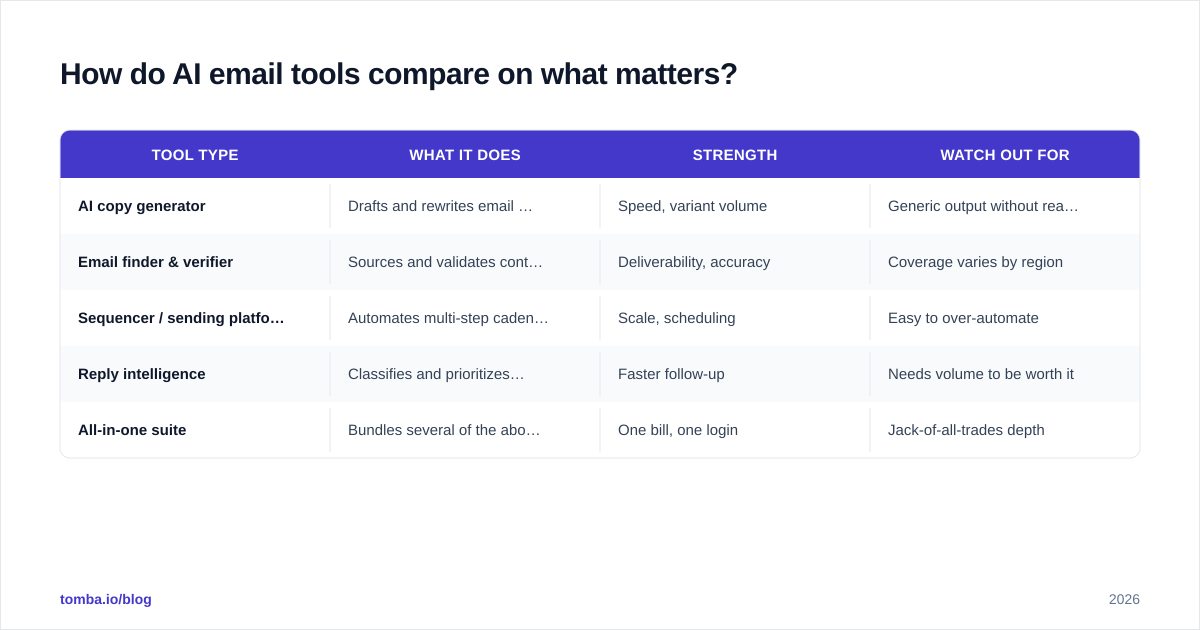
How do AI email tools compare on what matters?#
There's no single "best" tool — there are categories, and you usually need one from each. Here's how the main types stack up.
| Tool type | What it does | Strength | Watch out for |
|---|---|---|---|
| AI copy generator | Drafts and rewrites email body | Speed, variant volume | Generic output without real data |
| Email finder & verifier | Sources and validates contacts | Deliverability, accuracy | Coverage varies by region |
| Sequencer / sending platform | Automates multi-step cadences | Scale, scheduling | Easy to over-automate |
| Reply intelligence | Classifies and prioritizes responses | Faster follow-up | Needs volume to be worth it |
| All-in-one suite | Bundles several of the above | One bill, one login | Jack-of-all-trades depth |
Independent review sites like G2 are useful for filtering the noise here, because the category is crowded and every vendor claims to "10x your pipeline." Read the reviews from companies that look like yours.
The key takeaway: an AI writer and a data tool are complements, not competitors. The writer makes the message good; the data layer makes sure it reaches a real human and doesn't torch your response rate. Buying one without the other is half a system.
What does a good AI sales email prompt look like?#
A good prompt gives the model real inputs and tight constraints — not "write a sales email."
Here's a template that consistently produces usable first drafts:
Role: You are an SDR writing a first-touch cold email.

Prospect: {{first_name}}, {{title}} at {{company}}.
Verified signal: {{specific trigger — e.g., "hired 3 RevOps roles
  in the last 30 days"}}.
My offer: {{one-sentence value prop}}.
Proof point: {{one concrete customer result}}.

Constraints:
- Under 90 words.
- No more than one question.
- Reference the signal in the first line, not the offer.
- Plain language, no buzzwords, no "I hope this finds you well."
- One clear, low-friction call to action.

Write 3 variants with different opening lines.
Notice how much of that prompt is data, not instructions. The signal, the title, the proof point — these are the inputs that separate a relevant email from a template. If you can't fill those fields with real, verified information, the AI can't fix that for you. It will just invent something, which is worse.
A practical tip: keep a small library of proven proof points and value props, and let AI assemble them against each verified contact. That gives you consistency where you want it (your claims) and variety where you want it (the opening and framing). For more structured starting points, a vetted set of email templates saves you from reinventing the wheel on every campaign.
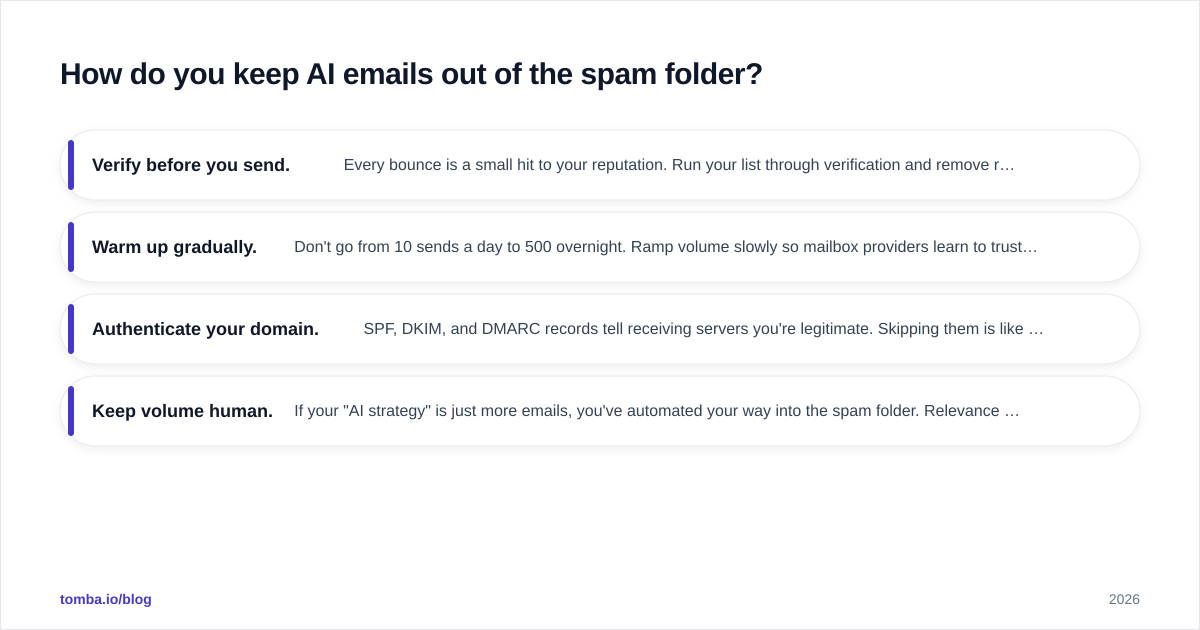
How do you keep AI emails out of the spam folder?#
Protect deliverability with verified data, sane volume, and authentication — AI quality can't save a damaged domain.
This is the part teams skip until it's too late. You can write the most relevant email in the world, but if your domain reputation is shot, it never gets seen. A few non-negotiables:
- Verify before you send. Every bounce is a small hit to your reputation. Run your list through verification and remove risky addresses first.
- Warm up gradually. Don't go from 10 sends a day to 500 overnight. Ramp volume slowly so mailbox providers learn to trust you.
- Authenticate your domain. SPF, DKIM, and DMARC records tell receiving servers you're legitimate. Skipping them is like mailing a letter with no return address.
- Keep volume human. If your "AI strategy" is just more emails, you've automated your way into the spam folder. Relevance over reach, always.
AI actually helps here in an underrated way: by improving relevance, it lifts reply and engagement rates, and engagement is exactly what mailbox providers reward. Good AI outreach is more deliverable than bad manual outreach, not less — but only when the data underneath is clean.
Does AI replace SDRs and sales reps?#
No. It replaces the busywork that was eating their day, and raises the bar on everything else.
The fear that AI will replace salespeople misreads what salespeople actually do. The job was never "type emails." It's understanding a buyer's situation, building trust, navigating a complex decision, and knowing when to push and when to wait. AI can't do any of that — but it can clear away the 60% of an SDR's week spent on manual research, list-building, and copy-pasting.
What changes is the standard. When everyone has AI drafting, a generic email stands out as lazy, not efficient. The reps who win in 2026 use AI to spend more time on judgment, not less — better account selection, sharper "why now" thinking, more thoughtful follow-up. The tooling raises the floor, so your edge moves up to the things tools can't do.
There's also a quieter shift in team structure. As AI absorbs the repetitive layer, smaller teams cover more accounts, and the skills that matter tilt toward research, messaging strategy, and data fluency. Knowing how to feed AI good inputs becomes a core sales skill, right alongside discovery and objection handling.
Putting it together: the AI sales email checklist#
Before any AI-assisted campaign goes out, run this list:
- Every contact is real and verified (not just "found")
- Each account has a documented "why now" signal
- The AI prompt includes the signal, title, and a real proof point
- A human reviewed each email for relevance and accuracy
- Subject lines were A/B tested, not guessed
- Domain authentication (SPF/DKIM/DMARC) is in place
- Send volume is within a healthy, warmed-up range
- Replies are being classified and followed up within 24 hours
Hit all eight and AI becomes a genuine force multiplier. Miss the first two and you're just automating mediocrity.
The bottom line#
AI for sales emails works when it amplifies good judgment and good data — and backfires when it replaces them. Use it to research faster, draft faster, and test more, but keep a human deciding who to contact, why now, and whether the message is actually worth sending. The teams that treat AI as a writing shortcut will keep wondering why their reply rates fall. The teams that treat it as one layer in a data-first system will book more meetings with less effort.
And remember where it all starts: even the smartest AI email is wasted on a wrong address. Before you scale your outreach, make sure every contact is real. Tomba's Email Finder sources and verifies professional email addresses by name, domain, or company — so your AI-crafted emails reach actual people, not bounce-backs. Start free with 25 searches a month, and check the full Tomba pricing when you're ready to scale. Give your AI something true to work with, and let the copy do its job.
Ready to find emails that actually work?
Join 150,000+ professionals who stopped guessing and started sending. Free credits on signup — no credit card required.
Get the Tomba newsletter
Practical outbound tactics and product updates — once every two weeks.
About the author