Best AI Forecasting Software in 2026: A Practical Buyer's Guide
AI forecasting software promises pipeline accuracy your spreadsheets can't match. Here's how the tools actually work, what they cost, and how to pick one in 2026.
TL;DR
- AI forecasting software uses machine learning on your CRM, activity, and historical deal data to predict revenue with far less manual guesswork than spreadsheets.
- The best tools improve forecast accuracy by 10-20 points versus rep-submitted numbers, mostly by catching slipping deals early.
- Expect to pay anywhere from bundled-with-CRM to $40-$150 per user per month for dedicated platforms; data quality matters more than the algorithm.
- No model can predict revenue from dirty pipeline data — clean contact and account records are the real prerequisite.
- Pick based on where your data already lives, how your team sells, and whether you need rep-level coaching or board-level roll-ups.
Sales leaders have been forecasting the same way for 20 years: ask reps to commit a number, eyeball the pipeline, add a gut-feel haircut, and hope. AI forecasting software changes the inputs. Instead of asking a rep how confident they feel, it reads thousands of historical deals, learns which signals actually predicted a close, and scores your open pipeline against that pattern. This guide explains how the category works, what it costs in 2026, and how to choose without overpaying for a black box.
What is AI forecasting software?#
AI forecasting software is a class of revenue tools that apply machine learning to predict future sales outcomes — deal close probability, quarterly bookings, pipeline coverage, and churn risk — using your own historical data instead of human judgment alone.
Think of it like a weather model versus looking out the window. Looking out the window (the rep's gut) works for the next ten minutes. A model that has ingested decades of atmospheric data spots the storm three days out. AI forecasting does the same with revenue: it has "seen" every deal your company closed and lost, so it recognizes the early signature of a deal that's about to slip.
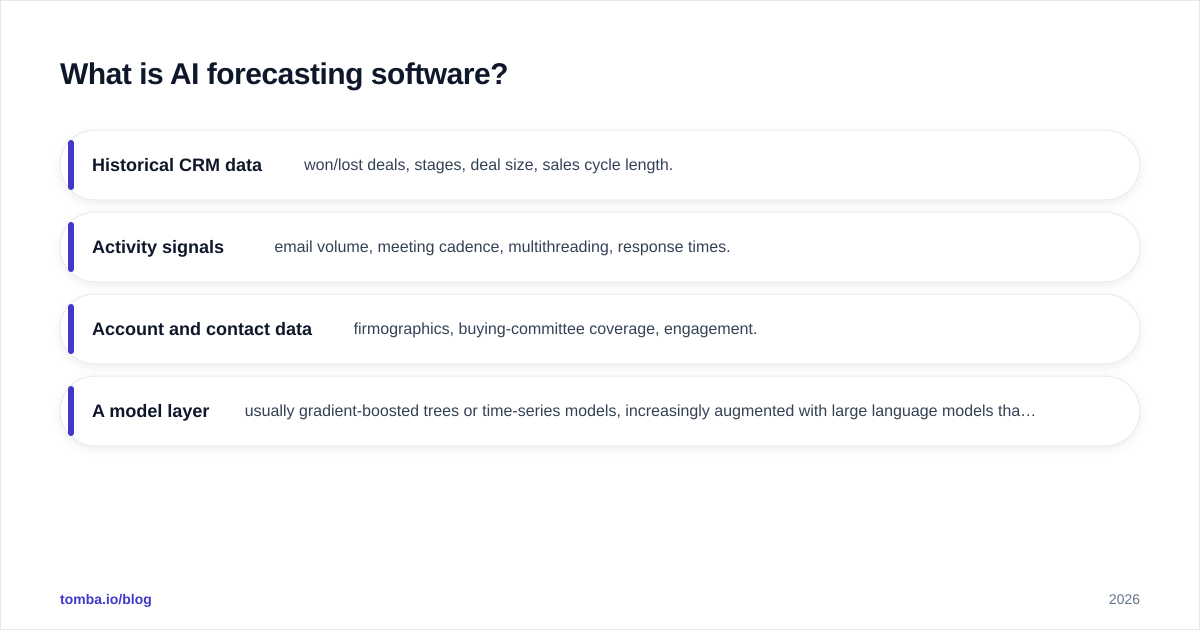
Technically, these platforms combine a few ingredients:
- Historical CRM data — won/lost deals, stages, deal size, sales cycle length.
- Activity signals — email volume, meeting cadence, multithreading, response times.
- Account and contact data — firmographics, buying-committee coverage, engagement.
- A model layer — usually gradient-boosted trees or time-series models, increasingly augmented with large language models that read call transcripts and email sentiment.
The output is not a crystal ball. It's a probability and a trend, surfaced where managers already work — a forecast roll-up, a deal-health score, or a "deals that moved this week" digest.
Why are teams replacing spreadsheet forecasting?#
Because rep-submitted forecasts are systematically wrong, and everyone knows it. According to Gartner research on sales operations, the majority of B2B sales organizations report forecast accuracy below 75% — and the gap usually isn't math, it's optimism and recency bias.
Spreadsheets fail in three predictable ways:
- They're backward-looking. A pivot table tells you what closed last quarter, not which open deal is quietly dying.
- They encode bias. Reps sandbag at quarter start and happy-ear at quarter end. Managers apply a flat discount that's wrong in both directions.
- They don't scale. Once you have 200 open opportunities, no human can weight them all consistently.
AI forecasting software attacks all three by scoring every deal the same way, every day, against evidence. The payoff isn't a magic number — it's earlier warning. When the model flags a "committed" deal as 30% likely because the economic buyer went dark three weeks ago, the rep still has time to act.

How does AI forecasting software actually work?#
The core loop is the same across vendors: ingest data, train a model on outcomes, score open pipeline, and feed the results back to humans who act on them. The diagram below shows the typical pipeline.
Walking through the stages:
1. Data ingestion. The platform syncs your CRM (Salesforce, HubSpot, Pipedrive), and often your email and calendar, into a unified deal timeline. This is where most implementations live or die — if your CRM has half-empty fields and ghost contacts, the model has nothing reliable to learn from. Cleaning and enriching records with accurate contact enrichment before you switch on a forecasting tool is the single highest-leverage prep step.
2. Feature engineering. The system derives signals: days in stage, stakeholder count, last-touch recency, email reply latency, discount depth. Modern tools add language features from call recordings — did the buyer say "budget," "legal," "next steps"?
3. Model training. It fits a model on your closed deals, learning which features separated winners from losers. Good vendors retrain continuously as new deals close, so the model adapts to a changing market rather than freezing 2024's assumptions.
4. Scoring and roll-up. Every open deal gets a close probability. The platform aggregates these bottom-up and compares against rep commits, manager judgment, and historical conversion to produce a forecast range, not a single fragile number.
5. Human action. The output lands in a dashboard, a Slack alert, or directly in the CRM. The point is intervention: coach the slipping deal, reallocate effort, adjust the board number with evidence.
You can read more on the discipline this supports in our overview of revenue operations, which is usually the team that owns the forecasting stack.
What features separate good AI forecasting tools from hype?#
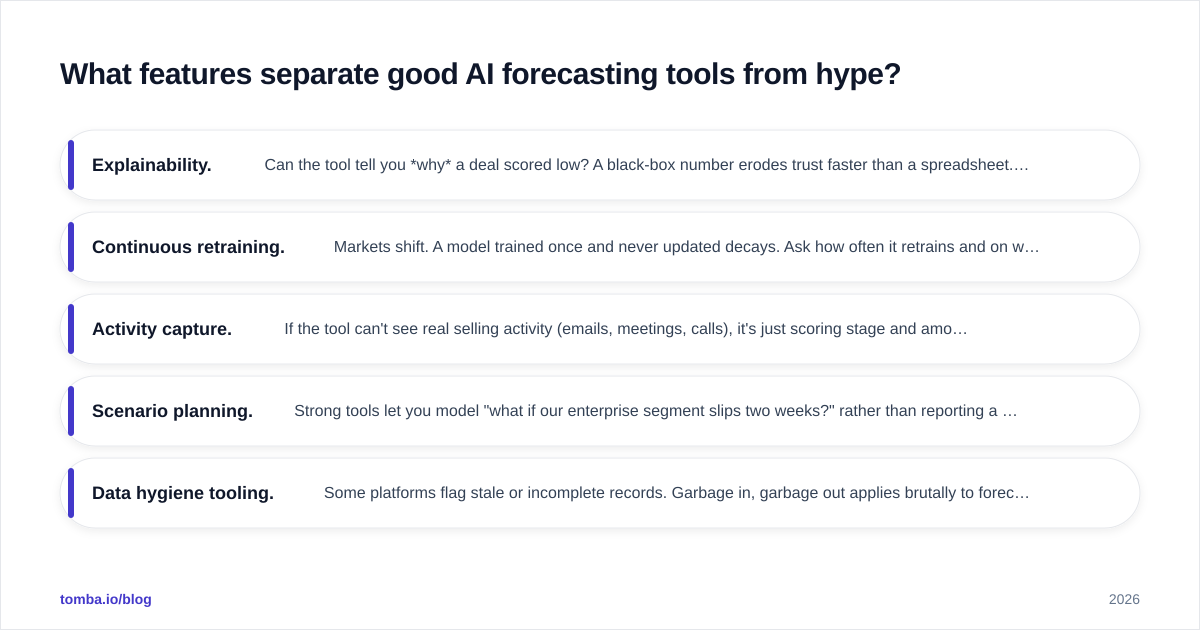
Not every tool that says "AI" runs a real model. When you evaluate, look past the marketing for these capabilities.
- Explainability. Can the tool tell you why a deal scored low? A black-box number erodes trust faster than a spreadsheet. The best platforms cite the specific signals (single-threaded, stalled 21 days, no mutual action plan).
- Continuous retraining. Markets shift. A model trained once and never updated decays. Ask how often it retrains and on what window.
- Activity capture. If the tool can't see real selling activity (emails, meetings, calls), it's just scoring stage and amount — which you can do in a spreadsheet.
- Scenario planning. Strong tools let you model "what if our enterprise segment slips two weeks?" rather than reporting a single point estimate.
- Data hygiene tooling. Some platforms flag stale or incomplete records. Garbage in, garbage out applies brutally to forecasting.
A quick reality check on accuracy: vendor claims of "95% accurate" usually measure aggregate quarterly bookings, where errors cancel out, not individual deal prediction. Treat aggregate accuracy and deal-level accuracy as two different metrics, and ask for both.
How much does AI forecasting software cost in 2026?#
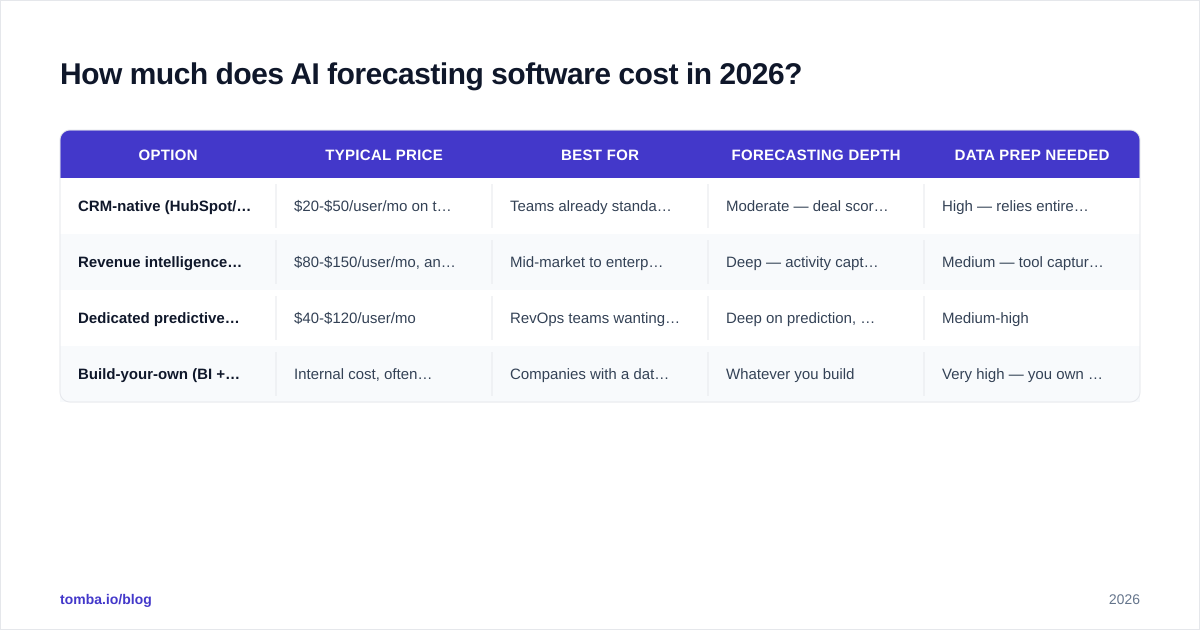
Pricing falls into three buckets: bundled inside your CRM, mid-market revenue-intelligence suites, and enterprise platforms. The table below compares representative tiers. Prices move, so verify on each vendor's site — these reflect publicly listed ranges and common deal structures as of 2026.
| Option | Typical price | Best for | Forecasting depth | Data prep needed |
|---|---|---|---|---|
| CRM-native (HubSpot/Salesforce AI add-on) | $20-$50/user/mo on top of CRM | Teams already standardized on one CRM | Moderate — deal scoring, basic roll-ups | High — relies entirely on your CRM data |
| Revenue intelligence suite (Clari, Gong, Aviso class) | $80-$150/user/mo, annual | Mid-market to enterprise revenue teams | Deep — activity capture, scenario planning | Medium — tool captures some activity itself |
| Dedicated predictive/forecasting platform | $40-$120/user/mo | RevOps teams wanting a focused tool | Deep on prediction, lighter on coaching | Medium-high |
| Build-your-own (BI + data science) | Internal cost, often $100k+/yr loaded | Companies with a data team and unusual motion | Whatever you build | Very high — you own the pipeline |
Two cost notes that catch buyers off guard. First, most revenue-intelligence suites are sold annually with platform minimums, so the real entry price is often $30k-$60k/year regardless of seat count. Second, the cheapest line item is rarely the cheapest project — a low monthly fee on a tool that needs six months of data cleanup costs more than a pricier tool that works on day one. You can compare how a focused data layer fits your budget against Tomba pricing if enrichment is part of your prep.
Is AI forecasting software better than a sales manager's judgment?#
Not better — together. The strongest setups treat the model and the manager as two independent forecasters and reconcile the gap.
The model wins on consistency, scale, and freedom from emotion. It scores 300 deals identically at 9 a.m. and again at 5 p.m. The manager wins on context the data can't see: the champion who just got promoted, the competitor that just had an outage, the handshake on the golf course. When the model says 40% and the manager says 80%, that disagreement is a feature — it's exactly the deal worth a 15-minute review.
A practical rule: let AI handle the bottom-up base case and the early-warning alerts, and let humans apply judgment at the top, on the record, with reasons logged. Over a few quarters you'll learn whose adjustments actually improve accuracy and whose are noise — which itself is a coaching tool. This pairs naturally with disciplined sales process and pipeline management, where win-rate trends give the model cleaner labels to learn from.
For a broader market view of the category and user reviews, G2's sales analytics category and HubSpot's forecasting resources are useful neutral references before you shortlist.
What's the catch with AI forecasting software?#
Three things, and none of them are about the algorithm.
Data quality is the whole game. A forecasting model is a mirror. Feed it a pipeline full of duplicate accounts, missing contacts, and deals parked in "stage 2" for 90 days, and it will confidently predict nonsense. Before you evaluate a single vendor, audit your CRM hygiene. Clean contact data, deduplicated accounts, and complete buying-committee coverage do more for forecast accuracy than any model upgrade. This is why enrichment and verification belong upstream of forecasting, not as an afterthought.
Adoption beats accuracy. A model that's 90% accurate but ignored by reps is worth less than an 80% model the team trusts and acts on. Explainability and CRM-native delivery drive adoption. If reps have to log into a separate tool to see a number they don't understand, they won't.
It predicts the past, not black swans. AI forecasting learns from history. A model trained on 2023-2025 deals doesn't know about a 2026 regulatory change or a sudden category shift. Keep a human in the loop for the unprecedented, and don't let a confident number lull you into autopilot.
How do you choose the right tool?#
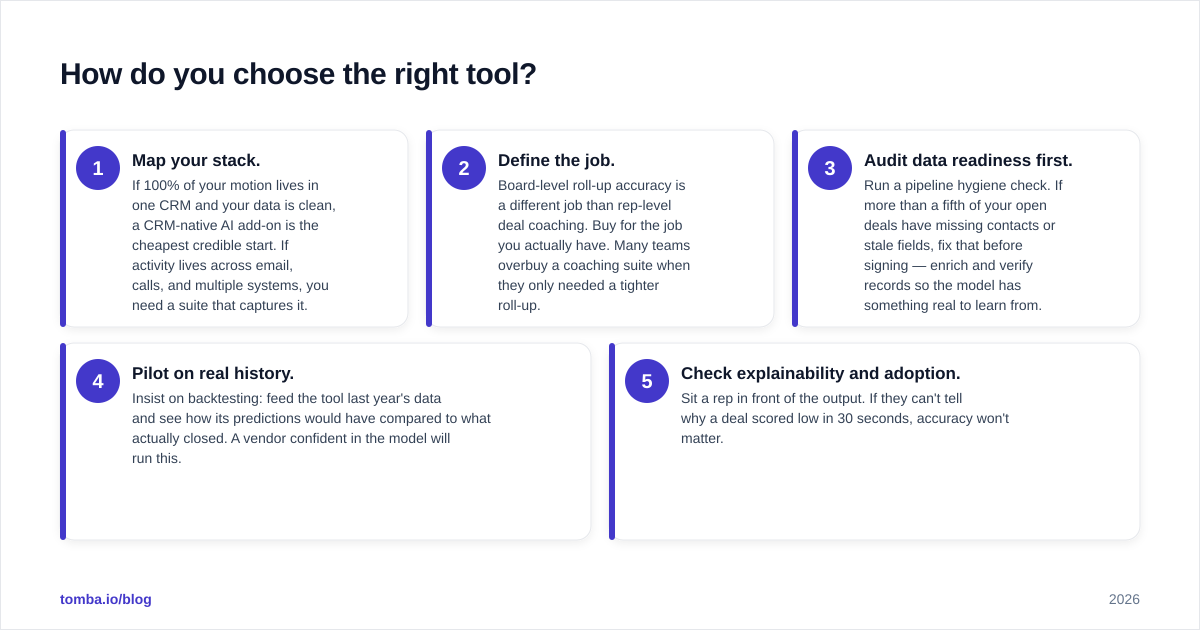
Work backward from where your data lives and how you sell. A short decision path:
- Map your stack. If 100% of your motion lives in one CRM and your data is clean, a CRM-native AI add-on is the cheapest credible start. If activity lives across email, calls, and multiple systems, you need a suite that captures it.
- Define the job. Board-level roll-up accuracy is a different job than rep-level deal coaching. Buy for the job you actually have. Many teams overbuy a coaching suite when they only needed a tighter roll-up.
- Audit data readiness first. Run a pipeline hygiene check. If more than a fifth of your open deals have missing contacts or stale fields, fix that before signing — enrich and verify records so the model has something real to learn from.
- Pilot on real history. Insist on backtesting: feed the tool last year's data and see how its predictions would have compared to what actually closed. A vendor confident in the model will run this.
- Check explainability and adoption. Sit a rep in front of the output. If they can't tell why a deal scored low in 30 seconds, accuracy won't matter.
For teams that sell off accurate contact and account data — which is most B2B teams — the unglamorous prerequisite is a reliable B2B database and clean records flowing into the CRM the model reads.
The bottom line#
AI forecasting software is genuinely better than the spreadsheet-and-gut method, but only as good as the data underneath it. The model is the easy part now; clean, complete, verified pipeline data is the hard part — and the part that determines whether your forecast is signal or theater. Start by fixing your inputs, pilot on real history, and buy for the specific forecasting job your team actually has.
Before you switch on any forecasting model, make sure the contacts and accounts feeding your CRM are real and reachable. Tomba's Email Finder helps you build and enrich accurate B2B contact records — verified emails, complete buying-committee coverage, and clean data — so your forecasting tool predicts from signal instead of noise. Start free with 25 searches a month, then scale on the Starter plan at $49/mo as your pipeline grows.
Ready to find emails that actually work?
Join 150,000+ professionals who stopped guessing and started sending. Free credits on signup — no credit card required.
Get the Tomba newsletter
Practical outbound tactics and product updates — once every two weeks.
About the author