AI Lead Categorization in 2026: How to Sort Leads Faster
AI lead categorization sorts your pipeline by fit and intent in seconds, not days. Here's how it works, what to automate, and how to start in 2026.
TL;DR
- AI lead categorization uses machine learning to classify inbound and outbound leads by fit, intent, and lifecycle stage — automatically, in seconds, instead of manual tagging.
- It works by combining firmographic data, behavioral signals, and enrichment fields, then scoring each lead against patterns from your closed-won history.
- Done right, it cuts response time, routes hot leads to the right rep, and stops good leads from rotting in a queue.
- Garbage in, garbage out: categorization is only as accurate as the underlying contact and company data feeding it.
- You can start small — a fit/intent matrix plus clean enrichment — before investing in a full predictive model.
What is AI lead categorization?#
AI lead categorization is the automatic sorting of leads into meaningful buckets — hot vs. cold, enterprise vs. SMB, ready-to-buy vs. nurture — using machine learning instead of manual rules a human maintains by hand.
Think of it like an airport's automated baggage system. Bags (leads) come in from every gate (channel), and instead of a person reading each tag and walking it to the right carousel, sensors read every bag and route it in seconds. The system gets faster and more accurate the more bags it handles. AI lead categorization does the same with your pipeline: it reads dozens of signals per lead and assigns a category before a rep ever opens the record.
Technically, it's a classification problem. The model takes a feature set — company size, industry, job title, page views, email opens, form fills, tech stack — and outputs a label (or a probability across several labels). Older systems used static point-based rules ("+10 for a VP title, +5 for a pricing-page visit"). Modern systems learn the weights themselves from your historical outcomes, which is why they catch patterns a human would never hand-code.
How is it different from traditional lead scoring?#
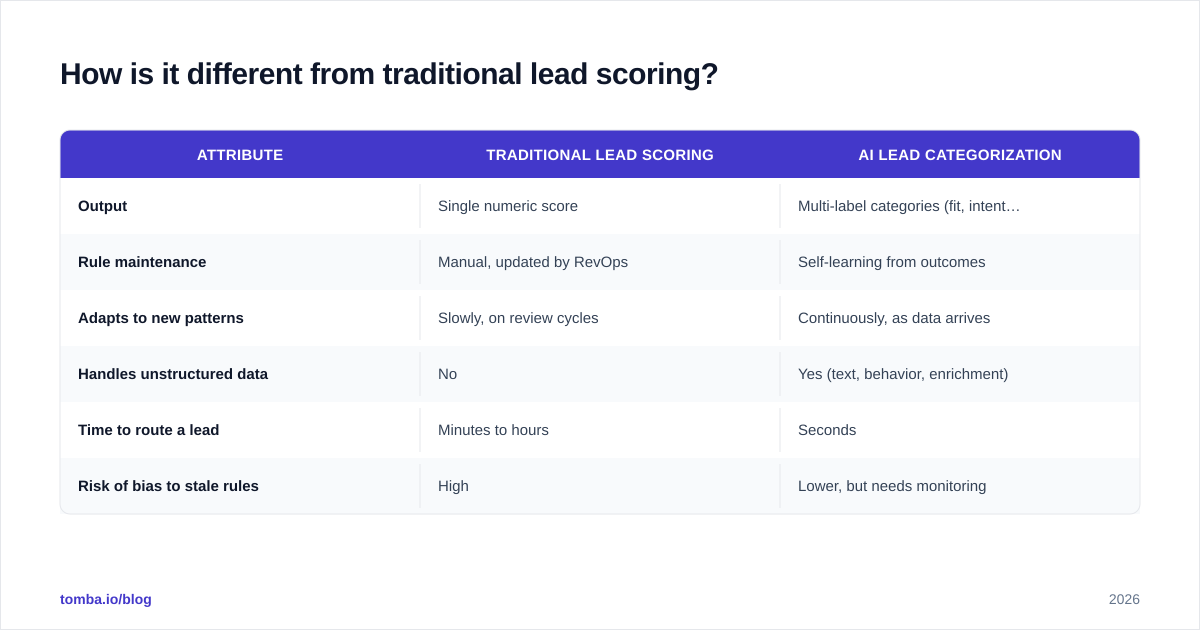
The conclusion first: traditional lead scoring gives you one number; AI categorization gives you a labeled, multi-dimensional picture you can act on without interpretation.
A classic lead scoring model adds and subtracts points until a lead crosses a threshold and becomes an MQL. The problem is that a single score flattens everything. A 75-point lead might be a perfect-fit enterprise account with low engagement, or a tire-kicking student who opened ten emails. Same score, completely different play.
AI categorization separates those dimensions. It can tell you a lead is high fit / low intent (worth a nurture sequence) versus low fit / high intent (worth a quick qualifying call, not a demo). That distinction is the difference between a rep wasting an afternoon and a rep closing a deal.
| Attribute | Traditional lead scoring | AI lead categorization |
|---|---|---|
| Output | Single numeric score | Multi-label categories (fit, intent, stage) |
| Rule maintenance | Manual, updated by RevOps | Self-learning from outcomes |
| Adapts to new patterns | Slowly, on review cycles | Continuously, as data arrives |
| Handles unstructured data | No | Yes (text, behavior, enrichment) |
| Time to route a lead | Minutes to hours | Seconds |
| Risk of bias to stale rules | High | Lower, but needs monitoring |

What data does AI lead categorization need?#
It needs three layers of data, and the order matters: identity, firmographics, and behavior.
Identity data is the anchor — a verified work email, company domain, and name. Without a confirmed identity, every downstream signal is attached to a ghost. This is where most categorization projects quietly fail: they score leads whose email addresses bounce or whose company can't be resolved. A clean email finder and verification step upstream keeps junk out of the model.
Firmographic data describes the company: size, industry, revenue, location, funding stage, tech stack. This drives the "fit" axis. A model can't tell whether a lead matches your ICP if it doesn't know the lead works at a 12-person agency versus a 12,000-person bank.
Behavioral data describes intent: pages visited, emails opened, content downloaded, demo requests, pricing-page dwell time. This is the "intent" axis and it's the most time-sensitive — intent decays fast.
The practical bottleneck is almost always firmographics. Leads rarely hand you their company size and tech stack on a form. That's where data enrichment earns its keep: it fills the blanks so the model has a complete feature set instead of a row full of nulls.
How does the categorization model actually work?#
Here's the pipeline, start to finish.
- Ingest — a lead enters from a form, ad, webinar, or outbound list.
- Resolve identity — match the email and domain to a real person and company; reject unverifiable records.
- Enrich — append firmographic and technographic fields from a data provider.
- Featurize — convert raw fields into model inputs (e.g., "employees" becomes a size bucket).
- Predict — the model assigns category labels and a confidence score.
- Route — rules send each category to the right destination (rep, sequence, or nurture).
- Feedback — closed-won and closed-lost outcomes flow back to retrain the model.
The feedback loop in step 7 is what makes it "AI" rather than a fancy if/then. Each quarter the model sees which leads actually converted and adjusts. If mid-market SaaS leads from a specific webinar keep closing, the model learns to rank them higher — without anyone editing a rule.
Most teams don't build this from scratch. CRMs like HubSpot and Salesforce ship predictive scoring features, and analysts at Gartner track a growing field of dedicated lead intelligence vendors. The build-vs-buy line usually comes down to data volume: under a few thousand leads a month, a packaged model plus good enrichment beats a custom one.
What categories should you actually use?#
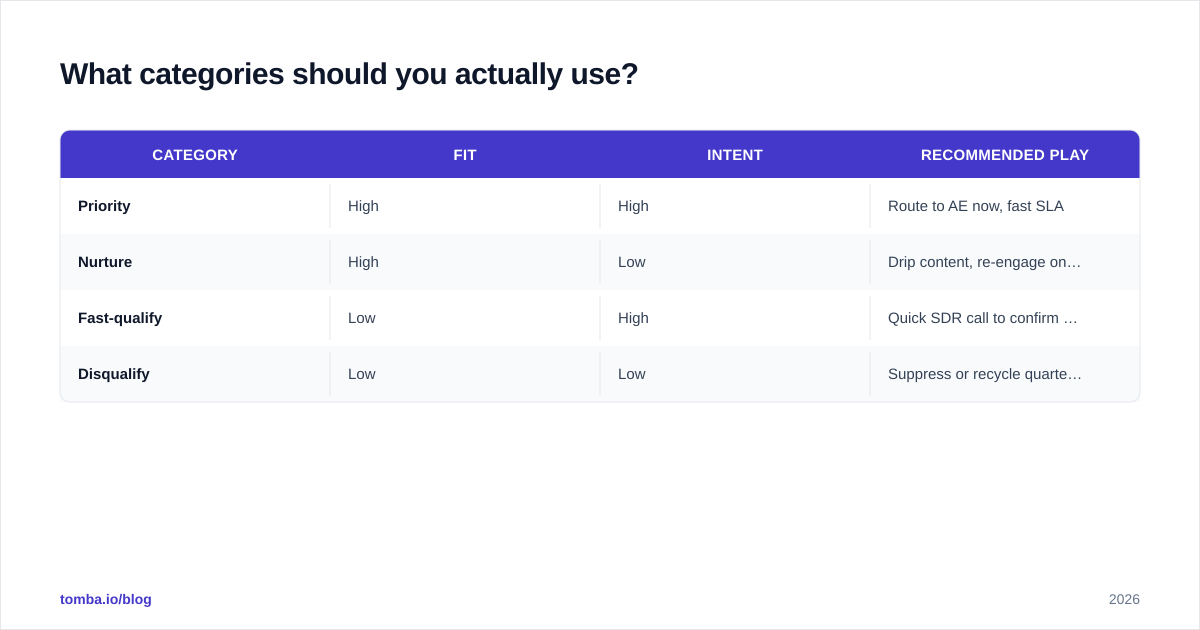
Start with a two-axis matrix before you reach for anything fancier. Fit on one axis, intent on the other, gives you four quadrants that map cleanly to four plays.
| Category | Fit | Intent | Recommended play |
|---|---|---|---|
| Priority | High | High | Route to AE now, fast SLA |
| Nurture | High | Low | Drip content, re-engage on signal |
| Fast-qualify | Low | High | Quick SDR call to confirm fit |
| Disqualify | Low | Low | Suppress or recycle quarterly |
This four-box model is boring on purpose. It's interpretable, every rep understands it instantly, and it exposes bad data fast — if "Priority" fills up with obviously poor-fit leads, you know enrichment or labels are off before you've trusted the system with revenue.
Once the matrix is stable, you can add a lifecycle-stage dimension (new, engaged, opportunity, customer) or a product-interest label. Resist adding categories no one will act on differently. A label that doesn't change what a rep does is just noise with a name.

How accurate is AI lead categorization?#
Accuracy lives and dies on input data, not the algorithm. A mediocre model on clean, enriched data beats a state-of-the-art model on dirty data every time.
The most common failure mode is silent: the model confidently categorizes leads built on unverified emails and stale company records. It looks like it's working — labels appear, leads route — but conversion rates don't move because half the "high-fit" leads can't even be reached. Before you judge a model, audit the data feeding it:
- What percentage of lead emails are verified deliverable?
- What percentage of records have complete firmographic fields after enrichment?
- How fresh is the company data — months old or years old?
Tightening those three numbers usually moves categorization accuracy more than any model tuning. It's also worth tracking where your provider sources data; transparency on data sources is a fair thing to demand from any vendor in this category.
A second failure mode is feedback starvation. If you don't pipe closed-won and closed-lost outcomes back into the model, it freezes in time and slowly drifts as your market shifts. Schedule a quarterly retrain at minimum.
How do you roll it out without breaking the pipeline?#
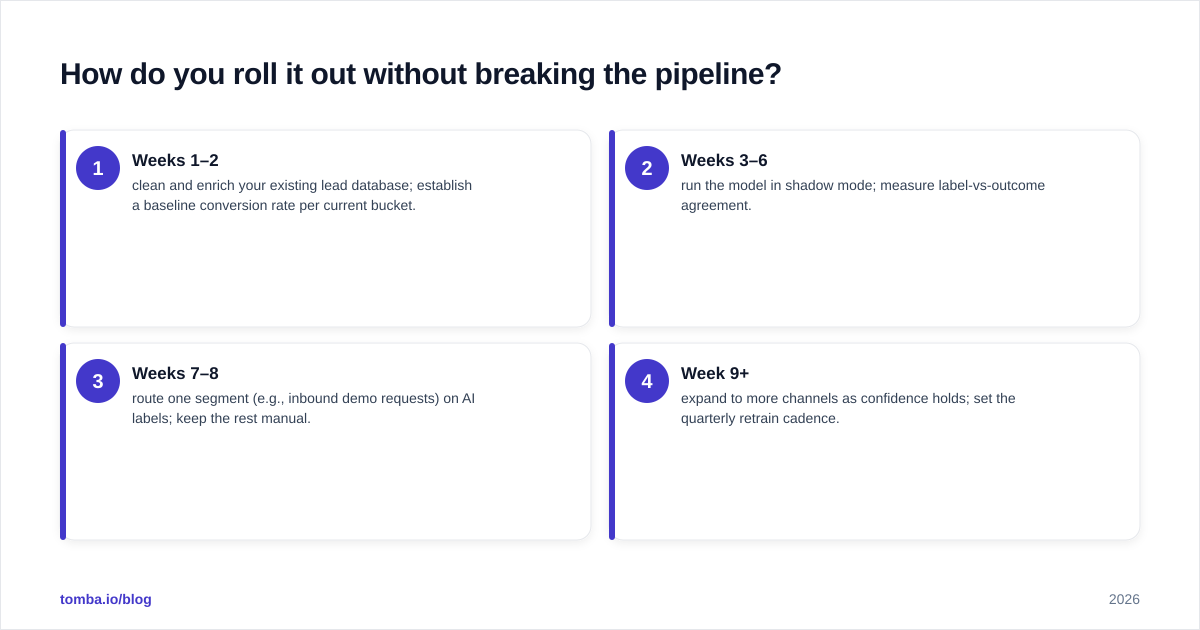
Run AI categorization in shadow mode first. Let it label leads for four to six weeks while your existing process keeps routing them. Then compare: did the leads the model flagged "Priority" actually convert at a higher rate than the ones it dismissed? If yes, start routing on its labels. If no, fix the data before you trust it with live traffic.
A staged rollout looks like this:
- Weeks 1–2 — clean and enrich your existing lead database; establish a baseline conversion rate per current bucket.
- Weeks 3–6 — run the model in shadow mode; measure label-vs-outcome agreement.
- Weeks 7–8 — route one segment (e.g., inbound demo requests) on AI labels; keep the rest manual.
- Week 9+ — expand to more channels as confidence holds; set the quarterly retrain cadence.
Keep a human override on day one. Reps spot context the model misses — a strategic logo, a competitor signal, a warm intro — and those overrides become valuable training labels. Treat the model as a tireless junior analyst, not an oracle.
Tie categorization to your broader pipeline discipline. Categories are only useful if they change SLAs, routing, and follow-up cadence inside your CRM. A label with no downstream automation is a sticker, not a system.
Common mistakes to avoid#
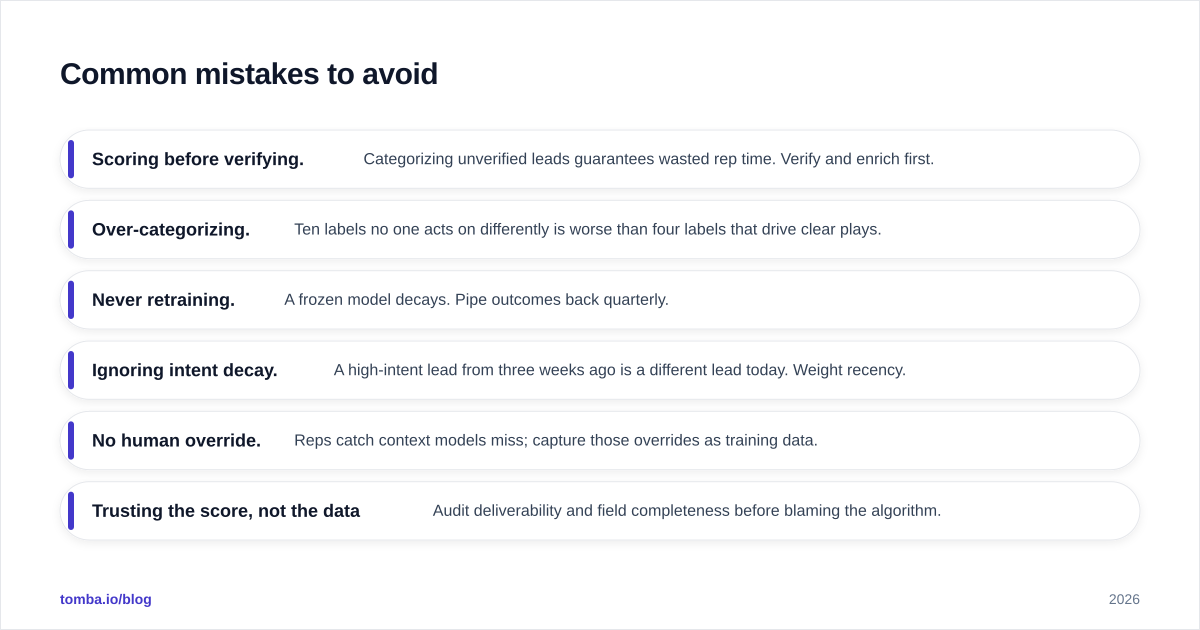
- Scoring before verifying. Categorizing unverified leads guarantees wasted rep time. Verify and enrich first.
- Over-categorizing. Ten labels no one acts on differently is worse than four labels that drive clear plays.
- Never retraining. A frozen model decays. Pipe outcomes back quarterly.
- Ignoring intent decay. A high-intent lead from three weeks ago is a different lead today. Weight recency.
- No human override. Reps catch context models miss; capture those overrides as training data.
- Trusting the score, not the data. Audit deliverability and field completeness before blaming the algorithm.
Frequently asked questions#
Is AI lead categorization worth it for a small team? Yes, if you have lead volume that's hard to triage by hand — roughly a few hundred leads a month and up. Below that, a simple fit/intent matrix plus clean enrichment often delivers most of the value without a predictive model.
Does it replace SDRs? No. It removes the triage grunt work so SDRs spend their hours on leads worth a human touch. It changes what reps do, not whether you need them.
How long until it's accurate? Plan for four to six weeks of shadow-mode evaluation, assuming clean data. Most of that time is spent fixing inputs, not tuning the model.
Where to start#
The fastest win isn't a new model — it's better data underneath the one you already have. Most categorization projects stall because the leads themselves are incomplete or unreachable, and no algorithm fixes that.
Start by making sure every lead enters your funnel with a verified, accurate work email and a resolved company. The Tomba Email Finder finds and confirms professional email addresses by name, domain, or company, so your categorization model scores real, reachable people instead of guesses. Pair it with enrichment, feed clean data into your fit/intent matrix, and let the AI sort from there. Check current Tomba pricing — the free tier gives you 25 searches a month to test it against your own list before committing.
// get started
Find, verify and enrich your first contacts today
Start on the free plan with 25 searches a month, then scale when your team is ready.
Free plan · No credit card required · GDPR & CCPA
// about the author