AI Outbound Agent in 2026: How Autonomous Selling Works
An AI outbound agent researches, writes, and sends at SDR scale without burning your domain. Here's how the tech actually works in 2026 — and where it still needs a human.
You keep hearing that an "AI SDR" will replace your outbound team by next quarter. The reality in 2026 is more useful and less dramatic: an AI outbound agent is a software worker that strings together research, copywriting, and sending into one loop — and it works best when you treat it like a junior rep with a leash, not a magic revenue button.
This guide breaks down what an AI outbound agent actually does, the stack underneath it, where it beats a human, and where it quietly torches your sender reputation if you let it run unsupervised.
TL;DR#
- An AI outbound agent is an autonomous system that researches prospects, drafts personalized messages, sends across email and LinkedIn, and reacts to replies — with minimal manual steps per contact.
- It is not one model. It's an orchestration layer wired to a data source, a sending tool, a CRM, and a set of guardrails.
- The biggest failure mode is scaling bad data: an agent sending 5,000 emails to unverified addresses just burns your domain faster.
- Best fit today: top-of-funnel research, first-touch drafting, list enrichment, and reply triage. Worst fit: negotiation, complex discovery, anything needing real judgment.
- Cost ranges from ~$50/mo (assembled from APIs) to $1,000s/mo (packaged "AI SDR" platforms). The cheap, honest path is usually a data API plus your own automation.
What is an AI outbound agent?#
An AI outbound agent is a software system that performs the repetitive parts of outbound sales development on its own. Think of it like a self-driving car for prospecting: you set the destination (your ICP and offer), and it handles lane-keeping (research, drafting, sending) while you stay ready to grab the wheel.
A traditional sales automation sequence is a dumb pipe — it sends step 1, waits, sends step 2, regardless of who's on the other end. An agent adds a decision loop on top: it reads each prospect's context, decides what to say, and adjusts based on what comes back. That feedback loop is the whole difference.
A real agent does four things in a cycle:
- Perceive — pull data about a person and company.
- Reason — decide if they fit and what angle to use.
- Act — write and send the message on the right channel.
- Learn — read the reply (or the silence) and choose the next move.
If a tool only does step 3 on a fixed schedule, it's a sequencer with AI-written copy — not an agent. The distinction matters when you're comparing vendors who all slap "AI SDR" on the box.

What does the AI outbound agent stack look like?#
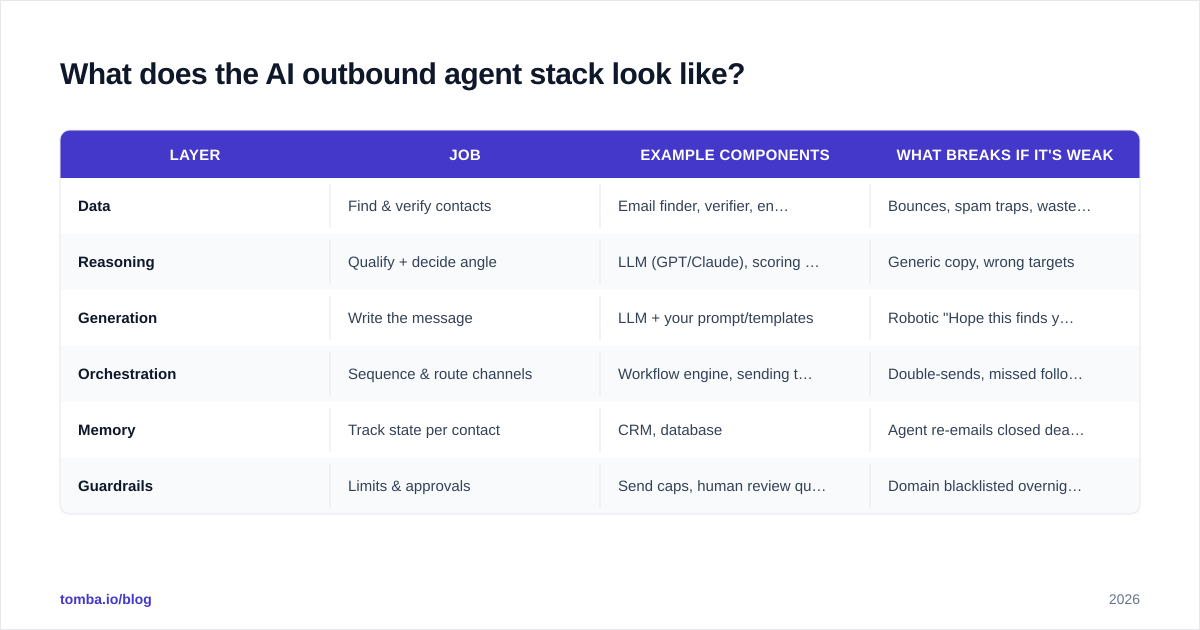
No single product does the whole job well. An AI outbound agent is an assembly of layers, and the weakest layer caps the quality of everything downstream.
| Layer | Job | Example components | What breaks if it's weak |
|---|---|---|---|
| Data | Find & verify contacts | Email finder, verifier, enrichment API | Bounces, spam traps, wasted sends |
| Reasoning | Qualify + decide angle | LLM (GPT/Claude), scoring rules | Generic copy, wrong targets |
| Generation | Write the message | LLM + your prompt/templates | Robotic "Hope this finds you well" spam |
| Orchestration | Sequence & route channels | Workflow engine, sending tool | Double-sends, missed follow-ups |
| Memory | Track state per contact | CRM, database | Agent re-emails closed deals |
| Guardrails | Limits & approvals | Send caps, human review queue | Domain blacklisted overnight |
The order matters. Most teams obsess over the reasoning and generation layers — the visible "AI" part — and starve the data layer. That's backwards. A brilliant prompt writing to a stale, unverified list produces beautifully personalized bounces.
This is why the unglamorous foundation — a reliable email finder and a real-time email verifier — does more for outbound results than swapping which LLM writes your first line. Garbage contacts in, garbage outcomes out, just faster.
Where the data layer plugs in#
If you're building rather than buying, the data layer is usually an API call inside your workflow. You pass a name and company domain, get back a verified email and enrichment fields, and feed those into the reasoning step. The Tomba API and bulk endpoints exist for exactly this: they sit upstream of your agent so every contact entering the loop is real before a single token of copy gets generated.
How is an AI outbound agent different from a normal sequencer?#
Here's the honest comparison, because vendors blur this line on purpose.
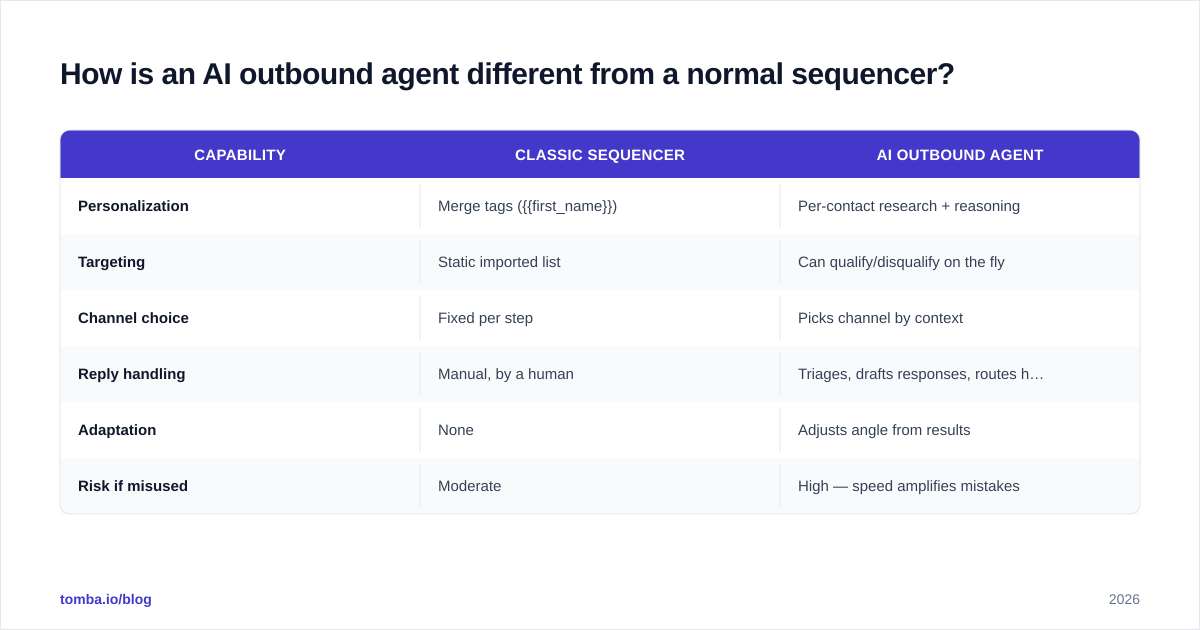
| Capability | Classic sequencer | AI outbound agent |
|---|---|---|
| Personalization | Merge tags ({{first_name}}) | Per-contact research + reasoning |
| Targeting | Static imported list | Can qualify/disqualify on the fly |
| Channel choice | Fixed per step | Picks channel by context |
| Reply handling | Manual, by a human | Triages, drafts responses, routes hot leads |
| Adaptation | None | Adjusts angle from results |
| Risk if misused | Moderate | High — speed amplifies mistakes |
The agent's advantage is adaptation. The agent's danger is also adaptation, at volume. A sequencer sending to a bad list is a slow leak. An agent doing the same is a burst pipe — it'll discover, enrich, and email 3,000 wrong people before your morning coffee, and you'll learn about it from your sender reputation tanking.
According to Gartner, most "autonomous" GTM tooling still requires meaningful human oversight to hit acceptable quality — which matches what teams actually experience. Treat "fully autonomous" as marketing until you've watched a tool run on your own data for a month.
What should an AI outbound agent actually do (and not do)?#
Match the work to the technology. The agent earns its keep on volume-heavy, judgment-light tasks. It costs you deals on the rest.
Good fits — hand these over:
- Building and enriching target lists from an ICP definition
- Finding and verifying contact details before any send
- Drafting first-touch messages from real research, not mad-libs
- Triaging inbound replies: sorting "interested" from "unsubscribe" from "wrong person"
- Routing hot leads to a human with full context attached
Bad fits — keep these human:
- Discovery calls and qualification beyond surface signals
- Negotiating price, terms, or handling objections that matter
- Anything where a tone-deaf message damages a real relationship
- Strategic account targeting where one wrong message burns a logo
The framework: if a mistake is cheap and reversible, let the agent run. If a mistake is expensive and remembered, the agent drafts and a human approves.
How do you keep an AI outbound agent from destroying deliverability?#
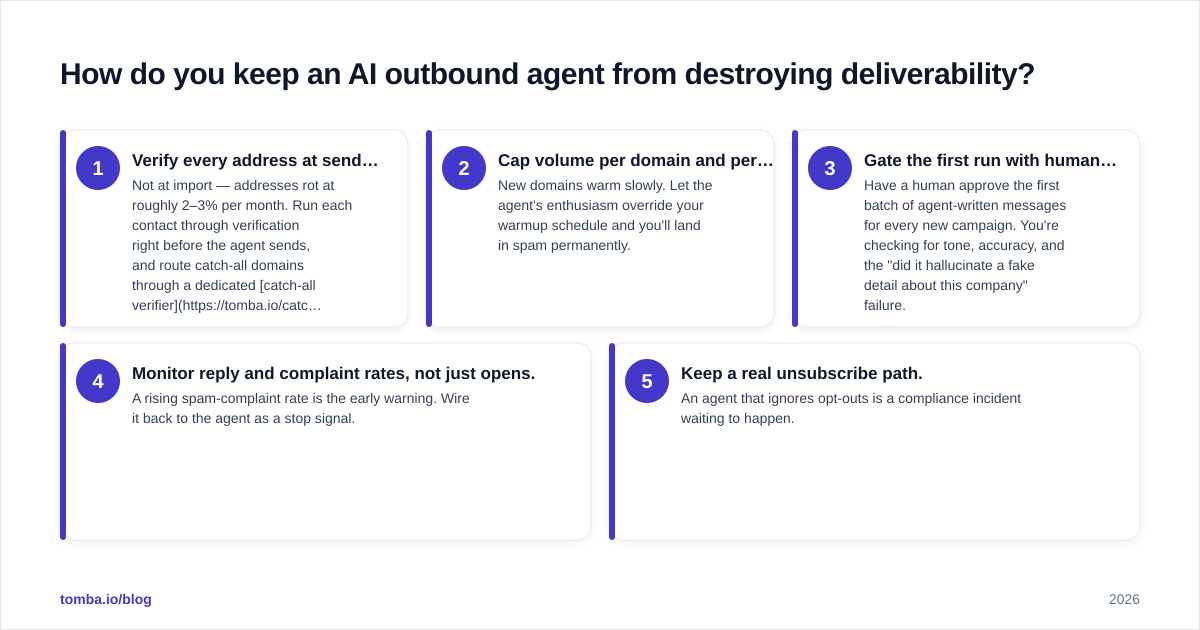
This is the question that separates teams who get results from teams who get blacklisted. An agent multiplies whatever you point it at — including your mistakes.
Non-negotiable guardrails:
- Verify every address at send time. Not at import — addresses rot at roughly 2–3% per month. Run each contact through verification right before the agent sends, and route catch-all domains through a dedicated catch-all verifier instead of guessing.
- Cap volume per domain and per inbox. New domains warm slowly. Let the agent's enthusiasm override your warmup schedule and you'll land in spam permanently.
- Gate the first run with human review. Have a human approve the first batch of agent-written messages for every new campaign. You're checking for tone, accuracy, and the "did it hallucinate a fake detail about this company" failure.
- Monitor reply and complaint rates, not just opens. A rising spam-complaint rate is the early warning. Wire it back to the agent as a stop signal.
- Keep a real unsubscribe path. An agent that ignores opt-outs is a compliance incident waiting to happen.
The pattern underneath all five: the agent proposes, your guardrails dispose. Speed without verification isn't productivity — it's accelerated self-harm to your domain. For the deliverability fundamentals an agent must respect, HubSpot's guidance on email deliverability is a solid baseline.

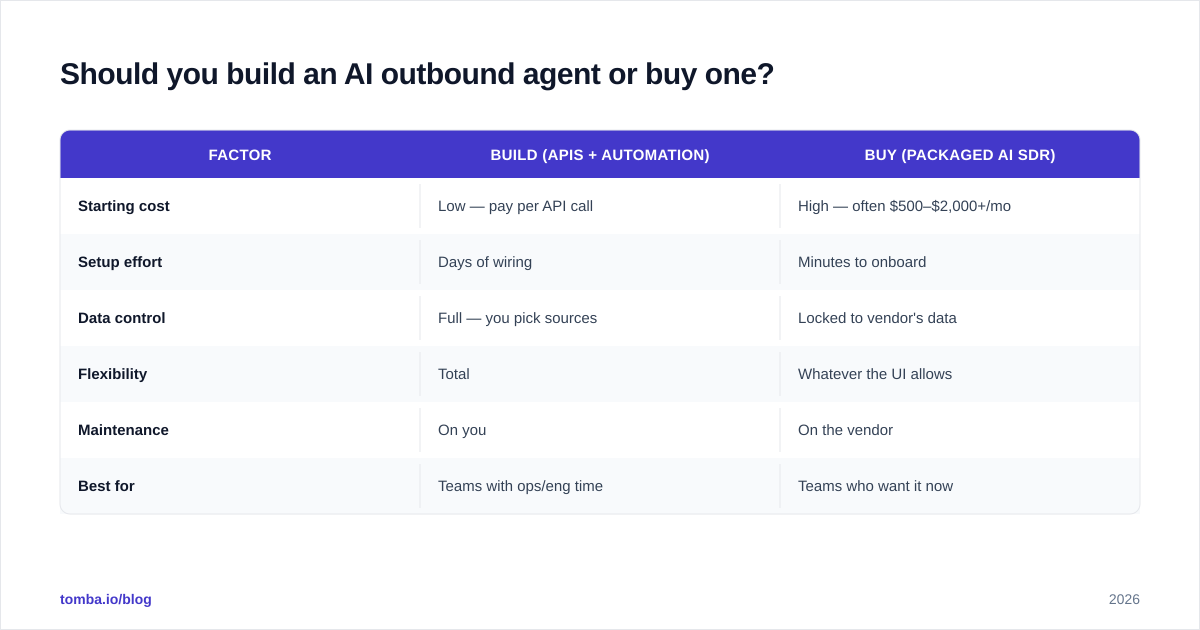
Should you build an AI outbound agent or buy one?#
Both work. The right call depends on whether you have engineering time and how much control you want over the data layer.
| Factor | Build (APIs + automation) | Buy (packaged AI SDR) |
|---|---|---|
| Starting cost | Low — pay per API call | High — often $500–$2,000+/mo |
| Setup effort | Days of wiring | Minutes to onboard |
| Data control | Full — you pick sources | Locked to vendor's data |
| Flexibility | Total | Whatever the UI allows |
| Maintenance | On you | On the vendor |
| Best for | Teams with ops/eng time | Teams who want it now |
The hybrid most teams land on: buy the orchestration and sending layer, but bring your own data layer through an API so you control accuracy and cost. You connect a finder/verifier to your workflow engine, and you're not paying a premium SaaS markup on every enrichment.
If you want to assemble it yourself, the building blocks are cheap and composable. A data enrichment endpoint, a bulk email finder for list building, and a verifier wired into your sending tool cover the entire data and verification layer. Pricing is transparent — see the Tomba pricing tiers — and you can validate the whole approach on the free tier before committing budget.
For evaluating packaged platforms, real buyer reviews on G2 cut through vendor claims faster than any feature page.
What does a realistic AI outbound agent workflow look like?#
Concretely, here's a sane loop you can run today without a research lab:
- Define ICP — job titles, company size, tech stack, region.
- Source companies — pull a target account list.
- Find people — resolve names to verified emails by domain via a domain search, then verify each one.
- Enrich — add role, seniority, and recent signals to feed the reasoning step.
- Draft — the LLM writes a first touch using one real, specific detail per contact.
- Human gate (first batch) — approve tone and accuracy.
- Send within caps — respect warmup and per-inbox limits.
- Triage replies — agent sorts and drafts; humans take the interested ones.
- Sync to CRM — every state change logged so the agent never re-emails a live deal.
Notice that two of the nine steps are explicitly human, and three are verification or data quality. The "AI writes emails" part everyone fixates on is one step. That ratio is the whole lesson: the agent is the engine, but data and guardrails are the brakes and steering — and a car with a great engine and no brakes is just a faster crash.
Is an AI outbound agent worth it in 2026?#
Yes, with a clear-eyed scope. An AI outbound agent reliably removes the grind from top-of-funnel work — research, list building, verification, first drafts, and reply sorting — and frees your humans for the conversations that actually close. It does not replace a skilled rep's judgment, and any vendor promising otherwise is selling you the demo, not the Tuesday-afternoon reality.
Start narrow. Point an agent at one repeatable, low-risk task — list enrichment and verification is the safest first win — prove it lifts your numbers without hurting deliverability, then expand. The teams winning with these agents in 2026 aren't the ones who automated everything. They're the ones who automated the right things and verified obsessively.
The foundation under all of it is data you can trust. Before you let any agent write a word, make sure every contact entering the loop is real: use the Tomba Email Finder to source and verify professional emails by name, company, or domain — start free with 25 searches a month, scale to the Starter plan at $49/mo when your agent is ready to run. Get the data layer right, and the rest of your outbound stack finally has something solid to stand on.
// get started
Find, verify and enrich your first contacts today
Start on the free plan with 25 searches a month, then scale when your team is ready.
Free plan · No credit card required · GDPR & CCPA
// about the author