AI Prompts for Lead Generation: 25 Templates That Win in 2026
Steal 25 battle-tested AI prompts for lead generation that turn ChatGPT into a research, scoring, and outreach engine your pipeline actually feels.
TL;DR
- AI prompts for lead generation only work when they are fed specific inputs — your ICP, a real account, a verified data point — not vague asks like "write me a cold email."
- The highest-leverage use cases are research and qualification, not copywriting: a good prompt can compress an hour of account research into 90 seconds.
- Personalization at scale fails without clean contact data, so pair your prompts with a verified email source before you hit send.
- Below are 25 copy-paste prompts grouped by funnel stage, plus a framework for chaining them and a comparison of the tools that run them.
- Treat every AI output as a draft a junior rep handed you — review, fact-check, and verify the contact before it counts as a lead.
What are AI prompts for lead generation?#
An AI prompt for lead generation is a structured instruction you give a large language model (ChatGPT, Claude, Gemini) to perform one discrete step of your pipeline work: building an ideal customer profile, researching an account, scoring a lead, drafting an opener, or summarizing a call.
Think of a prompt like a work order you'd hand a brand-new SDR. If you say "go find some leads," you get garbage. If you say "find me 20 Series-B fintech companies in the US that just hired a VP of Sales, and list the hiring manager and company domain," you get something useful. The model is only as good as the brief — and the brief is the prompt.
The mistake most teams make in 2026 is treating AI as a content firehose. They generate 500 emails, blast them, and torch their domain. The teams that win use prompts narrowly: to think faster, not to send more. The prompt does the research and the first draft; a human does the judgment and the verification.
Why do most lead-gen prompts fail?#
Three reasons, and all of them are fixable.
1. No context in, no quality out. A prompt with zero inputs returns generic sludge. The fix is to feed the model real artifacts — your one-pager, a prospect's LinkedIn "About" section, a recent press release, the exact ICP attributes that define a good fit.
2. The model invents facts. LLMs hallucinate company details, funding rounds, and — most dangerously — email addresses. An AI will happily guess john.smith@acme.com and present it as fact. That guess bounces, hurts your sender reputation, and burns the account. Never trust an AI-generated email; run it through a real email verifier first.
3. No human gate. The prompt is step one of a process, not the whole process. Output that goes straight to a send queue with no review is how you end up apologizing to a prospect for calling them by the wrong company name.
The 25 prompts, by funnel stage#
Copy these, swap the bracketed inputs for your real data, and chain them. Each one is written to take specific inputs — that's the whole trick.
ICP and market research (prompts 1–6)#
- ICP builder: "Here is our product one-pager: [paste]. Based on our 10 best current customers — [list names, industries, sizes] — define our ideal customer profile as a table with columns: industry, employee range, revenue range, tech stack signals, and trigger events."
- Trigger-event finder: "List 12 buying signals that indicate a [industry] company is ready to buy a [product category]. For each, name a public data source where I could detect it."
- TAM segmentation: "Segment the market for [product] into 5 named sub-segments. For each, give the core pain, the likely buyer title, and one message angle."
- Competitor displacement: "We compete with [competitor]. List 8 reasons a customer would switch away from them, and turn each into a one-sentence prospecting hook."
- Vertical translation: "Rewrite this generic value prop — [paste] — specifically for [vertical], using that industry's language and metrics."
- Lookalike expansion: "Given these 5 closed-won accounts — [list] — describe the firmographic and technographic pattern they share so I can find 50 more like them."
Lead research and scoring (prompts 7–13)#
- Account brief: "Summarize [company] for a sales call: what they do, recent news, likely priorities this quarter, and 3 reasons our [product] is relevant. Cite the sources you used."
- Lead scoring rubric: "Build a 0–100 lead scoring model for [product]. Weight these attributes — [list] — and output the formula plus a worked example."
- Score this lead: "Using the rubric above, score this lead: [paste firmographic + behavioral data]. Show the breakdown and a recommended next action."
- Persona inference: "From this LinkedIn headline and bio — [paste] — infer this person's top 3 professional priorities and the metric they're measured on."
- Disqualifier check: "Given our ICP [paste], list the red flags that should disqualify a lead so my reps stop wasting time on bad fits."
- Intent summarizer: "Here are the pages this account visited on our site — [list]. What buying stage are they in, and what should the first touch say?"
- Org-chart guess: "For a [size] [industry] company, sketch the likely buying committee for [product]: titles, who's the economic buyer, who's the blocker."
Personalization and outreach (prompts 14–20)#
- First-line generator: "Write 3 one-sentence cold-email openers referencing this specific detail about the prospect: [paste a real fact]. No flattery, no 'I came across your profile.'"
- Cold email draft: "Write a 90-word cold email to [title] at [company]. Pain: [X]. Proof: [customer result]. One CTA: a 15-minute call. Plain text, no buzzwords."
- Follow-up sequence: "Write a 4-email follow-up sequence spaced over 12 days, each under 75 words, each adding a new angle — not 'just bumping this.'"
- LinkedIn connect note: "Write a 280-character LinkedIn connection request to [name] that references [specific trigger] and asks nothing."
- Subject-line bank: "Generate 10 cold-email subject lines under 5 words for [offer]. Mix curiosity, specificity, and a question."
- Objection pre-empt: "List the top 3 objections a [title] would have to [product], and write one sentence that defuses each inside a cold email."
- Voicemail script: "Write a 15-second cold voicemail for [persona] that earns a callback. End with a reason to call back, not 'just following up.'"
Qualification and handoff (prompts 21–25)#
- Discovery question set: "Generate 8 MEDDIC-aligned discovery questions for a [product] deal with a [title]."
- Call summarizer: "Summarize this call transcript — [paste] — into: pains named, budget signals, next steps, and a fit score out of 10."
- CRM note formatter: "Turn these messy call notes — [paste] — into a clean CRM update with fields: stage, next step, decision date, risk."
- Routing logic: "Given this lead's score and segment — [paste] — recommend whether to route to self-serve, SDR, or AE, and why."
- Re-engagement: "This lead went cold 60 days ago. Last context: [paste]. Write a 50-word reactivation email with a fresh hook."
How do you chain prompts into a workflow?#
A single prompt is a tactic. Chaining is the strategy. The pattern that works: define → find → research → personalize → verify → send.
You run the ICP builder (prompt 1) once. That output feeds the lookalike expansion (prompt 6), which gives you a target list. You enrich that list with real contacts using a bulk email finder, then run the account brief (prompt 7) and first-line generator (prompt 14) per account, and finally verify every address before the email sequence runs.
The non-negotiable link in that chain is verification. AI generates the who and the what to say; it cannot reliably produce a working email address. That gap is where deliverability dies. Use a real source — find email addresses by name and domain, then confirm them — instead of letting the model guess.
Which AI tool should run your prompts?#
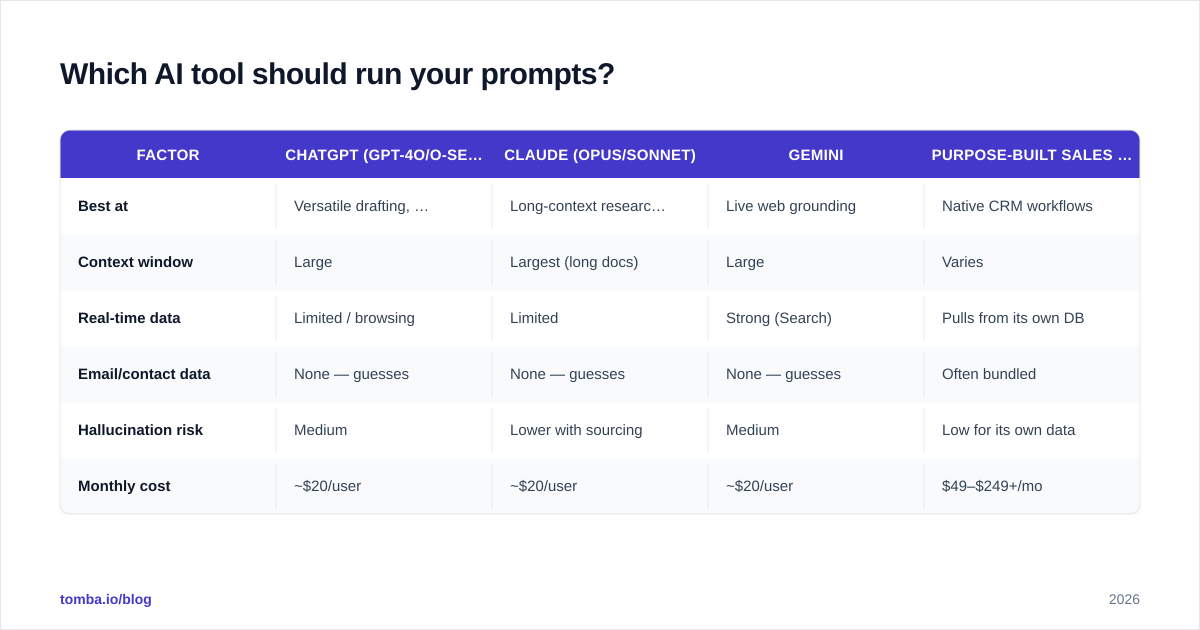
The prompts are portable; the tool mostly affects context window, data freshness, and integration. Here's an honest comparison for lead-gen work specifically.
| Factor | ChatGPT (GPT-4o/o-series) | Claude (Opus/Sonnet) | Gemini | Purpose-built sales AI |
|---|---|---|---|---|
| Best at | Versatile drafting, plugins | Long-context research, nuanced tone | Live web grounding | Native CRM workflows |
| Context window | Large | Largest (long docs) | Large | Varies |
| Real-time data | Limited / browsing | Limited | Strong (Search) | Pulls from its own DB |
| Email/contact data | None — guesses | None — guesses | None — guesses | Often bundled |
| Hallucination risk | Medium | Lower with sourcing | Medium | Low for its own data |
| Monthly cost | ~$20/user | ~$20/user | ~$20/user | $49–$249+/mo |
The takeaway: a general LLM handles 90% of the thinking prompts above for $20 a month. What none of them do is give you verified contact data — that's a separate, dedicated layer. Pairing a $20 chat model with a focused data tool beats paying for an all-in-one that does both jobs at 70%. For broader tool selection, see independent reviews on G2 before you commit.
How do you keep AI-generated outreach from hurting deliverability?#
This is the part teams skip, and it's the part that determines whether any of this works.
AI lets you 10x your send volume. Your domain reputation does not 10x with it. If you generate hundreds of emails and fire them at unverified addresses, your bounce rate spikes, mailbox providers flag you, and even your good emails land in spam. Strong email deliverability is the constraint that governs everything downstream.
Three rules:
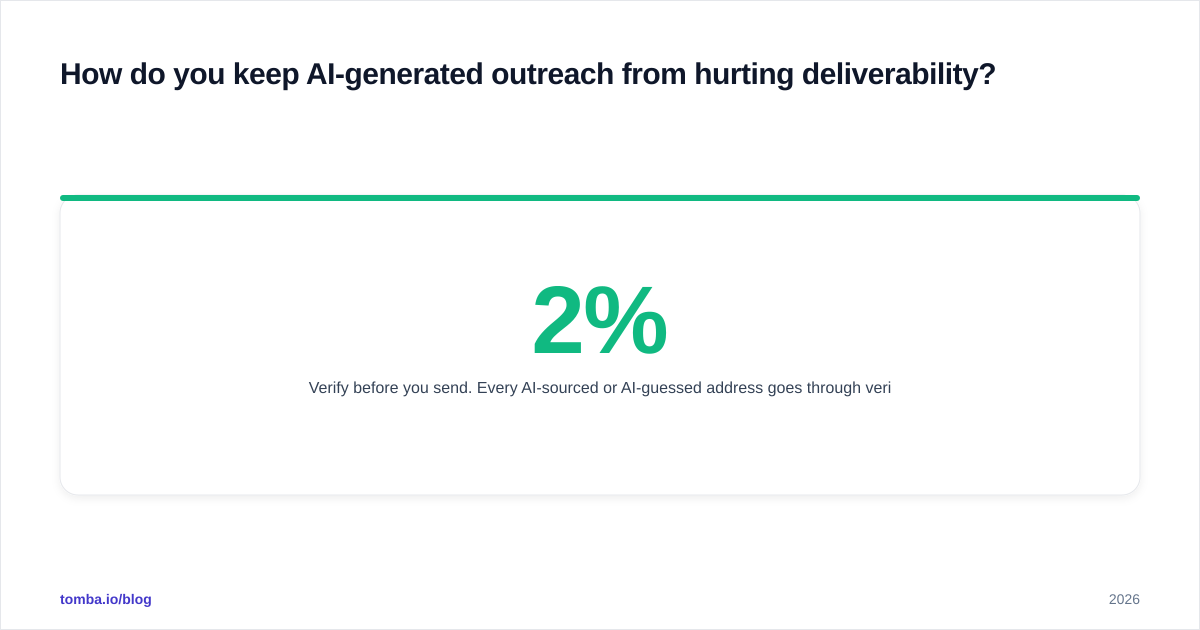
- Verify before you send. Every AI-sourced or AI-guessed address goes through verification. A clean list keeps bounce rates under 2%.
- Cap volume per domain. AI scale is tempting; warm up and ramp instead of blasting. HubSpot's research on email engagement consistently shows relevance beats volume.
- Keep a human in the loop. Spot-check 1 in 10 AI drafts for accuracy and tone before the sequence goes live.
The honest framing: AI makes the top of your funnel cheaper, but it also makes it easier to do damage at scale. Verification is the brake pedal that lets you drive fast safely.
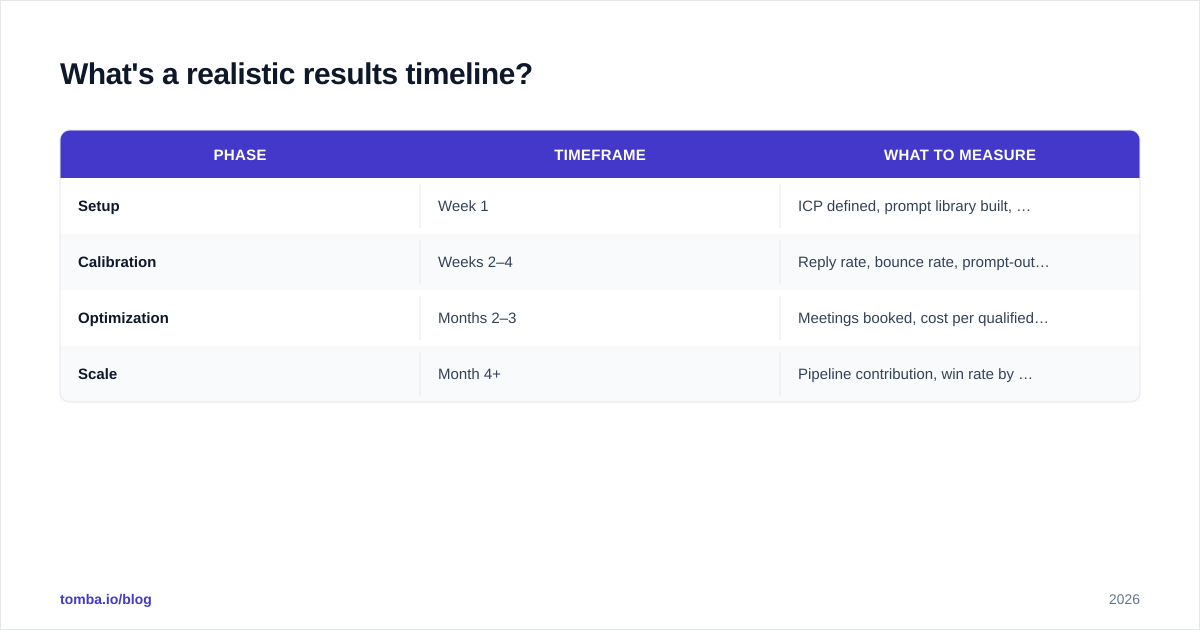
What's a realistic results timeline?#
Set expectations correctly so you don't kill a working system at week two.
| Phase | Timeframe | What to measure |
|---|---|---|
| Setup | Week 1 | ICP defined, prompt library built, data source connected |
| Calibration | Weeks 2–4 | Reply rate, bounce rate, prompt-output quality |
| Optimization | Months 2–3 | Meetings booked, cost per qualified lead |
| Scale | Month 4+ | Pipeline contribution, win rate by segment |
Most teams see better research efficiency immediately — that's the easy win. Reply-rate improvements take 3–4 weeks of prompt tuning. Don't judge the system on volume; judge it on qualified meetings and bounce rate.
Frequently asked questions#
Are AI prompts for lead generation worth it for small teams? Yes — arguably more so. A two-person team gets the research leverage of a much larger one. Start with the research and scoring prompts (7–13); they have the highest time savings and lowest risk.
Can AI find email addresses for me? No, and don't trust it when it says it can. LLMs guess at email formats and present guesses as facts. Use a dedicated finder and verifier; treat any AI-produced address as unverified until a real tool confirms it.
Will prospects know my email was AI-assisted? Only if you skip the human edit. The tell-tale signs are generic openers and buzzwords. Use AI for the draft and structure, then cut the fluff and add one specific, true detail.
How many prompts do I actually need? Five to eight, used consistently, beat a library of fifty you never reuse. Pick one per funnel stage and refine them.
The bottom line#
AI prompts for lead generation are a research and drafting multiplier, not a magic pipeline machine. The prompts above turn a blank chat window into a structured workflow — but the workflow only converts when it ends in a verified, real contact and a human-checked message.
That last mile is where Tomba fits. Use the Tomba Email Finder to turn the company-and-name lists your AI prompts produce into verified, ready-to-send contacts — by domain, by name, or in bulk — so your AI-scaled outreach actually reaches a human inbox instead of a bounce log. Start free with 25 searches a month, and check Tomba pricing when you're ready to scale. Pair smart prompts with clean data, and your pipeline stops being a guessing game.
Ready to find emails that actually work?
Join 150,000+ professionals who stopped guessing and started sending. Free credits on signup — no credit card required.
Get the Tomba newsletter
Practical outbound tactics and product updates — once every two weeks.
About the author