AI Prompts for Sales: 30+ Templates to Close More in 2026
The best AI prompts for sales reps in 2026 — copy-paste templates for prospecting, discovery, objection handling, and follow-up, plus a framework to write your own.
TL;DR
- AI prompts for sales only work when they carry context: role, ICP, deal stage, tone, and a clear output format. A bare "write a cold email" gets you bland filler.
- This guide gives you 30+ copy-paste prompts across prospecting, discovery, objection handling, follow-up, and forecasting — plus the R-C-T-O-C framework to build your own.
- Prompts replace the blank page, not the rep. You still own targeting, judgment, and the relationship.
- Feed prompts real data (verified emails, firmographics, call notes) and quality jumps. Garbage in, garbage out applies harder to AI than to humans.
- Pair your prompts with a clean contact source like the Tomba Email Finder so the personalization you generate actually lands in the right inbox.
What are AI prompts for sales?#
AI prompts for sales are structured instructions you give a large language model — ChatGPT, Claude, Gemini, or a sales-specific copilot — to produce a usable sales asset: an outbound email, a discovery question set, an objection rebuttal, a call summary, or a forecast narrative.
Think of a prompt like a brief you hand a new SDR. If you say "email this account," you get something generic. If you say "email this VP of Ops at a 200-person logistics firm who just posted about warehouse delays, reference that pain, keep it under 90 words, end with a soft CTA," you get something you can actually send. The model is the SDR; the prompt is the brief. Better brief, better output.
The gap between a mediocre prompt and a great one is almost entirely context and constraints. Reps who treat the model like a vending machine get vending-machine copy. Reps who treat it like a sharp junior teammate get drafts worth editing.
Why do most sales AI prompts fail?#
Most prompts fail for three predictable reasons, and all three are fixable.
1. No role or audience. "Write a follow-up" gives the model nothing to anchor on. Tell it who it is (a senior AE selling a payroll API) and who it's writing to (a skeptical CFO who ghosted after a demo).
2. No constraints. Without a word count, tone, and format, models default to long, hedge-heavy prose stuffed with phrases like "in today's competitive landscape." Constraints are where quality lives.
3. No real data. A prompt that says "personalize this" with no actual detail produces fake personalization — the worst kind. The model invents a "loved your recent expansion" line that may be wrong. Feed it verified facts instead: a real trigger event, a real job title, a verified email tied to a real person.
The fix for all three is a repeatable structure. Here's the one we use.
What is the R-C-T-O-C prompt framework?#
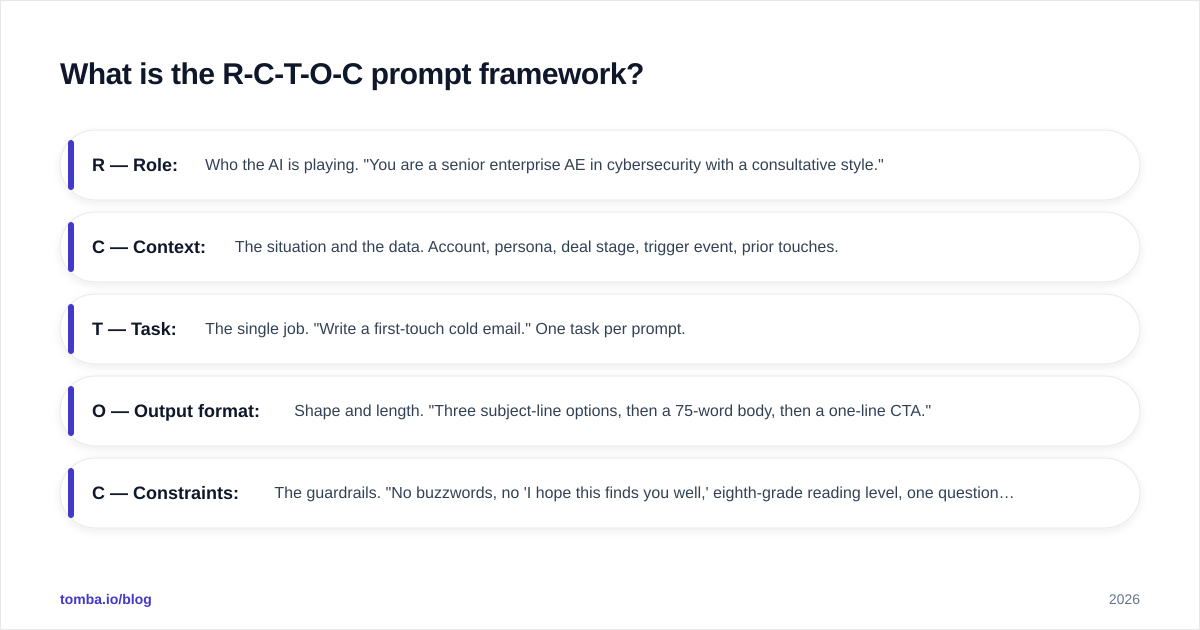
R-C-T-O-C is a five-part skeleton that turns a vague request into a reliable prompt. Use it for any sales asset.
- R — Role: Who the AI is playing. "You are a senior enterprise AE in cybersecurity with a consultative style."
- C — Context: The situation and the data. Account, persona, deal stage, trigger event, prior touches.
- T — Task: The single job. "Write a first-touch cold email." One task per prompt.
- O — Output format: Shape and length. "Three subject-line options, then a 75-word body, then a one-line CTA."
- C — Constraints: The guardrails. "No buzzwords, no 'I hope this finds you well,' eighth-grade reading level, one question max."
Once you internalize this, you stop writing prompts and start filling in a form. The framework also makes prompts shareable across your team — drop them in a shared doc and every rep gets the same baseline quality.
What are the best AI prompts for sales prospecting?#
Prospecting is where AI saves the most time, because the work is high-volume and pattern-based. These prompts assume you've already sourced the contact and verified it.
Cold email, first touch:
You are a senior AE selling [product] to [persona] at [company type]. Write a cold email referencing this trigger: [paste trigger event]. Constraints: under 90 words, one sentence of relevance, one clear value statement, one soft CTA asking for interest (not a meeting). No greetings like "hope you're well." Give me 3 subject lines under 6 words each.
LinkedIn connection note:
Write a LinkedIn connection request to [name], [title] at [company]. Reference [shared group / recent post / mutual connection]. Max 280 characters. No pitch. Sound like a peer, not a vendor.
Account research summary:
Summarize what a salesperson should know before contacting [company]. Pull from [paste 10-K excerpt / news / website copy I provide]. Output: 3 likely pain points, 2 recent initiatives, 1 conversation starter. Bullet points only.
Personalization line generator:
Given these notes about a prospect: [paste]. Write 3 one-sentence opener lines that prove I did my homework. No flattery, no "I came across your profile."
A prompt is only as good as the contact behind it. If you're firing personalized emails at guessed addresses, your reply rate collapses regardless of copy quality. Build your list with a real domain search and confirm addresses before the AI ever drafts a word.
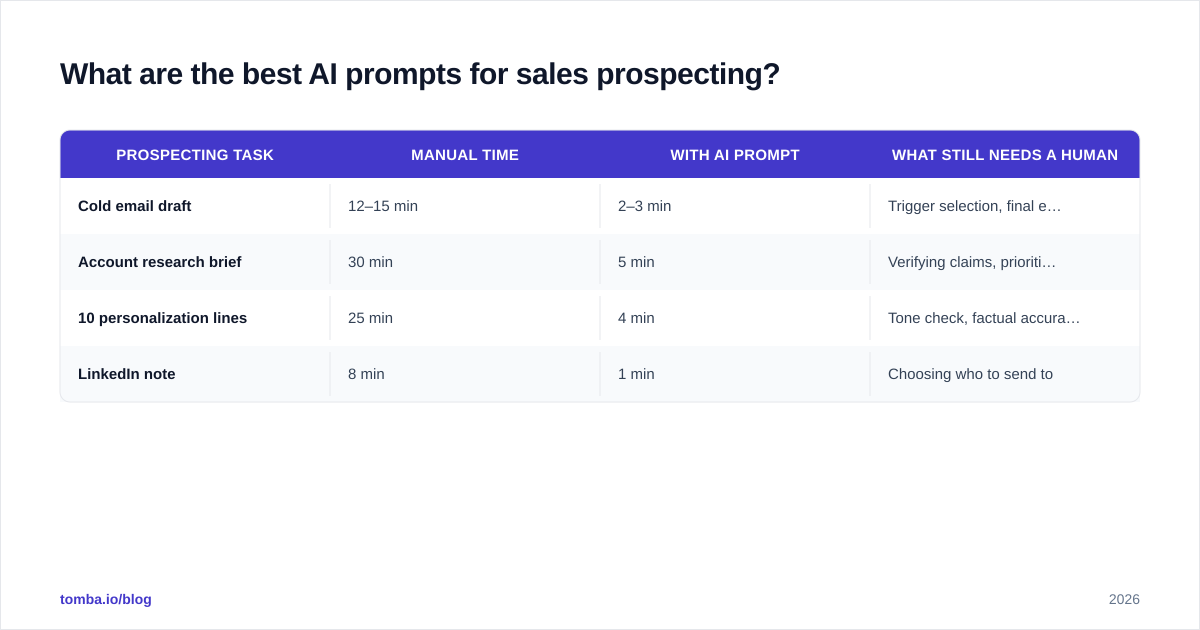
| Prospecting task | Manual time | With AI prompt | What still needs a human |
|---|---|---|---|
| Cold email draft | 12–15 min | 2–3 min | Trigger selection, final edit |
| Account research brief | 30 min | 5 min | Verifying claims, prioritization |
| 10 personalization lines | 25 min | 4 min | Tone check, factual accuracy |
| LinkedIn note | 8 min | 1 min | Choosing who to send to |
What AI prompts help with discovery and demos?#
Discovery is about asking better questions, and models are good at generating question banks you'd never brainstorm under time pressure.
Discovery question generator:
You are a consultative AE. Generate 12 discovery questions for [persona] evaluating [product category]. Group them: current state, pain, impact, decision process. Make them open-ended. Avoid yes/no questions.
Pre-call plan:
Build a pre-call plan for a discovery call with [name, title, company]. Include: 1 hypothesis about their main pain, 3 questions to test it, 1 relevant proof point, 1 likely objection. Keep it to half a page.
Demo script tailoring:
I'm demoing [product] to [persona] who cares about [priority]. Reorder these features by relevance and give me a one-line "why this matters to you" for each: [paste feature list].
Call summary from notes:
Turn these raw call notes into a structured summary: [paste]. Output: attendees, pains identified, next steps with owners, deal risks, MEDDIC gaps.
That last prompt is a quiet workhorse. Clean call summaries feed your CRM, and structured CRM data is what makes the rest of your revenue operations function instead of guess. Tools like Gong automate call capture, but a good prompt does 80% of the job from notes you already took.
What are the best AI prompts for objections and follow-up?#
This is where deals stall, so the prompts need to be sharp.
Objection rebuttal:
A prospect said: "[paste exact objection]." You are a calm, consultative AE. Give me 2 responses: one that acknowledges and reframes, one that asks a diagnostic question. No defensiveness. Under 60 words each.
Pricing pushback:
Prospect says we're too expensive vs [competitor]. Write a response that shifts from price to total cost of ownership without trashing the competitor. Include one question that surfaces their real budget constraint.
Re-engage a ghosted deal:
Write a 3-email breakup sequence for a prospect who went dark after a demo 3 weeks ago. Email 1: value reminder. Email 2: new angle / resource. Email 3: graceful close that leaves the door open. Each under 80 words.
Multithreading intro:
Help me get introduced to [new stakeholder, title] inside [account] where my champion is [name]. Draft a short message I can send my champion asking for the intro.
The breakup sequence only works if it reaches a monitored inbox. Before you queue any follow-up cadence, run the list through an email verifier — chasing bounced addresses tanks both your reply rate and your sender reputation.

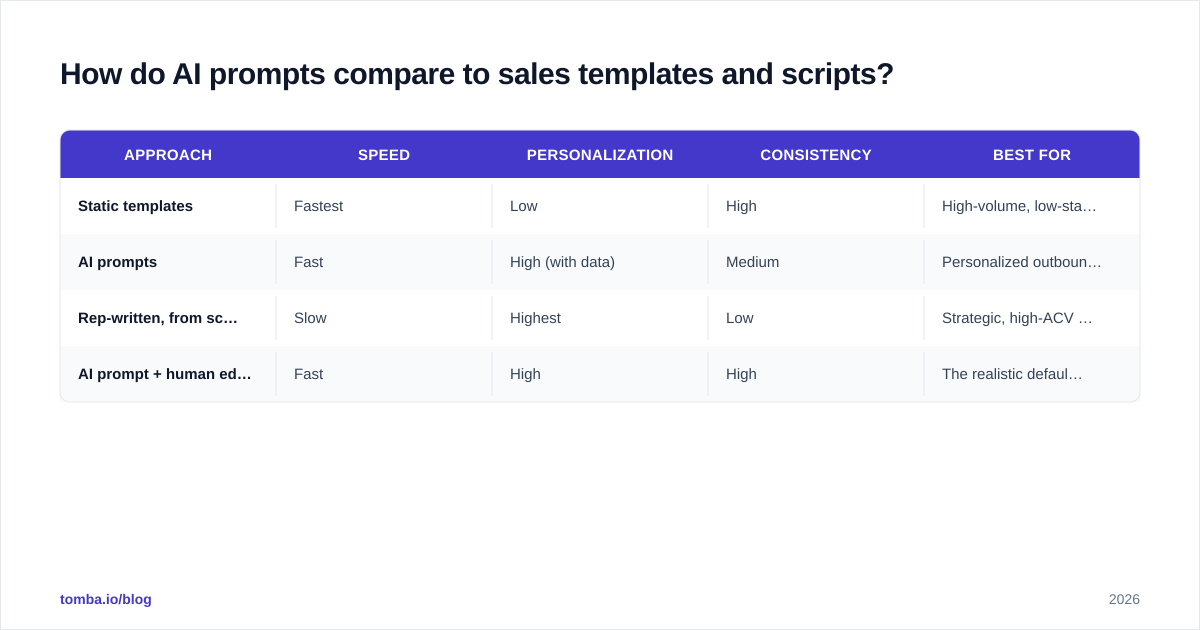
How do AI prompts compare to sales templates and scripts?#
AI prompts, static templates, and rep-written scripts each have a place. The mistake is treating them as competitors when they're a stack.
| Approach | Speed | Personalization | Consistency | Best for |
|---|---|---|---|---|
| Static templates | Fastest | Low | High | High-volume, low-stakes outreach |
| AI prompts | Fast | High (with data) | Medium | Personalized outbound at scale |
| Rep-written, from scratch | Slow | Highest | Low | Strategic, high-ACV accounts |
| AI prompt + human edit | Fast | High | High | The realistic default for most teams |
The winning pattern for most teams is the bottom row: a prompt generates the draft, a human spends 60 seconds editing for accuracy and voice. You get the speed of automation and the judgment of a person. If you want a starting library, our cold email templates and subject line generator pair well as the "static" layer beneath your prompts.
A note on tooling: you don't need an expensive AI sales suite to start. A general model plus a disciplined prompt library plus clean data outperforms a flashy tool fed bad inputs. Vendors like HubSpot and Salesforce now ship native AI assistants, but the prompt discipline matters more than the logo.
How do you keep AI sales prompts accurate and on-brand?#
Three habits keep AI output safe to send.
1. Never let the model invent facts. If a prompt asks for personalization, supply the facts. The model should arrange your data, not generate new claims about the prospect. A hallucinated "congrats on your Series C" to a bootstrapped company ends the conversation.
2. Lock your voice into the role line. Save a tested "You are…" preamble that encodes your brand tone, and reuse it. Consistency comes from reuse, not from rewriting the role every time.
3. Close the data loop. Prompts produce messages; messages need recipients; recipients need verification and enrichment. Run your output against verified contacts and enriched firmographics so the personalization is true. Tomba's data enrichment and bulk email finder exist precisely to feed this loop at scale.
A quick build checklist for any new prompt:
- Did I assign a clear role?
- Did I paste real context and data, not placeholders?
- Is it one task, not three?
- Did I specify length, format, and tone?
- Did I ban the AI tells I hate ("delve," "in today's landscape," "I hope this finds you well")?
If you can answer yes to all five, your output will need light editing instead of a rewrite.
Frequently asked questions#
Which AI model is best for sales prompts? For most reps, any frontier model (ChatGPT, Claude, Gemini) handles sales writing well. The differentiator is your prompt quality and the data you feed it, not the model brand. Test the same prompt across two models and keep the one whose voice matches yours.
Will AI prompts hurt my deliverability? Not directly — but AI makes it easy to send more, faster, which can. Volume without verification is the real risk. Keep lists clean and warm your domain. See our take on email deliverability for the fundamentals.
Can prompts replace SDRs? No. Prompts remove the blank page and the busywork. Targeting, judgment, timing, and relationship-building stay human. The reps who win are the ones who use prompts to spend more time on the parts machines can't do.
How many prompts do I actually need? Start with five — one per deal stage — and refine them weekly based on what gets replies. A small, battle-tested library beats a giant untested one.
Put your prompts to work with clean data#
The best AI prompts for sales are worthless if your messages land in dead inboxes. Personalization, tone, and timing all collapse the moment an email bounces. Start by building a verified, enriched contact list with the Tomba Email Finder — find professional addresses by name, domain, or company, confirm they're deliverable, and feed your prompts real people instead of guesses. Pair a disciplined prompt library with accurate data, and you turn AI from a novelty into a pipeline engine. Check Tomba pricing to start free with 25 searches a month, then scale as your outbound does.
// get started
Find, verify and enrich your first contacts today
Start on the free plan with 25 searches a month, then scale when your team is ready.
Free plan · No credit card required · GDPR & CCPA
// about the author