What Is an AI Reply Agent? The 2026 Guide for Sales Teams
An AI reply agent drafts, routes, and sends inbox responses for you. Here's how the tech works in 2026, what to look for, and where it breaks.
TL;DR
- An AI reply agent is software that reads inbound email, understands intent, and drafts (or sends) a context-aware response on your behalf — not a static autoresponder.
- The good ones combine an LLM, your CRM/knowledge base, and routing rules so replies stay accurate and on-brand instead of generic.
- Use cases split into three buckets: sales reply handling, customer support triage, and personal inbox assistance. Each needs a different setup.
- The hard part isn't drafting — it's data and guardrails: stale CRM records, wrong recipient data, and missing approval steps are what sink most deployments.
- Start in "draft mode" (human approves every send), measure reply quality, then graduate to autonomy on narrow categories.
What is an AI reply agent?#
An AI reply agent is a tool that reads an incoming message, figures out what the sender actually wants, and produces a reply that fits the thread — automatically. Think of it as the difference between a vending machine and a barista. A classic autoresponder is a vending machine: one button, one canned output, no awareness of who's standing there. An AI reply agent is the barista who remembers your order, notices you look rushed, and adjusts.
Technically, it sits on top of a large language model (the part that writes), wired into your email provider (the part that sends), and grounded in your own data — CRM notes, past threads, product docs, pricing — so the answer is specific instead of plausible-sounding filler.
The category exploded because two things matured at once: LLMs got good enough to handle nuance and tone, and the connective tissue (APIs, webhooks, retrieval) got cheap. In 2026, "AI reply agent" covers everything from a Gmail side-panel that suggests three drafts to a fully autonomous SDR layer that handles objection emails without a human touching the keyboard.
How does an AI reply agent actually work?#
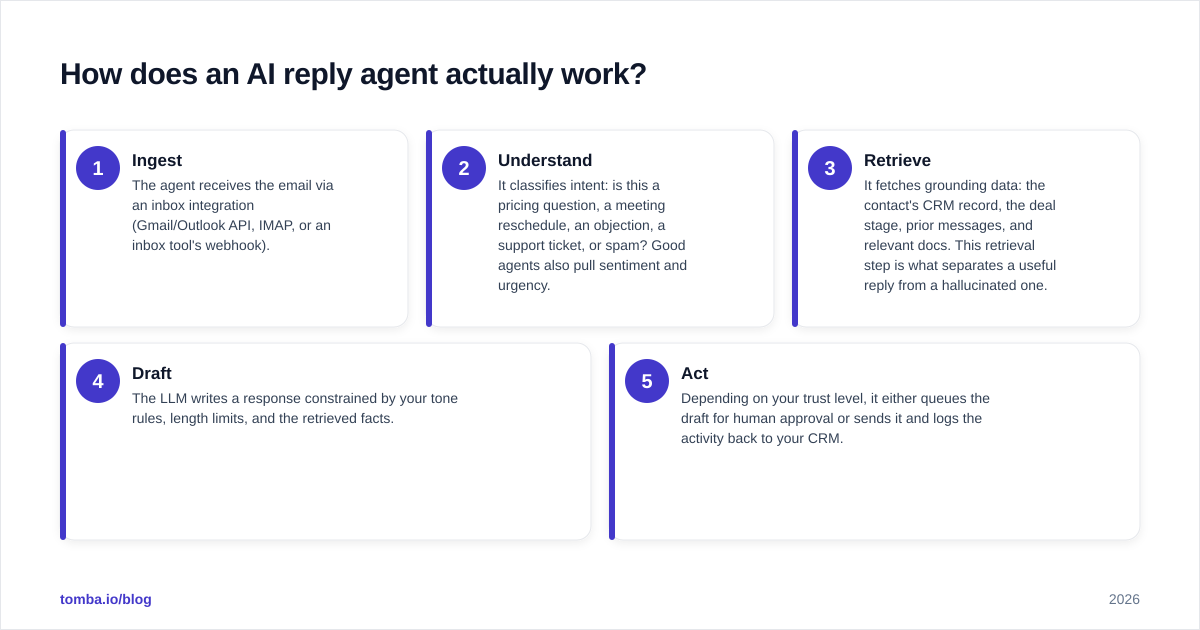
Five stages run every time a message lands:
- Ingest — The agent receives the email via an inbox integration (Gmail/Outlook API, IMAP, or an inbox tool's webhook).
- Understand — It classifies intent: is this a pricing question, a meeting reschedule, an objection, a support ticket, or spam? Good agents also pull sentiment and urgency.
- Retrieve — It fetches grounding data: the contact's CRM record, the deal stage, prior messages, and relevant docs. This retrieval step is what separates a useful reply from a hallucinated one.
- Draft — The LLM writes a response constrained by your tone rules, length limits, and the retrieved facts.
- Act — Depending on your trust level, it either queues the draft for human approval or sends it and logs the activity back to your CRM.
The retrieval stage is where contact data quality decides everything. If the agent is replying to a lead, it needs the right email, the right name, and the right company context. Feeding it a verified, enriched record beats feeding it a guess every time — which is why teams pair reply agents with tools like an email verifier and data enrichment upstream, so the agent reasons over clean inputs instead of garbage.
)
What are the main types of AI reply agents?#
Not every "AI reply agent" does the same job. They cluster into three families, and buying the wrong family is the most common mistake.
Sales reply agents#
These handle the back-and-forth after a cold email or inbound demo request. They detect "not interested," "send me pricing," "circle back in Q3," and respond appropriately — often integrated with sequencing tools. The win is speed-to-lead: replying in 2 minutes instead of 2 hours measurably lifts conversion.
Support and triage agents#
These read support inboxes, deflect repetitive questions with knowledge-base answers, and escalate the complex ones to humans with a summary attached. The bar for accuracy is higher here because a wrong answer becomes a complaint.
Personal inbox assistants#
These live in your own mailbox and draft replies for you to approve. Lower stakes, lower autonomy, but a real time-saver for busy operators.
What should you look for in an AI reply agent in 2026?#
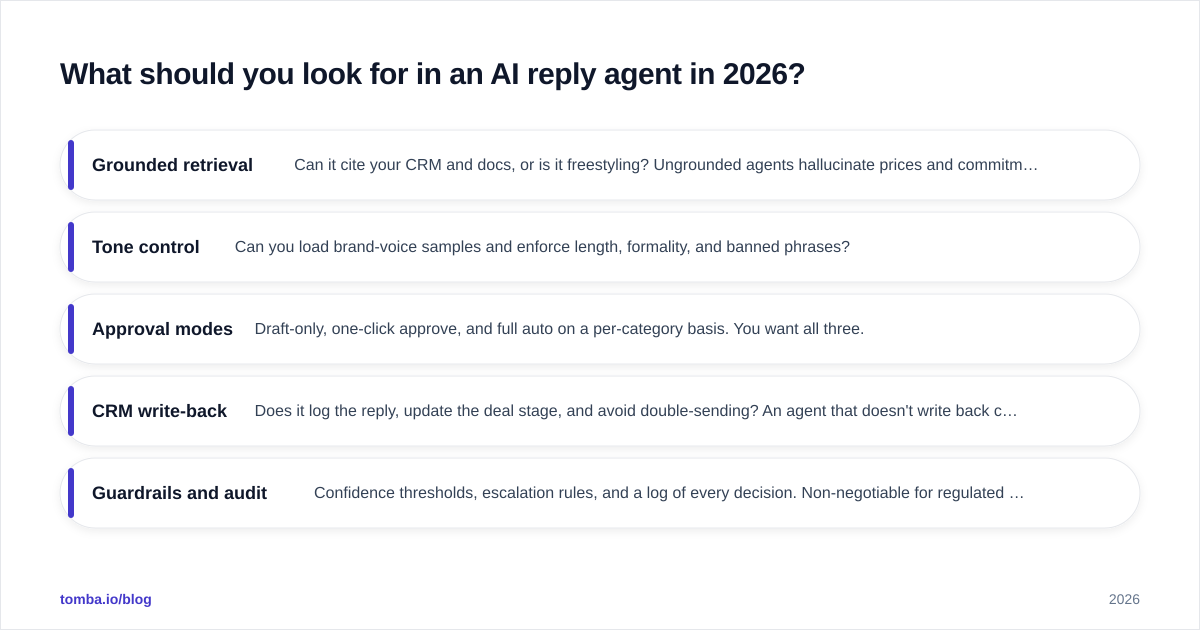
Five capabilities actually move the needle. Everything else is packaging.
- Grounded retrieval — Can it cite your CRM and docs, or is it freestyling? Ungrounded agents hallucinate prices and commitments.
- Tone control — Can you load brand-voice samples and enforce length, formality, and banned phrases?
- Approval modes — Draft-only, one-click approve, and full auto on a per-category basis. You want all three.
- CRM write-back — Does it log the reply, update the deal stage, and avoid double-sending? An agent that doesn't write back creates blind spots.
- Guardrails and audit — Confidence thresholds, escalation rules, and a log of every decision. Non-negotiable for regulated teams.
For a broader view of how buyers rate these platforms, G2's automated sales tools category is a useful neutral reference, and HubSpot's research on email reply timing backs the speed-to-lead argument with data.
AI reply agent vs. autoresponder vs. canned templates#
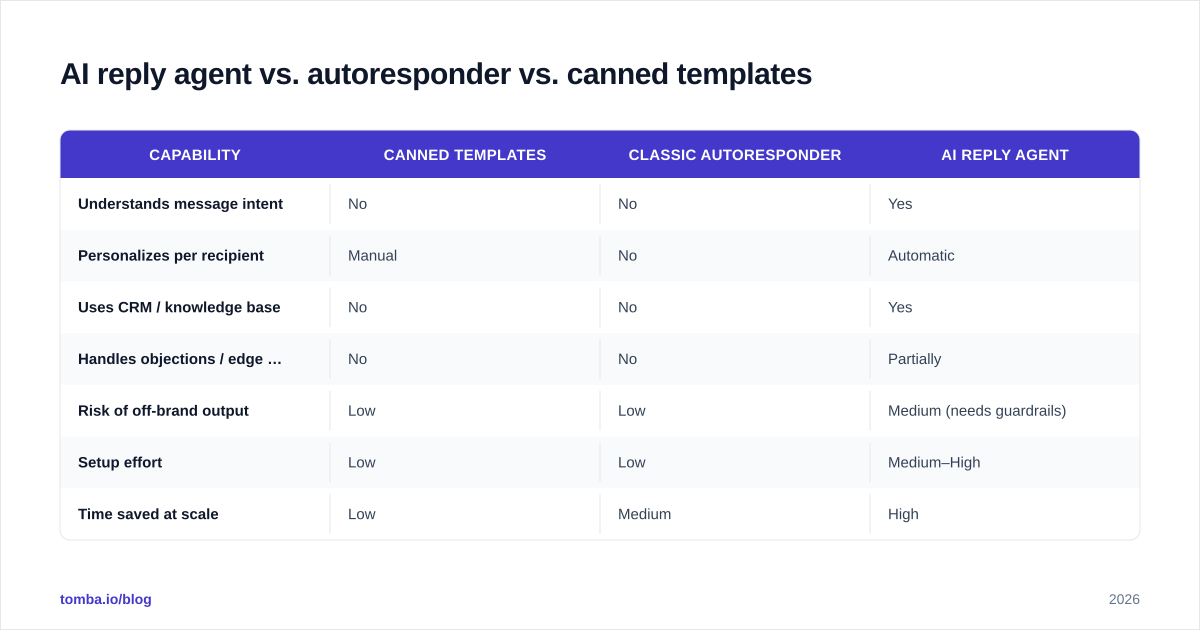
Here's the honest comparison. Picking the right row for your stage matters more than chasing the most advanced option.
| Capability | Canned templates | Classic autoresponder | AI reply agent |
|---|---|---|---|
| Understands message intent | No | No | Yes |
| Personalizes per recipient | Manual | No | Automatic |
| Uses CRM / knowledge base | No | No | Yes |
| Handles objections / edge cases | No | No | Partially |
| Risk of off-brand output | Low | Low | Medium (needs guardrails) |
| Setup effort | Low | Low | Medium–High |
| Time saved at scale | Low | Medium | High |
| Best for | One-off blasts | Out-of-office | High-volume reply handling |
The takeaway: templates and autoresponders are predictable but dumb. An AI reply agent is smart but needs supervision until you've proven it on a narrow slice.
How accurate are AI reply agents — and where do they break?#
The conclusion first: accuracy is mostly a data problem, not a model problem. Modern LLMs draft fluent replies easily. They fail when the inputs are wrong.
The three failure modes that actually cause incidents:
- Wrong recipient data. The agent addresses "Hi David" to Sarah because the CRM record was stale or the email belonged to a different person. Replying to a reverse email lookup result without verifying it is asking for an embarrassing send.
- Confident hallucination. Without retrieval grounding, the agent invents a price, a feature, or a commitment. The fix is forcing it to answer only from retrieved facts and escalating when confidence is low.
- Tone drift. It sounds like a chatbot, not your brand. The fix is loading real voice samples and a banned-phrase list.
A practical rule: deploy in draft mode first, sample 100 drafts, and score them for accuracy and tone before you let anything auto-send. If a category scores below ~95%, keep a human in the loop for it.
)
How do you set up an AI reply agent without shipping garbage?#
A staged rollout beats a big-bang switch. Here's the sequence that keeps you out of trouble.
Step 1 — Clean the inputs. Garbage contacts produce garbage replies. Before the agent touches anything, make sure the records it reasons over are real: valid emails, correct names, current companies. Running your list through an email verifier and enriching gaps removes the single biggest source of embarrassing sends.
Step 2 — Define categories and rules. List the message types you'll automate (pricing, reschedule, objection-X) and the ones you'll always escalate (legal, refunds, anything emotional).
Step 3 — Load voice and guardrails. Add brand-voice samples, length caps, and confidence thresholds.
Step 4 — Run in draft mode. Every reply is queued for human approval. Measure accuracy, edit rate, and time saved.
Step 5 — Graduate narrowly. Turn on auto-send only for the categories that scored highest, and keep the audit log on.
Step 6 — Monitor and refresh. Reply quality decays as products and pricing change. Re-load docs monthly and re-check your contact data, since email and role data goes stale fast.
This is also where outbound contact accuracy pays off: if your agent is initiating replies to leads you sourced, the upstream email finder and verification quality caps how well the whole system can perform. No reply agent can rescue a reply sent to the wrong inbox.
What does an AI reply agent cost in 2026?#
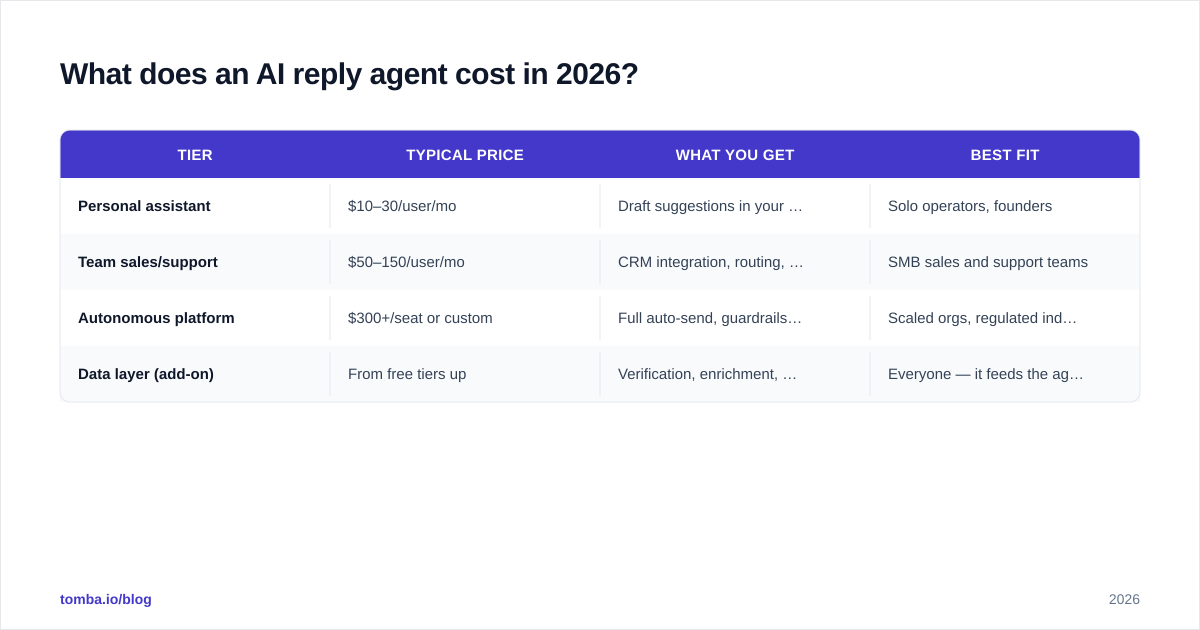
Pricing splits into three rough tiers. Personal assistants run cheapest; autonomous sales layers cost the most because of the integration and support load.
| Tier | Typical price | What you get | Best fit |
|---|---|---|---|
| Personal assistant | $10–30/user/mo | Draft suggestions in your inbox | Solo operators, founders |
| Team sales/support | $50–150/user/mo | CRM integration, routing, analytics | SMB sales and support teams |
| Autonomous platform | $300+/seat or custom | Full auto-send, guardrails, audit, SSO | Scaled orgs, regulated industries |
| Data layer (add-on) | From free tiers up | Verification, enrichment, finding | Everyone — it feeds the agent |
Budget for the data layer separately. A reply agent is only as good as the contact data behind it, and that's a line item teams routinely forget. For reference, transparent Tomba pricing starts with a free tier of 25 searches per month and a Starter plan at $49/mo — useful for keeping the data feeding your agent clean without enterprise contracts.
Should your team adopt an AI reply agent now?#
Yes — if you have reply volume and clean data, and you start conservatively. The teams that win treat the agent as a drafting copilot first and an autonomous actor second.
A quick self-check before you buy:
- Do you handle enough inbound replies that minutes-to-respond matters? If not, templates are fine.
- Is your CRM data trustworthy, or will the agent reason over noise? Fix data first.
- Can you assign a human to review drafts for the first month? If not, you're not ready for auto-send.
- Do you operate in a regulated space where a wrong reply is a real liability? Then guardrails and audit logs are mandatory, not optional.
If you answered "yes, mostly," pilot one on a single category and expand from proof, not from hope. And remember the unglamorous truth that decides the whole thing: the model writes the words, but your data decides whether those words go to the right person with the right facts.
The bottom line#
An AI reply agent in 2026 is a genuine productivity unlock for any team buried in inbound email — but only when it's grounded in accurate, verified contact data and wrapped in approval guardrails. The model is the easy part. The data is the moat.
Before you let any agent draft a single reply, make sure the contacts behind it are real. Start with the Tomba Email Finder to source and verify the professional emails your reply agent depends on — accurate inputs in, accurate replies out. Pair it with the email verifier and data enrichment, and your AI reply agent stops guessing and starts performing. Try the free tier and see how clean data changes your reply quality.
// get started
Find, verify and enrich your first contacts today
Start on the free plan with 25 searches a month, then scale when your team is ready.
Free plan · No credit card required · GDPR & CCPA
// about the author