AI Sales Automation in 2026: Tools, Workflows & ROI Guide
AI sales automation has moved from hype to daily workflow. Here's what to automate, what to keep human, the tools that matter in 2026, and how to measure real ROI.
TL;DR
- AI sales automation means handing repetitive, rules-based selling tasks — research, data entry, sequencing, scoring, follow-up drafting — to software so reps spend more time talking to qualified humans.
- The biggest, safest wins in 2026 are at the top of the funnel: lead research, data enrichment, list building, and first-draft outreach. The riskiest place to over-automate is the actual conversation.
- A working stack usually combines a data layer (find and verify contacts), an engagement layer (sequencing and reply handling), and an intelligence layer (scoring and forecasting).
- ROI is real but uneven: teams report large time savings on admin work, while deliverability and personalization quality decide whether automated outreach actually books meetings.
- Start with one workflow, measure it for 30 days, then expand. Automating a broken process just produces bad outcomes faster.
If your reps spend half their week on tasks that don't involve a prospect, you don't have a selling problem — you have an automation problem. This guide breaks down what AI sales automation actually does in 2026, where it pays off, where it backfires, and how to build a stack that holds up.
What is AI sales automation?#
AI sales automation is the use of machine learning and large language models to handle sales tasks that used to require a human: researching accounts, enriching contact records, building lists, scoring leads, drafting emails, routing replies, and updating the CRM.
Think of it like cruise control on a long highway drive. Cruise control handles the steady, predictable part — holding speed — so you can focus on the parts that need judgment: merging, exits, weather. AI sales automation holds the boring, repeatable parts of selling steady so reps can focus on the parts that need a human: discovery, objection handling, and negotiation.
The distinction that matters: classic sales automation (think rule-based sequences and "if lead opens email, send follow-up") has existed for a decade. What changed is the intelligence layer. Modern systems can read a prospect's website, infer intent, draft a personalized opener, and decide who to contact next — tasks that previously required a person. That shift is why "AI sales automation" is a distinct category from plain sales automation.
What sales tasks should you actually automate?#
Not everything. The rule of thumb: automate tasks that are high-volume, rules-based, and low-judgment. Keep humans on tasks that are low-volume, ambiguous, and relationship-defining.
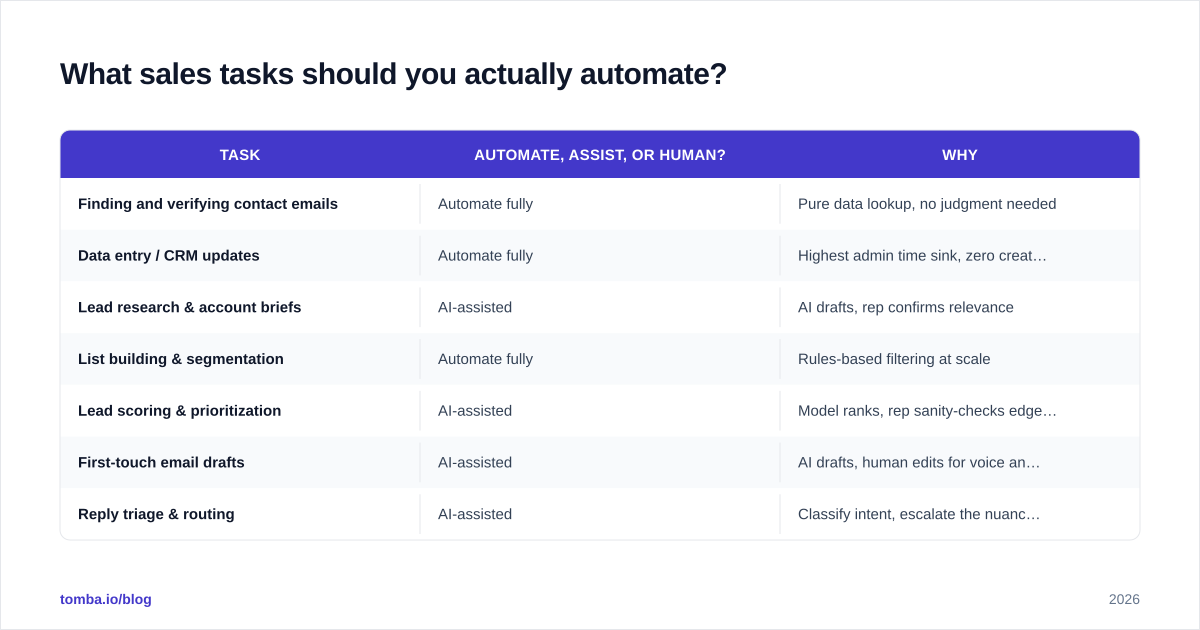
Here's how the common sales workflow breaks down:
| Task | Automate, assist, or human? | Why |
|---|---|---|
| Finding and verifying contact emails | Automate fully | Pure data lookup, no judgment needed |
| Data entry / CRM updates | Automate fully | Highest admin time sink, zero creativity |
| Lead research & account briefs | AI-assisted | AI drafts, rep confirms relevance |
| List building & segmentation | Automate fully | Rules-based filtering at scale |
| Lead scoring & prioritization | AI-assisted | Model ranks, rep sanity-checks edge cases |
| First-touch email drafts | AI-assisted | AI drafts, human edits for voice and accuracy |
| Reply triage & routing | AI-assisted | Classify intent, escalate the nuanced ones |
| Discovery calls & demos | Human | Trust and judgment live here |
| Pricing & negotiation | Human | High-stakes, relationship-defining |
The pattern is clear: the top of the funnel is where automation compounds, and the bottom is where humans close. A 2024 study referenced by Salesforce found reps spend only around 28% of their week actually selling — the rest goes to admin, research, and manual data work. That 72% is your automation target.
)
What does a modern AI sales automation stack look like?#
Most effective stacks have three layers. You don't need a separate vendor for each — many tools span two — but thinking in layers stops you from buying overlapping software.
1. Data layer — find and verify who to contact. This is the foundation. If your contact data is wrong, every downstream automation amplifies the error. You need an email finder to source verified addresses, an email verifier to scrub bounces before sending, and ideally data enrichment to fill in titles, company size, and tech stack. Bad data is the single most common reason automated outreach fails — you can write a perfect sequence and still hit a 40% bounce rate if your list is stale.
2. Engagement layer — reach out and respond. Sequencers, multichannel cadence tools, and AI reply assistants live here. This layer decides timing, channel, and message. The AI contribution in 2026 is drafting personalized first lines from research, A/B testing subject lines automatically, and classifying inbound replies (interested / not now / unsubscribe / referral) so reps only touch the ones that need a human.
3. Intelligence layer — decide who matters and what's next. Lead scoring, intent signals, conversation analytics, and forecasting. This layer answers "who should I call today?" and "which deals are slipping?" It's the least mature layer and the easiest to over-trust — treat its outputs as a ranked to-do list, not gospel.
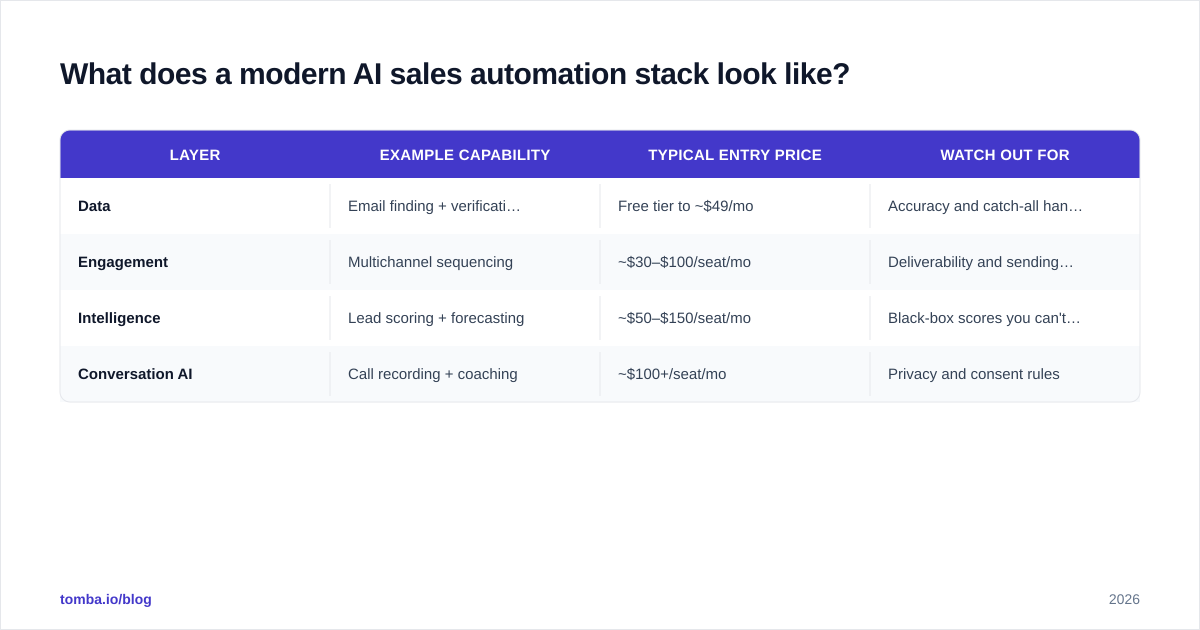
Here's how representative tooling maps to those layers and price points:
| Layer | Example capability | Typical entry price | Watch out for |
|---|---|---|---|
| Data | Email finding + verification | Free tier to ~$49/mo | Accuracy and catch-all handling |
| Engagement | Multichannel sequencing | ~$30–$100/seat/mo | Deliverability and sending limits |
| Intelligence | Lead scoring + forecasting | ~$50–$150/seat/mo | Black-box scores you can't audit |
| Conversation AI | Call recording + coaching | ~$100+/seat/mo | Privacy and consent rules |
For the data layer specifically, Tomba's pricing starts with a free tier of 25 searches per month, then Starter at $49/mo, Growth at $99/mo, and Pro at $249/mo — which keeps the foundational layer affordable while you spend bigger budgets on engagement and intelligence tooling.
How do you build an AI sales automation workflow step by step?#
Here's a concrete, build-it-this-week workflow for outbound. It chains the three layers into one pipeline.
- Define the trigger. A new account lands in a target segment — say, a SaaS company that just raised a funding round. Use intent or news signals as the trigger rather than a static list.
- Enrich the account. Automatically pull firmographics, the tech stack, and key decision-maker titles. Tools that connect to your B2B database do this without a rep lifting a finger.
- Find and verify contacts. Use domain search to pull every relevant address at the company, then run each through verification so you never send to a dead inbox. This step alone protects your sender reputation.
- Draft personalized outreach. Feed the enriched data to an AI writer to produce a first-draft email referencing the funding round and a relevant pain point. A rep spends 30 seconds editing, not 10 minutes writing.
- Sequence and send. Push the contact into a multichannel cadence with throttled sending limits to protect deliverability.
- Triage replies. AI classifies inbound responses and routes hot ones to the rep instantly while auto-handling unsubscribes and out-of-office.
- Sync to CRM. Every touch, reply, and status change writes back automatically — no manual logging.
The compounding effect: a rep who used to research and write 15 personalized emails a day can now review and send 60, with better data and fewer bounces. That's not a marginal gain; it's a different job.
A quick guardrail on step 4: AI drafts are a starting point, not a send-ready product. Prospects can smell a template, and a confidently wrong personalization line ("congrats on your role at [Company]") does more damage than a plain email. Keep a human in the loop on anything that reaches an inbox.
Does AI sales automation actually improve results?#
Yes, but the gains cluster in specific places, and a few metrics decide everything.
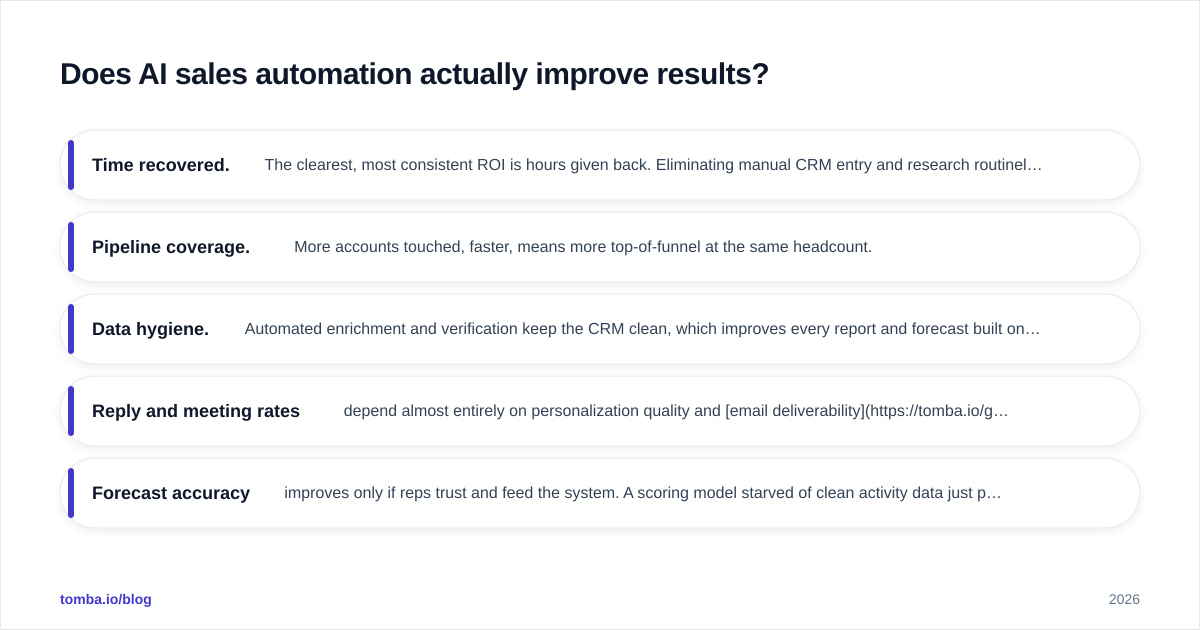
Where it reliably wins:
- Time recovered. The clearest, most consistent ROI is hours given back. Eliminating manual CRM entry and research routinely returns 5–10 hours per rep per week. Industry analysts at Gartner have repeatedly flagged administrative overhead as the top drag on seller productivity.
- Pipeline coverage. More accounts touched, faster, means more top-of-funnel at the same headcount.
- Data hygiene. Automated enrichment and verification keep the CRM clean, which improves every report and forecast built on it.
Where it's conditional:
- Reply and meeting rates depend almost entirely on personalization quality and email deliverability. Automation that blasts generic messages to unverified lists lowers results — you burn your domain reputation and train prospects to ignore you. Automation that sends fewer, sharper, well-targeted messages raises them.
- Forecast accuracy improves only if reps trust and feed the system. A scoring model starved of clean activity data just produces confident nonsense.
The honest summary: AI sales automation is a force multiplier, not a magic wand. It multiplies whatever process you point it at. Point it at a good process with clean data and it's transformative; point it at spray-and-pray outreach and it accelerates your decline.
)
How is AI sales automation different from a sales engagement platform or CRM?#
These categories overlap, which is why buyers get confused. Here's the clean separation:
- A CRM (customer relationship management) is the system of record. It stores accounts, contacts, deals, and history. It's a database with workflow, not an automation engine.
- A sales engagement platform runs cadences and tracks touches. It's the execution layer for outreach.
- AI sales automation is the intelligence and labor you layer across both — the research, drafting, scoring, and data work that used to be manual.
In practice, the lines blur because CRMs like the ones documented by HubSpot now ship AI features, and engagement platforms add scoring. But the mental model holds: CRM stores, engagement executes, AI automates the work in between. You'll likely run all three, and your data layer feeds every one of them — which is why getting contact data right is the prerequisite, not an afterthought.
What should you watch out for before you automate?#
Four traps sink most AI sales automation projects.
1. Automating a broken process. If your targeting is wrong or your messaging doesn't resonate, automation just produces bad outcomes at scale. Fix the process manually until it works, then automate it.
2. Ignoring deliverability. This is the silent killer. High send volume on a poorly warmed domain with unverified lists tanks your sender reputation, and once you're in spam folders, no amount of clever copy helps. Verify every address, throttle sending, and monitor your reputation. A clean list run through a proper email verifier is the cheapest insurance you can buy.
3. Over-trusting the black box. AI scores and "intent signals" are probabilistic. Treat them as a prioritized to-do list a human reviews, not as automatic actions. The moment a model auto-disqualifies real buyers, you've lost revenue you'll never see in a report.
4. Losing the human voice. Buyers in 2026 are saturated with obviously-automated outreach. The teams winning are the ones using automation to free up time for genuine personalization, not to remove humans entirely. Automate the research; keep the relationship human.
A useful test before automating any step: would you be embarrassed if a prospect found out a bot did this? Auto-enriching a record — fine, nobody cares. Auto-sending a fake-personal "I loved your recent post" with no human review — that's the kind of shortcut that costs you the deal.
Frequently asked questions#
Will AI sales automation replace sales reps? No — it replaces the parts of the job reps hate. The research, data entry, and list building shrink dramatically, but discovery, negotiation, and relationship-building remain human. Reps who adopt it out-produce reps who don't; that's the real competitive shift.
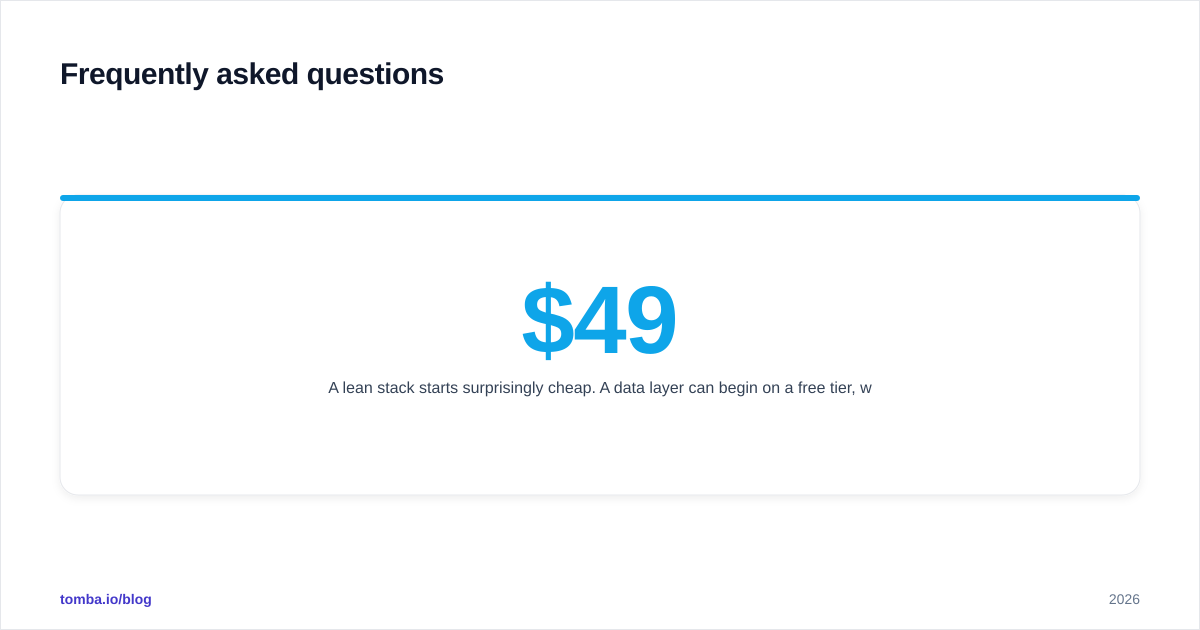
How much does a basic AI sales automation stack cost? A lean stack starts surprisingly cheap. A data layer can begin on a free tier, with paid plans around $49/mo, while engagement and intelligence tools typically run $30–$150 per seat per month. Most small teams run a capable stack for a few hundred dollars monthly.
What's the fastest workflow to automate first? Contact data. Automating how you find and verify emails removes bounces, protects deliverability, and feeds every other tool. It's the highest-leverage, lowest-risk place to start.
Is automated outreach bad for deliverability? Only when done carelessly. Verified lists, warmed domains, and throttled sending keep you safe. Unverified blasts are what trigger spam filters — the automation isn't the problem, the bad data is.
Where to start#
The fastest, lowest-risk win in AI sales automation is fixing your data layer first — because every sequence, score, and forecast downstream depends on it. Start by automating how you find and verify contacts so your reps stop hand-building lists and your sends stop bouncing.
Tomba's Email Finder is built exactly for that foundation: find professional email addresses by domain, name, or company, verify them before they ever hit a sequence, and feed clean, enriched contacts into the rest of your stack. Begin on the free tier with 25 searches a month, then scale into paid plans as your automated pipeline grows. Get the data layer right, and the rest of your AI sales automation actually delivers on the promise.
// get started
Find, verify and enrich your first contacts today
Start on the free plan with 25 searches a month, then scale when your team is ready.
Free plan · No credit card required · GDPR & CCPA
// about the author