AI Sales Outreach Tech Stack: The 2026 Build Guide
A practical 2026 blueprint for building an AI sales outreach tech stack: the data, AI, sequencing, and deliverability layers that actually book meetings — and how to wire them together without overpaying.
You do not have an outreach problem. You have a stack problem. Reps are juggling a dozen disconnected tabs, paying for overlapping data, and blasting templated emails into spam folders. An ai sales outreach tech stack fixes the wiring — it connects clean data, AI personalization, sequencing, and deliverability into one pipeline that books meetings instead of burning domains.
This guide breaks the stack into four layers, compares the tools that fill each one, and gives you a framework to assemble them in 2026 without overpaying or over-engineering.
TL;DR#
- An AI sales outreach tech stack has four layers: data, AI/personalization, sequencing/automation, and deliverability. Skip any one and the whole thing leaks.
- Start with data quality. The fanciest AI copy still fails if the email bounces — verified contacts beat clever subject lines every time.
- AI belongs to research and personalization, not to "spray more volume." Use it to write the first line, not the whole email.
- Budget realistically: a lean but complete stack runs roughly $200–$600/mo for a small team, scaling with seats and send volume.
- Consolidate where you can. Fewer tools that talk to each other beat a sprawl of best-in-class point solutions nobody integrates.
What is an AI sales outreach tech stack?#
An AI sales outreach tech stack is the connected set of tools that takes you from "I know my ideal customer" to "a qualified prospect replied." Think of it like a kitchen line, not a single appliance: sourcing ingredients (data), prepping them (enrichment and AI research), cooking to order (personalized sequencing), and plating so it actually reaches the table (deliverability).
Most teams buy appliances at random — a microwave here, a blender there — and wonder why dinner never ships on time. The stack mindset forces you to ask a different question: does each tool hand off cleanly to the next one?
Technically, the stack is a pipeline. Raw company and contact signals enter at the top, get verified and enriched, get matched to AI-generated relevance, get scheduled into multi-channel sequences, and get protected by warmup and authentication so the messages land. Every layer feeds the one below it.
What are the four layers of the stack?#
Layer 1 — Data and contact discovery#
This is the foundation, and it is the layer teams most often get wrong. You need accurate company targeting, the right contacts inside those companies, and verified email addresses and phone numbers. Garbage in, bounced out.
The core capabilities here are an email finder to locate professional addresses by name or company, domain search to pull every reachable contact at a target account, and an email verifier to scrub the list before you ever hit send. If your bounce rate creeps above 3–4%, mailbox providers start throttling you — so verification is not optional hygiene, it is deliverability insurance.
Layer 2 — AI research and personalization#
AI's real job is research at scale, not writing more spam faster. A good setup pulls a prospect's recent activity, company news, tech stack, and role, then drafts a genuinely relevant opening line or angle. The rep approves or edits — the AI never sends blind.
Used well, this layer is the difference between "Hi {{first_name}}, I see you work at {{company}}" and a first line that proves you actually understand their world. Used badly, it just industrializes mediocrity.
Layer 3 — Sequencing and automation#
This is the engine that schedules and sends your multi-step, multi-channel cadences — email, LinkedIn, and calls — and tracks replies. It enforces the follow-up discipline humans forget. The platform here owns your inbox rotation, send throttling, A/B tests, and reply detection.
Layer 4 — Deliverability and infrastructure#
The unglamorous layer that decides whether any of the above matters. Domain warmup, SPF/DKIM/DMARC authentication, inbox rotation, and spam testing live here. You can have perfect data and brilliant copy and still land in Promotions if your sending domain has no reputation.
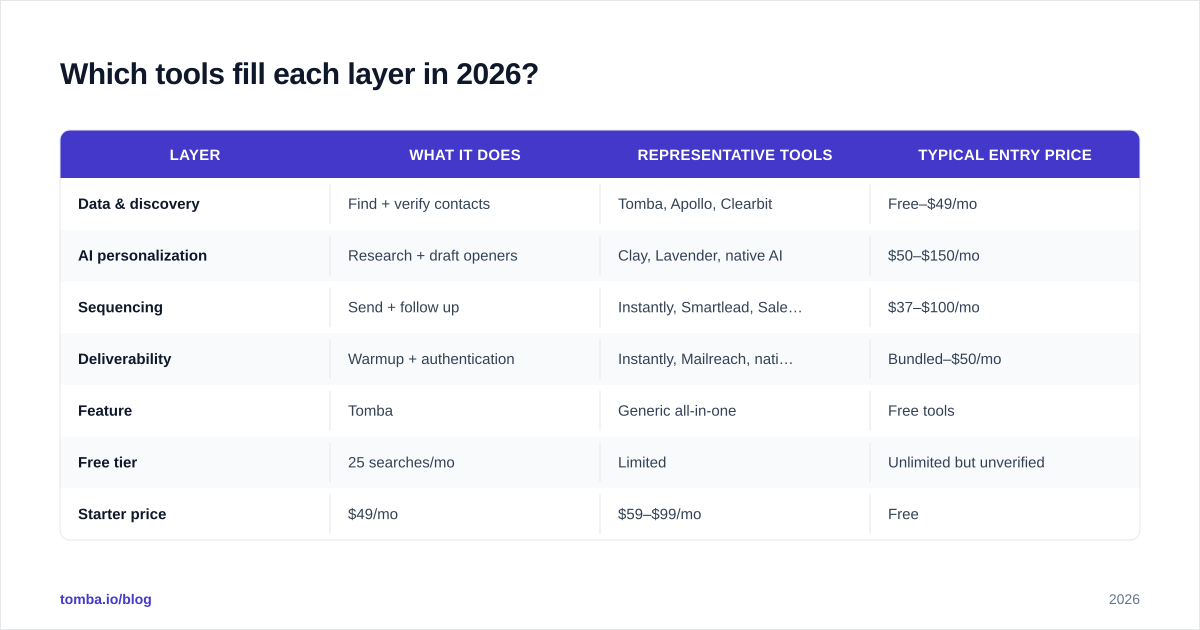
Which tools fill each layer in 2026?#
No single vendor wins every layer, and the "all-in-one" platforms that claim to usually do one layer well and the rest passably. Here is how the common categories compare.
| Layer | What it does | Representative tools | Typical entry price |
|---|---|---|---|
| Data & discovery | Find + verify contacts | Tomba, Apollo, Clearbit | Free–$49/mo |
| AI personalization | Research + draft openers | Clay, Lavender, native AI | $50–$150/mo |
| Sequencing | Send + follow up | Instantly, Smartlead, Salesloft | $37–$100/mo |
| Deliverability | Warmup + authentication | Instantly, Mailreach, native | Bundled–$50/mo |
A few honest notes on the table. The "all-in-one" prospecting suites bundle data and sequencing but charge a premium and often ship weaker verification — which is why many teams pair a dedicated finder/verifier with a lighter sequencer. If you want to swap out a heavyweight suite, the Apollo alternative and Instantly alternative breakdowns walk through the trade-offs.
How do the data layer options actually compare?#
Because the data layer is load-bearing, it deserves its own table. Accuracy and verification depth matter more than raw database size — a billion stale records help no one.
| Feature | Tomba | Generic all-in-one | Free tools |
|---|---|---|---|
| Free tier | 25 searches/mo | Limited | Unlimited but unverified |
| Starter price | $49/mo | $59–$99/mo | Free |
| Email verification | Built-in | Add-on | None |
| Catch-all handling | Yes | Partial | No |
| API + bulk | Yes | Varies | No |
For a deeper accuracy methodology and pricing breakdown, Tomba publishes its data sources and full Tomba pricing openly, which is more transparency than most of the category offers. Independent reviews on G2 are a useful sanity check before you commit to any vendor.
How do you assemble the stack without overpaying?#
Buy in the order the pipeline flows, and prove each layer works before adding the next.
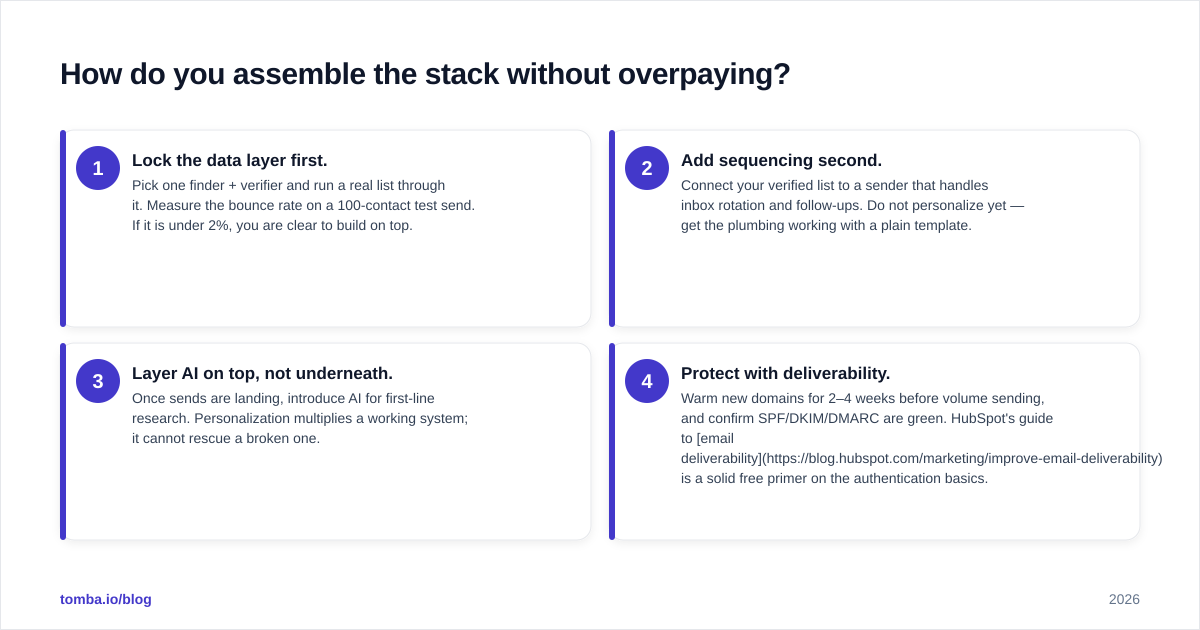
- Lock the data layer first. Pick one finder + verifier and run a real list through it. Measure the bounce rate on a 100-contact test send. If it is under 2%, you are clear to build on top.
- Add sequencing second. Connect your verified list to a sender that handles inbox rotation and follow-ups. Do not personalize yet — get the plumbing working with a plain template.
- Layer AI on top, not underneath. Once sends are landing, introduce AI for first-line research. Personalization multiplies a working system; it cannot rescue a broken one.
- Protect with deliverability. Warm new domains for 2–4 weeks before volume sending, and confirm SPF/DKIM/DMARC are green. HubSpot's guide to email deliverability is a solid free primer on the authentication basics.
The most expensive mistake is buying all four layers at once from four vendors, wiring nothing together, and discovering in month two that your data tool and your sequencer fight over the same field. Consolidate where the handoffs are tightest — usually data-to-sequencing — and only fan out to specialists where a layer genuinely needs depth.
How does AI change the personalization layer specifically?#
AI moved personalization from a luxury to a baseline expectation, and that cuts both ways. Buyers now spot a {{merge_field}} template instantly, so generic mail-merge personalization performs worse than it did three years ago. The bar moved.
The winning pattern in 2026 is "AI researches, human approves." The model reads the prospect's LinkedIn, recent posts, funding news, and role, then proposes an angle. A rep spends ten seconds confirming it makes sense. This keeps the relevance high and the embarrassing hallucinations out of your sent folder.
Where AI does not help: it will not fix a bad ICP, it will not make an irrelevant offer relevant, and it will not save a cold domain. Teams that bolt AI onto a broken process just send polished irrelevance faster. Keep AI scoped to research and drafting, and keep a human on the trigger.
One practical tip — feed the AI layer enriched data, not raw scrapes. Running contacts through data enrichment before the model sees them means the openers reference accurate titles, company size, and tech stack instead of guessing. Better inputs, better outputs.
What does a complete stack cost?#
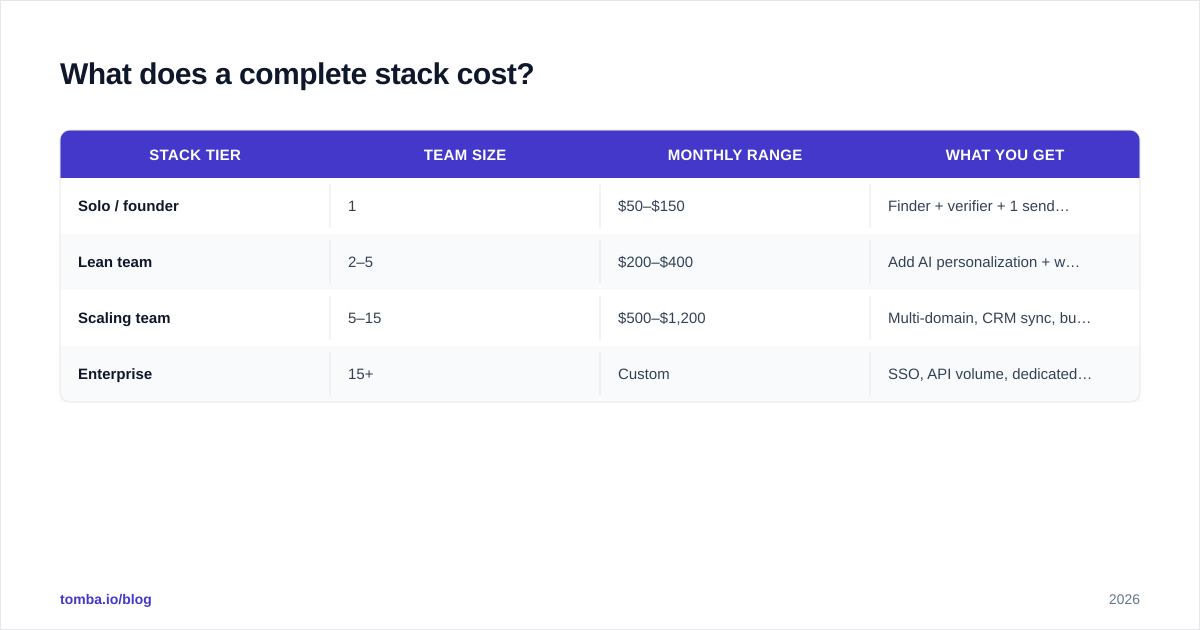
Budget by team size and send volume, not by feature checklist. A realistic lean-but-complete stack for a small team breaks down roughly like this.
| Stack tier | Team size | Monthly range | What you get |
|---|---|---|---|
| Solo / founder | 1 | $50–$150 | Finder + verifier + 1 sender |
| Lean team | 2–5 | $200–$400 | Add AI personalization + warmup |
| Scaling team | 5–15 | $500–$1,200 | Multi-domain, CRM sync, bulk |
| Enterprise | 15+ | Custom | SSO, API volume, dedicated data |
Two cost traps to avoid. First, paying for overlapping data across an all-in-one suite and a standalone finder — pick one source of truth. Second, under-investing in deliverability to save $40/mo, then torching a domain that costs far more to replace. The cheapest line item in the stack protects the most expensive one.
Frequently asked questions#
Do I need all four layers to start?#
Functionally, yes — but you can start thin. The minimum viable stack is a verified data source plus a sender with built-in warmup. That covers data, sequencing, and deliverability in two tools. Add the dedicated AI personalization layer once your sends are consistently landing.
Can one platform replace the whole stack?#
Some all-in-one suites try, and for very early-stage teams they are a reasonable on-ramp. But they typically lead on sequencing and lag on verification depth, so most teams that scale end up pairing a specialist data tool with a sequencer anyway. Treat all-in-one as a starting point, not a permanent answer.
Where does the CRM fit?#
The CRM sits beside the stack as the system of record, not inside the outreach pipeline itself. Your sequencing and data layers should sync to it — via native integrations or Zapier — so reps work the pipeline in one place and the CRM stays the source of truth for closed deals.
How do I keep the data clean over time?#
Re-verify before every major campaign and enrich on a rolling basis. B2B data decays at roughly 2–3% per month as people change jobs, so a list verified six months ago is meaningfully stale today. Bulk verification on a schedule keeps bounce rates low and your sender reputation intact.
Build the data layer first#
Every layer above the data layer is multiplying whatever number sits underneath it — and if that number is "40% of these emails bounce," the multiplication works against you. Start where the leverage is.
Tomba's Email Finder gives you the foundation the rest of the stack depends on: accurate professional emails by name, company, or domain, with verification and catch-all handling built in rather than bolted on. The free tier covers 25 searches a month so you can test accuracy on your own list before paying anything, and the $49/mo Starter plan scales with real outreach volume. Get the data layer right, wire the rest on top, and your AI sales outreach tech stack will finally do what the brochures promised — book meetings.
Ready to find emails that actually work?
Join 150,000+ professionals who stopped guessing and started sending. Free credits on signup — no credit card required.
Get the Tomba newsletter
Practical outbound tactics and product updates — once every two weeks.
About the author