The AI SDR Onboarding Plan: A 30-60-90 Framework for 2026
An AI SDR is only as good as the way you ramp it. Here is a 30-60-90 onboarding plan covering data, guardrails, ICP training, and the KPIs that prove it works.
You bought an AI SDR. Now what? Most teams plug in a tool, point it at a list, and wonder why reply rates crater in week two. The problem is almost never the model — it's the onboarding. An AI SDR is a new hire that reads your whole playbook in an afternoon and then sends 500 emails before lunch. Onboard it badly and it scales your worst habits. Onboard it well and it becomes the most consistent rep on the floor.
This is the onboarding plan we'd hand a RevOps lead on day one.
TL;DR#
- An AI SDR onboarding plan is a structured 30-60-90 ramp that controls data quality, ICP definition, messaging guardrails, and escalation rules before the AI touches a single prospect.
- Week one is not "send emails" — it's data hygiene, suppression lists, and domain warmup. Garbage in, blocklist out.
- Use a 30-60-90 framework: foundation → supervised sending → scaled autonomy, with a human approving everything until metrics clear a threshold.
- Track ramp with leading indicators (bounce rate, spam rate, positive reply rate), not just meetings booked.
- The biggest failure mode is treating the AI SDR as a "set and forget" robot. It needs a manager, a feedback loop, and clean contact data — same as a human rep.
What is an AI SDR and what does onboarding actually mean?#
An AI SDR (Sales Development Representative) is software that handles the top-of-funnel work a junior rep would do: researching accounts, finding contacts, writing first-touch emails, sequencing follow-ups, and qualifying replies. Think of it as a tireless intern who never forgets a follow-up but also has zero common sense on day one — it will do exactly what you configure, at volume.
"Onboarding" an AI SDR means everything you do before and during the first 90 days to make its output safe, on-brand, and effective. It mirrors human onboarding: you give it accounts to work, a definition of a good lead, scripts to start from, and a manager who reviews its work until trust is earned. The difference is speed and blast radius. A human intern sends ten clumsy emails and you correct them. An AI SDR sends a thousand and torches your domain reputation before standup.
According to Gartner's sales research, the teams seeing returns from sales AI are the ones that redesign the workflow around it — not the ones that bolt it onto a broken process. Onboarding is where that redesign happens.
Why do most AI SDR rollouts fail in the first 30 days?#
They fail for boring, fixable reasons. Almost none of them are about the AI being "not smart enough."
- Dirty data. The AI sends to stale, role-based, or invalid addresses. Bounces spike, and mailbox providers flag the sending domain. This is the number one killer.
- No suppression list. It emails existing customers, open opportunities, or competitors. Sales and CS find out the hard way.
- No domain warmup. A brand-new sending domain blasts 800 cold emails on day one and lands permanently in spam.
- Vague ICP. "Anyone in SaaS" produces a list of 40,000 contacts and a 0.2% reply rate.
- Unsupervised messaging. The AI improvises a value prop that's subtly wrong, and nobody catches it until a prospect screenshots it on LinkedIn.
Every one of these is an onboarding gap, not a product defect. Fix them in sequence and the same tool that flamed out in week two becomes a pipeline engine by week ten.
What does a 30-60-90 AI SDR onboarding plan look like?#
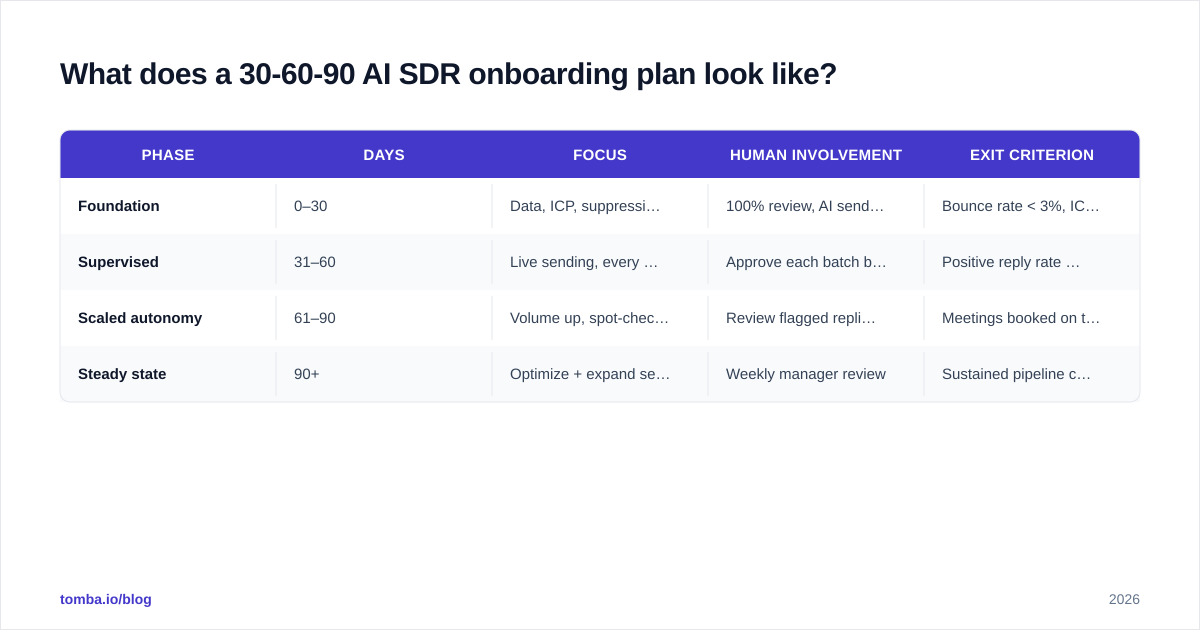
Here's the structure. Each phase has an exit criterion — you don't advance until the previous phase's metrics clear. Treat it like a ramp for a human rep, because that's exactly what it is.
| Phase | Days | Focus | Human involvement | Exit criterion |
|---|---|---|---|---|
| Foundation | 0–30 | Data, ICP, suppression, warmup | 100% review, AI sends nothing live | Bounce rate < 3%, ICP list verified, domains warmed |
| Supervised | 31–60 | Live sending, every message approved | Approve each batch before send | Positive reply rate ≥ 3%, spam complaints < 0.1% |
| Scaled autonomy | 61–90 | Volume up, spot-check only | Review flagged replies + weekly QA | Meetings booked on target, < 5% messages need edits |
| Steady state | 90+ | Optimize + expand segments | Weekly manager review | Sustained pipeline contribution |
The temptation is to skip to phase three on day three. Resist it. The whole point of the ramp is that trust compounds: clean data earns sending volume, good sending earns autonomy, and autonomy earns a seat in your real pipeline forecast.
Days 0–30: Foundation (the AI sends nothing)#
This phase is unglamorous and it's where the whole program is won or lost.
1. Fix your data first. Your AI SDR is downstream of your contact data. If the addresses are wrong, nothing else matters. Pull your target accounts, find verified contacts, and run them through an email verifier before anything goes live. For net-new sourcing, a quality email finder gives you addresses tied to real people at real domains instead of guessed permutations that bounce. Layer in data enrichment so the AI has job title, seniority, and company context to personalize against — a first line that references the prospect's actual role beats "I hope this email finds you well" every time.
2. Define the ICP in writing. Not "mid-market SaaS." Write the filters: employee count, region, tech stack, trigger events, exclusion rules. The AI uses this verbatim, so ambiguity becomes noise at scale.
3. Build the suppression list. Existing customers, open opps, churned-and-angry accounts, partners, competitors, and anyone who's unsubscribed. Sync it from your CRM and make it a hard block.
4. Warm the domain. Use a separate sending domain (not your primary), set up SPF/DKIM/DMARC, and ramp volume gradually. HubSpot's deliverability guidance is a solid baseline here — cold volume on a cold domain is how you get blocklisted.
Days 31–60: Supervised sending#
Now the AI sends live — but a human approves every batch.
This is where you discover what the AI actually does versus what you assumed. Read the first few hundred messages. You'll catch a value prop that's slightly off, a merge field that breaks on contacts missing a first name, a follow-up that's too aggressive. Correct the configuration, not just the individual email. Each correction is a training signal that makes the next batch better.
Watch three numbers obsessively: bounce rate (data quality), spam complaint rate (deliverability), and positive reply rate (messaging fit). If bounces climb, your list went stale — re-verify. If spam complaints rise, slow down and check targeting. You only advance when positive replies clear ~3% and complaints stay under 0.1%.
Days 61–90: Scaled autonomy#
The AI has earned volume. Now you spot-check instead of approving everything. Increase daily send limits gradually, expand to adjacent segments, and let the AI handle reply triage — but route anything that smells like a real opportunity or a complaint to a human immediately. Your job shifts from approver to manager: weekly QA, message refresh, and segment expansion.
How do you set guardrails so the AI SDR doesn't go rogue?#
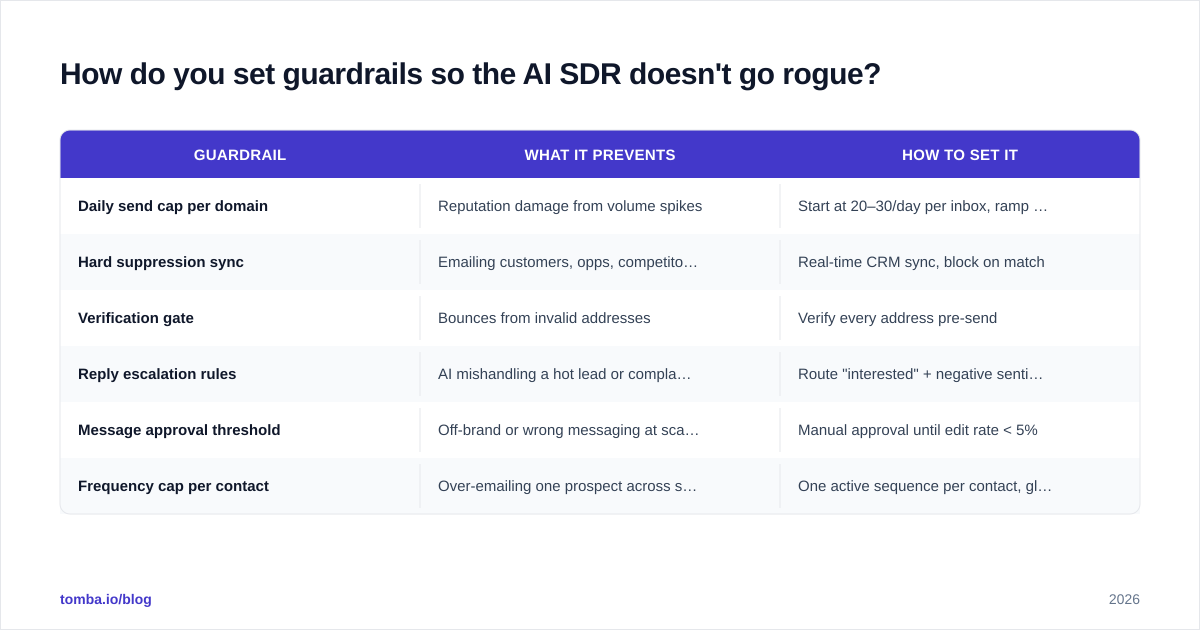
Guardrails are the difference between an asset and a liability. Configure these before the AI sends anything live:
| Guardrail | What it prevents | How to set it |
|---|---|---|
| Daily send cap per domain | Reputation damage from volume spikes | Start at 20–30/day per inbox, ramp weekly |
| Hard suppression sync | Emailing customers, opps, competitors | Real-time CRM sync, block on match |
| Verification gate | Bounces from invalid addresses | Verify every address pre-send |
| Reply escalation rules | AI mishandling a hot lead or complaint | Route "interested" + negative sentiment to humans |
| Message approval threshold | Off-brand or wrong messaging at scale | Manual approval until edit rate < 5% |
| Frequency cap per contact | Over-emailing one prospect across sequences | One active sequence per contact, global cap |
The pattern across all of these: the AI gets autonomy in proportion to demonstrated reliability. Same as you'd manage a person.

What KPIs prove the AI SDR is actually ramping?#
Meetings booked is a lagging indicator — by the time it moves, you've already won or lost weeks ago. Manage the ramp with leading indicators, then hold the lagging ones for the business case.
Leading indicators (watch daily/weekly):
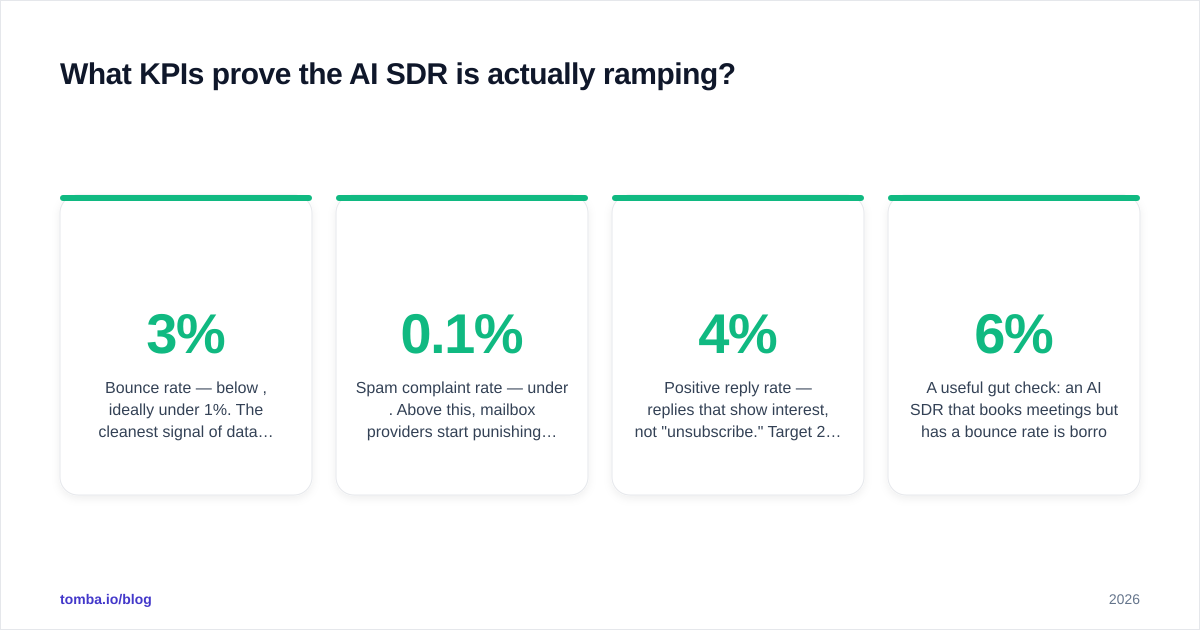
- Bounce rate — below 3%, ideally under 1%. The cleanest signal of data quality.
- Spam complaint rate — under 0.1%. Above this, mailbox providers start punishing you.
- Positive reply rate — replies that show interest, not "unsubscribe." Target 2–4% on cold.
- Message edit rate — what % of AI drafts a human has to fix. Should fall toward zero as it ramps.
Lagging indicators (watch monthly):
- Meetings booked and meeting-held rate
- Pipeline sourced ($) and opportunity conversion
- Cost per meeting vs. a human SDR
A useful gut check: an AI SDR that books meetings but has a 6% bounce rate is borrowing against your domain's future. Clean ramps optimize deliverability first, volume second, meetings third — in that order.
How does an AI SDR compare to hiring a human SDR?#
Not an either/or for most teams — the AI handles volume and consistency, the human handles judgment and complex conversations. But the cost and ramp math is worth seeing side by side.
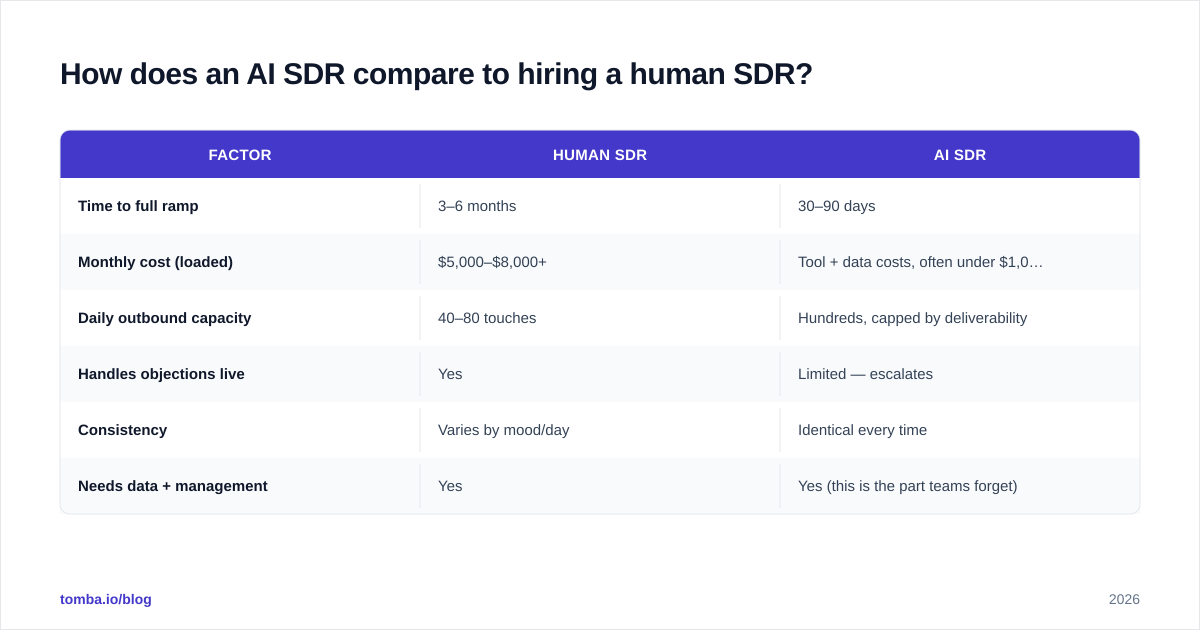
| Factor | Human SDR | AI SDR |
|---|---|---|
| Time to full ramp | 3–6 months | 30–90 days |
| Monthly cost (loaded) | $5,000–$8,000+ | Tool + data costs, often under $1,000 |
| Daily outbound capacity | 40–80 touches | Hundreds, capped by deliverability |
| Handles objections live | Yes | Limited — escalates |
| Consistency | Varies by mood/day | Identical every time |
| Needs data + management | Yes | Yes (this is the part teams forget) |
The "needs management" row is the one everyone underestimates. An AI SDR without an onboarding plan and an owner is like hiring a rep and never showing up to a single 1:1. The tool didn't fail; the management did. You can compare vendor capabilities on G2's sales AI category — but whatever you pick, the onboarding plan is the same.
What's the fastest way to get the data foundation right?#
Since data quality is the single biggest predictor of AI SDR success, invest there first. Source verified contacts for your ICP, enrich them with the context your AI needs to personalize, and keep a verification step in the loop so your lists stay clean as they age.
Tomba's Email Finder gives your AI SDR verified professional emails by domain, name, or company — so the very first thing your digital rep does is send to real people instead of bouncing off invalid addresses and dragging your domain into spam. Pair it with verification and enrichment, set the guardrails above, and run the 30-60-90 plan. Start free with 25 searches a month, and check Tomba pricing when you're ready to scale the list to match your AI SDR's appetite.
Onboard the data, and the AI SDR onboards itself.
Ready to find emails that actually work?
Join 150,000+ professionals who stopped guessing and started sending. Free credits on signup — no credit card required.
Get the Tomba newsletter
Practical outbound tactics and product updates — once every two weeks.
About the author