AI Subject Line Generator: Best Tools & Tactics for 2026
An AI subject line generator can lift open rates fast — but only if you use it right. Here's how the tools work, which to pick, and how to test in 2026.
TL;DR#
- An ai subject line generator uses a language model trained on high-performing emails to draft multiple subject line variants in seconds, scored for tone, length, and likely open rate.
- The best tools do more than spit out text — they tag spam triggers, predict mobile truncation, and give you A/B variants ready to test.
- Generated lines are a starting point, not a finished product. The teams that win pair generation with disciplined A/B testing and a clean, verified send list.
- Below: a feature-by-feature comparison of the top 2026 tools, a repeatable testing framework, and the mistakes that quietly kill open rates.
- Deliverability matters more than cleverness. The wittiest subject line still fails if it lands in spam or hits a dead inbox.
What is an AI subject line generator?#
An AI subject line generator is a tool that takes a short brief — your offer, audience, and tone — and returns a ranked list of email subject lines. Think of it like a sous-chef: you hand it the raw ingredients (product, goal, recipient), and it plates up a dozen options you can taste-test, rather than starting from a blank line every time.
Under the hood, modern generators run on large language models fine-tuned on millions of email campaigns and their open-rate outcomes. The model has effectively read more cold emails than any human ever could, so it has internalized patterns: curiosity gaps work, ALL CAPS triggers filters, personalization tokens lift engagement, and anything over ~45 characters gets clipped on mobile.
The practical payoff is speed and volume. Instead of agonizing over one line, you generate 10, filter to 3, and let real data pick the winner. That shift — from guessing to testing — is the entire point.
How does an AI subject line generator actually work?#
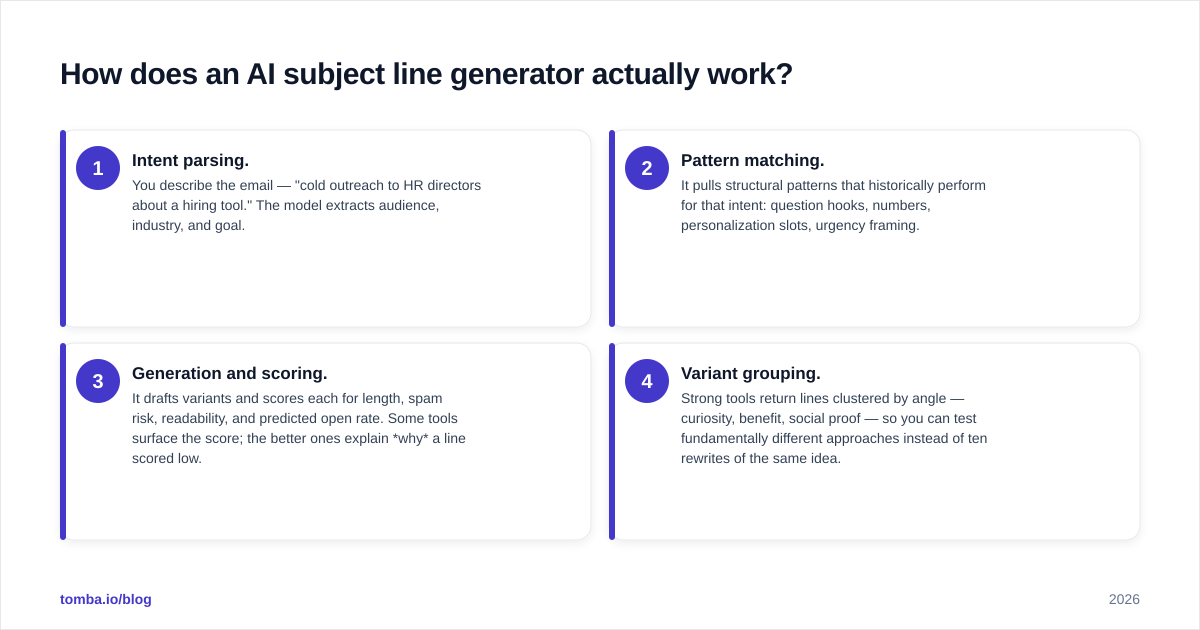
Four steps happen between your prompt and the output list:
- Intent parsing. You describe the email — "cold outreach to HR directors about a hiring tool." The model extracts audience, industry, and goal.
- Pattern matching. It pulls structural patterns that historically perform for that intent: question hooks, numbers, personalization slots, urgency framing.
- Generation and scoring. It drafts variants and scores each for length, spam risk, readability, and predicted open rate. Some tools surface the score; the better ones explain why a line scored low.
- Variant grouping. Strong tools return lines clustered by angle — curiosity, benefit, social proof — so you can test fundamentally different approaches instead of ten rewrites of the same idea.
That last point separates a real tool from a toy. If a generator hands you ten near-identical lines, your A/B test only measures word choice. You want to test angles, then refine wording inside the winning angle.
Which AI subject line generator should you use in 2026?#
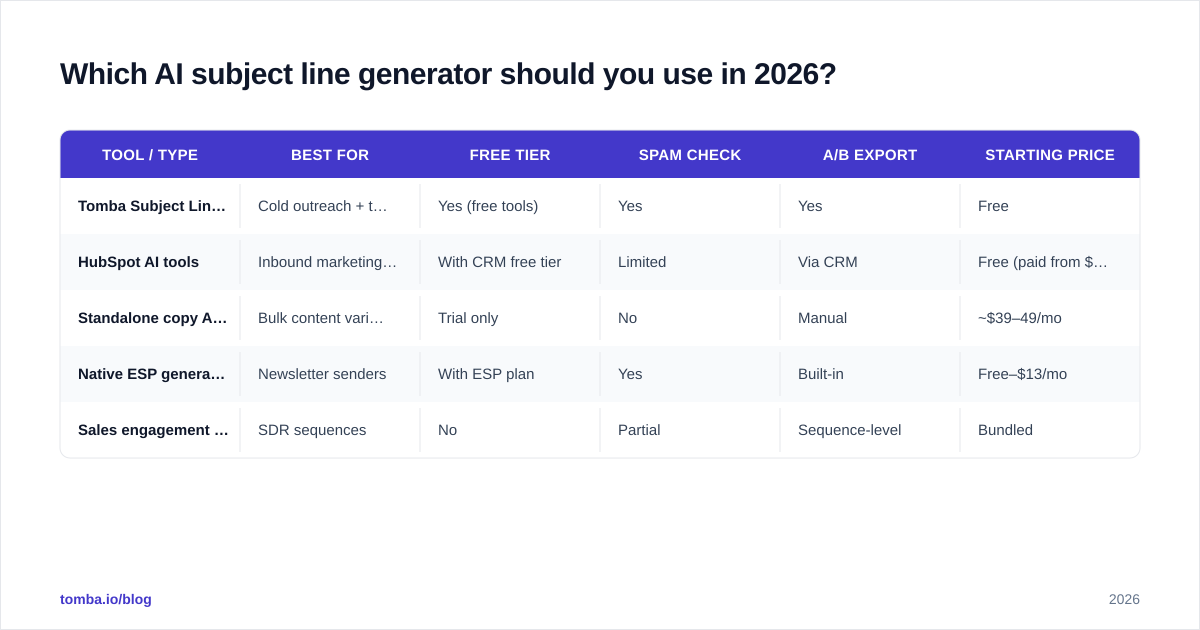
There's no single winner — it depends on whether you live inside a sales platform, a marketing suite, or a standalone copy tool. Here's how the main categories stack up.
| Tool / Type | Best for | Free tier | Spam check | A/B export | Starting price |
|---|---|---|---|---|---|
| Tomba Subject Line Generator | Cold outreach + testing | Yes (free tools) | Yes | Yes | Free |
| HubSpot AI tools | Inbound marketing teams | With CRM free tier | Limited | Via CRM | Free (paid from $20/mo) |
| Standalone copy AI (Jasper, Copy.ai) | Bulk content variants | Trial only | No | Manual | ~$39–49/mo |
| Native ESP generators (Mailchimp) | Newsletter senders | With ESP plan | Yes | Built-in | Free–$13/mo |
| Sales engagement add-ons | SDR sequences | No | Partial | Sequence-level | Bundled |
A few honest takeaways. If you mostly send newsletters, your ESP's built-in generator is usually good enough and keeps everything in one place. If you run cold outreach, you want a tool that pairs generation with a subject line tester and connects to your prospecting stack. Standalone copy tools produce the most creative variety but leave deliverability and testing entirely on you.
For a quick, no-login start, Tomba's subject line generator and its companion cold email AI writer cover the full draft-and-refine loop without a subscription.
Do AI-generated subject lines actually improve open rates?#
Yes — but the lift comes from testing volume, not magic wording. Generating ten options means you A/B test better angles than you'd have written by hand. The model doesn't know your list; it knows what tends to work.
Industry benchmarks from sources like HubSpot's email research consistently show personalization and concise length as the two biggest open-rate levers. AI tools are good at both: they slot in personalization tokens and respect mobile character limits automatically.
The trap is treating the top-scored line as gospel. A predicted score is a probability, not a promise. The only verdict that counts is your audience's behavior, which is why the next section matters more than tool choice.
What's the right testing framework for AI subject lines?#
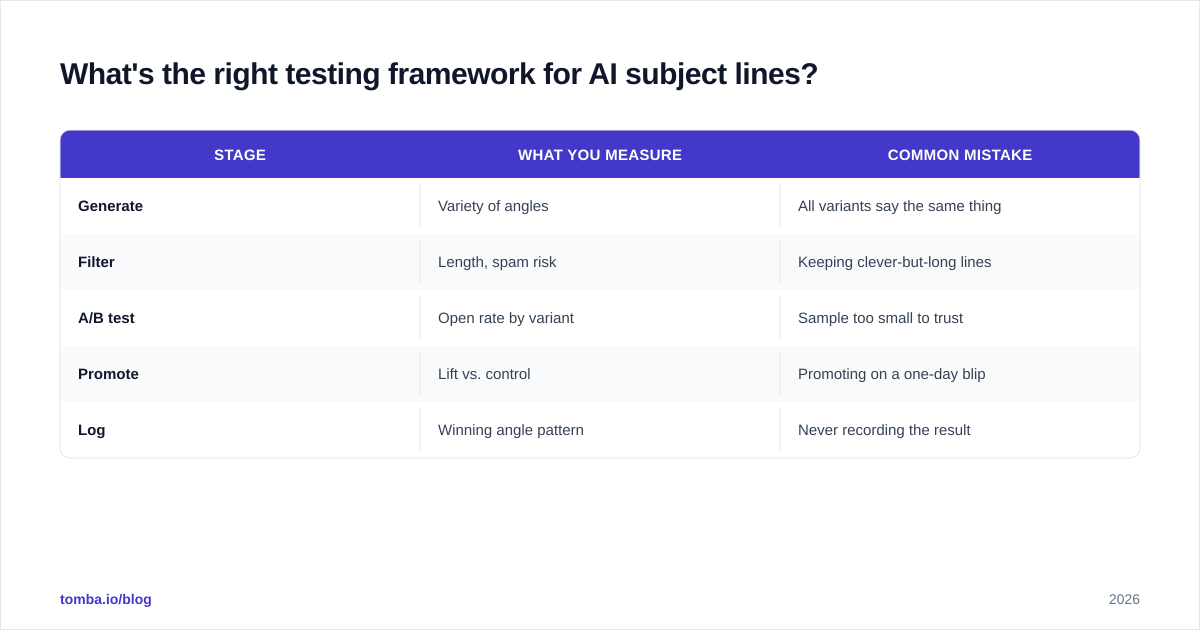
Use a simple loop: Generate → Filter → A/B test → Promote → Log.
- Generate 8–12 variants across at least three angles (curiosity, benefit, social proof).
- Filter to 3 finalists. Cut anything over 45 characters, anything with spam-trigger words, and any line that only works if the reader already trusts you.
- A/B test two finalists against your current control on a 10–20% sample of the segment.
- Promote the winner to the rest of the segment once you hit statistical significance.
- Log the winning angle in a swipe file so the next generation round starts smarter.
This is where most teams leak performance: they generate brilliantly and then never test, or they test once and never log the result. The swipe file is your compounding asset — over a quarter it teaches you which angles your specific audience opens.
| Stage | What you measure | Common mistake |
|---|---|---|
| Generate | Variety of angles | All variants say the same thing |
| Filter | Length, spam risk | Keeping clever-but-long lines |
| A/B test | Open rate by variant | Sample too small to trust |
| Promote | Lift vs. control | Promoting on a one-day blip |
| Log | Winning angle pattern | Never recording the result |

Why does deliverability beat cleverness every time?#
Because a subject line only matters if the email reaches an inbox. The smartest AI line in the world earns a 0% open rate when it lands in spam or hits an address that bounced six months ago.
Two upstream factors decide whether your clever line ever gets a chance:
- List quality. Sending to invalid or stale addresses spikes your bounce rate, which trashes sender reputation and drags every future send toward spam. Clean the list with an email verifier before the campaign, not after.
- Sender health. Proper authentication and a warmed domain keep you out of the spam folder regardless of subject wording.
Here's the order of operations that actually moves open rates: verify the list, confirm deliverability, then optimize the subject line. Teams that invert that order — polishing copy while sending to a dirty list — wonder why their open rates won't budge. You can check a free sample of addresses with Tomba's free email checker before you spend an hour wordsmithing.
If you're sourcing fresh prospects rather than emailing an existing list, start from accurate contact data. A good email finder gives you verified addresses, so the open-rate math starts from a real denominator instead of a bounce-riddled one.
What mistakes kill AI-generated subject lines?#
Even with a strong tool, these errors quietly sink performance:
- Over-personalizing. "Hi {FirstName}, about {Company}'s {PainPoint}…" reads like a mail merge that broke. One natural personalization beats three robotic ones.
- Ignoring mobile truncation. More than half of opens happen on phones. If your hook lives at character 50, it's invisible. Front-load the value.
- Spam-trigger stacking. "FREE!!! Limited offer, act now" is a filter magnet. Most generators flag this — listen to the warning.
- Testing wording, not angles. Ten variants of "Quick question about hiring" teaches you nothing. Test a question against a benefit against social proof.
- Never closing the loop. Generation without logging results means you relearn the same lessons every month.
Tools like G2's email software category are useful for comparing generators, but no review site can tell you which angle your audience opens — only your own test log can.
How do you fit a generator into your real workflow?#
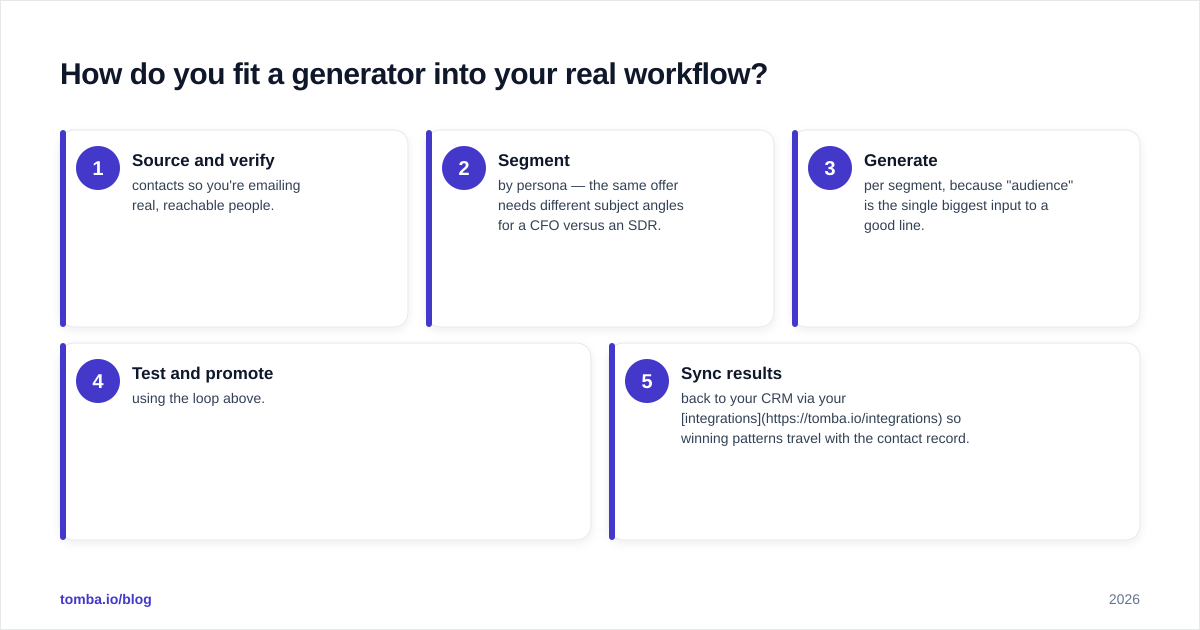
Wire it into the stack you already use. The generator should sit downstream of your list-building and upstream of your send:
- Source and verify contacts so you're emailing real, reachable people.
- Segment by persona — the same offer needs different subject angles for a CFO versus an SDR.
- Generate per segment, because "audience" is the single biggest input to a good line.
- Test and promote using the loop above.
- Sync results back to your CRM via your integrations so winning patterns travel with the contact record.
The connective tissue is data quality. A generator fed accurate, segmented contacts produces sharper lines than one guessing into a generic blast. That's why the most reliable open-rate gains come from the boring upstream work — clean lists, tight segments — not from a cleverer adjective.
The bottom line#
An ai subject line generator is one of the highest-ROI tools in your stack — it turns subject-line writing from a guessing game into a testable, repeatable process. But it's a multiplier, not a foundation. Generate widely, test honestly, log relentlessly, and never let a clever line distract you from the unglamorous work of list hygiene and deliverability.
Ready to make every generated subject line count? Start by building a list worth sending to. Tomba's Email Finder gives you verified, deliverable B2B email addresses — so your AI-crafted subject lines reach real inboxes and your open rates reflect great copy, not a bounce-riddled list. Try it free at the free tier, find your first 25 contacts, and let your subject lines do what they were generated to do: get opened.
Ready to find emails that actually work?
Join 150,000+ professionals who stopped guessing and started sending. Free credits on signup — no credit card required.
Get the Tomba newsletter
Practical outbound tactics and product updates — once every two weeks.
About the author