Aircall Pricing, Reviews, Pros and Cons (2026 Guide)
Is Aircall worth it in 2026? An honest breakdown of Aircall's real pricing, the 3-license minimum, standout features, and where it falls short — plus how to fill the gaps in your outbound stack.
Aircall is one of the most recognizable cloud phone systems for sales and support teams, but the pricing page leaves a lot unsaid. Before you commit a whole team to it, you need the real numbers, the fine print, and an honest read on where it shines and where it frustrates.
This guide breaks down Aircall pricing, reviews, pros and cons for 2026 — no marketing gloss, just what you actually pay and what you actually get.
TL;DR#
- Aircall starts around $30/user/month (Essentials, billed annually) with a hard 3-license minimum, so the real entry cost is closer to $90/month before add-ons.
- Strengths: fast setup, clean call analytics, 100+ native integrations (HubSpot, Salesforce, Pipedrive), and a genuinely good power dialer on higher tiers.
- Weaknesses: per-seat pricing scales expensively, international numbers and extra credits cost more, and reviewers flag occasional call-quality and support issues.
- Best fit: SMB and mid-market sales/support teams already living in a CRM who want plug-and-play calling — not bootstrapped teams chasing the cheapest VoIP.
- Aircall handles the calls; it doesn't find the numbers. Pair it with a phone finder so your reps dial verified contacts instead of dead lines.
What is Aircall and who is it for?#
Aircall is a cloud-based business phone and call-center platform. Think of it as the difference between owning a landline and renting a fully-staffed switchboard that already knows your CRM: you get numbers in 100+ countries, call routing, IVR menus, analytics, and a softphone that runs in the browser or as a desktop/mobile app — all without buying hardware.
It targets two audiences: outbound sales teams that want a dialer wired into their pipeline, and support teams that want shared inboxes, routing, and SLA tracking. The sweet spot is companies with roughly 5–100 agents that already use a CRM and want calling to feel like a native feature of it rather than a bolt-on.
If you're a solo founder or a two-person team, the 3-seat minimum alone tells you Aircall wasn't built for you. If you're an enterprise contact center with thousands of agents, you'll likely outgrow it toward Genesys or Five9. Everyone in between is the real market.
How much does Aircall cost in 2026?#
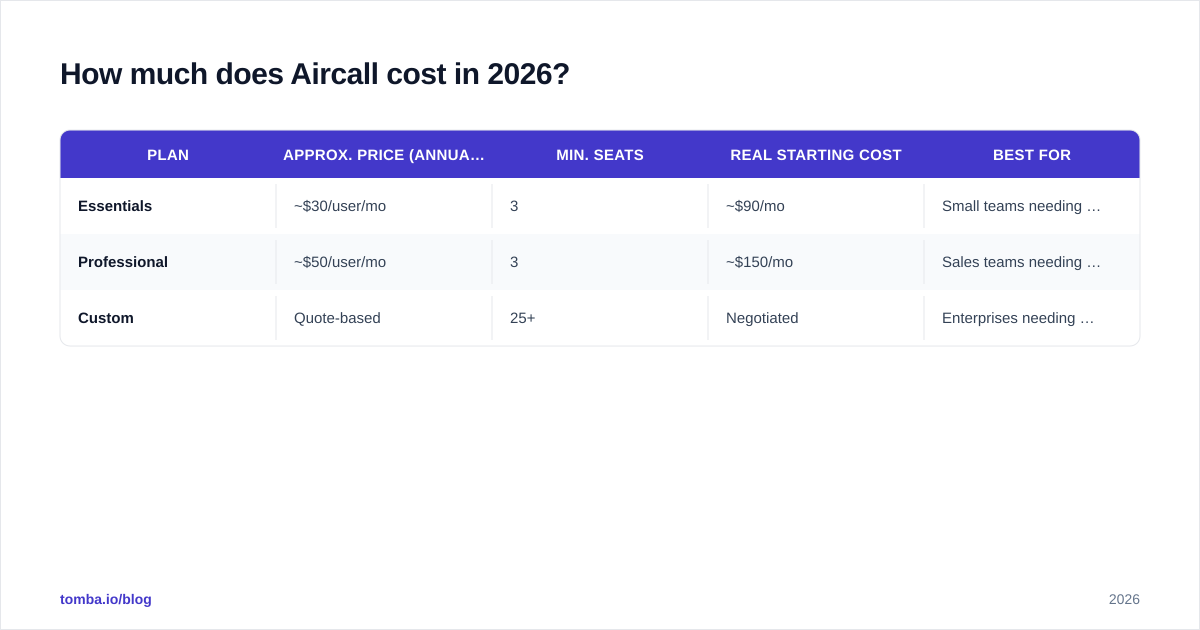
Aircall uses per-user, per-month pricing with a minimum of three licenses, and the published rates assume annual billing. Monthly billing costs more. The two standard public tiers are Essentials and Professional, with a Custom tier for larger or regulated buyers.
Here's the practical breakdown. Treat these as reference figures and confirm current numbers on the official Aircall pricing page, since vendors adjust tiers frequently.
| Plan | Approx. price (annual) | Min. seats | Real starting cost | Best for |
|---|---|---|---|---|
| Essentials | ~$30/user/mo | 3 | ~$90/mo | Small teams needing core calling + integrations |
| Professional | ~$50/user/mo | 3 | ~$150/mo | Sales teams needing power dialer + advanced analytics |
| Custom | Quote-based | 25+ | Negotiated | Enterprises needing SSO, API rate limits, SLAs |
What the headline price doesn't include:
- Phone numbers: one local number is typically included per user, but extra, toll-free, or international numbers carry monthly fees.
- Outbound credits: calling minutes beyond bundled allowances are billed as usage, and international rates vary widely by destination.
- Add-ons: the AI features, advanced analytics, and some integrations live on higher tiers or cost extra.
So a "from $30" plan for a 6-rep team realistically lands at $180+/month before usage, and a Professional 10-seat team is $500+/month before international calling. That's not unusual for the category — but it's a long way from the sticker price.
Where Aircall pricing bites#
The per-seat model is the thing to model carefully. Because there's a 3-license floor and every active rep is a full seat, costs scale linearly with headcount — there's no "light user" discount for the manager who only listens to call recordings. Teams that grow fast feel this. For budget planning, compare it against your other tooling the way you'd compare any subscription stack, including how you budget for data tools like Tomba pricing where credits, not seats, drive cost.
What do Aircall reviews say?#
Aircall holds generally solid ratings on the major software directories — typically around 4.2–4.3 out of 5 on G2 and similar on Capterra across thousands of reviews. The themes are remarkably consistent.
What reviewers praise:
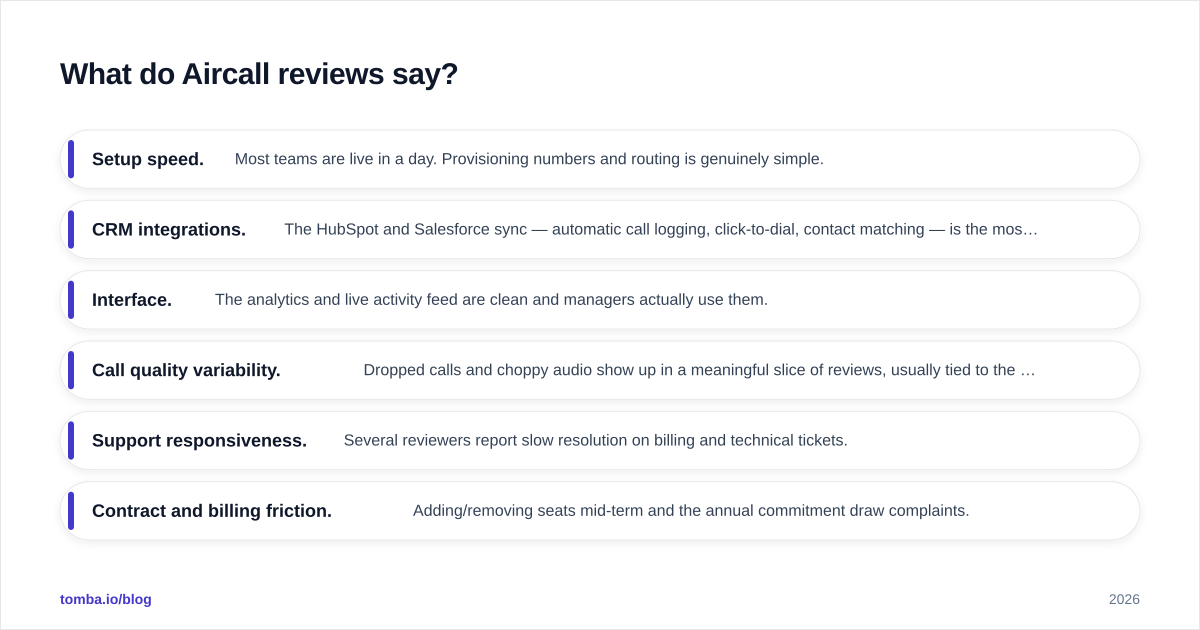
- Setup speed. Most teams are live in a day. Provisioning numbers and routing is genuinely simple.
- CRM integrations. The HubSpot and Salesforce sync — automatic call logging, click-to-dial, contact matching — is the most-cited reason teams stay.
- Interface. The analytics and live activity feed are clean and managers actually use them.
What reviewers criticize:
- Call quality variability. Dropped calls and choppy audio show up in a meaningful slice of reviews, usually tied to the user's own network but frustrating regardless.
- Support responsiveness. Several reviewers report slow resolution on billing and technical tickets.
- Contract and billing friction. Adding/removing seats mid-term and the annual commitment draw complaints.
The pattern is typical of category leaders: the core product works well, and the friction is concentrated in edge cases, support, and the commercial terms rather than the software itself.
What are the pros and cons of Aircall?#
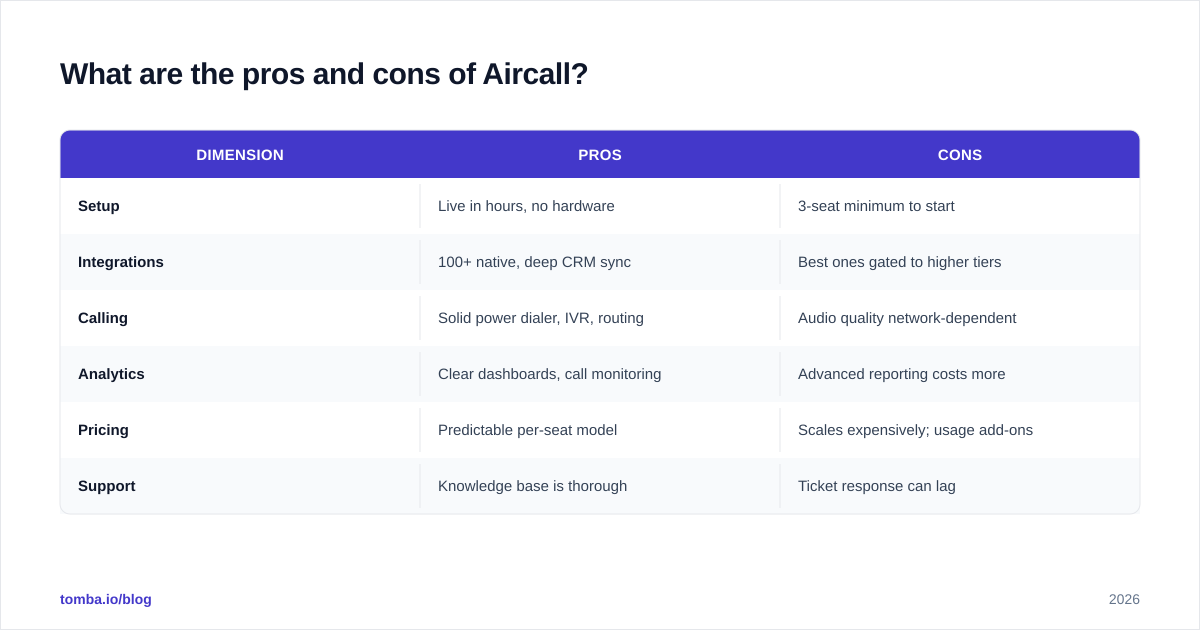
Here's the honest ledger. A tool this widely adopted earns its strengths, but no platform is a clean win for every team.
| Dimension | Pros | Cons |
|---|---|---|
| Setup | Live in hours, no hardware | 3-seat minimum to start |
| Integrations | 100+ native, deep CRM sync | Best ones gated to higher tiers |
| Calling | Solid power dialer, IVR, routing | Audio quality network-dependent |
| Analytics | Clear dashboards, call monitoring | Advanced reporting costs more |
| Pricing | Predictable per-seat model | Scales expensively; usage add-ons |
| Support | Knowledge base is thorough | Ticket response can lag |
The pros, in plain terms#
Aircall's biggest advantage is that it disappears into your existing workflow. When a rep clicks a number in HubSpot and the call logs itself with notes and recording attached, that's hours of admin saved every week. The HubSpot integration and Salesforce connector are the reason most teams pick it over a cheaper generic VoIP line — and why they tolerate the price.
The power dialer on the Professional tier is also legitimately good for outbound volume: queue a list, auto-advance through it, and let reps focus on conversations instead of dialing.
The cons that actually matter#
Two things deserve scrutiny before you sign. First, total cost of ownership — model the international numbers, extra credits, and tier upgrades, not the per-seat headline. Second, the data problem Aircall doesn't solve: a dialer is only as good as the list you feed it. If half your numbers are wrong, your fancy power dialer just burns through bad data faster.

How does Aircall compare to alternatives?#
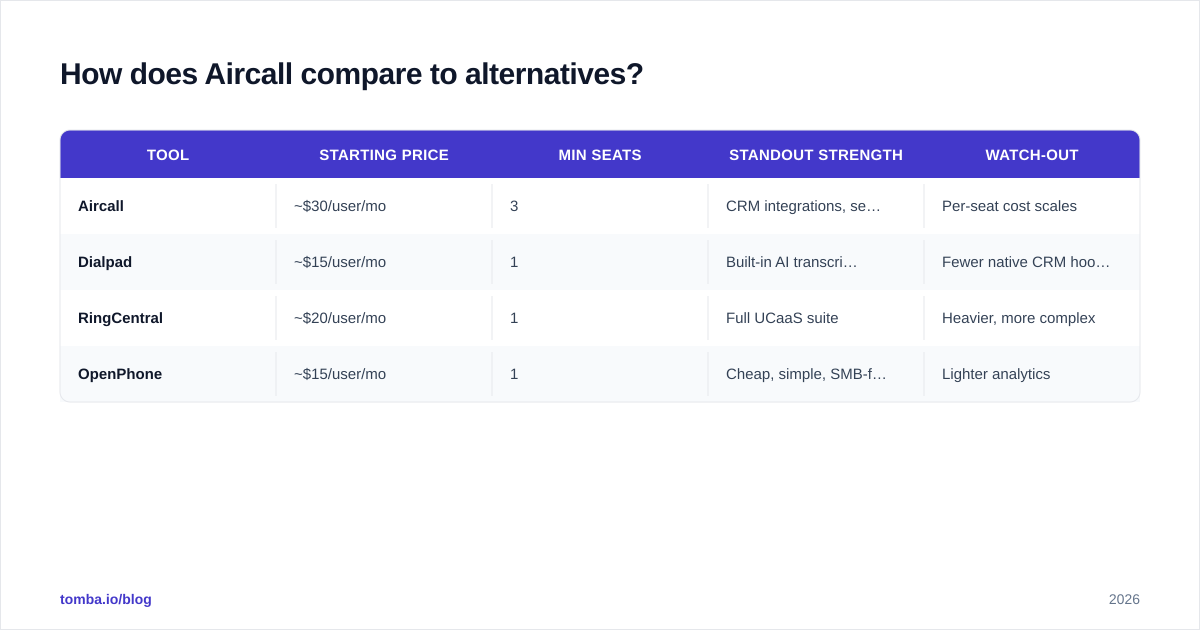
Aircall sits in a crowded field. The closest comparisons depend on what you're optimizing for — CRM-native sales calling, pure VoIP cost, or contact-center depth.
| Tool | Starting price | Min seats | Standout strength | Watch-out |
|---|---|---|---|---|
| Aircall | ~$30/user/mo | 3 | CRM integrations, setup speed | Per-seat cost scales |
| Dialpad | ~$15/user/mo | 1 | Built-in AI transcription | Fewer native CRM hooks |
| RingCentral | ~$20/user/mo | 1 | Full UCaaS suite | Heavier, more complex |
| OpenPhone | ~$15/user/mo | 1 | Cheap, simple, SMB-friendly | Lighter analytics |
If raw price per seat is your driver, Dialpad and OpenPhone undercut Aircall and drop the seat minimum. If you want a complete unified-comms suite (video, messaging, contact center), RingCentral is broader. Aircall's defensible position is the balance: deep enough integrations for serious sales ops, simple enough to deploy without a project manager. For a team already standardized on Salesforce, that native sync is often the deciding factor.
Is Aircall worth it for your team?#
Aircall is worth it if you check three boxes: you run a sales or support team of roughly 5–100 people, you already live inside a CRM, and you value plug-and-play reliability over squeezing the lowest possible per-minute rate. For that buyer, it's a safe, well-supported choice that won't embarrass you in front of the team.
It's not worth it if you're a tiny or bootstrapped team (the 3-seat minimum and annual terms hurt), if you make heavy international call volume on a budget (usage costs add up), or if you need true enterprise contact-center features like advanced workforce management.
The decision usually comes down to one question: do the integration time-savings justify the per-seat premium over a cheaper line? For most CRM-centric sales teams, yes. For everyone else, shop the alternatives above.
What's the one thing Aircall won't fix?#
Your data. This is the gap every dialer review skips. Aircall makes calling efficient, but it assumes you already have correct, current phone numbers to call. In practice, B2B contact data decays fast — people change roles, companies, and numbers constantly — and a power dialer pointed at a stale list just produces more wrong numbers per hour.
That's the half of the stack you own. Before a number ever hits Aircall's dialer, it should be sourced and checked. Use a phone validator to strip out disconnected and invalid lines, and enrich your accounts so reps reach decision-makers instead of voicemail graveyards. The calling tool and the data layer are two different problems — Aircall solves the first, not the second.
Final verdict and next step#
Aircall earns its reputation: easy to deploy, strong CRM integrations, clean analytics, and a capable dialer — at a per-seat price that scales faster than the sticker suggests and with usage add-ons worth modeling carefully. For mid-market sales and support teams, it's a defensible pick. For the budget-constrained or the very small, the alternatives deserve a hard look.
Whichever phone system you land on, fix the data feeding it first. Tomba's phone finder and Tomba Email Finder let you build verified contact lists — direct dials and professional emails sourced from real, checked data — so every call your reps make through Aircall actually connects. Start free with 25 searches a month, then scale on a credit-based plan instead of paying per seat for empty dial tone. Get the contacts right, and any dialer works harder for you.
// get started
Find, verify and enrich your first contacts today
Start on the free plan with 25 searches a month, then scale when your team is ready.
Free plan · No credit card required · GDPR & CCPA
Get the Tomba newsletter
Product and data updates
// about the author