Aircall vs Dialpad 2026: Which Sales Phone System Wins?
Aircall vs Dialpad compared on pricing, AI features, integrations, and call quality for 2026 — a neutral breakdown to help you pick the right sales phone system.
Choosing a cloud phone system for a sales team usually comes down to two names that show up on every shortlist: Aircall and Dialpad. Both replace the old desk-phone-and-spreadsheet workflow with a browser tab, a softphone, and a CRM that logs calls automatically. But they solve the problem from opposite ends — Aircall leads with integrations and call-center workflow, Dialpad leads with native AI and voice intelligence.
This is a neutral, hands-on comparison. No winner is declared in the first paragraph because the honest answer depends on your team size, your CRM, and how much you care about AI transcription. Let's break it down.
TL;DR — Aircall vs Dialpad in 30 seconds#
- Aircall is the better fit if you live inside HubSpot, Salesforce, or Pipedrive and want a polished call-center workflow (IVR, queues, analytics) with 100+ one-click integrations.
- Dialpad wins on built-in AI: real-time transcription, live call coaching, sentiment analysis, and post-call summaries are native, not add-ons.
- Pricing: Dialpad starts cheaper (around $15/user/mo) and folds AI into mid-tier plans; Aircall starts around $30/user/mo with a 3-seat minimum.
- Call quality is comparable; both run on global carrier networks. Dialpad's proprietary backbone edges ahead on large international teams.
- Neither tool finds the phone numbers or emails you call — pair them with a data source like a phone finder to keep the dialer full.
What are Aircall and Dialpad?#
Both are cloud-based business phone systems (VoIP) built for sales and support teams, not just internal chat. Think of them as the difference between a landline and a smartphone: a landline makes calls, but a smartphone records, transcribes, routes, and syncs everything to your other apps automatically. That "everything else" is where these two products compete.
Aircall launched in 2014 and positioned itself as the integration-first phone system. Its core pitch: connect your existing CRM and helpdesk, get a shared number, route calls through IVR menus and ring groups, and see the analytics in a clean dashboard. It's a workflow layer on top of telephony.
Dialpad started the same year but bet early on AI. Its "Dialpad Ai" engine transcribes calls live, surfaces coaching cards mid-conversation, scores sentiment, and writes the call summary for you. Telephony is the foundation; voice intelligence is the headline.
If you're building an outbound motion, the phone system is only half the stack. You still need numbers to dial and contacts to enrich — which is why most teams run a phone system alongside a prospecting data tool. More on that at the end.
How do Aircall and Dialpad compare on pricing?#
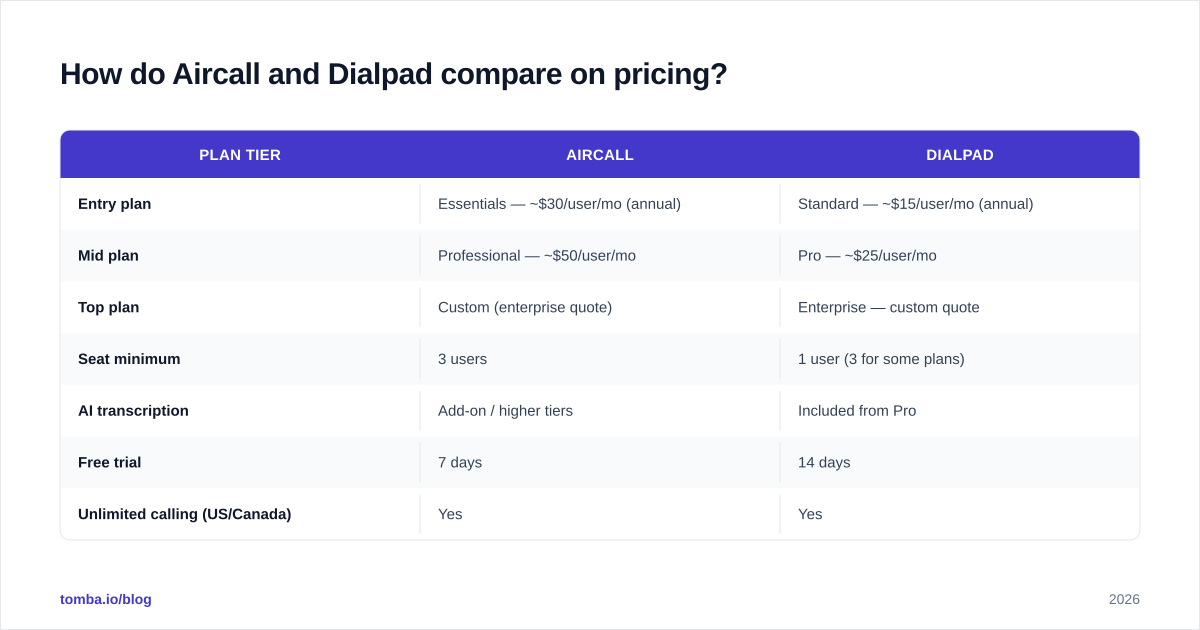
Pricing is where the two diverge most clearly. Dialpad's entry plan is roughly half the cost of Aircall's, and it bundles AI features that Aircall either charges extra for or reserves for higher tiers.
| Plan tier | Aircall | Dialpad |
|---|---|---|
| Entry plan | Essentials — ~$30/user/mo (annual) | Standard — ~$15/user/mo (annual) |
| Mid plan | Professional — ~$50/user/mo | Pro — ~$25/user/mo |
| Top plan | Custom (enterprise quote) | Enterprise — custom quote |
| Seat minimum | 3 users | 1 user (3 for some plans) |
| AI transcription | Add-on / higher tiers | Included from Pro |
| Free trial | 7 days | 14 days |
| Unlimited calling (US/Canada) | Yes | Yes |
A few honest caveats. Aircall's higher price buys deeper call-center tooling — advanced analytics, mandatory call tagging, queue callback, and a more mature integration marketplace. Dialpad's low entry price assumes annual billing; month-to-month is meaningfully higher. Always confirm current numbers on the Aircall pricing page and Dialpad pricing page before you commit, because both vendors reshuffle tiers regularly.
Is Dialpad's AI actually better than Aircall's?#
Yes — for now, and by a clear margin. This is Dialpad's strongest differentiator.
Dialpad Ai transcribes every call in real time, and the transcription quality is good enough to be useful rather than a novelty. During a live call, reps see "AI moments" — coaching prompts triggered by keywords, like surfacing a battle card when a competitor is mentioned. After the call, Dialpad generates a summary, action items, and a sentiment score with no manual effort. For a sales manager coaching ten reps, that's hours saved every week.
Aircall has been catching up with its "AI" add-on — call transcription, summaries, and topic recognition — but it's a newer layer and, in most plans, costs extra. If AI-driven coaching and automatic call notes are central to how you run your team, Dialpad is the safer bet today.
That said, "better AI" doesn't automatically mean "better tool for you." If your reps make 30 calls a day and your managers review recordings manually, you may be paying for intelligence you won't use. Match the feature to the workflow, not the marketing.
How do they compare on integrations and CRM sync?#
Aircall is the integration leader. Its marketplace has 100+ native integrations, and the depth of the major CRM connections is excellent. Calls log automatically, click-to-dial works inside the CRM record, and dispositions sync back without a
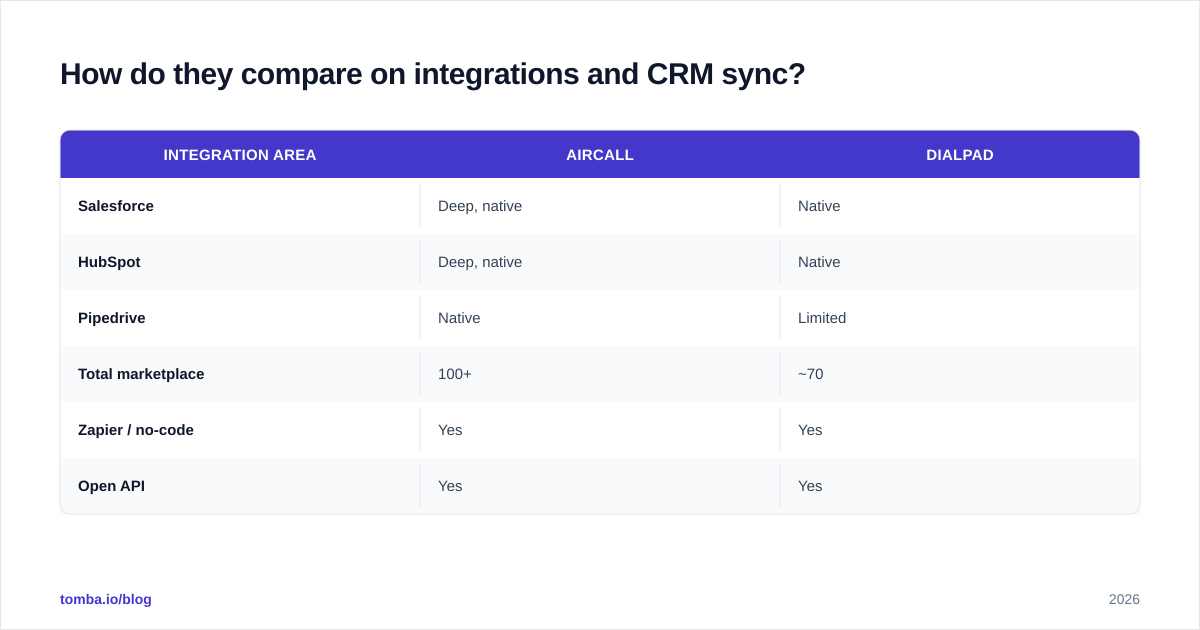
Zapier middle-layer.
Dialpad integrates with the same core platforms — Salesforce, HubSpot, Zoho, Zendesk — but the catalog is smaller and a few connections are shallower. For most sales teams on a mainstream CRM, both are fine. For teams with an unusual stack or many niche tools, Aircall's breadth wins.
| Integration area | Aircall | Dialpad |
|---|---|---|
| Salesforce | Deep, native | Native |
| HubSpot | Deep, native | Native |
| Pipedrive | Native | Limited |
| Total marketplace | 100+ | ~70 |
| Zapier / no-code | Yes | Yes |
| Open API | Yes | Yes |
Whichever you pick, your CRM is only as valuable as the data inside it. A phone system logs the call; it doesn't tell you the contact's direct dial moved, or that the company changed domains. Keeping records fresh is a separate job — many teams use data enrichment to fill gaps the phone system leaves behind. If you run HubSpot, Tomba's HubSpot integration pushes verified contact data straight into the records your dialer reads from.
Which has better call quality and reliability?#
Call quality is close to a tie, with a slight edge to Dialpad on large international deployments. Dialpad runs significant parts of its own voice infrastructure, which gives it tighter control over latency and uptime across regions. Aircall partners with established carriers and delivers consistently solid quality in its core markets.
In practice, both score well on G2 for reliability, and the difference rarely matters for a team calling within one or two countries. If you're dialing across continents daily, run a trial in your actual regions before deciding — published uptime numbers don't capture local routing quirks.
A practical note on numbers: both platforms let you buy local and toll-free numbers in dozens of countries, which matters for connect rates. Buyers answer local caller IDs far more often than unknown international ones.
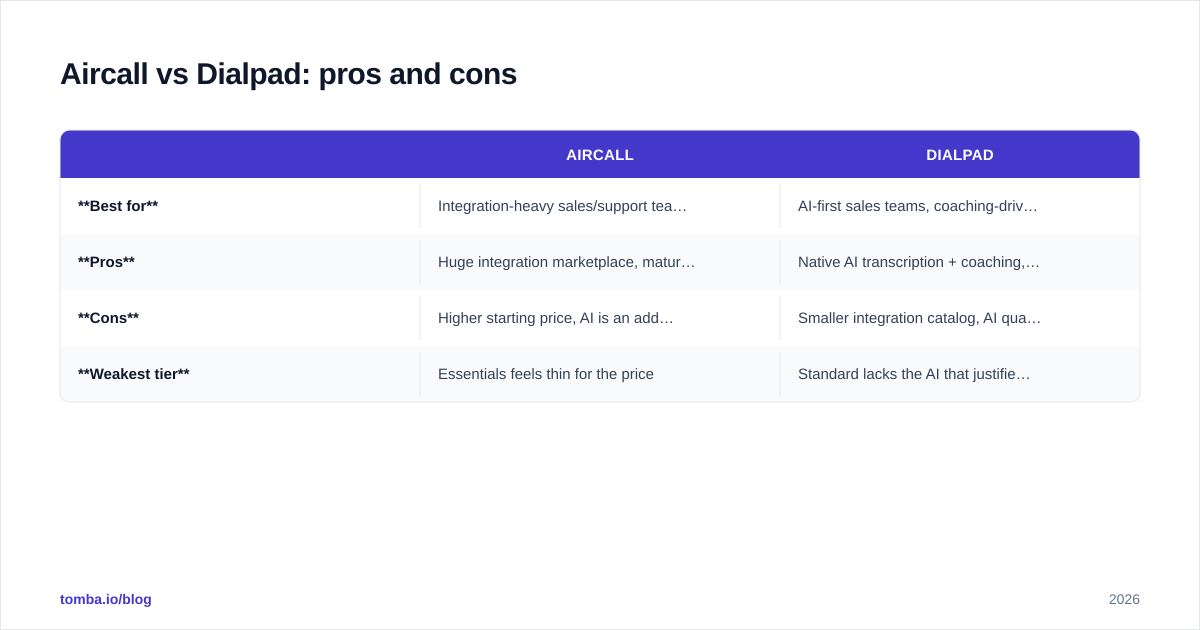
Aircall vs Dialpad: pros and cons#
| Aircall | Dialpad | |
|---|---|---|
| Best for | Integration-heavy sales/support teams | AI-first sales teams, coaching-driven orgs |
| Pros | Huge integration marketplace, mature call-center features, clean analytics | Native AI transcription + coaching, lower entry price, strong UC (chat + video) |
| Cons | Higher starting price, AI is an add-on, 3-seat minimum | Smaller integration catalog, AI quality varies by accent/audio |
| Weakest tier | Essentials feels thin for the price | Standard lacks the AI that justifies Dialpad |
When should you choose Aircall over Dialpad?#
Choose Aircall if any of these describe you:
- Your team runs on Pipedrive, or a less common CRM/helpdesk, and you need deep two-way sync.
- You operate a structured call center — IVR menus, skill-based routing, queue callbacks, mandatory call tagging.
- Analytics and team performance dashboards drive your daily standups.
- You'd rather pay more for a battle-tested workflow than chase the newest AI feature.
Choose Dialpad if:
- AI call notes, live coaching, and sentiment scoring would change how your managers work.
- You want phone, video, and team messaging unified in one app (Dialpad doubles as a UCaaS platform).
- Budget matters and you want AI included without jumping to a top tier.
- You're a smaller or fast-growing team that values speed-to-value over deep configuration.
What neither tool does — and why it matters#
Here's the gap nobody mentions in the sales demo: a phone system is a dialer, not a data source. Aircall and Dialpad will route, record, transcribe, and log your calls beautifully. They will not tell you who to call or what number reaches them.
That's the difference between a great kitchen and a full pantry. A top-tier oven won't cook dinner if the fridge is empty. Your reps can have the slickest softphone on earth and still burn the morning hunting for a decision-maker's direct line.
This is where a prospecting data layer sits beside your phone system. Before a call ever hits the dialer, you need a verified number and ideally an email for follow-up. Tools like a phone validator confirm a number is live before your rep wastes a dial on a dead line, and a company email search pulls the right contacts at a target account so your list is built on real people, not guesses.
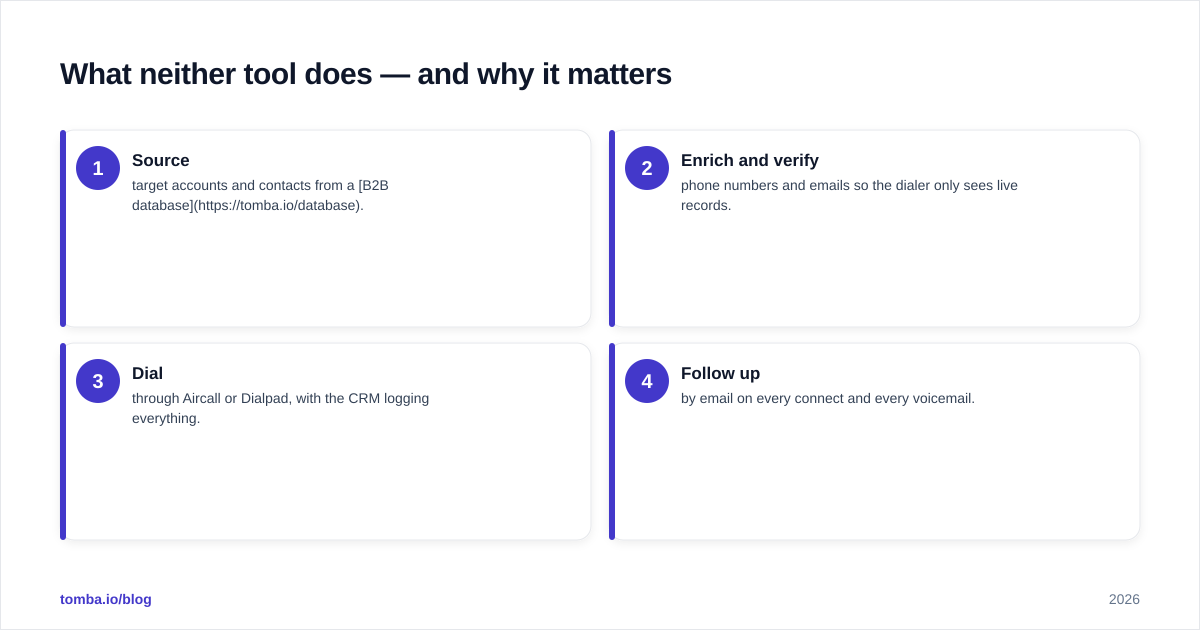
The workflow most efficient outbound teams run looks like this:
- Source target accounts and contacts from a B2B database.
- Enrich and verify phone numbers and emails so the dialer only sees live records.
- Dial through Aircall or Dialpad, with the CRM logging everything.
- Follow up by email on every connect and every voicemail.
Skip step two and you'll feel it: low connect rates, reps demoralized by dead numbers, and a CRM full of "wrong number" dispositions. The phone system gets blamed when the real problem is the data feeding it.
Frequently asked questions#
Is Aircall or Dialpad cheaper? Dialpad is cheaper at entry — roughly $15/user/mo versus Aircall's ~$30/user/mo — and it bundles AI earlier. Aircall costs more but includes deeper call-center tooling.
Does Aircall have AI like Dialpad? Aircall offers an AI add-on with transcription and summaries, but it's newer and usually costs extra. Dialpad's AI is native and more mature.
Can both integrate with Salesforce and HubSpot? Yes. Both have native, deep integrations with Salesforce and HubSpot. Aircall has the larger overall integration marketplace.
Which is better for a call center? Aircall, generally — its IVR, routing, queue, and analytics features are more developed for structured inbound/outbound call-center operations.
Do I still need a separate data tool? Yes. Neither platform sources or verifies contact data. You'll want a dedicated finder/verifier to keep the dialer fed with live numbers and valid emails.
The verdict#
There's no universal winner — and any review that claims one is selling something. Pick Dialpad if AI and unified communication drive your decision and budget is tight. Pick Aircall if integrations, call-center workflow, and mature analytics matter more than the newest AI feature. Most teams will be happy with either; the wrong choice only hurts at the extremes (heavy call-center ops → Aircall; AI-first coaching → Dialpad).
Whatever you choose, the phone system is one layer. The bottleneck for most sales teams isn't the dialer — it's the quality of the list going into it. Tomba's Email Finder and phone finder help you build verified, ready-to-dial prospect lists so your reps spend their time talking to real decision-makers, not chasing dead numbers. Start on the free tier (25 searches/month), then scale up as your outbound motion grows — see full Tomba pricing for details. Fill the pantry first; then the kitchen pays off.
// get started
Find, verify and enrich your first contacts today
Start on the free plan with 25 searches a month, then scale when your team is ready.
Free plan · No credit card required · GDPR & CCPA
// about the author