Aircall vs Grasshopper 2026: Which Business Phone Wins?
Aircall and Grasshopper both put a business phone in your pocket, but they aim at very different teams. Here's the honest 2026 breakdown of features, pricing, and fit.
TL;DR
- Aircall is a cloud call center built for sales and support teams that live inside a CRM — power dialer, analytics, and 100+ integrations, starting at $30/user/mo (3-user minimum).
- Grasshopper is a virtual phone number layered on your existing cell phone — perfect for solopreneurs and tiny teams, flat-rate from $14/mo with no per-seat math.
- If you run outbound calling, route inbound tickets, or need call logging in HubSpot/Salesforce, pick Aircall.
- If you just need a professional business line, extensions, and voicemail without buying hardware or seats, pick Grasshopper.
- Neither tool finds the numbers you dial — you still need a data layer to feed accurate contacts into your dialer.
What is the real difference between Aircall and Grasshopper?#
The short answer: Aircall is a phone system; Grasshopper is a phone number.
Think of it like the difference between leasing a fully staffed call center floor versus forwarding a second line to the phone already in your pocket. Aircall assumes you have a team that makes and receives a high volume of calls and wants every one of them logged, recorded, routed, and measured. Grasshopper assumes you are one person — or a handful of people — who wants to look professional without carrying two phones or buying a desk handset.
That single distinction explains almost every pricing, feature, and integration gap between them. Once you know which camp you are in, the decision is usually obvious.
Who is Aircall built for?#
Aircall (aircall.io) targets revenue and support teams of roughly 3 to 500 seats. It is a VoIP call-center platform: agents log in through a desktop or mobile app, calls route through ring groups and IVR menus, and every interaction syncs to your CRM automatically.
The standout pieces for a sales org:
- Power Dialer that loads a list of numbers and dials them back to back, so reps stop copy-pasting from a spreadsheet.
- Call recording, monitoring, whisper, and barge — managers can listen live and coach mid-call.
- Analytics dashboards for call volume, missed-call rate, time-to-answer, and rep activity.
- 100+ native integrations, including deep two-way sync with Salesforce, HubSpot,
Zendesk, and Pipedrive.
If your reps already work cases inside a CRM, Aircall's HubSpot integration-style automatic logging is the headline benefit. A call ends, the recording and notes attach to the contact record, and nobody has to remember to write it down.
The trade-off is that Aircall is priced and structured for teams. There is a three-seat minimum, and the cost scales per user. For a single founder, that is overkill.
Who is Grasshopper built for?#
Grasshopper (grasshopper.com) is the opposite philosophy. It is a virtual phone service for solopreneurs, freelancers, and small businesses that want a dedicated business line without changing how they already make calls.
You pick a local, toll-free, or vanity number, set up extensions ("press 1 for sales"), and calls forward to the personal phones you and your team already own. There is no separate hardware, no agent seats to provision, and no CRM to configure.
What Grasshopper does well:
- Flat-rate pricing that does not climb with headcount — one plan covers a set number of users and numbers.
- Business texting, voicemail transcription, and custom greetings out of the box.
- A second line on your cell phone so personal and business calls stay separated.
- Dead-simple setup — you can be live in under an hour with no IT help.
What Grasshopper is not: it is not a call center. There is no power dialer, no live call monitoring, no advanced routing, and no native CRM logging. It moves calls to your phone and stops there. For a 12-person SDR team, that ceiling gets hit fast.
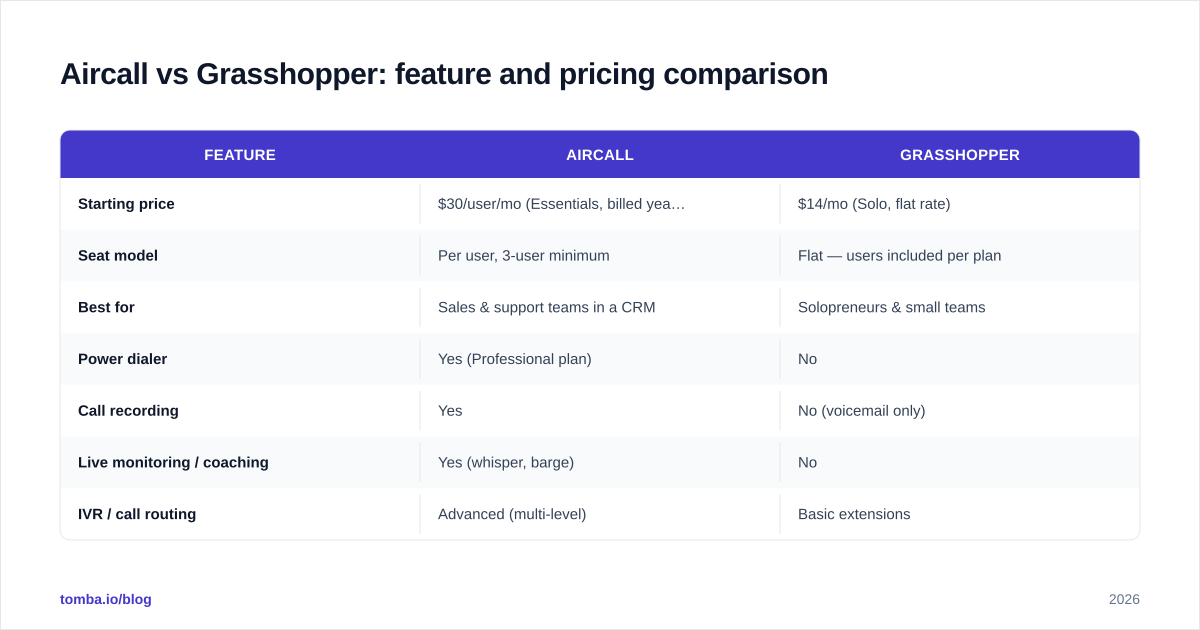
Aircall vs Grasshopper: feature and pricing comparison#
Here is the side-by-side. Prices reflect publicly listed 2026 plans; always confirm current rates on each vendor's pricing page, since both run promotions.
| Feature | Aircall | Grasshopper |
|---|---|---|
| Starting price | $30/user/mo (Essentials, billed yearly) | $14/mo (Solo, flat rate) |
| Seat model | Per user, 3-user minimum | Flat — users included per plan |
| Best for | Sales & support teams in a CRM | Solopreneurs & small teams |
| Power dialer | Yes (Professional plan) | No |
| Call recording | Yes | No (voicemail only) |
| Live monitoring / coaching | Yes (whisper, barge) | No |
| IVR / call routing | Advanced (multi-level) | Basic extensions |
| CRM integrations | 100+ native (Salesforce, HubSpot, etc.) | None native |
| Business texting | Yes | Yes |
| Analytics dashboards | Yes, detailed | Minimal |
| Setup complexity | Moderate (team config) | Very low |
| Mobile + desktop apps | Both | Both |
The pattern is consistent: Aircall costs more and does far more; Grasshopper costs less and stays deliberately simple.
Is Aircall better than Grasshopper for sales teams?#
Yes — for an actual sales team, Aircall wins clearly, and it is not particularly close.
Outbound sales lives and dies on activity volume and call data. Aircall's power dialer alone can lift connect rates meaningfully because reps spend their time talking instead of dialing. Layer on call recording for coaching, real-time dashboards for the manager, and automatic CRM logging, and you have a system that compounds. According to peer reviews on G2, teams most often cite the CRM integrations and analytics as the reason they switch to it.
Grasshopper has none of that machinery. It will route a call to a rep's cell, and that rep will then manually log the outcome somewhere — if they remember. For one person handling occasional inbound calls, that is fine. For a team measured on dials, talk time, and pipeline, the missing data layer is disqualifying.
There is one honest caveat: Aircall's per-seat pricing and three-seat floor mean a true solo operator pays for capacity they will never use. "Better for sales teams" is not the same as "better for everyone."
Is Grasshopper better than Aircall for small businesses?#
For a genuine micro-business — a consultant, a two-person agency, a contractor who just needs calls to stop going to a personal voicemail — Grasshopper is usually the smarter buy.
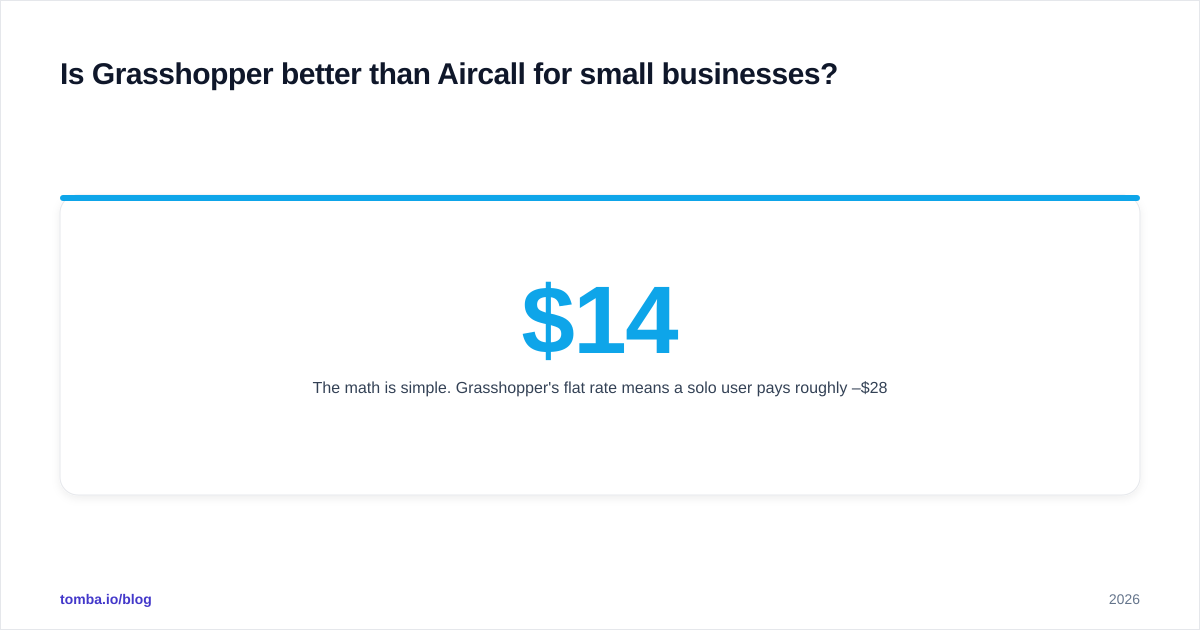
The math is simple. Grasshopper's flat rate means a solo user pays roughly $14–$28/mo total. The equivalent Aircall setup forces you into three seats at $30 each, so you are looking at $90/mo minimum for features you will not touch. You are paying for a call center to answer a phone that rings twice a day.
Grasshopper also wins on speed-to-value. There is no routing logic to design, no CRM to wire up, no agent onboarding. Pick a number, record a greeting, and you are done. That simplicity is the entire product, and it is genuinely good at it.
The moment you outgrow it — when you hire your third rep, start running outbound campaigns, or need call data in your CRM — that simplicity becomes a ceiling. Many businesses start on Grasshopper and migrate to Aircall (or a similar platform) at exactly that inflection point. That is a healthy progression, not a mistake.
How do Aircall and Grasshopper handle integrations and data?#
This is where the gap is widest, and where it matters most for revenue teams.
Aircall maintains a large marketplace of native integrations and an open API. Beyond CRMs, it connects to helpdesks, e-commerce platforms, and automation tools, so a call can trigger a workflow — create a ticket, update a deal stage, fire a Slack alert. If you already run Salesforce or HubSpot, the two-way sync is the feature that pays for itself.
Grasshopper, by design, is mostly self-contained. It moves calls and texts; it does not pretend to be a system of record. There is no native CRM logging and no analytics worth building a process around.
But here is the part both tools quietly assume and neither solves: the quality of the phone numbers you load into them. A power dialer is only as good as the list it dials. If 30% of your numbers are wrong, disconnected, or belong to the wrong person, you are burning rep hours regardless of how slick the dialer is.
That is a data problem, not a phone-system problem. Before a number ever reaches Aircall's dialer, it should be sourced and verified. A phone finder pulls direct-dial and mobile numbers for your target contacts, a phone validator confirms a line is active before you waste a dial, and contact data enrichment fills in the title, company, and email so reps know who they are calling. Feed clean data in, and either phone tool performs dramatically better.
What should you choose in 2026?#
Here is the decision in plain terms:
- Choose Aircall if you have three or more people making or taking calls, you run outbound, you want call recording and coaching, and you need every call logged in your CRM. The per-seat cost buys you a measurable, coachable calling operation.
- Choose Grasshopper if you are a solo founder or a small team that wants a professional business line, extensions, and texting on the phones you already carry — without seats, hardware, or setup overhead.
- Choose neither yet if your contact data is a mess. The most expensive dialer on the market cannot fix a list full of dead numbers. Sort the data first.
A useful rule of thumb: if you can describe your need as "I want my calls to be smarter," buy Aircall. If you can describe it as "I want a business number," buy Grasshopper. The two products rarely compete for the same buyer once you frame it that way.
Both vendors offer trials, so the cheapest way to be sure is to run a week of real calls on each and watch where the friction shows up — for teams it shows up as missing data and manual logging, and for solos it shows up as paying for seats nobody uses.
The contact data behind every call#
Whichever phone system wins your evaluation, it is the last mile of your outbound motion — not the first. The first mile is knowing exactly who to call and reaching them at a verified address.
That is what Tomba is built for. Use the Tomba Email Finder to pull accurate, verified email addresses for the decision-makers you are targeting, then pair them with B2B phone numbers so your reps dial real people instead of dead ends. Tomba's pricing starts free with 25 searches a month, scales to $49/mo (Starter) and $99/mo (Growth), and plugs into the same CRMs Aircall syncs with — so your contact data, email, and calls all line up in one record. Get the data right, and Aircall or Grasshopper becomes the easy part.
// get started
Find, verify and enrich your first contacts today
Start on the free plan with 25 searches a month, then scale when your team is ready.
Free plan · No credit card required · GDPR & CCPA
// about the author