Airscale vs Clay (2026): Best Lead Gen Automation Tool?
Airscale and Clay both promise hands-off list building and enrichment — but they solve different problems. Here's an honest 2026 breakdown of pricing, data, and fit.
You opened two tabs — one for Airscale, one for Clay — and both pages promise the same dream: pour in a target audience, get back enriched, ready-to-email contacts, no spreadsheets harmed. The pricing pages don't make the choice easier, and neither do the gushing LinkedIn testimonials. This post cuts through it.
TL;DR
- Clay is a data orchestration platform: a spreadsheet-shaped canvas that chains 100+ data providers, waterfalls, and AI prompts. Most powerful, steepest learning curve, credit costs add up fast.
- Airscale is a lighter LinkedIn-first list builder + enrichment tool aimed at agencies and lean outbound teams who want results without building workflows from scratch.
- Pick Clay if you have a RevOps-minded operator and complex, multi-source enrichment needs. Pick Airscale if you want LinkedIn-sourced lists enriched and pushed to your sequencer with minimal setup.
- Neither is a dedicated email-finder — both rent data from third parties. Pairing either with a primary email finder and email verifier is how you keep bounce rates low.
- Budget reality: Clay's usable plans start around $149/mo and scale steeply; Airscale sits lower for list-building but caps depth.
What are Airscale and Clay?#
Think of the two tools like kitchens. Clay is a fully equipped professional kitchen — every appliance, every ingredient supplier on speed dial, infinite recipes. You can cook anything, but you need to know how to cook. Airscale is a meal-kit service: fewer choices, but the prep is done and dinner is on the table faster.
Clay (clay.com) is a data orchestration and enrichment platform. You start with a table, import or scrape a list of companies or people, then add "enrichment columns" that call external providers — email finders, firmographic databases, LinkedIn scrapers, AI research agents. Its signature feature is the waterfall: try provider A for an email, fall back to B, then C, paying only for the first hit. It then syncs to your CRM or cold-email tool.
Airscale (airscale.io) is a LinkedIn-centric prospecting and enrichment tool. Its core loop is: pull leads from LinkedIn (including Sales Navigator searches) or other sources, enrich them with verified emails and data points, and export them — often straight into a cold-email platform. It leans toward speed and simplicity for agencies running volume outbound.
The key distinction: Clay is a horizontal platform you bend to almost any data task. Airscale is a vertical workflow purpose-built for "LinkedIn list → enriched contacts → outbound."
How do Airscale and Clay compare on features?#
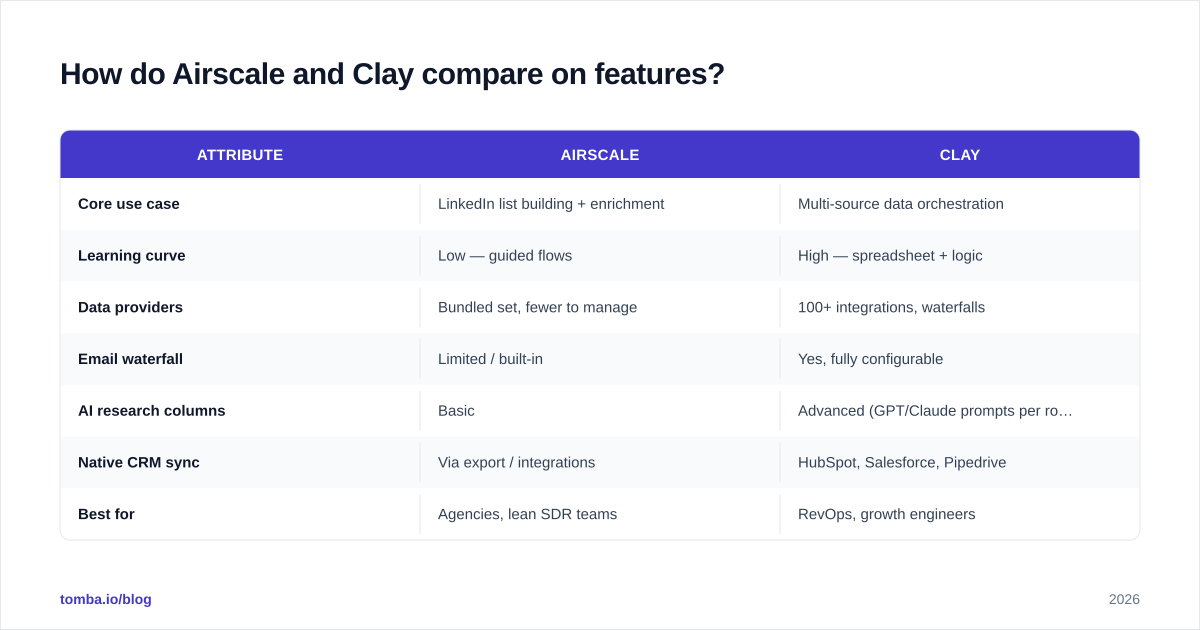
Here's the honest side-by-side. Treat exact numbers as directional — both vendors revise plans frequently, so confirm on their pricing pages before you buy.
| Attribute | Airscale | Clay |
|---|---|---|
| Core use case | LinkedIn list building + enrichment | Multi-source data orchestration |
| Learning curve | Low — guided flows | High — spreadsheet + logic |
| Data providers | Bundled set, fewer to manage | 100+ integrations, waterfalls |
| Email waterfall | Limited / built-in | Yes, fully configurable |
| AI research columns | Basic | Advanced (GPT/Claude prompts per row) |
| Native CRM sync | Via export / integrations | HubSpot, Salesforce, Pipedrive |
| Best for | Agencies, lean SDR teams | RevOps, growth engineers |
| Entry price (usable) | Lower | ~$149/mo and up |
| Credit model | Simpler | Multi-credit, can spike |
| Free trial | Yes | Free plan + paid trials |
The pattern: Airscale wins on time-to-value, Clay wins on ceiling. If your enrichment need is "verified work email + title + company size for a LinkedIn list," Airscale gets you there in an afternoon. If your need is "score every lead with a custom AI prompt, waterfall across six providers, then branch on the result," that's Clay's home turf.
)
Which tool has better data accuracy?#
Neither tool owns its data — and that matters more than the marketing implies.
Both Airscale and Clay are aggregators. They call third-party providers (and in Clay's case, dozens of them) to find and verify emails. That means accuracy depends on (a) which providers are in the stack and (b) how aggressively the tool verifies before handing you the address. Clay's waterfall is genuinely strong here because it tries multiple sources and can route results through a verification step. Airscale bundles its own provider set, which is simpler but gives you less control over which source "won."
The trap with both: a found email is not a verified email. If you blast a list that was found but not re-verified, you'll feel it in your bounce rate and, eventually, your sender reputation. The fix is to run any list — regardless of source — through dedicated verification before it touches your sequencer.
This is exactly why many teams keep a primary email-finding and verification layer outside their orchestration tool. Running enriched contacts through bulk email verification catches the catch-all addresses and stale mailboxes that aggregators happily return. For catch-all domains specifically — common in enterprise targets — a dedicated catch-all verifier saves you from guessing.
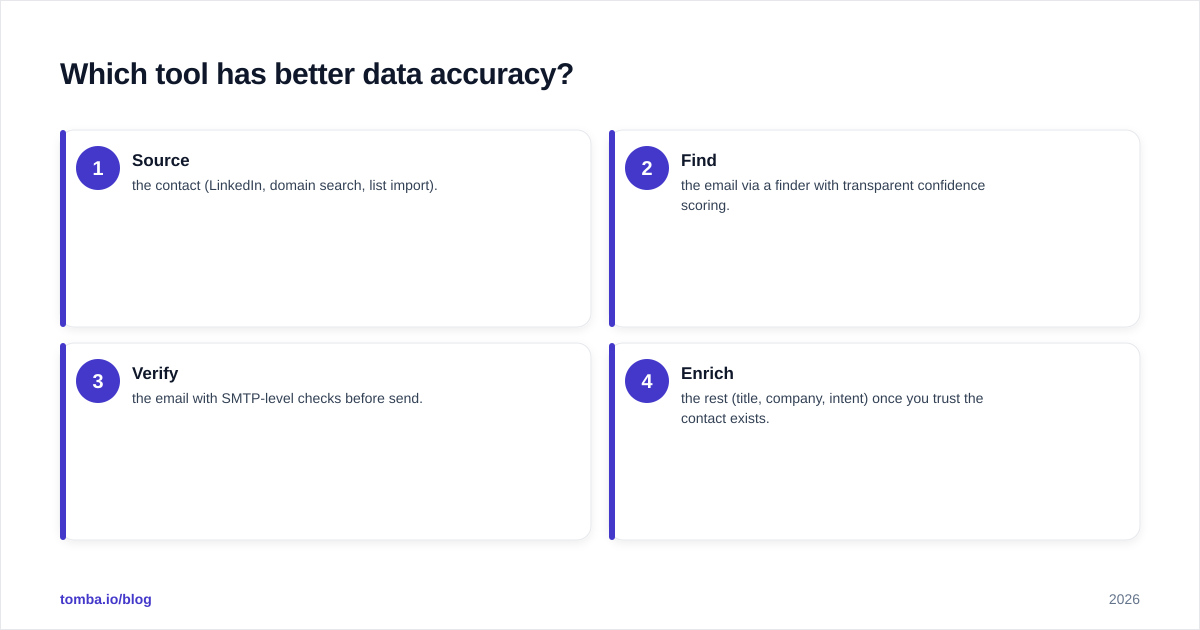
A practical accuracy hierarchy, regardless of which tool you choose:
- Source the contact (LinkedIn, domain search, list import).
- Find the email via a finder with transparent confidence scoring.
- Verify the email with SMTP-level checks before send.
- Enrich the rest (title, company, intent) once you trust the contact exists.
Skip step 3 and the other three are wasted.
Is Clay better than Airscale for complex workflows?#
Yes — and it's not close. But "better" assumes you need complexity.
Clay's strength is composability. Each row in a Clay table can trigger a chain: scrape the company's careers page, detect their tech stack, run an AI prompt that writes a personalized first line, then waterfall an email and verify it. You can branch logic, dedupe, and conditionally enrich only rows that meet criteria. For a growth engineer, it's a sandbox. People build entire signal-based outbound systems inside Clay alone.
That power has three costs:
- Time. A non-technical SDR will not be productive in Clay on day one. Expect a real ramp — templates help, but custom workflows take hands-on building.
- Credits. Every enrichment column consumes credits, and waterfalls multiply spend across providers. A 10,000-row table with five enrichment columns can burn through a plan quickly. Model your cost per enriched lead before you scale.
- Maintenance. Complex tables break when a provider changes, a scrape fails, or a column errors mid-run. Someone has to own that.
Airscale deliberately avoids this surface area. You're not building a data pipeline; you're running a proven prospecting flow. For an agency spinning up campaigns for ten clients a month, "boring and repeatable" beats "infinitely flexible" most days.
)
What about pricing and value?#
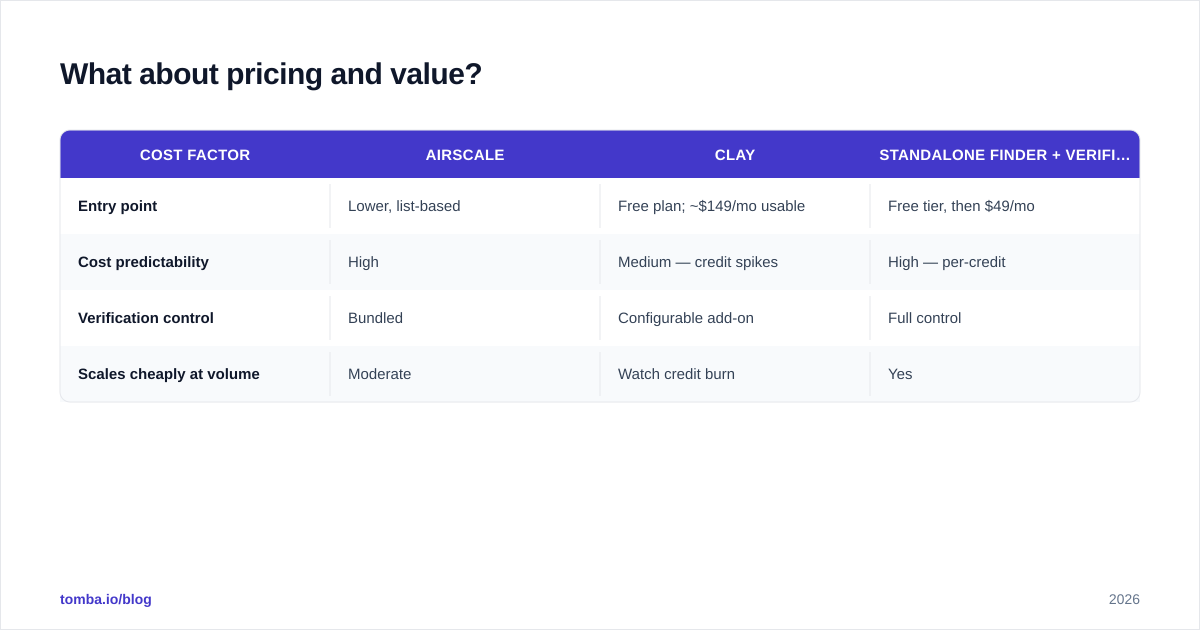
Pricing is where the "which is cheaper" question falls apart — because they're priced for different jobs.
Airscale prices around list volume and enrichment, sitting in the affordable-for-agencies range and easy to predict month to month. Clay has a free plan to learn on, but the plans with enough credits and provider access to run real campaigns start higher (commonly cited around $149/mo for Starter and climbing through Explorer and Pro tiers), with credit overages on top.
The hidden-cost lesson: a tool that "includes" email finding and verification in its credits isn't free — you're paying provider markup baked into the credit price. Running your own finder and verifier on a transparent plan is frequently cheaper at volume and gives you a consistent accuracy baseline across every tool you use.
For reference, a standalone finding-and-verification layer like Tomba's pricing starts with a free tier (25 searches/mo), then Starter at $49/mo, Growth at $99/mo, and Pro at $249/mo — predictable per-credit costs you can model against your list sizes instead of guessing at multi-provider waterfall spend.
| Cost factor | Airscale | Clay | Standalone finder + verifier |
|---|---|---|---|
| Entry point | Lower, list-based | Free plan; ~$149/mo usable | Free tier, then $49/mo |
| Cost predictability | High | Medium — credit spikes | High — per-credit |
| Verification control | Bundled | Configurable add-on | Full control |
| Scales cheaply at volume | Moderate | Watch credit burn | Yes |
The smart-money setup for many teams is a hybrid: use Clay or Airscale for orchestration and sourcing, but route the actual email find-and-verify through a dedicated provider so your cost per valid lead stays flat and visible.
Who should choose Airscale?#
Choose Airscale if you recognize yourself here:
- You're an agency or lean outbound team running repeatable LinkedIn-sourced campaigns and you value speed over flexibility.
- You don't have a dedicated RevOps/growth-engineer to build and babysit workflows.
- Your enrichment needs are standard — verified email, title, company, headcount — not custom AI research per row.
- Predictable monthly cost matters more than infinite extensibility.
Airscale's bet is that most outbound doesn't need a data platform; it needs good lists, enriched and exported, fast. For a large slice of B2B teams, that bet is correct.
Who should choose Clay?#
Choose Clay if:
- You have a technical operator who enjoys building systems and will own the workflows.
- Your outbound is signal-based — you trigger on hiring, funding, tech-stack changes, or other intent data and need to orchestrate multiple sources.
- Personalization at scale is your edge, and you want AI columns writing research-backed first lines per lead.
- You're consolidating several point tools into one canvas and can absorb the credit costs.
Clay rewards investment. Teams that commit to learning it build outbound machines that competitors can't easily copy. Teams that dabble pay for power they never use.
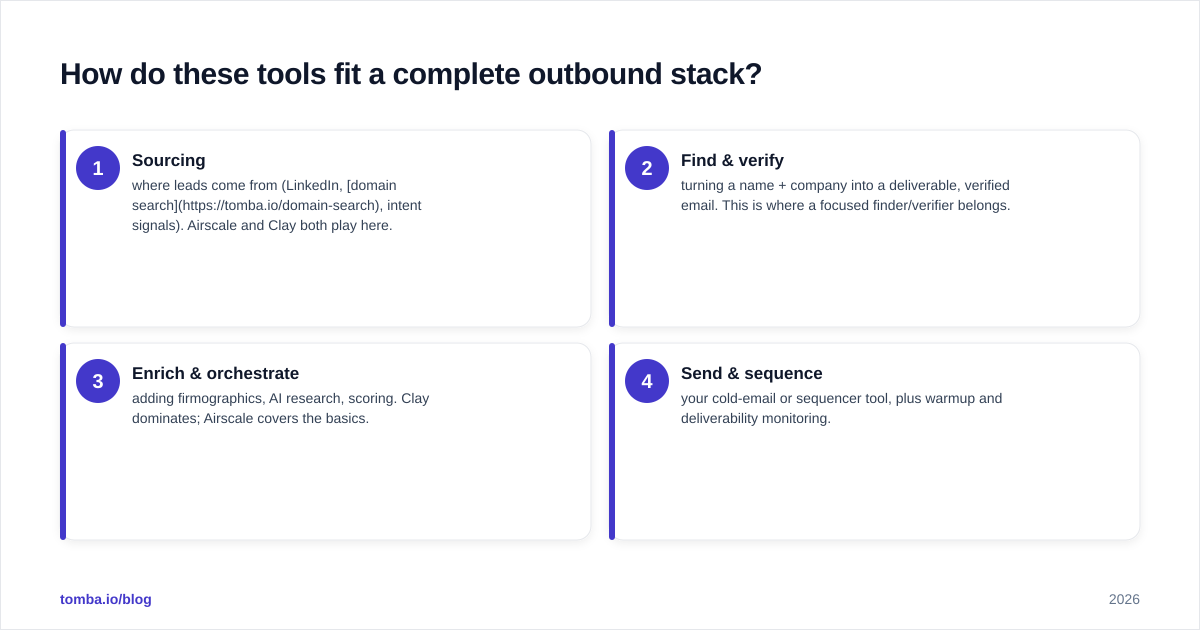
How do these tools fit a complete outbound stack?#
Neither tool is your whole stack — and treating either as "the one tool" is the most common mistake.
A healthy 2026 outbound stack usually has four layers:
- Sourcing — where leads come from (LinkedIn, domain search, intent signals). Airscale and Clay both play here.
- Find & verify — turning a name + company into a deliverable, verified email. This is where a focused finder/verifier belongs.
- Enrich & orchestrate — adding firmographics, AI research, scoring. Clay dominates; Airscale covers the basics.
- Send & sequence — your cold-email or sequencer tool, plus warmup and deliverability monitoring.
Notice that layer 2 is its own discipline. Whether you run Clay or Airscale, plugging a dedicated finder and verifier into the pipeline — via Tomba's API or native integrations — keeps your deliverability stable no matter which orchestration tool you switch to next year. Tools come and go; a clean, verified contact layer is the part you don't want to rebuild every time.
For deliverability itself, validate your sending setup independently of either platform — check your SPF record and monitor bounce rates. Aggregators won't protect your domain reputation for you.
Airscale vs Clay: the verdict#
There's no universal winner — there's a winner for your situation.
- Most agencies and lean teams will get more value, faster, from Airscale. Lower cost, gentler curve, results this week.
- Teams with a technical operator and signal-based outbound should invest in Clay. The ceiling is unmatched, and the systems you build become a moat.
- Everyone should keep email finding and verification as a controlled, transparent layer rather than trusting bundled credits blindly.
Compare them honestly against your team's skill, your campaign complexity, and your tolerance for credit-cost variance. Don't buy the tool with the best demo; buy the one your team will actually operate on a Tuesday.
You can also read independent user reviews on G2 to sanity-check vendor claims against real operator feedback before committing.
Get the contact layer right first#
Before you commit to Airscale, Clay, or any orchestration platform, lock down the part that determines whether your emails land at all: finding and verifying real addresses. Tomba's Email Finder turns a name and company domain into a verified, confidence-scored email — and pairs with the email verifier and data enrichment so every lead your stack sources is deliverable before it hits a sequence. Start free with 25 searches a month, then scale on transparent per-credit pricing that won't spike on you mid-campaign. Build your outbound on a contact layer you control, and let Airscale or Clay handle the orchestration on top.
Ready to find emails that actually work?
Join 150,000+ professionals who stopped guessing and started sending. Free credits on signup — no credit card required.
Get the Tomba newsletter
Practical outbound tactics and product updates — once every two weeks.
About the author