amoCRM Pricing, Reviews, Pros and Cons: The 2026 Guide
A neutral, numbers-first look at amoCRM (now Kommo): real pricing tiers, what reviewers actually say, the honest pros and cons, and who should pick a different CRM in 2026.
TL;DR
- amoCRM rebranded to Kommo in 2022, but the product and pricing model are the same: three per-user, annually-billed tiers — Base $15, Advanced $25, Enterprise $45 per user/month.
- It is a messenger-first sales CRM: WhatsApp, Instagram, Telegram, and Facebook DMs land in a unified inbox with pipeline automation. That is its biggest strength.
- Reviewers love the visual pipeline and chat integrations; they complain about support, the learning curve, and weak native reporting.
- It is a strong fit for SMB and conversational sales teams in EMEA, LATAM, and APAC. It is a weaker fit if you need deep marketing automation or enterprise analytics.
- Whatever CRM you pick, it is only as good as the contact data you feed it. Pair it with a dedicated email finder and data enrichment so reps are not chasing dead inboxes.
What is amoCRM (now Kommo)?#
amoCRM is a cloud-based sales CRM built around one idea: most deals now start in a chat window, not a phone call. Instead of forcing reps to copy messages into a CRM after the fact, it pulls WhatsApp, Instagram, Telegram, Facebook Messenger, and live chat into a single lead card tied to your pipeline.
If you searched for "amoCRM" and landed on a site called Kommo, you are not lost. The company rebranded from amoCRM to Kommo in 2022. The interface, the pricing, the API, and the philosophy are unchanged — only the name moved. Throughout this guide "amoCRM" and "Kommo" refer to the same product. You can confirm this on the official Kommo site.
The core building blocks are familiar to anyone who has used a CRM: leads, a drag-and-drop pipeline, tasks, a unified inbox, and a no-code automation builder called Salesbot. What sets it apart is how tightly the messaging channels are stitched into that pipeline.
How much does amoCRM pricing cost in 2026?#
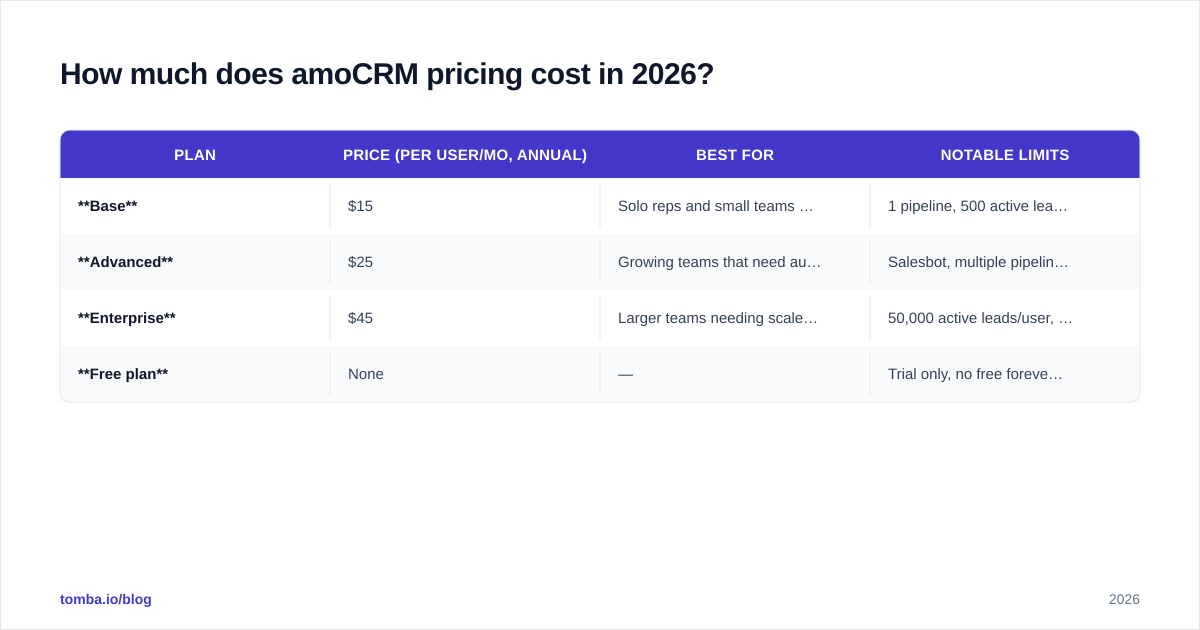
amoCRM/Kommo keeps pricing simple — three tiers, billed per user, per month, on an annual contract. There is no permanently free plan, only a free trial (typically 14 days).
| Plan | Price (per user/mo, annual) | Best for | Notable limits |
|---|---|---|---|
| Base | $15 | Solo reps and small teams starting out | 1 pipeline, 500 active leads/user, basic automation |
| Advanced | $25 | Growing teams that need automation | Salesbot, multiple pipelines, advanced fields |
| Enterprise | $45 | Larger teams needing scale + retention | 50,000 active leads/user, lead scoring, 24-month data retention |
| Free plan | None | — | Trial only, no free forever tier |
A few things buyers miss until the invoice arrives:
- Annual billing is the headline price. Monthly billing, where offered, costs more per seat. Budget for the yearly commitment.
- It is priced per user. A 10-rep team on Advanced is roughly $250/month ($3,000/year), not $25.
- Active-lead caps matter. Base caps active leads per user; high-volume inbound teams hit that ceiling faster than they expect and get nudged toward Enterprise.
- Add-ons and integrations from the marketplace can carry their own fees.
Compared with HubSpot or Salesforce, amoCRM is inexpensive at the entry point. The trade-off is that the cheapest tier is genuinely basic — you will likely need Advanced to get the automation that makes the product worth using.
What do amoCRM reviews actually say?#
Aggregate scores are solid but not spotless. Across G2 and Capterra, amoCRM/Kommo typically sits in the 4.2–4.6 out of 5 range over thousands of reviews. The themes are remarkably consistent.
What reviewers praise:
- The messenger inbox. This is the single most-praised feature. Teams running sales through WhatsApp and Instagram describe it as a category of one.
- Visual pipeline. The drag-and-drop board is intuitive; new reps get productive fast.
- Salesbot automation. No-code chat automation that genuinely reduces manual follow-up.
- Price-to-value at the low end. Cheaper than the enterprise incumbents for small teams.
What reviewers criticize:
- Support quality. The most common complaint — slow responses and reliance on partners for serious help.
- Learning curve. "Easy to start, hard to master." Salesbot and the automation logic take time.
- Reporting depth. Native analytics are thinner than HubSpot or Pipedrive; power users export to BI tools.
- Occasional sync hiccups with third-party messaging APIs, which are partly outside Kommo's control.
The honest read: reviews skew positive specifically among conversational-sales teams. Outside that use case, satisfaction drops because people are comparing it to general-purpose CRMs it was never designed to beat.
What are the pros and cons of amoCRM?#
Here is the balanced ledger — the reason this section exists in a search for amoCRM pricing reviews pros and cons.
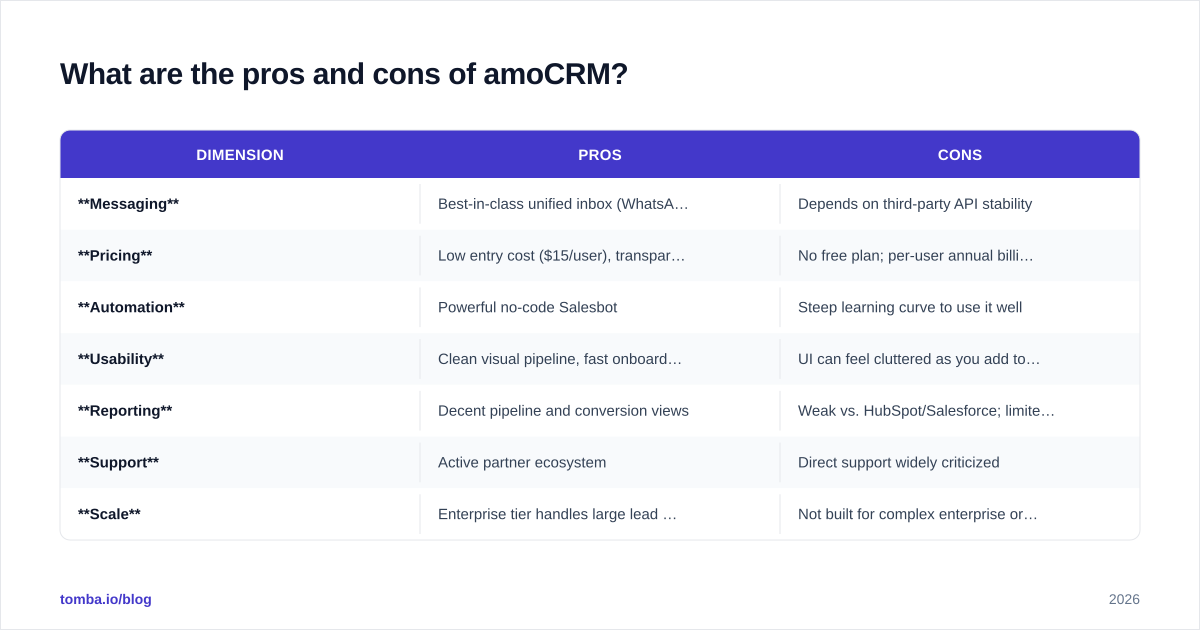
| Dimension | Pros | Cons |
|---|---|---|
| Messaging | Best-in-class unified inbox (WhatsApp, IG, Telegram, FB) | Depends on third-party API stability |
| Pricing | Low entry cost ($15/user), transparent tiers | No free plan; per-user annual billing adds up |
| Automation | Powerful no-code Salesbot | Steep learning curve to use it well |
| Usability | Clean visual pipeline, fast onboarding | UI can feel cluttered as you add tools |
| Reporting | Decent pipeline and conversion views | Weak vs. HubSpot/Salesforce; limited custom dashboards |
| Support | Active partner ecosystem | Direct support widely criticized |
| Scale | Enterprise tier handles large lead volumes | Not built for complex enterprise org structures |
Who amoCRM is a great fit for#
- SMBs and startups selling through chat and social DMs.
- Teams in EMEA, LATAM, and APAC where WhatsApp is the default business channel.
- Agencies and service businesses that want a pipeline + inbox in one tool.
Who should look elsewhere#
- Teams needing deep marketing automation (email nurture, landing pages, scoring at scale).
- Enterprises with complex reporting and forecasting requirements.
- Companies wanting a large native US app marketplace and US-centric support hours.
How do you evaluate amoCRM against alternatives?#
Do not pick a CRM from a feature checklist alone. Weight the criteria against how your team actually sells. The framework below scores any CRM — amoCRM included — on the dimensions that move revenue, not the ones that look good in a demo.
Run each candidate through five questions:
- Channel fit — Where do your deals actually start? If 70% begin in WhatsApp or Instagram, amoCRM wins before the demo. If they start with cold email, a different tool may serve you better.
- Data quality — A CRM stores contacts; it does not find or clean them. You still need a way to source and verify email addresses and keep records fresh.
- Automation depth — Can a non-technical rep build the workflows you need? Salesbot is strong but not instant.
- Reporting — Will leadership get the dashboards they want natively, or will you be exporting to a BI tool?
- Total cost — Multiply per-user pricing by real headcount across a year, then add integrations and onboarding time.
amoCRM vs. common alternatives#
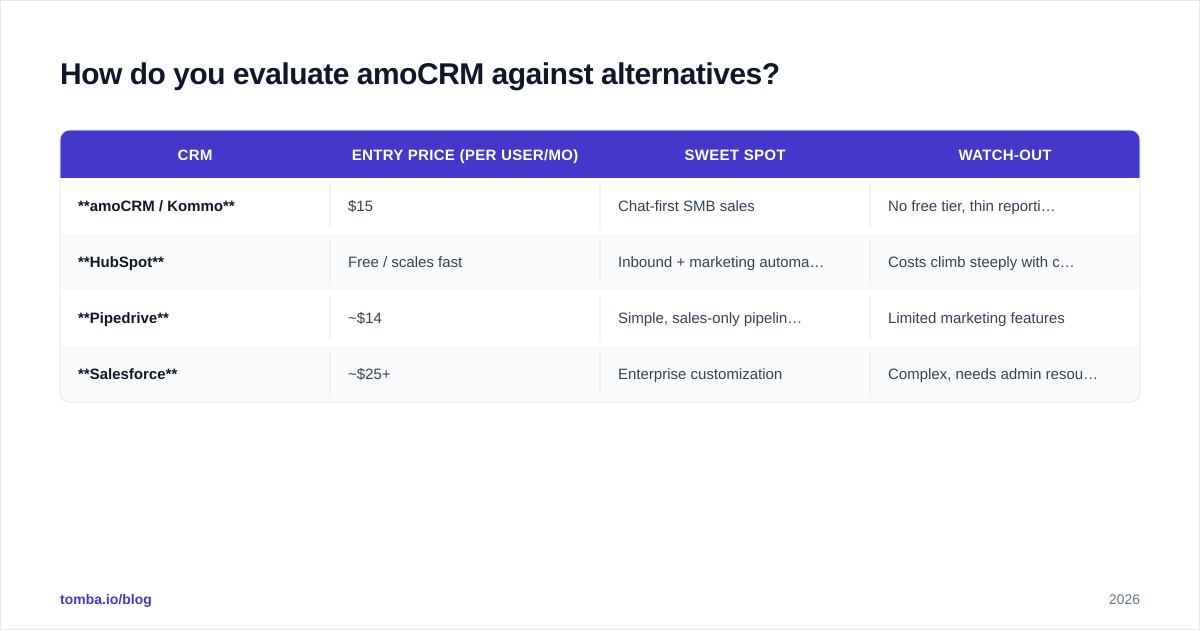
| CRM | Entry price (per user/mo) | Sweet spot | Watch-out |
|---|---|---|---|
| amoCRM / Kommo | $15 | Chat-first SMB sales | No free tier, thin reporting |
| HubSpot | Free / scales fast | Inbound + marketing automation | Costs climb steeply with contacts |
| Pipedrive | ~$14 | Simple, sales-only pipelines | Limited marketing features |
| Salesforce | ~$25+ | Enterprise customization | Complex, needs admin resource |
For most buyers the real question is not "amoCRM vs. everyone" — it is "amoCRM vs. the one tool my channel mix points to." If you run on messengers, amoCRM is hard to beat at the price. If you want a deeper comparison of the email and prospecting layer that feeds any of these, the Tomba blog covers the data side in detail.
Does amoCRM solve your data problem? (No — and that matters)#
This is the part most CRM reviews skip. amoCRM manages relationships; it does not create contacts out of thin air. When a lead messages you on WhatsApp, great — the inbox captures it. But outbound motions, list-building, and account research need a separate data engine.
A clean CRM starts upstream:
- Use a domain search to map every reachable contact at a target company before you import a single row.
- Run a bulk email finder when you are building outbound lists at volume.
- Push the results through an email verifier so amoCRM is not clogged with bounces that wreck your sender reputation.
- Enrich leads with firmographics and roles so reps personalize instead of guessing.
Garbage in, garbage out applies to CRMs more than almost any other tool. A messenger-first CRM with dirty outbound data is a fast inbox attached to a slow pipeline. The fix is not a better CRM — it is better data feeding the one you have.
Frequently asked questions#
Is amoCRM the same as Kommo? Yes. amoCRM rebranded to Kommo in 2022. Same product, same pricing model, same API — only the brand name changed.
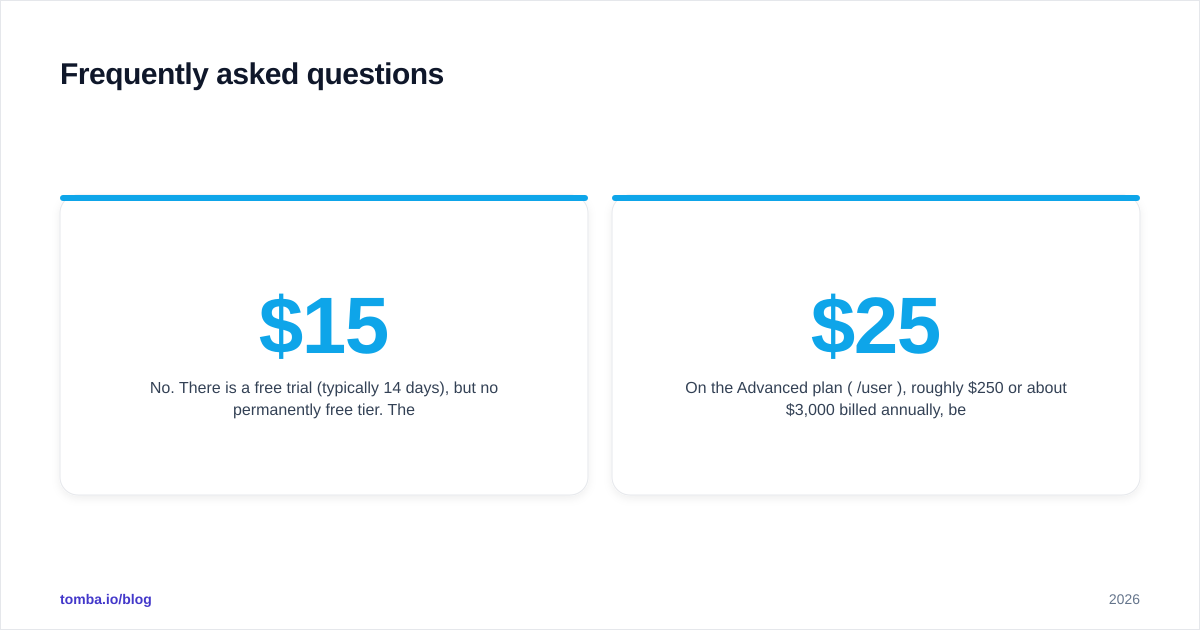
Does amoCRM have a free plan? No. There is a free trial (typically 14 days), but no permanently free tier. The cheapest paid plan is Base at $15 per user/month on annual billing.
Is amoCRM good for cold email outreach? It can store and track outreach, but it is not a cold-email platform and it does not find or verify addresses. Pair it with a dedicated email finder and verifier for outbound.
What is amoCRM best known for? Its unified messenger inbox — WhatsApp, Instagram, Telegram, and Facebook chats in one pipeline view — and no-code Salesbot automation.
How much does amoCRM cost for a team of 10? On the Advanced plan ($25/user/month), roughly $250/month or about $3,000/year billed annually, before add-ons.
The bottom line on amoCRM in 2026#
amoCRM/Kommo is a focused, affordable, messenger-first CRM that earns its strong reviews from the teams it was built for — conversational sales in markets where chat is the default channel. Its pricing is transparent and cheap to start, its automation is genuinely useful, and its biggest weaknesses are support and reporting depth, not the core product.
If your deals live in DMs, shortlist it. If you need enterprise analytics or heavy marketing automation, weigh the alternatives in the table above first. And remember the part no CRM solves on its own: the quality of the contacts you load in.
That is where Tomba fits. Before a lead ever reaches your amoCRM pipeline, use the Tomba Email Finder to source accurate, verified professional emails by name, domain, or company — then enrich and verify them so your reps spend time selling, not cleaning data. Start free with 25 searches a month, and check Tomba pricing when you are ready to scale. A great CRM plus great data beats a great CRM alone, every time.
// get started
Find, verify and enrich your first contacts today
Start on the free plan with 25 searches a month, then scale when your team is ready.
Free plan · No credit card required · GDPR & CCPA
// about the author