amoCRM vs Bitrix24 (2026): Which B2B CRM Actually Wins?
amoCRM is a focused sales-pipeline CRM; Bitrix24 is an all-in-one business suite. Here is the honest 2026 breakdown of pricing, features, and which one fits your team.
Choosing between amoCRM and Bitrix24 usually comes down to one question: do you want a lean tool that does sales pipelines extremely well, or a sprawling platform that tries to run your entire business? They look like competitors because both are popular in SMB and Eastern European markets, but they solve different problems.
This guide breaks down pricing, real feature differences, automation, and which CRM fits which team — without the marketing gloss.
TL;DR — amoCRM vs Bitrix24 at a glance#
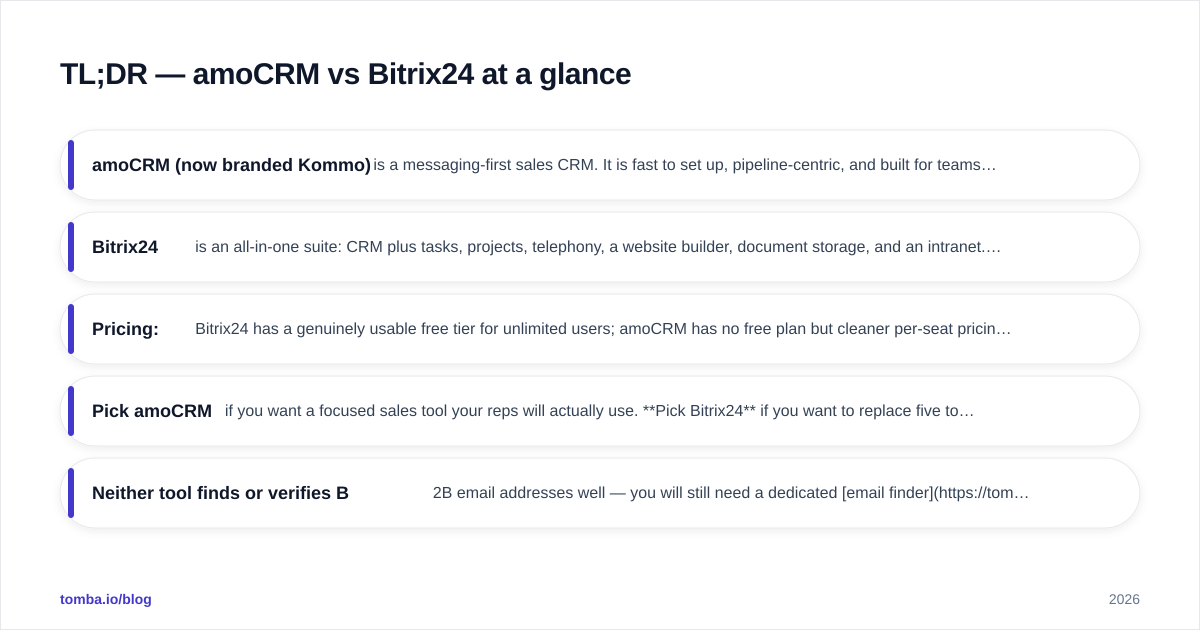
- amoCRM (now branded Kommo) is a messaging-first sales CRM. It is fast to set up, pipeline-centric, and built for teams whose job is closing deals over chat, email, and phone.
- Bitrix24 is an all-in-one suite: CRM plus tasks, projects, telephony, a website builder, document storage, and an intranet. More power, more complexity.
- Pricing: Bitrix24 has a genuinely usable free tier for unlimited users; amoCRM has no free plan but cleaner per-seat pricing.
- Pick amoCRM if you want a focused sales tool your reps will actually use. Pick Bitrix24 if you want to replace five tools with one and accept a steeper learning curve.
- Neither tool finds or verifies B2B email addresses well — you will still need a dedicated email finder to fill the top of the funnel.
What is amoCRM (Kommo)?#
amoCRM is a sales-pipeline CRM that rebranded to Kommo for its global audience (the amoCRM name still circulates widely, especially in CIS markets). Its core idea is simple: every lead is a card that moves through a visual pipeline, and most of the selling happens inside a unified inbox that merges WhatsApp, Instagram, Telegram, email, and live chat into one conversation thread.
The product is opinionated. It does not try to be your project manager or your HR system. It tries to make sure no lead falls through the cracks and that reps spend time talking to buyers, not updating fields. That focus is its biggest strength and its main limitation.
Typical buyers are small and mid-sized sales teams, agencies, and online-first businesses that live in chat apps. If your sales motion is conversational and high-volume, amoCRM feels natural.
What is Bitrix24?#
Bitrix24 is a business operations platform with a CRM at its center. The same login gives you a CRM, task and project management, a company intranet with chat and feeds, telephony, a website and landing-page builder, online document editing, and even basic HR tools.
The pitch is consolidation: instead of paying for a CRM, a project tool, a phone system, and a file store, you run it all from one subscription. For budget-conscious teams — especially those on the free plan — that consolidation is real and valuable.
The trade-off is surface area. Bitrix24 has a famously dense interface. Onboarding takes longer, admins need to invest time configuring it, and reps can feel buried under features they never asked for. Learn what a CRM is meant to do at its core, and you will notice Bitrix24 does that plus a great deal more.
How do amoCRM and Bitrix24 compare on features and pricing?#
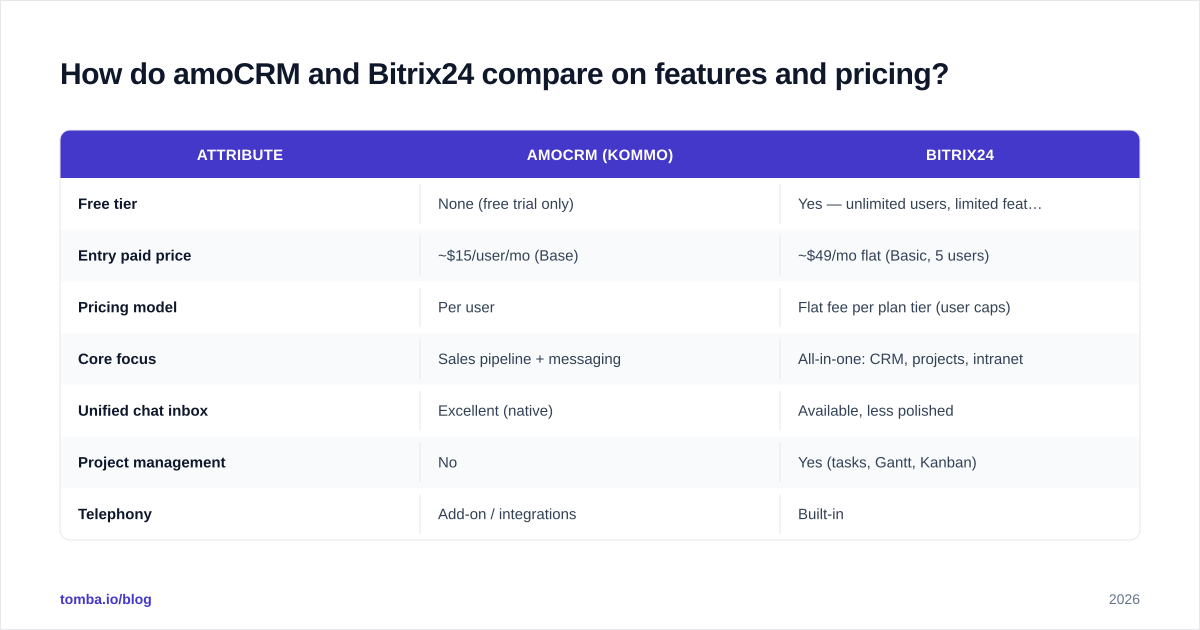
Here is the head-to-head on the attributes that actually drive a buying decision. Prices reflect publicly listed plans in 2026 and are per user unless noted; always confirm current rates on each vendor's site.
| Attribute | amoCRM (Kommo) | Bitrix24 |
|---|---|---|
| Free tier | None (free trial only) | Yes — unlimited users, limited features |
| Entry paid price | ~$15/user/mo (Base) | ~$49/mo flat (Basic, 5 users) |
| Pricing model | Per user | Flat fee per plan tier (user caps) |
| Core focus | Sales pipeline + messaging | All-in-one: CRM, projects, intranet |
| Unified chat inbox | Excellent (native) | Available, less polished |
| Project management | No | Yes (tasks, Gantt, Kanban) |
| Telephony | Add-on / integrations | Built-in |
| Website builder | Basic landing pages | Full site + store builder |
| Learning curve | Low | High |
| Best for | Focused sales teams | Ops-heavy SMBs replacing many tools |
The pricing structures are not directly comparable on purpose. amoCRM charges per seat, so cost scales linearly with headcount. Bitrix24 sells tiered plans with user caps, so a 40-person company can land on a flat monthly fee that looks cheap per head — until you need a higher tier for storage or automation limits.
Is amoCRM better than Bitrix24 for sales teams?#
For pure sales execution, amoCRM is usually the better daily driver. Three reasons stand out.
First, the unified inbox. Reps handle WhatsApp, Instagram DMs, email, and live chat from a single thread tied to the deal card. For businesses that sell through social and messaging, this removes constant app-switching. Bitrix24 has multichannel features, but they feel bolted onto a larger system rather than designed as the main event.
Second, time-to-value. A small team can configure an amoCRM pipeline and start working leads the same day. Bitrix24 rewards teams willing to spend a week configuring it; rushed rollouts often end with reps ignoring half the platform.
Third, adoption. CRMs fail when reps do not use them. amoCRM's narrower scope means fewer fields, fewer screens, and fewer reasons to avoid logging in. Independent reviews on G2 consistently flag ease of use as amoCRM's standout trait and complexity as Bitrix24's most common complaint.
That said, "better for sales" is not "better for everything." If your operation needs project tracking, internal collaboration, and a phone system in the same place, amoCRM's focus becomes a wall you hit fast.
When does Bitrix24 win?#
Bitrix24 wins when consolidation is the goal and budget is tight.
The free plan is the headline: unlimited users with a working CRM, tasks, chat, and storage. For a bootstrapped startup or a non-profit, that is a legitimate way to run a small company at zero software cost. No mainstream all-in-one rival matches it on user count.
It also wins for operations-heavy teams. If your day involves managing client projects, assigning internal tasks, storing shared documents, and tracking deals — all by the same people — Bitrix24 keeps that in one system with one source of truth. You can read the full feature scope on the official Bitrix24 site, and the breadth is real.
Finally, it wins on built-in telephony and website tools. amoCRM leans on integrations for calling and offers only light landing pages; Bitrix24 ships a phone system and a full site/store builder in-box.
The cost is complexity. Expect a real onboarding investment, an admin who owns the configuration, and some feature fatigue among reps. If nobody owns the rollout, Bitrix24's power turns into clutter.

How do they handle automation and integrations?#
Both platforms automate, but at different altitudes.
amoCRM's Salesbot automates conversations and pipeline moves: auto-replies, lead routing, follow-up triggers, and stage changes based on buyer behavior. It is sales-process automation aimed at keeping deals moving and reps prompted at the right moment.
Bitrix24's automation spans the whole business: CRM rules and triggers, plus workflow automation across tasks, documents, and approvals. It is broader and, predictably, more involved to configure. Power users can build genuinely complex workflows; casual users may never touch most of it.
On integrations, both offer marketplaces and APIs. amoCRM's ecosystem skews toward messaging channels and sales tooling. Bitrix24's skews toward office and operations apps. If you orchestrate tools through automation platforms, check coverage on Capterra reviews and each vendor's marketplace before committing — integration depth varies a lot by region.
One shared gap matters for outbound teams: neither tool is a contact-data source. They manage relationships you already have; they do not find new ones.
What do amoCRM and Bitrix24 both miss?#
Neither CRM solves the top of your funnel. They store, route, and progress leads — but the leads have to come from somewhere, with accurate contact details, or your pipeline is just an empty board.
This is where most CRM rollouts quietly underperform. Reps spend hours hunting for the right person's email, guessing patterns, and chasing bounced messages. A CRM cannot fix a contact list full of stale or invalid addresses.
The fix is to add a dedicated data layer in front of whichever CRM you pick:
- Use an email verifier before import so you are not pushing dead addresses into amoCRM or Bitrix24.
- Use data enrichment to fill in titles, companies, and missing fields the CRM expects.
- Run bulk lead generation when you need to populate a new pipeline fast instead of one card at a time.
Plug a reliable data source into the CRM and both platforms perform dramatically better, because the deals on the board are real and reachable.
Which CRM should you choose in 2026?#
Decide by your dominant motion, not by feature count.
- Choose amoCRM if you are a sales-led team that sells through chat and email, wants fast adoption, and prefers a focused tool over a Swiss-army knife. It is the better choice when "will my reps actually use it?" is your real worry.
- Choose Bitrix24 if you want to consolidate CRM, projects, telephony, and collaboration into one subscription, you have someone to own configuration, and the free unlimited-user tier fits your budget.
A simple rule: if the word "sales" describes 80% of what the tool needs to do, lean amoCRM. If the tool needs to run the business, lean Bitrix24.
Whichever you choose, compare current plans directly — features and limits shift between tiers — and pilot with a small group before a company-wide rollout. You can sanity-check your own budget against transparent benchmarks like Tomba pricing when you scope the full cost of your sales stack, since the CRM is rarely the only line item.
Fill your CRM with leads worth working#
A CRM is only as good as the contacts inside it. Before you commit to amoCRM or Bitrix24, fix the input: stop importing guesses and bounces. The Tomba Email Finder lets you find verified professional emails by name, company, or domain, so every lead you push into your pipeline is real and reachable. Start on the free tier (25 searches a month), scale to Starter at $49/mo when outbound ramps, and let your CRM do what it does best — close the deals you actually sourced.
Ready to find emails that actually work?
Join 150,000+ professionals who stopped guessing and started sending. Free credits on signup — no credit card required.
Get the Tomba newsletter
Practical outbound tactics and product updates — once every two weeks.
About the author