Ampliz vs Findymail 2026: Which Email Finder Wins?
Ampliz and Findymail solve different B2B data problems. We break down accuracy, pricing, coverage, and the best fit for cold email and prospecting in 2026.
TL;DR
- Ampliz is a B2B sales-intelligence database — strongest for healthcare and APAC contact data, with firmographic and intent layers bolted on.
- Findymail is a focused email finder built for cold outreach — it prioritizes verified, low-bounce emails and tight integrations with sequencing tools.
- They aren't really the same product: Ampliz sells coverage and context, Findymail sells deliverable emails per credit.
- For pure cold-email volume with clean lists, Findymail usually wins on cost-per-valid-email. For account research and niche vertical data, Ampliz pulls ahead.
- If you want both accuracy and predictable pricing without picking a lane, a generalist like Tomba is worth a look before you commit.
If you're weighing Ampliz vs Findymail, the honest answer is that you're comparing two tools that were built for different jobs. This post breaks down where each one actually earns its keep — accuracy, pricing, data coverage, integrations, and the use cases each is built around — so you can match the tool to your workflow instead of the marketing page.
What is Ampliz?#
Ampliz is a B2B data and sales-intelligence platform. Its pitch is breadth: company firmographics, contact records, technographics, and intent signals, with a recognized strength in healthcare data (the "Ampliz Healthcare Intelligence" product) and Asia-Pacific coverage that many US-centric databases handle poorly.
You use Ampliz the way you'd use a database, not a single-purpose lookup tool. You filter by industry, geography, job function, or specialty, build a list, and export contacts with attached company context. That makes it closer in spirit to Apollo or Lusha than to a lightweight email finder.
The trade-off: when a tool optimizes for how many records it can show you, the percentage of those records that are current and deliverable becomes the thing you have to watch. Database-style tools tend to report large contact counts; the real question is how many survive verification.
What is Findymail?#
Findymail is a B2B email finder built specifically for cold outreach. Its core promise is verified emails with a low bounce rate, and it leans hard into workflows that matter to cold emailers: pulling emails from LinkedIn and Sales Navigator lists, enriching CSVs, and pushing clean contacts straight into sequencing tools.
Findymail's design philosophy is narrow on purpose. It doesn't try to be your intent-data provider or your CRM. It tries to return an email that won't bounce, charge you only when it finds one, and stay out of your way. For teams whose main pain is "my cold email lists are full of dead addresses," that focus is the whole point.
How do Ampliz and Findymail compare at a glance?#
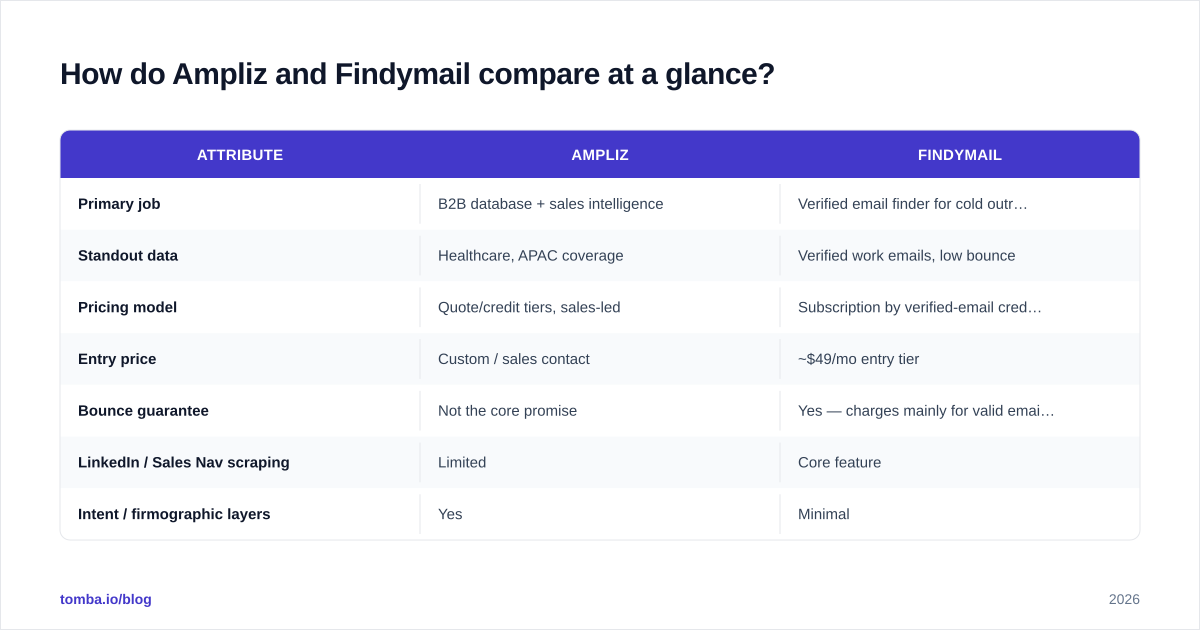
Here's the side-by-side on the attributes that actually drive a buying decision. Treat published accuracy figures from any vendor as marketing until you test on your own list — but the shape of each tool is clear.
| Attribute | Ampliz | Findymail |
|---|---|---|
| Primary job | B2B database + sales intelligence | Verified email finder for cold outreach |
| Standout data | Healthcare, APAC coverage | Verified work emails, low bounce |
| Pricing model | Quote/credit tiers, sales-led | Subscription by verified-email credits |
| Entry price | Custom / sales contact | ~$49/mo entry tier |
| Bounce guarantee | Not the core promise | Yes — charges mainly for valid emails |
| LinkedIn / Sales Nav scraping | Limited | Core feature |
| Intent / firmographic layers | Yes | Minimal |
| Best for | Account research, niche verticals | High-volume cold email |
The pattern: Ampliz gives you context per contact, Findymail gives you deliverability per credit. Neither is "better" in the abstract — they're optimized for different end states.

Which is more accurate for finding emails?#
For the specific job of returning a deliverable email address, Findymail has the structural advantage, and the reason is its business model. When a tool only charges you for verified emails, every incentive points toward not handing you garbage. Findymail runs verification before it returns a result, which is why cold-email teams cite consistently low bounce rates.
Ampliz can absolutely surface the same contact — often with richer company context attached — but as a database-first platform, a slice of its records will be stale on any given pull. That's not unique to Ampliz; it's the nature of large static databases. The fix is the same everywhere: re-verify before you send.
This is the part people skip. No data provider stays accurate without verification at send time. Whichever tool you pick, run exports through a dedicated email verifier before a campaign, especially for catch-all domains where finders guess and hope. A quick free email checker on a sample tells you fast whether a vendor's "verified" label means what you think it does.

How does pricing compare?#
Pricing is where the two diverge most, and it's the area buyers misread most often.
Findymail uses transparent subscription tiers priced around verified-email credits, with an entry plan in the ~$49/month range. You can model your cost-per-valid-email before you buy, which is exactly what a cold-email team needs for unit economics.
Ampliz is sales-led — pricing is quote-based and tied to data volume and modules (healthcare data, intent, etc.). That suits enterprise procurement and teams that need a specific vertical dataset, but it makes a quick comparison harder and the entry point higher.
The cost trap with database tools is paying for total record counts you'll never verify or use. Findymail's "pay for what's valid" model sidesteps that. If you're comparing total cost of ownership, calculate cost per deliverable email, not cost per record returned — those are very different numbers once bounce rates are factored in.
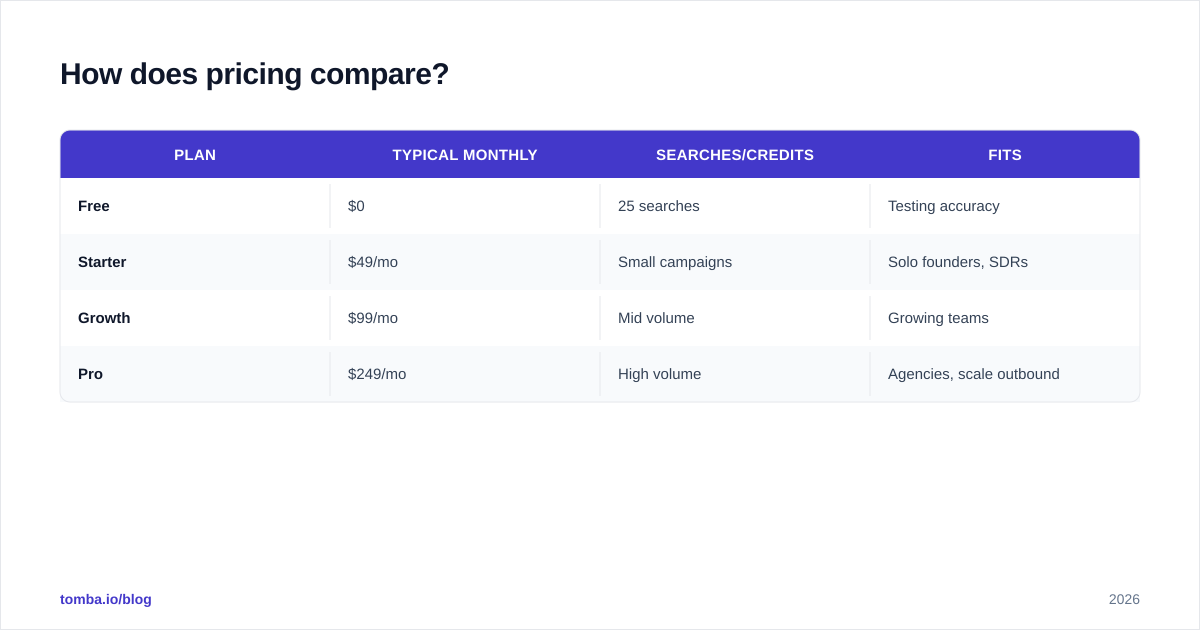
For reference, here's how a focused finder typically lays out its plans — flat tiers, a free entry point, and credits that map to real lookups rather than opaque "data units":
| Plan | Typical monthly | Searches/credits | Fits |
|---|---|---|---|
| Free | $0 | 25 searches | Testing accuracy |
| Starter | $49/mo | Small campaigns | Solo founders, SDRs |
| Growth | $99/mo | Mid volume | Growing teams |
| Pro | $249/mo | High volume | Agencies, scale outbound |
(That table reflects Tomba pricing — included as a transparent-pricing reference point, since Ampliz doesn't publish comparable numbers.)
Which integrates better with a cold-email stack?#
Findymail wins on outbound workflow integration, and it's not especially close. Native LinkedIn and Sales Navigator extraction, CSV enrichment, and direct pushes into popular sequencing tools mean a Findymail-to-campaign pipeline takes minutes. That tight loop is the reason it's popular with agencies running high-volume outbound.
Ampliz integrates with CRMs and supports exports, but as a database platform it's oriented toward list building and research rather than feeding a sending tool. You'll more often go database → export → clean → import, which is more steps.
If your stack is "scrape a LinkedIn list, enrich, verify, send," a finder-first tool fits the contour. If your stack is "research target accounts in a niche vertical, then hand a curated list to AEs," the database model fits better.

What are the main use cases for each?#
Choose Ampliz when:
- You sell into healthcare or need provider/specialty-level data.
- You target APAC markets that US-centric databases cover poorly.
- You want firmographic and intent context attached to every contact for account-based selling.
- Procurement is comfortable with sales-led, quote-based pricing.
Choose Findymail when:
- Your primary motion is cold email at volume and bounce rate is your KPI.
- You build lists from LinkedIn / Sales Navigator and want one-click enrichment.
- You need predictable, transparent pricing you can model per campaign.
- You'd rather pay for valid emails than browse a giant database.
What are the pros and cons?#
| Pros | Cons | |
|---|---|---|
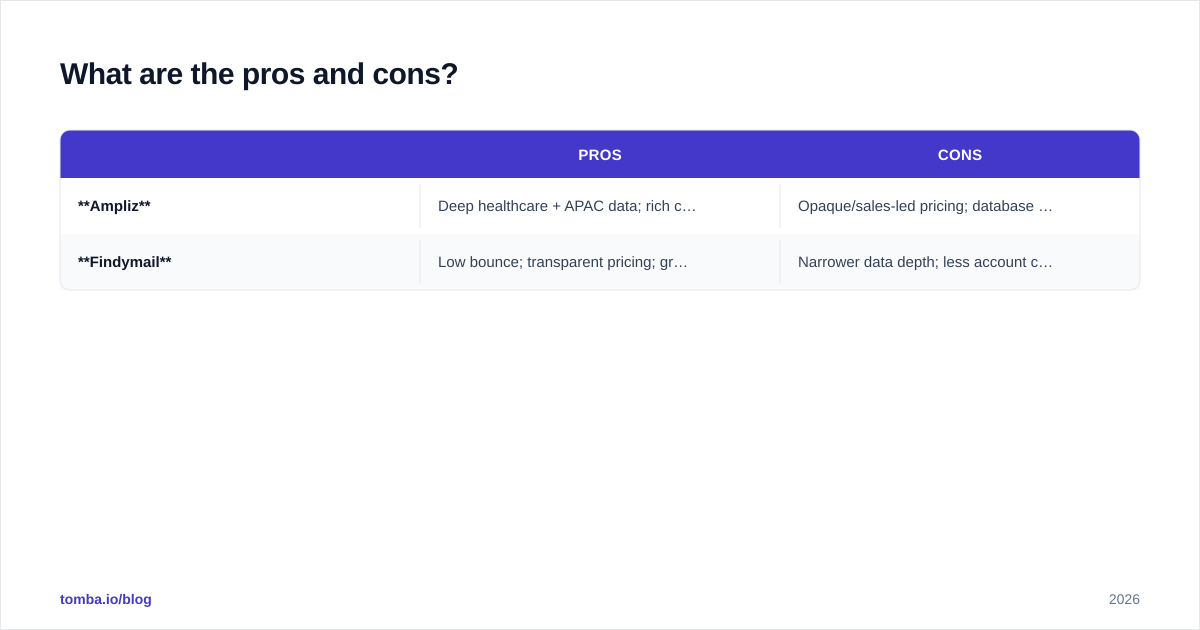
| Ampliz | Deep healthcare + APAC data; rich context; intent signals | Opaque/sales-led pricing; database staleness; higher entry point |
| Findymail | Low bounce; transparent pricing; great LinkedIn workflow | Narrower data depth; less account context; focused on email, not full intelligence |
The decision usually comes down to one question: are you buying emails or buying intelligence? Findymail is the email answer. Ampliz is the intelligence answer. Forcing one into the other's job is how teams end up overpaying or under-delivering.
Is there a better middle-ground option?#
Often, yes — and it's worth naming honestly. Many teams don't need Ampliz's vertical depth or Findymail's outreach-only narrowness. They need accurate emails, verification built in, transparent pricing, and the option to enrich when a deal warrants it.
That's the generalist lane, and it's where a tool like Tomba sits. The email finder returns emails by name, domain, or company; the built-in verifier and catch-all verifier keep bounce rates down; and domain search covers the list-building job without committing you to a sales call for pricing. If you're specifically evaluating Findymail, the Findymail alternative breakdown maps the feature overlap directly.
This isn't "Tomba beats both at everything" — it doesn't have Ampliz's healthcare depth. The point is that the Ampliz vs Findymail framing assumes you must trade coverage for deliverability. For mainstream B2B prospecting, you usually don't have to.
You can sanity-check any of these claims yourself. Read verified user reviews on G2 rather than vendor pages, then run a 25-contact test on each tool and verify the results independently. Real bounce rates on your domains beat any benchmark chart.
How should you decide?#
Run a three-step test before you sign anything:
- Build the same 25-contact list in each tool you're considering.
- Verify every result through an independent verifier — count actual valid emails, not claimed ones.
- Divide cost by valid emails, not by records returned. That's your true cost-per-lead.
Do that and the right tool picks itself. Ampliz will show its value if your targets live in healthcare or APAC. Findymail will show its value on clean, high-volume cold-email lists. And a generalist will show its value if you want one bill, transparent pricing, and verification baked in.
The bottom line#
Ampliz and Findymail aren't really rivals — they're answers to different questions. Buy Ampliz for vertical depth and account intelligence; buy Findymail for deliverable emails and a tight cold-email workflow. Just don't pay database prices for an email-finding job, or strap a finder to a research job it wasn't built for.
If you want to skip the trade-off entirely, start with the Tomba Email Finder free tier — 25 searches a month, verification built in, and pricing you can read off the page. Run the same test list through it alongside Ampliz and Findymail, verify the results, and let cost-per-valid-email make the call for you.
Ready to find emails that actually work?
Join 150,000+ professionals who stopped guessing and started sending. Free credits on signup — no credit card required.
Get the Tomba newsletter
Practical outbound tactics and product updates — once every two weeks.
About the author