Antideo vs Findymail: Email Tool Comparison for 2026
Antideo validates and flags risky emails; Findymail finds verified B2B contacts. See which one fits your prospecting stack in 2026 — and where a third option wins.
Picking between Antideo and Findymail feels like a head-to-head, but it isn't really one. They solve different halves of the same problem: one tells you whether an email is safe to send to, the other tells you the email address in the first place. This guide shows you exactly where each tool wins, where each falls short, and how to decide based on what your pipeline actually needs in 2026.
TL;DR#
- Antideo is a free-tier validation and risk API — email syntax, disposable detection, IP reputation, phone, and profanity checks. It does not find emails.
- Findymail is a B2B email finder and verifier built for sales teams, with LinkedIn and list-building workflows. It does not do IP or fraud scoring.
- If you need to discover decision-maker emails, Findymail beats Antideo outright — different category.
- If you need to screen signups or clean a list cheaply, Antideo's free tier is hard to beat.
- For teams that want finding and verification in one place with better coverage, a consolidated platform like Tomba Email Finder usually wins on cost-per-valid-contact.
What is Antideo?#
Antideo is a developer-focused data-validation API. Its core job is to look at a piece of contact data you already have and score its quality or risk. The free plan is the headline: a generous request allowance across several endpoints with no credit card, which is why a lot of indie developers and small SaaS teams reach for it to block junk signups.
Antideo's endpoints cover email validation (syntax, MX records, disposable/temporary domains), IP reputation and geolocation, phone number validation, and a profanity/content filter. It's an input-quality and fraud-prevention layer, not a prospecting tool. You feed it data; it grades that data.
The mental model: Antideo is a bouncer at the door. It doesn't go out and recruit guests — it checks IDs and turns away the fakes.
What is Findymail?#
Findymail is an email finder built for outbound sales. You give it a name and company, a LinkedIn profile, or a Sales Navigator list, and it returns a business email it claims to have verified. Its pitch is "no fake emails" — it runs verification before handing the address back, so bounce rates stay low.
Findymail leans hard into the LinkedIn workflow. Its Chrome extension and Sales Navigator export are the features sales reps actually use day to day, pulling contacts straight from prospecting sessions into a clean list. It also does list enrichment, taking a CSV of names and companies and filling in verified emails.
The mental model: Findymail is a recruiter. It goes out, finds the people you want to reach, and confirms they're real before introducing them.
So already you can see why "Antideo vs Findymail" is a slightly unfair framing — they're on opposite ends of the same pipeline. The real question is which half of the problem you're trying to solve.
Antideo vs Findymail: how do they compare directly?#
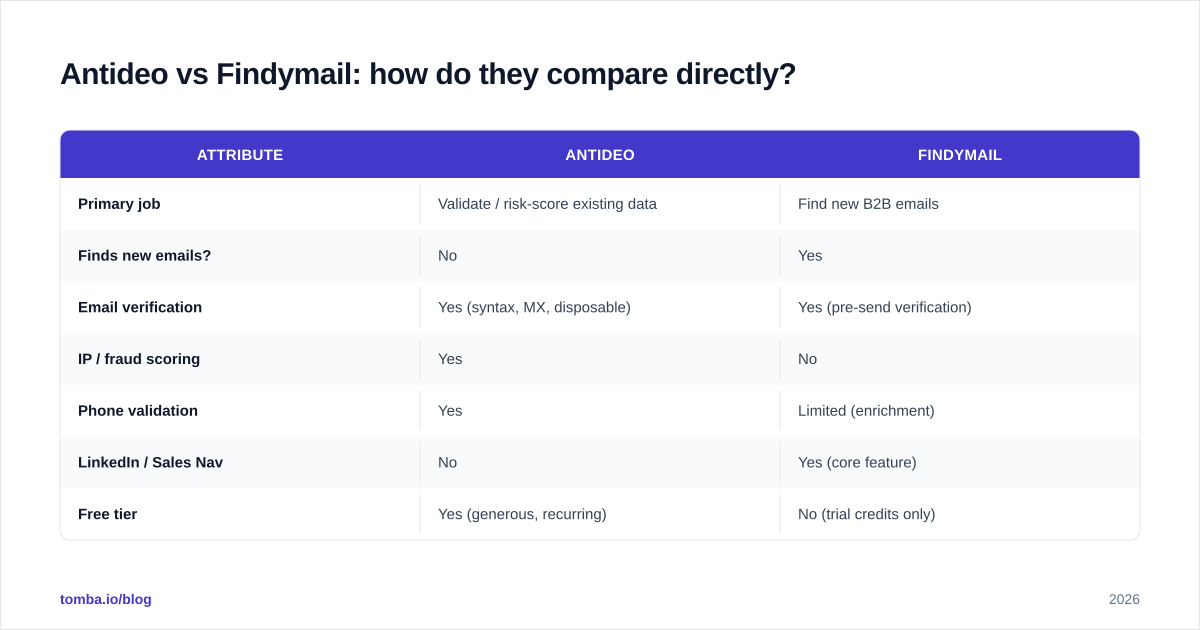
Here's the side-by-side on the dimensions that actually drive a buying decision.
| Attribute | Antideo | Findymail |
|---|---|---|
| Primary job | Validate / risk-score existing data | Find new B2B emails |
| Finds new emails? | No | Yes |
| Email verification | Yes (syntax, MX, disposable) | Yes (pre-send verification) |
| IP / fraud scoring | Yes | No |
| Phone validation | Yes | Limited (enrichment) |
| LinkedIn / Sales Nav | No | Yes (core feature) |
| Free tier | Yes (generous, recurring) | No (trial credits only) |
| Entry paid price | ~$15/mo range | ~$49/mo range |
| Best for | Devs, signup screening, fraud | SDRs, founders, list building |
| API-first? | Yes | Yes, but UI-led |
The split is clean. Antideo is cheaper and free-tier friendly because validation is computationally light and it isn't paying to maintain a contact database. Findymail costs more because finding and verifying emails at scale requires data infrastructure, ongoing sourcing, and SMTP verification that burns real resources.
If your honest need is "I have a list of leads and need to know which emails will bounce," Antideo or a dedicated email verifier is the right layer. If your need is "I have a list of companies and need the actual humans to contact," only Findymail (or a finder like it) does that.

Which one is more accurate?#
Accuracy means two different things here, so judge each on its own job.
For validation accuracy, Antideo does the standard checks well: it catches malformed addresses, role accounts, and the big disposable-domain lists. Where lightweight validators like Antideo struggle is catch-all domains — servers configured to accept mail for any address. A simple MX-plus-syntax check can't tell you whether jane@company.com is a real mailbox when the domain accepts everything. That's a known ceiling for free validation APIs, and it's why serious senders pair them with a catch-all verifier.
For finding accuracy, Findymail is the only one in the conversation. Its "no fake emails" promise is backed by verification before delivery, and in practice its hit rate on common B2B domains is solid. The weak spots are the same ones every finder fights: smaller companies, non-US regions, and people who guard their work email. No finder is at 100%, and anyone claiming so is selling you guesses dressed up as data.

The practical takeaway: don't judge a finder and a validator on the same yardstick. A finder's job is coverage with low bounce; a validator's job is catching bad addresses before you send. You usually want both stages, and the accuracy that matters is end-to-end — valid contacts delivered, not raw match rate.
How much do Antideo and Findymail cost?#
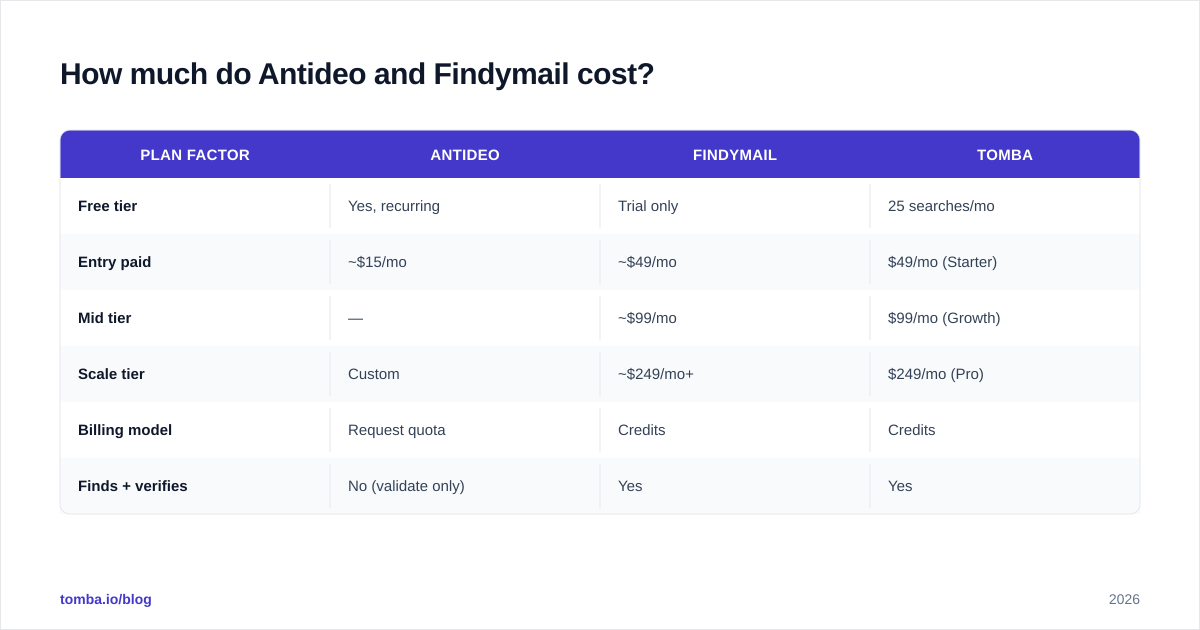
Pricing is where the category difference becomes obvious.
Antideo's free tier handles a meaningful volume of validation and IP checks each month, and its paid plans stay inexpensive because you're buying compute, not data. For a developer adding a signup gate, the free tier alone may be enough indefinitely.
Findymail charges per verified contact through credit-based monthly plans, starting around the $49/mo tier and scaling with volume. That's normal for the finder category — you're paying for an actively maintained dataset and live verification.
| Plan factor | Antideo | Findymail | Tomba |
|---|---|---|---|
| Free tier | Yes, recurring | Trial only | 25 searches/mo |
| Entry paid | ~$15/mo | ~$49/mo | $49/mo (Starter) |
| Mid tier | — | ~$99/mo | $99/mo (Growth) |
| Scale tier | Custom | ~$249/mo+ | $249/mo (Pro) |
| Billing model | Request quota | Credits | Credits |
| Finds + verifies | No (validate only) | Yes | Yes |
If you only validate, Antideo is the cheapest serious option. If you find and verify, compare Findymail against consolidated platforms — because paying a finder and a separate validator often costs more than one tool that does both. You can see how a combined finder-plus-verifier model prices out on the Tomba pricing page.

When should you choose Antideo?#
Pick Antideo when your problem is data quality and risk, not data discovery:
- You're a developer who wants to block disposable emails and fraud signups at registration.
- You need IP reputation or geolocation scoring as part of an abuse-prevention flow.
- You want a free, no-card validation API for a side project or early-stage SaaS.
- You already have your contact list and just need a cheap bounce filter before import.
Antideo is not the tool if you're trying to build an outbound list. It has no finder, no LinkedIn integration, and no contact database. Asking it to source emails is asking the bouncer to go recruit guests — wrong job.
When should you choose Findymail?#
Pick Findymail when your problem is reaching people you don't yet have addresses for:
- You're an SDR or founder running cold outbound and live inside LinkedIn / Sales Navigator.
- You need verified emails with low bounce rates so your sender reputation survives.
- You want to enrich a list of names and companies into a sendable campaign.
- You value a polished UI and browser extension over raw API throughput.
Findymail is not the tool if you mainly need fraud scoring, IP checks, or phone validation at signup. Those aren't its domain, and bolting it onto a product-security flow would be overkill and overpriced.
For deeper outbound context, our guides on email deliverability and protecting sender reputation explain why pre-send verification matters as much as finding the address.
Is there a better all-in-one alternative?#
Often, yes — because most teams need both halves, and running two vendors adds cost, integration work, and reconciliation headaches.
A consolidated platform like Tomba covers the full pipeline: an email finder for discovery, a built-in email verifier and catch-all verifier for the validation layer Antideo handles, plus domain search, data enrichment, and a phone finder. That means one credit pool, one API, and one bill instead of stitching a finder to a separate validator.

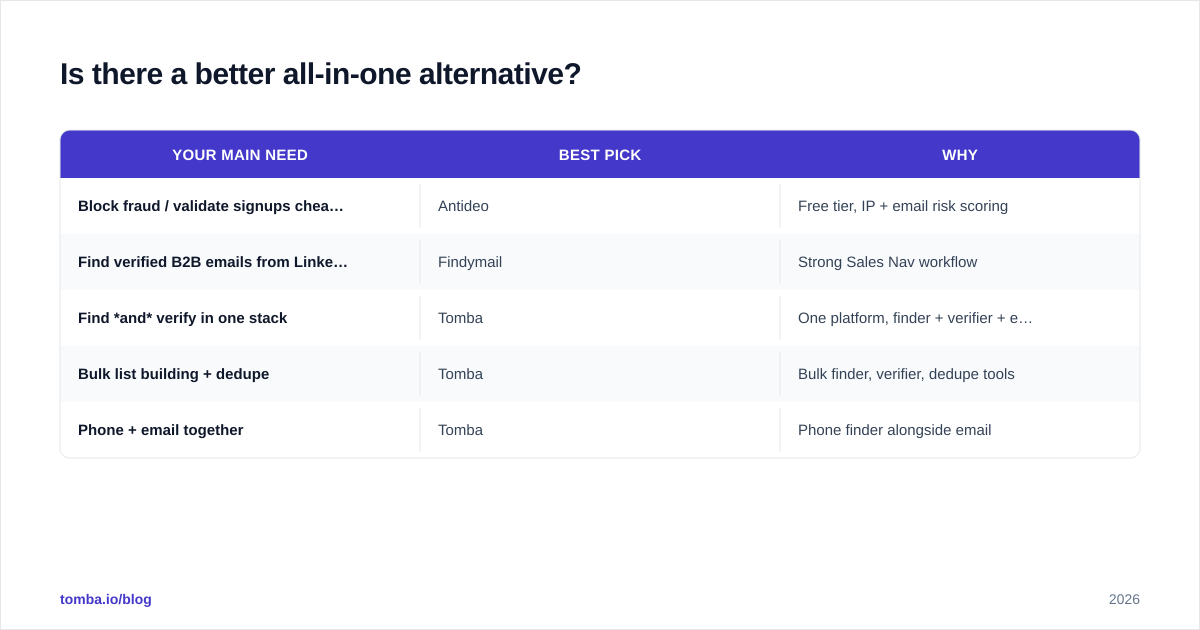
Here's the decision in one table.
| Your main need | Best pick | Why |
|---|---|---|
| Block fraud / validate signups cheaply | Antideo | Free tier, IP + email risk scoring |
| Find verified B2B emails from LinkedIn | Findymail | Strong Sales Nav workflow |
| Find and verify in one stack | Tomba | One platform, finder + verifier + enrichment |
| Bulk list building + dedupe | Tomba | Bulk finder, verifier, dedupe tools |
| Phone + email together | Tomba | Phone finder alongside email |
This isn't a knock on either tool. Antideo is excellent at the narrow, valuable job of input validation, and its free tier is genuinely useful. Findymail is a clean, focused finder that sales reps like. The point is that "Antideo vs Findymail" is rarely the real choice — the real choice is whether you want two specialized tools or one platform that spans the whole find-verify-enrich flow.
For an even broader view of the category, independent directories like G2's email-finder grid and Capterra let you cross-check feature claims against verified user reviews before you commit budget. It's worth ten minutes to validate any vendor's marketing against real-world ratings — including ours.
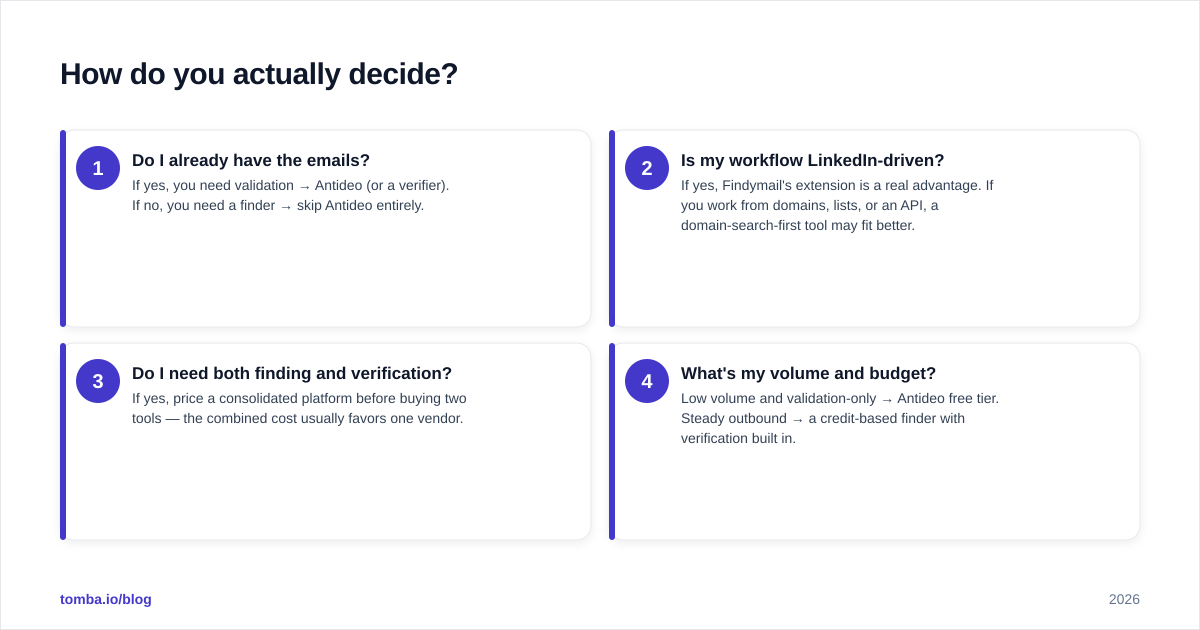
How do you actually decide?#
Run this quick test:
- Do I already have the emails? If yes, you need validation → Antideo (or a verifier). If no, you need a finder → skip Antideo entirely.
- Is my workflow LinkedIn-driven? If yes, Findymail's extension is a real advantage. If you work from domains, lists, or an API, a domain-search-first tool may fit better.
- Do I need both finding and verification? If yes, price a consolidated platform before buying two tools — the combined cost usually favors one vendor.
- What's my volume and budget? Low volume and validation-only → Antideo free tier. Steady outbound → a credit-based finder with verification built in.
Most growing sales teams land on point 3: they start with a finder, realize they also need verification and enrichment, and consolidate. Buying that way from the start saves a migration later.
The bottom line#
Antideo and Findymail aren't really competitors — they're two stages of the same pipeline. Antideo screens and scores data you already have, with a free tier that's tough to beat for fraud prevention. Findymail discovers and verifies new B2B emails, with a LinkedIn workflow sales reps actually adopt. Choose Antideo for validation and risk, Findymail for finding.
But if your honest answer is "I need both," don't run two vendors when one platform covers the whole flow. Start free with Tomba Email Finder — find verified decision-maker emails, validate them with the built-in verifier and catch-all checks, and enrich the records, all from one credit pool and one API. You get 25 searches a month free to test coverage against your own target accounts before spending a dollar. Find the contact, confirm it's real, and send with confidence — without stitching together a finder and a validator to get there.
Ready to find emails that actually work?
Join 150,000+ professionals who stopped guessing and started sending. Free credits on signup — no credit card required.
Get the Tomba newsletter
Practical outbound tactics and product updates — once every two weeks.
About the author