Antideo vs Hunter 2026: Which Email Tool Wins for B2B?
Antideo and Hunter solve different halves of the email problem. This 2026 breakdown compares accuracy, pricing, APIs, and use cases so you pick the right one—or the tool that beats both.
TL;DR
- Antideo is a developer-first validation and reputation API (email, IP, phone). It shines at cheap, real-time "is this junk?" checks but does not find email addresses for you.
- Hunter is a sales-first email finder and verifier with domain search, a Chrome extension, and campaign tooling. It finds emails but charges per search and caps lower tiers tightly.
- They are not true competitors — Antideo answers "is this address/IP risky?" while Hunter answers "what is this person's email?"
- For accuracy on B2B finding + verifying in one workflow, neither is a complete prospecting stack. A combined finder/verifier like Tomba Email Finder usually beats running both.
- Pick Antideo for signup-fraud filtering and API-heavy validation, Hunter for outbound list-building, and Tomba when you need finding and verification at scale.
What is Antideo?#
Antideo is an API-first data-quality service. Think of it as a bouncer at the door of your signup form: it checks each visitor's email, IP, and phone against reputation and format rules, then waves them through or flags them. It does not go out and find new guests.
Its core endpoints cover email validation (syntax, disposable detection, free-provider flags, MX checks), IP reputation and geolocation, phone validation, and profanity/bad-word filtering. The pitch is real-time fraud reduction — stopping throwaway addresses and bot signups before they pollute your database.
Antideo's hook is a free tier with daily call limits and a clean REST API. That makes it popular with indie developers and product teams who want lightweight checks baked into a registration flow, not a sales team building cold lists. You can read their positioning on the official Antideo site.
What Antideo is not: an email finder. You cannot hand it a name and a company domain and get back a verified work email. That single gap is the whole reason this comparison is lopsided — and why so many teams end up needing a second tool anyway.
What is Hunter?#
Hunter (hunter.io) is the email-finding incumbent most B2B reps have used at least once. Hand it a domain and it returns the email addresses it has on file, the likely pattern (first.last@, flast@, etc.), and a confidence score. Hand it a name plus a domain and it predicts the individual address.
Hunter bundles four things that matter for outbound:
- Domain Search — all known emails at a company, with sources.
- Email Finder — a specific person's address from name + domain.
- Email Verifier — an SMTP-level check on deliverability.
- Campaigns — a light cold-email sender layered on top.
It also ships a well-known Chrome extension and a Google Sheets add-on. You can compare its market reviews on G2. For a sales rep who lives in the browser, Hunter's strength is speed: find, verify, and export without leaving the tab.
The trade-off is the credit model. Hunter counts a "search" and a "verification" as separate consumable units, and the lower paid tiers run out faster than teams expect once you're prospecting daily.
Antideo vs Hunter: how do they actually compare?#
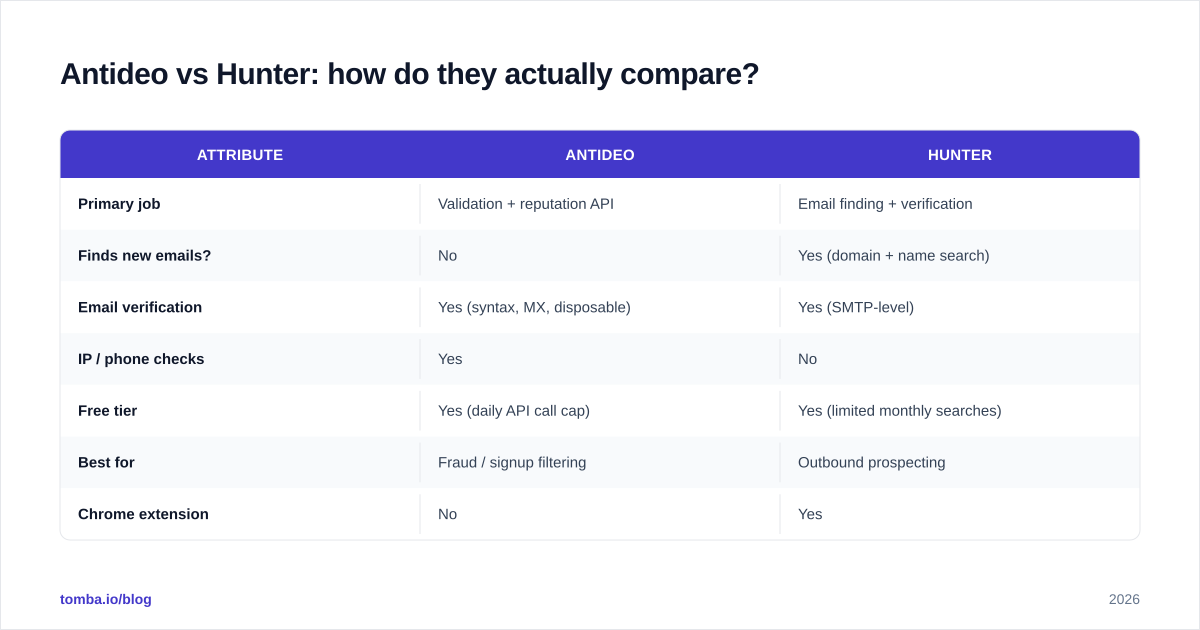
Here's the honest framing: these tools overlap on email verification and diverge everywhere else. Antideo validates; Hunter finds and validates. If your only job is rejecting disposable signups, Hunter is overkill. If your job is building a prospect list, Antideo can't help you start.
| Attribute | Antideo | Hunter |
|---|---|---|
| Primary job | Validation + reputation API | Email finding + verification |
| Finds new emails? | No | Yes (domain + name search) |
| Email verification | Yes (syntax, MX, disposable) | Yes (SMTP-level) |
| IP / phone checks | Yes | No |
| Free tier | Yes (daily API call cap) | Yes (limited monthly searches) |
| Best for | Fraud / signup filtering | Outbound prospecting |
| Chrome extension | No | Yes |
| Campaign sending | No | Yes (basic) |
| Pricing model | API call volume | Per search + verification credits |
| Ideal user | Developers, product teams | SDRs, marketers, founders |
The table makes the decision clearer than any paragraph: you choose by job to be done, not by feature count. A fintech blocking fake accounts wants Antideo. A 3-person sales team filling a pipeline wants Hunter — or something that finds and verifies in one pass.

Which tool is more accurate?#
Accuracy means different things for each tool, so compare like-for-like.
For validation accuracy (catching disposables, bad syntax, dead MX records), Antideo and Hunter both perform well on obvious junk. The harder test is catch-all domains — servers that accept every address whether or not the mailbox exists. Neither tool fully solves catch-alls; this is an industry-wide weak spot, which is why dedicated tools like a catch-all verifier exist as a separate layer.
For finding accuracy, the comparison is one-sided because Antideo doesn't find emails. Hunter's finding accuracy depends on how recently its sources were crawled and whether the company uses a guessable pattern. Confidence scores help, but a 70% score still means roughly one in three could bounce — so you should always re-verify found emails before sending. That's a good habit regardless of vendor; see why in our guide to email verification.

The practical takeaway: no single number tells you the truth. Validation accuracy and finding accuracy are different skills, and a tool that's great at one can be mediocre at the other. Test both on your own domain list before committing budget.
How do Antideo and Hunter price out?#
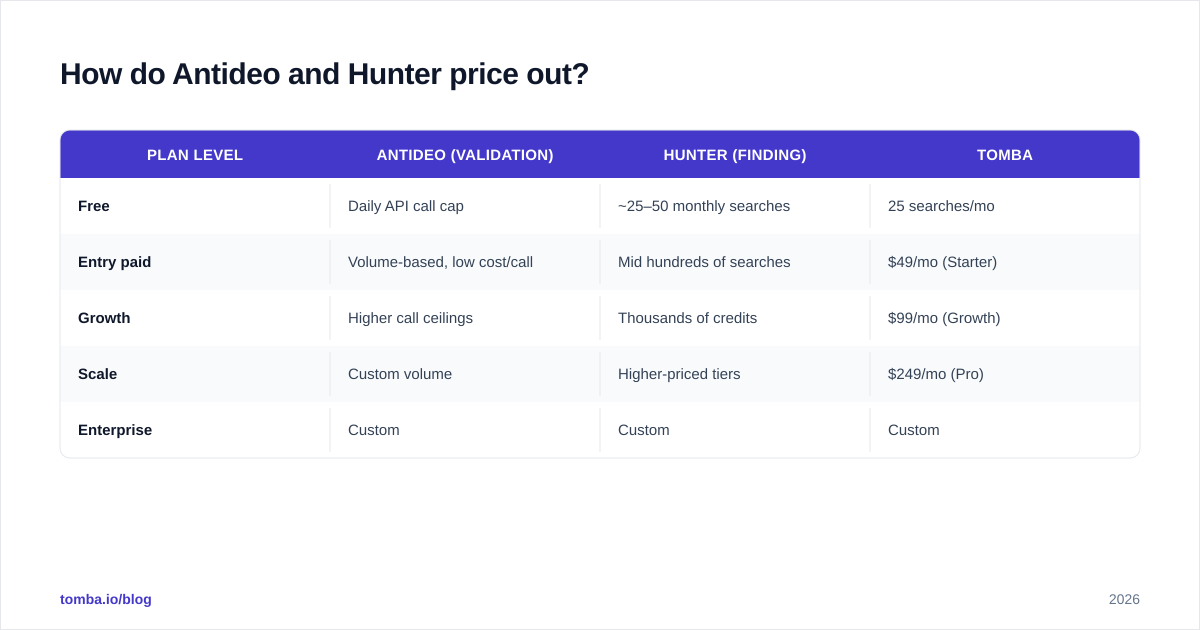
Pricing is where the "they aren't really competitors" point gets concrete.
Antideo prices on API call volume. The free tier covers low daily limits — fine for a side project or a small signup form — and paid plans scale with throughput. Because each check is cheap, high-volume validation stays affordable.
Hunter prices on searches and verifications as credits. Its free plan offers a modest monthly allowance; paid tiers raise the ceiling but a prospecting-heavy week can exhaust a mid plan quickly. If you find and verify every lead, you burn two credit types at once.
| Plan level | Antideo (validation) | Hunter (finding) | Tomba |
|---|---|---|---|
| Free | Daily API call cap | ~25–50 monthly searches | 25 searches/mo |
| Entry paid | Volume-based, low cost/call | Mid hundreds of searches | $49/mo (Starter) |
| Growth | Higher call ceilings | Thousands of credits | $99/mo (Growth) |
| Scale | Custom volume | Higher-priced tiers | $249/mo (Pro) |
| Enterprise | Custom | Custom | Custom |
Always confirm current numbers on each vendor's own page — pricing shifts. For Tomba's exact figures, see the Tomba pricing page. The pattern to notice: if you need both finding and verifying, paying two vendors (one to find, one to validate) often costs more than a single tool that does both.

When should you choose Antideo?#
Choose Antideo when your problem is inbound quality, not outbound volume.
- You run a signup or checkout form and want to block disposable emails and bot traffic in real time.
- You need IP reputation or geolocation alongside email checks — Antideo bundles these; Hunter doesn't.
- You're a developer who wants a simple REST API and a generous-enough free tier to prototype.
- You're validating phone numbers or filtering user-generated content for profanity.
Antideo is the wrong call if anyone on your team ever says "I need to find the VP of Marketing's email." That's not what it does, full stop.
When should you choose Hunter?#
Choose Hunter when your problem is building and reaching a prospect list.
- You're an SDR or founder doing manual outbound and want a browser-native find-and-verify loop.
- You need domain search to map an entire company's contactable emails.
- You want a lightweight campaign sender without buying a separate cold-email platform.
- You value brand familiarity and a large, well-reviewed user base.
Hunter is the wrong call if you only need validation (overkill) or if your monthly finding volume is high enough that credit costs balloon. At scale, per-credit pricing is the constraint that pushes teams to look at alternatives.
Is there a tool that does both better?#
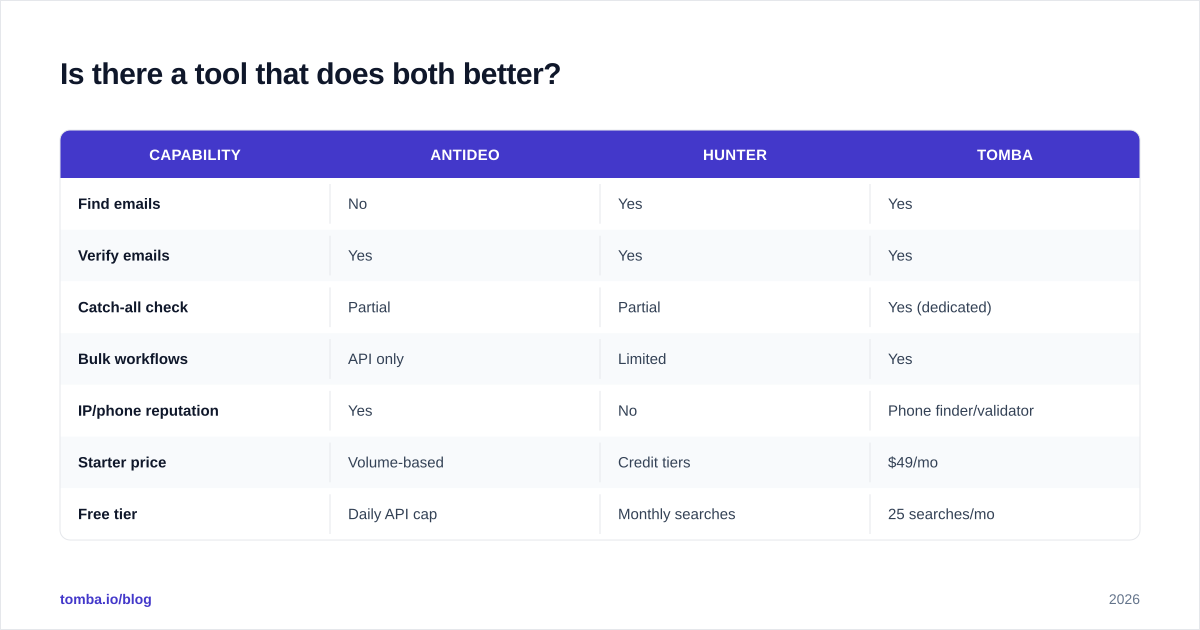
Yes — and this is the honest part most one-vs-one posts skip. If your real workflow is find the email, then verify it before sending, you're trying to staple Antideo's validation onto Hunter's finding (or vice versa). A unified platform removes that seam.
Tomba was built for exactly this two-step job. It combines:
- Email finding by name, domain, or company — like Hunter, via domain search.
- Built-in verification so found addresses are checked before they hit your sequence.
- Catch-all handling, bulk processing, and a developer-grade Tomba API for teams that want Antideo-style automation.
| Capability | Antideo | Hunter | Tomba |
|---|---|---|---|
| Find emails | No | Yes | Yes |
| Verify emails | Yes | Yes | Yes |
| Catch-all check | Partial | Partial | Yes (dedicated) |
| Bulk workflows | API only | Limited | Yes |
| IP/phone reputation | Yes | No | Phone finder/validator |
| Starter price | Volume-based | Credit tiers | $49/mo |
| Free tier | Daily API cap | Monthly searches | 25 searches/mo |
This isn't a claim that Tomba wins every box — Antideo's IP reputation features are genuinely outside Tomba's lane, and if fraud-scoring is your only need, Antideo is the leaner pick. But for the common B2B sequence of find → verify → enrich → send, one tool beats stitching two together.
How should you decide?#
Run this quick decision tree:
- Do you need to find new emails? If no, Antideo (or any validator) is enough. If yes, skip Antideo.
- Is your volume low and browser-based? Hunter's extension and free tier are a fine start.
- Do you find and verify regularly, or work in bulk/API? A combined finder/verifier like Tomba avoids double-paying and double-tooling.
- Do you also need fraud/IP signals? Keep Antideo for that specific layer — it's a complement, not a competitor.
The mistake teams make is treating "Antideo vs Hunter" as a single winner-take-all fight. It isn't. They occupy different rooms of the same house. The sharper question is: what's your actual workflow, and which single tool covers the most of it without forcing a second subscription?
For most B2B prospecting teams in 2026, that answer is a unified finder-and-verifier. Start free with Tomba Email Finder — find verified work emails by name or domain, run them through built-in verification, and skip the find-with-one-tool, validate-with-another shuffle. You can scale from the free 25 searches into Tomba plans as your pipeline grows, and wire it straight into your stack with the email finder API when you're ready to automate.
Ready to find emails that actually work?
Join 150,000+ professionals who stopped guessing and started sending. Free credits on signup — no credit card required.
Get the Tomba newsletter
Practical outbound tactics and product updates — once every two weeks.
About the author