Antideo vs Kaspr 2026: Email Validation vs Lead Data
Antideo validates emails, IPs, and phones; Kaspr pulls phone numbers and emails off LinkedIn. They solve different problems — here is how to choose, and where a dedicated email finder beats both.
Most "Antideo vs Kaspr" searches start from a wrong assumption: that these two tools compete. They don't. One is a validation and fraud-prevention API. The other is a LinkedIn-first contact data tool. Picking between them as if they were rivals is how teams end up with a stack that finds leads it can't trust, or trusts data it never actually found.
This guide breaks down what each tool really does, where they overlap, where they don't, and how to assemble a data workflow that covers the full job — from finding a contact to confirming the email won't bounce.
TL;DR: Antideo vs Kaspr at a glance#
- Antideo is a developer-focused validation API: email validation, IP reputation/geolocation, phone validation, and profanity filtering. It checks data you already have; it does not find new contacts.
- Kaspr is a B2B prospecting tool built around a LinkedIn Chrome extension. It reveals phone numbers and emails for prospects you browse; it is not built to validate data at scale.
- They solve opposite halves of the same pipeline — acquisition (Kaspr) vs hygiene/fraud-prevention (Antideo).
- Neither is a complete record-finding + verification engine. A dedicated email finder with built-in verification covers the gap both leave open.
- Choose by job to be done, not by feature-count. Most growth teams need find + verify; most product/signup teams need real-time validation at the form.
What is Antideo?#
Antideo is an API-first data validation and abuse-prevention service. Instead of helping you build prospect lists, it inspects records you already hold and tells you whether they are real, risky, or junk. Think of it as the bouncer at the door of your database — it does not bring guests, it decides who gets in.
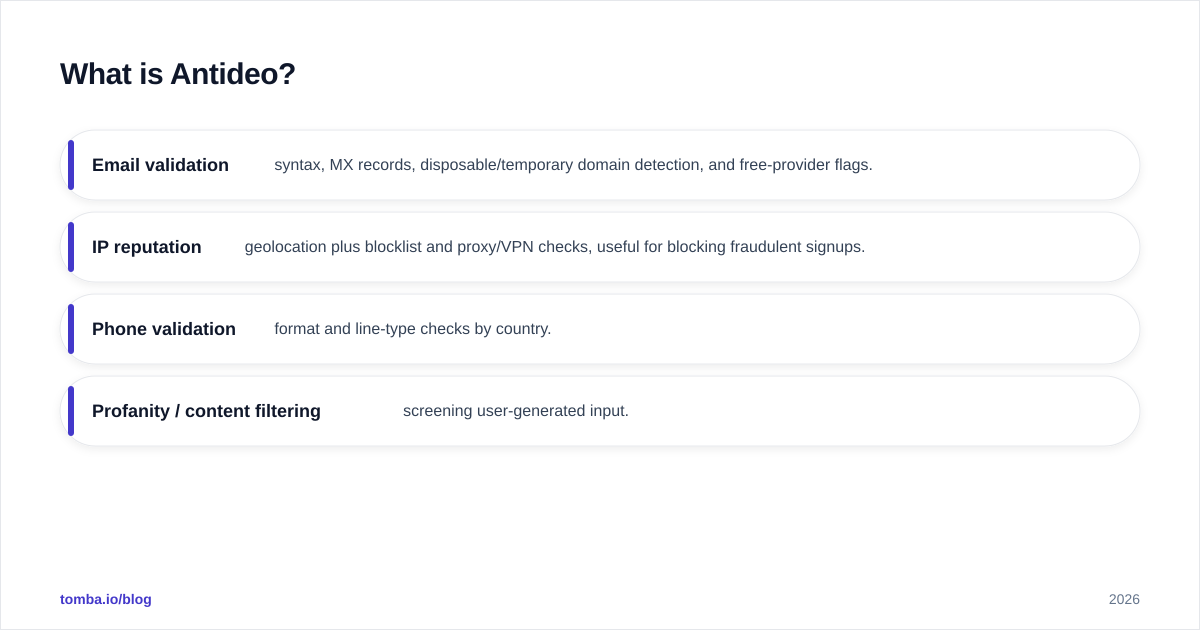
Its core endpoints cover four areas:
- Email validation — syntax, MX records, disposable/temporary domain detection, and free-provider flags.
- IP reputation — geolocation plus blocklist and proxy/VPN checks, useful for blocking fraudulent signups.
- Phone validation — format and line-type checks by country.
- Profanity / content filtering — screening user-generated input.
The audience is developers and product teams who want to stop fake signups, reduce bounce rates at the point of entry, and keep abusive traffic out. Antideo offers a free tier with rate-limited calls, which makes it popular for small projects and proof-of-concept builds. You can see the live endpoints on the official antideo.com site.
What Antideo is not: a source of new contact data. It will never hand you a decision-maker's email or mobile number. If your problem is "I have a list and need to clean it," Antideo fits. If your problem is "I have a company and need the right person's contact," it does nothing for you.
What is Kaspr?#
Kaspr is a B2B contact-data and prospecting tool whose center of gravity is LinkedIn. Its Chrome extension sits on top of LinkedIn profiles, Sales Navigator, and even group/event member lists, and surfaces phone numbers and email addresses for the people you're viewing. Where Antideo guards the door, Kaspr goes out and finds the guests.
Kaspr's strengths:
- LinkedIn-native workflow — reveal contacts while you prospect, one profile at a time or in bulk from a list.
- Mobile numbers — it leans heavily on phone data, which is a differentiator for SDRs who cold call.
- Lightweight CRM features — basic lead organization, notes, and enrichment, plus integrations with HubSpot, Pipedrive, and others.
- GDPR-aware positioning — Kaspr is a European vendor and markets compliance prominently. Details are on kaspr.io.
What Kaspr is not: a validation or deliverability tool. It gives you emails, but confirming those emails are safe to send to at scale is not its core competency. It is also tightly coupled to LinkedIn — outside that surface, its utility drops sharply.
Antideo vs Kaspr: how do they actually compare?#
Because the two tools occupy different stages of the pipeline, a head-to-head table is less "which is better" and more "which job does each one do."
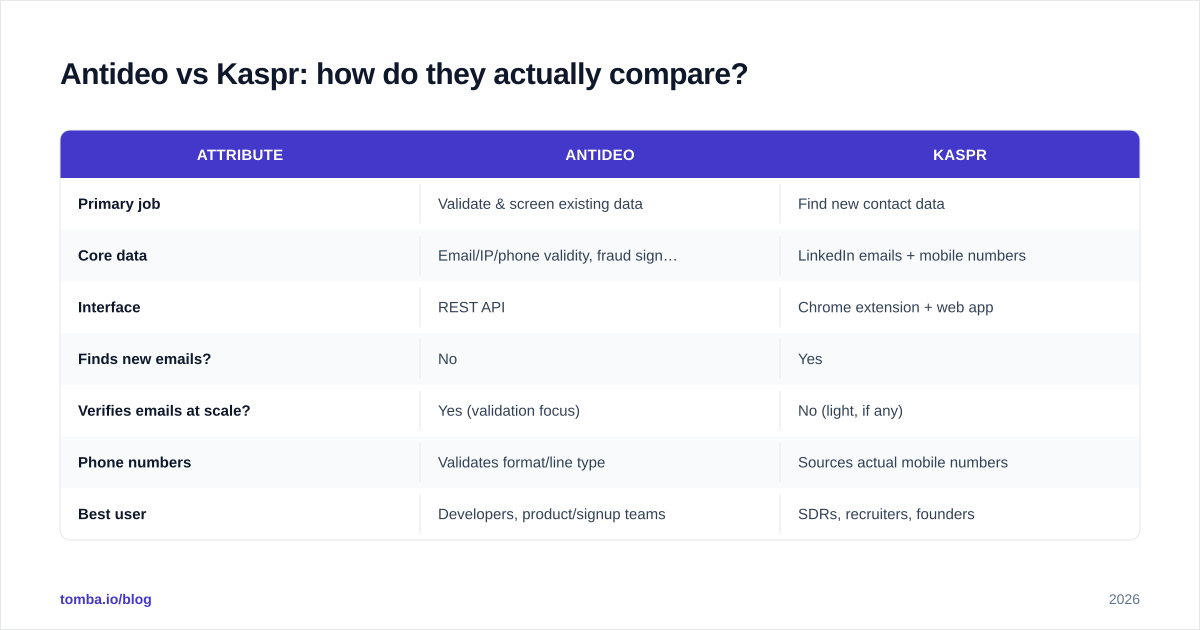
| Attribute | Antideo | Kaspr |
|---|---|---|
| Primary job | Validate & screen existing data | Find new contact data |
| Core data | Email/IP/phone validity, fraud signals | LinkedIn emails + mobile numbers |
| Interface | REST API | Chrome extension + web app |
| Finds new emails? | No | Yes |
| Verifies emails at scale? | Yes (validation focus) | No (light, if any) |
| Phone numbers | Validates format/line type | Sources actual mobile numbers |
| Best user | Developers, product/signup teams | SDRs, recruiters, founders |
| Free option | Yes, rate-limited free tier | Limited free credits |
| Pricing model | API call volume / tiers | Per-seat credit plans |

The takeaway from the table: if you put a checkmark in "finds new emails," only Kaspr qualifies. If you put one in "validates at scale to protect deliverability," only Antideo qualifies. Neither tool checks both boxes well, which is exactly why so many teams run a third tool for the part both leave thin — finding a verified, send-ready email in one motion.
Which problem are you actually solving?#
Before you pick, name the job. Most confusion in the "antideo vs kaspr" decision comes from skipping this step.
Job 1 — Stop fraud and bad input at signup. A user types an email into your form; you need a real-time yes/no before you create the account. This is validation at the boundary. Antideo wins cleanly. Kaspr is irrelevant here.
Job 2 — Build a prospect list from LinkedIn. You're an SDR working Sales Navigator and you need the mobile and email of 50 target accounts this week. This is acquisition. Kaspr wins. Antideo can't source a single new record.
Job 3 — Find verified emails for outbound at scale, by domain or name. You have a list of companies and need the right person's address, confirmed deliverable, ready to load into a sequencer. Neither Antideo nor Kaspr nails this end to end — Antideo finds nothing, Kaspr finds but doesn't verify deeply and is capped to LinkedIn browsing. This is where a purpose-built email finder and email verifier pairing earns its place.
If your real need is Job 3 — and for most outbound and demand-gen teams it is — comparing Antideo against Kaspr is comparing two tools that each do half of what you want.
Is Antideo or Kaspr better for cold outreach?#
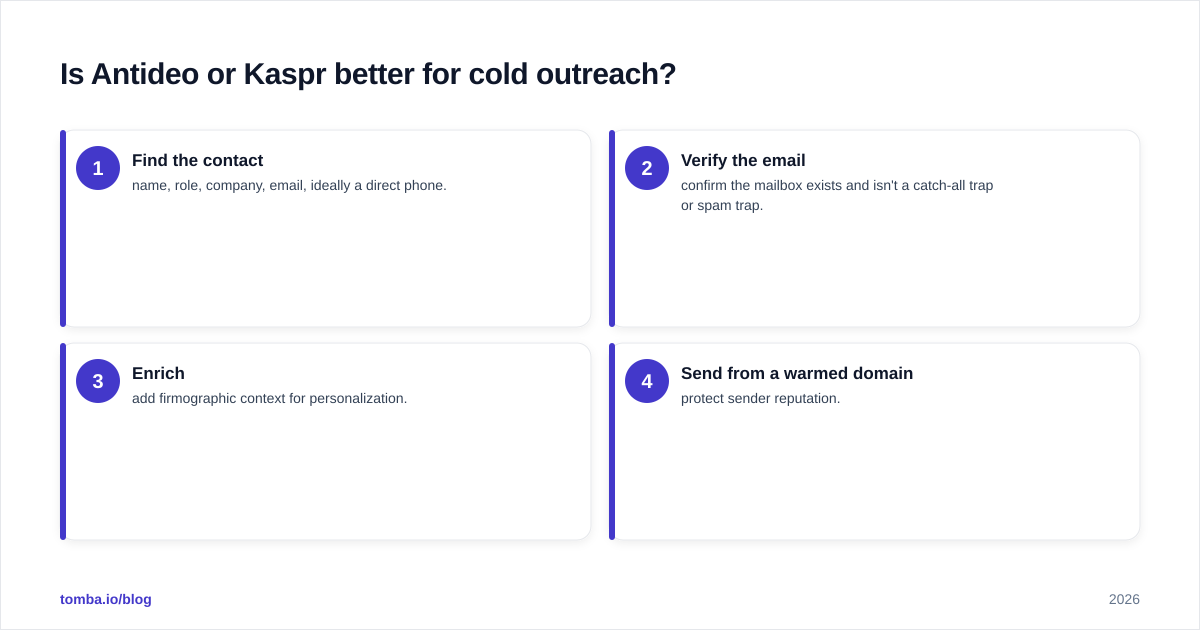
For cold outreach specifically, Kaspr is the closer fit because it produces contactable data. But "closer fit" is not "complete fit." Here's the honest sequence a deliverability-conscious outbound team needs:
- Find the contact — name, role, company, email, ideally a direct phone.
- Verify the email — confirm the mailbox exists and isn't a catch-all trap or spam trap.
- Enrich — add firmographic context for personalization.
- Send from a warmed domain — protect sender reputation.
Kaspr handles step 1 well inside LinkedIn and gives you phone numbers for cold calling, which is a genuine advantage if calling is in your motion. But it leaves step 2 underpowered. Sending unverified addresses pulled from any source — Kaspr included — drives hard bounces, and hard bounces wreck sender reputation. A bounce rate above 2-3% is a fast track to the spam folder.
Antideo could theoretically validate those emails after the fact, but you'd be stitching two vendors, two billing relationships, and two data formats together to approximate one workflow. That works, but it's friction.
This is the structural weakness of the "antideo vs kaspr" framing: you almost always need a verification step Kaspr doesn't fully provide and an acquisition step Antideo can't provide at all.
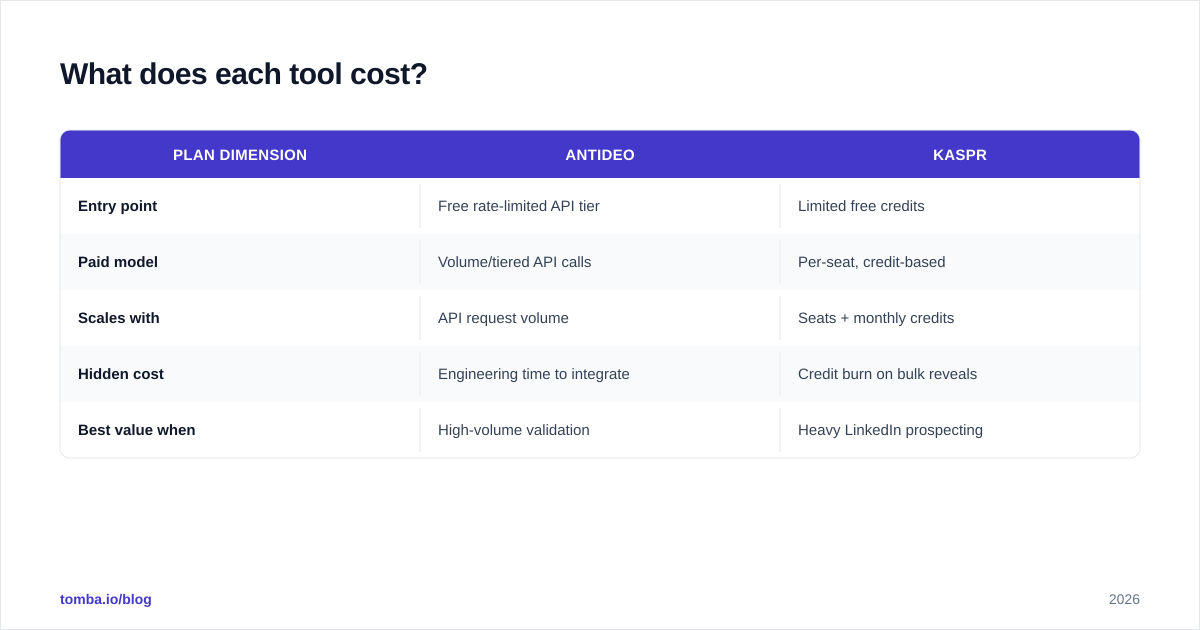
What does each tool cost?#
Pricing is a moving target, so treat this as directional and confirm on each vendor's page before buying.
| Plan dimension | Antideo | Kaspr |
|---|---|---|
| Entry point | Free rate-limited API tier | Limited free credits |
| Paid model | Volume/tiered API calls | Per-seat, credit-based |
| Scales with | API request volume | Seats + monthly credits |
| Hidden cost | Engineering time to integrate | Credit burn on bulk reveals |
| Best value when | High-volume validation | Heavy LinkedIn prospecting |
Two cost traps to watch. With Antideo, the sticker price is low — sometimes free — but you pay in engineering integration time, since it's an API with no prospecting UI. With Kaspr, the trap is credit burn: bulk-revealing contacts eats credits fast, and per-seat pricing multiplies as your team grows. Compare both against the all-in cost of a single tool that finds and verifies, like Tomba pricing, where a $49/mo Starter plan covers finding plus verification in one place rather than two line items.
Where do these tools fall short — and what fills the gap?#
Both tools are good at their narrow job and weak outside it. The gap between them is the find-and-verify-in-one-motion workflow that outbound, recruiting, and demand-gen teams actually live in.
A dedicated email-finding platform closes that gap by combining several jobs:
- Find by domain or name — give it a company and get the team's addresses via domain search, no LinkedIn tab required.
- Pull contacts from LinkedIn too, when that's your surface, with a LinkedIn finder.
- Source direct dials with a phone finder, covering Kaspr's calling use case.
- Verify before you send so bounces stay low and reputation stays intact.
The point isn't that Antideo and Kaspr are bad — they're well-built for what they do. It's that running both still leaves seams, and a single find-plus-verify engine removes those seams for the most common B2B job. Independent reviews on G2 are a useful sanity check on any of these vendors before you commit budget; read the one-star reviews, not just the fives.
Antideo vs Kaspr: which should you choose?#
Decide by mapping your dominant job to the right tool — and be honest that the answer is often "neither alone."
- Choose Antideo if you're a developer or product team that needs real-time email/IP/phone validation and fraud screening at the point of signup, and you have engineering capacity to integrate an API. You are protecting data quality, not building lists.
- Choose Kaspr if your motion is LinkedIn-heavy prospecting, you cold call as much as you cold email, and you want contacts revealed inside the platform where your reps already work.
- Choose a dedicated email finder + verifier if your job is outbound at scale: find the right person by domain or name, confirm the address is deliverable, enrich for personalization, and load into your sequencer — without juggling two vendors. This is the majority case.
A simple heuristic: if the word "validate" describes your problem, lean Antideo. If "find on LinkedIn" describes it, lean Kaspr. If "find verified emails for outbound" describes it, you've outgrown both and want a find-and-verify platform.
Can you combine them?#
Yes, and some teams do. A defensible stack is Kaspr for LinkedIn-sourced phone numbers, Antideo for real-time signup validation on your product, and a dedicated finder/verifier for everything outbound. The cost of that combination is three contracts, three data formats, and the integration glue between them.
The leaner alternative is to consolidate the outbound half — finding and verifying — into one tool and keep only the genuinely specialized pieces (say, Antideo's fraud screening on your signup form) as add-ons. Most teams overspend by buying overlapping point tools and underspend on the one workflow that drives revenue: clean, deliverable contact data at scale.
The bottom line#
Antideo and Kaspr aren't really competitors — they're two ends of a pipeline. Antideo validates and screens the data you already have; Kaspr sources new contacts from LinkedIn. Comparing them as rivals hides the real gap: finding the right person's email and confirming it's safe to send, in one motion, by domain or by name.
If that find-and-verify workflow is your actual job, skip the false choice. Start with the Tomba Email Finder to locate professional emails by domain, name, or company, verify them before they ever hit your sequencer, and pull direct phone numbers when you need to call. One tool, finding plus verification, with a free tier of 25 searches a month to test it against your own target accounts — so you can prove the data is real before you spend a credit or send a single cold email.
Ready to find emails that actually work?
Join 150,000+ professionals who stopped guessing and started sending. Free credits on signup — no credit card required.
Get the Tomba newsletter
Practical outbound tactics and product updates — once every two weeks.
About the author