Anymail Finder vs Lusha (2026): Pricing & Accuracy Compared
Anymail Finder vs Lusha: one is a verification-first email finder, the other a contact database with phone numbers. See which fits your outbound stack in 2026.

Choosing between Anymail Finder and Lusha usually means choosing between two different philosophies of prospecting. One is a lean, verification-first email finder built to feed cold email at scale. The other is a contact database that bundles emails, direct-dial phone numbers, and a browser extension aimed at salespeople working LinkedIn. They overlap enough to compete, but they are not the same product — and picking the wrong one wastes budget fast.
This breakdown compares both tools on the things that actually move pipeline: data accuracy, pricing structure, phone coverage, workflow fit, and where each one quietly fails. Where a third option makes more sense, this guide says so.
TL;DR: Anymail Finder vs Lusha at a glance#
- Anymail Finder is an email-finder specialist. It only charges for verified emails, integrates cleanly with cold-email tools, and is priced for volume outreach. No phone numbers.
- Lusha is a sales-intelligence database. Its standout feature is direct-dial mobile numbers plus a slick LinkedIn extension — but credits get expensive and email accuracy is uneven outside North America.
- Pricing model is the real fork: Anymail Finder bills per verified email; Lusha bills per credit (one credit = one contact reveal), and phone reveals burn credits faster.
- If email is your channel, a verification-first finder wins on cost per usable lead. If cold calling is core, Lusha's phone data is the draw.
- A strong middle path is Tomba Email Finder, which pairs verified email discovery with a phone finder and enrichment under one flat plan.

What is Anymail Finder?#
Anymail Finder is a B2B email-finding tool whose entire pitch is built around one promise: you only pay for emails it can verify. Feed it a full name plus a company domain (or just a company), and it returns an address with a confidence label — "verified" or "not found." Crucially, found-but-unverifiable results don't cost you credits on most plans, which keeps your effective cost-per-lead honest.
The product is deliberately narrow. There's a single-search UI, a bulk email finder-style CSV upload for lists, an API, and a handful of native integrations for cold-email sequencers. It does not try to be a CRM, a sequencer, or a dialer. That focus is the point — it's a clean top-of-funnel data source for teams who already have their outreach stack and just need accurate addresses pumped into it.
Where it shines: deliverability-conscious senders. Because Anymail Finder runs SMTP-level checks before it bills you, the lists it produces tend to bounce less, which protects your sender reputation. Where it falls short: it has no phone data, thinner firmographic enrichment than a full database, and coverage that gets patchy for smaller companies and some non-Western regions.
What is Lusha?#
Lusha is a sales-intelligence platform best known for direct-dial phone numbers. Its core experience is a browser extension: open a LinkedIn profile, click the Lusha button, and it surfaces the person's work email, mobile number, and basic company data. That motion is genuinely fast for reps doing manual, one-at-a-time prospecting.
Under the hood, Lusha is a contact database with community-sourced and licensed data, GDPR/CCPA compliance positioning, and a credit system. One credit reveals one contact. The platform layers on prospecting filters, list building, and CRM integrations (Salesforce, HubSpot, Pipedrive) on higher tiers.
Lusha's strength is the phone numbers — for SDRs who live on the dialer, accurate mobiles are worth real money. Its weaknesses are cost predictability and email accuracy. Credits evaporate quickly when you're revealing both email and phone per contact, and independent testing repeatedly shows its email match rates trailing dedicated email finders, especially outside the US.
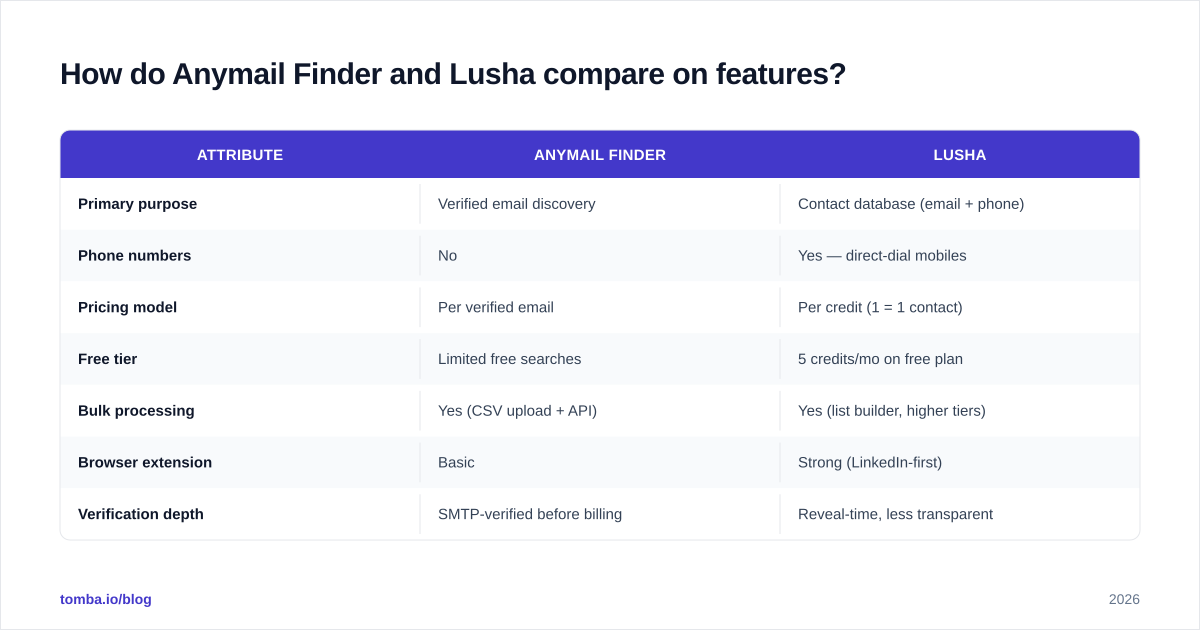
How do Anymail Finder and Lusha compare on features?#
The fastest way to see the gap is side by side. These two tools solve adjacent problems, so the comparison is less "which is better" and more "which job are you hiring it for."
| Attribute | Anymail Finder | Lusha |
|---|---|---|
| Primary purpose | Verified email discovery | Contact database (email + phone) |
| Phone numbers | No | Yes — direct-dial mobiles |
| Pricing model | Per verified email | Per credit (1 = 1 contact) |
| Free tier | Limited free searches | 5 credits/mo on free plan |
| Bulk processing | Yes (CSV upload + API) | Yes (list builder, higher tiers) |
| Browser extension | Basic | Strong (LinkedIn-first) |
| Verification depth | SMTP-verified before billing | Reveal-time, less transparent |
| Best fit | Cold email at volume | SDRs cold calling + LinkedIn |
| Weak spot | No phone, regional gaps | Credit cost, email accuracy |
The headline: Anymail Finder is the better pure email engine, Lusha is the better LinkedIn-and-phone companion. If you try to use Lusha as a high-volume email source, the credit math punishes you. If you try to use Anymail Finder for cold calling, there's simply no phone data to pull.
How accurate is each tool?#
Accuracy is where email finders win or lose, because a 90% verified list and a 70% guessed list produce wildly different bounce rates. Anymail Finder's "pay only for verified" model forces honesty here — the tool has a structural incentive not to mark a shaky address as good, since it can't bill you for the misses. In practice that means cleaner exports and fewer bounces, though at the cost of more "not found" results on obscure domains.
Lusha's accuracy is strong on phone numbers and decent on US email, but reveal-time verification is less transparent. You spend a credit, you get a contact, and you find out at send time whether the email was live. For teams who don't run a separate email verifier pass, that's a real deliverability risk.

The practical rule: whatever you choose, verify before you send. Even the most accurate finder produces stale results as people change jobs, and catch-all domains hide invalid addresses behind a server that accepts everything. A dedicated catch-all verifier step catches what the finder can't.
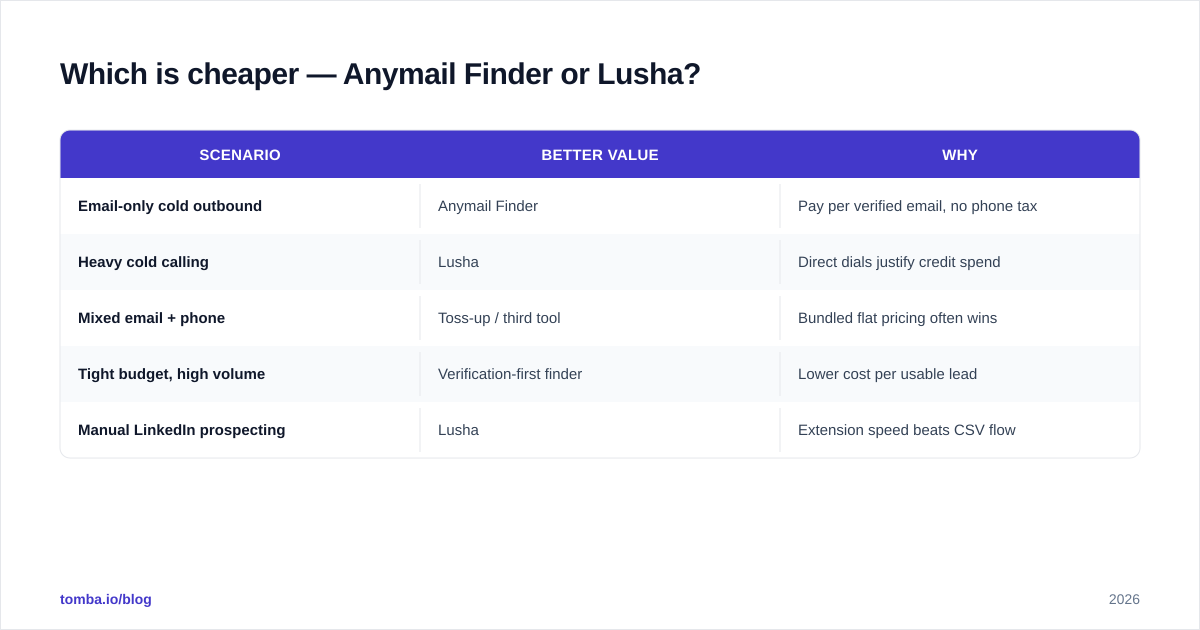
Which is cheaper — Anymail Finder or Lusha?#
It depends entirely on your channel mix, and the two pricing models make a flat comparison misleading.
Anymail Finder bills per verified email. If you run email-only outbound, your cost scales with usable leads — you're not paying for the misses, which makes cost-per-lead predictable as your hit rate stays roughly constant. The downside is no bundled phone or deep enrichment; you're buying one thing.
Lusha bills per credit, and the trap is that a single contact can cost multiple credits if you reveal email plus phone. For an SDR revealing both on every prospect, the effective cost-per-contact climbs quickly, and Lusha's higher tiers add per-seat costs on top. The phone data may justify it — but only if you actually dial.
Here's how the value calculus tends to shake out:
| Scenario | Better value | Why |
|---|---|---|
| Email-only cold outbound | Anymail Finder | Pay per verified email, no phone tax |
| Heavy cold calling | Lusha | Direct dials justify credit spend |
| Mixed email + phone | Toss-up / third tool | Bundled flat pricing often wins |
| Tight budget, high volume | Verification-first finder | Lower cost per usable lead |
| Manual LinkedIn prospecting | Lusha | Extension speed beats CSV flow |
If your motion is mixed — some email, some phone, lots of volume — paying two per-unit meters gets expensive. That's exactly where a flat-rate platform changes the math.

Where does Tomba fit in this comparison?#
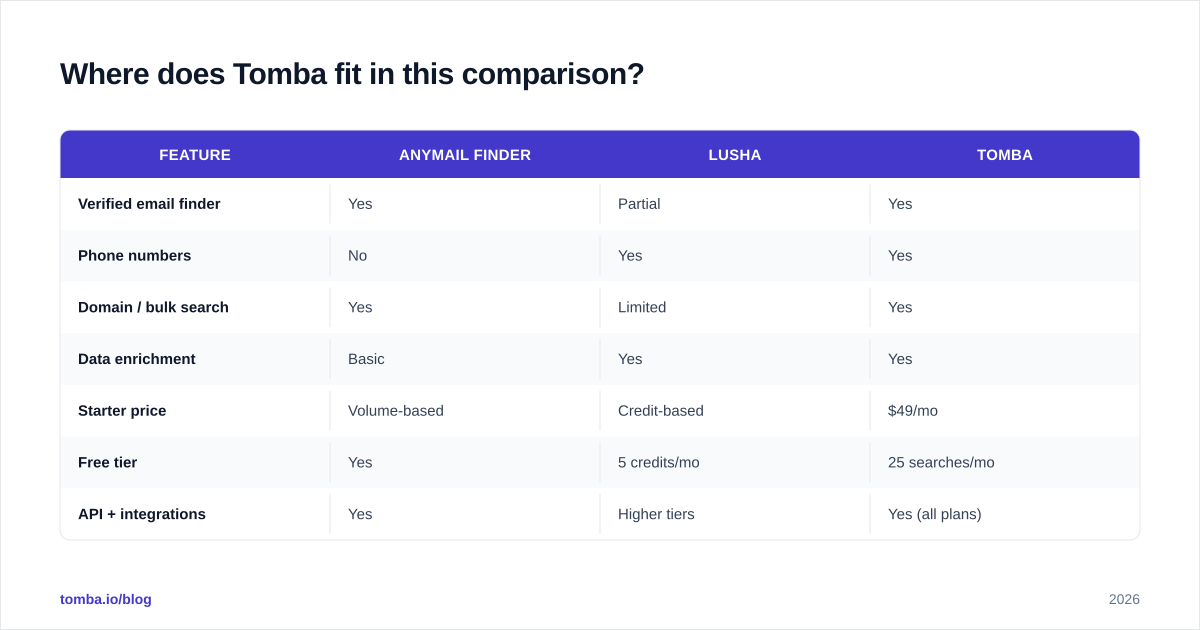
Tomba sits in the gap both tools leave open: it's an email finder with the verification rigor of Anymail Finder, plus the phone and enrichment breadth that pushes people toward Lusha — under one flat subscription instead of two metered ones.
The core find email addresses engine works by domain, name, or company, and every result runs through email verification before it lands in your export. Need to call as well as email? The phone finder adds B2B numbers without a separate credit meter. Building lists at scale? Domain search pulls every public address on a company in one pass, and bulk tools handle thousands of rows.
| Feature | Anymail Finder | Lusha | Tomba |
|---|---|---|---|
| Verified email finder | Yes | Partial | Yes |
| Phone numbers | No | Yes | Yes |
| Domain / bulk search | Yes | Limited | Yes |
| Data enrichment | Basic | Yes | Yes |
| Starter price | Volume-based | Credit-based | $49/mo |
| Free tier | Yes | 5 credits/mo | 25 searches/mo |
| API + integrations | Yes | Higher tiers | Yes (all plans) |
On price, Tomba pricing runs a free tier with 25 searches/mo, Starter at $49/mo, Growth at $99/mo, and Pro at $249/mo — flat plans that bundle finding, verifying, phone lookup, and enrichment rather than charging per reveal. For teams tired of watching credits drain mid-campaign, that predictability is the headline difference.
This isn't a knock on either competitor. Anymail Finder is a genuinely good email engine, and Lusha's phone data is best-in-class for some regions. The point is that if your workflow spans both email and phone, paying one flat platform usually beats stitching two metered ones together.
Which tool should you choose?#
Decide by your dominant channel, then by budget structure.
- Choose Anymail Finder if email is your only channel, you care most about low bounce rates, and you want to pay strictly for verified addresses. It's a clean, focused source that plays nicely with any sequencer.
- Choose Lusha if cold calling is central to your motion, you prospect manually on LinkedIn, and accurate mobile numbers are worth a premium credit cost. The extension speed is real.
- Choose Tomba if you want both email and phone, predictable flat pricing, and verification built into the find step — without juggling two credit meters. Start free and scale on Tomba plans as volume grows.
A useful gut check: map your last 100 prospecting touches. If 90 were emails, optimize for verified email cost. If 40 were calls, you need phone data in the mix. If it's genuinely split, a bundled platform almost always wins on total cost.
For deeper background on why verification matters before you send, the basics of email deliverability explain how bounce rates feed back into sender reputation — the silent killer of cold campaigns. And if you're evaluating more than these two, the broader Apollo alternative and database landscape is worth a look, since many teams over-buy a full platform when a focused finder would do.

Final verdict#
Anymail Finder vs Lusha comes down to one question: are you sending emails or making calls? Anymail Finder is the sharper email engine — verification-first, honest pricing, deliverability-friendly. Lusha is the stronger call-prospecting companion — phone numbers and a LinkedIn extension that SDRs love. Neither does both jobs cheaply.
If your outbound spans email and phone, or you simply want one predictable bill instead of two ticking credit meters, try Tomba Email Finder free with 25 searches a month. Verified emails, B2B phone numbers, domain search, and enrichment live under one flat plan — so you spend your budget on pipeline, not on per-reveal surprises. Find the contact, verify it before you send, and dial when you need to, all without switching tools.
// get started
Find, verify and enrich your first contacts today
Start on the free plan with 25 searches a month, then scale when your team is ready.
Free plan · No credit card required · GDPR & CCPA
// about the author