Apexverify vs DiscoverOrg: B2B Data Tool Comparison 2026
Apexverify verifies emails; DiscoverOrg (now ZoomInfo) sells contact data. We compare what each actually does, where they overlap, and which fits your 2026 stack.
TL;DR
- They solve different problems. Apexverify is an email verification tool that cleans lists and confirms deliverability. DiscoverOrg was a B2B data intelligence platform that sold contact and company records — it merged into ZoomInfo in 2019.
- Comparing them head-to-head is a category error, but teams do it anyway because both touch the same workflow: getting accurate contacts into your CRM.
- If you need verified deliverability, a dedicated verifier wins. If you need net-new contact data, you need a data provider, not a verifier.
- DiscoverOrg as a standalone brand is effectively legacy — the buying decision today is really "ZoomInfo vs everyone else," and the price tag reflects it.
- The pragmatic 2026 stack is usually a lean data source plus a verification layer, not one expensive monolith. Tools like Tomba bundle finding and verifying at a fraction of enterprise-suite pricing.
What are Apexverify and DiscoverOrg, really?#
Quick answer: Apexverify checks whether an email address is real and safe to send to; DiscoverOrg (now part of ZoomInfo) hands you the email address — and a few hundred fields around it — in the first place.
Think of it like a kitchen. DiscoverOrg is the grocery delivery that fills your fridge with ingredients (names, titles, direct dials, org charts, intent signals). Apexverify is the "smell test" you run before cooking, throwing out anything that's gone off. You can't substitute one for the other. A fridge full of spoiled food and an empty fridge both leave you hungry.
That distinction matters because the phrase "Apexverify vs DiscoverOrg" usually hides the real question someone is asking, which is one of:
- "My bounce rate is killing my domain — what fixes that?" (verification problem)
- "I have no one to email — where do I get contacts?" (data problem)
- "I'm paying too much for ZoomInfo — what's the leaner stack?" (cost problem)
We'll answer all three. First, the lay of the land.
Is DiscoverOrg even a separate product in 2026?#
Short answer: not really. DiscoverOrg acquired ZoomInfo in 2019 and adopted the ZoomInfo brand, folding its datasets into the combined platform. If you go shopping for "DiscoverOrg" today, the homepage you land on is ZoomInfo. The legacy DiscoverOrg strengths — deep org charts, IT-department mapping, manually researched records — live on inside ZoomInfo's higher tiers.
So when you evaluate "DiscoverOrg," you're evaluating an enterprise sales-intelligence suite: huge contact database, intent data, technographics, workflow integrations, and an enterprise price tag to match. Its history is worth knowing because the DiscoverOrg DNA was human-verified data — analysts re-checking records on a cycle. That's the legacy reputation people are buying.

Apexverify, by contrast, lives in the narrow, unglamorous, deeply useful world of email validation: SMTP checks, syntax and MX validation, catch-all detection, role-account and disposable-address flagging, and bulk list cleaning. It doesn't claim to find you new leads. It claims to keep the leads you have from torching your sender reputation.
How do Apexverify and DiscoverOrg compare side by side?#
Here's the honest comparison — with the caveat that the right-hand column is really "
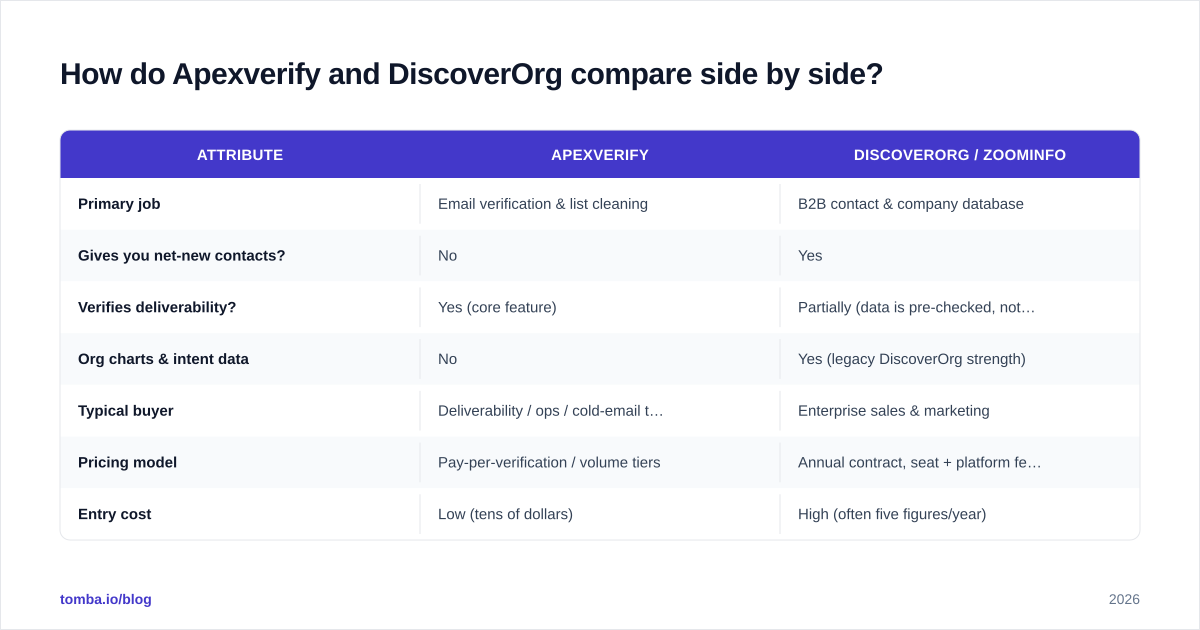
ZoomInfo (formerly DiscoverOrg)."
| Attribute | Apexverify | DiscoverOrg / ZoomInfo |
|---|---|---|
| Primary job | Email verification & list cleaning | B2B contact & company database |
| Gives you net-new contacts? | No | Yes |
| Verifies deliverability? | Yes (core feature) | Partially (data is pre-checked, not a live verifier) |
| Org charts & intent data | No | Yes (legacy DiscoverOrg strength) |
| Typical buyer | Deliverability / ops / cold-email teams | Enterprise sales & marketing |
| Pricing model | Pay-per-verification / volume tiers | Annual contract, seat + platform fees |
| Entry cost | Low (tens of dollars) | High (often five figures/year) |
| Best for | Protecting domain health | Large-scale account-based outbound |
| Contract friction | Self-serve, cancel anytime | Sales-led, annual commitment |
The table makes the mismatch obvious. These tools sit at opposite ends of the lead lifecycle. One is a sniper rifle for bad addresses; the other is a supply depot for contacts.
When should you choose a verification tool like Apexverify?#
Choose verification-first when your problem is quality, not quantity. Specific signals:
- Your bounce rate is above 3%. Mailbox providers treat high bounces as a spam signal. Cleaning the list before you send is the single fastest fix. Run addresses through a dedicated email verifier before any campaign.
- You bought or inherited a list. Purchased and aged lists rot at roughly 22–30% per year as people change jobs. Verification tells you what's still alive.
- You're hitting spam traps or blocklists. Verification flags the obvious offenders — disposable domains, role accounts, malformed syntax — before they damage email deliverability.
- You operate at the catch-all wall. A huge share of B2B domains are catch-all, meaning the server accepts everything and verifies nothing. You need a catch-all verifier that scores risk instead of returning a useless "unknown."
What verification does not do: give you someone new to email. If your CRM is empty, a verifier just confirms that the void is, in fact, empty.
When do you actually need DiscoverOrg-grade data?#
Choose a data-intelligence platform when your bottleneck is coverage and depth — you know your ideal customer profile but can't name the humans inside those accounts.
DiscoverOrg's legacy and
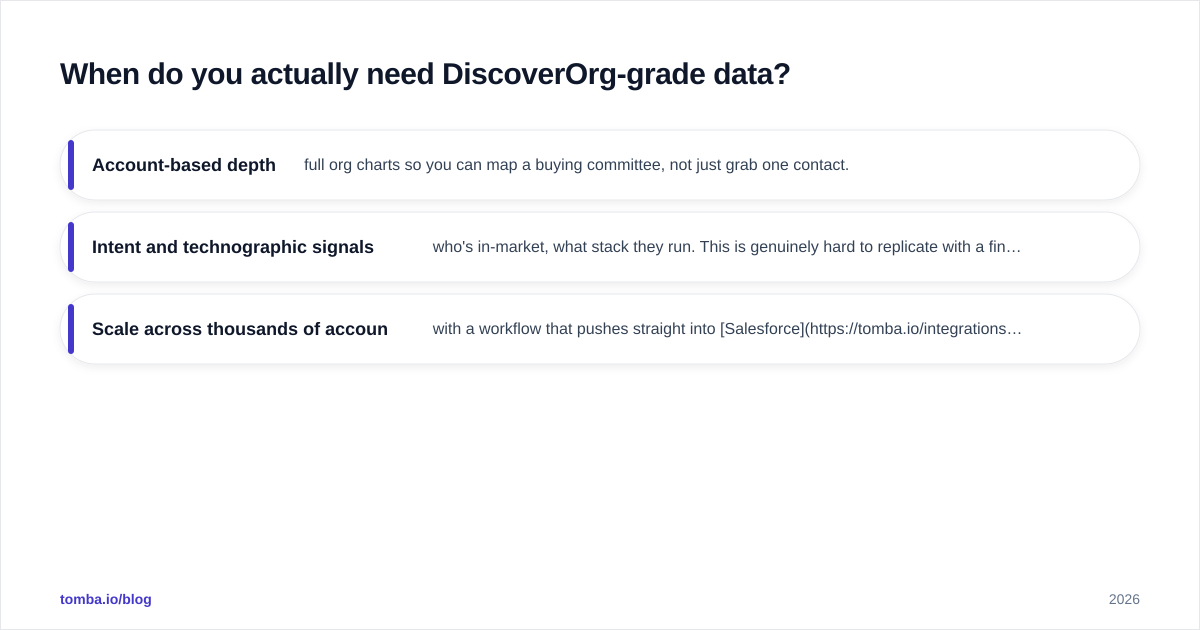
ZoomInfo's current pitch shine when you need:
- Account-based depth — full org charts so you can map a buying committee, not just grab one contact.
- Intent and technographic signals — who's in-market, what stack they run. This is genuinely hard to replicate with a finder alone.
- Scale across thousands of accounts with a workflow that pushes straight into Salesforce or HubSpot.
The trade-off is cost and commitment. Enterprise suites are sold on annual contracts that frequently run well into five figures, with seat minimums and platform fees. For a 50-person SDR org chasing enterprise logos, that math works. For a 3-person team doing targeted outbound, it's like buying a freight train to commute to work.
A common, expensive mistake: teams buy the big suite for the data, then discover the records still bounce, and bolt on a verifier anyway. The data was "pre-verified" on the vendor's cycle, not at your send time — and B2B emails decay between those cycles.
Apexverify vs DiscoverOrg vs the modern middle option#
Here's where the framing breaks down for most buyers in 2026. The real choice isn't binary. A third category — combined finder-and-verifier platforms — has eaten the middle of this market by doing the 80% that most teams need at a self-serve price.
The workflow most teams want looks like this:
- Find the right email by name + company domain.
- Verify it before it enters a sequence.
- Enrich it with title, company, and social data.
- Sync it to the CRM.
DiscoverOrg/
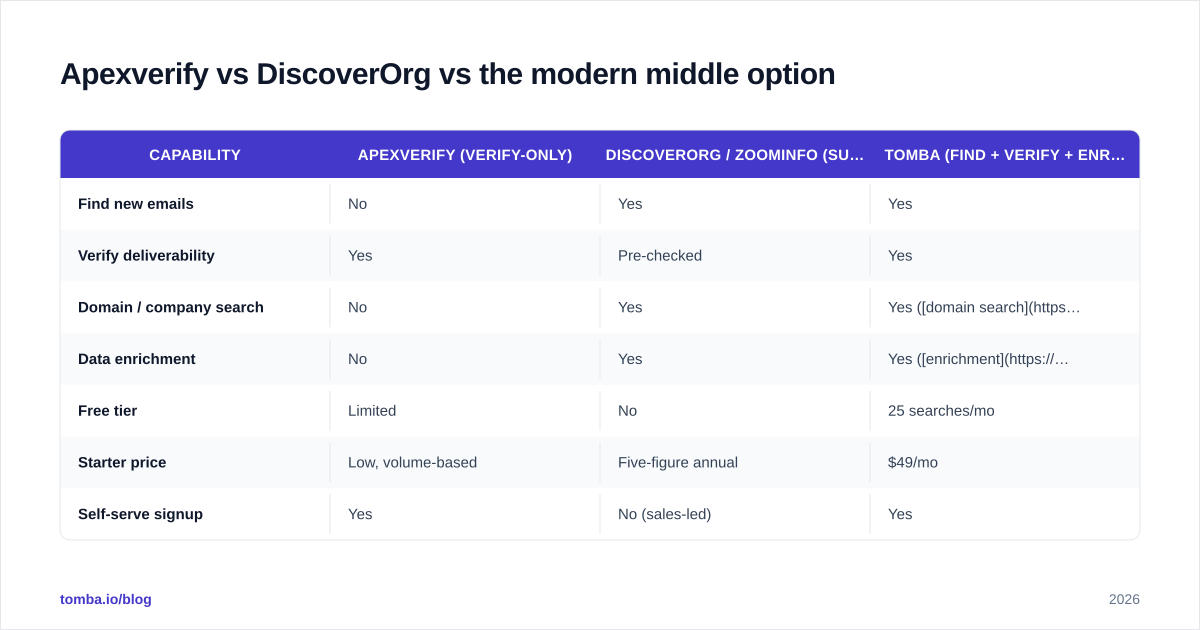
ZoomInfo does all four — at enterprise pricing. A pure verifier like Apexverify only does step 2. The combined tools do all four steps without the annual contract.
| Capability | Apexverify (verify-only) | DiscoverOrg / ZoomInfo (suite) | Tomba (find + verify + enrich) |
|---|---|---|---|
| Find new emails | No | Yes | Yes |
| Verify deliverability | Yes | Pre-checked | Yes |
| Domain / company search | No | Yes | Yes (domain search) |
| Data enrichment | No | Yes | Yes (enrichment) |
| Free tier | Limited | No | 25 searches/mo |
| Starter price | Low, volume-based | Five-figure annual | $49/mo |
| Self-serve signup | Yes | No (sales-led) | Yes |
That middle column is why "Apexverify vs DiscoverOrg" is increasingly the wrong fight. Most teams aren't choosing between a scalpel and a freight train — they want a reliable multi-tool.
How accurate is the data, and how do you know?#
Accuracy is the only metric that matters, and it's the one vendors are loosest about. Two principles cut through the marketing:
1. Freshness beats volume. A database of 100M contacts that was last refreshed six months ago is worse than a smaller source verified at the moment you pull it. DiscoverOrg built its reputation on human re-verification cycles, which was excellent — for the era. In 2026, real-time SMTP verification at the point of use is the standard, because job changes don't wait for a quarterly refresh.
2. "Verified" needs a definition. Some vendors call an address "verified" if it matched a known pattern. That's a guess, not a verification. A real check pings the mail server. When you compare tools, ask: is verification a live SMTP check, or a confidence score on a pattern match? Both have uses, but only one protects your bounce rate. You can sanity-check any provider's claim with a free email checker on a sample.
For the curious, peer reviews on G2 are more honest about real-world bounce rates than any vendor datasheet — read the 3-star reviews, not the 5-star ones, where users describe actual deliverability numbers.
Tomba publishes its data sources and runs verification at search time, so the address you get is checked against the live server, not a stale cache. That transparency is the thing to demand from any vendor in this category, regardless of which logo you pick.
What does each option cost in practice?#
Cost is where the three categories separate hardest.
- Apexverify-style verifiers price per verification or in volume tiers. You might spend tens of dollars to clean a list of tens of thousands. Cheap, predictable, no lock-in.
- **DiscoverOrg/
ZoomInfo** prices on annual contracts with platform and seat fees. Public benchmarks and reseller data put realistic entry points in the low-to-mid five figures per year, scaling sharply with seats and data credits. There's no free tier and no month-to-month.
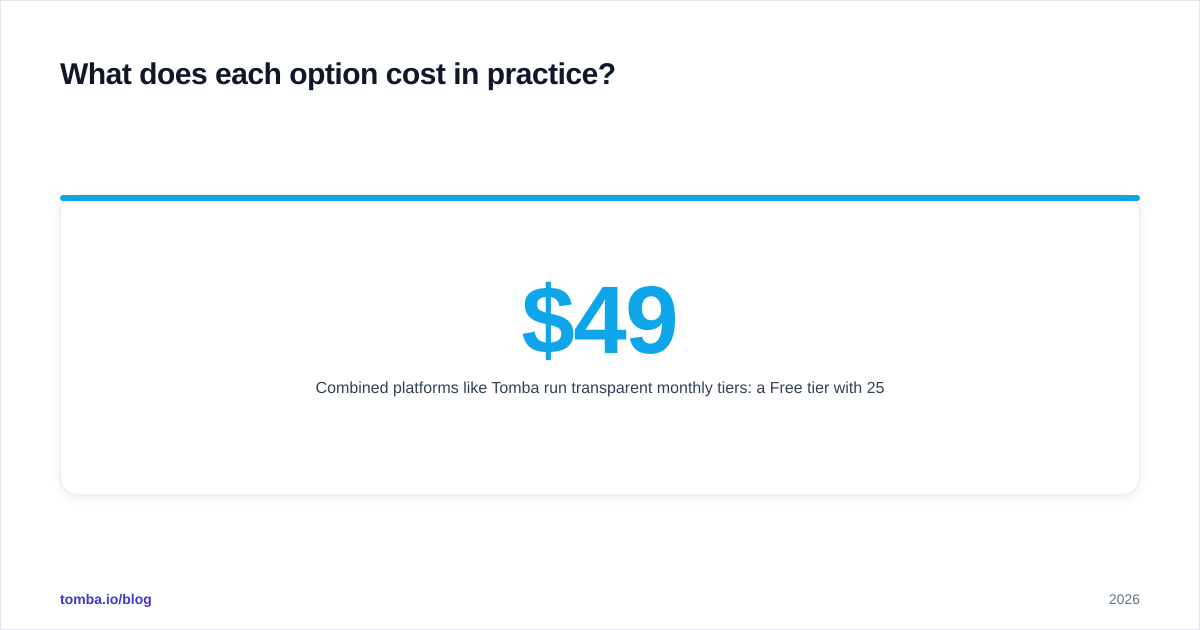
- Combined platforms like Tomba run transparent monthly tiers: a Free tier with 25 searches/month, Starter at $49/mo, Growth at $99/mo, Pro at $249/mo, and custom Enterprise. You can see full Tomba pricing without a sales call.
The buying lesson: match the contract to the team. If you can't predict 12 months of usage, an annual enterprise commitment is a risk, not a feature. Self-serve, cancel-anytime tooling lets a small team scale spend with results instead of betting it upfront.
So which one should you pick?#
Decide by your actual bottleneck, not by the brand name in the comparison:
- "My emails bounce / my domain is flagged." You have a verification problem. A dedicated verifier — Apexverify or the email verifier inside a broader platform — is the right call. Clean first, send second.
- "I have no one to contact and I sell into the enterprise with complex buying committees." You have a data depth problem. This is the one case where DiscoverOrg/ZoomInfo's price can be justified — if you'll use the org charts and intent data at scale.
- "I need accurate contacts, verified, without an annual contract." You're the 80% in the middle. A combined find-and-verify platform gives you net-new emails and live verification and enrichment at a self-serve price — no freight train required.
Be honest about which sentence describes you. Most teams say "data depth" out of aspiration and then never touch the org charts they paid five figures for.
The bottom line#
Apexverify and DiscoverOrg aren't really competitors — one verifies, the other supplies, and DiscoverOrg itself now lives inside ZoomInfo. The useful question is which capability you're short on: clean deliverability, deep account data, or an affordable middle path that does both well enough.
For the large majority of B2B teams, the answer is the middle path. You want to find the right email, confirm it's deliverable before you hit send, enrich it, and push it to your CRM — without signing a year-long contract for features you'll never open.
That's exactly what the Tomba Email Finder is built for: find professional emails by name, company, or domain, verified at search time, with enrichment and integrations built in — starting free with 25 searches a month and scaling at $49/mo when you're ready. Skip the category confusion, start with the workflow you actually run every day, and add depth only when your pipeline proves you need it.
Ready to find emails that actually work?
Join 150,000+ professionals who stopped guessing and started sending. Free credits on signup — no credit card required.
Get the Tomba newsletter
Practical outbound tactics and product updates — once every two weeks.
About the author