Artificial Intelligence Sales Assistant: 2026 Buyer's Guide
An AI sales assistant can draft outreach, score leads, and enrich contacts in seconds. Here's how the 2026 tools actually compare, where they break, and how to build a stack that pays for itself.
TL;DR
- An artificial intelligence sales assistant is software that automates the repetitive parts of selling — research, data entry, drafting, scoring, and follow-up — so reps spend more time talking to qualified buyers.
- The category splits into four jobs: prospecting and data, conversation and copy, pipeline and forecasting, and coaching. No single tool wins all four in 2026.
- Accuracy of the underlying contact data matters more than the chat interface. A slick assistant built on stale emails just bounces faster.
- Most teams overpay by buying one expensive "do-everything" platform. A focused data layer plus a writing layer usually costs less and performs better.
- Use the build-vs-buy framework below before signing anything. Start with the highest-volume task you do manually today.
What is an artificial intelligence sales assistant?#
An artificial intelligence sales assistant is a tool that uses machine learning and large language models to take over the manual, repeatable work in a sales workflow — finding contacts, enriching records, writing first-draft emails, summarizing calls, scoring leads, and nudging reps about next steps.
Think of it like a GPS for a road trip. You still decide where you're going and you still drive the car, but the assistant handles the turn-by-turn busywork — recalculating the route, flagging traffic, telling you when to act. It does not replace the driver. It removes the parts of the trip where a human adds no value.
That distinction matters because vendors blur it. Marketing copy implies the assistant "closes deals." In reality, the work it reliably automates is narrow and unglamorous: lookups, formatting, drafting, reminders. The judgment — qualifying a buyer, handling an objection, negotiating — stays human. The teams that win treat AI as leverage on volume, not a replacement for skill.
What can an AI sales assistant actually do in 2026?#
Break the category into four jobs. Most tools are strong in one and average in the rest.
1. Prospecting and data. Find the right person, get a deliverable email or phone number, and enrich the record with role, company, and intent signals. This is the foundation — every other job downstream depends on the contact being real. Tools here include dedicated email finders and enrichment APIs.
2. Conversation and copy. Draft cold emails, personalize at scale, suggest subject lines, and write follow-ups based on prior replies. This is where LLMs shine, and where the output needs the most human review.
3. Pipeline and forecasting. Auto-log activity, score and prioritize leads, predict which deals will close, and surface stalled opportunities. This depends on clean CRM data, which loops back to job one.
4. Coaching and enablement. Transcribe calls, score them against a methodology, and tell reps what to do differently. Useful for managers, less so for individual contributors.
The mistake teams make is assuming one platform does all four well. The "all-in-one" pitch sounds efficient, but in practice you end up with a mediocre email finder bolted to a decent writer, paying premium prices for both. A focused stack — a strong data layer feeding a strong copy layer — almost always beats the bundle.
What separates a good AI sales assistant from a gimmick?#
Data accuracy. Everything else is downstream of whether the assistant hands your rep a real, deliverable contact.
A beautifully written, perfectly personalized cold email sent to j.smith@company.com — where the real address is john.smith@company.com — bounces. Worse, repeated bounces wreck your sender reputation, which quietly tanks the deliverability of every other email you send. The flashy chat interface is irrelevant if the verification layer underneath is weak.
So when you evaluate an artificial intelligence sales assistant, interrogate the data first:
- Where does the contact data come from? Public sources, partnerships, user contributions, or scraping?
- Is every email verified before it reaches you, or does the tool return guesses with a confidence score?
- How does it handle catch-all domains, which accept every address and defeat naive verification?
- What's the documented bounce rate, and is it independently testable on your own list?
This is why a dedicated data tool often outperforms a generalist assistant. A tool built specifically to find email addresses and verify them — like Tomba — invests its entire roadmap in accuracy, sourcing, and catch-all handling. A do-everything platform spreads its engineering across a dozen features and treats data as one checkbox among many.
How do the main types of AI sales assistant compare?#
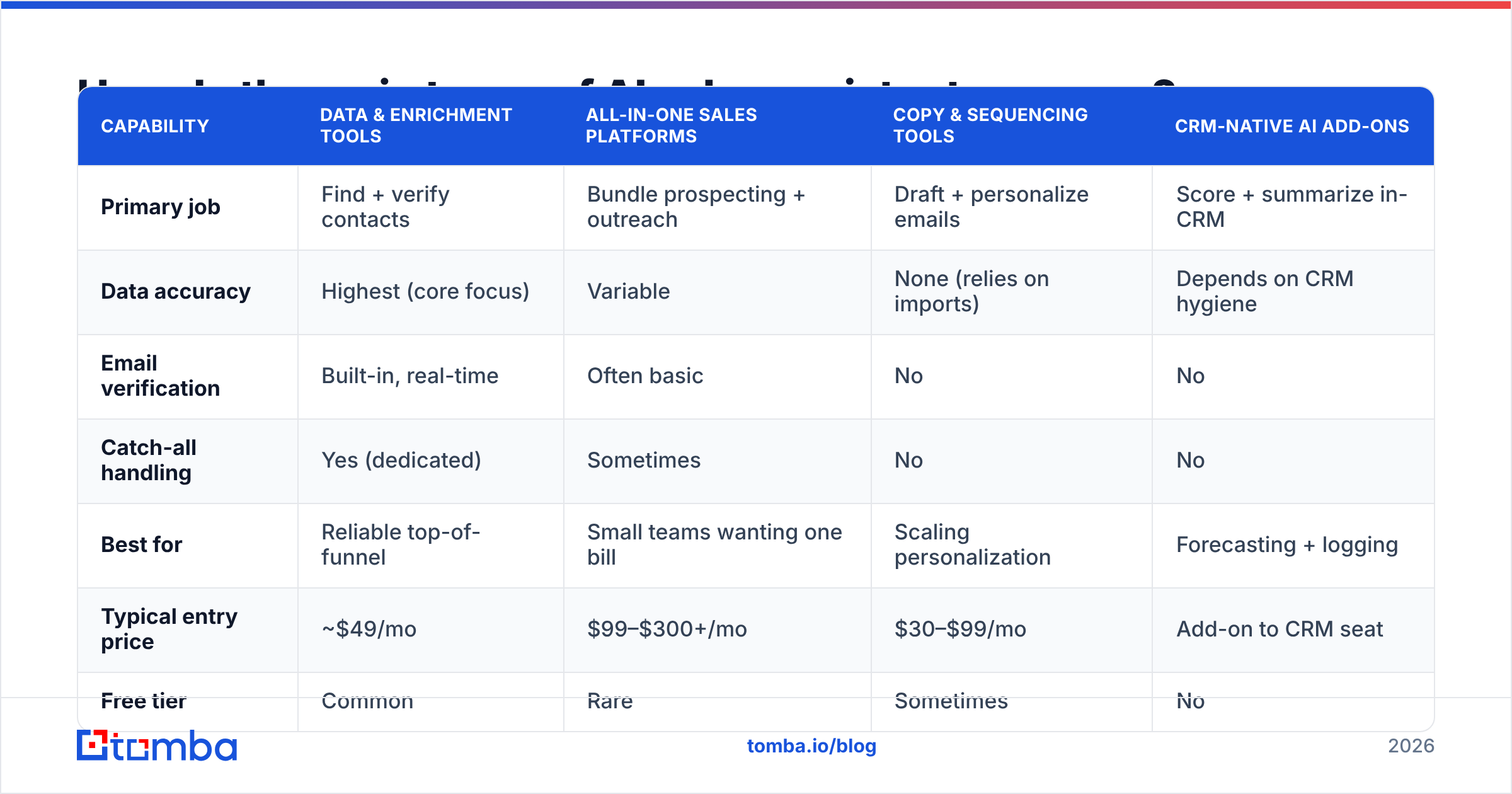
The table below groups tools by their primary job rather than by brand, because most products lead with one and add the rest as filler. Match the row to the gap in your workflow.
| Capability | Data & enrichment tools | All-in-one sales platforms | Copy & sequencing tools | CRM-native AI add-ons |
|---|---|---|---|---|
| Primary job | Find + verify contacts | Bundle prospecting + outreach | Draft + personalize emails | Score + summarize in-CRM |
| Data accuracy | Highest (core focus) | Variable | None (relies on imports) | Depends on CRM hygiene |
| Email verification | Built-in, real-time | Often basic | No | No |
| Catch-all handling | Yes (dedicated) | Sometimes | No | No |
| Best for | Reliable top-of-funnel | Small teams wanting one bill | Scaling personalization | Forecasting + logging |
| Typical entry price | ~$49/mo | $99–$300+/mo | $30–$99/mo | Add-on to CRM seat |
| Free tier | Common | Rare | Sometimes | No |
| Risk if it's weak | Bounces, blocklists | Pay for unused features | Generic, ignored emails | Garbage-in forecasts |
The pattern: data-and-enrichment tools are the cheapest entry point and the highest-leverage, because they fix the problem every other layer inherits. All-in-one platforms are convenient but you pay for breadth you rarely use. Copy tools are powerful only when fed accurate contacts. CRM add-ons are great for managers and useless if the underlying records are dirty.
For a deeper teardown of specific vendors, see how Tomba stacks up against bundled platforms on the Apollo alternative and RocketReach alternative pages.
How do you choose: build, buy, or stack?#
Use this framework before you sign anything. The goal is to automate your highest-volume manual task first, prove ROI, then expand — not to buy a platform and hope you grow into it.
Step 1 — Audit your manual minutes. For one week, track where reps actually spend time: researching prospects, hunting for emails, writing first drafts, logging calls. Whatever eats the most hours is your first automation target.
Step 2 — Match the job to the layer. If reps burn hours finding contacts, you need a data layer, not a writing tool. If they have good lists but send generic emails, you need a copy layer. Don't buy the opposite of your bottleneck.
Step 3 — Test accuracy on your own data. Take 100 real target accounts. Run them through any tool's free tier and measure: how many emails returned, how many verified, how many bounced when you sent. Tools that won't let you test this on your list are hiding something. Tomba's free tier gives 25 searches a month for exactly this kind of trial.
Step 4 — Stack, don't bundle. Connect a focused data layer to your CRM and your sequencer through native integrations or the Tomba API. You get best-in-class accuracy feeding best-in-class outreach, usually for less than one bundled seat.
Step 5 — Keep the human in the loop. Let the assistant draft; let the rep approve. Auto-send at scale without review is how teams land on blocklists and erode email deliverability for the whole domain.
Will an AI sales assistant replace SDRs?#
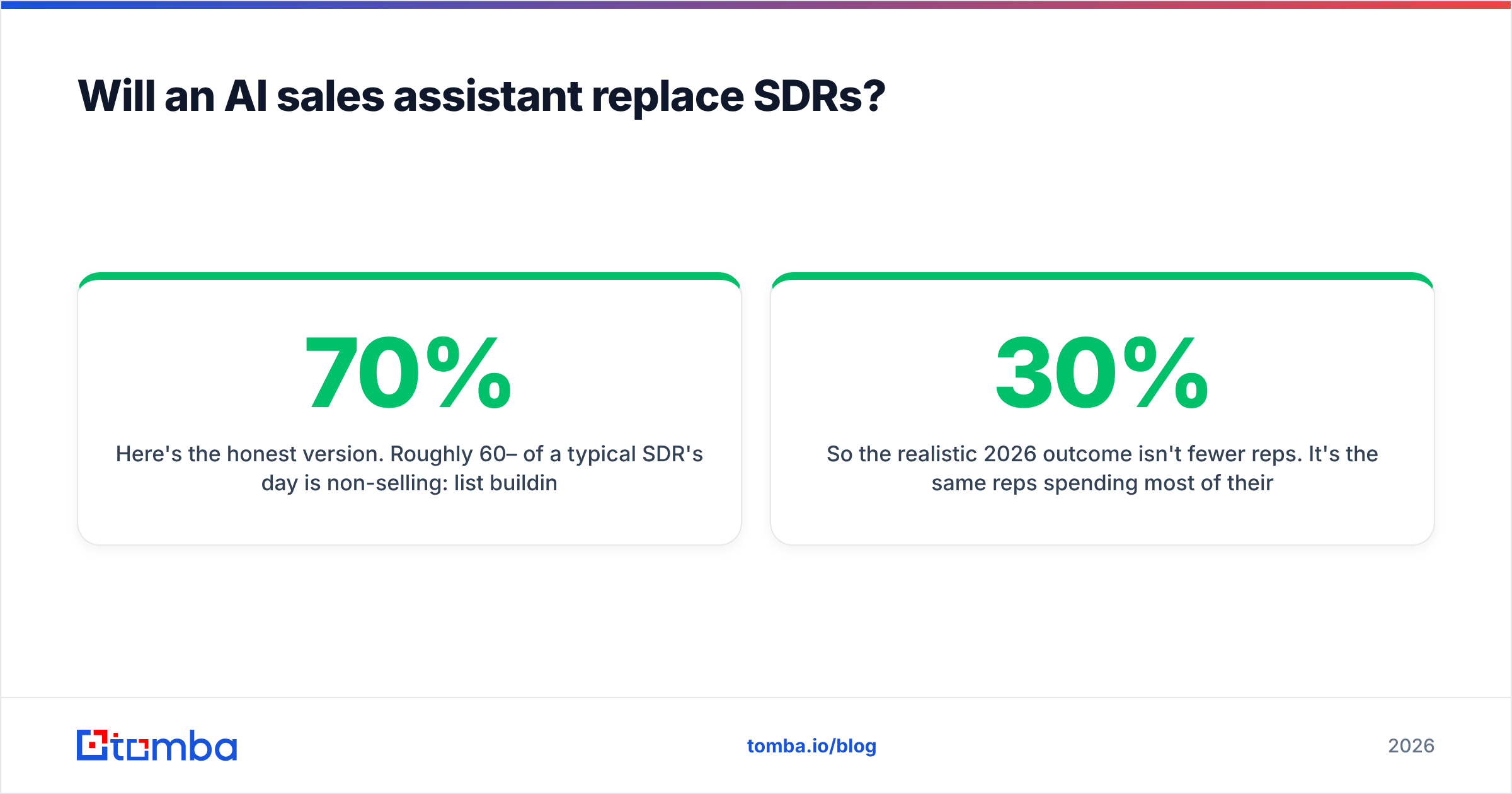
No — at least not the part of the job that creates pipeline. It replaces the part SDRs hate.
Here's the honest version. Roughly 60–70% of a typical SDR's day is non-selling: list building, data cleanup, manual research, copy-pasting between tools, logging activity. That's the part AI eats. The remaining 30–40% — judgment calls on fit, real conversations, handling a skeptical buyer, knowing when to push and when to walk — is exactly what AI is worst at and what actually moves deals.
So the realistic 2026 outcome isn't fewer reps. It's the same reps spending most of their day on the high-value 30% instead of the busywork. A rep who used to research 20 accounts a day can now have the assistant surface 200 enriched, verified, scored accounts and spend the freed hours actually selling.
The risk is over-automation. Teams that fully automate outreach — AI finds, AI writes, AI sends, no human review — generate volume and torch their reputation. According to HubSpot's research on sales trends, personalization and relevance still drive reply rates far more than raw send volume. The assistant should raise your floor on quality, not let you flood inboxes.
For analyst context on where this market is heading, Gartner's sales technology coverage and peer reviews on G2's sales intelligence category are useful neutral checkpoints before you commit budget.
What does a practical AI sales stack look like?#
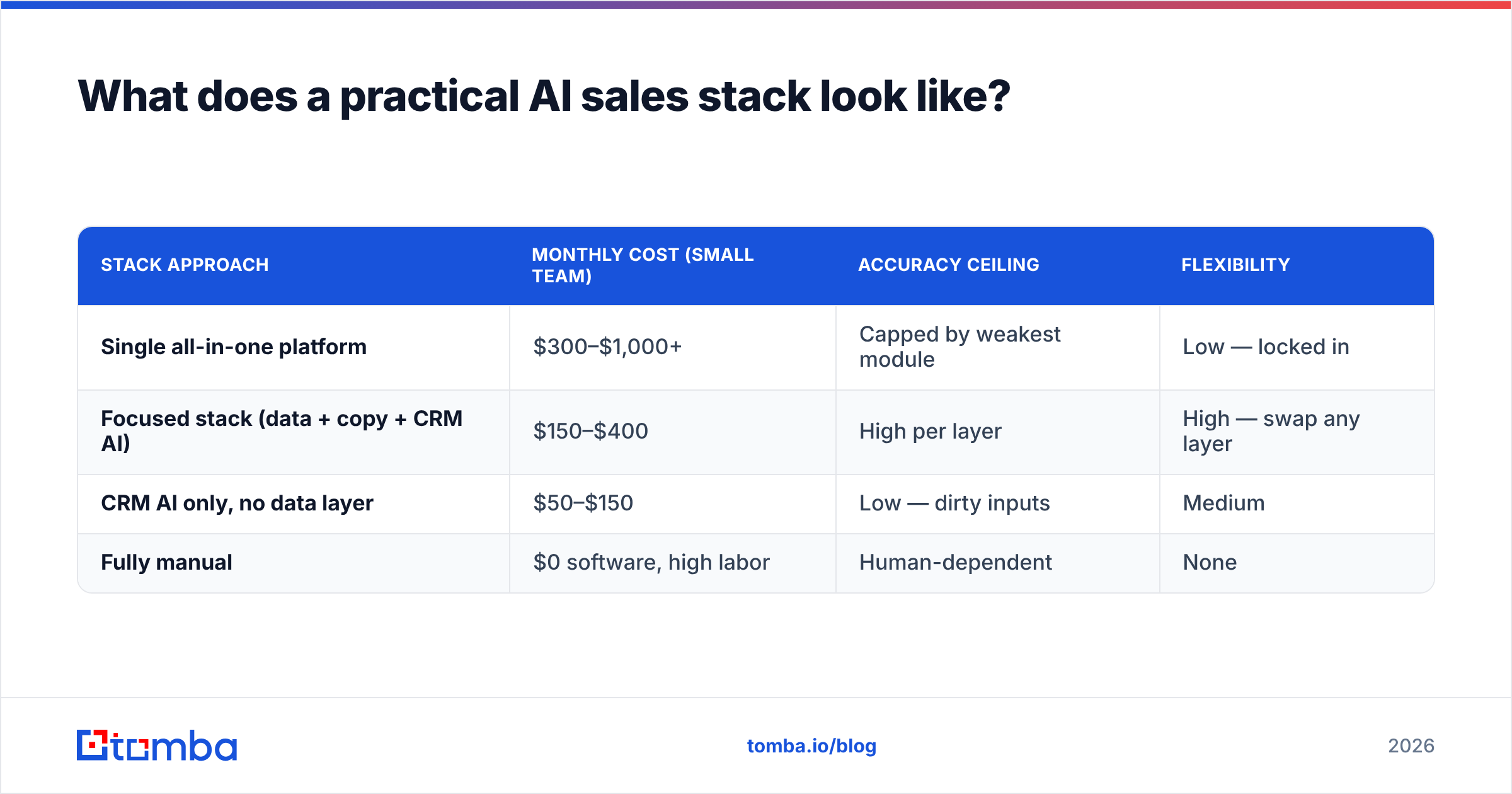
A lean, effective stack in 2026 has three layers, and you can assemble it without a single all-in-one contract.
Layer 1 — Data and enrichment. Find and verify contacts, enrich with firmographics, fill CRM gaps. This is your foundation. A dedicated data enrichment and domain search tool covers it. Run it in bulk for list-building and via API for real-time CRM enrichment.
Layer 2 — Conversation and copy. Draft personalized first emails and follow-ups, generate subject lines, summarize replies. Use an LLM-based writer, but always feed it verified contacts from Layer 1 and keep human approval on.
Layer 3 — Pipeline and signal. Score leads, prioritize, log activity, surface stalled deals. This is your CRM plus its native AI, fed by clean data from Layer 1.
Notice the dependency runs one direction: Layers 2 and 3 are only as good as Layer 1. That's why the smartest first investment is rarely the chat assistant — it's the accuracy of the contacts underneath it. Get that right and a $49/mo data tool makes a $300/mo platform look slow.
| Stack approach | Monthly cost (small team) | Accuracy ceiling | Flexibility |
|---|---|---|---|
| Single all-in-one platform | $300–$1,000+ | Capped by weakest module | Low — locked in |
| Focused stack (data + copy + CRM AI) | $150–$400 | High per layer | High — swap any layer |
| CRM AI only, no data layer | $50–$150 | Low — dirty inputs | Medium |
| Fully manual | $0 software, high labor | Human-dependent | None |
How do you measure if it's working?#
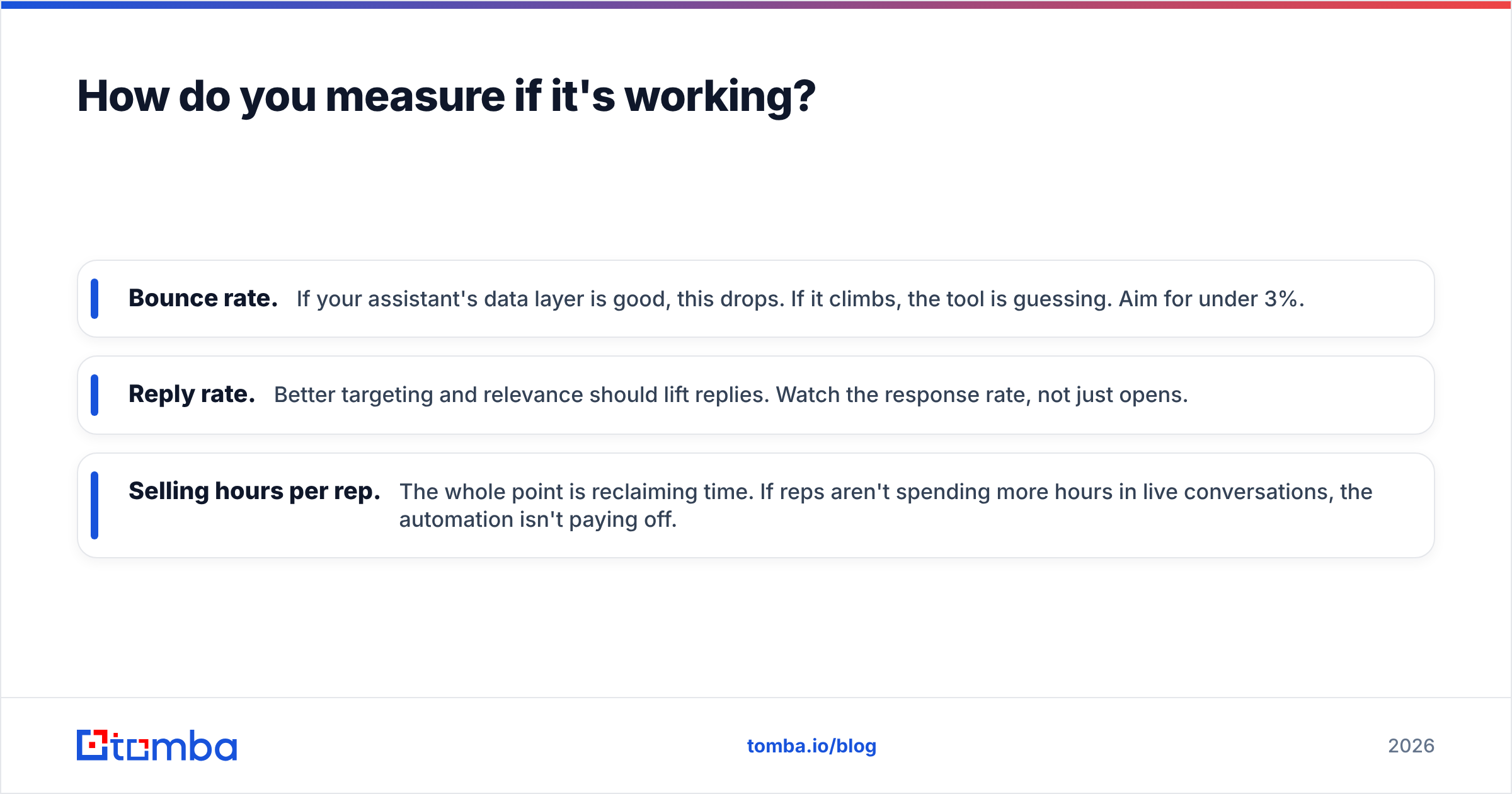
Track three numbers before and after, and don't let the vendor pick the metric for you.
- Bounce rate. If your assistant's data layer is good, this drops. If it climbs, the tool is guessing. Aim for under 3%.
- Reply rate. Better targeting and relevance should lift replies. Watch the response rate, not just opens.
- Selling hours per rep. The whole point is reclaiming time. If reps aren't spending more hours in live conversations, the automation isn't paying off.
If all three move the right way after 60 days, expand the stack. If they don't, the tool is decoration, not leverage — cut it.
The bottom line#
An artificial intelligence sales assistant earns its keep when it removes busywork and feeds your reps accurate, verified contacts to act on. The interface is the least important part; the data underneath is everything. Start by fixing the layer every other tool depends on.
That's where Tomba fits. Before you spend on a flashy all-in-one assistant, lock down your data foundation with the Tomba Email Finder — find professional emails by name, domain, or company, with built-in verification and catch-all handling so your AI-drafted outreach actually lands. Start free with 25 searches a month, test it on your own target list, and only scale once the bounce rate proves it. Get the accuracy right first, and every other layer of your sales stack works better.
// get started
Find, verify and enrich your first contacts today
Start on the free plan with 25 searches a month, then scale when your team is ready.
Free plan · No credit card required · GDPR & CCPA
// about the author