Asana for Sales Pipeline: Setup, Templates & 2026 Guide
Can a project tool run your deals? Here's how to build a real Asana sales pipeline in 2026 — stages, automations, templates, and where it beats (and loses to) a CRM.

TL;DR
- Asana can run a working sales pipeline if you model deals as tasks, stages as board columns, and use custom fields for deal value, close date, and owner.
- It is best for small teams, founder-led sales, and agencies that already live in Asana — not for 20-rep teams that need forecasting, call logging, and email sequencing.
- Rules (Asana's native automation) handle stage hand-offs, reminders, and follow-up creation without a paid CRM.
- The weak spot is data: Asana has no contact enrichment, so you still need an email finder and a verifier to keep records usable.
- Below: a copy-ready stage model, an automation list, a CRM comparison table, and a setup checklist.
Can you actually use Asana for a sales pipeline?#
Yes — and for a lot of teams it is the right call. If your deals fit on a whiteboard and your "CRM" is currently a spreadsheet plus your inbox, an Asana board gives you stages, ownership, due dates, and reporting in an afternoon. You are not bending Asana into something weird; a sales pipeline is just a board where each card moves left to right until it closes.
The honest limit: Asana is a project tool, not a revenue tool. It will track that a deal exists and where it sits. It will not log calls, score leads, sequence cold email, or forecast a quarter the way a purpose-built CRM does. The trick is knowing which jobs to give it and which to send elsewhere.
This guide shows the exact build, the automations that make it feel like a CRM, and the point where you should graduate to a real one.
How do you structure deal stages in Asana?#
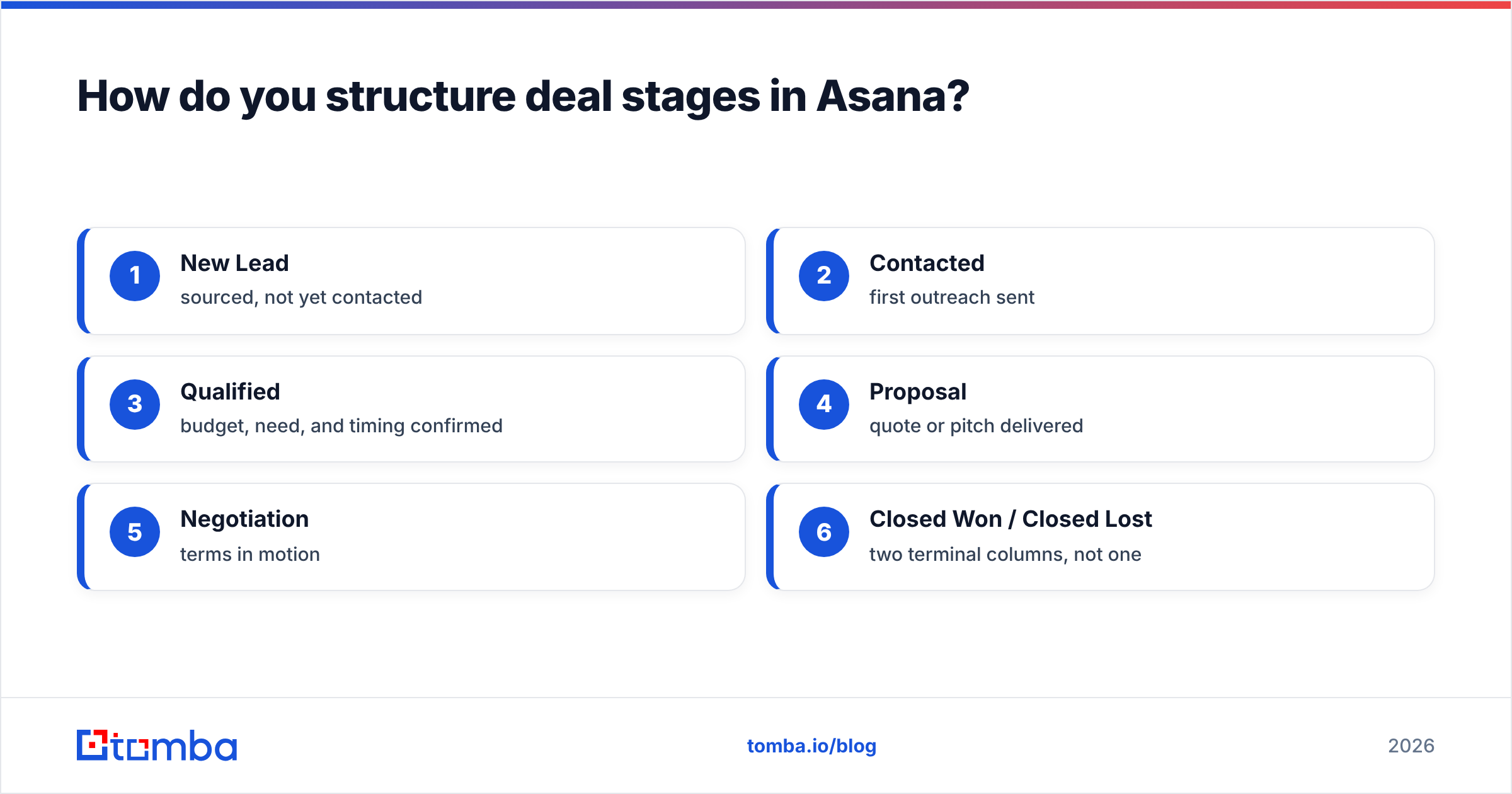
Start with a single project in Board view. Each column is a pipeline stage; each card is one deal. Keep stages to six or fewer — more than that and reps stop updating it.
A clean default set of stages:
- New Lead — sourced, not yet contacted
- Contacted — first outreach sent
- Qualified — budget, need, and timing confirmed
- Proposal — quote or pitch delivered
- Negotiation — terms in motion
- Closed Won / Closed Lost — two terminal columns, not one
Then add custom fields to every card so the board carries real data, not just a title:
- Deal value (number, currency)
- Close date (date)
- Owner (people field)
- Source (dropdown: referral, inbound, outbound, event)
- Next step (text)
Custom fields are what turn a to-do board into a pipeline you can report on. With deal value as a number field, Asana's Dashboard tab will sum your weighted pipeline by column automatically.
A naming convention keeps the board scannable. Use Company — Contact — $Value, e.g. Northwind — Dana Cole — $12k. You can read the whole column at a glance without opening cards.
What automations make Asana behave like a CRM?#
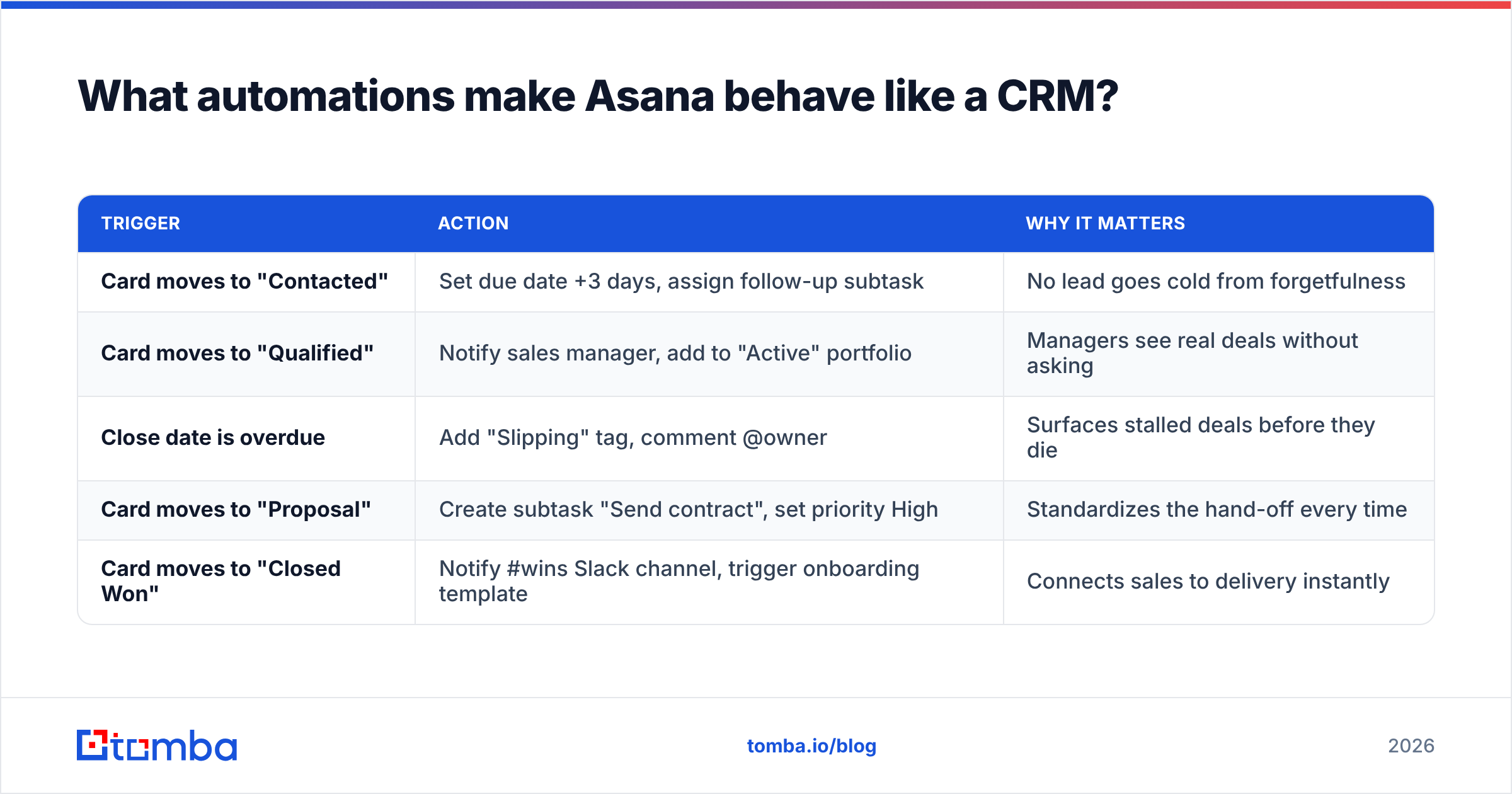
Asana Rules are the difference between a static board and a pipeline that moves itself. On paid plans you get multi-action rules; even the free tier covers the basics. The highest-leverage ones:
| Trigger | Action | Why it matters |
|---|---|---|
| Card moves to "Contacted" | Set due date +3 days, assign follow-up subtask | No lead goes cold from forgetfulness |
| Card moves to "Qualified" | Notify sales manager, add to "Active" portfolio | Managers see real deals without asking |
| Close date is overdue | Add "Slipping" tag, comment @owner | Surfaces stalled deals before they die |
| Card moves to "Proposal" | Create subtask "Send contract", set priority High | Standardizes the hand-off every time |
| Card moves to "Closed Won" | Notify #wins Slack channel, trigger onboarding template | Connects sales to delivery instantly |
Layer in Forms for inbound: a public Asana Form drops new leads straight into the "New Lead" column with fields pre-mapped. Pair that with a rule that round-robins the Owner field and you have lightweight lead routing — something most teams pay a CRM add-on for.
For recurring outbound motions, build a task template with your standard subtask checklist (research account, find contact email, send sequence step 1, log reply). Every new deal starts from the same playbook instead of a blank card.
Is Asana better than a real CRM for sales?#
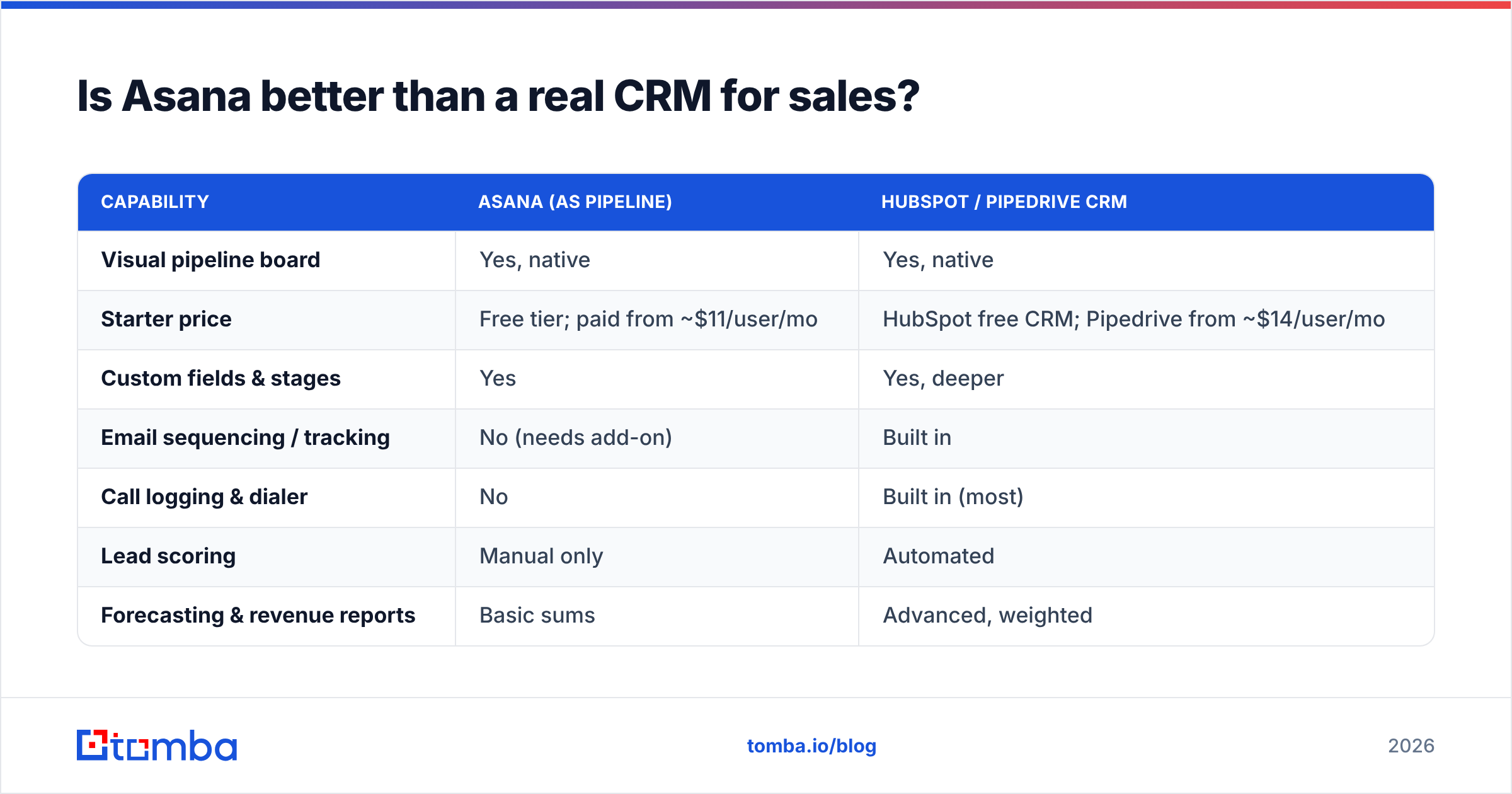
Conclusion first: Asana wins on simplicity and price for small teams; a dedicated CRM wins on depth and scale. Here is the side-by-side.
| Capability | Asana (as pipeline) | HubSpot / Pipedrive CRM |
|---|---|---|
| Visual pipeline board | Yes, native | Yes, native |
| Starter price | Free tier; paid from ~$11/user/mo | HubSpot free CRM; Pipedrive from ~$14/user/mo |
| Custom fields & stages | Yes | Yes, deeper |
| Email sequencing / tracking | No (needs add-on) | Built in |
| Call logging & dialer | No | Built in (most) |
| Lead scoring | Manual only | Automated |
| Forecasting & revenue reports | Basic sums | Advanced, weighted |
| Contact enrichment | None | Native or integrated |
| Doubles as project/delivery tool | Yes — its core strength | No |
The real decision rarely comes down to features. It comes down to where your team already works. If delivery, marketing, and ops all run in Asana, keeping early-stage sales there removes a tool switch and a license cost. The moment you need email open tracking, sequence automation, or a forecast your CFO trusts, you have outgrown the workaround.
If you are weighing dedicated options, neutral review sites like G2 and the vendor's own docs at pipedrive.com are better sources than any single blog. For a deeper definition of the underlying discipline, see this primer on revenue operations.
Where does Asana fall short — and how do you patch it?#
The single biggest gap is data quality. Asana stores whatever you type into a card. It does not find a prospect's email, verify it, or tell you when a contact changed jobs. A pipeline full of stale or guessed addresses bounces your outreach and tanks your sender reputation — which no amount of board automation can fix.
The fix is to feed Asana clean contacts before they ever hit the board. The practical workflow:
- Build your target account list.
- Use an email finder to get verified, professional addresses by name and domain.
- Run a quick pass through an email verifier so every address is deliverable before outreach.
- Push the cleaned rows into Asana via the Google Sheets sync or [
Zapier integration](https://tomba.io/integrations/zapier) — new verified lead in, new card created.
That last step is where Asana shines: it has a deep integrations catalog, so you wire the data layer to the pipeline layer once and forget it. For domain-wide prospecting (finding everyone in sales at a target company), a domain search populates an entire account's contacts in one query, which you then map to a single Asana card as subtasks per stakeholder.
Other gaps and quick patches:
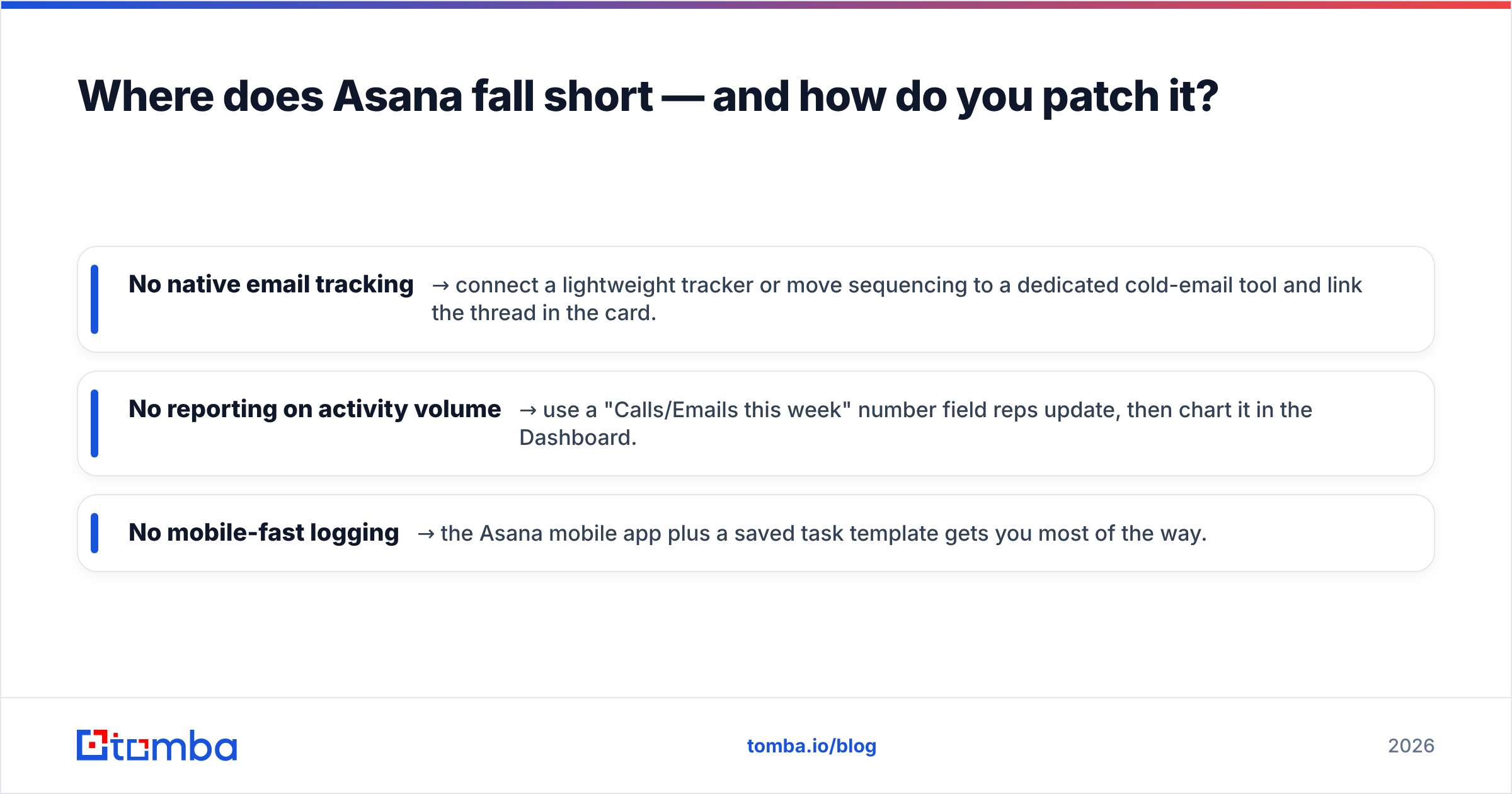
- No native email tracking → connect a lightweight tracker or move sequencing to a dedicated cold-email tool and link the thread in the card.
- No reporting on activity volume → use a "Calls/Emails this week" number field reps update, then chart it in the Dashboard.
- No mobile-fast logging → the Asana mobile app plus a saved task template gets you most of the way.
How do you set up your Asana sales pipeline in one sitting?#
A checklist you can run top to bottom:
- Create a project, switch to Board view, name your six stage columns.
- Add custom fields: deal value, close date, owner, source, next step.
- Build a task template with your standard deal checklist.
- Create a public Form for inbound leads → "New Lead" column.
- Add Rules: follow-up due dates, overdue-deal flags, won-deal notifications.
- Build a Dashboard that sums deal value per stage.
- Wire your data source: email finder → verifier → Zapier → Asana.
- Set a Friday recurring task: "Review pipeline, clear stale cards."
Run that and you have a functioning pipeline for the cost of an Asana seat. Keep an eye on two signals that tell you it is time to graduate to a dedicated CRM: reps asking for email tracking they cannot get, and your forecast becoming a guess because the board cannot weight deals by probability.
For teams genuinely on the fence about tooling, it is worth reading how a structured sales process and pipeline is defined before you commit — the methodology matters more than the app.
The bottom line#
Asana is a legitimate, low-cost sales pipeline for small and founder-led teams, especially ones already running delivery and ops inside it. Model deals as cards, stages as columns, and let Rules do the nagging. Just remember the board is only as good as the contacts on it.
That is the part Asana cannot do for you. Before a deal ever reaches "New Lead," fill it with verified, deliverable contacts using the Tomba Email Finder — find professional emails by domain, name, or company, verify them in the same flow, and sync them straight into your board. Start free with 25 searches a month, and check the Tomba pricing plans when you scale your outbound. A clean pipeline beats a clever board every time.
Ready to find emails that actually work?
Join 150,000+ professionals who stopped guessing and started sending. Free credits on signup — no credit card required.
Get the Tomba newsletter
Practical outbound tactics and product updates — once every two weeks.
About the author