Auto Emailer 2026: Best Tools to Automate Cold Email Sending
An auto emailer can 10x your outreach or torch your domain. Here's how automated email sending actually works in 2026, which tools win, and the data layer that keeps you out of spam.
TL;DR
- An auto emailer is software that sends personalized emails automatically on a schedule or trigger — cold sequences, follow-ups, drip campaigns, and transactional sends.
- The tool that hits "send" is the cheap part. The data feeding it — verified addresses, clean lists, real personalization fields — decides whether you land in the inbox or the spam folder.
- The best auto emailer stacks in 2026 pair a sending engine (Instantly, Smartlead, HubSpot) with a contact-data layer for finding and verifying addresses before the first email goes out.
- Bounce rate above 3–4% wrecks sender reputation fast. Verify every address first and warm up new domains for 2–3 weeks.
- Tomba sits at the front of the pipeline: find and verify the addresses, then hand a clean list to whatever sender you already love.
What is an auto emailer?#
An auto emailer is a tool that sends email for you without a human clicking "send" each time. Think of it like a sprinkler system for outreach: you set the zones (your audience), the schedule (when water runs), and the volume (how many messages), then it runs on its own while you do something else.
In practice, "auto emailer" covers a few overlapping jobs:
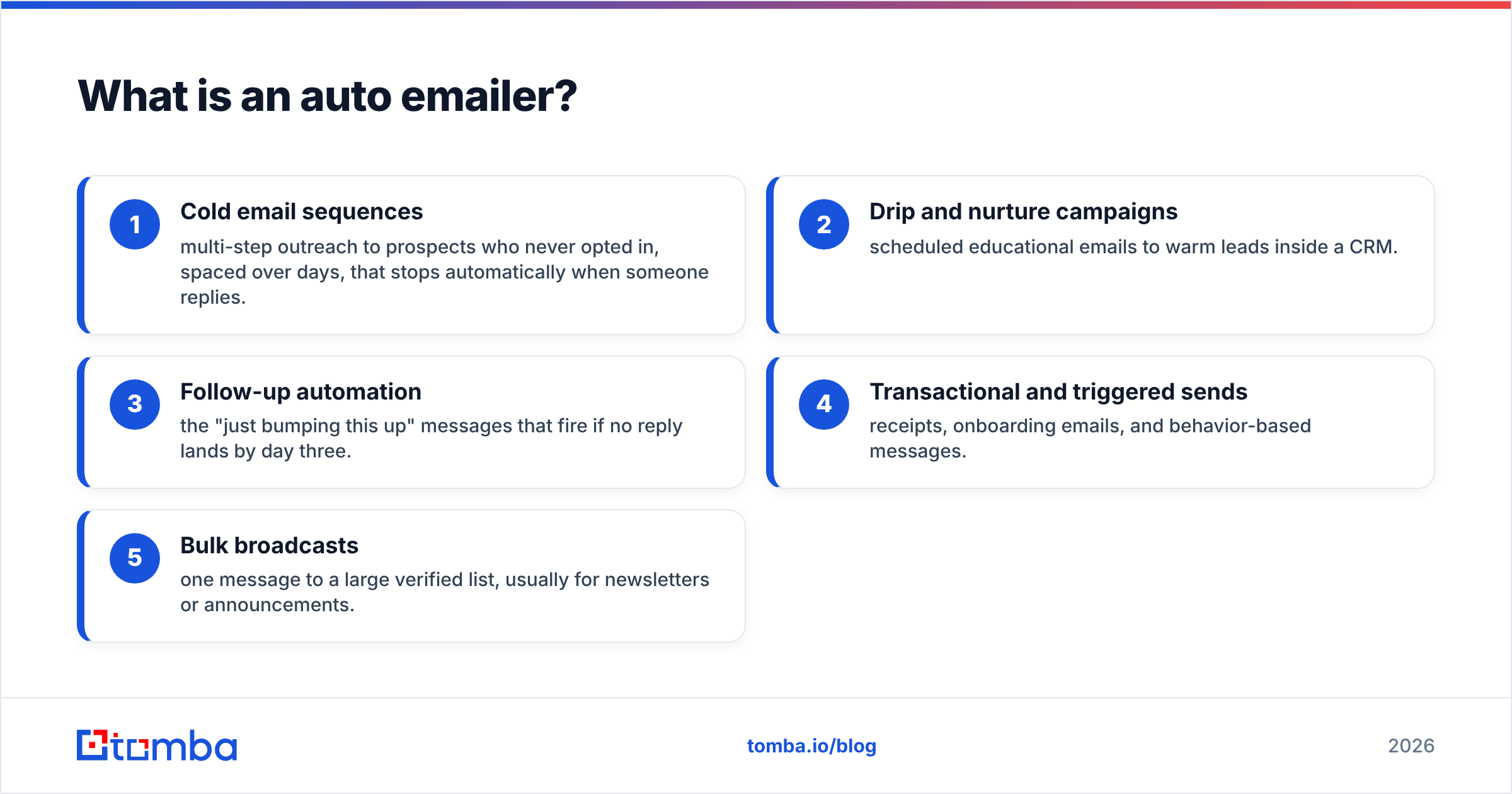
- Cold email sequences — multi-step outreach to prospects who never opted in, spaced over days, that stops automatically when someone replies.
- Drip and nurture campaigns — scheduled educational emails to warm leads inside a CRM.
- Follow-up automation — the "just bumping this up" messages that fire if no reply lands by day three.
- Transactional and triggered sends — receipts, onboarding emails, and behavior-based messages.
- Bulk broadcasts — one message to a large verified list, usually for newsletters or announcements.
The common thread is that a machine decides when and to whom based on rules you define. What it does not decide is whether your list is any good. That part is on you, and it is where most automated campaigns quietly fail.
How does automated email sending actually work?#
Every auto emailer, no matter the brand, runs the same four-stage loop under the hood. Understanding it tells you exactly where campaigns break.
- Source the contacts. You feed the tool a list of recipients — names, companies, and email addresses. This is the input layer, and garbage here poisons everything downstream.
- Personalize with variables. The tool merges fields like
{{first_name}}or{{company}}into a template so each send looks individually written. - Schedule and throttle. Instead of blasting 2,000 emails in one minute (a guaranteed spam flag), it drips them out — say 30–50 per inbox per day across staggered hours to mimic human behavior.
- Track and branch. Opens, clicks, replies, and bounces feed back into the logic. A reply pauses the sequence; a bounce should pull that contact out entirely.
The fragile stage is the first one. A sending engine can be flawless and still destroy your domain if the addresses you imported are stale, guessed, or full of typos. That is why serious senders treat finding and verifying contacts as a separate, non-negotiable step — using an email finder to source real addresses and an email verifier to strip out anything that will bounce before the auto emailer ever touches it.
Why do most auto emailer campaigns land in spam?#
Short answer: bad data and impatience, not bad copy.
Mailbox providers like Google and Microsoft score your sender reputation on signals you control at the data and pacing level. The three that sink campaigns:
- High bounce rate. Sending to invalid addresses tells Gmail you bought a list. Keep bounces under 2–3%. The only reliable way is verifying every address first.
- Spam-trap hits. Old scraped lists are littered with traps — addresses that exist only to catch spammers. One hit can blacklist your domain.
- Cold-start volume spikes. A brand-new domain that suddenly sends 500 emails a day looks exactly like an attacker. New domains need a 2–4 week warmup, ramping from a handful of emails a day.
Authentication matters too. Without proper SPF records, DKIM, and DMARC set up, even verified lists struggle to land. Google's own sender guidelines now effectively require all three for bulk senders. Set them once, correctly, and they stop being a problem.
The pattern is consistent: the auto emailer gets blamed, but the real culprit is the list it was handed.
What features should an auto emailer have in 2026?#
Not every tool needs every feature, but for cold outbound at scale, this is the checklist that separates a real platform from a glorified mail-merge:
- Inbox rotation — spreading sends across multiple connected mailboxes so no single inbox exceeds safe daily limits.
- Built-in or integrated warmup — automated reputation-building before real campaigns start.
- Reply detection and auto-pause — stop sequencing the moment a human responds.
- Spintax / AI personalization — vary phrasing per send so identical messages don't trip spam filters.
- Native verification or a clean data integration — to catch bounces before they happen.
- Deliverability analytics — per-inbox bounce, spam, and reply tracking, not just vanity opens.
A tool missing the last two will eventually cost you a domain.
Which auto emailer tools are best? A side-by-side comparison#
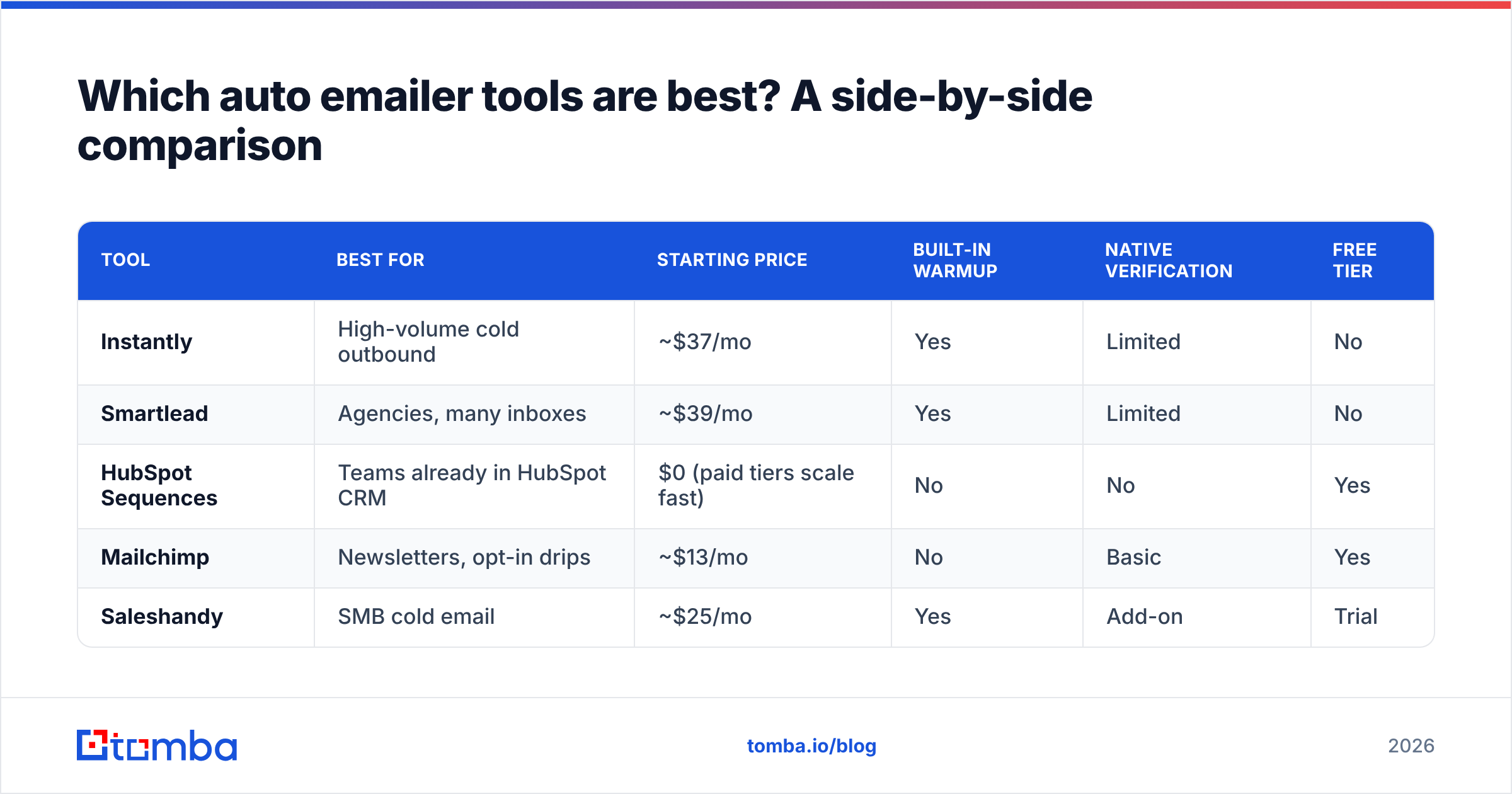
Here's how the most common 2026 options stack up. Note that these are primarily sending engines — none of them is a substitute for a dedicated data-sourcing layer, which is why teams usually pair one of these with a finder/verifier.
| Tool | Best for | Starting price | Built-in warmup | Native verification | Free tier |
|---|---|---|---|---|---|
| Instantly | High-volume cold outbound | ~$37/mo | Yes | Limited | No |
| Smartlead | Agencies, many inboxes | ~$39/mo | Yes | Limited | No |
| HubSpot Sequences | Teams already in HubSpot CRM | $0 (paid tiers scale fast) | No | No | Yes |
| Mailchimp | Newsletters, opt-in drips | ~$13/mo | No | Basic | Yes |
| Saleshandy | SMB cold email | ~$25/mo | Yes | Add-on | Trial |
Two things jump out. First, "native verification" is almost always limited or absent — even premium senders expect you to bring a clean list. Second, the cheap headline prices balloon once you add inboxes, warmup seats, and verification credits.
That's the gap a front-of-pipeline data tool fills. You can compare full pricing on Tomba's pricing page, but the point is structural: separate the finding and verifying from the sending, and each layer gets better at its one job.

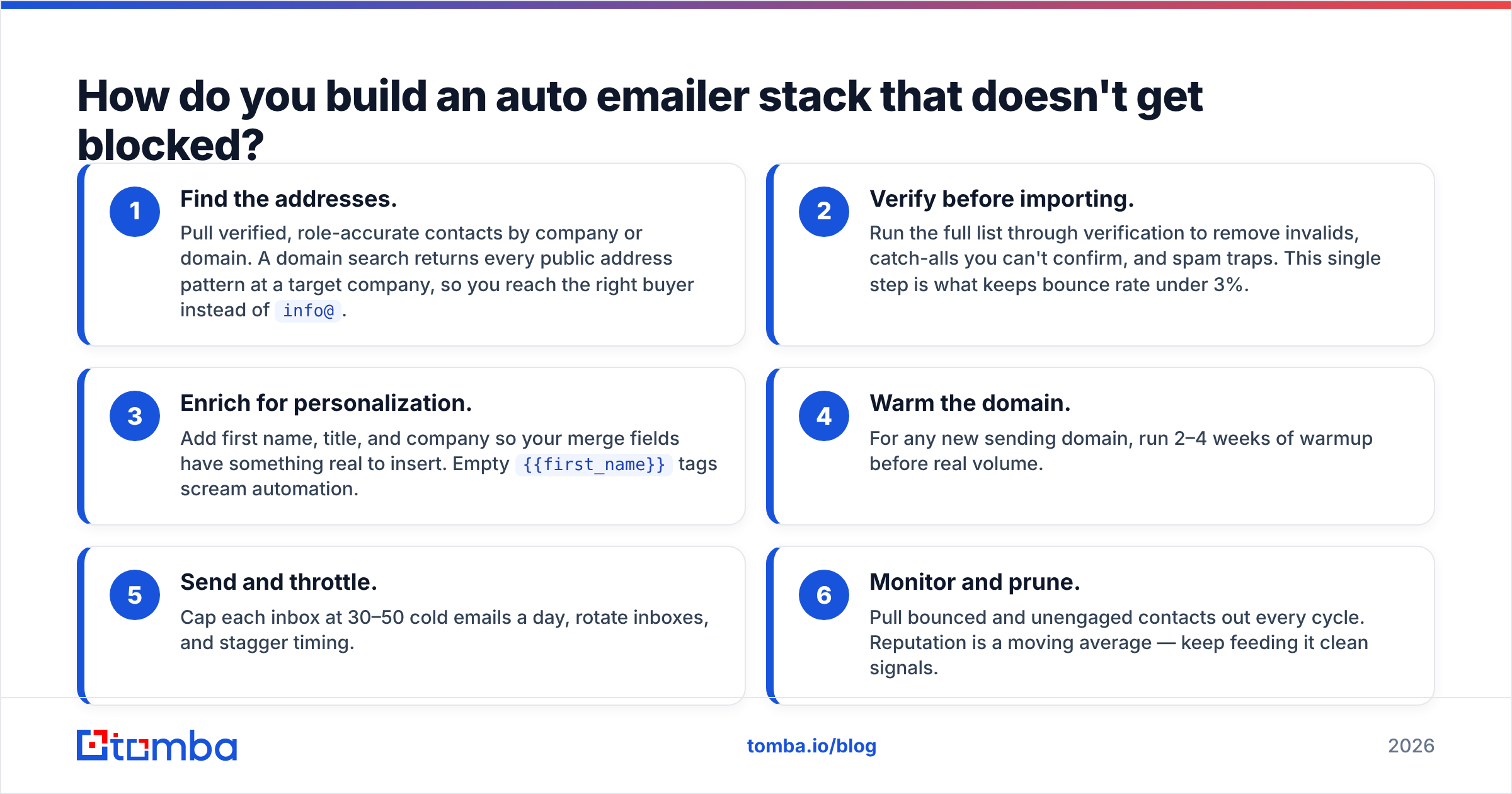
How do you build an auto emailer stack that doesn't get blocked?#
Treat it as an assembly line, not a single machine. Each station does one thing and hands clean output to the next.
- Find the addresses. Pull verified, role-accurate contacts by company or domain. A domain search returns every public address pattern at a target company, so you reach the right buyer instead of
info@. - Verify before importing. Run the full list through verification to remove invalids, catch-alls you can't confirm, and spam traps. This single step is what keeps bounce rate under 3%.
- Enrich for personalization. Add first name, title, and company so your merge fields have something real to insert. Empty
{{first_name}}tags scream automation. - Warm the domain. For any new sending domain, run 2–4 weeks of warmup before real volume.
- Send and throttle. Cap each inbox at 30–50 cold emails a day, rotate inboxes, and stagger timing.
- Monitor and prune. Pull bounced and unengaged contacts out every cycle. Reputation is a moving average — keep feeding it clean signals.
For large lists, doing steps 1–3 by hand is hopeless. A bulk email finder handles thousands of contacts at once, and the verification runs in the same pass, so the list that reaches your auto emailer is already inbox-ready.
If your CRM is the hub, wire the data layer straight in: Tomba's HubSpot integration pushes verified contacts into the same place your sequences fire from, so there's no CSV juggling between finding and sending.
Is an auto emailer worth it versus sending manually?#
Yes — but only past a certain volume, and only with clean data.
Manual sending wins when you're emailing fewer than ~10 high-value prospects a day and each message is genuinely bespoke. The human touch outperforms automation on tiny, high-stakes lists.
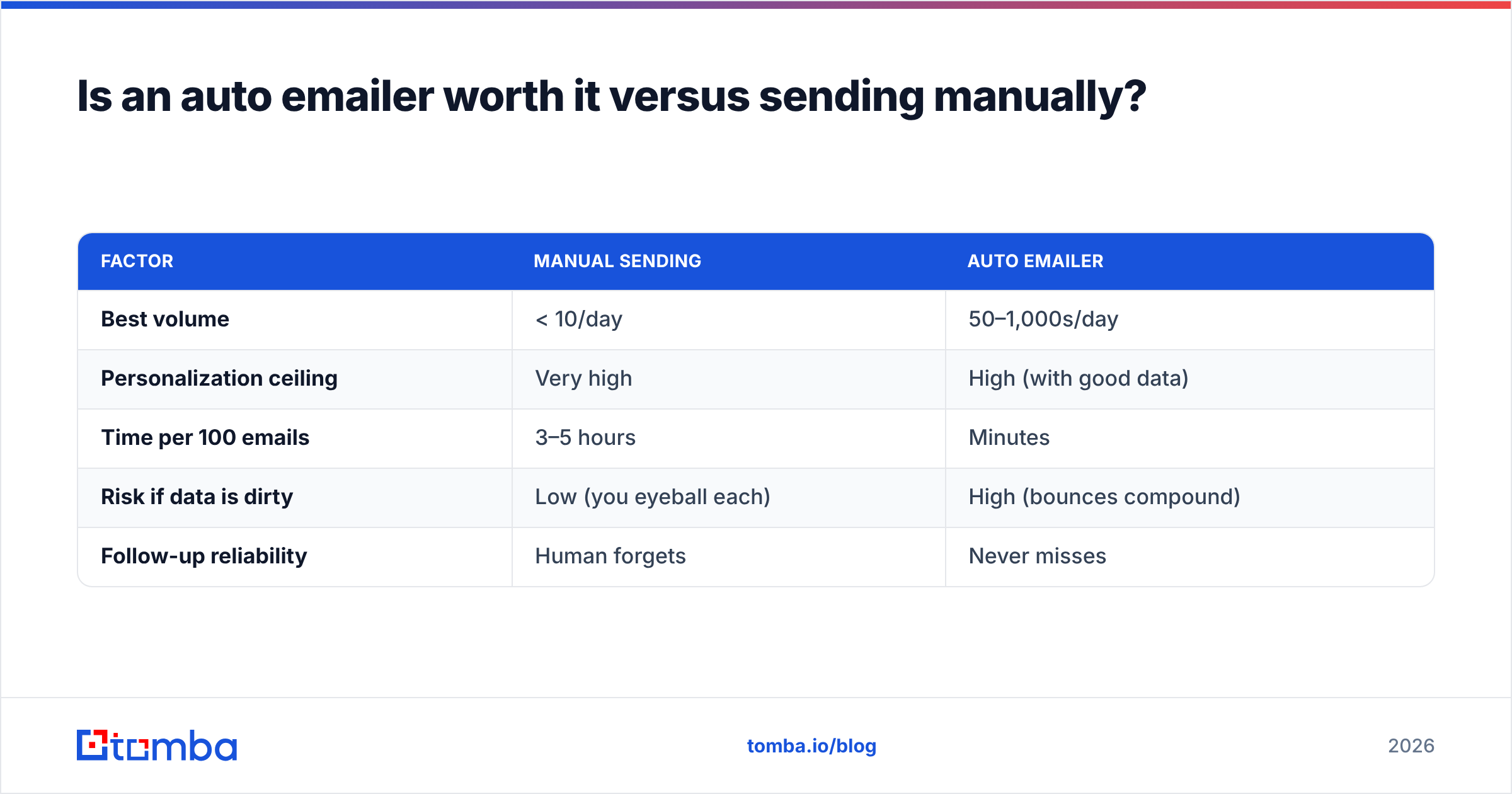
Automation wins the moment you're sending the same structured message to dozens or hundreds of people. Here's the honest trade-off:
| Factor | Manual sending | Auto emailer |
|---|---|---|
| Best volume | < 10/day | 50–1,000s/day |
| Personalization ceiling | Very high | High (with good data) |
| Time per 100 emails | 3–5 hours | Minutes |
| Risk if data is dirty | Low (you eyeball each) | High (bounces compound) |
| Follow-up reliability | Human forgets | Never misses |
The catch is in that last-but-one row. Manual sending forgives a bad list because you read each address before hitting send. Automation does not — it will cheerfully fire 400 emails at 400 dead addresses and hand Gmail 400 reasons to flag you. So the value of an auto emailer is entirely conditional on the quality of the list you feed it. Clean data turns automation into leverage; dirty data turns it into a domain-destroying machine.
What's the biggest mistake teams make with auto emailers?#
They buy the sending tool first and think about data never.
The typical failure story: a team subscribes to a slick sequencer, scrapes or buys a list, imports 5,000 contacts, and launches. Week one looks fine. Week two, bounces climb, the warmup inboxes can't keep up with the reputation damage, and by week three their main domain is landing in spam for every recipient — including warm replies and internal email.
The fix is boring and it works: never import an unverified list. Source addresses from a real provider, verify them, and only then automate. You can read more on how email deliverability actually gets scored, but the one-line version is that providers reward consistency and punish surprises. A verified list is the most consistent signal you can send.
Tools like G2's email marketing category are full of five-star sending engines wrecked by one-star data hygiene. The sender wasn't the problem.
Frequently asked questions#
Is using an auto emailer legal? Automated sending is legal. What's regulated is consent and disclosure — CAN-SPAM (US) and GDPR (EU) require accurate sender info, a real unsubscribe path, and a lawful basis for processing contact data. Automation doesn't change those rules; it just makes following them faster.
How many emails can I send per day safely? On a warmed domain, 30–50 cold emails per inbox per day is the conservative ceiling. Scale by adding inboxes, not by raising per-inbox volume.
Do I still need email verification if my tool has warmup? Yes. Warmup builds reputation; verification protects it. They solve different problems, and you need both.
Ready to feed your auto emailer a list that actually lands?#
Your sending tool is only as good as the addresses you give it. Before your next sequence goes out, source verified, real contacts with the Tomba Email Finder — find decision-makers by name, company, or domain, verify every address in the same workflow, and export a clean list straight into Instantly, Smartlead, HubSpot, or whatever auto emailer you already run. Start free with 25 searches a month, then scale on the Starter plan at $49/mo when your outbound takes off. Clean data in, replies out — that's the whole game.
// get started
Find, verify and enrich your first contacts today
Start on the free plan with 25 searches a month, then scale when your team is ready.
Free plan · No credit card required · GDPR & CCPA
// about the author