Auto Follow Up: How to Automate Sales Follow-Ups in 2026
Most replies come from follow-ups, not the first email. Here's how to build an auto follow up system that books meetings without sounding like a robot.
You send a cold email. Nobody replies. You assume the prospect isn't interested and move on. That assumption is costing you most of your pipeline.
The data is blunt: the majority of positive replies in outbound arrive after the first message, not from it. Yet most reps stop after one or two touches because manual follow-up is tedious, easy to forget, and impossible to scale. An auto follow up system fixes the discipline problem — it sends the right message at the right interval, every time, whether you remember or not.
This guide covers how auto follow up actually works, how to sequence it, the copy that keeps it from sounding robotic, and how to pick tooling that won't wreck your deliverability.
TL;DR#
- Follow-ups drive most replies. Studies across outbound platforms consistently show 40–60% of responses come after the first email. Stopping early leaves money on the table.
- Auto follow up = scheduled, conditional, multi-touch sequences that pause the moment a prospect replies or books — so you never message someone who already answered.
- 3–5 touches over 2–3 weeks is the sweet spot for B2B. More than that and you're spamming; fewer and you quit too soon.
- Personalization and timing beat volume. A short, value-adding follow-up outperforms a "just bumping this" nudge every time.
- Your data quality decides everything. Auto follow up amplifies whatever list you feed it — verified, accurate contacts protect your sender reputation; bad ones torch it.
What is auto follow up?#
Auto follow up is the practice of pre-writing a series of follow-up messages and letting software send them on a schedule, automatically stopping when the prospect engages.
Think of it like a thermostat versus a space heater. A space heater (manual follow-up) only works when you're standing there flipping it on and off. A thermostat (auto follow up) holds the target temperature on its own — it reacts to conditions and shuts off the moment the goal is met. You set the rules once; the system enforces them across hundreds of prospects without you babysitting each thread.
Technically, an auto follow up sequence has three moving parts:
- Steps — the individual emails (or LinkedIn touches, or calls) in order.
- Delays — the wait time between each step, measured in business days.
- Exit conditions — the triggers that remove someone from the sequence: a reply, a meeting booked, a link click, or a bounce.
The exit conditions are what separate a real sequence from a dumb mail-merge blast. Without them, you email people who already said yes — the fastest way to look incompetent.
Why do follow-ups matter more than the first email?#
Because attention is a lottery and you rarely win on the first ticket. Your prospect was in a meeting, your email landed at 4:55pm on a Friday, it slid under twelve other threads — none of that means "no." It means "not right now."
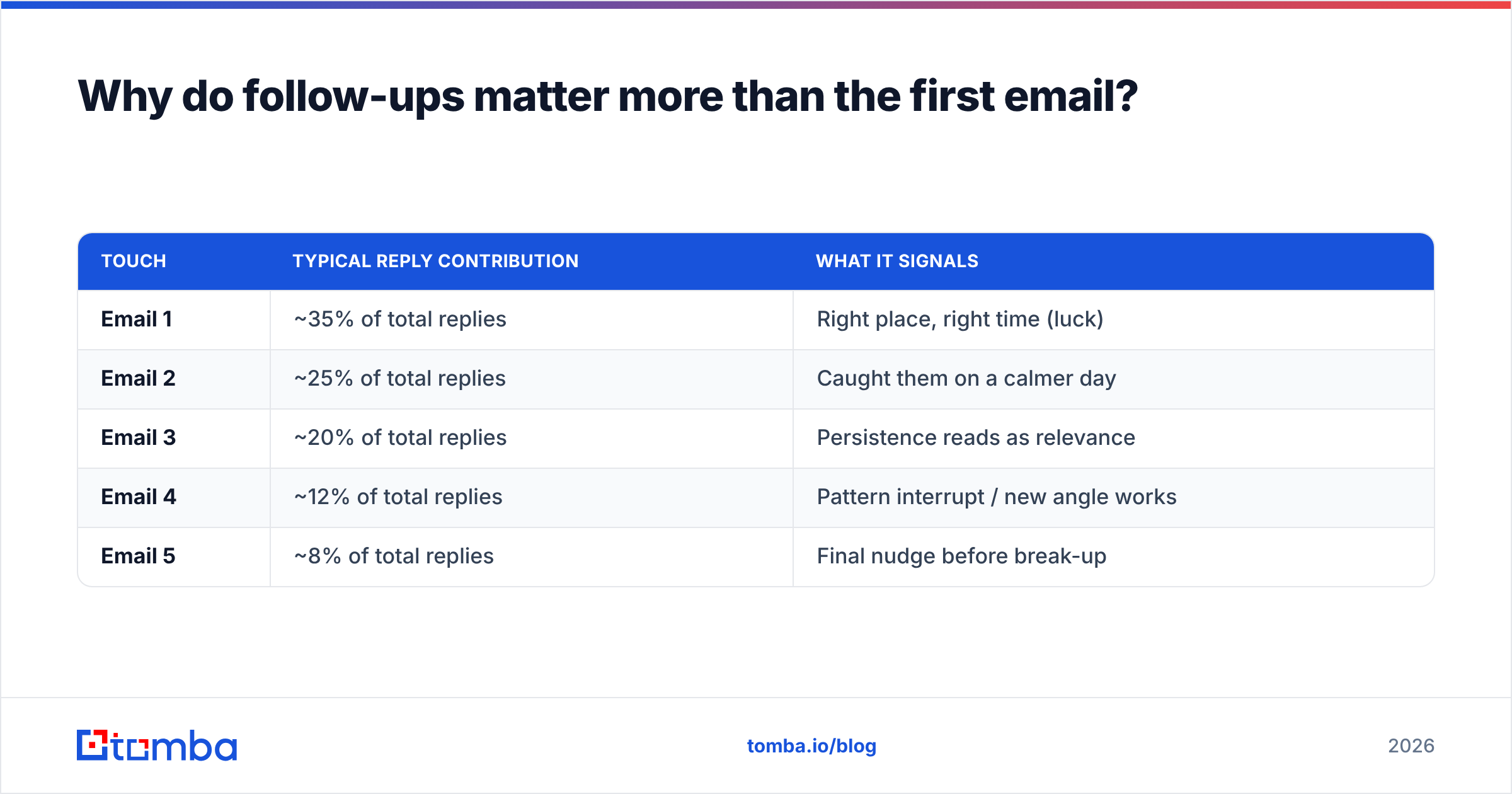
Persistence research from vendors like HubSpot and reviews aggregated on G2 repeatedly land on the same pattern: response rates climb with each of the first few follow-ups, then plateau. A typical curve looks like this.
| Touch | Typical reply contribution | What it signals |
|---|---|---|
| Email 1 | ~35% of total replies | Right place, right time (luck) |
| Email 2 | ~25% of total replies | Caught them on a calmer day |
| Email 3 | ~20% of total replies | Persistence reads as relevance |
| Email 4 | ~12% of total replies | Pattern interrupt / new angle works |
| Email 5 | ~8% of total replies | Final nudge before break-up |
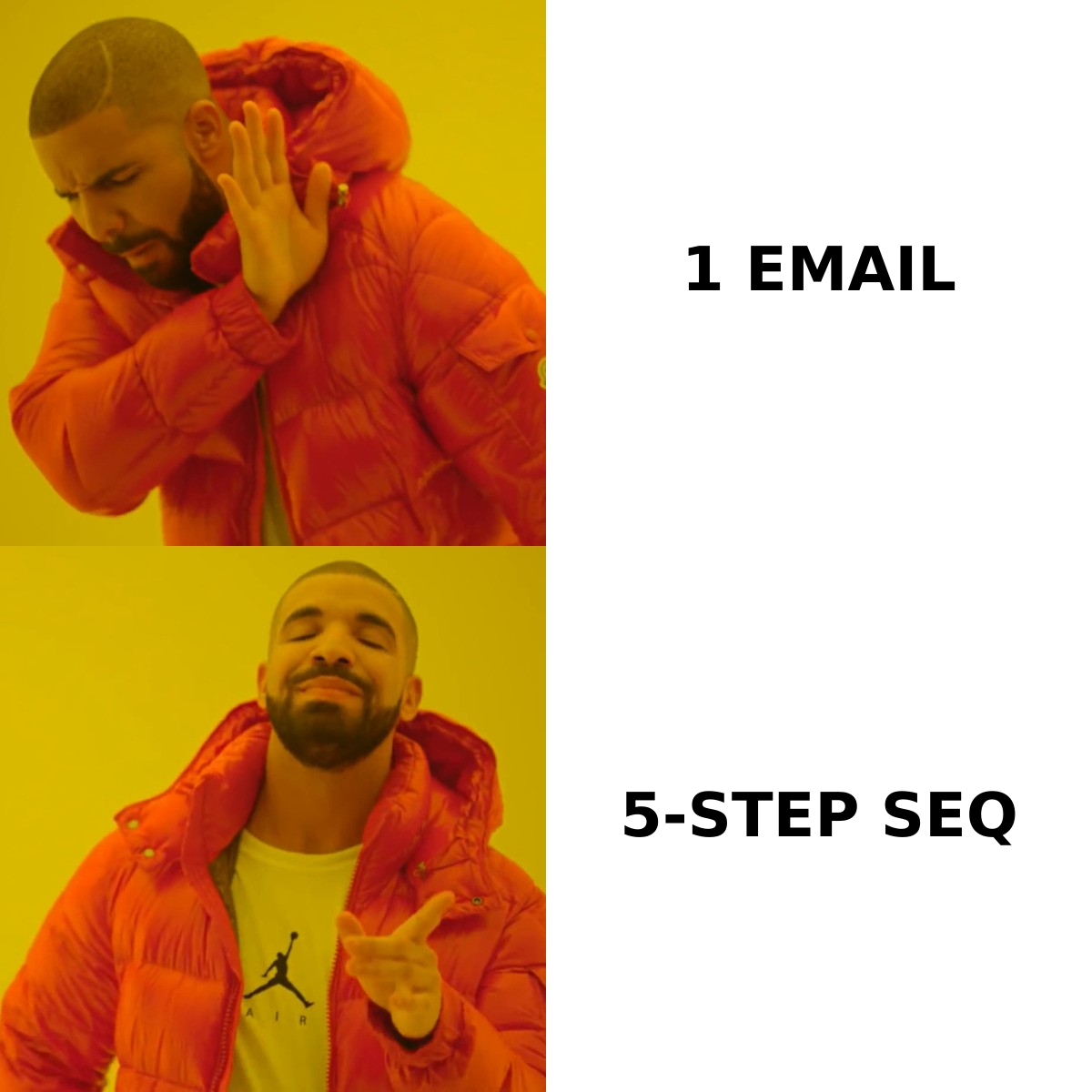
The lesson isn't "send infinite emails." It's that the second through fourth touches collectively out-earn the first. If you stop at one, you're voluntarily skipping the better half of your response rate.
How many follow-ups should an auto follow up sequence have?#
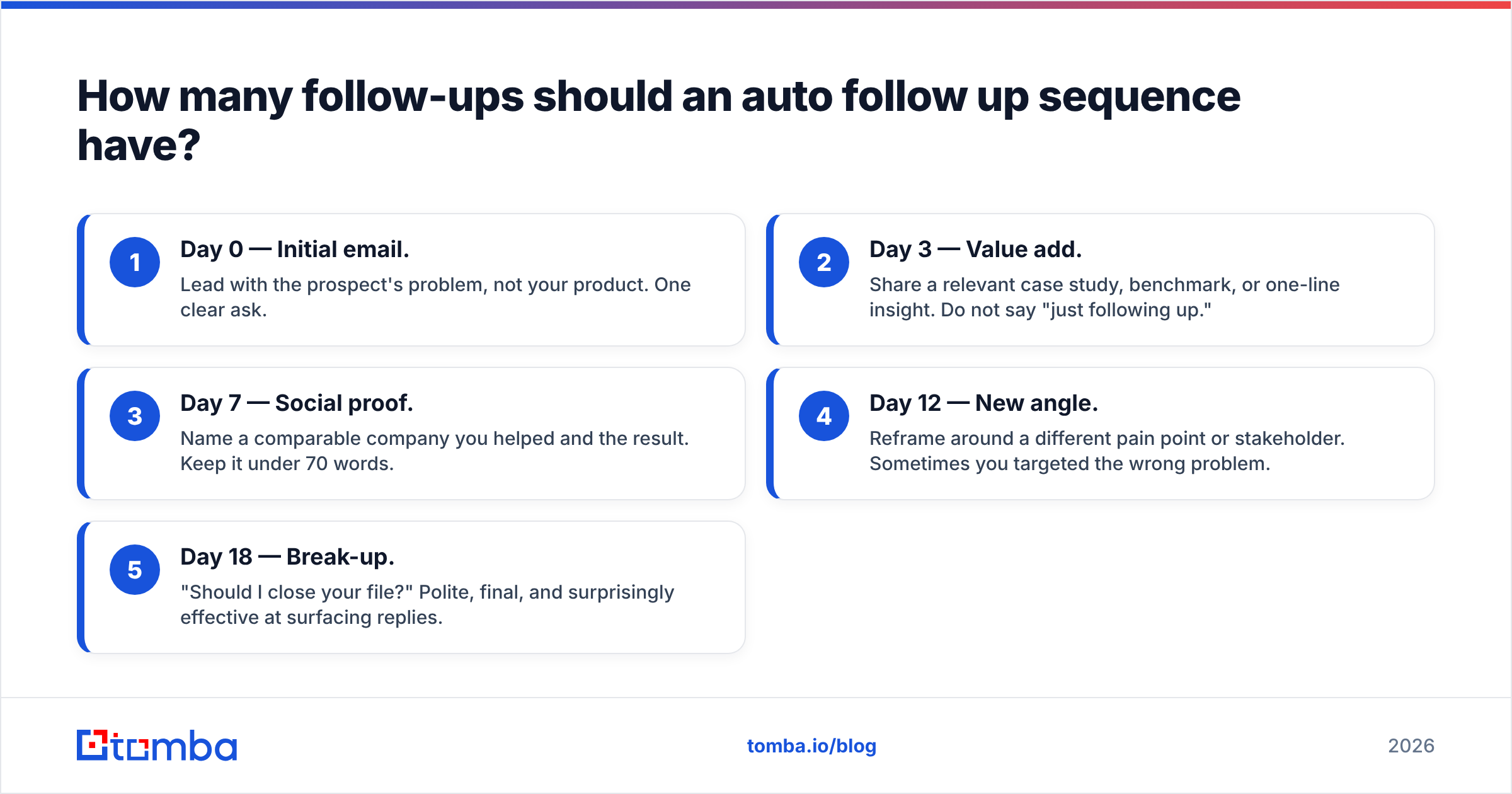
Three to five steps over two to three weeks, for most B2B outbound. That range balances persistence against annoyance.
Here's a sequence skeleton that works across industries:
- Day 0 — Initial email. Lead with the prospect's problem, not your product. One clear ask.
- Day 3 — Value add. Share a relevant case study, benchmark, or one-line insight. Do not say "just following up."
- Day 7 — Social proof. Name a comparable company you helped and the result. Keep it under 70 words.
- Day 12 — New angle. Reframe around a different pain point or stakeholder. Sometimes you targeted the wrong problem.
- Day 18 — Break-up. "Should I close your file?" Polite, final, and surprisingly effective at surfacing replies.
Each step waits on the prior delay and checks exit conditions first. If the prospect replied on Day 4, steps 3–5 never fire.
A note on cadence: use business days, not calendar days, so nothing lands on a Sunday. And avoid stacking touches too tightly — three emails in three days reads as desperation, not diligence.
What does good auto follow up copy look like?#
Short, specific, and additive. Every follow-up should give the prospect a reason to reply that didn't exist in the previous message.
Bad auto follow up:
"Hi {{first_name}}, just bumping this to the top of your inbox. Any thoughts?"
This adds nothing. It's a reminder that you want something, with no new value. Prospects delete it.
Good auto follow up:
"Hi {{first_name}} — saw {{company}} just opened a second office in Austin. Most teams we work with hit data-decay problems right after expansion. Worth a 10-minute look at how {{competitor_company}} handled it?"
This references a trigger, names a relevant pain, and offers a concrete reason to engage. If you want a head start on structures like this, browse proven cold email templates and adapt them rather than writing from a blank page.
Rules that keep automated copy human:
- One ask per email. Two asks split attention and lower reply rates.
- No "per my last email." It reads as passive-aggressive.
- Vary the format. Mix a question, a resource, a one-liner. Identical-feeling emails get pattern-matched as spam.
- Plain text beats HTML. Heavy templates trip spam filters and look mass-produced.
How do you build an auto follow up system without hurting deliverability?#
Protect the inbox first; automate second. The fastest way to ruin an auto follow up program is to scale a bad list or a cold domain. Volume amplifies whatever you already have — good or bad.
Three guardrails matter most:
1. Warm the sending domain. A brand-new domain blasting 200 emails a day looks exactly like a spammer to inbox providers. Ramp gradually and check your math with a warmup calculator before you scale volume.
2. Verify every address before it enters a sequence. Bounces above ~3% signal mailbox providers that you're sending to a stale list, and your domain reputation drops for everyone in it. Run your list through an email verifier so the auto follow up engine only ever touches deliverable addresses.
3. Source contacts from accurate data. Guessed email patterns bounce. Auto follow up multiplies that bounce rate across five touches. Start with a real email finder that returns verified, confidence-scored addresses instead of permutations you hope resolve.
Get those three right and automation becomes a multiplier on good fundamentals. Skip them and you're just automating your own blacklisting. For the underlying mechanics, Salesforce's deliverability guidance and most ESP docs say the same thing: reputation is earned slowly and lost fast.
Manual follow-up vs. auto follow up: which wins?#
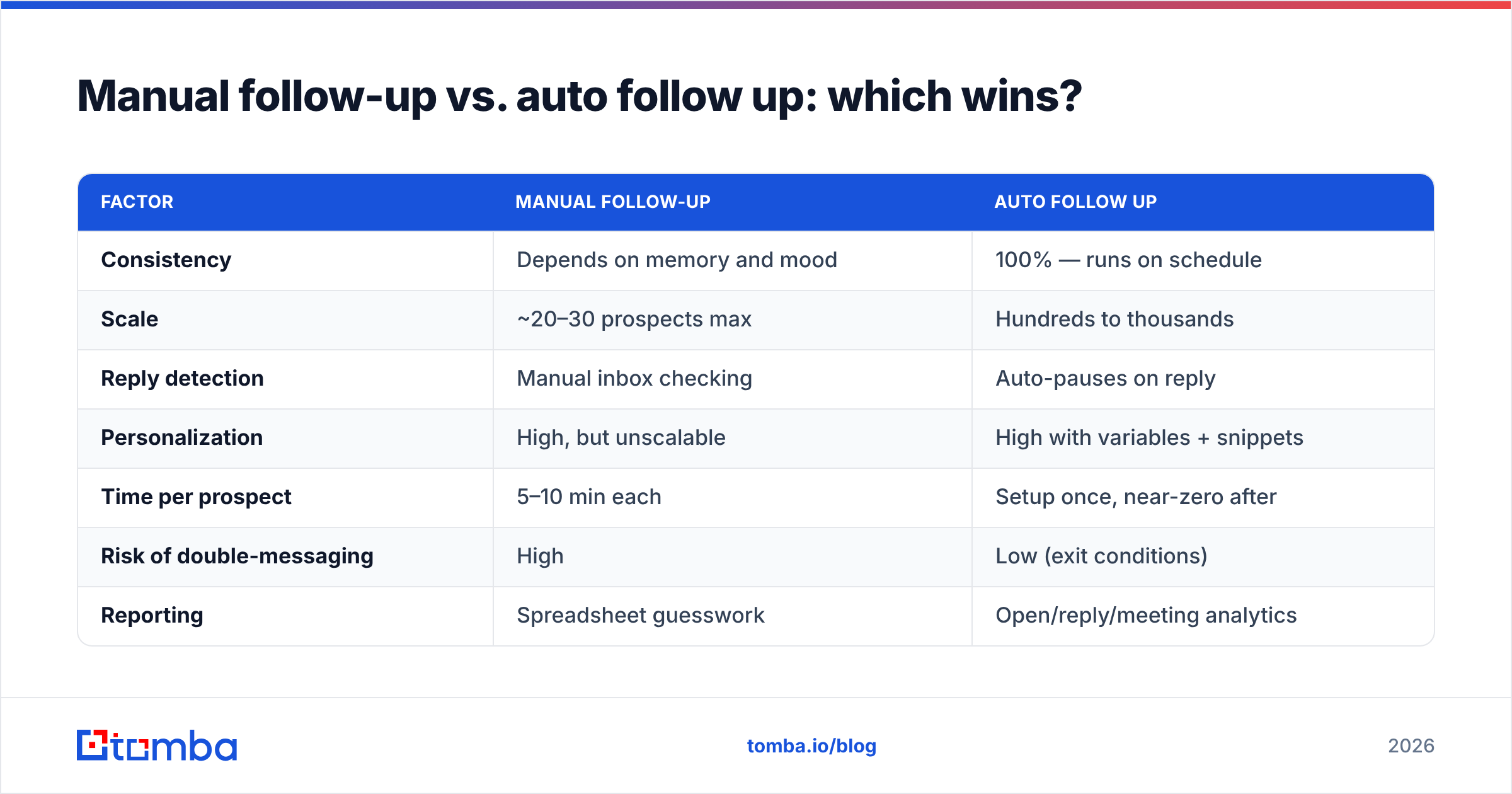
Auto follow up wins on consistency and scale; manual follow-up wins on nothing except very low volume. Here's the honest comparison.
| Factor | Manual follow-up | Auto follow up |
|---|---|---|
| Consistency | Depends on memory and mood | 100% — runs on schedule |
| Scale | ~20–30 prospects max | Hundreds to thousands |
| Reply detection | Manual inbox checking | Auto-pauses on reply |
| Personalization | High, but unscalable | High with variables + snippets |
| Time per prospect | 5–10 min each | Setup once, near-zero after |
| Risk of double-messaging | High | Low (exit conditions) |
| Reporting | Spreadsheet guesswork | Open/reply/meeting analytics |
The one real risk with automation is sounding canned. You mitigate that with the copy rules above and by using dynamic fields — first name, company, recent trigger event — pulled from enriched contact records, not blank placeholders.
How does auto follow up fit the rest of your stack?#
It sits at the center of your outbound motion, but it depends on two layers underneath it: data and channels.
- Data layer (bottom). Verified emails, phone numbers, and firmographics. Pull these with an email finder and enrichment so every record is complete before it enters a sequence.
- Sequencing layer (middle). The auto follow up engine itself — steps, delays, exit conditions, A/B variants.
- Channel layer (top). Email, LinkedIn, and phone. Multi-channel sequences mix these; a missed email follow-up becomes a LinkedIn touch or a call.
A common 2026 pattern: email steps 1–3, a LinkedIn connection on day 5, and a call task on day 9 for high-value accounts. The auto follow up tool orchestrates the timing; a rep handles the human channels when prompted.
Most teams connect their sequencer to a CRM so replies and meetings sync automatically. If you're evaluating platforms, compare an Instantly alternative or a Saleshandy alternative on their native verification and CRM sync — not just their sending limits.
What metrics tell you the auto follow up is working?#
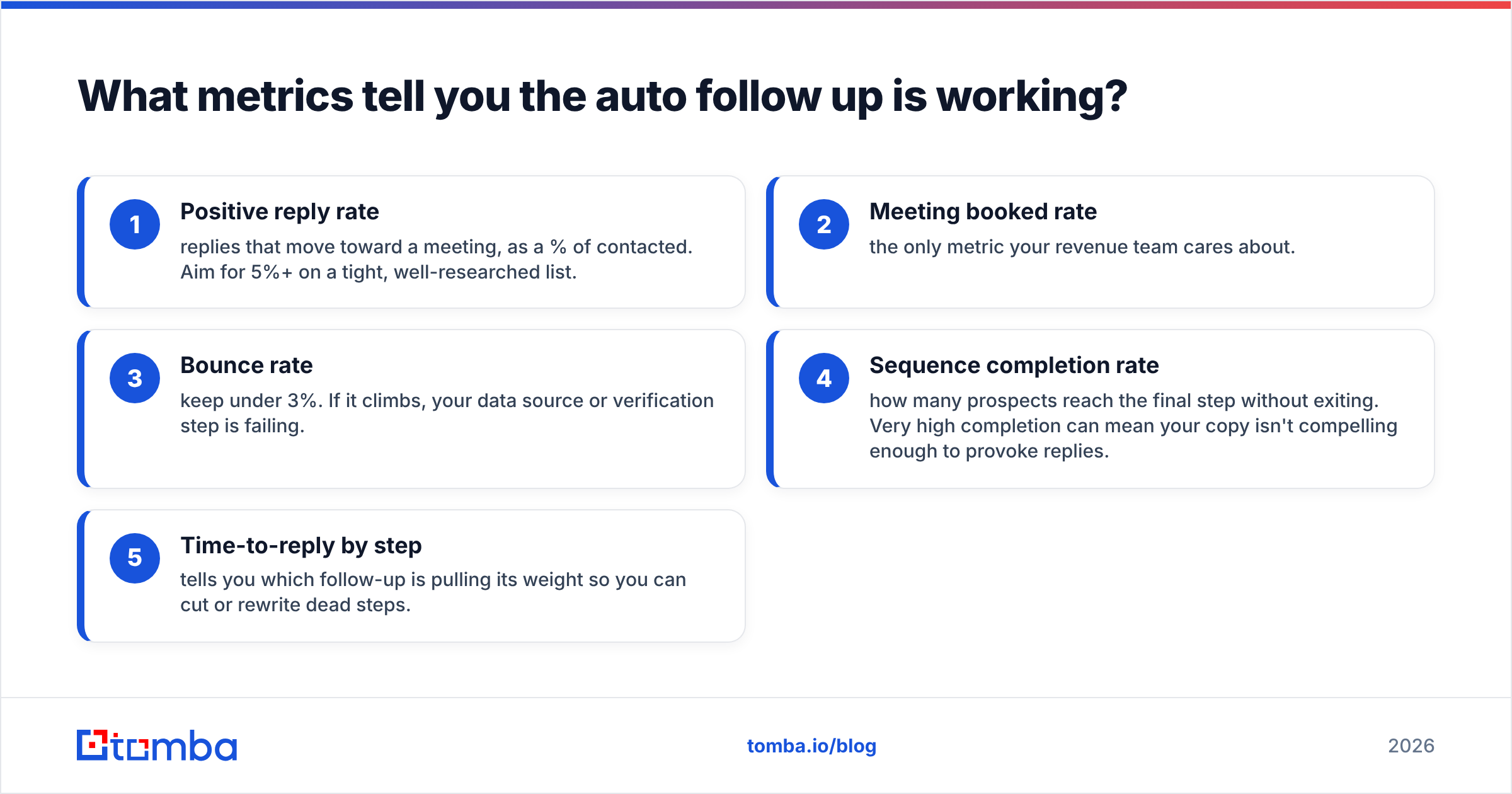
Track reply rate and meetings booked per sequence, not opens. Open tracking is increasingly unreliable thanks to privacy proxies that pre-fetch images and inflate your numbers.
The metrics that actually matter:
- Positive reply rate — replies that move toward a meeting, as a % of contacted. Aim for 5%+ on a tight, well-researched list.
- Meeting booked rate — the only metric your revenue team cares about.
- Bounce rate — keep under 3%. If it climbs, your data source or verification step is failing.
- Sequence completion rate — how many prospects reach the final step without exiting. Very high completion can mean your copy isn't compelling enough to provoke replies.
- Time-to-reply by step — tells you which follow-up is pulling its weight so you can cut or rewrite dead steps.
Review these weekly. Kill the steps that don't earn replies, double down on the angles that do, and refresh copy every quarter so it doesn't go stale across your account list.
Common auto follow up mistakes to avoid#
- Sending on the wrong cadence. Daily emails feel like harassment. Space touches 3–5 business days apart.
- Forgetting to pause on out-of-office replies. Configure your tool to detect OOO and resume later, not plow ahead.
- One generic sequence for every persona. A CFO and a developer need different angles. Segment.
- Ignoring the break-up email. It consistently surfaces "sorry, wrong timing — circle back in Q3" replies you'd otherwise never get.
- Scaling before verifying. The single most expensive mistake. Verify first, always.
The bottom line#
Auto follow up isn't about sending more email — it's about never dropping a prospect who just needed a second or third touch. Build a 3–5 step sequence, write copy that adds value at every step, set hard exit conditions, and protect your deliverability with verified data underneath it all.
That last part is where most programs quietly fail. An automated sequence is only as good as the contacts feeding it — guessed addresses bounce, drag down your sender reputation, and waste every follow-up you queued. Start with accurate, verified contact data using the Tomba Email Finder. It returns confidence-scored, deliverable email addresses so your auto follow up sequences reach real inboxes from the first touch to the break-up. The free tier gives you 25 searches a month to test it before you scale — feed your sequences clean data and let the follow-ups do the work you used to forget.
// get started
Find, verify and enrich your first contacts today
Start on the free plan with 25 searches a month, then scale when your team is ready.
Free plan · No credit card required · GDPR & CCPA
// about the author