Auto Sales CRM in 2026: Best Tools, Features & Buyer's Guide
An auto sales CRM keeps every lead, test drive, and follow-up in one place. Compare the top platforms, features, and pricing for 2026 — and see how clean contact data makes any of them close faster.
TL;DR#
- An auto sales CRM is a customer relationship platform built for dealerships and car-sales teams — it tracks every lead, test drive, trade-in, and follow-up from first inquiry to signed paperwork.
- The best fit depends on your store size: independent lots lean toward HubSpot or Pipedrive, while franchise dealers usually need DealerSocket or VinSolutions for DMS integration.
- Features that actually move the needle: lead-source tracking, automated follow-up, inventory matching, texting, and clean contact data.
- A CRM is only as good as the data inside it. Stale phone numbers and dead email addresses quietly kill follow-up — enrichment tools fix that gap.
- Below: a feature-and-price comparison table, a buyer's checklist, and how to keep your CRM records accurate without manual data entry.
What is an auto sales CRM?#
An auto sales CRM is the system of record for everyone who walks onto your lot, fills out a web form, or replies to a marketing blast. Think of it as the dealership's memory: instead of a salesperson keeping deals in their head (or on sticky notes), every interaction — the SUV a buyer test-drove, the trade-in they mentioned, the financing question they asked — lives in one searchable place.
The difference between a generic CRM and an auto sales CRM comes down to the workflow. Car buyers don't convert in a single visit; the average shopper takes weeks and touches a dozen sources before they sign. An auto-specific CRM models that journey: it connects to your inventory feed, your Dealer Management System (DMS), and the third-party lead sites (AutoTrader, Cars.com, your own website), then routes each "up" to the right rep with the right follow-up cadence.
Done well, it answers three questions instantly: Who is this lead, what vehicle do they want, and when do we follow up next? For a deeper definition of the category, the CRM glossary entry covers the fundamentals that apply across every industry.
What features should an auto sales CRM have?#
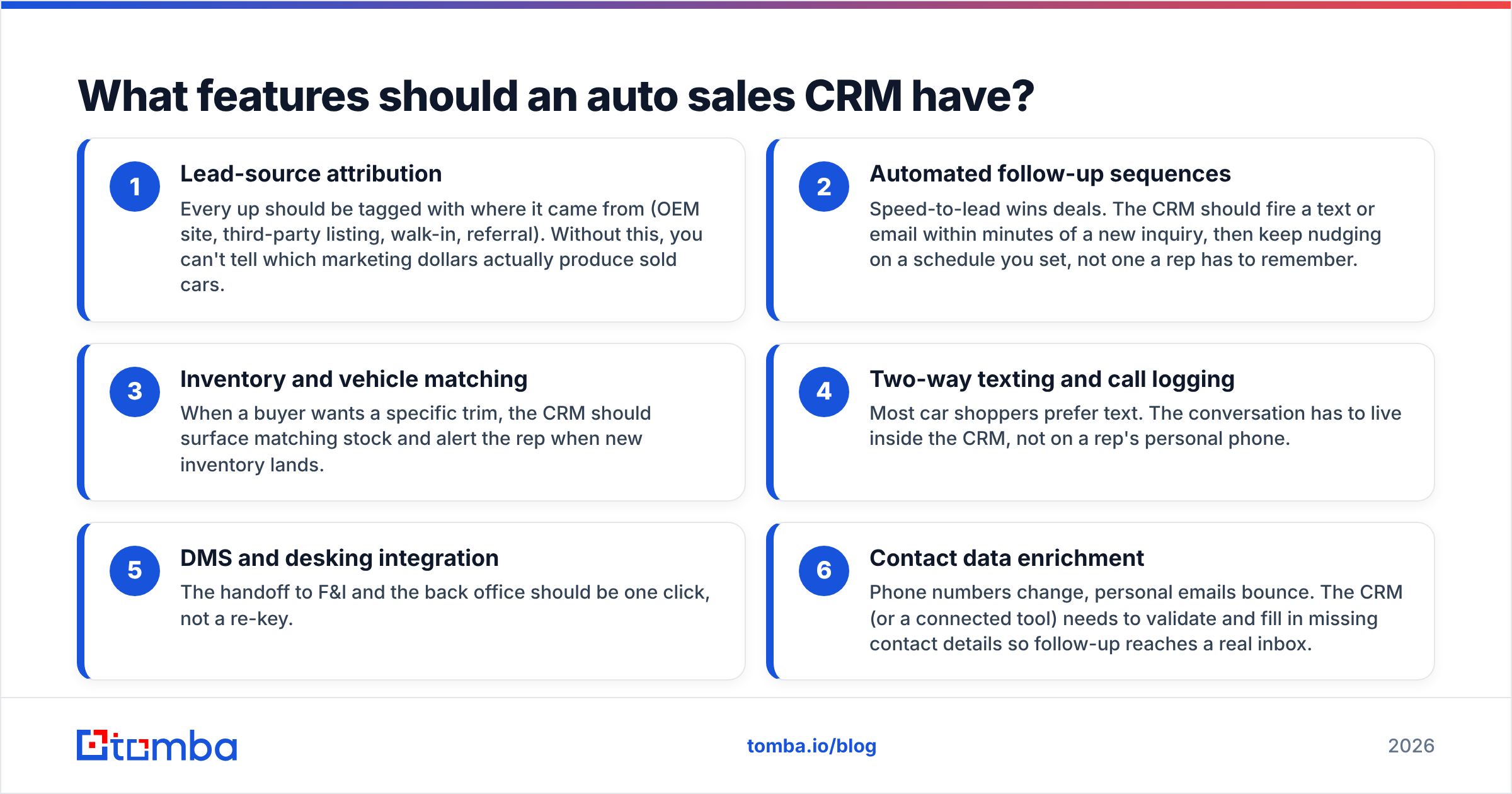
Not every "CRM" sold to dealers earns the name. Use these six capabilities as your non-negotiable checklist:
- Lead-source attribution — Every up should be tagged with where it came from (OEM site, third-party listing, walk-in, referral). Without this, you can't tell which marketing dollars actually produce sold cars.
- Automated follow-up sequences — Speed-to-lead wins deals. The CRM should fire a text or email within minutes of a new inquiry, then keep nudging on a schedule you set, not one a rep has to remember.
- Inventory and vehicle matching — When a buyer wants a specific trim, the CRM should surface matching stock and alert the rep when new inventory lands.
- Two-way texting and call logging — Most car shoppers prefer text. The conversation has to live inside the CRM, not on a rep's personal phone.
- DMS and desking integration — The handoff to F&I and the back office should be one click, not a re-key.
- Contact data enrichment — Phone numbers change, personal emails bounce. The CRM (or a connected tool) needs to validate and fill in missing contact details so follow-up reaches a real inbox.
That last point is where most dealership CRMs quietly fall down — and where it costs you. A pipeline full of dead numbers looks busy and produces nothing.
Which auto sales CRM is best in 2026?#
There's no single winner — the right tool scales to your store. Here's how the leading options stack up across the attributes dealers actually weigh.
| Platform | Best for | Starting price | DMS integration | Built-in texting | Free tier |
|---|---|---|---|---|---|
| DealerSocket | Franchise & multi-rooftop | Custom (≈$650/mo) | Native | Yes | No |
| VinSolutions | Cox Automotive dealers | Custom quote | Native (Cox) | Yes | No |
| HubSpot CRM | Independent & used lots | Free / $20 per seat | Via |
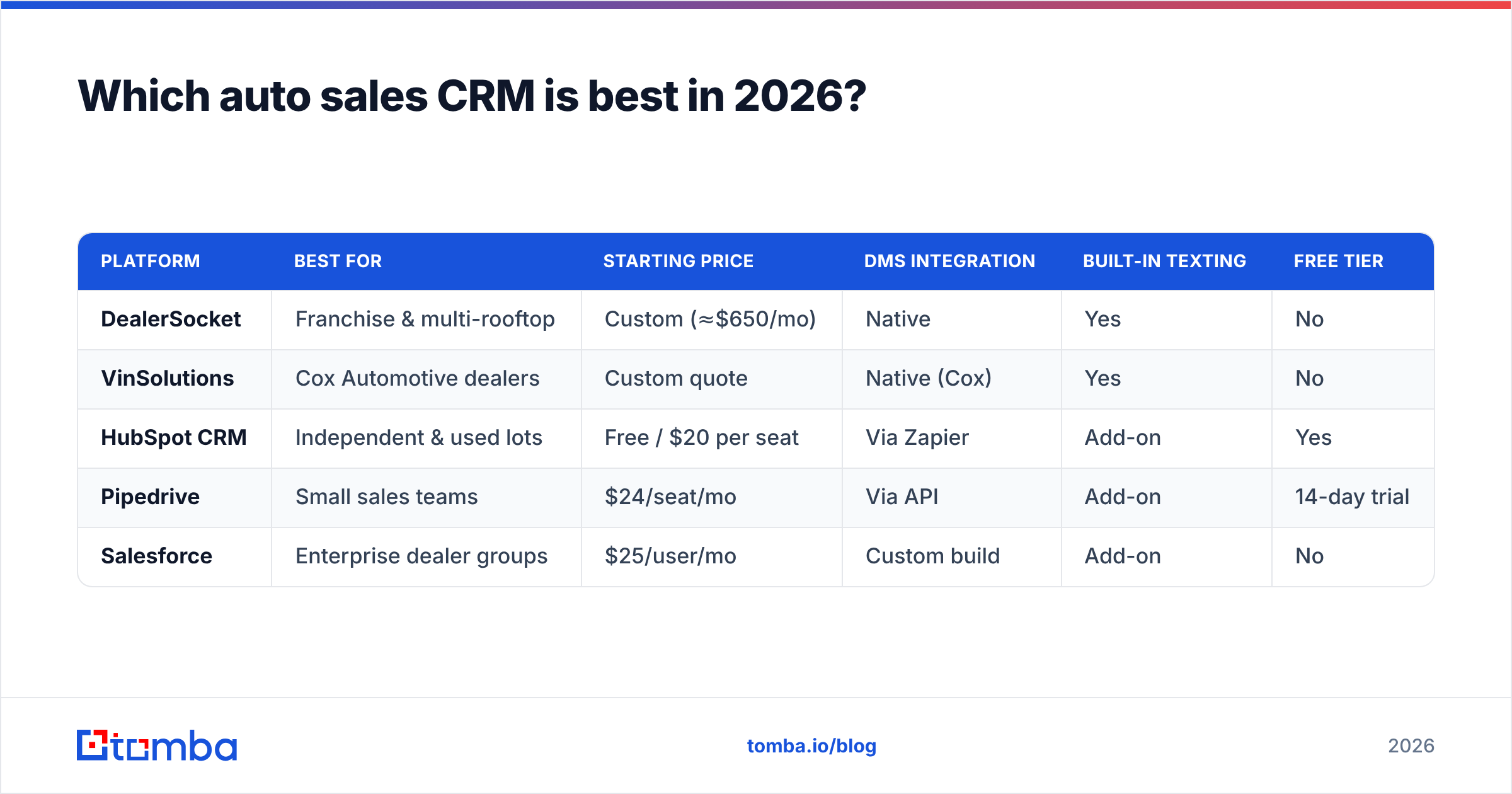
Zapier | Add-on | Yes | | Pipedrive | Small sales teams | $24/seat/mo | Via API | Add-on | 14-day trial | | Salesforce | Enterprise dealer groups | $25/user/mo | Custom build | Add-on | No |
A few honest takeaways from the table:
- Franchise stores that need tight DMS coupling and OEM compliance gravitate to DealerSocket or VinSolutions — they're purpose-built, but you'll pay franchise-tier pricing and onboarding.
- Independent and used-car lots often get more value from a flexible general CRM like HubSpot or Pipedrive, then bolt on the auto-specific pieces. The free HubSpot tier alone covers a small team's pipeline.
- Large dealer groups with a developer or RevOps function pick Salesforce for the customization ceiling — it does anything, but only after you build it.
Compare current plans and feature breakdowns on a neutral marketplace like G2 before you commit; dealer CRM contracts are long and the switching cost is real.
How much does an auto sales CRM cost?#
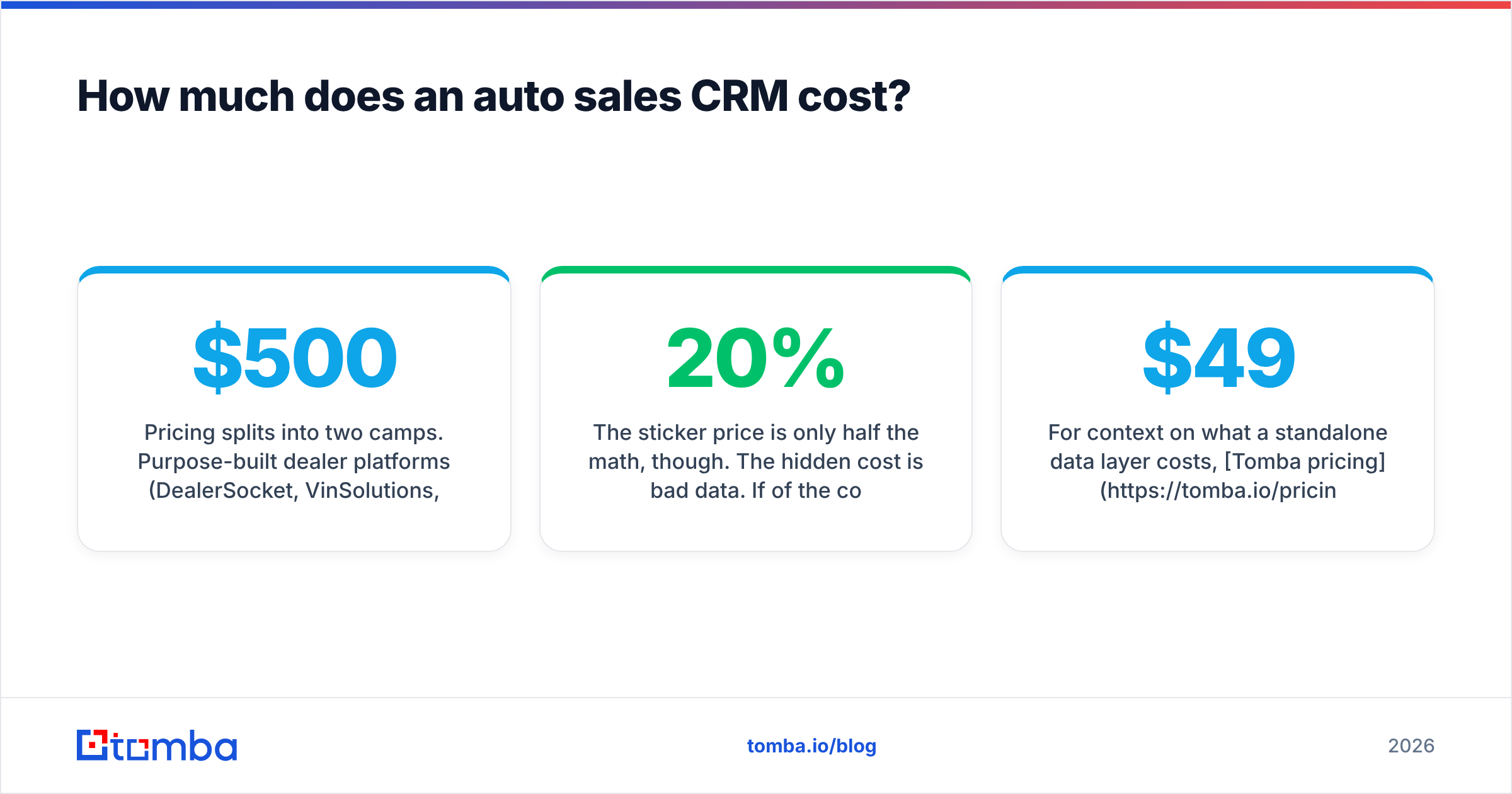
Pricing splits into two camps. Purpose-built dealer platforms (DealerSocket, VinSolutions, Elead) quote custom contracts that typically land between $500 and $1,500 per rooftop per month, usually with implementation fees and annual terms. Horizontal CRMs (HubSpot, Pipedrive, Salesforce) charge per seat — anywhere from free to $150 a user — and let you start small.
The sticker price is only half the math, though. The hidden cost is bad data. If 20% of the contacts in a $1,000-a-month CRM have wrong phone numbers or dead emails, you're paying full price for a fifth of the system to sit idle. That's why dealers increasingly pair their CRM with a low-cost enrichment layer: a tool that finds and verifies contact details runs a fraction of the CRM cost and lifts the return on the whole stack.
For context on what a standalone data layer costs, Tomba pricing starts with a free tier (25 searches/month) and a Starter plan at $49/mo — small money next to a four-figure dealer CRM, and it keeps the expensive system's records accurate.
How does data quality affect your CRM?#
Conclusion first: your CRM's results rise and fall on the accuracy of the contacts inside it. Everything else — automation, dashboards, AI scoring — runs on top of that foundation, and a shaky foundation cracks the whole thing.
Here's the everyday version. A CRM is like a contact book for a delivery driver. The fanciest route-planning app in the world won't deliver a package if the address is wrong. Auto sales CRMs are the same: the follow-up sequences and lead-scoring models are the route planner, but if the phone number is disconnected or the email bounces, nothing gets delivered.
Three data problems sink most dealership pipelines:
- Decay — Contact info goes stale fast. People change jobs, swap numbers, and abandon old email accounts. A lead captured six months ago may already be unreachable.
- Gaps — Web forms and walk-ins often leave fields blank. A name with no email, or a phone with no name, is a half-dead record.
- Typos — Manual entry at the desk introduces errors that silently route follow-up into the void.
You fix all three with verification and enrichment. An email verifier confirms an address can actually receive mail before your sequence wastes a send on it, and data enrichment fills the blanks — appending missing emails, names, or company details so each record is complete enough to act on.

How do you keep CRM contact data accurate without manual entry?#
Manual data hygiene doesn't scale — no rep is going to re-verify 2,000 records by hand. The fix is to automate the inflow and the cleanup. Three practical moves:
1. Find missing contact details at capture. When a lead comes in with only a name and a company (common with B2B fleet and commercial-vehicle sales), an email finder locates the professional address so your first follow-up lands. For phone-first markets, a phone finder does the same for direct numbers.
2. Verify before you send or dial. Run new and aging records through verification so your outreach only hits live contacts. This protects your sender reputation too — high bounce rates from a junk list can land your whole dealership domain in spam folders.
3. Sync it into the CRM you already run. Enrichment is only useful if it lands where reps work. Tomba pushes verified contacts into the tools dealers already use through its Salesforce integration and HubSpot integration, so the CRM stays the single source of truth and nobody re-keys anything.
The result is a closed loop: leads come in, get completed and verified automatically, and reps spend their time selling cars instead of cleaning spreadsheets.
Auto sales CRM vs. general CRM: which should you pick?#
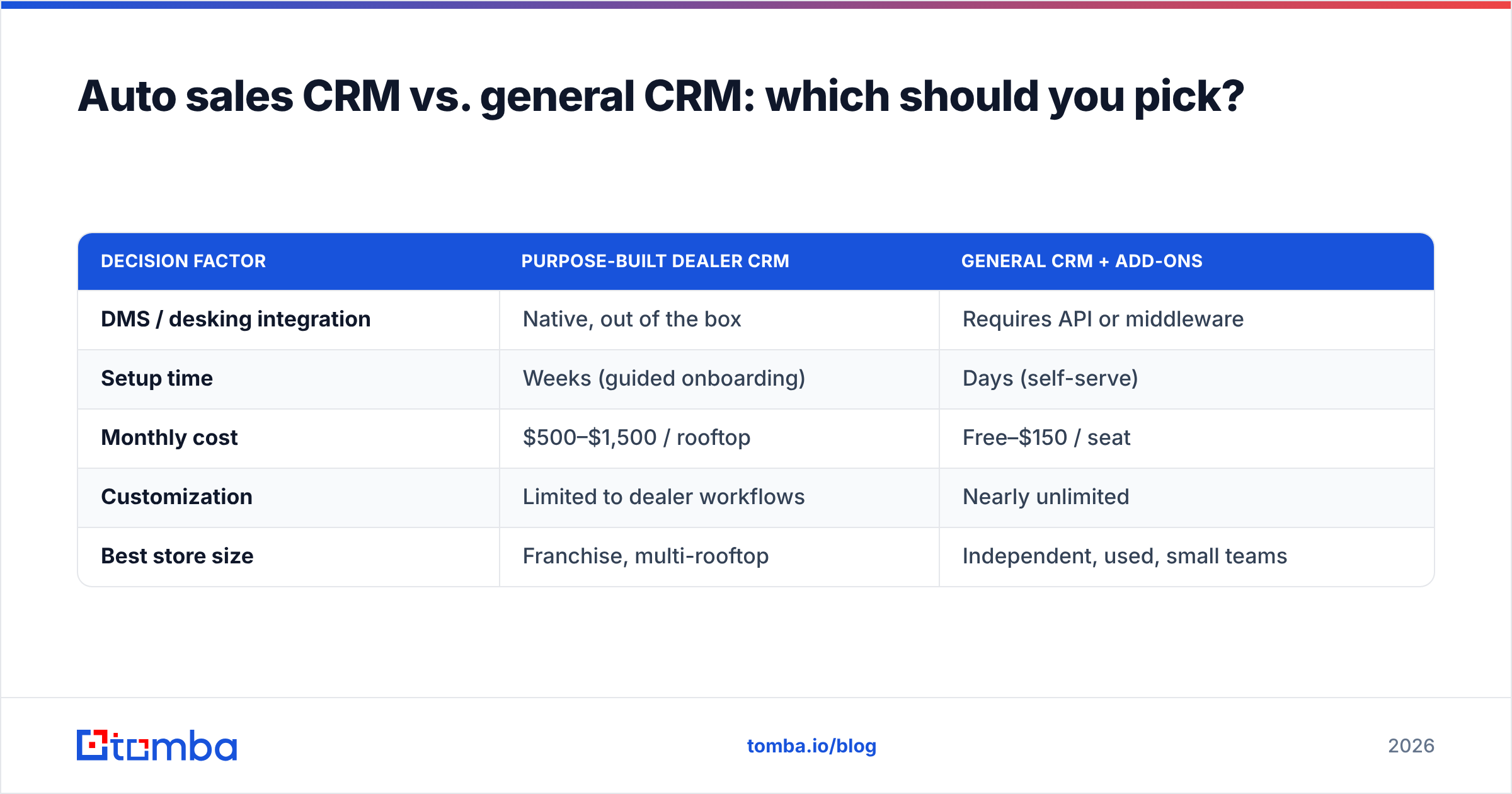
The decision usually comes down to integration depth versus flexibility.
| Decision factor | Purpose-built dealer CRM | General CRM + add-ons |
|---|---|---|
| DMS / desking integration | Native, out of the box | Requires API or middleware |
| Setup time | Weeks (guided onboarding) | Days (self-serve) |
| Monthly cost | $500–$1,500 / rooftop | Free–$150 / seat |
| Customization | Limited to dealer workflows | Nearly unlimited |
| Best store size | Franchise, multi-rooftop | Independent, used, small teams |
If you run a franchise rooftop with OEM reporting requirements and a DMS you can't change, a purpose-built dealer CRM earns its premium. If you're an independent lot, a buy-here-pay-here store, or a lean used-car operation, a general CRM plus a sharp data layer gives you 90% of the capability at a fraction of the cost — and it's far easier to switch if you outgrow it.
Either way, the data layer is the same recommendation. The CRM holds the workflow; an enrichment and verification tool keeps the records inside it worth acting on.
Frequently asked questions#
What does CRM stand for in car sales? CRM stands for Customer Relationship Management. In car sales it refers to the software that tracks leads, customer interactions, test drives, and follow-ups across the entire buying journey, from first inquiry to delivery.
Do small dealerships need a CRM? Yes. Even a two-person used-car lot loses deals to missed follow-up. A free or low-cost CRM (like HubSpot's free tier) plus reliable contact data captures the leads that would otherwise slip through the cracks.
Can I use a general CRM for auto sales? Absolutely. HubSpot, Pipedrive, and Salesforce all work for dealerships, especially independent and used-car stores. You'll add auto-specific pieces (inventory matching, DMS sync) through integrations rather than getting them out of the box.
Why do CRM leads go cold? Usually because of slow follow-up or bad contact data. Speed-to-lead automation fixes the first; verification and enrichment fix the second by ensuring every number and email is reachable.
Getting started#
Your CRM choice matters — but the data inside it matters more. The fastest win for any dealership, on any platform, is to stop letting follow-up die on dead phone numbers and bounced emails.
Start by plugging the gaps in your existing pipeline. Use the Tomba Email Finder to locate and verify professional contact details for the leads already sitting in your CRM, then connect it to your stack so every new record comes in complete and reachable. The free tier lets you test it against your own lead list before you spend a dollar — find out how many of your "active" contacts are actually live, and watch your follow-up connect rate climb from there.
// get started
Find, verify and enrich your first contacts today
Start on the free plan with 25 searches a month, then scale when your team is ready.
Free plan · No credit card required · GDPR & CCPA
// about the author