How to Automate Lead Distribution: 2026 Routing Playbook
Manual lead assignment leaks revenue every hour a hot lead sits unrouted. Here's how to automate lead distribution in 2026 — models, tools, and a build plan.
TL;DR
- Automating lead distribution means routing each inbound or sourced lead to the right rep automatically — by territory, round-robin, account ownership, or scored fit — instead of a manager pasting rows into a spreadsheet.
- Speed-to-lead is the whole game: contacting a lead within 5 minutes makes you up to 21x more likely to qualify it than waiting 30 minutes. Manual assignment can't hit that window.
- The four core routing models are round-robin, weighted, territory/account-based, and score-based. Most teams blend them.
- The data layer matters more than the routing logic: garbage leads with missing emails, fake phones, or wrong company data route fast and convert at zero. Enrich and verify before you route.
- You can build a working auto-distribution flow with your CRM, a workflow tool (Zapier/Make), and an enrichment API — no enterprise RevOps suite required.
What does it mean to automate lead distribution?#
To automate lead distribution is to hand the "who gets this lead?" decision to a rule set instead of a human. The moment a lead enters your system — a demo request, a form fill, a list import, an enriched record — software evaluates it against criteria you defined and assigns it to a rep, queue, or team in seconds.
Think of it like an airport's baggage system. Without it, a worker reads every tag and walks each bag to the right carousel — slow, error-prone, and it stops when the worker takes a break. Automated routing is the conveyor: the tag (the lead's attributes) determines the belt (the rep), and it runs 24/7 without anyone touching a row.
Technically, lead distribution automation has three moving parts:
- A trigger — a new lead is created or updated (form submission, import, API push, or a status change).
- A rule engine — logic that reads the lead's fields (region, company size, source, score) and decides the owner.
- An action — the CRM updates the owner field, notifies the rep, and starts an SLA timer.
The reason this matters is brutal arithmetic. Harvard Business Review's classic lead-response study found firms that contact a lead within an hour are nearly 7x more likely to have a meaningful conversation than those who wait even two hours. Manual assignment routinely burns that hour before a rep ever sees the name.
Why does manual lead assignment cost you deals?#
Manual assignment fails in four predictable ways, and every one of them is a revenue leak.
- Latency. A lead submitted at 4:58 PM Friday sits until Monday. By then a competitor with auto-routing already booked the call.
- Lopsided workloads. Whoever the manager likes — or whoever shouts loudest in Slack — gets the fat leads. Reps notice, morale drops, and your best closer ends up starved.
- Leakage. Rows get skipped, duplicated, or assigned to a rep who's on PTO. Nobody owns the lead, so nobody works it.
- No accountability. Without a timestamped owner and SLA, "I never saw that lead" is unfalsifiable.
The hidden tax is data quality. A lead that routes instantly but has a typo'd email or a disconnected phone is just fast garbage. Before any routing rule fires, the record should be enriched and validated. Running new contacts through an email verifier and pulling firmographics via data enrichment means your routing logic acts on real attributes, not noise. Route clean data, or you're just distributing dead ends faster.
What are the main lead distribution models?#
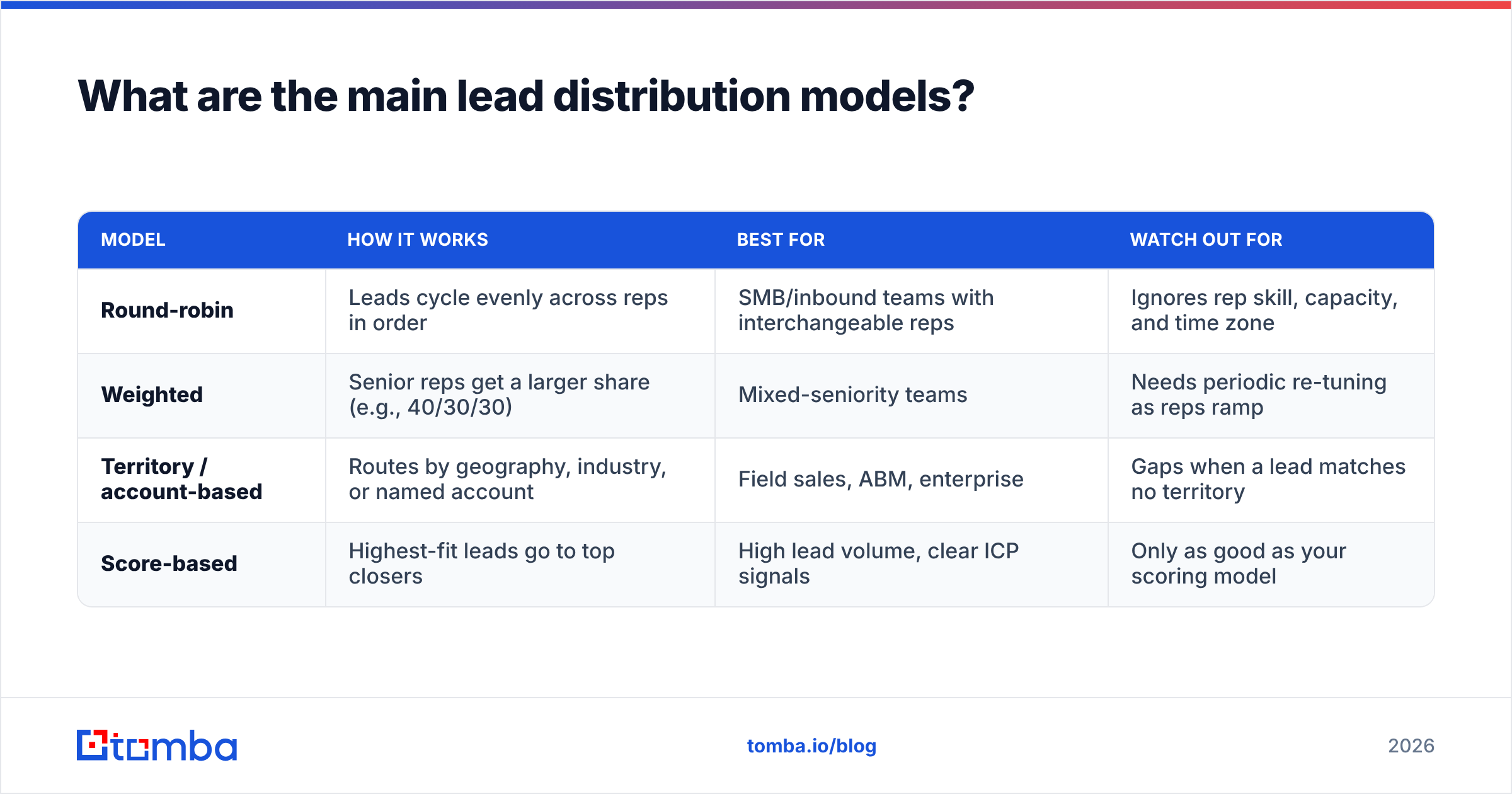
There are four routing models worth knowing. Most mature teams run a blend — for example, territory first, then round-robin inside the territory.
| Model | How it works | Best for | Watch out for |
|---|---|---|---|
| Round-robin | Leads cycle evenly across reps in order | SMB/inbound teams with interchangeable reps | Ignores rep skill, capacity, and time zone |
| Weighted | Senior reps get a larger share (e.g., 40/30/30) | Mixed-seniority teams | Needs periodic re-tuning as reps ramp |
| Territory / account-based | Routes by geography, industry, or named account | Field sales, ABM, enterprise | Gaps when a lead matches no territory |
| Score-based | Highest-fit leads go to top closers | High lead volume, clear ICP signals | Only as good as your scoring model |
Round-robin is the default starting point because it's fair and simple. But fairness isn't the same as effectiveness. If a $500K enterprise lead lands on a junior rep just because it was "their turn," you've optimized the wrong metric. That's why scoring layers on top: feed in firmographic and behavioral signals, rank the lead, then route the top tier to the people most likely to close it. A solid lead scoring foundation turns round-robin from "fair" into "fair and smart."
How do you automate lead distribution step by step?#
Here's a build plan you can implement this week with tools you likely already own. The principle is the same whether you use HubSpot, Salesforce, or Pipedrive.
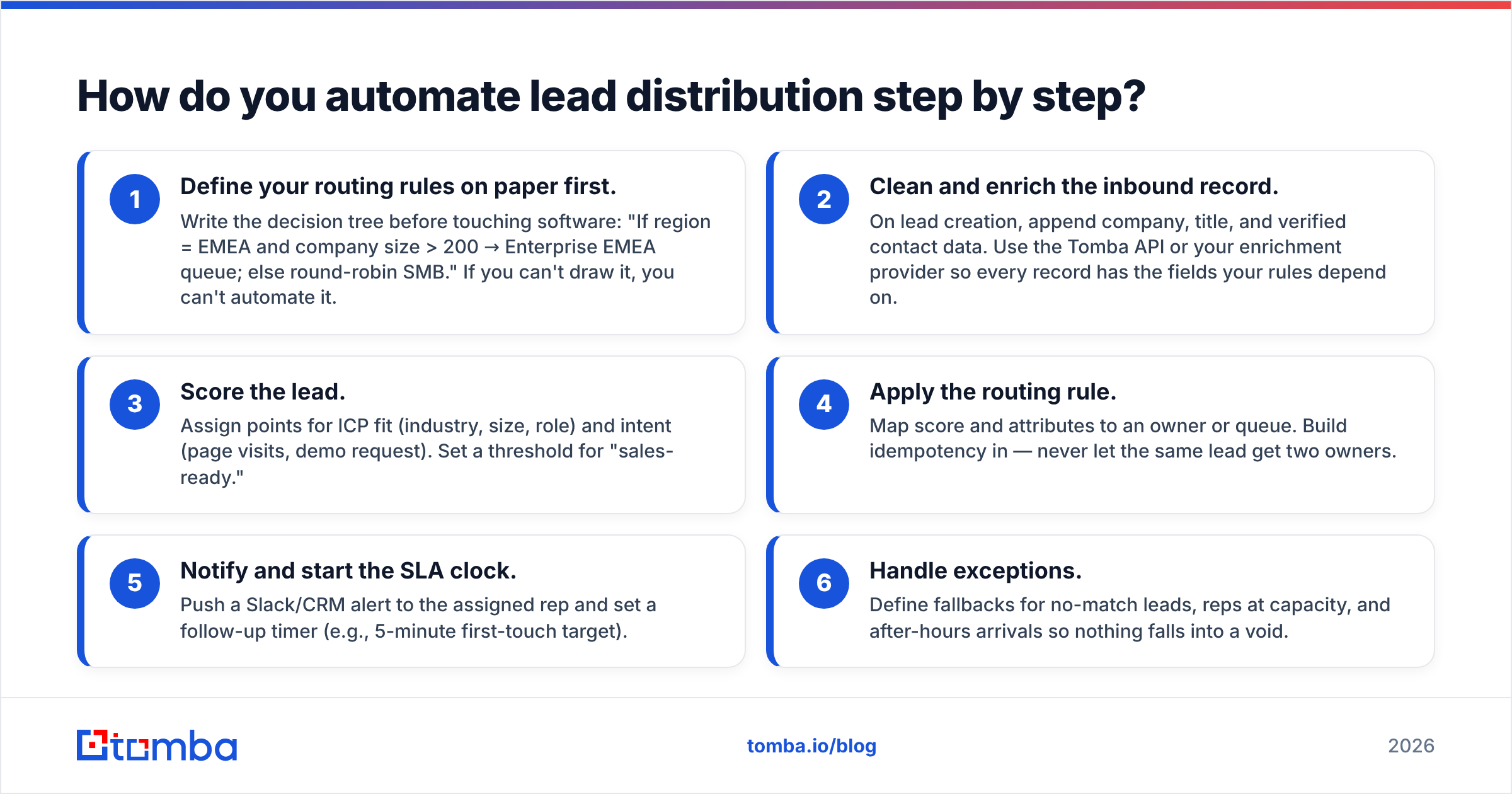
- Define your routing rules on paper first. Write the decision tree before touching software: "If region = EMEA and company size > 200 → Enterprise EMEA queue; else round-robin SMB." If you can't draw it, you can't automate it.
- Clean and enrich the inbound record. On lead creation, append company, title, and verified contact data. Use the Tomba API or your enrichment provider so every record has the fields your rules depend on.
- Score the lead. Assign points for ICP fit (industry, size, role) and intent (page visits, demo request). Set a threshold for "sales-ready."
- Apply the routing rule. Map score and attributes to an owner or queue. Build idempotency in — never let the same lead get two owners.
- Notify and start the SLA clock. Push a Slack/CRM alert to the assigned rep and set a follow-up timer (e.g., 5-minute first-touch target).
- Handle exceptions. Define fallbacks for no-match leads, reps at capacity, and after-hours arrivals so nothing falls into a void.
The glue between these steps is usually a workflow automation tool. A native CRM workflow handles the simple cases; for cross-app logic (enrich in one tool, score in another, route in the CRM, alert in Slack) a connector like [
Zapier](https://tomba.io/integrations/zapier) or Make stitches it together without code. If you live in HubSpot, the HubSpot integration lets you enrich and verify records the instant they enter the funnel, so routing rules fire on complete data.

Which tools automate lead distribution in 2026?#
The market splits into three tiers: native CRM routing, dedicated routing apps, and the data layer that feeds them. You almost always need one from each.
| Tool category | Examples | Strength | Typical cost |
|---|---|---|---|
| Native CRM routing | HubSpot, Salesforce flows | Built in, no extra vendor | Included in higher CRM tiers |
| Dedicated routing | LeanData, Chili Piper, Distribute.ai | Complex rules, scheduling, ABM matching | $1,000+/mo enterprise |
| Workflow glue |
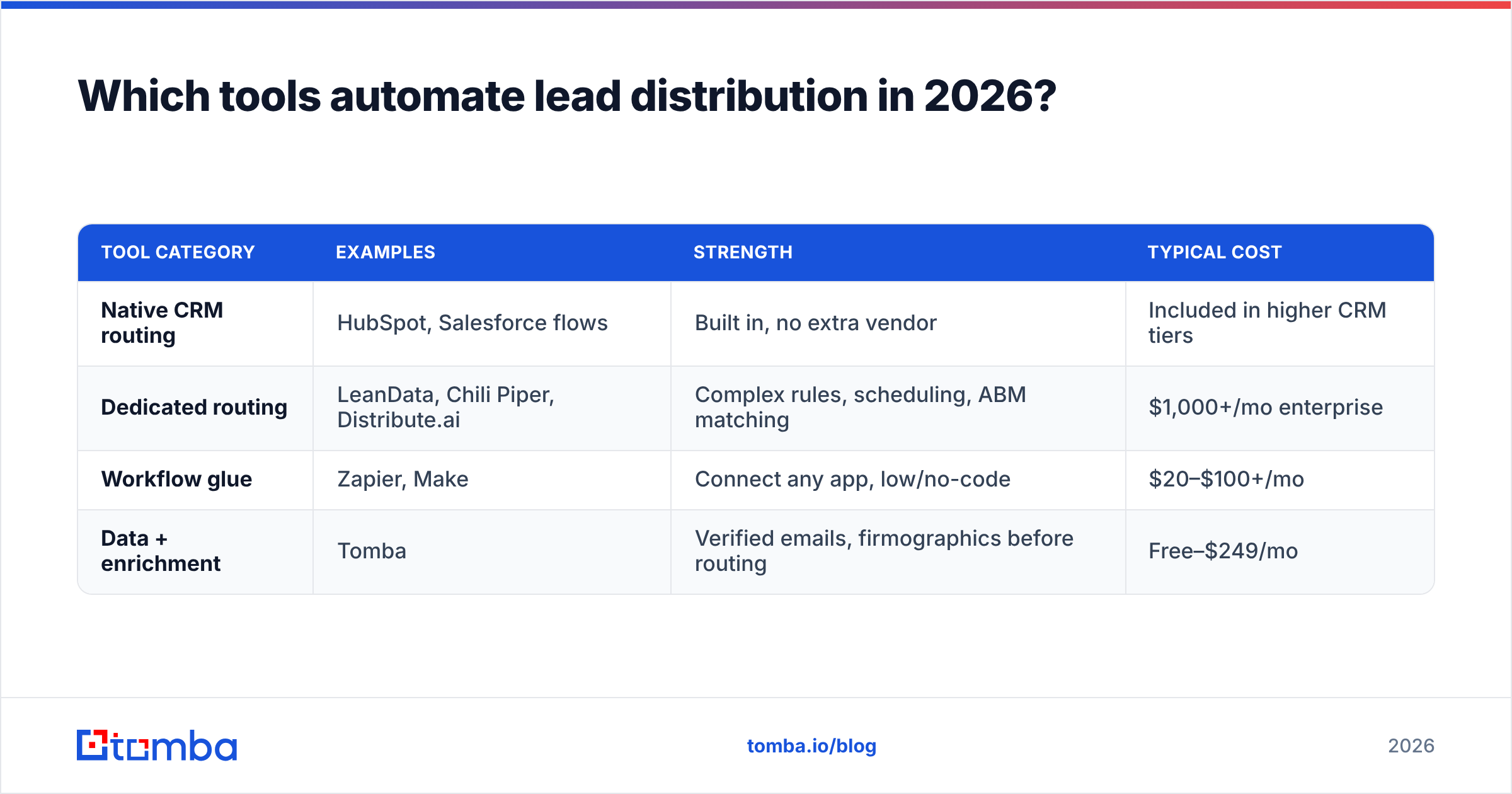
Zapier, Make | Connect any app, low/no-code | $20–$100+/mo | | Data + enrichment | Tomba | Verified emails, firmographics before routing | Free–$249/mo |
Two honest notes. First, dedicated routers like LeanData and Chili Piper are excellent but priced for enterprise — overkill if you route under a few hundred leads a month. Second, none of these fix bad data; they happily route incomplete records. That's where the data layer earns its keep.
This is where Tomba fits cleanly. It isn't a routing engine and doesn't pretend to be — it's the enrichment and verification layer that makes routing decisions accurate. Before a lead hits your round-robin or scoring rule, Tomba can find the missing work email via the email finder, confirm it's deliverable, append company data, and even surface a B2B phone number for speed-to-lead callbacks. Compared to bundling everything into one pricey platform, the modular approach — CRM for routing, Tomba for data — is cheaper and more reliable. You can review Tomba pricing against the enterprise routers and see the gap: a Growth plan at $99/mo versus four figures for a suite you'll use 20% of.
For teams comparing all-in-one prospecting platforms, it's worth reading independent reviews on G2 before committing — routing features are often buried in tiers you didn't expect to pay for.
How fast does automation pay off?#
Speed-to-lead is the metric that turns routing automation into revenue, and the payback is usually measured in weeks, not quarters.
Run the math on your own funnel. Suppose you get 400 leads a month and your average manual first-touch is 90 minutes. Cutting that to under 5 minutes with auto-routing typically lifts conversion on inbound demo requests by double digits, because you're catching the prospect while intent is still hot. If your average deal is $4,000 and you convert even 10 more leads a year because reps respond instantly, that's $40,000 against a tool stack that might cost $1,500 annually.
The second payoff is operational. Your RevOps person — or the founder doing RevOps at 11 PM — stops being a human router. That reclaimed time goes into improving the scoring model and territory design, which compounds. A well-tuned sales pipeline feeds on this loop: route faster, measure outcomes, refine the rules, route smarter.
A few guardrails so automation doesn't backfire:
- Don't over-engineer the rules. Five clean conditions beat thirty brittle ones. Complexity is where routing silently breaks.
- Monitor the fallback queue weekly. No-match leads are where revenue hides. If that queue grows, your rules have a gap.
- Verify before you route, every time. A fast route to an invalid email is a loss disguised as efficiency.
- Keep a human override. Strategic accounts sometimes need a named owner regardless of what the algorithm says.
What does a good lead distribution setup look like end to end?#
A healthy 2026 setup reads like a relay race where no baton ever drops:
A form fills → the record is enriched and the email verified within seconds → a score is computed from ICP fit and intent → the routing engine assigns an owner by territory then round-robin → Slack pings the rep and a 5-minute SLA timer starts → if the timer expires, the lead reassigns automatically. Every handoff is logged, so you can audit conversion by source, rep, and response time.
The teams that win this aren't the ones with the most expensive routing suite. They're the ones whose data is clean enough that simple rules work. Routing logic is commoditized; accurate, verified, enriched lead data is the durable advantage. Get that layer right and even basic round-robin outperforms a rival's fancy scoring model running on stale, half-empty records.
Closing: route clean data, close more deals#
Automating lead distribution is the cheapest revenue upgrade most B2B teams haven't finished. The routing logic is easy; the hard part — and the part that decides whether routing helps or just speeds up failure — is the quality of the data you route. Find the right contact, verify it's reachable, enrich the firmographics, then let your rules do their job in seconds.
Start at the source. Use the Tomba Email Finder to find verified, deliverable work emails for every lead before it enters your routing flow, plug it into your CRM via the API or a native integration, and let your reps spend their time closing instead of chasing dead addresses. Spin up the free tier — 25 searches a month — and route your next batch on data you can actually trust.
// get started
Find, verify and enrich your first contacts today
Start on the free plan with 25 searches a month, then scale when your team is ready.
Free plan · No credit card required · GDPR & CCPA
// about the author