Automated Cold Calling Software in 2026: A Buyer's Guide
Auto-dialers promise more conversations per hour, but the wrong setup tanks connect rates and risks compliance fines. Here is how to choose automated cold calling software in 2026 — and feed it data that actually connects.
TL;DR
- Automated cold calling software (auto-dialers) removes manual dialing, voicemail drops, and logging so reps spend minutes on conversations instead of dial tones — done right, talk time jumps 2-3x.
- The dialer type matters more than the brand: power, predictive, and parallel dialers each trade connect quality for raw volume, and the wrong one triggers "spam likely" flags or TCPA exposure.
- Software is only half the system. A predictive dialer pointed at stale numbers just burns your caller ID reputation faster.
- Compliance (TCPA, STIR/SHAKEN, state laws) is now a feature, not an afterthought — pick tools with built-in consent tracking and local presence done legally.
- Accurate, verified phone data is the input that decides everything downstream. Validate numbers before they ever hit the dialer.
What is automated cold calling software?#
Automated cold calling software is a tool that dials phone numbers for your reps automatically, connects answered calls to a human, and logs the outcome to your CRM — so the rep never touches the keypad. Think of it like a dishwasher for outbound calling: you still load it and put away the clean dishes, but the tedious scrubbing in the middle is handled for you.
The category covers several distinct mechanisms that get lumped together. A click-to-call dialer just removes manual entry. A power dialer works through a list one number at a time, pausing for the rep. A predictive dialer calls several numbers per rep at once and predicts when an agent will free up. A parallel dialer rings many lines simultaneously and patches through only the first human who answers.
That distinction is the whole game. More automation means more dials per hour, but it also means more dropped calls, more "abandoned call" compliance risk, and a higher chance carriers flag your numbers. The right tool depends on your team size, your list quality, and how regulated your market is.
How does an auto-dialer actually work?#
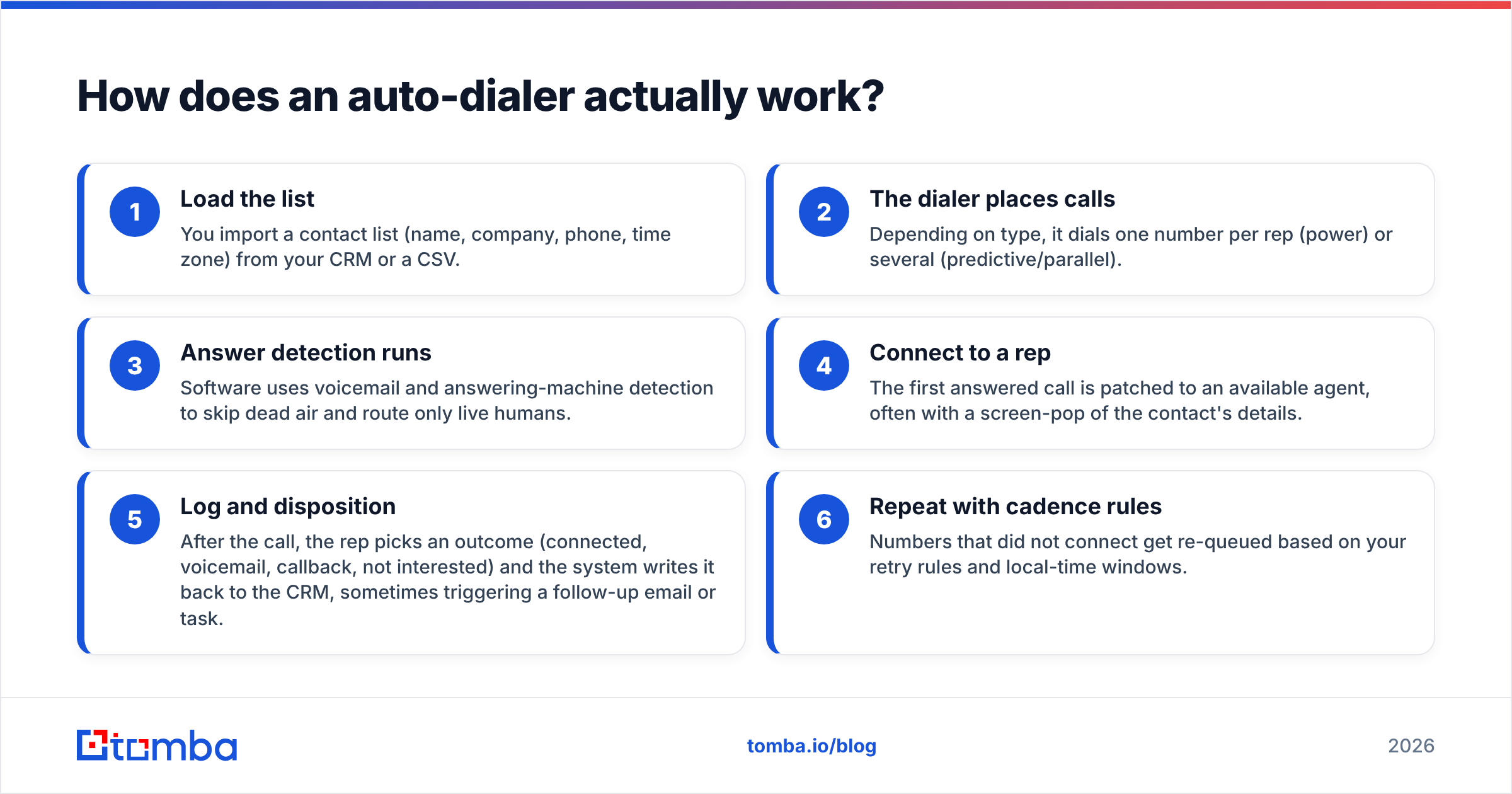
Here is the core loop, the way a sales floor experiences it:
- Load the list — You import a contact list (name, company, phone, time zone) from your CRM or a CSV.
- The dialer places calls — Depending on type, it dials one number per rep (power) or several (predictive/parallel).
- Answer detection runs — Software uses voicemail and answering-machine detection to skip dead air and route only live humans.
- Connect to a rep — The first answered call is patched to an available agent, often with a screen-pop of the contact's details.
- Log and disposition — After the call, the rep picks an outcome (connected, voicemail, callback, not interested) and the system writes it back to the CRM, sometimes triggering a follow-up email or task.
- Repeat with cadence rules — Numbers that did not connect get re-queued based on your retry rules and local-time windows.
The magic and the danger both live in step 2. Dialing ahead of your reps is how you push talk time from 12 minutes an hour to 40 — and also how you accidentally abandon calls when too many people answer at once.
)
Which dialer type should you choose?#
Pick the dialer to match your list quality and headcount, not the flashiest demo. Here is the practical breakdown:
- Click-to-call — Best for low volume, high-value outreach (enterprise AEs, founders). Zero abandonment risk, full control, but minimal speed gain.
- Power dialer — Best for SMB SDR teams running clean lists. One line per rep means no dropped calls and predictable pacing. The safest default for most outbound teams.
- Predictive dialer — Best for large call centers (8+ agents) with big lists where occupancy is the priority. Powerful, but needs volume to predict accurately and carries the most compliance weight.
- Parallel dialer — Best for solo reps and small teams who want power-dialer safety with more speed; rings 3-5 lines and drops the rest the instant a human answers.
- AI / voice-agent dialer — Emerging in 2026: an AI voice qualifies or books before handing to a human. Useful for triage, still legally murky for cold outreach in many states.
If you only take one thing from this section: predictive dialing is a volume tool, and volume without data hygiene is just a faster way to get blocked.
What are the best automated cold calling tools in 2026?#
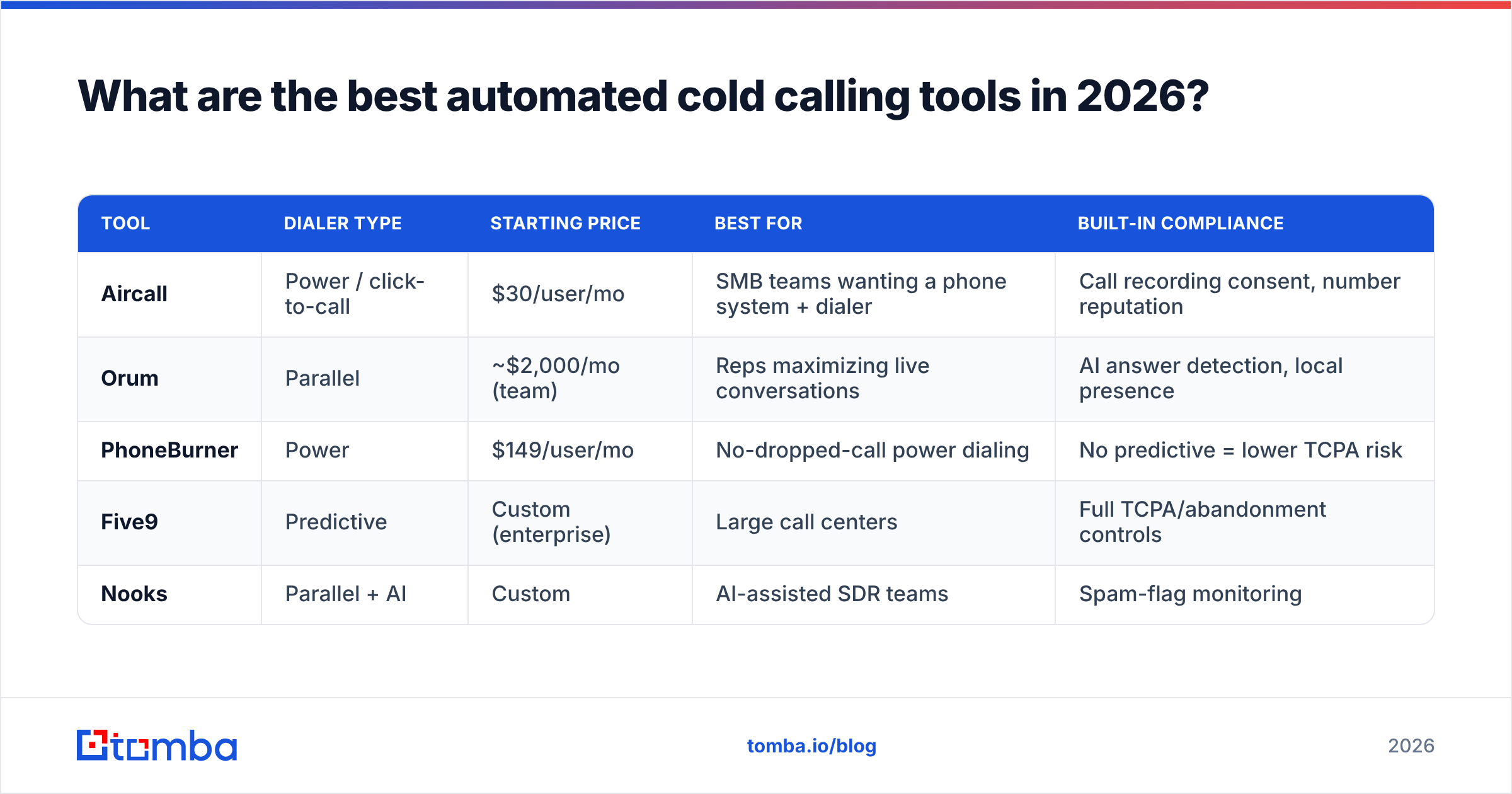
The market splits into dedicated dialers and sales-engagement suites with dialing built in. Below is a side-by-side of representative options so you can see the trade-offs. Prices are entry-level published rates and shift often — always confirm on the vendor's own page.
| Tool | Dialer type | Starting price | Best for | Built-in compliance |
|---|---|---|---|---|
| Aircall | Power / click-to-call | $30/user/mo | SMB teams wanting a phone system + dialer | Call recording consent, number reputation |
| Orum | Parallel | ~$2,000/mo (team) | Reps maximizing live conversations | AI answer detection, local presence |
| PhoneBurner | Power | $149/user/mo | No-dropped-call power dialing | No predictive = lower TCPA risk |
| Five9 | Predictive | Custom (enterprise) | Large call centers | Full TCPA/abandonment controls |
| Nooks | Parallel + AI | Custom | AI-assisted SDR teams | Spam-flag monitoring |
Notice none of these find the numbers you dial — they assume you arrive with a list. That is the gap most buyers underestimate. A great dialer fed a bad list produces great-looking activity metrics and terrible pipeline. You can compare full feature depth on a review marketplace like G2 before committing to a contract.
Is automated cold calling still worth it in 2026?#
Yes — if you treat the dialer as one stage in a system rather than a silver bullet. The economics are simple: a manual rep makes roughly 40-60 dials a day; an automated setup pushes that to 200+, and parallel dialers higher still. Even with falling connect rates, more conversations at the top of the funnel usually wins, provided your data and compliance hold up.
But two forces are squeezing pure-volume calling. First, carrier analytics (the systems behind "Spam Likely" labels) now score your numbers in near real time, so a sloppy predictive setup poisons your own caller ID within days. Second, buyers screen unknown numbers harder than ever, which is why pairing calls with a warm channel matters.
The teams winning with phones in 2026 do three things: they verify numbers before dialing, they rotate caller IDs responsibly with legitimate local presence, and they sequence calls alongside email and LinkedIn instead of calling in a vacuum. If you want the multichannel context, our breakdown of LinkedIn outreach pairs naturally with a calling motion.
)
What about TCPA and compliance?#
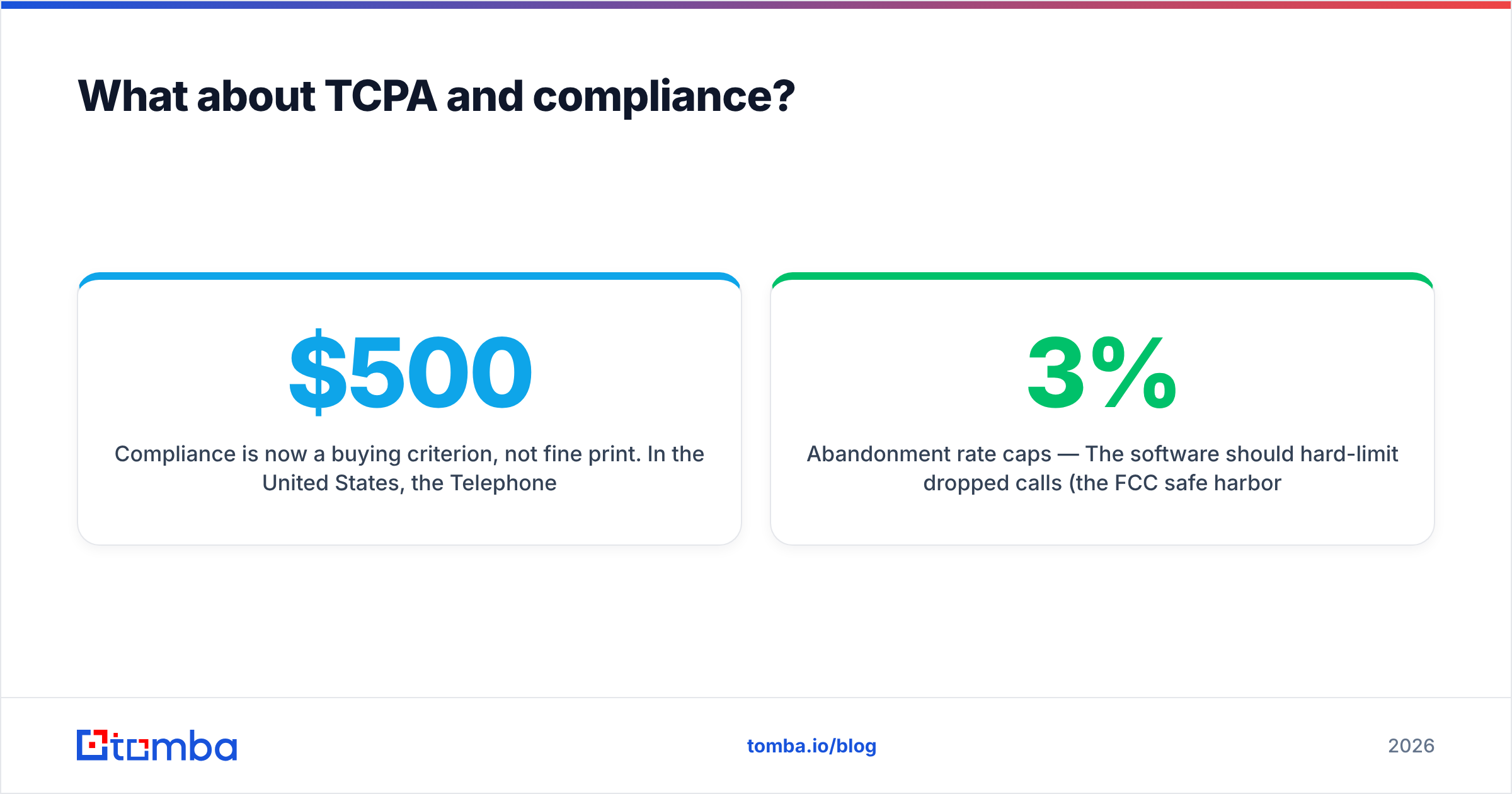
Compliance is now a buying criterion, not fine print. In the United States, the Telephone Consumer Protection Act (TCPA) governs automated dialing, and penalties run $500 to $1,500 per call. Predictive dialers face the most scrutiny because abandoned calls (where no agent is available when someone answers) are explicitly regulated. STIR/SHAKEN caller-ID authentication is mandatory for carriers, and several states have layered on their own consent and calling-window rules.
Practical guardrails to demand from any vendor:
- Abandonment rate caps — The software should hard-limit dropped calls (the FCC safe harbor is 3% over 30 days).
- DNC scrubbing — Automatic checks against the National Do Not Call Registry and your internal suppression list.
- Consent and recording logs — Timestamped records of consent and one-/two-party recording compliance by state.
- Local presence done right — Displaying a local area code is fine; spoofing a number you do not control is not. Confirm how the vendor sources its numbers.
- Calling-window enforcement — Time-zone aware dialing that blocks before 8 a.m. and after 9 p.m. local.
The single fastest way to create a compliance problem is dialing wrong or recycled numbers, which leads directly into the part most buyers skip.
For a deeper read on the rules themselves, the official FCC TCPA resource is the authoritative source, and most enterprise vendors like Five9 publish their own compliance documentation.
Why does phone data quality decide everything?#
Because your dialer can only be as good as the numbers you feed it — and bad numbers cost you twice. Disconnected or wrong numbers waste dial attempts and, worse, when a predictive dialer hammers dead lines, carriers read the pattern as spam behavior and flag your caller ID. You pay in both wasted reps' time and a poisoned sender reputation.
Industry data consistently shows B2B phone data decays fast as people change roles and companies. That means a list you bought six months ago is already meaningfully wrong. The fix is a hygiene step before the dialer: enrich contacts with current direct-dial numbers, validate that each line is active, and drop the rest.
This is where a data layer pays for itself. Tools like the phone finder surface current B2B phone numbers tied to a verified contact, a phone validator confirms the line is live and identifies line type before you spend a dial on it, and data enrichment keeps the rest of the record (title, company, email) fresh for multichannel follow-up. Run your list through validation, and your connect rate and your caller-ID health both improve at once.
| Without data hygiene | With verified data |
|---|---|
| 25-30% of dials hit dead numbers | Dead numbers filtered pre-dial |
| Caller ID flagged "Spam Likely" in days | Reputation preserved, lines rotated cleanly |
| Reps waste talk time on wrong contacts | More live, on-target conversations |
| Higher abandonment / TCPA exposure | Cleaner pacing, lower legal risk |
A modest investment in Tomba pricing tiers for verification typically pays back faster than upgrading to a more aggressive dialer, because it raises the yield of every dial you already make.
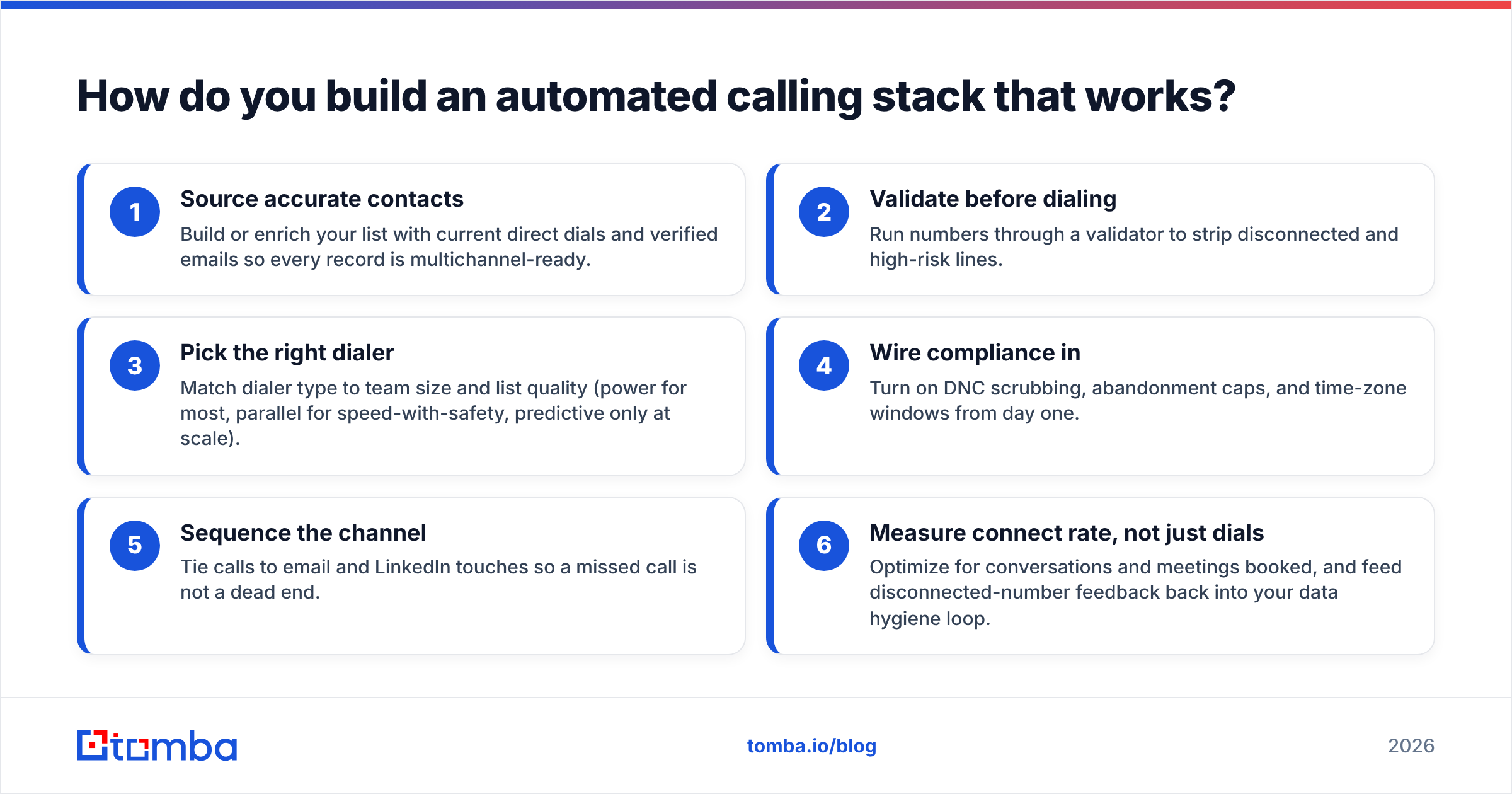
How do you build an automated calling stack that works?#
Layer the system in this order, and each piece amplifies the next:
- Source accurate contacts — Build or enrich your list with current direct dials and verified emails so every record is multichannel-ready.
- Validate before dialing — Run numbers through a validator to strip disconnected and high-risk lines.
- Pick the right dialer — Match dialer type to team size and list quality (power for most, parallel for speed-with-safety, predictive only at scale).
- Wire compliance in — Turn on DNC scrubbing, abandonment caps, and time-zone windows from day one.
- Sequence the channel — Tie calls to email and LinkedIn touches so a missed call is not a dead end.
- Measure connect rate, not just dials — Optimize for conversations and meetings booked, and feed disconnected-number feedback back into your data hygiene loop.
Done in that order, the dialer stops being a vanity-metrics machine and becomes a genuine pipeline engine.
Frequently asked questions#
Is automated cold calling legal? Yes, when done within TCPA, STIR/SHAKEN, DNC, and state rules. Predictive dialing to consumer cell phones carries the most risk; B2B direct dials with proper scrubbing and calling windows are far safer. Always confirm your specific use case with counsel.
Will an auto-dialer get my number marked as spam? It can, if you dial dead numbers, over-dial, or spoof caller IDs. Clean data, responsible caller-ID rotation, and reputation monitoring prevent most flagging.
Power dialer vs. predictive dialer — which is safer? Power dialers call one line per rep, so there is no abandonment risk, making them the safer default. Predictive dialers are more efficient at scale but require strict abandonment controls.
Do I still need email and LinkedIn if I have a dialer? Yes. Connect rates on cold calls are low enough that a phone-only motion leaves pipeline on the table. Sequencing channels lifts overall reply and meeting rates.
The bottom line#
Automated cold calling software is one of the highest-leverage tools an outbound team can buy — but only when it sits on top of clean, verified data and real compliance controls. Buy the dialer that matches your team and list, not the one with the biggest dials-per-hour number on the slide.
Before you spend on a faster dialer, fix the input. Use the Tomba phone finder to source current B2B direct dials, validate them so your reps only ring live lines, and enrich the rest of each record for true multichannel follow-up. Start free with 25 searches a month, and feed your dialer the data that actually connects — that single change usually moves connect rates more than any software upgrade you could make.
// get started
Find, verify and enrich your first contacts today
Start on the free plan with 25 searches a month, then scale when your team is ready.
Free plan · No credit card required · GDPR & CCPA
// about the author