Automated Email Templates in 2026: The Complete Guide
Automated email templates turn one-off copy into a repeatable system. Here's how dynamic fields, triggers, and personalization tokens cut send time and lift reply rates in 2026.
TL;DR
- Automated email templates are reusable message skeletons with dynamic fields (name, company, role) and trigger logic that fire without manual editing — they are not the same as the static "saved replies" most teams settle for.
- The payoff is consistency plus speed: you write once, personalize at scale, and stop retyping the same 200 words 40 times a day.
- The risk is the "Hi {{first_name}}" disaster — broken tokens, generic copy, and blast-everyone logic that tanks deliverability.
- A good stack pairs templates with clean data: accurate contact fields in, accurate merge fields out. Garbage data turns automation into automated embarrassment.
- Below: how they work, a tool comparison table, a build checklist, real examples, and the data layer that makes any of it work.
What are automated email templates?#
Automated email templates are pre-written message structures that fill themselves in and send themselves based on rules you set once. Think of them like a coffee machine with programmable presets: you load the beans and water (your copy and data), pick a setting (the trigger), and it produces a consistent cup every time without you grinding by hand.
A static template is just text you copy and paste. An automated template adds three layers on top:
- Dynamic fields (merge tags) — placeholders like
{{first_name}},{{company}}, or{{recent_funding}}that pull live values from your CRM or list. - Conditional logic — "if the lead is in SaaS, use opener A; if e-commerce, use opener B."
- Triggers — events that send the email automatically: a form submit, a demo no-show, a 7-day silence, a website visit.
The difference matters. Copy-paste templates save typing. Automated templates remove the human from the send loop entirely, which is what lets a two-person team run the outreach volume of a ten-person team — if the underlying data is clean.

Why do automated email templates matter in 2026?#
Because manual personalization does not scale and pure automation without personalization gets you blocked. Automated templates are the middle path.
Here is the concrete case for them, with the trade-offs each one carries:
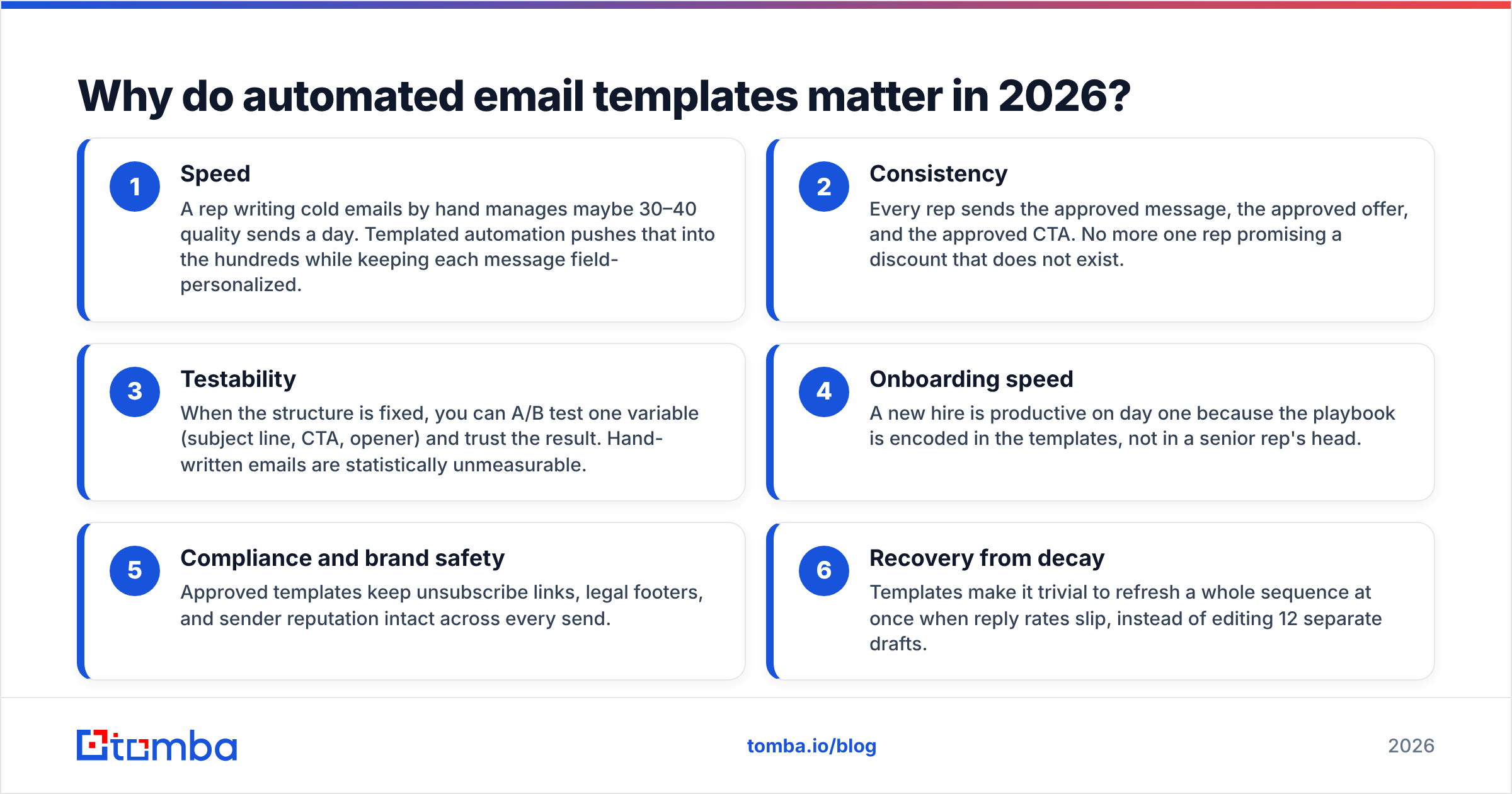
- Speed — A rep writing cold emails by hand manages maybe 30–40 quality sends a day. Templated automation pushes that into the hundreds while keeping each message field-personalized.
- Consistency — Every rep sends the approved message, the approved offer, and the approved CTA. No more one rep promising a discount that does not exist.
- Testability — When the structure is fixed, you can A/B test one variable (subject line, CTA, opener) and trust the result. Hand-written emails are statistically unmeasurable.
- Onboarding speed — A new hire is productive on day one because the playbook is encoded in the templates, not in a senior rep's head.
- Compliance and brand safety — Approved templates keep unsubscribe links, legal footers, and sender reputation intact across every send.
- Recovery from decay — Templates make it trivial to refresh a whole sequence at once when reply rates slip, instead of editing 12 separate drafts.
The catch baked into all six: automation multiplies whatever you feed it. A great template on a dirty list sends great emails to the wrong people. The data layer is not optional.
How do automated email templates actually work?#
Four moving parts have to line up. Miss one and the whole thing reads as spam.
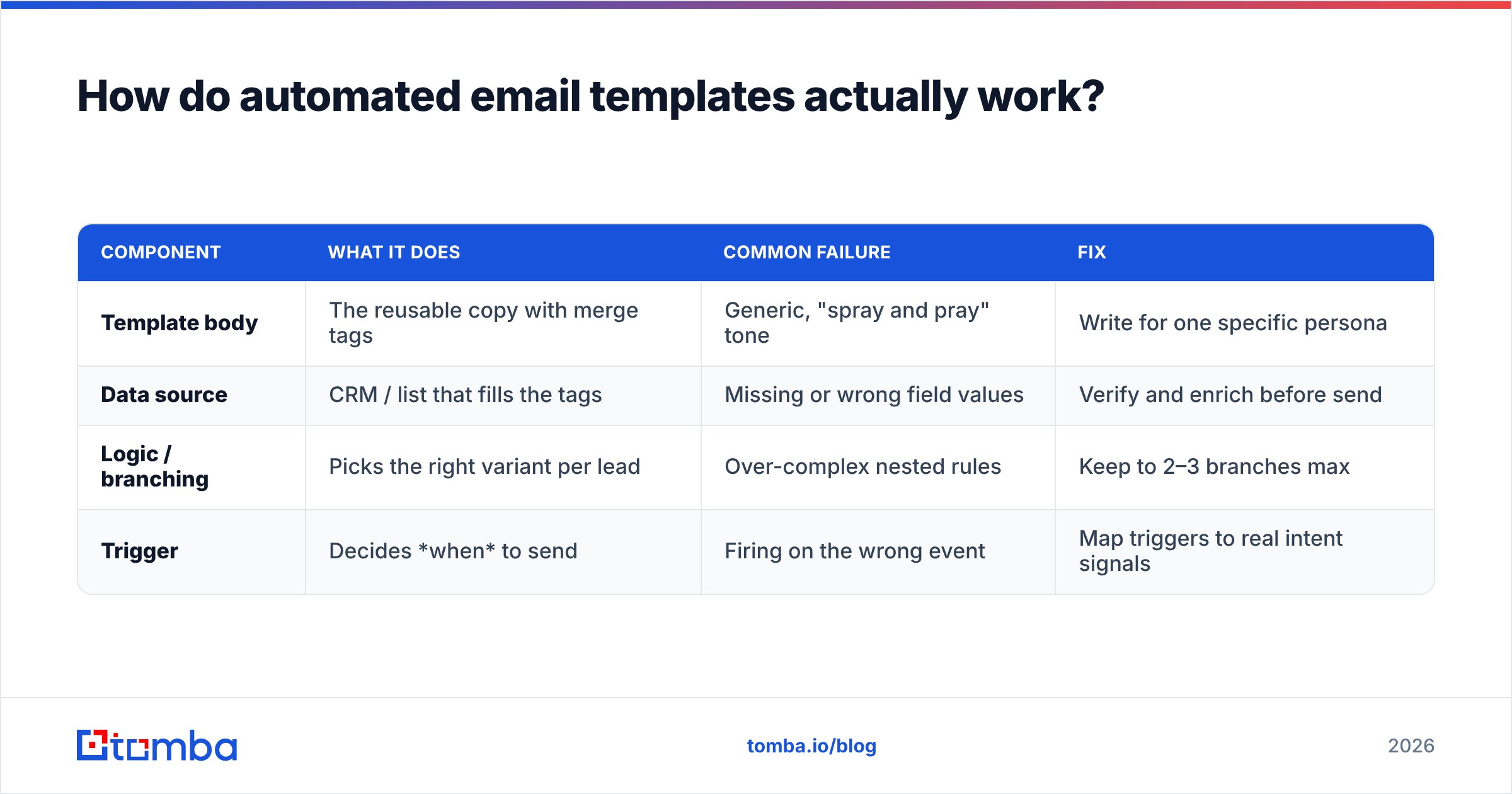
| Component | What it does | Common failure | Fix |
|---|---|---|---|
| Template body | The reusable copy with merge tags | Generic, "spray and pray" tone | Write for one specific persona |
| Data source | CRM / list that fills the tags | Missing or wrong field values | Verify and enrich before send |
| Logic / branching | Picks the right variant per lead | Over-complex nested rules | Keep to 2–3 branches max |
| Trigger | Decides when to send | Firing on the wrong event | Map triggers to real intent signals |
The flow looks like this: a trigger fires (lead downloads a guide) → the system pulls that lead's record → conditional logic selects the matching template → merge tags resolve against the record's fields → the email sends. If the record is missing a company value, you get "I loved what you're doing at ." That single empty field signals "this is automated junk" louder than anything in your copy.
This is why the most overlooked step in template automation is field hygiene. Tools like data enrichment exist specifically to fill the gaps — title, company, location, LinkedIn — so your merge tags never resolve to blanks. You can also pre-flight a list with an email verifier so automated sends don't hit dead addresses and drag your domain reputation down.
Which tools handle automated email templates best?#
The market splits into three buckets: CRM-native template engines, dedicated cold-outreach platforms, and lightweight standalone template tools. Each fits a different job.
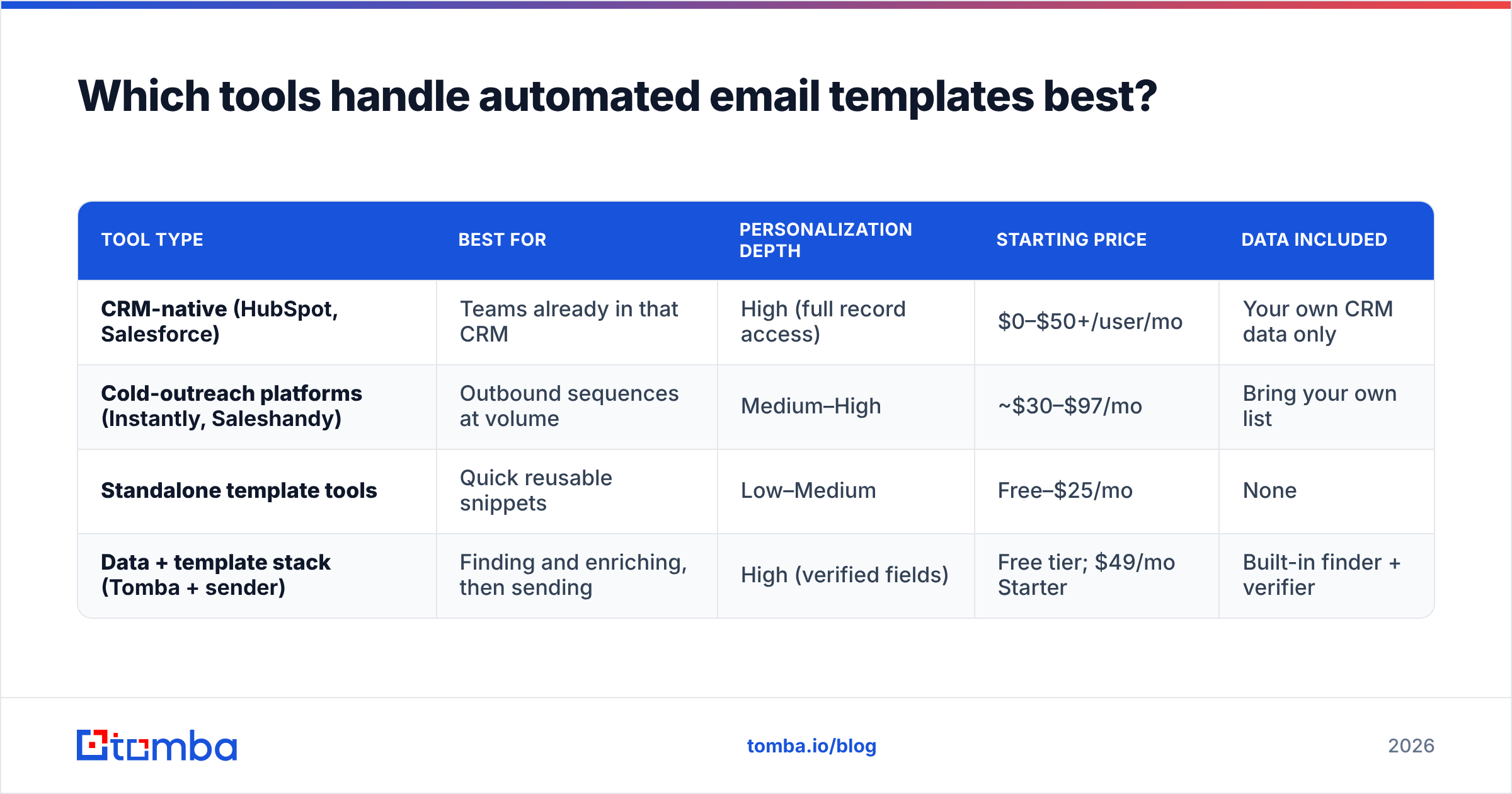
| Tool type | Best for | Personalization depth | Starting price | Data included |
|---|---|---|---|---|
| CRM-native (HubSpot, Salesforce) | Teams already in that CRM | High (full record access) | $0–$50+/user/mo | Your own CRM data only |
| Cold-outreach platforms (Instantly, Saleshandy) | Outbound sequences at volume | Medium–High | ~$30–$97/mo | Bring your own list |
| Standalone template tools | Quick reusable snippets | Low–Medium | Free–$25/mo | None |
| Data + template stack (Tomba + sender) | Finding and enriching, then sending | High (verified fields) | Free tier; $49/mo Starter | Built-in finder + verifier |
A few honest notes:
- HubSpot and Salesforce give you the deepest merge-field access because the data already lives there. The trade-off is that they only know what your CRM knows — they don't find new contacts.
- Cold-outreach platforms are built for sequences and inbox rotation, but they assume you arrive with a clean, verified list. They are senders, not data sources.
- Standalone snippet tools are fine for support replies and personal email, weak for real campaigns.
- The data-first approach solves the part everyone skips: getting accurate contact fields into the template in the first place. You can browse independent reviews on G2 to compare how each category actually performs in production.
If you want to wire a template engine to a finder, Tomba's [
Zapier integration](https://tomba.io/integrations/zapier) and HubSpot integration push verified contacts straight into your sending tool's merge fields.

What does a good automated email template look like?#
Short, specific, one CTA, and built so that a broken merge tag still reads like a human wrote it. Here are two patterns that survive automation.
Cold outreach (intent-triggered):
Subject: quick idea for {{company}}'s {{department}} team
Hi {{first_name}},
Saw {{company}} is hiring SDRs — usually a sign the outbound motion is scaling faster than the data behind it.
We help teams like yours keep contact data accurate so reps aren't emailing dead addresses. Worth a 10-minute look?
— {{sender_name}}
Follow-up (no-reply trigger, day 4):
Subject: re: quick idea for {{company}}
Hi {{first_name}}, floating this back up. If now's not the moment, just reply "later" and I'll circle back next quarter. No hard feelings.
Notice the design choices:
- Fallback-safe tags.
{{company}}failing still leaves a readable sentence. Avoid tags mid-sentence where a blank breaks grammar. - One variable per test. Change only the subject across a batch and you learn something real about your subject line.
- A graceful exit. "Reply 'later'" lifts reply rates and protects your domain because non-interested leads opt out softly instead of marking spam.
You can pull more ready-made structures from Tomba's free cold email templates library, or draft variants fast with the cold email AI writer and then lock the winner as your automated template.
How do you set up automated email templates without getting flagged?#
Follow a build order. Most deliverability disasters come from automating before the foundation is in place.
- Authenticate the domain first. Set SPF, DKIM, and DMARC before a single automated send. Skip this and even perfect copy lands in spam. Check your SPF record with a free SPF checker before you start.
- Verify the list. Run every address through an email verifier so automation doesn't fire at invalid mailboxes. Bounce rate above ~3% is a reputation killer.
- Enrich the gaps. Empty merge fields are the tell of automation. Fill
title,company, andindustryso every tag resolves. - Write fallback-safe copy. Every merge tag needs a default value or a sentence that survives a blank.
- Cap volume and warm up. Ramp sends gradually on a new domain. Automated templates make it easy to blast — resist it.
- Test one variable, then scale. Send a small batch, read the metrics, then roll the winner out wide.
This is the part where the template world and the email deliverability world collide. The template can be flawless, but if the address is dead or the domain is unauthenticated, automation just helps you fail faster. Clean inputs are non-negotiable.
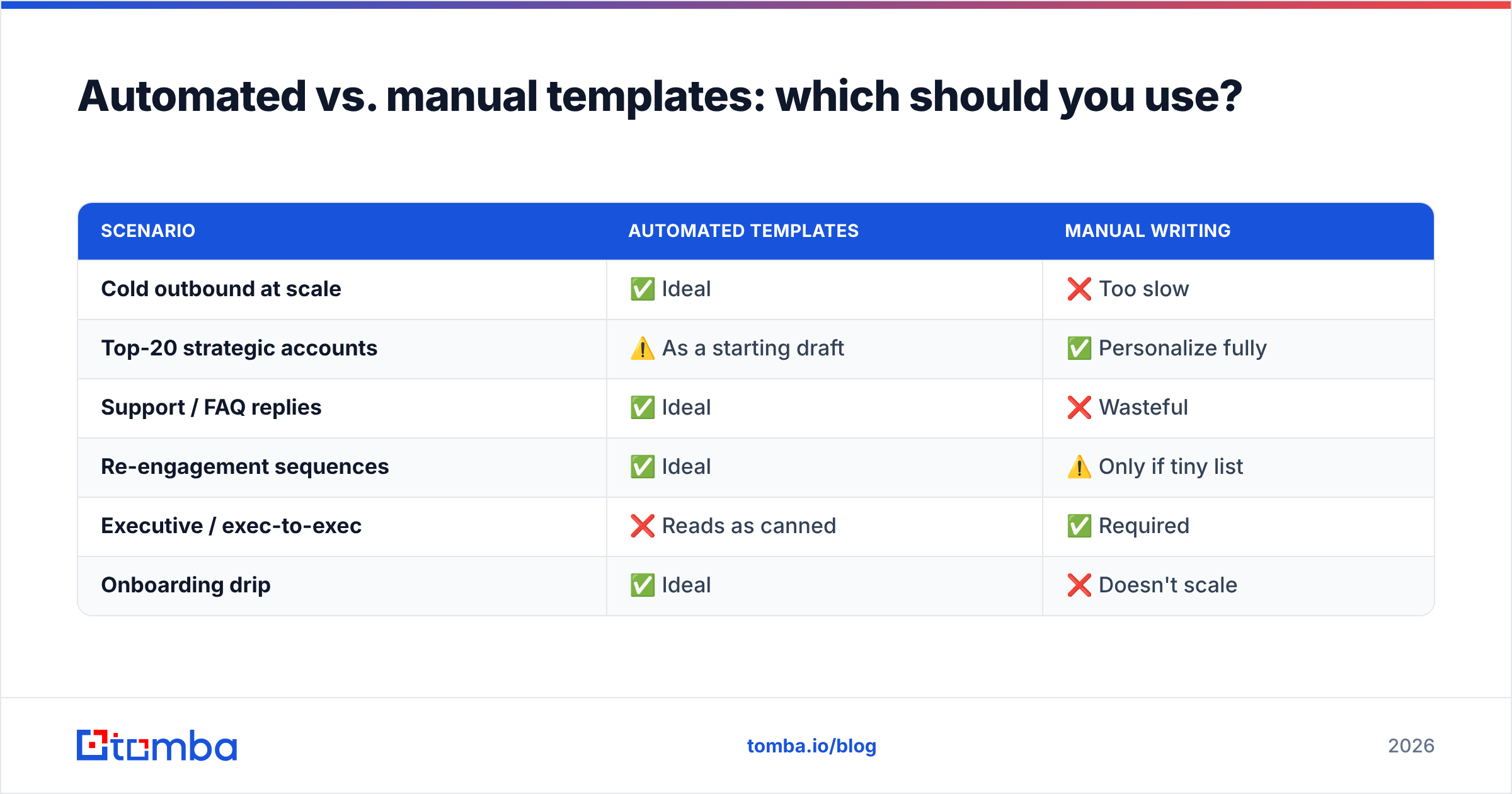
Automated vs. manual templates: which should you use?#
Use automated templates for repeatable, high-volume, structured outreach. Use manual writing for high-value, low-volume, relationship-driven email. Most teams need both.
| Scenario | Automated templates | Manual writing |
|---|---|---|
| Cold outbound at scale | ✅ Ideal | ❌ Too slow |
| Top-20 strategic accounts | ⚠️ As a starting draft | ✅ Personalize fully |
| Support / FAQ replies | ✅ Ideal | ❌ Wasteful |
| Re-engagement sequences | ✅ Ideal | ⚠️ Only if tiny list |
| Executive / exec-to-exec | ❌ Reads as canned | ✅ Required |
| Onboarding drip | ✅ Ideal | ❌ Doesn't scale |
The rule of thumb: the higher the deal value and the smaller the audience, the more you lean manual. The higher the volume and the more repeatable the message, the more you lean automated. The mistake is using automation for a CEO-to-CEO intro, or hand-writing 500 onboarding emails. Match the tool to the stakes.
What metrics tell you your templates are working?#
Watch four numbers, in order, because each one diagnoses a different stage:
- Bounce rate (target under ~2–3%) — measures data quality. High bounces mean your list, not your copy, is the problem.
- Open rate — measures subject line and sender reputation. Low opens point at the subject or the domain.
- Reply rate (the number that pays the bills) — measures relevance and copy. This is where template quality shows.
- Unsubscribe / spam rate — measures targeting. A spike means you're automating to the wrong people.
If bounce rate is high, no amount of template editing helps — fix the data first with verification and enrichment. If opens are fine but replies are flat, the template copy is the lever. Reading the funnel in order stops you from rewriting copy when the real problem is a dirty list. Track response rate per template variant so you always know which skeleton to keep and which to retire.
Common automated email template mistakes#
- The empty-tag tell. "Hi ," instantly brands you as a bot. Always set fallback values.
- Over-branching logic. Five nested conditions are unmaintainable. Cap variants at two or three.
- Automating before authenticating. SPF/DKIM/DMARC come first, every time.
- One template for everyone. A message written for "all B2B leads" speaks to no one. Segment by persona.
- Set-and-forget. Templates decay. Refresh copy and re-verify lists every quarter.
- Ignoring the data layer. The single biggest mistake — assuming the list is clean. It rarely is.
Closing: get the data layer right first#
Automated email templates are only as good as the contact data flowing into them. The template is the easy part — clean, verified, enriched fields are what separate "personalized at scale" from "automated spam." Start there.
Tomba's Email Finder gives you accurate, verified professional email addresses to feed your templates, so every merge tag resolves to a real value and every automated send reaches a real inbox. Pair it with the built-in email verifier and data enrichment to keep bounce rates low and personalization tight. Start free with 25 searches a month, and scale up on the Starter plan at $49/mo when your template engine is humming. Build the clean list first — then let your automated templates do the heavy lifting.
Ready to find emails that actually work?
Join 150,000+ professionals who stopped guessing and started sending. Free credits on signup — no credit card required.
Get the Tomba newsletter
Practical outbound tactics and product updates — once every two weeks.
About the author