Automated Email Tools: Build a 2026 Sales Stack That Scales
A practical 2026 guide to automated email tools — what to automate, what to keep human, and how to wire finding, verifying, warmup, and sending into one stack that actually books meetings.
You can automate almost every step of cold outreach now — but automating the wrong steps is how you torch a domain and waste a quarter. This guide breaks down which automated email tools earn their keep in 2026, which tasks should stay human, and how the pieces fit into one stack.
TL;DR#
- Automate the mechanical work: finding addresses, verifying them, warming the inbox, scheduling sends, and logging replies to your CRM.
- Keep humans on judgment: targeting, the first-line of every email, and reply handling once a prospect engages.
- Data quality beats send volume. A verified list run through a real email verifier outperforms a bigger, dirtier list every time.
- The stack has four layers: discovery, verification, deliverability/warmup, and sending/sequencing. Most teams over-invest in sending and under-invest in the first two.
- Tomba covers the data layer — find emails, verify them, and enrich contacts — then hands clean records to your sequencer.
What are automated email tools?#
Automated email tools are software that removes manual steps from outbound email: finding a prospect's address, checking it's deliverable, warming your sending domain, sending at scale on a schedule, following up automatically, and syncing the results back to your CRM.
Think of it like a factory line. Raw material (a list of target companies) goes in one end, passes through stations that each do one job well, and finished product (booked meetings) comes out the other. Automation is the conveyor belt between stations — not a robot that replaces the whole factory. The strategy, the targeting, and the message still come from you.
The mistake most teams make is buying one "all-in-one" platform and assuming it does every station well. In practice, the tools that win each layer are usually specialists, connected by integrations.
What are the four layers of an automated email stack?#
Every reliable outbound system breaks into four layers. Get these in order — discovery and verification first, sending last — and your numbers hold up.
- Discovery — finding the right person and their email. Tools: an email finder, domain search for company-wide lookups, and a LinkedIn finder for profile-based prospecting.
- Verification — confirming the address is real and won't bounce. Tools: an email verifier and a catch-all verifier for tricky domains.
- Deliverability & warmup — building sender reputation so your mail lands in the inbox, not spam. Tools: warmup services, SPF/DKIM/DMARC checkers, blacklist monitors.
- Sending & sequencing — scheduling, personalizing at scale, following up, and logging replies. Tools: sequencers like Instantly, Smartlead, Apollo, or Salesloft.
A weak link in layer 1 or 2 makes layers 3 and 4 irrelevant. You can have perfect warmup and a beautiful sequence, but if 30% of your list bounces, your reputation collapses inside a week.
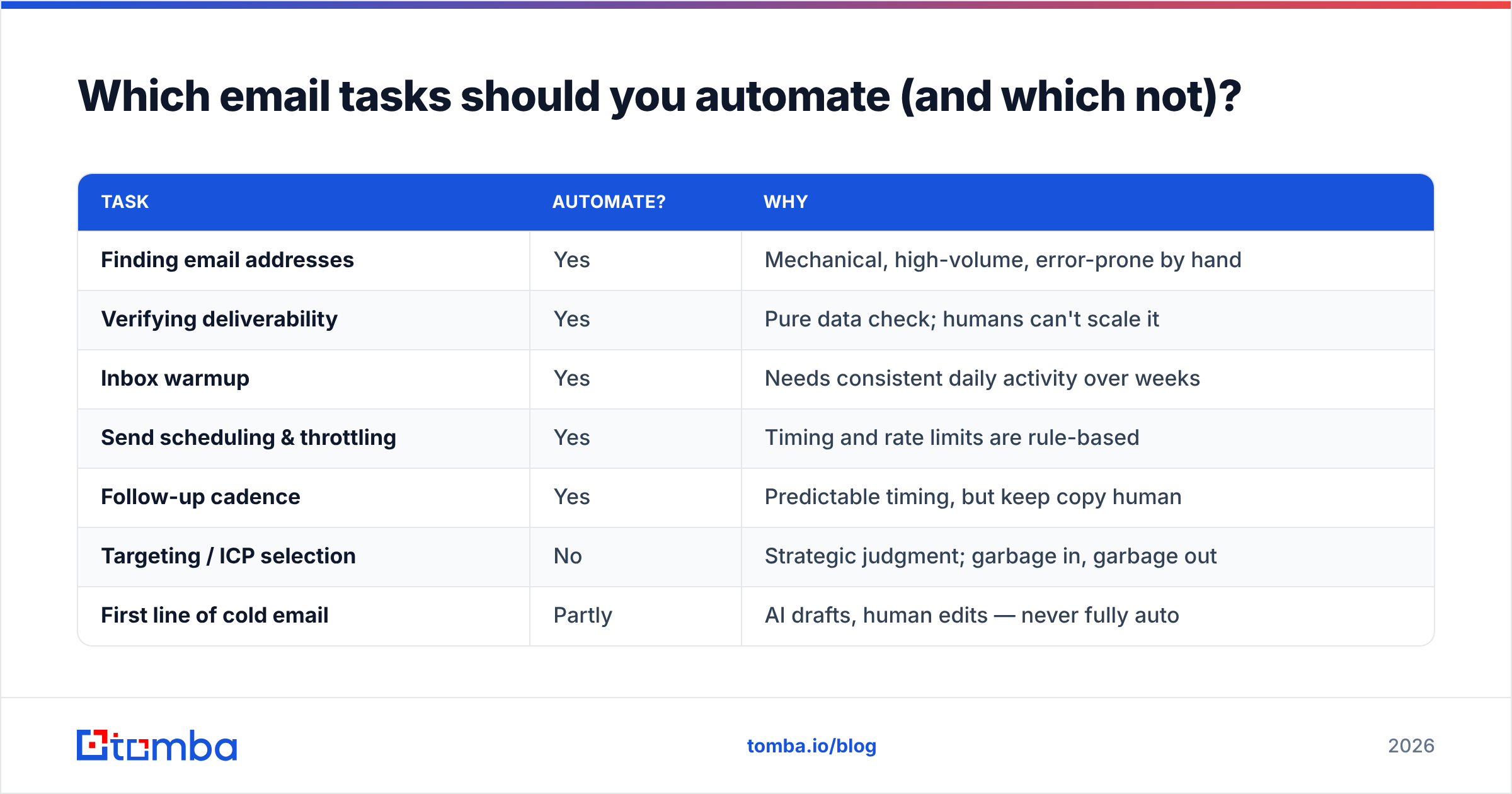
Which email tasks should you automate (and which not)?#
Automation is leverage, not autopilot. Here's the honest split.
| Task | Automate? | Why |
|---|---|---|
| Finding email addresses | Yes | Mechanical, high-volume, error-prone by hand |
| Verifying deliverability | Yes | Pure data check; humans can't scale it |
| Inbox warmup | Yes | Needs consistent daily activity over weeks |
| Send scheduling & throttling | Yes | Timing and rate limits are rule-based |
| Follow-up cadence | Yes | Predictable timing, but keep copy human |
| Targeting / ICP selection | No | Strategic judgment; garbage in, garbage out |
| First line of cold email | Partly | AI drafts, human edits — never fully auto |
| Reply handling after engagement | No | Real conversations close deals, not bots |
The pattern: automate anything that is rule-based and repetitive, keep humans on anything that requires judgment or relationship. A prospect can forgive a templated opener. They will not forgive a bot fumbling their reply.
How do the main automated email tools compare in 2026?#
Most teams run a specialist for data and a sequencer for sending. Here's how representative options stack up across the layers. Prices are starting tiers and move constantly, so treat them as ballpark, not gospel.
| Tool | Primary layer | Free tier | Starting price | Best for |
|---|---|---|---|---|
| Tomba | Discovery + verification | 25 searches/mo | $49/mo | Clean, verified data feeding any sequencer |
| Instantly | Sending + warmup | Limited trial | ~$37/mo | High-volume cold email at scale |
| Apollo | All-in-one | 50 credits/mo | ~$49/mo | Teams wanting data + sending in one seat |
| Smartlead | Sending + warmup | No | ~$39/mo | Agencies running many inboxes |
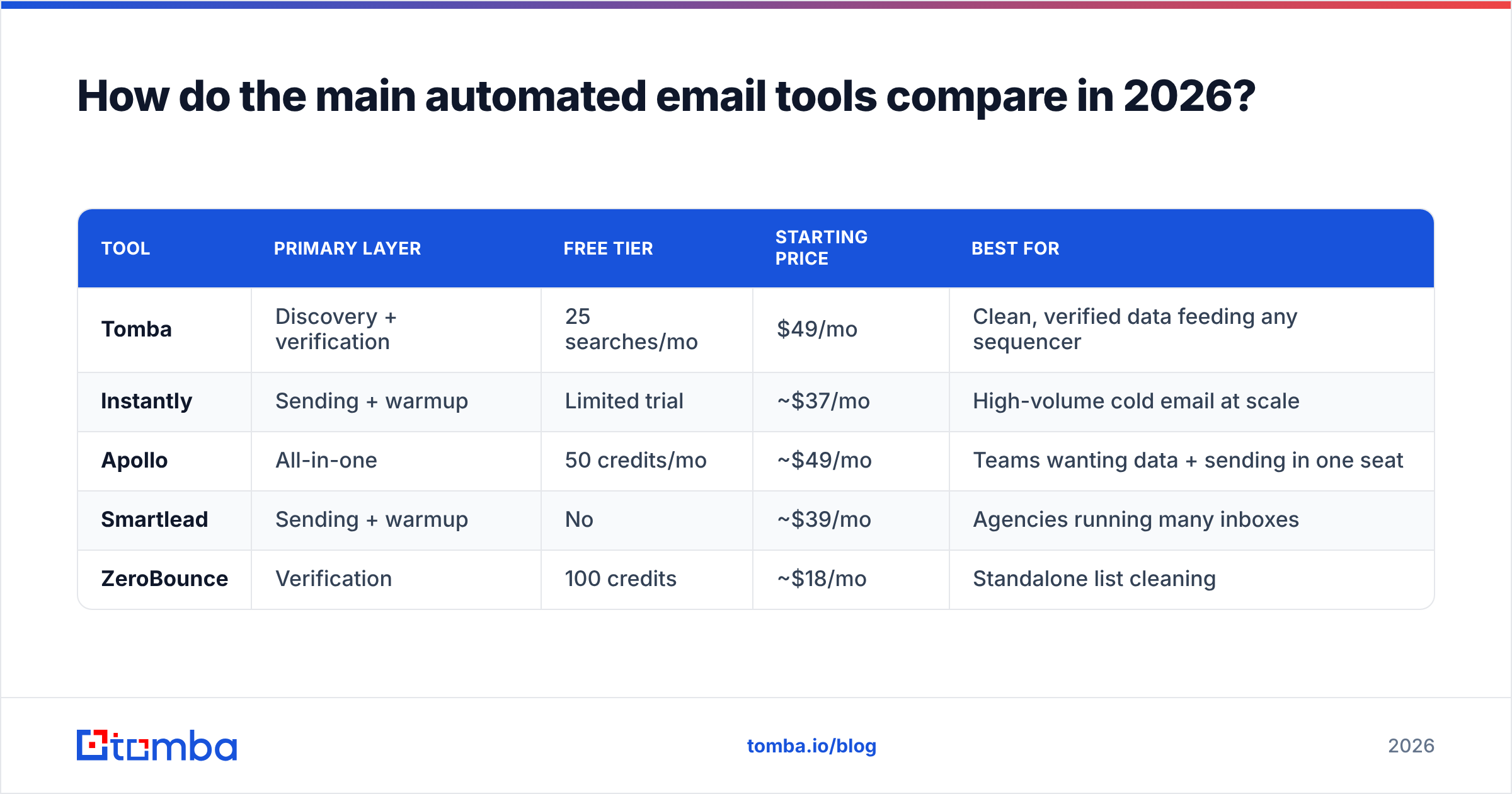
ZeroBounce | Verification | 100 credits | ~$18/mo | Standalone list cleaning |
The takeaway: no single tool dominates all four layers. Apollo bundles everything but trades depth for breadth; its data accuracy varies by region and seniority. Instantly and Smartlead are excellent sequencers with built-in warmup but thin on discovery. Pure verifiers like ZeroBounce do one job. A common high-performing setup is Tomba for discovery + verification → Instantly or Smartlead for sending, connected through the Tomba API or a no-code Zapier integration.
If you want a deeper view of how dedicated finders stack up on accuracy, G2's email finder category is a useful, vendor-neutral starting point.

Why does data quality matter more than send volume?#
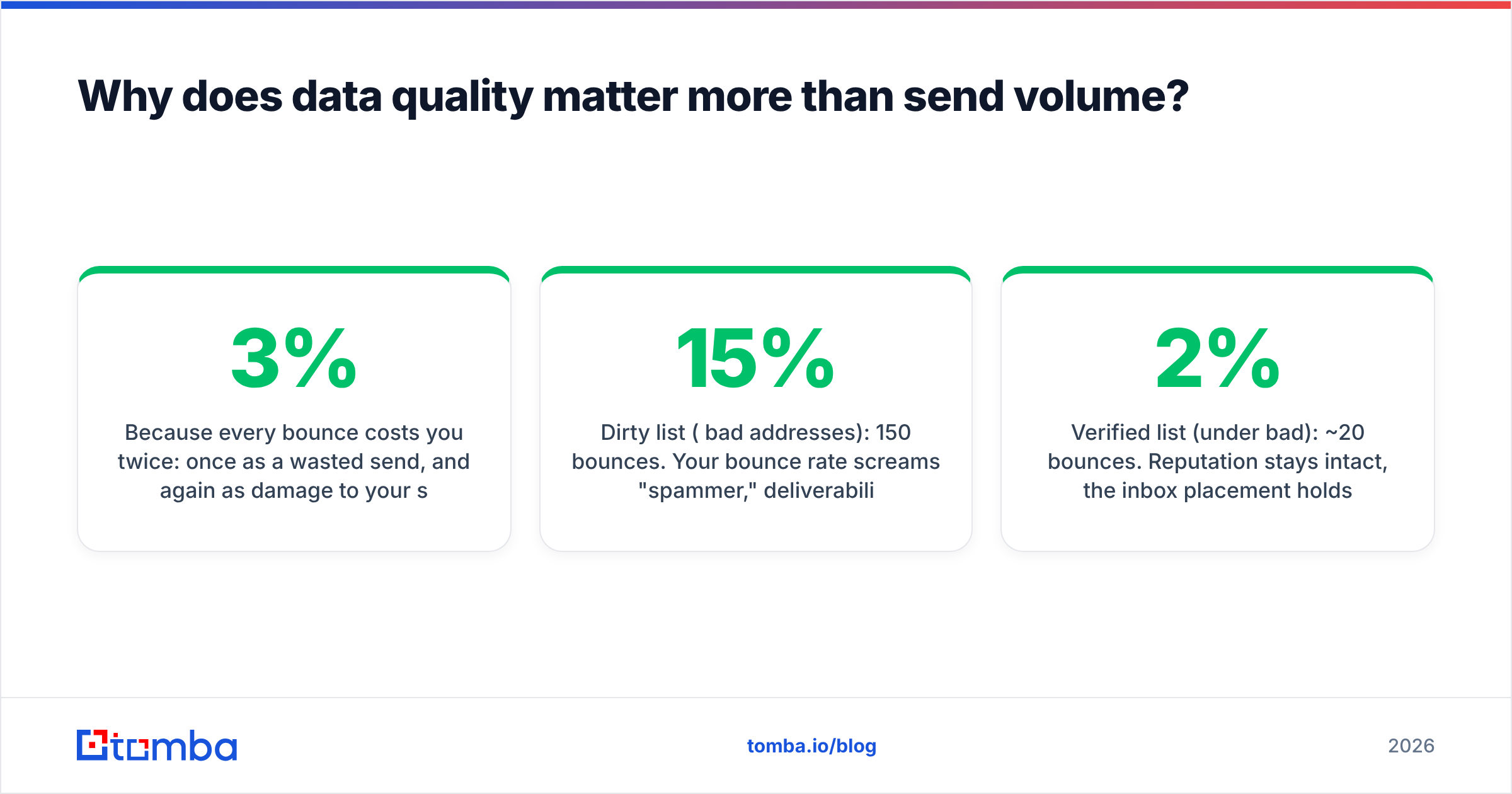
Because every bounce costs you twice: once as a wasted send, and again as damage to your sender reputation. Mailbox providers like Gmail and Outlook watch your bounce rate closely. Cross roughly 2-3% and they start routing your mail to spam — even mail to valid addresses.
Here's the math that surprises people. Say you send 1,000 cold emails:
- Dirty list (15% bad addresses): 150 bounces. Your bounce rate screams "spammer," deliverability tanks, and the 850 good addresses suffer too.
- Verified list (under 2% bad): ~20 bounces. Reputation stays intact, the inbox placement holds, and your reply rate reflects your actual copy — not your data hygiene.
This is why verification is non-negotiable before any send. Run new lists through verification, and for ambiguous domains use a catch-all finder to decide whether to risk the send. If you're scraping at volume, the bulk email finder and bulk verify let you process thousands of records in one pass instead of one address at a time.
For the deliverability side, follow the official guidance directly: Google's bulk sender requirements spell out exactly what authentication and complaint thresholds you need to hit. Pair that with proper SPF records and you've covered the basics most senders skip.
How do you actually wire these tools together?#
The connective tissue is what turns five tools into one system. Three common approaches:
- Native integrations. Push verified contacts straight into your CRM or sequencer. Tomba has direct connectors for HubSpot, Salesforce, and Pipedrive, so enriched records land where reps already work.
- No-code automation. Use Make or Zapier to build flows like: new lead in CRM → find email → verify → if valid, add to sequence. No engineering required.
- API + scripts. For custom pipelines, the email finder API and verification API let you embed discovery and validation directly into your product or internal tooling. Spreadsheet teams can stay in Google Sheets with the add-on.
A practical reference flow:
- Pull target accounts from your CRM or a list.
- Run domain search to find the right contacts per company.
- Verify every address; drop anything that fails.
- Enrich the survivors with data enrichment (title, company size, location) for personalization.
- Push clean, enriched records into your sequencer.
- Sequencer handles warmup-protected sending and follow-ups.
- Replies sync back to the CRM for human handling.
Steps 1-5 are fully automatable. Step 7 is where the human takes over — and where deals are actually won.
What does this cost to run?#
Less than most teams fear, if you buy by layer instead of by hype. A lean, effective 2026 stack:
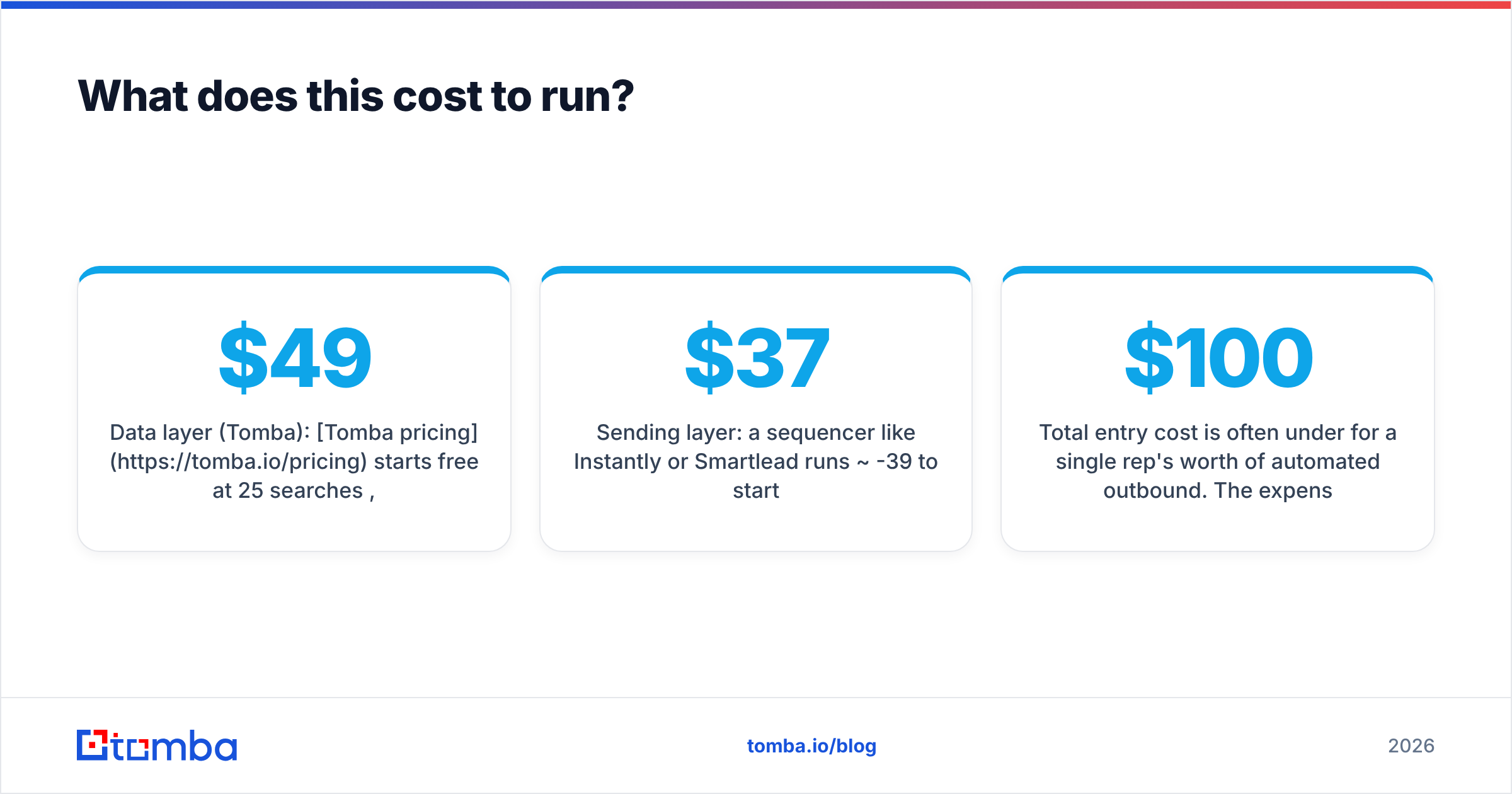
- Data layer (Tomba): Tomba pricing starts free at 25 searches/mo, then $49/mo (Starter), $99/mo (Growth), and $249/mo (Pro). Most early teams live comfortably on Starter or Growth.
- Sending layer: a sequencer like Instantly or Smartlead runs ~$37-39/mo to start.
- Inboxes & domains: budget for a few secondary sending domains and inboxes — this protects your primary domain.
Total entry cost is often under $100/mo for a single rep's worth of automated outbound. The expensive line item isn't the software; it's the wasted sends and burned domains that come from skipping the verification layer. Spend on clean data first.
What are the biggest automation mistakes to avoid?#
- Sending before warming up. A brand-new domain blasting 500 cold emails on day one gets flagged instantly. Warm for 2-4 weeks first.
- Skipping verification to "save credits." The credits you save are dwarfed by the reputation you lose.
- Over-personalizing with bad data. If your enrichment is wrong, "I saw you're the VP of Sales at [wrong company]" is worse than no personalization.
- Automating the reply. The moment a human responds, a human should respond back. Bots in live conversations kill trust.
- One mega-list, one sequence. Segment by ICP and tailor the message. Automation scales segments; it doesn't excuse skipping them.
Frequently asked questions#
Do automated email tools get you marked as spam? Not by themselves. Spam flags come from poor reputation: high bounces, low engagement, missing authentication. Tools that verify addresses and warm your domain actively reduce spam risk. Tools that just blast volume increase it.
Can one tool replace the whole stack? All-in-ones like Apollo come close but trade depth for convenience. For teams where data accuracy directly drives revenue, a specialist data layer plus a dedicated sequencer almost always outperforms a single bundle.
How many emails can I safely send per day? On a warmed domain, start around 20-50 per inbox per day and scale gradually. Use multiple inboxes rather than overloading one. Follow your sequencer's throttling and the mailbox provider's published limits.
Is free email verification reliable? Free tiers and a free email checker are fine for spot checks and small lists. For production outbound at volume, a paid verifier with catch-all handling pays for itself in protected deliverability.
Build the data layer first#
The fastest way to improve outbound results in 2026 isn't a better sequencer — it's a cleaner list feeding it. Start with the Tomba Email Finder to discover the right contacts, verify them before they ever hit your sequence, and enrich them so your personalization is accurate instead of embarrassing. The free tier gives you 25 searches a month to test the flow, and Tomba's plans scale with you from there. Get the data layer right, wire it into the sequencer you already like, and let automation do the mechanical work while your reps do the part that actually closes.
// get started
Find, verify and enrich your first contacts today
Start on the free plan with 25 searches a month, then scale when your team is ready.
Free plan · No credit card required · GDPR & CCPA
// about the author