Automated Email Verification: The Complete 2026 Guide
Manual list cleaning doesn't scale. Here's how automated email verification works in 2026, what to check before you send, and how to wire it into your stack.
TL;DR
- Automated email verification checks every address against syntax, DNS, MX, and live SMTP signals before you send — without a human touching the list.
- It exists to protect one thing: your sender reputation. Bounce rates above 2% drag inbox placement down for every campaign that follows.
- The hard part isn't valid vs. invalid — it's catch-all domains, role accounts, and disposable addresses that need their own logic.
- Real-time API verification (at signup or form submit) plus scheduled bulk re-verification covers most B2B teams.
- Tomba's email verifier and Tomba API handle both flows, including a dedicated catch-all path most tools skip.
What is automated email verification?#
Automated email verification is the process of programmatically confirming that an email address can actually receive mail — running it through a fixed set of checks without manual review. Think of it like a bouncer scanning IDs at the door: every address gets the same checks, in the same order, in milliseconds, whether you're validating one signup or two million records.
A human can eyeball john@gmial.com and catch the typo. A human cannot eyeball 50,000 rows. Automation is what makes verification a default step in your pipeline instead of a quarterly cleanup project you keep postponing.
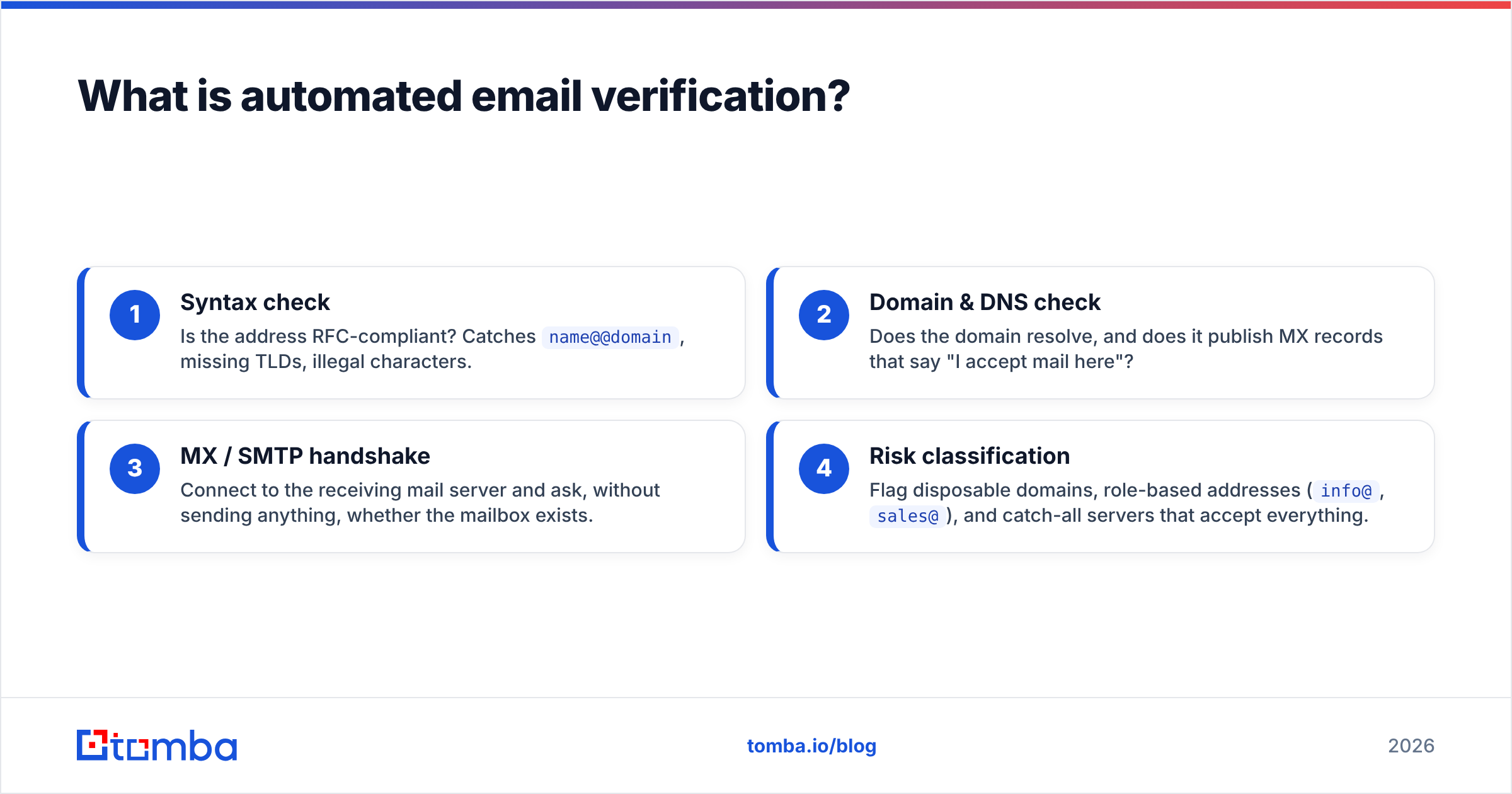
The checks run in a layered sequence, cheapest first:
- Syntax check — Is the address RFC-compliant? Catches
name@@domain, missing TLDs, illegal characters. - Domain & DNS check — Does the domain resolve, and does it publish MX records that say "I accept mail here"?
- MX / SMTP handshake — Connect to the receiving mail server and ask, without sending anything, whether the mailbox exists.
- Risk classification — Flag disposable domains, role-based addresses (
info@,sales@), and catch-all servers that accept everything.
Each layer rejects garbage before you pay for the next, more expensive layer. That ordering is the whole game.
)
Why does automated email verification matter in 2026?#
Because mailbox providers got stricter, and the penalty for a dirty list is now immediate.
In 2024 Google and Yahoo rolled out bulk-sender requirements that set a hard bounce/spam ceiling. By 2026 those thresholds are enforced aggressively: cross a spam complaint rate of 0.3% or let bounces pile up, and your mail starts landing in spam — or gets rejected outright. One bad send poisons the well for the next ten.
Here is the chain reaction a single unverified list triggers:
- Hard bounces spike because dead mailboxes reject on contact.
- Spam traps fire because recycled or pristine traps sit quietly in scraped lists.
- Sender reputation drops at the provider level — see sender reputation for how this is scored.
- Inbox placement collapses for all future campaigns, not just the bad one.
- Deliverability tools flag you, and recovery takes weeks of careful warming.
Automated verification is the cheap insurance against that whole cascade. You're not buying "valid emails" — you're buying a protected reputation and the email deliverability that depends on it.
How does automated email verification actually work?#
It works by talking to the receiving mail server the same way a sending server would — but stopping just short of delivering a message.
When verification hits the SMTP layer, it opens a connection to the domain's mail exchanger, issues the MAILFROM and RCPTTO commands, and reads the server's response code. A 250 means the mailbox is willing to accept mail. A 550 means no such user. The connection closes before any DATA is sent, so nothing lands in anyone's inbox. (If you want the protocol details, the SMTP entry on Wikipedia walks through the command sequence.)
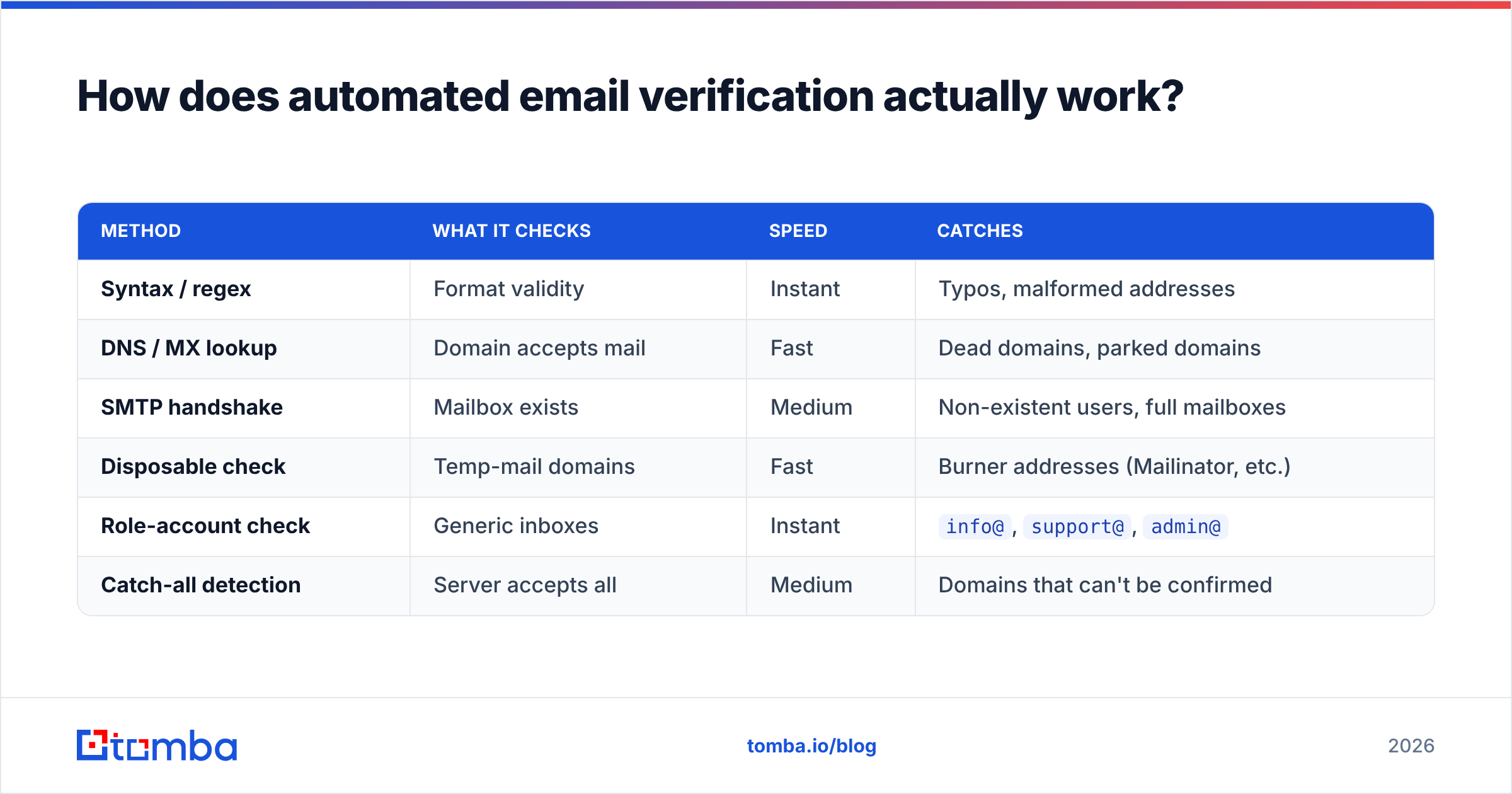
That SMTP probe is the heart of it. Everything else is classification logic wrapped around the result. Here's how the common verification methods compare:
| Method | What it checks | Speed | Catches |
|---|---|---|---|
| Syntax / regex | Format validity | Instant | Typos, malformed addresses |
| DNS / MX lookup | Domain accepts mail | Fast | Dead domains, parked domains |
| SMTP handshake | Mailbox exists | Medium | Non-existent users, full mailboxes |
| Disposable check | Temp-mail domains | Fast | Burner addresses (Mailinator, etc.) |
| Role-account check | Generic inboxes | Instant | info@, support@, admin@ |
| Catch-all detection | Server accepts all | Medium | Domains that can't be confirmed |
No single method is sufficient. Syntax alone passes ceo@nonexistent-startup.io. SMTP alone wastes time on addresses regex would have killed for free. The value is in running all of them, in order, automatically.
Where catch-all domains break naive tools#
A catch-all domain is configured to accept mail for any address — anything@company.com returns a 250. That means an SMTP probe can't distinguish a real mailbox from a fake one. Cheap verifiers either mark every catch-all address "valid" (false confidence) or dump them all as "unknown" (useless).
The better approach is a dedicated catch-all verifier that uses pattern analysis, historical signals, and secondary checks to assign a confidence score instead of a binary guess. For B2B lists — where catch-all is common at mid-market and enterprise domains — this single capability separates a tool you can trust from one you can't.
How do you automate verification in your own stack?#
Two patterns cover almost every team. Most mature operations run both.
1. Real-time verification at the point of capture. Wire a verification API call into your signup form, lead-gen form, or CRM intake. The address is checked before it's ever stored. Bad data never enters the database, so you never have to clean it later. This is the highest-leverage place to verify because it stops the problem at the source.
2. Scheduled bulk re-verification. Email addresses decay — people change jobs, companies fold, mailboxes get deactivated. A list that was clean in January is roughly 2–3% dead by July. A monthly or quarterly bulk verify job re-checks your existing database and quarantines newly-dead addresses before your next campaign.
A typical API integration looks like this in pseudocode:
POST https://api.tomba.io/v1/email-verifier/{email}
Authorization: <api-key>

→ { "email": "jane@acme.com",
    "status": "valid",
    "result": "deliverable",
    "score": 95,
    "mx_records": true,
    "smtp_check": true,
    "disposable": false,
    "webmail": false }
You branch on result: accept deliverable, reject undeliverable, and route risky / catch-all to a separate, lower-volume sending segment. The Tomba API returns this structure synchronously for single checks and via webhook for bulk batches, so both patterns share one integration.
)
What should you look for in an automated verification tool?#
Focus on five things. Marketing pages obscure most of them, so test against your own list before you commit.
- Real accuracy on a known list. Run a sample of addresses you've already mailed — where you know which bounced — and measure how well the tool's predictions match reality. Vendor-claimed accuracy is meaningless without your data behind it.
- Catch-all handling. Does it score catch-all domains or punt on them? For B2B, this is decisive.
- Speed and throughput. Real-time checks need sub-second latency. Bulk jobs need to process hundreds of thousands of rows without timing out.
- API quality. Clean docs, predictable rate limits, webhooks for async batches, and SDKs in your language. A command-line tool and spreadsheet add-ons help non-engineers self-serve.
- Honest pricing. Per-verification cost, free tier to test, and no surprise overage fees.
How Tomba compares to typical verifiers#
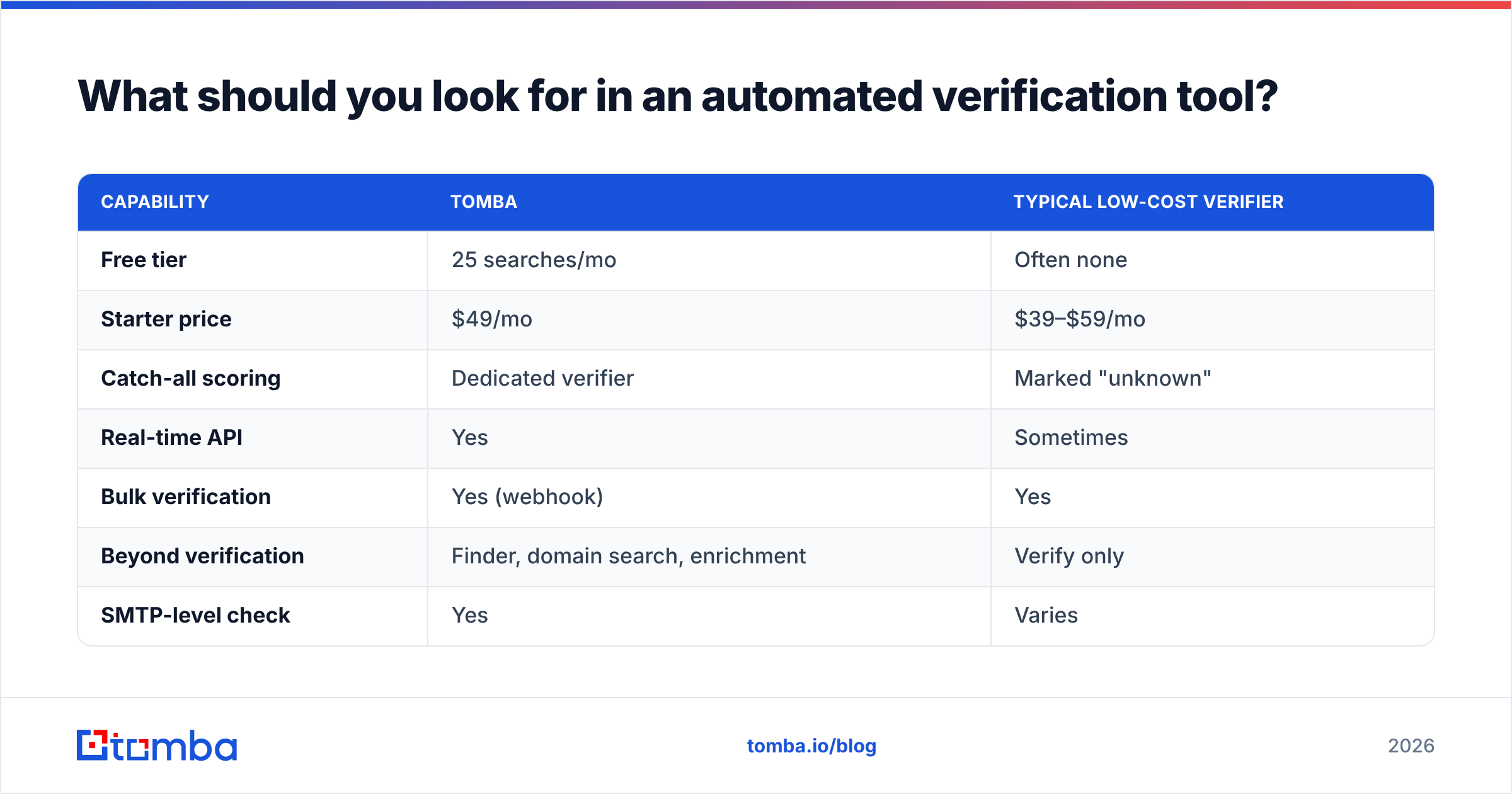
| Capability | Tomba | Typical low-cost verifier |
|---|---|---|
| Free tier | 25 searches/mo | Often none |
| Starter price | $49/mo | $39–$59/mo |
| Catch-all scoring | Dedicated verifier | Marked "unknown" |
| Real-time API | Yes | Sometimes |
| Bulk verification | Yes (webhook) | Yes |
| Beyond verification | Finder, domain search, enrichment | Verify only |
| SMTP-level check | Yes | Varies |
The practical difference: a standalone verifier cleans a list you already have. Tomba sits across the whole top of funnel — find email addresses, verify them, and enrich the contact — so you're not stitching three vendors together. Full Tomba pricing is public if you want the per-tier credit math.
For an independent read on any verifier, G2's email verification category aggregates real-user reviews and accuracy reports worth scanning before you buy.
What does automated verification cost you if you skip it?#
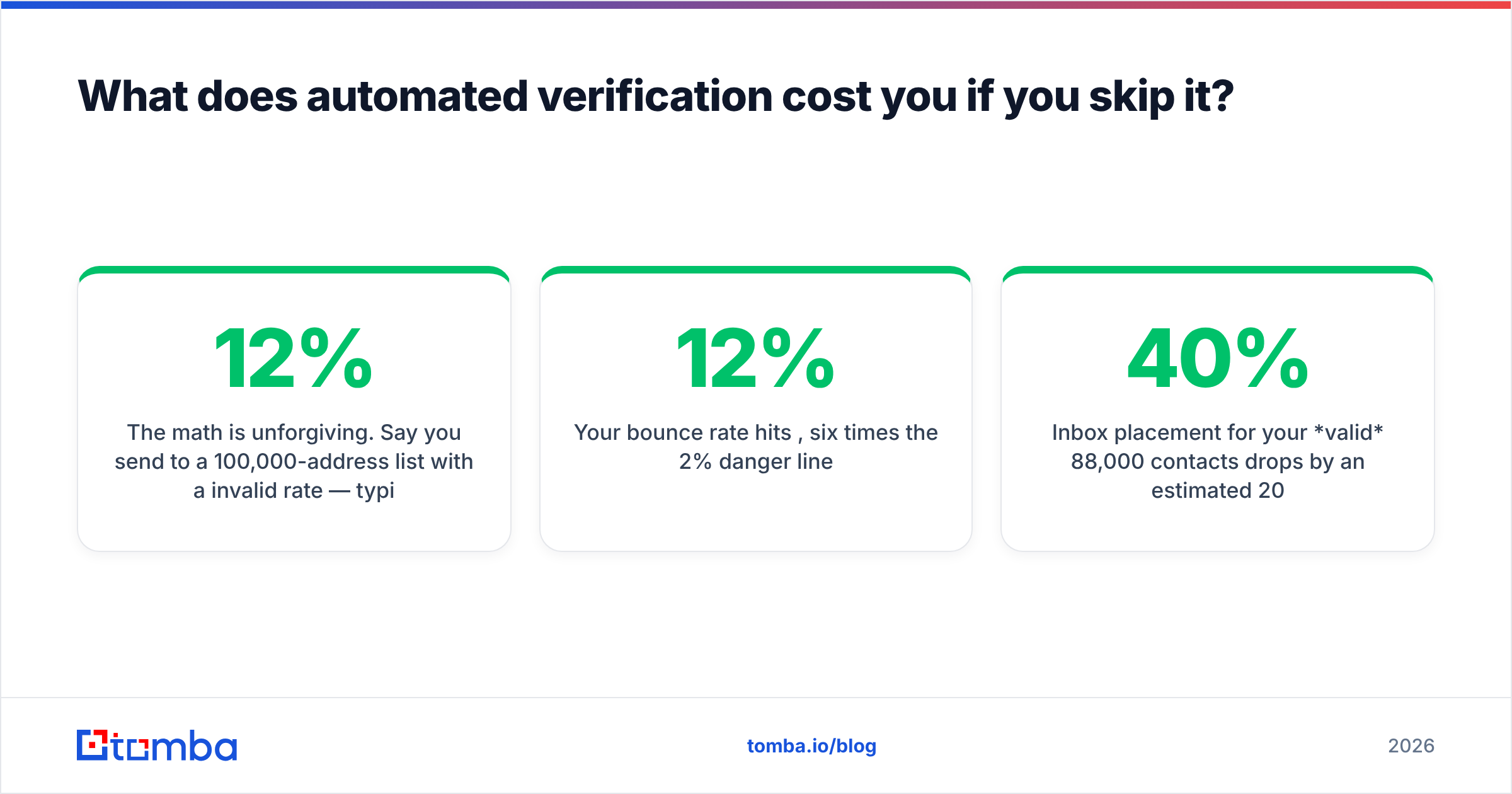
The math is unforgiving. Say you send to a 100,000-address list with a 12% invalid rate — typical for a scraped or aged B2B list.
- 12,000 addresses bounce on the first send.
- Your bounce rate hits 12%, six times the 2% danger line.
- Mailbox providers throttle or block your domain within hours.
- Inbox placement for your valid 88,000 contacts drops by an estimated 20–40%.
- Recovery requires pausing campaigns and re-warming the domain over 2–4 weeks.
Verifying that same list ahead of time costs a fraction of a cent per address and a few minutes of compute. The asymmetry is the entire argument. HubSpot's research on email deliverability consistently ties list hygiene to placement rates — clean lists simply land in more inboxes.
When should verification run — and how often?#
Match the cadence to how the data enters and ages:
- At capture (real-time): every form submit, signup, and CRM import. Non-negotiable for inbound.
- Before every send: verify any segment you haven't checked in 30+ days. A quick delta-check on recently-added rows is cheap.
- Scheduled full re-verification: monthly for high-volume senders, quarterly for everyone else. Decay is continuous; your hygiene should be too.
- After list acquisition: any purchased, scraped, or partner-shared list gets a full verification pass before it touches your sending domain. These lists are the highest-risk source of spam traps.
Automating these triggers — via API hooks and scheduled jobs — is what turns verification from a chore you forget into infrastructure you never think about.
Frequently asked questions#
Does email verification guarantee delivery? No. It confirms a mailbox can receive mail and that the address won't bounce. Whether your message lands in the inbox vs. spam still depends on content, authentication (SPF/DKIM/DMARC), and your sender reputation. Verification removes one major failure mode; it isn't the whole story.
Will verifying my list send emails to my contacts?
No. The SMTP check stops before the DATA command, so no message is ever transmitted. Recipients see nothing.
How accurate is automated verification on catch-all domains? Binary tools can't confirm individual mailboxes on catch-all servers. Scoring approaches — like Tomba's catch-all verifier — assign a confidence level instead, which is far more useful than a flat "unknown" for B2B sending decisions.
Can I verify emails inside a spreadsheet? Yes. Beyond the API, Tomba offers spreadsheet integrations so non-technical team members can verify columns directly. Engineers use the API and CLI; operators use the add-ons.
Make verification a default, not a deadline#
Stop treating list cleaning as a project you schedule when bounces get scary. Automated email verification belongs in your pipeline the same way input validation belongs in your code — running silently on every record, every time, so a dead address never reaches your sending domain in the first place.
If you want one platform that finds, verifies, and enriches in a single flow, start with the Tomba Email Finder and pair it with the built-in verifier. The free tier gives you 25 searches a month to test against your own list before you commit a dollar — which is exactly how you should evaluate any verification tool.
Ready to find emails that actually work?
Join 150,000+ professionals who stopped guessing and started sending. Free credits on signup — no credit card required.
Get the Tomba newsletter
Practical outbound tactics and product updates — once every two weeks.
About the author