Automated Lead Distribution in 2026: The Complete Guide
Manual lead assignment leaks revenue. Learn how automated lead distribution routes every inbound lead to the right rep in seconds, with models, tools, and a 2026 setup checklist.
TL;DR
- Automated lead distribution assigns inbound and outbound leads to the right rep using rules, scoring, or round-robin logic — no spreadsheets, no manual triage.
- The biggest payoff is speed-to-lead: routing in seconds instead of hours can lift conversion rates several times over.
- Choose a routing model (round-robin, weighted, account-based, or score-based) that matches how your team actually sells.
- Clean, enriched contact data is the fuel — bad data routes the wrong lead to the wrong rep and quietly burns pipeline.
- Tools range from CRM-native rules to dedicated routing platforms; pick based on team size, deal complexity, and data quality.
What is automated lead distribution?#
Automated lead distribution is the process of assigning incoming leads to sales reps automatically, based on predefined rules instead of manual hand-offs. Think of it like a busy restaurant host with a seating chart: instead of letting guests wander and pick tables at random, the host routes each party to the right server based on section, capacity, and who is free. Your CRM does the same thing for leads.
Technically, a routing engine evaluates each new lead against a set of conditions — territory, company size, product interest, lead score, rep availability — and writes an owner to the record the moment it qualifies. The rep gets a notification, the clock starts, and the lead never sits in an unassigned queue going stale.
This matters because the alternative is expensive. When leads pile up in a shared inbox or an "unassigned" CRM view, response times balloon, reps cherry-pick the easy wins, and territories get violated. Automated distribution removes the human bottleneck from the one moment that most predicts whether a deal closes: the first touch.

Why does speed-to-lead make or break conversion?#
The single strongest argument for automation is speed. Research popularized by HubSpot and the original Lead Response Management study found that contacting a lead within the first five minutes dramatically increases the odds of qualifying them — and that those odds fall off a cliff after the first hour.
Manual assignment almost guarantees you miss that window. A lead comes in at 4:55 PM, a manager sees it the next morning, assigns it by 9:30, and the rep calls at 11. By then a competitor with automated routing has already booked the demo.
Automated lead distribution collapses that timeline to seconds. The routing rule fires on form submission, the rep is paged in Slack, and the first call happens while the prospect still has your pricing page open. Speed-to-lead is not a vanity metric — it is the difference between a worked lead and a wasted one. Pair fast routing with a healthy response rate target and you have a measurable feedback loop for the whole funnel.
What are the main lead routing models?#
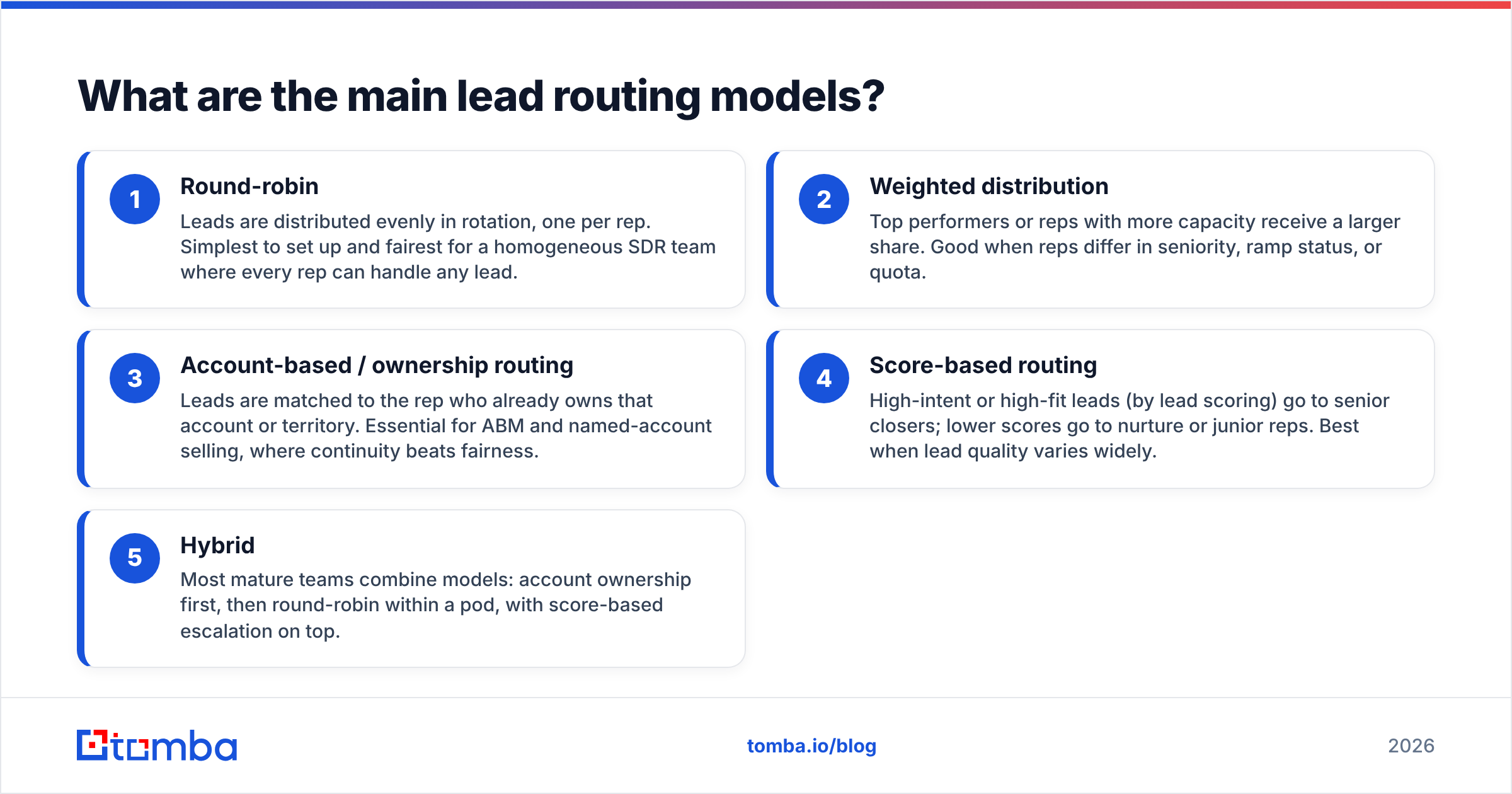
There is no single "best" routing model — the right one depends on how your team is structured and how complex your deals are. Here are the four that cover most B2B setups:
- Round-robin — Leads are distributed evenly in rotation, one per rep. Simplest to set up and fairest for a homogeneous SDR team where every rep can handle any lead.
- Weighted distribution — Top performers or reps with more capacity receive a larger share. Good when reps differ in seniority, ramp status, or quota.
- Account-based / ownership routing — Leads are matched to the rep who already owns that account or territory. Essential for ABM and named-account selling, where continuity beats fairness.
- Score-based routing — High-intent or high-fit leads (by lead scoring) go to senior closers; lower scores go to nurture or junior reps. Best when lead quality varies widely.
- Hybrid — Most mature teams combine models: account ownership first, then round-robin within a pod, with score-based escalation on top.
The mistake teams make is picking a model that flatters the org chart instead of the buyer. Route based on what gives the prospect the fastest path to a competent rep, not on internal politics.
How do the lead distribution approaches compare?#
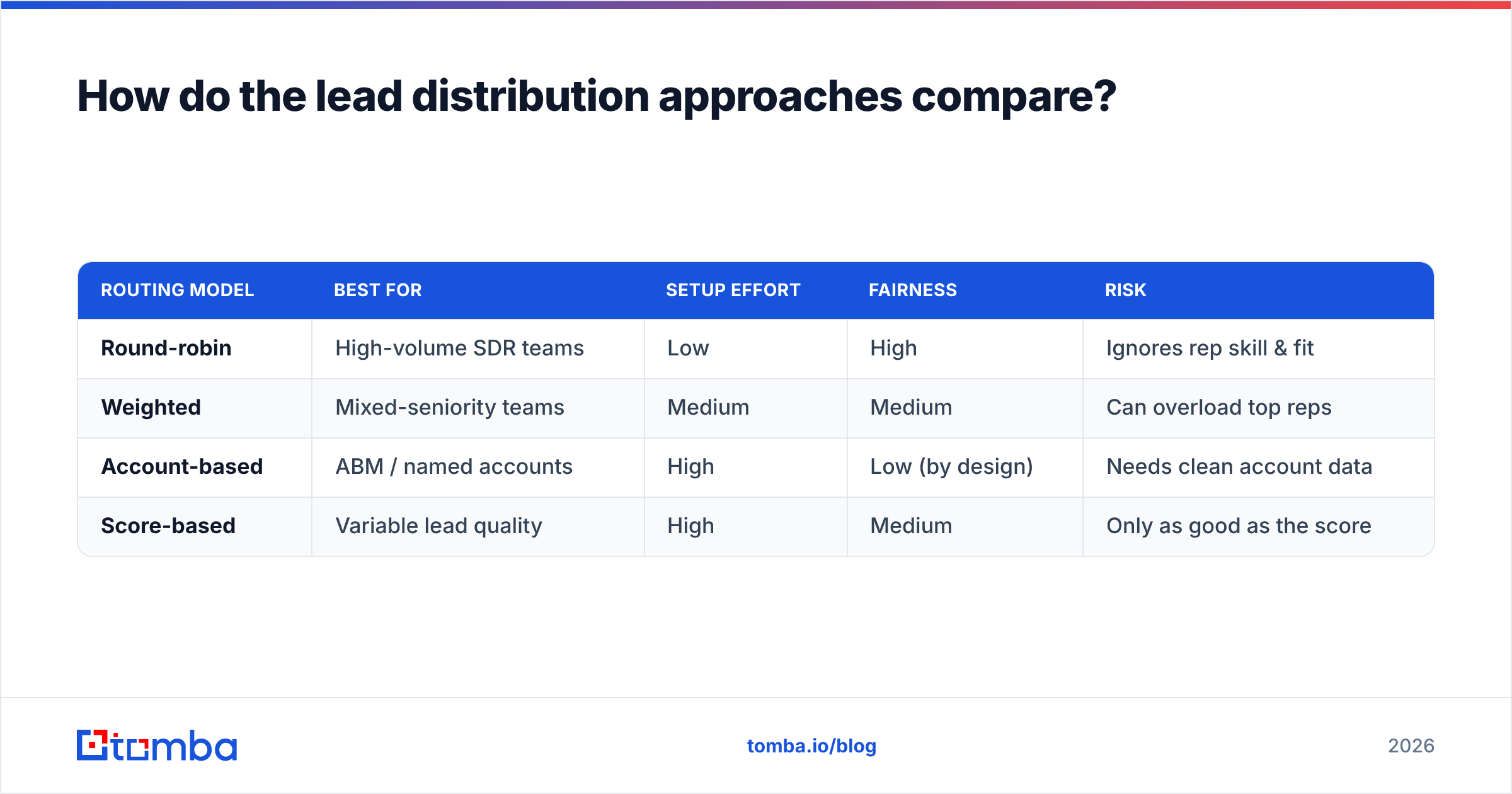
The table below maps the four core models against the criteria that usually decide which one you ship.
| Routing model | Best for | Setup effort | Fairness | Risk |
|---|---|---|---|---|
| Round-robin | High-volume SDR teams | Low | High | Ignores rep skill & fit |
| Weighted | Mixed-seniority teams | Medium | Medium | Can overload top reps |
| Account-based | ABM / named accounts | High | Low (by design) | Needs clean account data |
| Score-based | Variable lead quality | High | Medium | Only as good as the score |
A practical read: if you are early-stage with five interchangeable reps, start with round-robin and add complexity later. If you sell six-figure deals into named accounts, account-based routing is non-negotiable from day one. Score-based routing is powerful but it inherits every flaw in your scoring model and your underlying data — so fix those first.
Why does data quality decide whether routing works?#
Routing rules are only as good as the data they read. Every model above depends on accurate fields: company size, industry, territory, job title, email, and intent signals. If those fields are empty or wrong, the engine routes confidently — and incorrectly.
This is where most automated lead distribution projects quietly fail. A lead fills out a form with a personal Gmail and no company name. Your territory rule has nothing to match on, so the lead falls into a catch-all bucket and gets ignored. Multiply that by thousands of leads and you have a routing system that looks automated but leaks a third of your pipeline.
The fix is enrichment at the point of capture. Before a lead hits the routing engine, append the missing firmographic and contact data so the rules have something to evaluate. With data enrichment you can turn a bare email into a full record — company, role, size, and verified contact details — so every routing rule fires on complete information. Add an email verifier step and you stop assigning reps to bounce-prone or fake addresses entirely.

What tools handle automated lead distribution?#
Your options fall into three tiers, and the right tier depends on deal complexity and team size.
| Tier | Examples | Strengths | Limitations |
|---|---|---|---|
| CRM-native rules | HubSpot, Salesforce, Pipedrive | Free with your CRM, no extra tool | Basic logic, limited round-robin nuance |
| Dedicated routing | LeanData, Chili Piper, Distribute | Advanced rules, instant scheduling, SLAs | Added cost and admin overhead |
| Workflow automation |
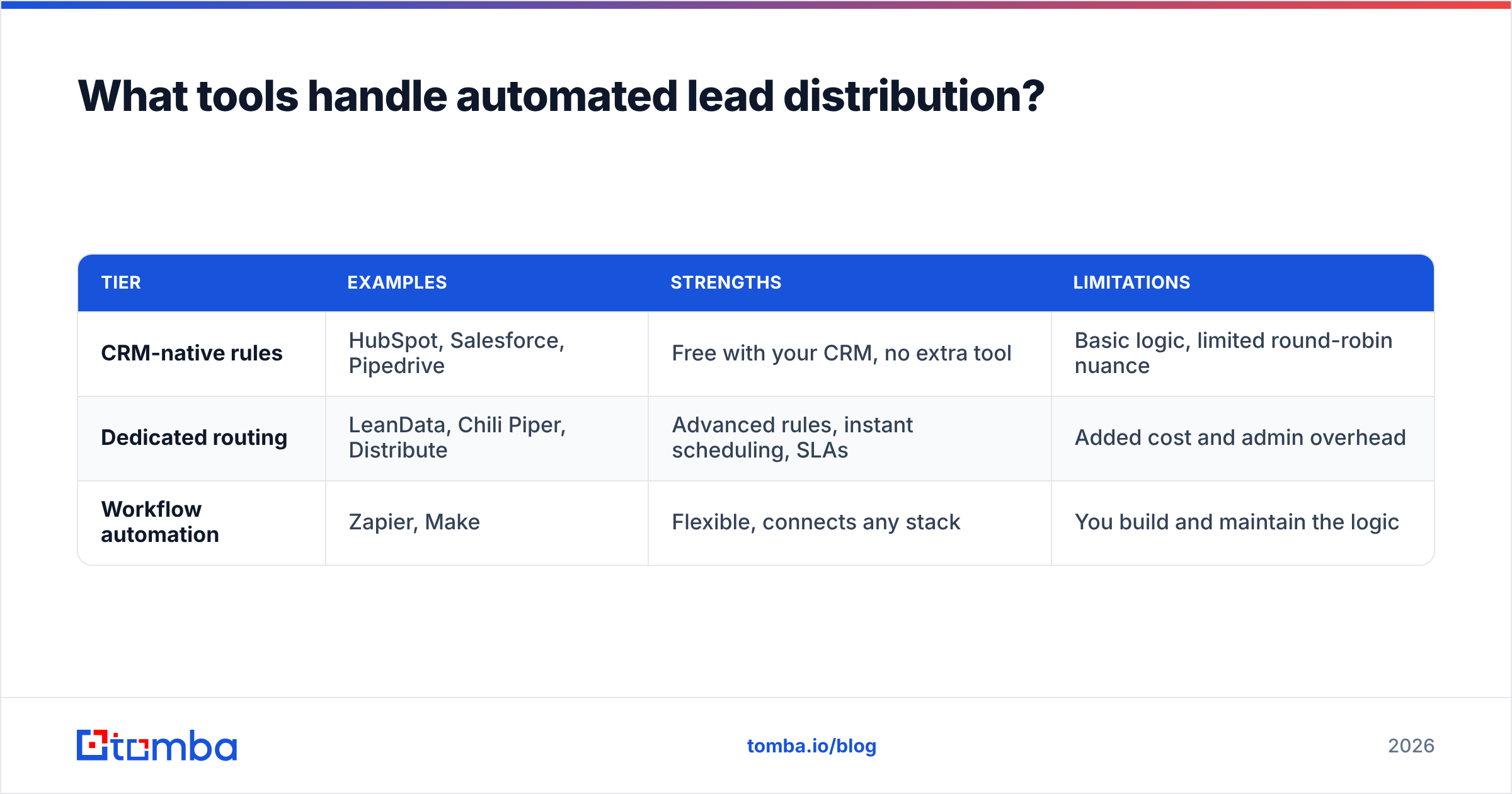
Zapier, Make | Flexible, connects any stack | You build and maintain the logic |
For most teams, the CRM-native layer is the place to start. Salesforce assignment rules and HubSpot's workflow-based rotation cover round-robin and rule-based routing out of the box. As you scale into complex territories and meeting hand-offs, a dedicated tool earns its cost.
The connective tissue matters too. Tomba plugs into this layer directly: the HubSpot integration and Salesforce integration push enriched, verified contacts straight into the records your routing rules read, while the Zapier integration lets you enrich and route through any custom workflow. The goal is one clean pipeline: capture → enrich → verify → route — with no manual step in the middle.
How do you set up automated lead distribution step by step?#
Here is a sequence that works whether you are on a CRM-native setup or a dedicated tool:
- Audit your current hand-off. Measure today's median speed-to-lead and your unassigned-lead rate. You need a baseline to prove the automation worked.
- Define your routing logic on paper first. Write the rules in plain language — "EMEA enterprise leads go to the named-account owner; everything else round-robins within the SMB pod." Logic bugs are cheaper to fix on paper.
- Standardize and enrich the fields your rules depend on. Make sure territory, company size, and role are populated on every record via enrichment before routing runs.
- Verify contact data. Run new emails through verification so you never route a rep to a dead address.
- Build the rules in your tool. Start with one model, keep it simple, and add escalation paths only after the base case works.
- Add notifications and SLAs. A routed lead nobody sees is no better than an unassigned one. Page the rep instantly and set a response deadline.
- Monitor and tune weekly. Watch for reps gaming the system, dead zones in your rules, and leads that still fall through. Routing is a living system, not a one-time build.
Treat steps 3 and 4 as load-bearing. Teams that skip enrichment and verification end up with beautifully configured rules routing garbage data — and they blame the rules.
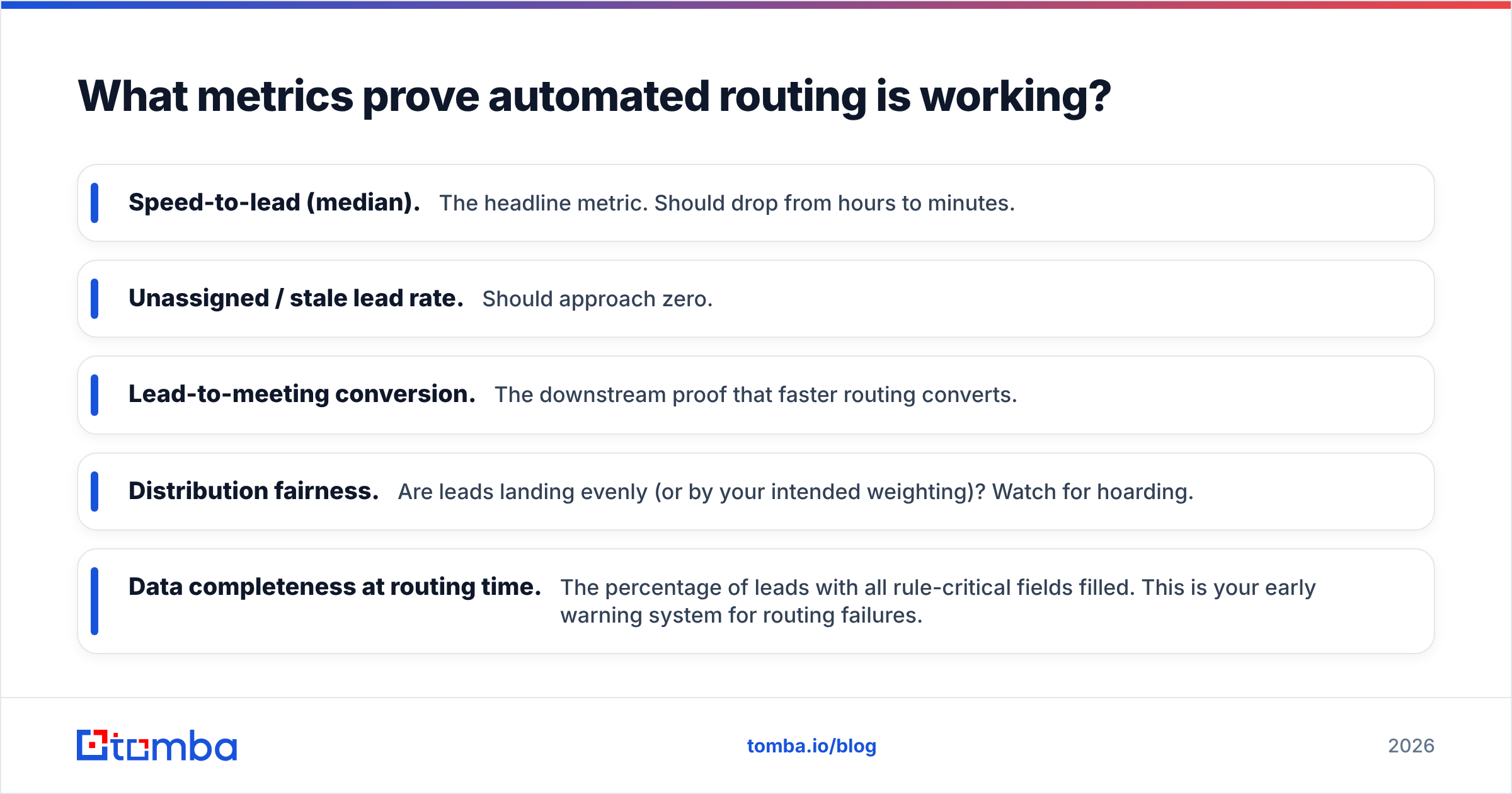
What metrics prove automated routing is working?#
Track these five and you will know within a month whether the system is paying off:
- Speed-to-lead (median). The headline metric. Should drop from hours to minutes.
- Unassigned / stale lead rate. Should approach zero.
- Lead-to-meeting conversion. The downstream proof that faster routing converts.
- Distribution fairness. Are leads landing evenly (or by your intended weighting)? Watch for hoarding.
- Data completeness at routing time. The percentage of leads with all rule-critical fields filled. This is your early warning system for routing failures.
If speed-to-lead drops but conversion does not, your problem is downstream — rep follow-up, win rate, or fit — not routing. If data completeness is low, fix enrichment before you touch the rules again.
Common mistakes to avoid#
- Routing on incomplete data. The number-one failure mode. Enrich first, route second.
- Over-engineering the rules. A twelve-condition routing tree nobody understands is a liability. Start simple.
- Ignoring rep capacity. Round-robin into an out-of-office rep buries leads. Build availability checks in.
- No SLA or notification. Assignment without urgency just moves the bottleneck.
- Set-and-forget. Territories change, reps churn, products launch. Review routing quarterly at minimum.
Frequently asked questions#
Is automated lead distribution only for big sales teams? No. Even a three-person team benefits from round-robin and instant notifications. The smaller the team, the more every fast response matters.
Does it replace lead scoring? No — they work together. Scoring decides which leads matter; distribution decides who gets them and how fast.
What is the fastest way to improve routing results without new software? Enrich and verify your inbound data. Most routing failures are data failures, and fixing the data lifts every rule you already have.
Route smarter with clean, enriched data#
Automated lead distribution lives or dies on data quality. The fastest routing rules in the world still fail when they fire on missing company names, wrong titles, or dead email addresses. Before you optimize the rules, fix the fuel.
Start with the Tomba Email Finder to capture and verify accurate contact details, layer in data enrichment so every record carries the firmographics your routing rules need, and push it all into your CRM through Tomba's native integrations. Tomba's free tier gives you 25 searches a month to test the workflow, and paid plans start at $49/mo — see the full Tomba pricing for team-scale options. Clean data in, right rep every time.
// get started
Find, verify and enrich your first contacts today
Start on the free plan with 25 searches a month, then scale when your team is ready.
Free plan · No credit card required · GDPR & CCPA
// about the author