How to Build an Automated Lead Follow Up System in 2026
Most leads go cold because nobody follows up fast enough. Here's how to build an automated lead follow up system in 2026 — triggers, sequences, tools, and the data that makes it work.
Most B2B revenue leaks out through one quiet hole: the follow-up that never happens. A rep promises to "circle back," the lead sits in a spreadsheet, and three weeks later it's dead. An automated lead follow up system closes that hole by making the next touch happen on its own — every time, on schedule, with the right context.
This guide shows you how to design one in 2026, which tools to compare, and where the data layer (the part most teams skip) actually lives.
TL;DR#
- An automated lead follow up system is a set of triggers, sequences, and data rules that send the right message to a lead at the right time without manual effort.
- Speed is the whole game: responding within five minutes can lift conversion dramatically versus responding the next day.
- Three layers make it work: a trigger layer (what starts a sequence), a content layer (the messages), and a data layer (accurate contact details so messages actually land).
- Tools range from full platforms like HubSpot and Salesforce to lightweight sequencers — pick based on your CRM, volume, and budget.
- Bad data breaks automation. Verified emails and enriched contact records are what separate a working system from an expensive auto-responder hitting dead inboxes.
What is an automated lead follow up system?#
An automated lead follow up system is software (or a stack of connected tools) that detects a lead event — a form fill, a demo request, an email open, a pricing-page visit — and then runs a pre-built sequence of touches without a human pressing send each time.
Think of it like a restaurant's drip-coffee setup versus a barista making each cup by hand. The barista (your rep) is great for the complex orders, but you don't want them manually pouring every basic refill. The machine handles the predictable, repeatable pours so the skilled person focuses on the high-value ones. An automated follow-up system is that machine for your pipeline.
A complete system has three layers:
- Trigger layer — the events that start, pause, or stop a sequence (new lead, reply received, meeting booked, deal stage change).
- Content layer — the actual emails, LinkedIn steps, SMS, or task reminders, ideally personalized with merge fields.
- Data layer — the contact records the system runs on: names, verified email addresses, phone numbers, job titles, and company data.
Most teams obsess over layer two (the copy) and ignore layer three (the data). That's backwards. A perfect five-email sequence sent to a bounced address converts nobody.
Why does follow-up speed matter so much?#
Because attention decays fast. The widely cited lead-response research popularized by HubSpot and others shows that contacting a web lead within the first five minutes massively outperforms waiting even an hour — and conversion odds fall off a cliff after the first day. Your competitor who replies in three minutes wins the deal you would have answered tomorrow.
Manual follow-up can't hit that window reliably. Reps sleep, take PTO, get buried in meetings, and forget. Automation doesn't. A system that fires the first touch within 60 seconds of a form submission, then paces the next four touches over two weeks, captures intent while it's still hot.
Speed also compounds across volume. Following up with 30 leads by hand is annoying; following up with 3,000 is impossible. The math only works with automation behind it. This is also why your response rate climbs once sequencing is consistent — you stop missing the second, third, and fourth touches that actually generate most replies.
What are the core components you need to build?#
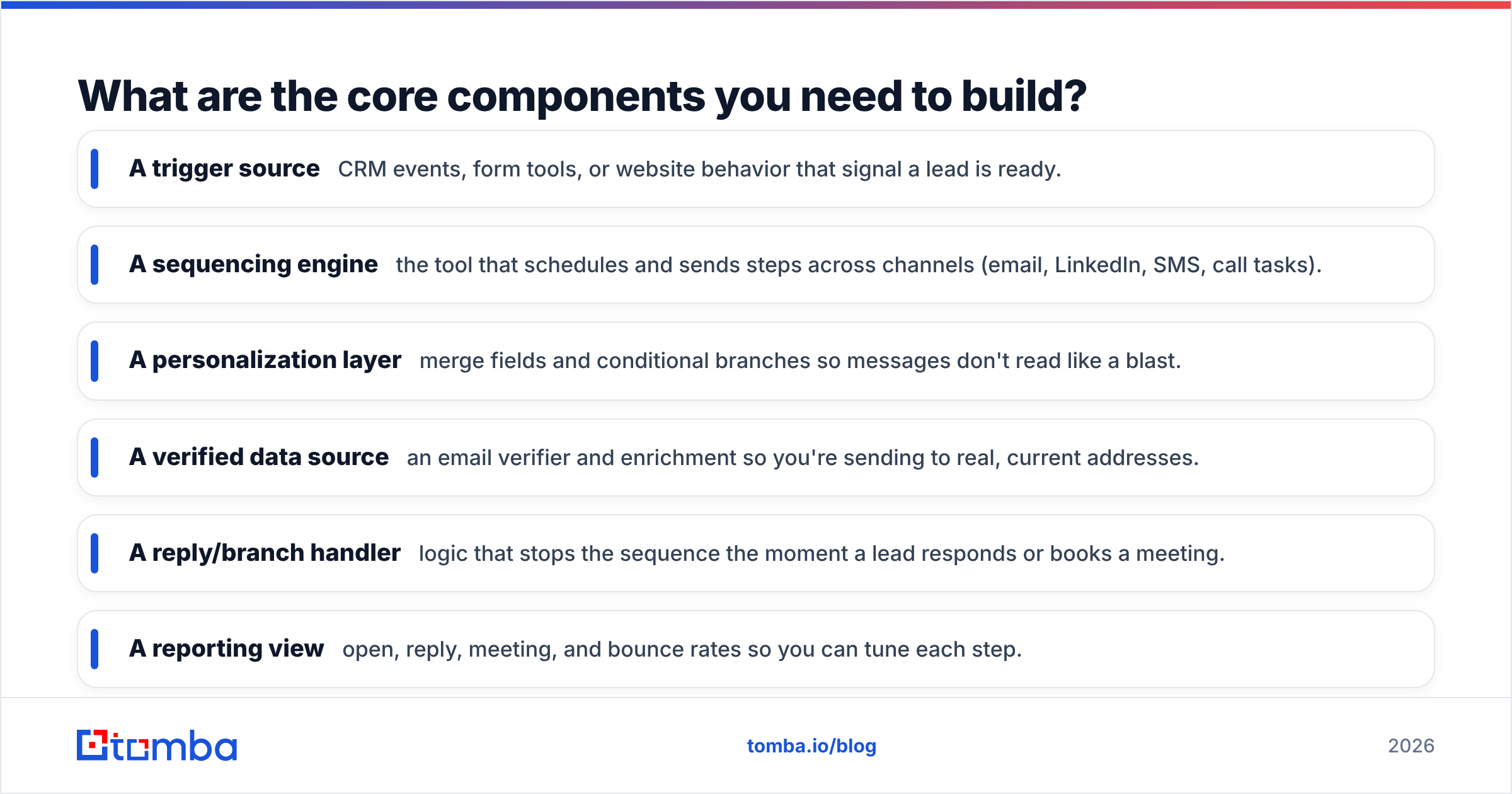
Here's the structured breakdown of what every working system needs:
- A trigger source — CRM events, form tools, or website behavior that signal a lead is ready.
- A sequencing engine — the tool that schedules and sends steps across channels (email, LinkedIn, SMS, call tasks).
- A personalization layer — merge fields and conditional branches so messages don't read like a blast.
- A verified data source — an email verifier and enrichment so you're sending to real, current addresses.
- A reply/branch handler — logic that stops the sequence the moment a lead responds or books a meeting.
- A reporting view — open, reply, meeting, and bounce rates so you can tune each step.
Skip any one of these and the system limps. Skip the data source and it actively damages your sender reputation by hammering invalid inboxes.
How do the main tool categories compare?#
You don't need one mega-platform. Most teams assemble two or three tools. Here's how the categories stack up:
| Tool category | Best for | Typical price | Built-in data? | Multi-channel |
|---|---|---|---|---|
| All-in-one CRM (HubSpot, Salesforce) | Teams wanting CRM + automation in one place | $$$ (seat + tier based) | Limited / add-on | Email + tasks |
| Dedicated sequencer (Outreach, Salesloft) | High-volume outbound SDR teams | $$$ per seat | No (bring your own) | Email, call, LinkedIn |
| Lightweight sequencer (Instantly, Saleshandy) | SMBs and lean outbound | $ – $$ | Minimal | Mostly email |
| Email finder + verifier (Tomba) | Feeding accurate contacts into any of the above | $49–$249/mo | Yes — that's the core | N/A (data layer) |
| No-code automation ( |
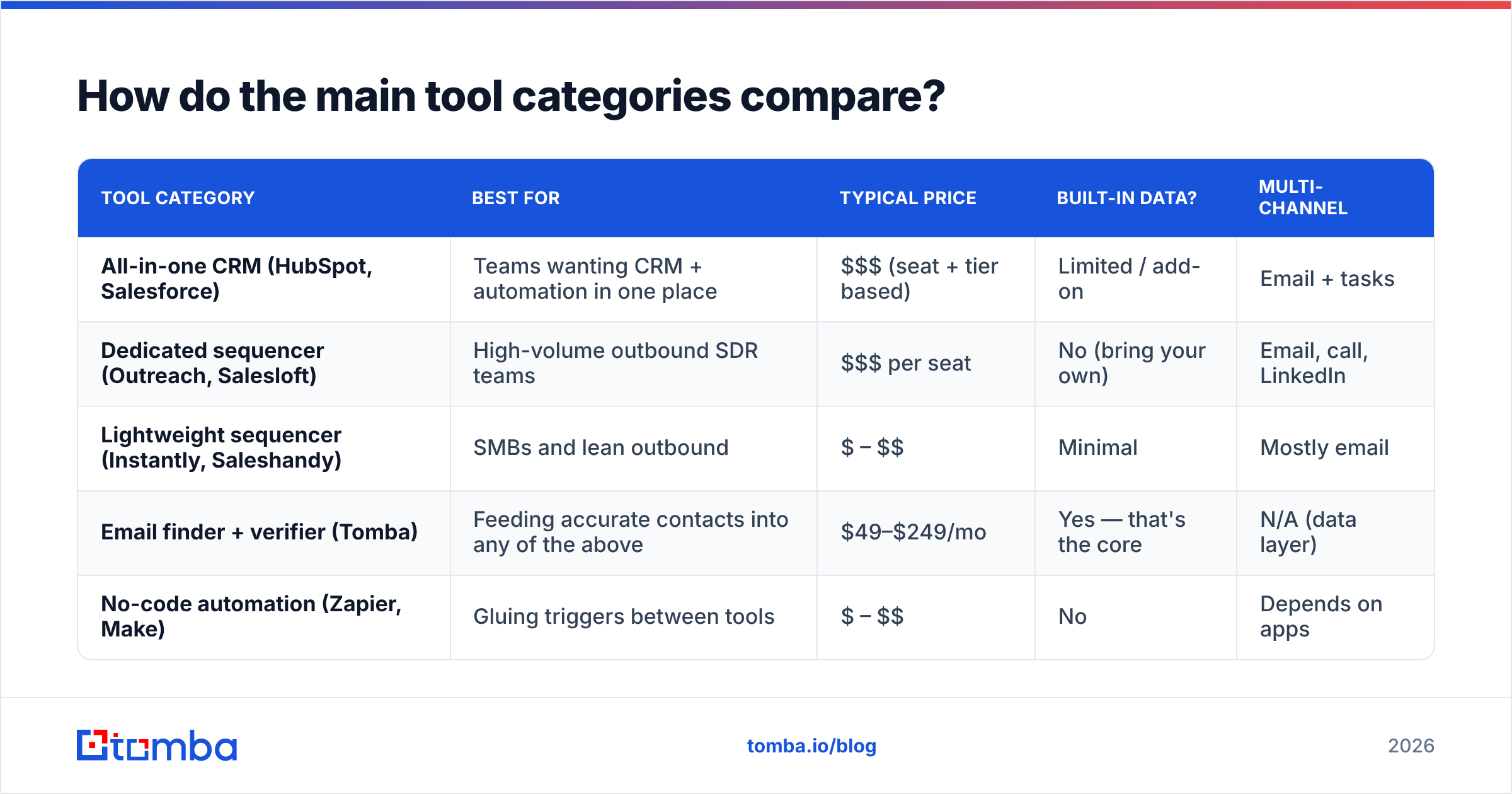
Zapier, Make) | Gluing triggers between tools | $ – $$ | No | Depends on apps |
The pattern most high-performing teams land on: a CRM or sequencer for the workflow, a no-code connector for the triggers, and a dedicated data tool for accuracy. You can compare full feature sets on review sites like G2 before committing.
For pricing transparency on the data layer, Tomba pricing runs a free tier (25 searches/mo), Starter at $49/mo, Growth at $99/mo, and Pro at $249/mo — far below the per-seat cost of bolting "data credits" onto an enterprise CRM.
How do you actually build the system, step by step?#
Step 1 — Map your trigger events. List every signal that should start a follow-up: inbound demo request, content download, abandoned trial, no-show, cold-list import. Each gets its own sequence.
Step 2 — Connect your CRM and forms. Use native integrations like the HubSpot integration or Salesforce integration, or a Zapier integration to pass events between tools. The goal: a form fill in one tool automatically creates or updates a record and enrolls the lead.
Step 3 — Build the sequences. A solid inbound sequence is usually 4–6 touches over 14 days, mixing value (a relevant resource), a soft ask, and a clear breakup email. Keep each message short and specific. You can start from proven cold email templates and adapt them per trigger.
Step 4 — Wire in the data layer. Before any sequence sends, route new contacts through verification and data enrichment so missing emails are found, job titles are filled in, and dead addresses are flagged. For list imports, run them through the bulk email finder first.
Step 5 — Add stop conditions. Nothing kills trust faster than a lead replying "I bought already" and getting email four anyway. Set sequences to halt instantly on reply, meeting booked, or unsubscribe.
Step 6 — Test, measure, iterate. Watch reply rate per step and bounce rate per source. If step three out-performs step one, your subject lines or timing are off. Tune monthly.

Where does most automated follow-up go wrong?#
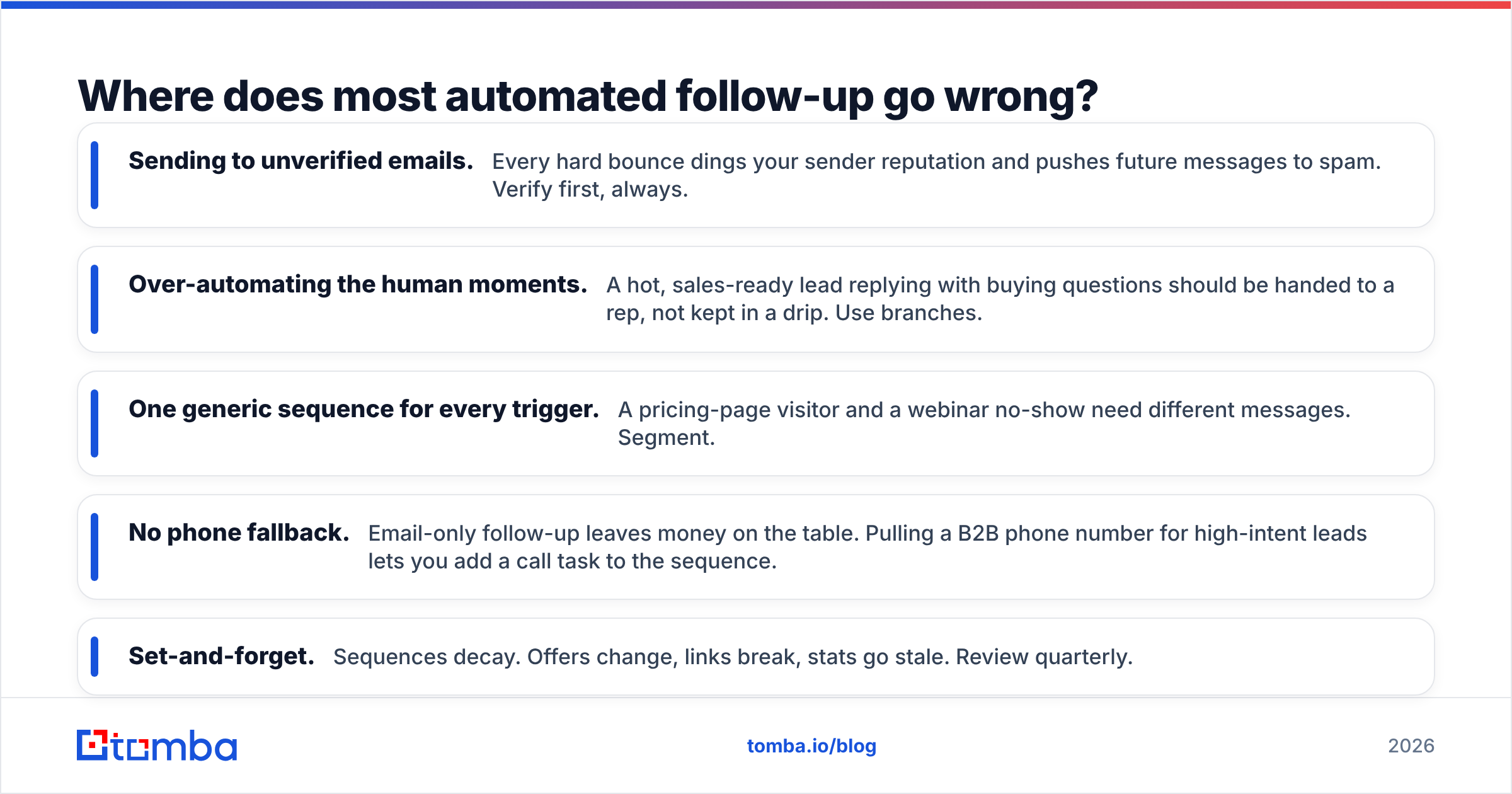
Automation amplifies whatever you feed it — including garbage. The most common failure modes:
- Sending to unverified emails. Every hard bounce dings your sender reputation and pushes future messages to spam. Verify first, always.
- Over-automating the human moments. A hot, sales-ready lead replying with buying questions should be handed to a rep, not kept in a drip. Use branches.
- One generic sequence for every trigger. A pricing-page visitor and a webinar no-show need different messages. Segment.
- No phone fallback. Email-only follow-up leaves money on the table. Pulling a B2B phone number for high-intent leads lets you add a call task to the sequence.
- Set-and-forget. Sequences decay. Offers change, links break, stats go stale. Review quarterly.
The thread running through every one of these: data quality and segmentation. Get those right and the automation does its job quietly. Get them wrong and you've built a very efficient way to annoy prospects.
How do you keep the data layer accurate over time?#
Contact data rots at roughly 25–30% per year as people change jobs — a figure echoed across data-quality research from vendors like Salesforce. That means a list you built 12 months ago is now a quarter wrong. An automated system running on rotting data quietly degrades every week.
Two habits fix this:
- Verify at the point of entry. Every new lead gets its email checked before enrollment. Tools like the email finder and a real-time email verifier plug into your forms or CRM so nothing dirty enters the pipeline.
- Re-enrich on a schedule. Quarterly, push your active records back through enrichment to catch job changes, new titles, and updated companies. A job change is often a buying signal, not just a data fix.
If you'd rather not manage credits and crons by hand, the Tomba API lets you verify and enrich inside your own workflow automatically, so the data layer stays clean without anyone babysitting it.
What does a good follow-up sequence actually look like?#
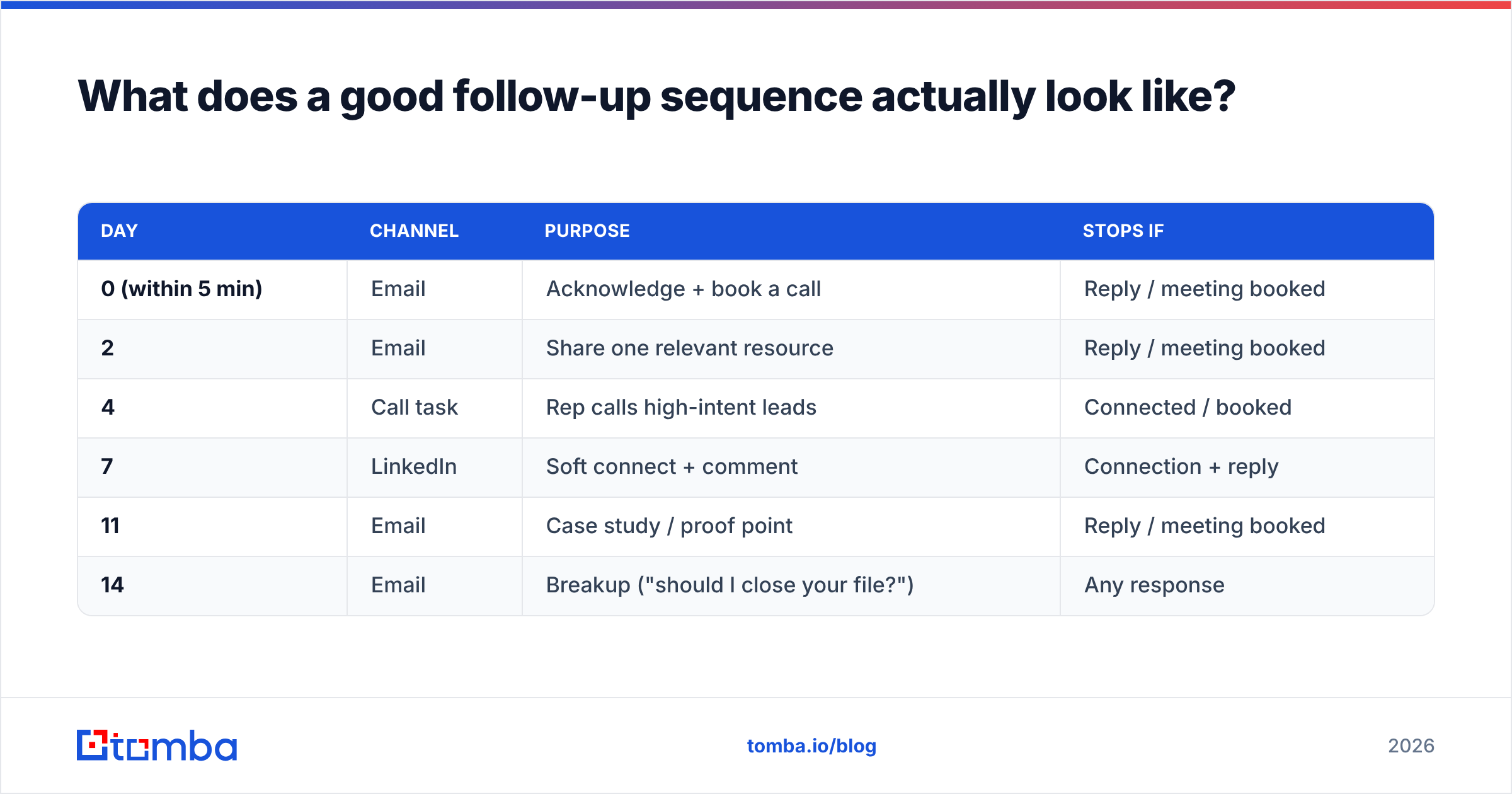
A concrete inbound example you can copy:
| Day | Channel | Purpose | Stops if |
|---|---|---|---|
| 0 (within 5 min) | Acknowledge + book a call | Reply / meeting booked | |
| 2 | Share one relevant resource | Reply / meeting booked | |
| 4 | Call task | Rep calls high-intent leads | Connected / booked |
| 7 | Soft connect + comment | Connection + reply | |
| 11 | Case study / proof point | Reply / meeting booked | |
| 14 | Breakup ("should I close your file?") | Any response |
Notice the call and LinkedIn steps are reserved for the middle, after email has warmed the lead, and the whole thing stops the instant the prospect engages. That balance — automated cadence, human handoff — is what separates a system from a spam cannon.
Frequently asked questions#
Do I need a separate tool for the data layer? Usually yes. CRMs and sequencers handle workflow well but treat accurate contact data as an expensive add-on. A dedicated finder-and-verifier is cheaper and more accurate for that one job.
How many follow-up touches are too many? For inbound, 4–6 over two weeks is the sweet spot. For cold outbound you can run longer, but always include a clear breakup message and honor unsubscribes.
Can I build this without an engineer? Yes. Between native integrations, Zapier, and no-code tools, a non-technical operator can wire a working system in a day. The API route is optional for teams wanting deeper control.
What's the single highest-leverage fix? Verify emails before sending. It protects deliverability, which protects every other step in the system.
Build the data layer first#
An automated lead follow up system is only as good as the contacts it runs on. Before you spend weeks perfecting sequences, fix the foundation: find the right people and confirm their emails are real. The Tomba Email Finder finds professional email addresses by name, company, or domain, and pairs with built-in verification so every contact entering your sequences is accurate from day one. Start on the free tier, wire it into your CRM, and let your automation send to inboxes that actually exist.
// get started
Find, verify and enrich your first contacts today
Start on the free plan with 25 searches a month, then scale when your team is ready.
Free plan · No credit card required · GDPR & CCPA
// about the author