Automated Lead Routing in 2026: The Complete Setup Guide
Slow lead assignment quietly kills pipeline. Here is how automated lead routing works in 2026, the rules that matter, and the tools that make it run.
TL;DR
- Automated lead routing is the rules-based system that assigns each inbound lead to the right rep or queue automatically, the moment it enters your stack — no spreadsheets, no manual triage.
- Speed is the whole point: responding within five minutes makes you up to 21x more likely to qualify a lead than waiting 30 minutes. Manual assignment can't hit that.
- The four routing models you'll actually use are round-robin, territory/account-based, skill/segment-based, and weighted (capacity-aware).
- Routing is only as good as the data underneath it. Garbage firmographics and unverified emails route leads to the wrong rep and break SLAs.
- Tools range from native CRM rules (HubSpot, Salesforce) to dedicated routers — but enrich and verify contact data first with a tool like Tomba so the rules have something accurate to act on.
What is automated lead routing?#
Automated lead routing is the process of assigning incoming leads to the correct salesperson, team, or queue based on predefined rules — automatically, in real time, without a human deciding who gets what.
Think of it like a hospital triage desk. A patient walks in, and within seconds someone routes them to cardiology, pediatrics, or the ER based on symptoms, severity, and which doctor is free. Nobody piles patients in a hallway and sorts them at the end of the day. Lead routing does the same thing for inbound demand: a form fill, a demo request, or a chat message gets matched to the right rep based on territory, deal size, product interest, or rep availability — instantly.
Technically, a routing engine evaluates each new lead record against a rule set (if-this-then-that logic, or a scoring model) and writes the owner field. Everything downstream — sequences, SLAs, notifications — keys off that owner assignment.
The reason this matters in 2026 is simple: buyers expect near-instant responses, and your competitors have automated this. Manual assignment introduces hours or days of delay, and that delay is where deals die.
Why does manual lead assignment cost you deals?#
Because speed-to-lead is the single most controllable lever on conversion, and humans are slow.
The classic Harvard Business Review / InsideSales research found that contacting a lead within five minutes makes you dramatically more likely to qualify it than waiting even 30 minutes — and the curve falls off a cliff after the first hour. Manual routing (someone checking a shared inbox, copying a name into a CRM, pinging a rep on Slack) routinely takes hours. Overnight and weekend leads can sit until Monday.
Manual assignment fails in three predictable ways:
- Lag — Nobody is watching the queue at 9 p.m. or during a Friday all-hands, so leads rot.
- Bias and leakage — Reps cherry-pick the obvious enterprise logos and ignore the rest, so smaller-but-real opportunities never get worked.
- No accountability — When ownership is fuzzy, SLA breaches are invisible. You can't manage what you can't measure.
Automated routing removes all three. The lead is owned within seconds, the assignment is logged, and you can report on response time per rep. The catch — and it's a big one — is that routing rules fire on data fields. If those fields are empty, stale, or wrong, automation just makes bad decisions faster.
What are the main lead routing models?#
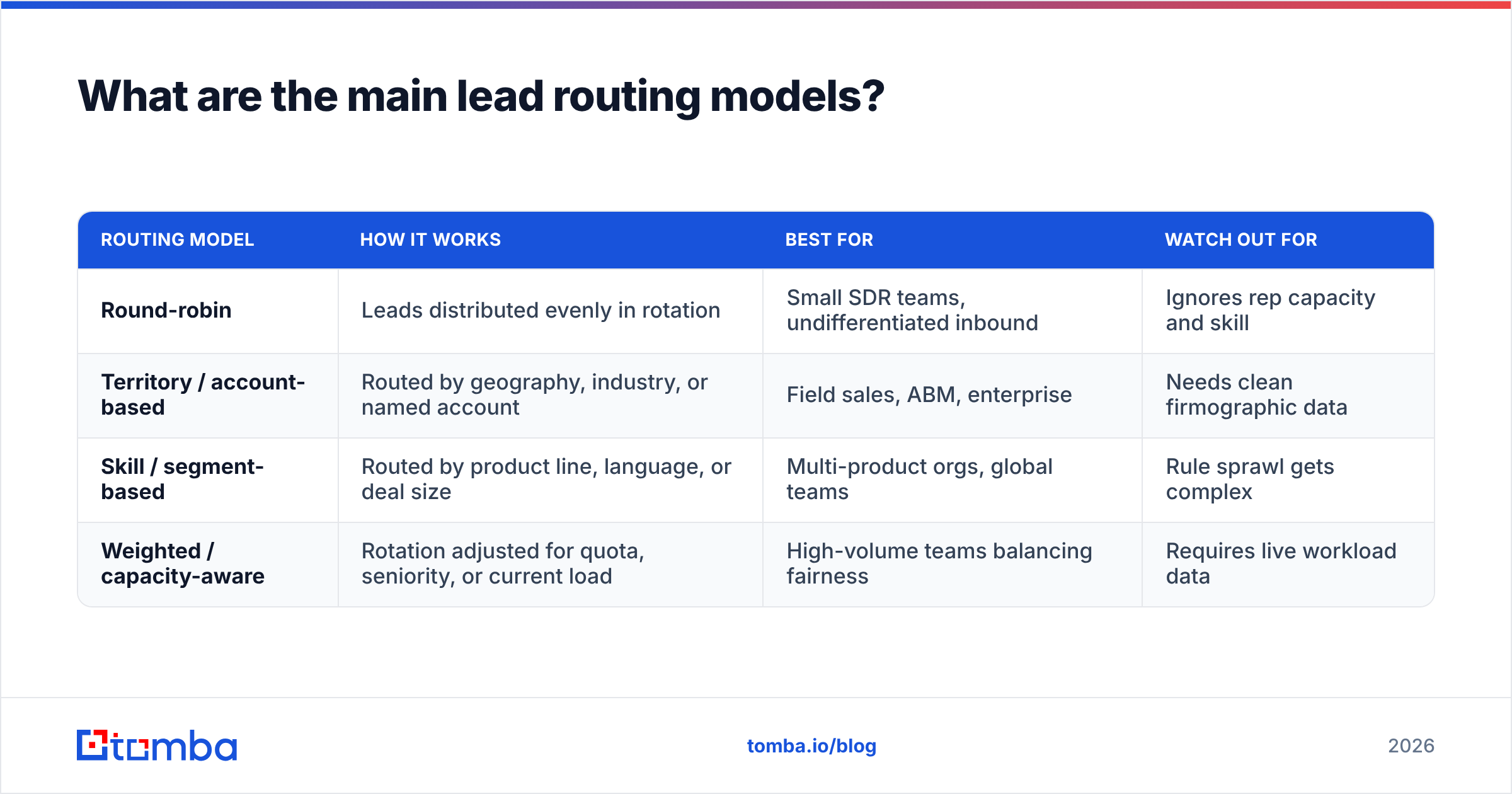
There are four routing models you'll combine in practice. Most mature teams run a hybrid: territory first, then weighted round-robin inside each territory.
| Routing model | How it works | Best for | Watch out for |
|---|---|---|---|
| Round-robin | Leads distributed evenly in rotation | Small SDR teams, undifferentiated inbound | Ignores rep capacity and skill |
| Territory / account-based | Routed by geography, industry, or named account | Field sales, ABM, enterprise | Needs clean firmographic data |
| Skill / segment-based | Routed by product line, language, or deal size | Multi-product orgs, global teams | Rule sprawl gets complex |
| Weighted / capacity-aware | Rotation adjusted for quota, seniority, or current load | High-volume teams balancing fairness | Requires live workload data |
Round-robin is the default starting point: lead 1 to Rep A, lead 2 to Rep B, and so on. Fair and simple, but blind to whether Rep A is already drowning.
Territory-based routing assigns by region, state, industry, or company size. This is the backbone of account-based and field sales motions, and it depends entirely on accurate firmographics — country, employee count, industry code.
Skill-based routing sends Spanish-speaking leads to Spanish-speaking reps, enterprise leads to senior AEs, and a specific product's leads to the team that knows it. It's powerful and it's where rule complexity explodes.
Weighted routing is round-robin with a brain: it accounts for who's at capacity, who closes faster, or who's ramping. It needs live signals about rep workload to work well.
How do you set up automated lead routing? (Step by step)#
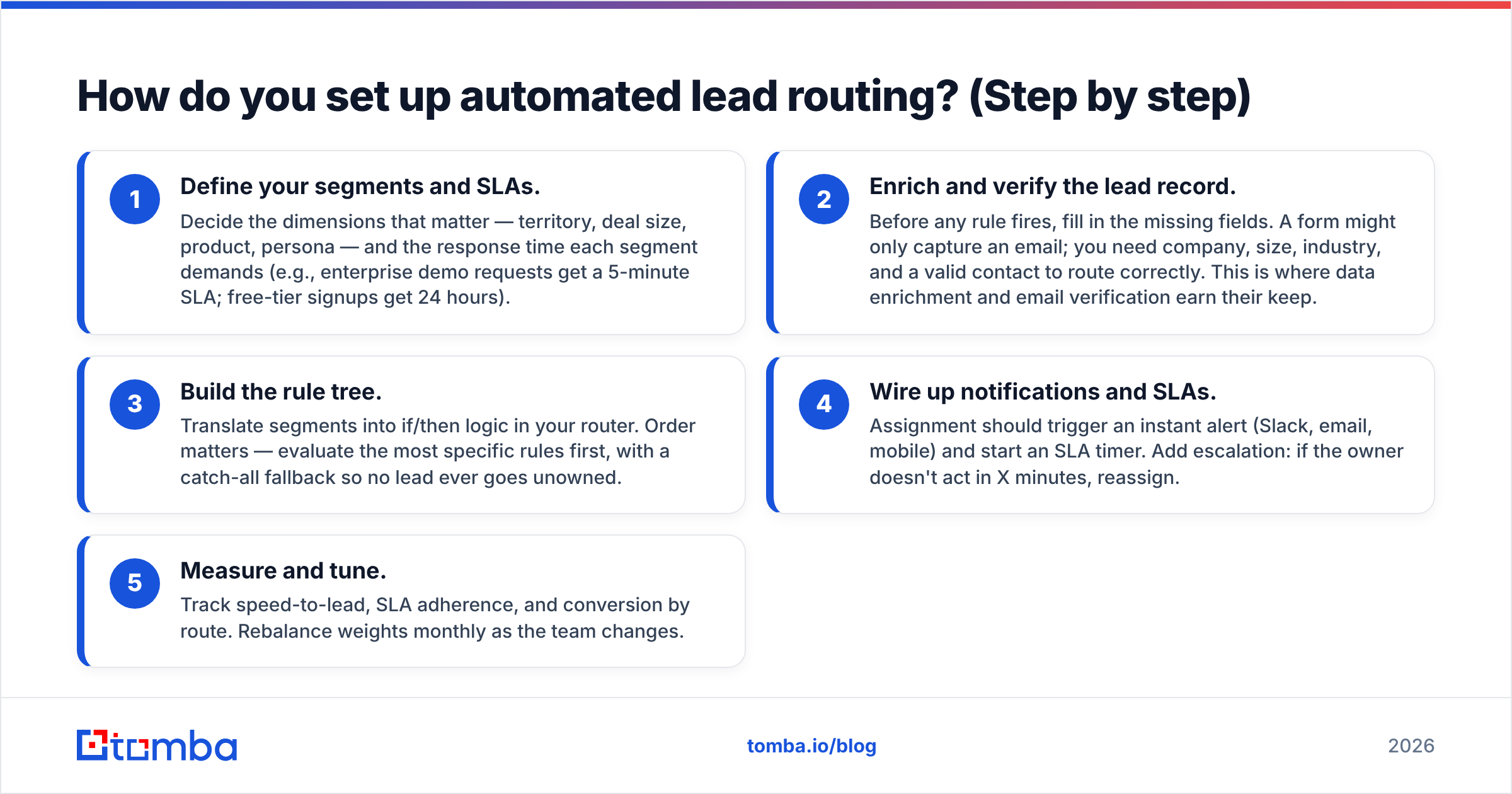
Set it up in five stages, in this order. Skipping the data step is the most common reason routing projects fail.
- Define your segments and SLAs. Decide the dimensions that matter — territory, deal size, product, persona — and the response time each segment demands (e.g., enterprise demo requests get a 5-minute SLA; free-tier signups get 24 hours).
- Enrich and verify the lead record. Before any rule fires, fill in the missing fields. A form might only capture an email; you need company, size, industry, and a valid contact to route correctly. This is where data enrichment and email verification earn their keep.
- Build the rule tree. Translate segments into if/then logic in your router. Order matters — evaluate the most specific rules first, with a catch-all fallback so no lead ever goes unowned.
- Wire up notifications and SLAs. Assignment should trigger an instant alert (Slack, email, mobile) and start an SLA timer. Add escalation: if the owner doesn't act in X minutes, reassign.
- Measure and tune. Track speed-to-lead, SLA adherence, and conversion by route. Rebalance weights monthly as the team changes.
A quick note on rule order: routers evaluate top-down and stop at the first match. Put "Enterprise, North America" above "North America" or your big accounts will fall into the generic bucket.
Why does data quality make or break lead routing?#
Because every routing rule is a query against fields that must be present and correct — and most inbound leads arrive half-empty.
Picture a demo form that only asks for work email. Your territory rule needs country and employee_count. Your skill rule needs industry. None of those exist on the raw record. Without enrichment, the lead hits your catch-all bucket and a senior AE never sees a perfect-fit enterprise account because it looked like an anonymous email.
Worse, if the email itself is fake or a typo, the lead is unreachable no matter how elegantly you route it. Bad data routes confidently to nowhere.

This is why the enrichment-and-verification layer sits before the router, not after. A reliable email finder backfills the decision-maker's verified address, and enrichment appends the firmographics your rules depend on. Tomba's data is built for exactly this hand-off — append company, role, and a verified email to a thin form fill, then let your CRM's rules act on a complete record. You can read more about where Tomba gets its data if accuracy is your concern.
The principle is old but ignored constantly: routing automation amplifies whatever data you feed it. Clean inputs, clean outcomes.
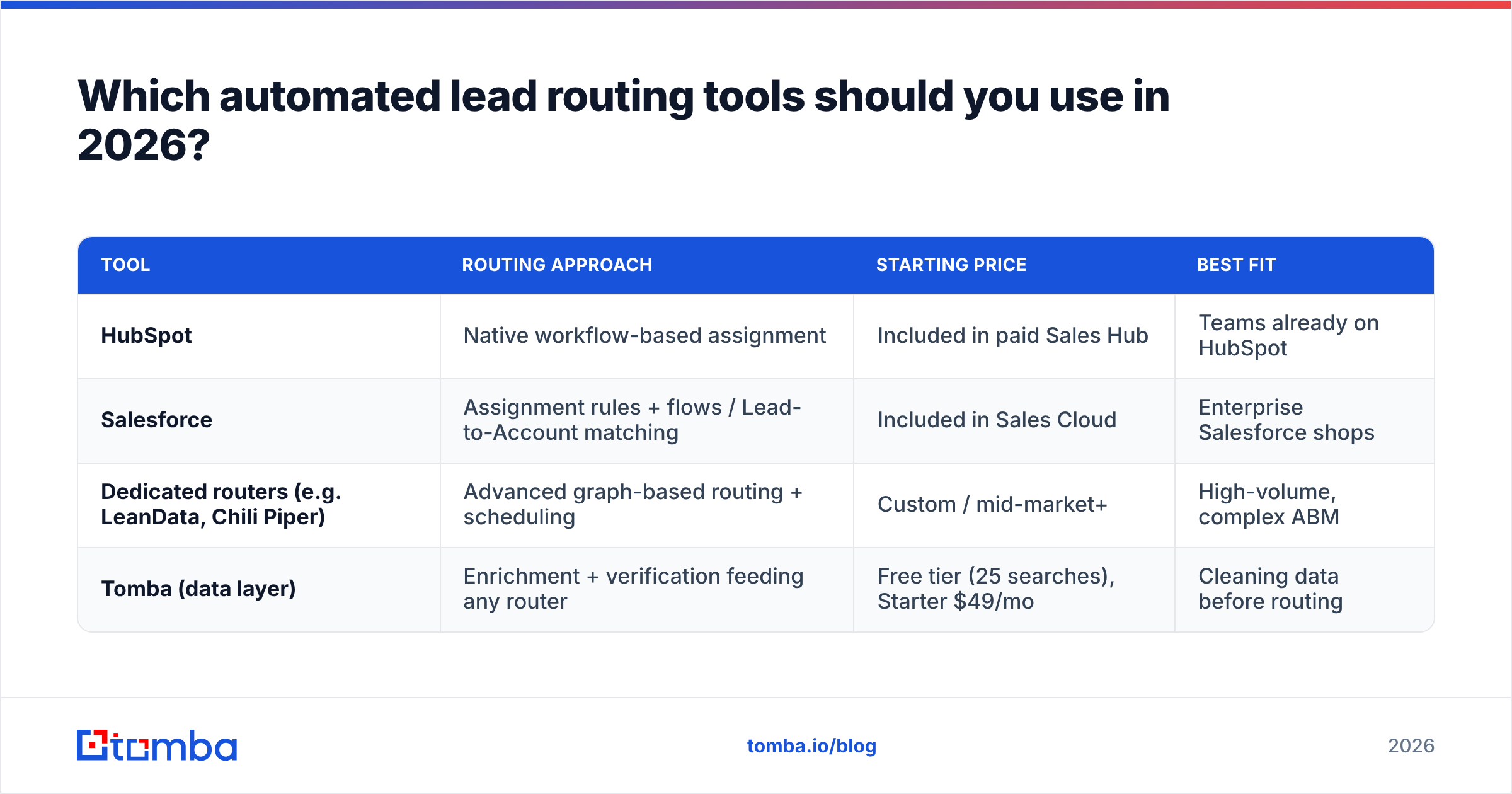
Which automated lead routing tools should you use in 2026?#
Your choice depends on volume, stack, and how much routing logic you need beyond what your CRM ships with.
| Tool | Routing approach | Starting price | Best fit |
|---|---|---|---|
| HubSpot | Native workflow-based assignment | Included in paid Sales Hub | Teams already on HubSpot |
| Salesforce | Assignment rules + flows / Lead-to-Account matching | Included in Sales Cloud | Enterprise Salesforce shops |
| Dedicated routers (e.g. LeanData, Chili Piper) | Advanced graph-based routing + scheduling | Custom / mid-market+ | High-volume, complex ABM |
| Tomba (data layer) | Enrichment + verification feeding any router | Free tier (25 searches), Starter $49/mo | Cleaning data before routing |
A few honest distinctions:
- HubSpot's rotation and workflow tools cover most SMB and mid-market needs without extra spend. Their own guidance on lead management is a good baseline.
- Salesforce offers powerful assignment rules and flows, but Lead-to-Account matching at scale often pushes teams toward an add-on router. The Salesforce ecosystem makes integration easy either way.
- Dedicated routers like LeanData win when you have thousands of leads, complex ABM matching, and need instant scheduling on the form. Independent reviews on G2 are the fastest way to compare them honestly.
- Tomba is not a router — and pretending otherwise would be dishonest. It's the data layer that makes whichever router you pick actually work, by enriching and verifying contacts before assignment. It plugs into your stack through native integrations like Salesforce and HubSpot, or through [
Zapier](https://tomba.io/integrations/zapier) for everything else.
If you run high inbound volume and your routing already works but conversion lags, the problem is usually data, not rules. If you have great data but leads still sit unassigned, you need a router. Most teams need both.
How do you measure if your lead routing is working?#
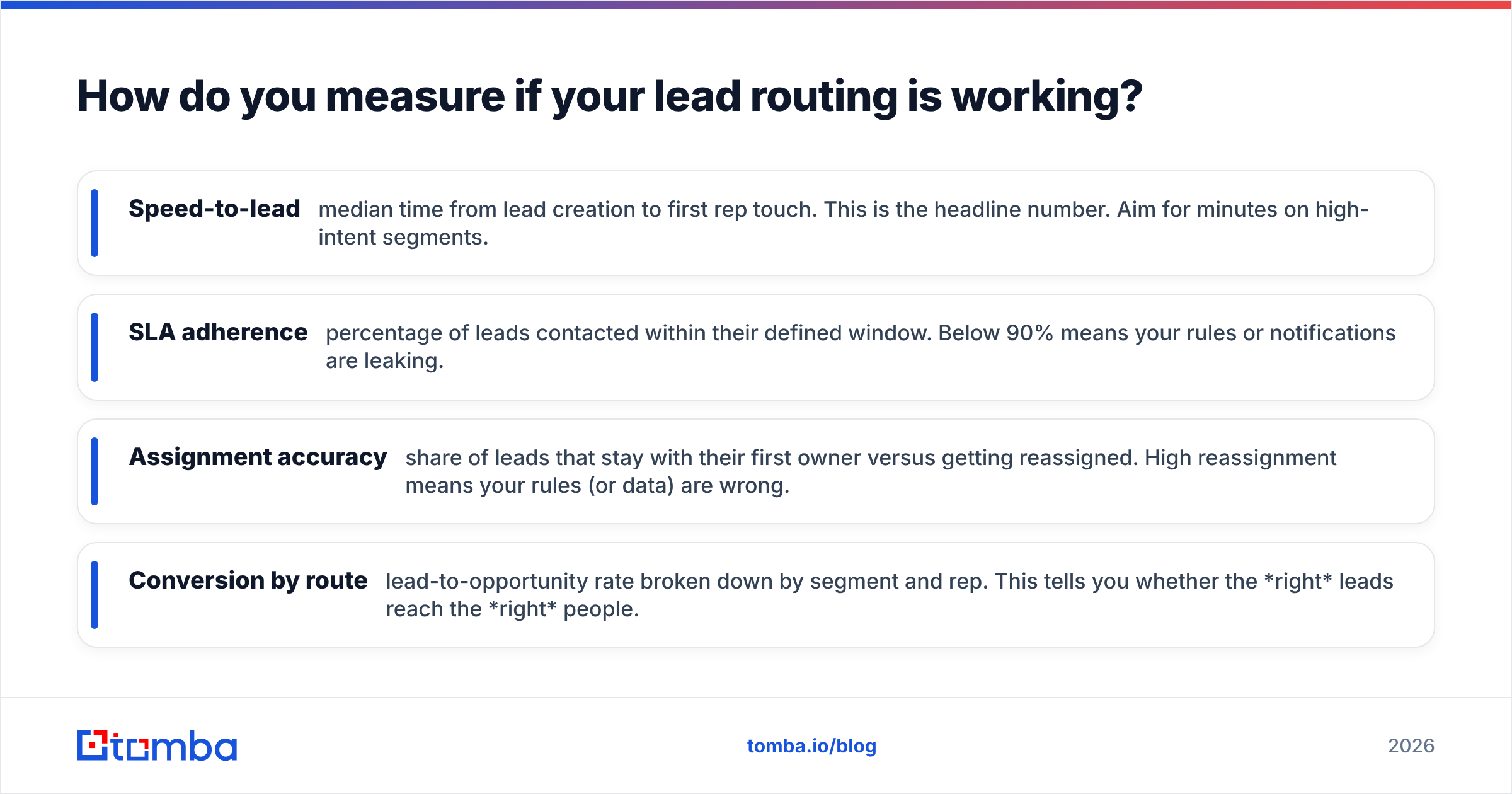
Track four metrics, and review them monthly against your SLAs inside your CRM.
- Speed-to-lead — median time from lead creation to first rep touch. This is the headline number. Aim for minutes on high-intent segments.
- SLA adherence — percentage of leads contacted within their defined window. Below 90% means your rules or notifications are leaking.
- Assignment accuracy — share of leads that stay with their first owner versus getting reassigned. High reassignment means your rules (or data) are wrong.
- Conversion by route — lead-to-opportunity rate broken down by segment and rep. This tells you whether the right leads reach the right people.
If speed-to-lead is good but conversion is flat, look upstream at lead quality and enrichment. If speed-to-lead is bad, look at notifications and rule coverage. The metrics tell you which layer to fix.
Common lead routing mistakes to avoid#
- No fallback rule. Every lead must have an owner. Build an explicit catch-all so nothing silently disappears.
- Routing before enriching. Firing rules on empty fields routes good leads to the generic pile. Enrich first.
- Ignoring capacity. Pure round-robin overloads your best reps and starves your ramping ones. Use weighted routing once you have more than a handful of reps.
- Set-and-forget. Teams change, territories shift, products launch. Rules that were right in January are wrong by June.
- No escalation. If the assigned rep is out, the lead should reassign automatically, not wait for them to return.
Final take: automate the assignment, but feed it clean data#
Conclusion first: automated lead routing is non-negotiable in 2026, but it only pays off when the data underneath it is enriched and verified. The router decides who; the data decides whether that decision is even correct.
Your CRM probably already has the routing engine you need. What it doesn't have is a way to turn a bare email into a complete, verified, route-ready lead record. That's the gap to close first.
Start by tightening the data layer. Use the Tomba Email Finder to find and verify the decision-maker behind every inbound lead, then append the firmographics your routing rules depend on — so by the time your router fires, it's working with accurate, complete records instead of guesses. Spin up the free tier (25 searches a month), wire it into your CRM, and let your routing rules finally do what you built them to do.
// get started
Find, verify and enrich your first contacts today
Start on the free plan with 25 searches a month, then scale when your team is ready.
Free plan · No credit card required · GDPR & CCPA
// about the author