Automated Prospecting in 2026: Tools, Workflow & Setup
Automated prospecting turns hours of manual list-building into a repeatable pipeline. Here is how the stack works in 2026, what to automate, and where humans still win.
TL;DR
- Automated prospecting replaces manual list-building, data entry, and repetitive outreach steps with a connected pipeline — so reps spend time on conversations, not spreadsheets.
- The stack has four layers: a data source, an enrichment/verification layer, a sequencing engine, and a CRM sync. Skip any one and the system leaks.
- Automation does not mean "spray and pray." The highest-performing teams automate the boring 80% (finding, verifying, logging) and keep the human 20% (research, personalization, replies).
- Bad data is the silent killer. If you automate on top of unverified emails, you scale your bounce rate and torch your sender reputation.
- You can build a working automated prospecting engine for under $150/month using a finder, a verifier, and a sequencer.
What is automated prospecting?#
Automated prospecting is the practice of using software to handle the repetitive, rules-based parts of finding and reaching potential customers — building target lists, finding and verifying contact details, enriching records, and triggering outreach — so your team only steps in where human judgment actually moves the needle.
Think of it like a modern car factory. The chassis, welding, and painting run on a programmed line. Humans handle design, quality inspection, and the final test drive. Nobody hand-welds a frame anymore, and nobody lets a robot sign off on the finished car. Automated prospecting works the same way: machines assemble the pipeline, humans approve and personalize the parts that decide whether a deal closes.
The mistake teams make is treating "automated" as a synonym for "hands-off." It is not. The goal is leverage, not absence. A well-built system lets one SDR do the prospecting volume of five, while still sounding like a person who read the prospect's last LinkedIn post.

Why automate prospecting at all?#
The math is brutal for manual prospecting. A rep building lists by hand typically spends 60–70% of the day on non-selling activity: searching LinkedIn, guessing email formats, copy-pasting into a CRM, and re-checking whether a contact already exists. According to widely cited HubSpot sales research, data entry and prospecting research are among the tasks reps most want to offload.
Here is what automation buys you in practical terms:
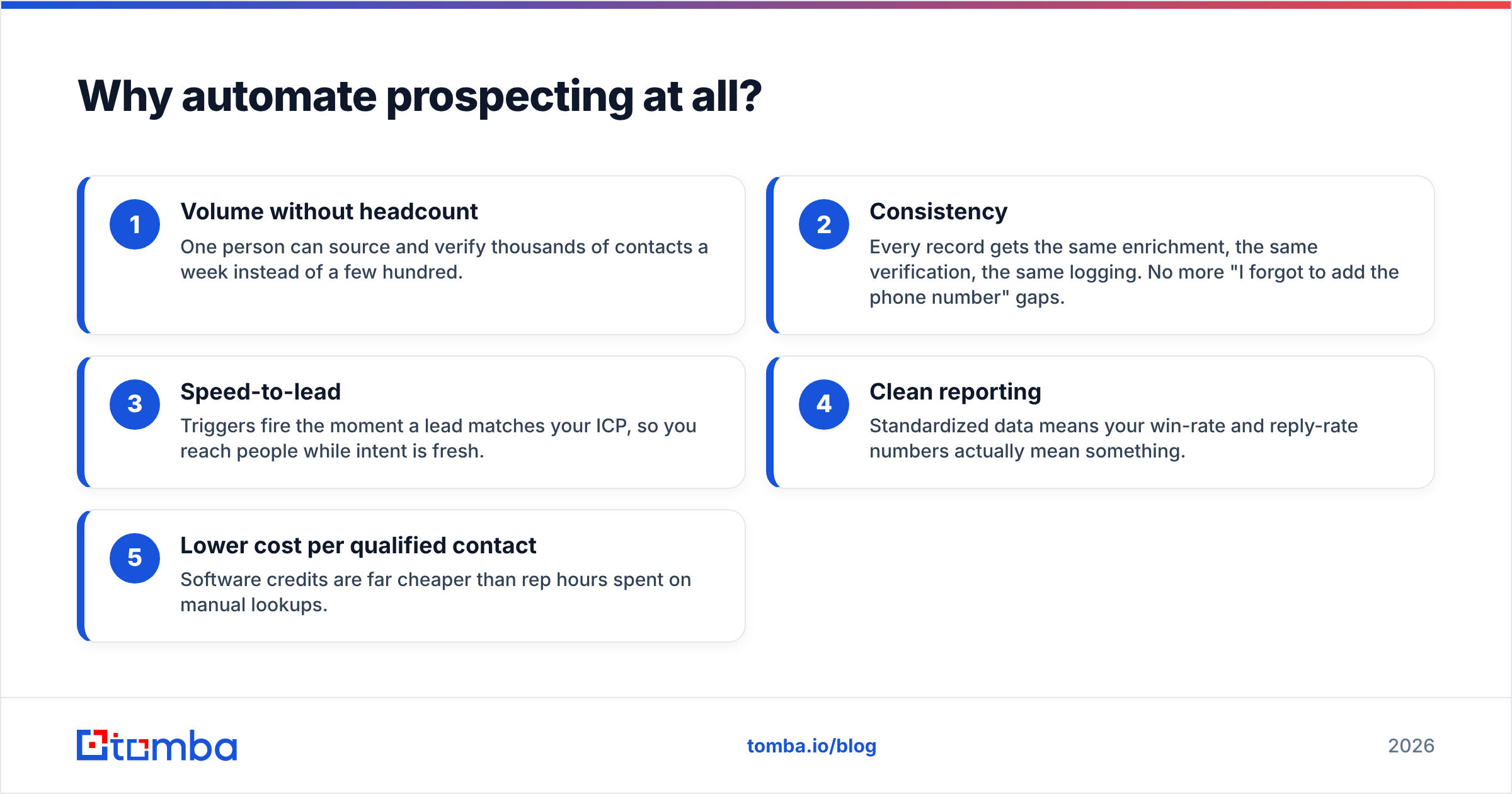
- Volume without headcount — One person can source and verify thousands of contacts a week instead of a few hundred.
- Consistency — Every record gets the same enrichment, the same verification, the same logging. No more "I forgot to add the phone number" gaps.
- Speed-to-lead — Triggers fire the moment a lead matches your ICP, so you reach people while intent is fresh.
- Clean reporting — Standardized data means your win-rate and reply-rate numbers actually mean something.
- Lower cost per qualified contact — Software credits are far cheaper than rep hours spent on manual lookups.
The catch: automation amplifies whatever you feed it. Feed it a sharp ICP and verified data, and it compounds your results. Feed it junk, and it compounds your bounces.
What does an automated prospecting stack look like?#
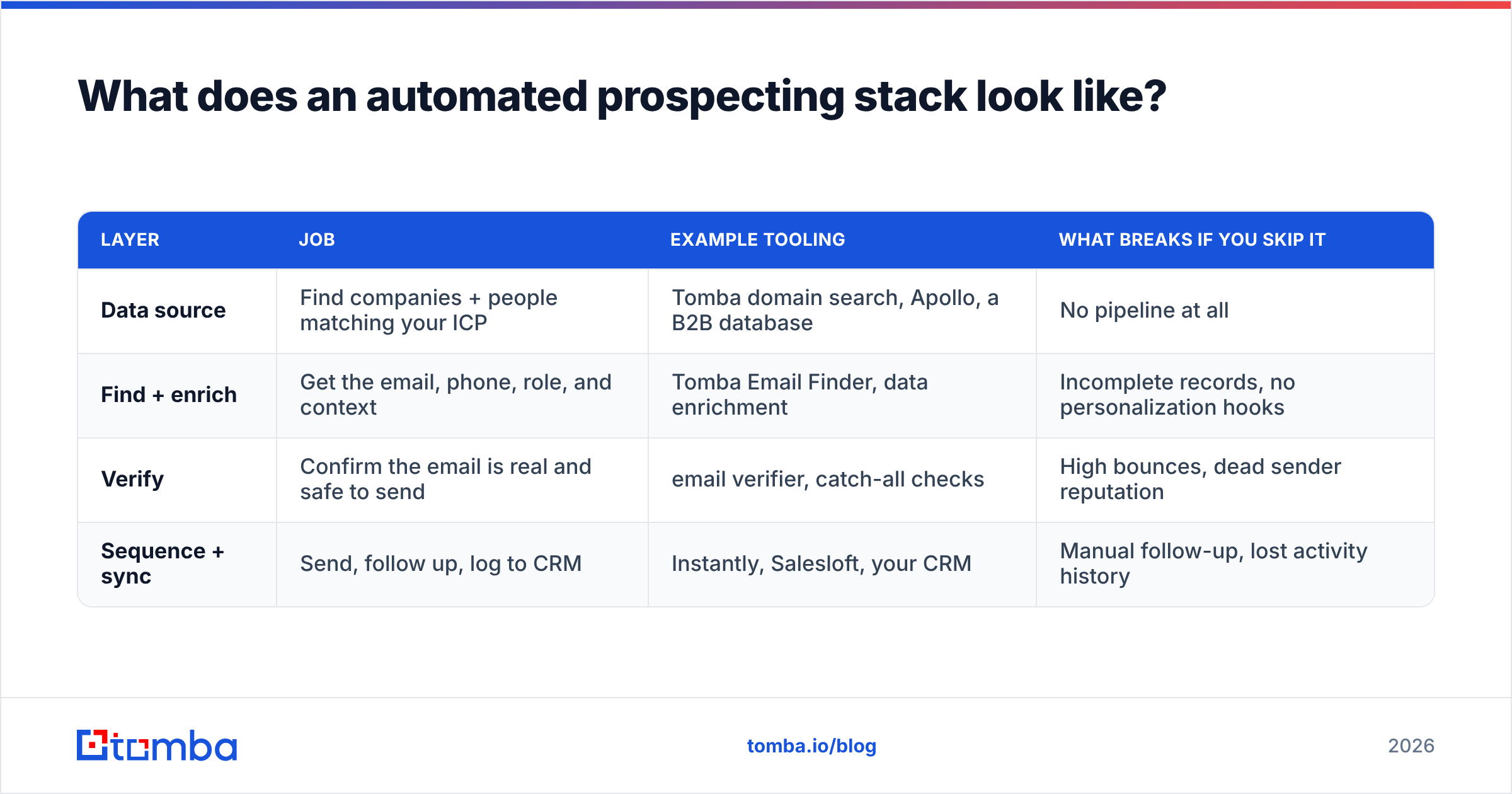
Every functional automated prospecting system has four layers. You can buy them as separate best-in-class tools or as one bundled platform, but the layers themselves are non-negotiable.
| Layer | Job | Example tooling | What breaks if you skip it |
|---|---|---|---|
| Data source | Find companies + people matching your ICP | Tomba domain search, Apollo, a B2B database | No pipeline at all |
| Find + enrich | Get the email, phone, role, and context | Tomba Email Finder, data enrichment | Incomplete records, no personalization hooks |
| Verify | Confirm the email is real and safe to send | email verifier, catch-all checks | High bounces, dead sender reputation |
| Sequence + sync | Send, follow up, log to CRM | Instantly, Salesloft, your CRM | Manual follow-up, lost activity history |
The single most common failure is treating verification as optional. People bolt a finder onto a sequencer, skip the verifier to "save a step," and then wonder why their domain lands in spam two weeks later. Verification is the seatbelt of automated prospecting — boring until the moment it saves you.
A concrete build, by budget#
- Lean ($50–100/mo): Tomba Starter at $49/mo for finding + verifying, plus a low-cost sequencer. Good for a solo founder or a single SDR.
- Team ($150–400/mo): Tomba Growth or Pro for higher volume and bulk lead generation, plus a sequencing platform with shared inboxes and a CRM sync.
- Scaled (custom): API-first setup wiring the email finder API directly into your data warehouse and CRM, with enrichment running on every inbound signup.
How do you build the workflow step by step?#
A repeatable automated prospecting workflow looks like this. Each step should hand off cleanly to the next without a human re-typing anything.
- Define the trigger. Decide what starts the pipeline: a new company matching your ICP, a website visitor, a funding announcement, or a list import. Triggers beat batch-and-blast because they catch intent.
- Source the accounts. Pull target domains from a database or your ICP filters. Keep the list tight — 200 well-fit accounts beat 2,000 random ones.
- Find the people. Run domain search to pull the right roles per account, then resolve individual emails with the finder. This is where a bulk email finder earns its keep.
- Enrich the record. Add job title, seniority, company size, tech stack, and a personalization hook. Pipe this through data enrichment so every row is ready to use.
- Verify before you send. Run every address through verification and flag catch-all domains. Drop or quarantine anything risky.
- Sequence with human checkpoints. Auto-load contacts into a sequence, but require a rep to approve the first touch and write the custom line.
- Sync and score. Push activity to the CRM, score replies, and feed positive signals back into the trigger for lookalike sourcing.
The handoffs are everything. If step 4 dumps a CSV that a human has to clean before step 5, you do not have an automated pipeline — you have a slower manual one with extra software bills.

What should you automate vs. keep human?#
This is the question that separates teams with 8% reply rates from teams with 1%. Automate the mechanical work. Protect the human work.
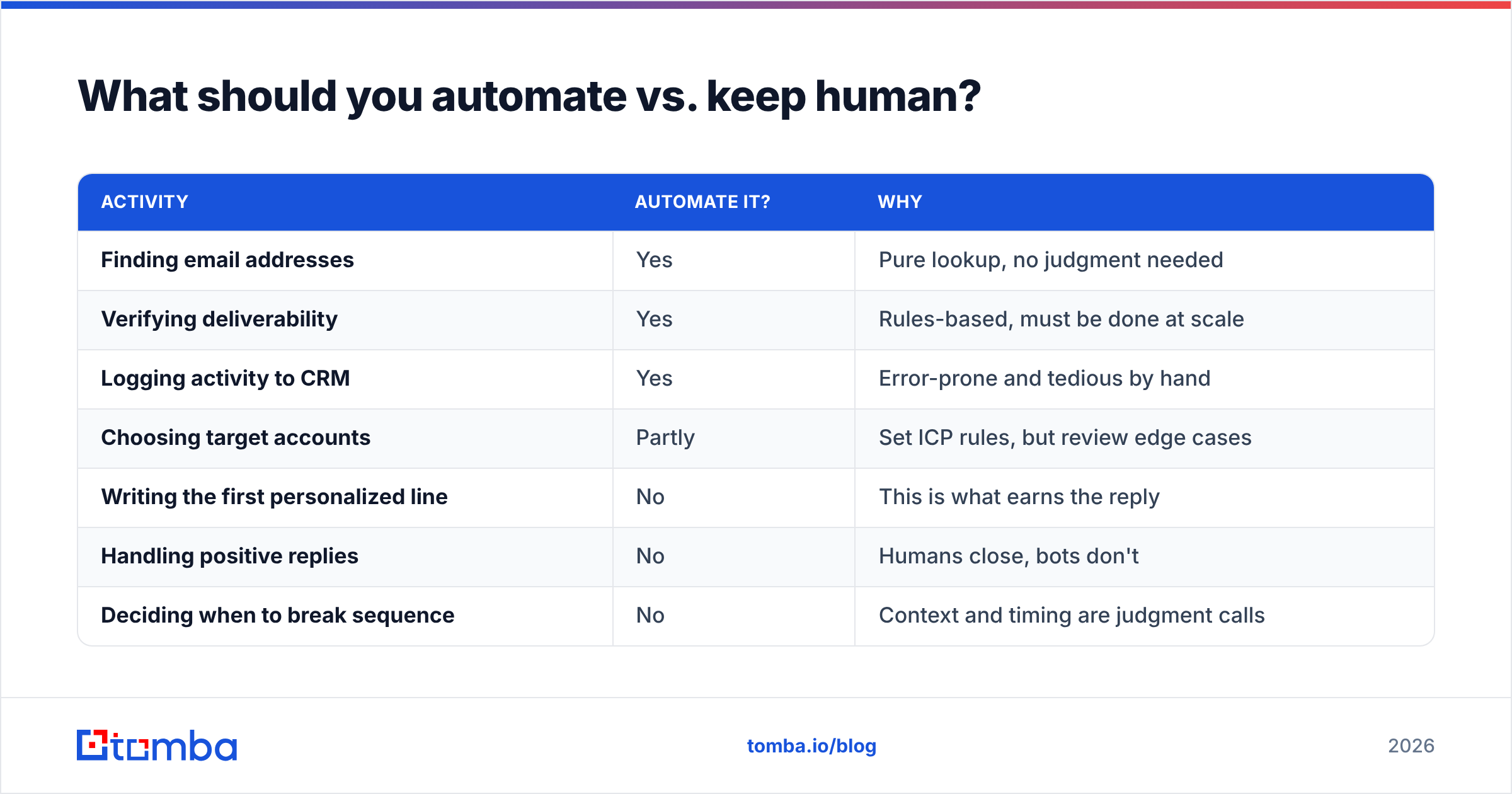
| Activity | Automate it? | Why |
|---|---|---|
| Finding email addresses | Yes | Pure lookup, no judgment needed |
| Verifying deliverability | Yes | Rules-based, must be done at scale |
| Logging activity to CRM | Yes | Error-prone and tedious by hand |
| Choosing target accounts | Partly | Set ICP rules, but review edge cases |
| Writing the first personalized line | No | This is what earns the reply |
| Handling positive replies | No | Humans close, bots don't |
| Deciding when to break sequence | No | Context and timing are judgment calls |
The teams that lose are the ones that automate the reply-earning parts — generic merge-tag personalization, AI-spun "I loved your post" lines that clearly weren't read. Buyers can smell it. Automate the path to the inbox; let a human own the message that lands there. If you want help with the message itself, a cold email AI assist plus human editing beats either one alone.
Is automated prospecting the same as spam?#
No — and the difference is entirely about data quality and relevance, not volume. Spam is unsolicited, irrelevant, and sent to addresses that were scraped without verification. Compliant automated prospecting is targeted, relevant to the recipient's role, and sent to verified, business-context addresses with a clear opt-out.
Two technical practices keep you on the right side of the line:
- Verify everything. Sending to invalid or catch-all addresses spikes bounces, which platforms read as a spammer signal. Protect sender reputation by cleaning lists before every send.
- Respect deliverability hygiene. Warm up domains, keep daily volume sane per inbox, and monitor email deliverability signals. Automation lets you send more, which means bad hygiene hurts you faster.
Tools like G2's sales engagement category list dozens of platforms that handle the sending side; the differentiator between them is rarely features and almost always how clean your input data is. That is upstream of the sequencer — it lives in your finder and verifier.
How do you measure if automation is working?#
Track the funnel, not just the activity. Volume metrics ("we sent 5,000 emails") are vanity. The numbers that matter measure whether automation improved efficiency without degrading quality.
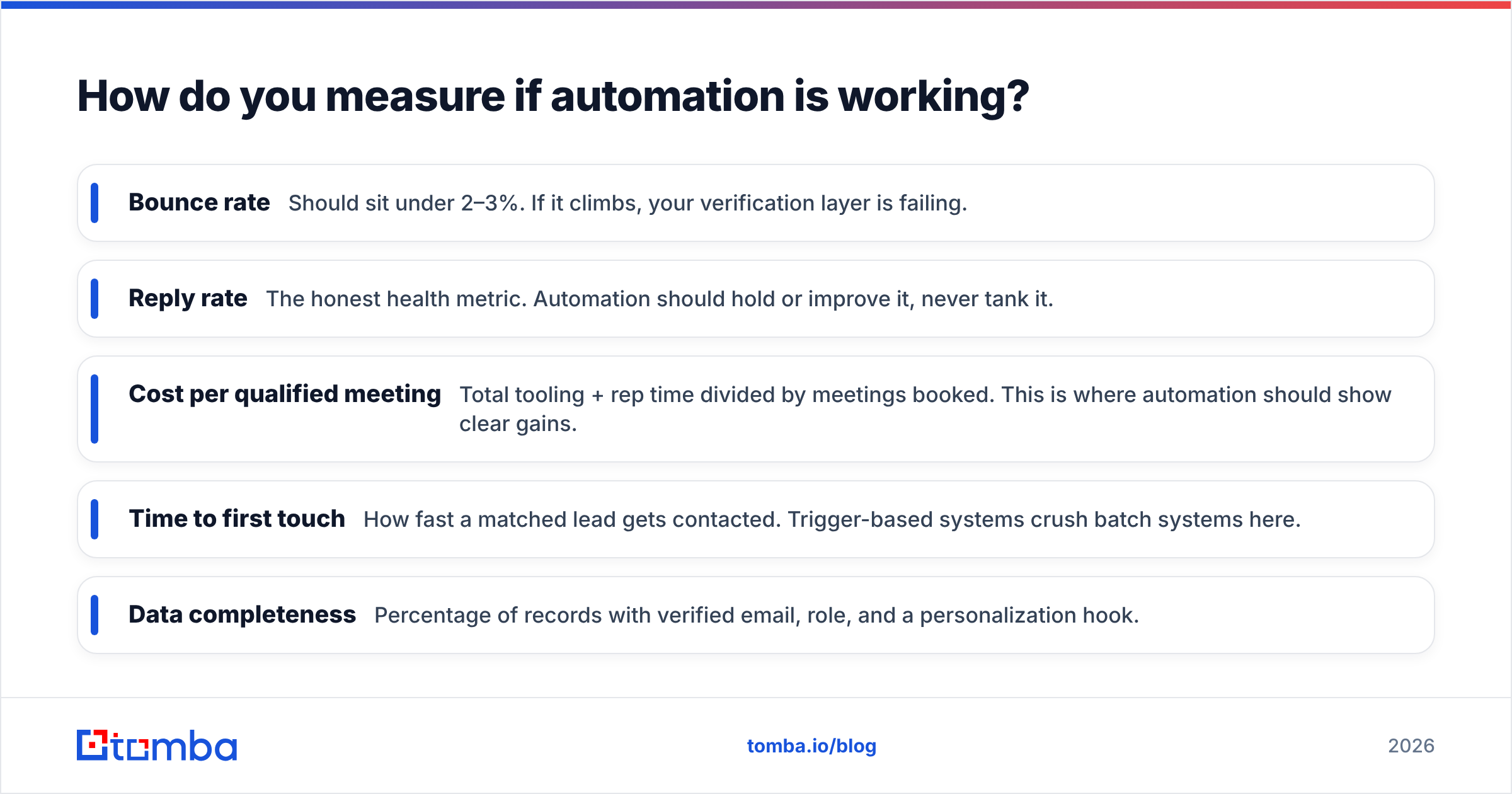
- Bounce rate — Should sit under 2–3%. If it climbs, your verification layer is failing.
- Reply rate — The honest health metric. Automation should hold or improve it, never tank it.
- Cost per qualified meeting — Total tooling + rep time divided by meetings booked. This is where automation should show clear gains.
- Time to first touch — How fast a matched lead gets contacted. Trigger-based systems crush batch systems here.
- Data completeness — Percentage of records with verified email, role, and a personalization hook.
If reply rate drops as volume rises, you have over-automated the human layer. Pull back personalization into human hands and re-test.
Common automated prospecting mistakes#
- Skipping verification to save credits. You will pay it back tenfold in deliverability damage.
- Buying static lists. Contact data decays roughly 25–30% per year as people change jobs. Automate fresh sourcing instead of resurrecting a 2024 CSV.
- One mega-sequence for everyone. Segment by role and trigger. A VP and an analyst should not get the same message.
- No human in the loop. Fully automated outreach reads as fully automated. Keep approval checkpoints.
- Ignoring catch-all domains. They look valid but silently swallow mail. Use a catch-all verifier to handle them deliberately.
Frequently asked questions#
Is automated prospecting worth it for a small team? Yes — arguably more so, because small teams feel the time savings immediately. A two-person team can punch far above its weight with a finder, a verifier, and a sequencer wired together.
How much does an automated prospecting stack cost? A functional setup starts around $49/mo for the data and verification layer, plus your sequencer. See Tomba pricing for the finder/verifier tiers.
Does automation hurt personalization? Only if you automate the wrong layer. Automate finding, verifying, and logging; keep the message human. Done right, automation gives reps more time to personalize.
What's the first thing to automate? Email finding and verification. It is the highest-volume, lowest-judgment task and the one that protects everything downstream.
Start with clean, verified data#
Automated prospecting only compounds in your favor when the data underneath it is real. Every wasted credit, every bounce, every "this person left the company" reply traces back to the finding-and-verifying layer — so that is where to start. Tomba's Email Finder pulls verified professional emails by name, company, or domain, and pairs with built-in verification so you are sequencing real people, not guesses. Spin up the free tier with 25 searches, wire it into your workflow, and let automation amplify good data instead of bad. Build the engine once; let it run while you sell.
Ready to find emails that actually work?
Join 150,000+ professionals who stopped guessing and started sending. Free credits on signup — no credit card required.
Get the Tomba newsletter
Practical outbound tactics and product updates — once every two weeks.
About the author