Automated Sales Process: The 2026 Playbook for Scaling Revenue
An automated sales process removes the busywork that kills reps' selling time. Here's how to map, build, and measure one in 2026 — stage by stage.
Automated Sales Process: The 2026 Playbook for Scaling Revenue
Reps spend less than a third of their week actually selling. The rest disappears into data entry, list building, follow-up reminders, and copy-pasting between tabs. An automated sales process is how you claw that time back — by handing repeatable steps to software and keeping humans where judgment matters.
This guide breaks down what an automated sales process actually is, the stages worth automating, the tools that do it in 2026, and how to measure whether it's working.
TL;DR#
- An automated sales process uses software to run repeatable steps — prospecting, data entry, follow-ups, routing — so reps spend time on conversations, not admin.
- Automate the boring middle, not the human ends: lead capture, enrichment, sequencing, and CRM hygiene are prime targets; discovery calls and negotiation are not.
- Start with data quality. Automation amplifies whatever you feed it — bad emails and stale records just fail faster at scale.
- Stack matters less than sequence. Map your pipeline first, then bolt automation onto the stages that leak time.
- Measure with cycle time and rep selling-hours, not just "number of automations live."
What is an automated sales process?#
An automated sales process is a sales workflow where the predictable, rules-based steps run without a human pushing every button. Think of it like a dishwasher versus washing by hand: you still load it and decide what goes in, but the scrubbing happens on its own while you do something more valuable.
Technically, it's a chain of triggers and actions across your tech stack. A form submission triggers lead enrichment. A closed-won deal triggers an onboarding email. A prospect opening three emails triggers a task for the rep to call. The reps still sell — they just stop doing the manual plumbing between every step.
The key distinction: automation handles the process, not the relationship. You're not replacing the salesperson. You're deleting the 200 small frictions that stop them from getting to the next conversation.
Which sales stages should you actually automate?#
Not every stage benefits. Automating a discovery call would be a disaster; automating list-building is a no-brainer. Here's where the leverage actually sits across a typical B2B pipeline:
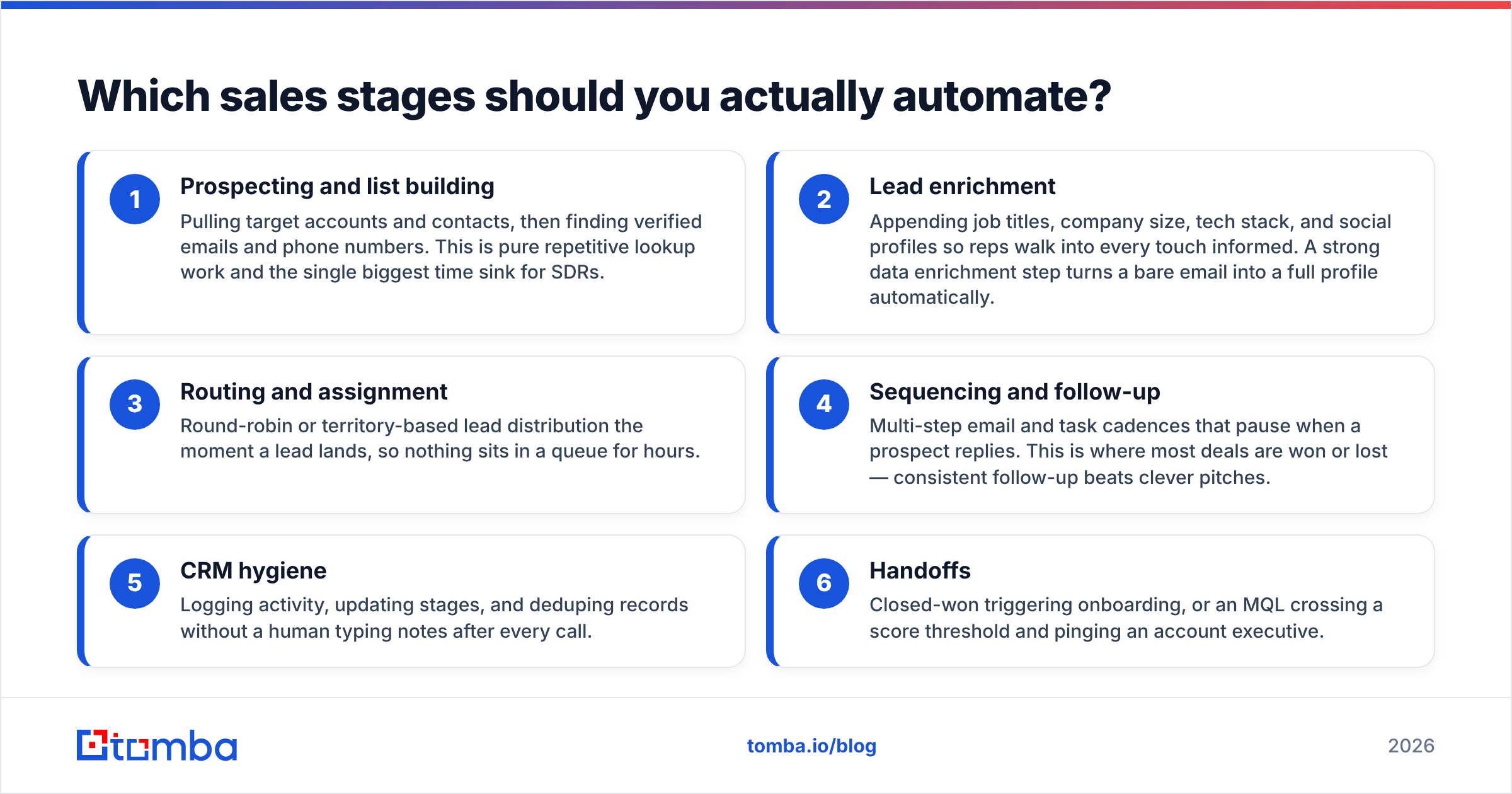
- Prospecting and list building — Pulling target accounts and contacts, then finding verified emails and phone numbers. This is pure repetitive lookup work and the single biggest time sink for SDRs.
- Lead enrichment — Appending job titles, company size, tech stack, and social profiles so reps walk into every touch informed. A strong data enrichment step turns a bare email into a full profile automatically.
- Routing and assignment — Round-robin or territory-based lead distribution the moment a lead lands, so nothing sits in a queue for hours.
- Sequencing and follow-up — Multi-step email and task cadences that pause when a prospect replies. This is where most deals are won or lost — consistent follow-up beats clever pitches.
- CRM hygiene — Logging activity, updating stages, and deduping records without a human typing notes after every call.
- Handoffs — Closed-won triggering onboarding, or an MQL crossing a score threshold and pinging an account executive.
The pattern: automate anything that is rules-based, high-volume, and low-judgment. Leave anything that needs empathy, negotiation, or creativity to the human.
Manual vs automated sales process: what changes?#
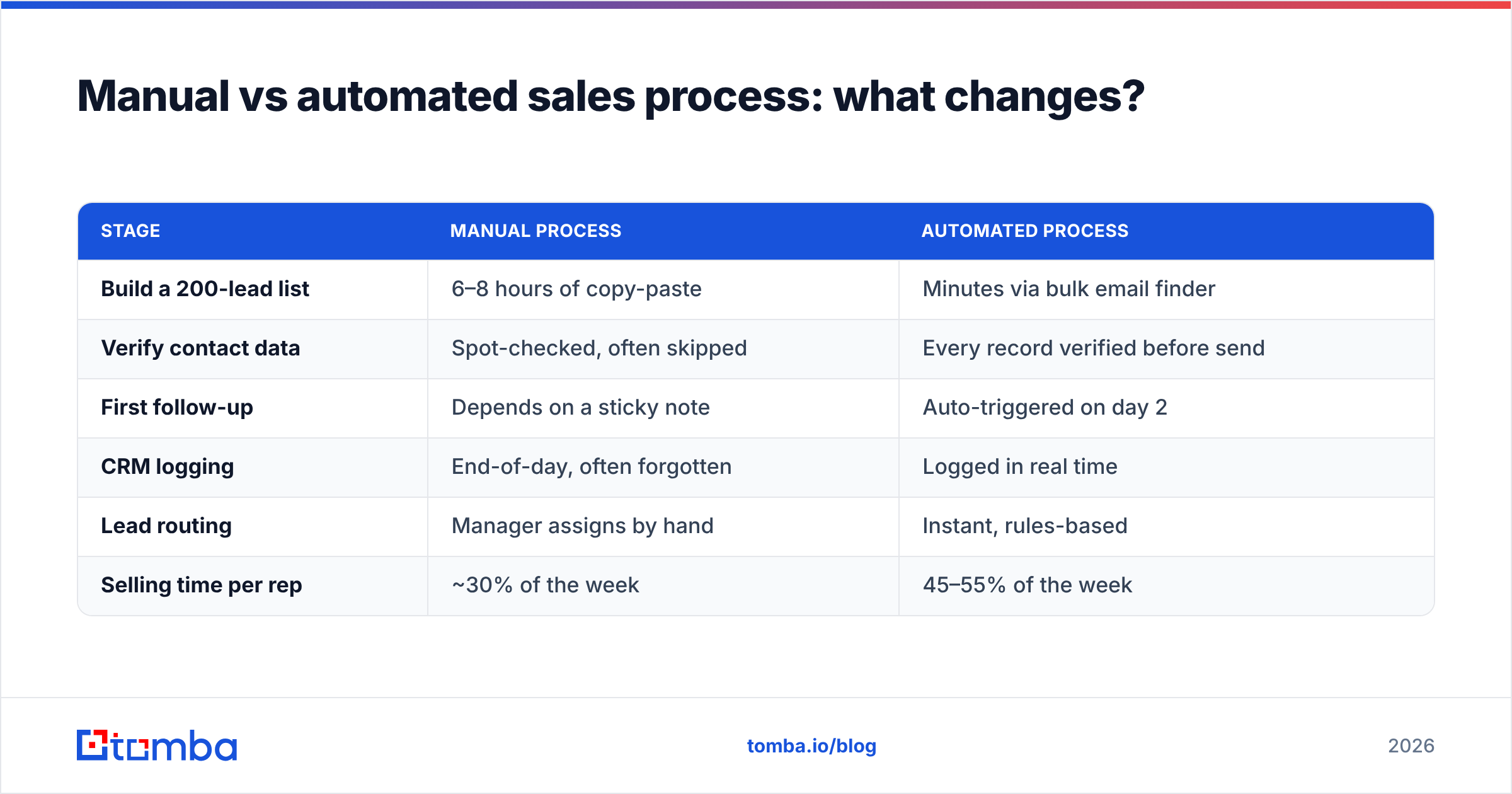
The difference compounds. A manual process loses a little time at every step; an automated one loses almost none, and the gap widens as volume grows.
| Stage | Manual process | Automated process |
|---|---|---|
| Build a 200-lead list | 6–8 hours of copy-paste | Minutes via bulk email finder |
| Verify contact data | Spot-checked, often skipped | Every record verified before send |
| First follow-up | Depends on a sticky note | Auto-triggered on day 2 |
| CRM logging | End-of-day, often forgotten | Logged in real time |
| Lead routing | Manager assigns by hand | Instant, rules-based |
| Selling time per rep | ~30% of the week | 45–55% of the week |
The automated column isn't theoretical — it's the same work, just with the friction removed. The reps in the second column aren't working harder; they're spending their hours on calls and demos instead of spreadsheets.
How do you build an automated sales process step by step?#
Build it in this order. Skipping straight to tools is the most common — and most expensive — mistake.
Step 1 — Map the current process. Write down every stage from "lead enters" to "deal closes," including who does what and how long it takes. You can't automate a process you can't see. This is also where you find the redundant steps worth deleting entirely.
Step 2 — Find the time leaks. Ask reps where their week actually goes. The honest answers — list building, chasing emails, updating the CRM — are your automation backlog, ranked by hours saved.
Step 3 — Fix data quality first. Automation scales whatever you feed it. If your contact data is 30% wrong, you'll now send 30% of your sequences into the void faster than ever. Lock down email finding and verification before you automate outreach.
Step 4 — Automate one stage end to end. Don't try to automate everything at once. Pick the biggest leak — usually prospecting or follow-up — and fully automate it. Prove it works, then move to the next.
Step 5 — Connect the stages. Once individual stages run, wire them together with triggers so a completed step kicks off the next. This is where a process becomes a pipeline.
Step 6 — Measure and tune. Track cycle time, reply rates, and rep selling-hours. Kill automations that don't move a number.
What tools power an automated sales process in 2026?#
The stack splits into four layers. You rarely need a single all-in-one suite — most teams assemble best-of-breed tools connected by an automation layer like [
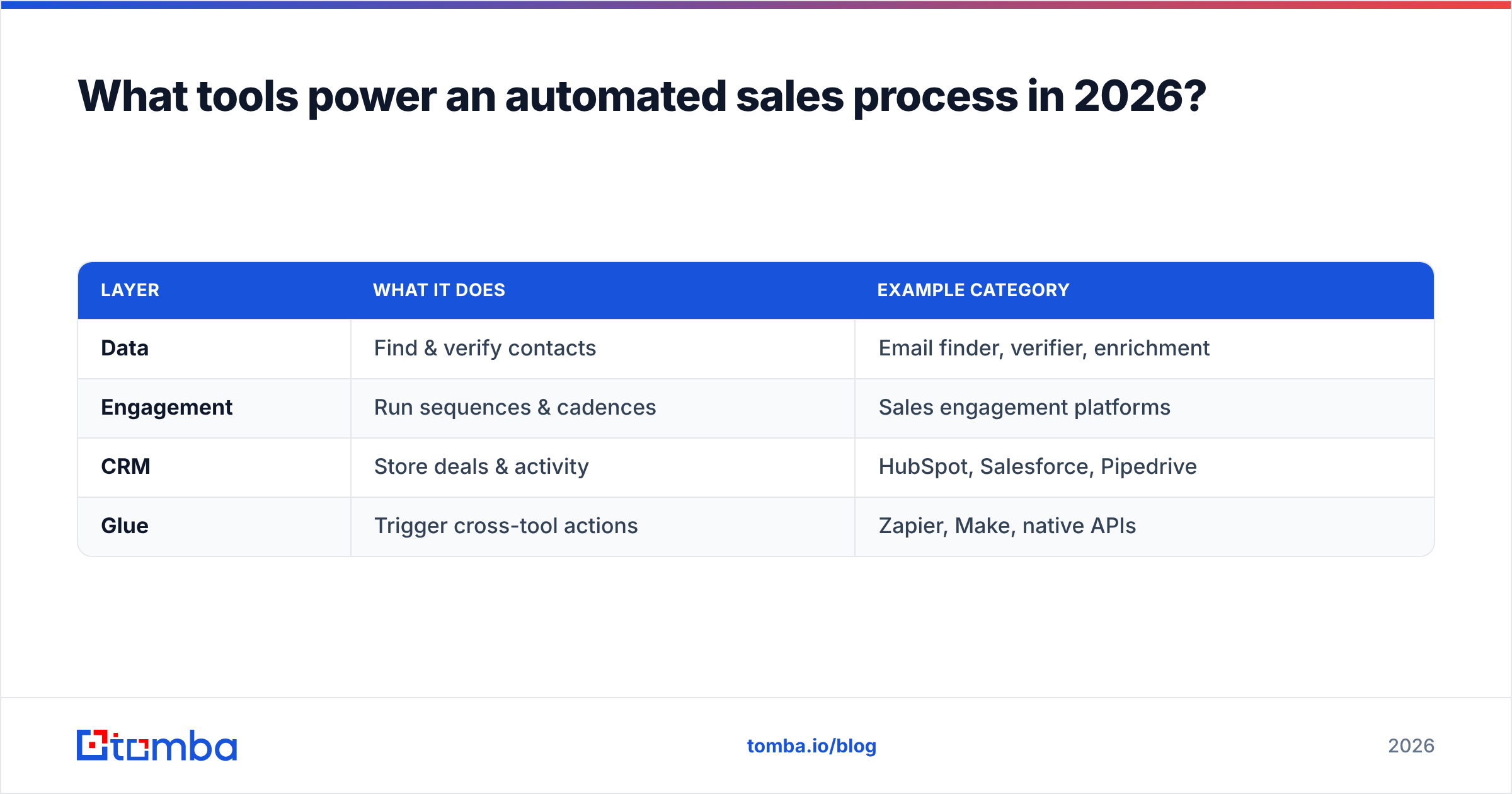
Zapier](https://tomba.io/integrations/zapier) or Make.
| Layer | What it does | Example category |
|---|---|---|
| Data | Find & verify contacts | Email finder, verifier, enrichment |
| Engagement | Run sequences & cadences | Sales engagement platforms |
| CRM | Store deals & activity | HubSpot, Salesforce, Pipedrive |
| Glue | Trigger cross-tool actions | Zapier, Make, native APIs |
The data layer is the foundation — and the one teams most often underinvest in. Every downstream automation depends on accurate contacts. Tools like Tomba's email finder plug into this layer to supply verified addresses on demand, either through the dashboard, a Chrome extension, or the email finder API for fully programmatic pipelines.
For context on the broader category and what "good" looks like, G2's sales engagement software grid and HubSpot's guide to sales automation are useful neutral references.
How do you keep automation from feeling robotic?#
The fastest way to ruin an automated sales process is to make prospects feel automated at. The fix is personalization at scale — using the enriched data you already collected to make each touch specific.
- Use real variables, not just {{first_name}}. Reference the prospect's role, recent company news, or tech stack — fields you enriched in step 3.
- Trigger on behavior, not calendars. A sequence that responds to an email open or a pricing-page visit feels timely; one that fires on a fixed schedule feels like spam.
- Always pause on reply. Nothing kills trust faster than a "just following up" email arriving the day after someone already responded.
- Keep a human in the loop at the threshold. When a lead hits a qualifying score, the next action should be a human reaching out — not another automated email.
Automation should make outreach feel more personal, because the rep now has time to actually personalize. If it makes outreach feel more generic, you automated the wrong thing.
What metrics prove your automation is working?#
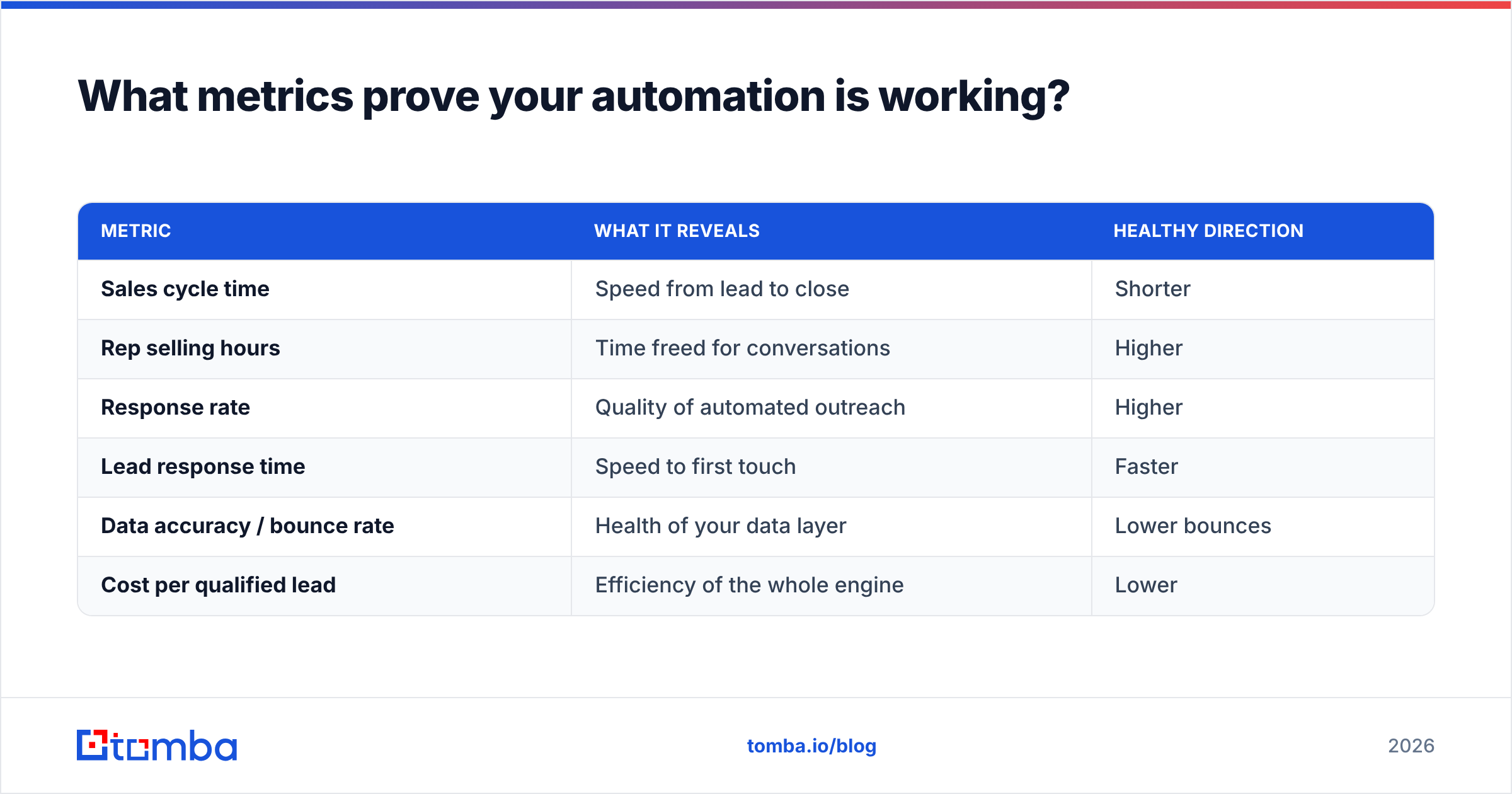
Counting how many automations you've built tells you nothing. These numbers do:
| Metric | What it reveals | Healthy direction |
|---|---|---|
| Sales cycle time | Speed from lead to close | Shorter |
| Rep selling hours | Time freed for conversations | Higher |
| Response rate | Quality of automated outreach | Higher |
| Lead response time | Speed to first touch | Faster |
| Data accuracy / bounce rate | Health of your data layer | Lower bounces |
| Cost per qualified lead | Efficiency of the whole engine | Lower |
If cycle time drops and selling hours rise, the automation is earning its keep. If your bounce rate climbs, your data layer is broken and every downstream metric is lying to you — fix the source before tuning anything else.
Common mistakes that break an automated sales process#
- Automating on bad data. The number one failure. Garbage contacts in, faster garbage out. This is why verification belongs at the front of every pipeline.
- Over-automating the human stages. Auto-sending a "contract ready" email is fine. Auto-handling an objection is not. Know the line.
- Building before mapping. Tools bolted onto an undefined process just automate the chaos.
- No reply detection. Sequences that don't stop when someone replies torch your sender reputation and your brand.
- Set-and-forget. Automations decay. Job titles change, domains change, and an untouched sequence slowly becomes a list of bounces. Review quarterly.
Frequently asked questions#
Does automating my sales process mean fewer reps? No — it means reps spend more of their time selling instead of doing admin. Teams that automate well usually grow pipeline without growing headcount, rather than cutting people.
What's the first thing I should automate? Whichever stage eats the most rep hours, which is almost always prospecting and list building. Verified contact data feeds everything downstream, so it's the highest-leverage starting point.
How much does an automated sales stack cost? It scales with volume. A lean stack — a data tool, a sequencer, and a CRM — can start under $200/month for a small team. The Tomba pricing for the data layer, for example, starts free (25 searches/month) and runs to $49/month on the Starter plan.
Can small teams automate, or is this enterprise-only? Small teams benefit most. With fewer people, every hour saved on admin is a larger percentage of your selling capacity. The tooling is no longer enterprise-priced.
Start with the data layer#
Every automated sales process lives or dies on contact data. Sequences, routing, scoring, and reporting all assume the email and phone number are real — and at scale, "assume" is expensive.
Start there. Tomba's Email Finder finds and verifies professional email addresses by name, domain, or company, then feeds them straight into your CRM and sequencer through native integrations or the API. Build the rest of your automation on contacts you can trust — try the free tier (25 searches/month) and wire up your first automated stage this week.
// get started
Find, verify and enrich your first contacts today
Start on the free plan with 25 searches a month, then scale when your team is ready.
Free plan · No credit card required · GDPR & CCPA
// about the author