Automatic Email Generator Software: Best Tools for 2026
Automatic email generator software writes, personalizes, and scales your outreach in seconds. Here is how the top 2026 tools compare and where each one wins.
Automatic Email Generator Software: Best Tools for 2026
Staring at a blank compose window is the slowest part of any outreach campaign. Automatic email generator software fixes that by turning a few inputs — a name, a company, an offer — into a finished, personalized draft in seconds. But not every "AI email writer" is built for the same job, and picking the wrong one means generic copy that lands in spam.
TL;DR#
- Automatic email generator software uses AI (usually a large language model) to draft, personalize, and sometimes send emails from short prompts or contact data.
- The best tool depends on the job: cold outreach, newsletters, transactional replies, or bulk personalization each reward different features.
- Personalization quality lives or dies on your input data — a generator is only as good as the contact record feeding it.
- Expect to pay $0 to $99/mo for most solo and small-team plans; enterprise personalization engines run higher.
- Pair any generator with a clean, verified contact list — accurate emails are what keep AI-written campaigns out of the spam folder.
What is automatic email generator software?#
Automatic email generator software is any tool that produces ready-to-send email copy from minimal input, instead of you writing every line by hand. You give it context — a recipient, a goal, a tone — and it returns a draft you can send, tweak, or run through an approval step.
Think of it like a GPS for writing. You still choose the destination (the goal of the email) and you can override the route (edit the copy), but the software handles the turn-by-turn work of phrasing, structure, and personalization tokens. Technically, most modern generators sit on top of a large language model and layer in templates, brand-voice rules, and merge fields pulled from your CRM or a lead list.
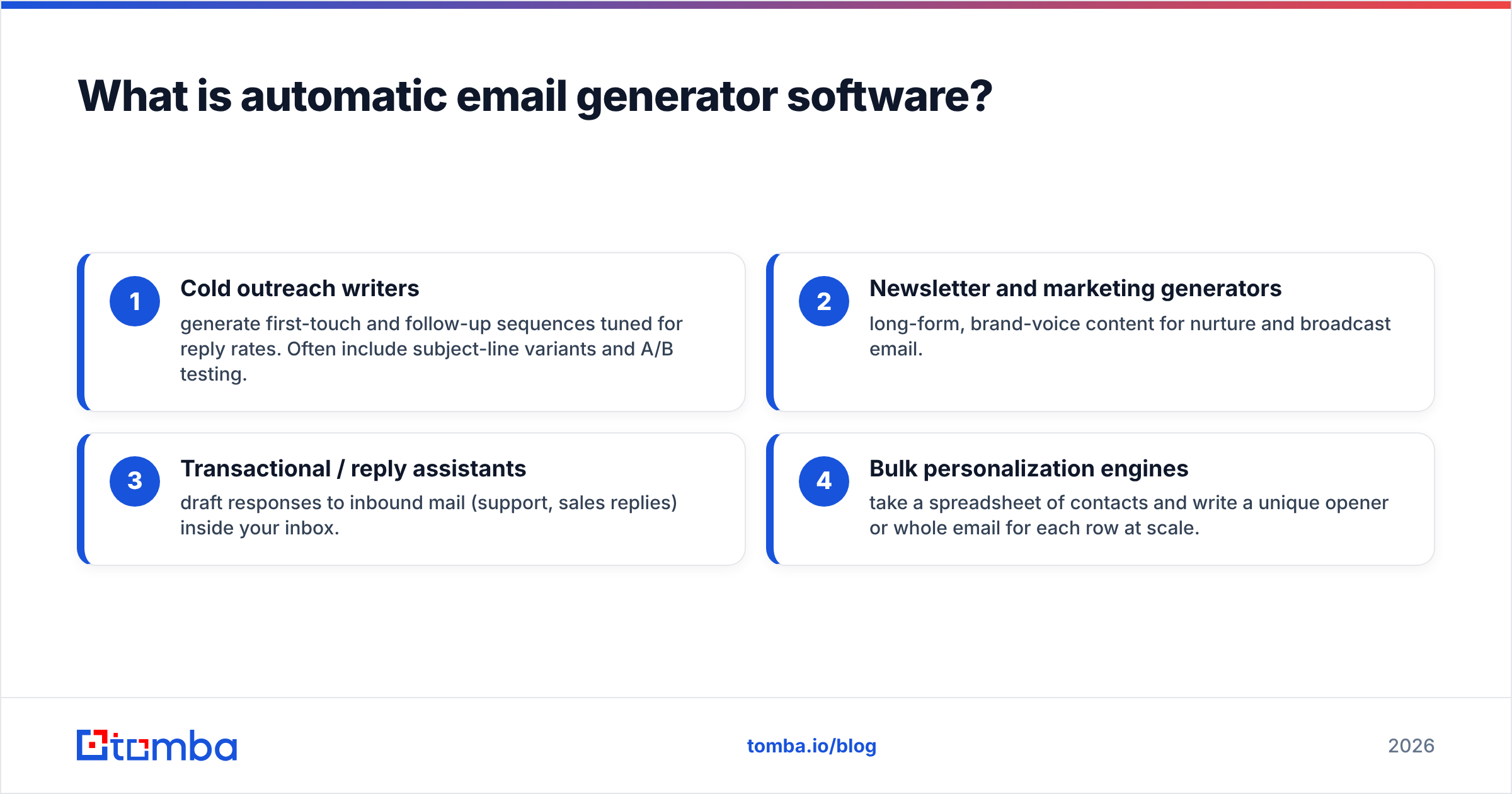
These tools generally fall into four buckets:
- Cold outreach writers — generate first-touch and follow-up sequences tuned for reply rates. Often include subject-line variants and A/B testing.
- Newsletter and marketing generators — long-form, brand-voice content for nurture and broadcast email.
- Transactional / reply assistants — draft responses to inbound mail (support, sales replies) inside your inbox.
- Bulk personalization engines — take a spreadsheet of contacts and write a unique opener or whole email for each row at scale.

Why use an automatic email generator at all?#
Because speed and personalization usually trade off against each other — and good software lets you keep both. Writing 200 genuinely personalized cold emails by hand is a full day of work. A generator does it in minutes, and the better ones reference real, contact-specific details so the copy still reads like a human wrote it.
The measurable wins teams report:
- Throughput: 5–10x more drafts per rep per hour.
- Consistency: brand voice and CTA structure stay uniform across a team.
- Testing: instant subject-line and opener variants make A/B testing trivial.
- Lower writer's block: reps start from a draft, not a blank page.
The catch: a generator amplifies whatever data you feed it. Send it a contact with the wrong email or a stale job title and it confidently writes a personalized message to the wrong person. That is why the strongest workflows put a verified contact list in front of the writer, not after it.
How does automatic email generator software actually work?#
Most tools follow the same four-step loop under the hood:
- Input capture — you provide a prompt, a template, or a CRM record. Bulk tools ingest a CSV or pull rows via API.
- Context assembly — the software combines your input with personalization fields (name, company, role, recent activity) and any brand-voice settings.
- Generation — a language model drafts the copy, often producing several variants for subject lines and openers.
- Review and send — output lands in an editor, a sequencer, or directly in your inbox for approval before sending.
The single biggest quality lever is the context assembly step. A generator with rich, accurate contact data writes "Saw your team just opened a Berlin office" instead of "I hope this email finds you well." That context comes from your data sources, which is why data enrichment and email generation are increasingly bundled in the same workflow.
What are the best automatic email generator tools in 2026?#
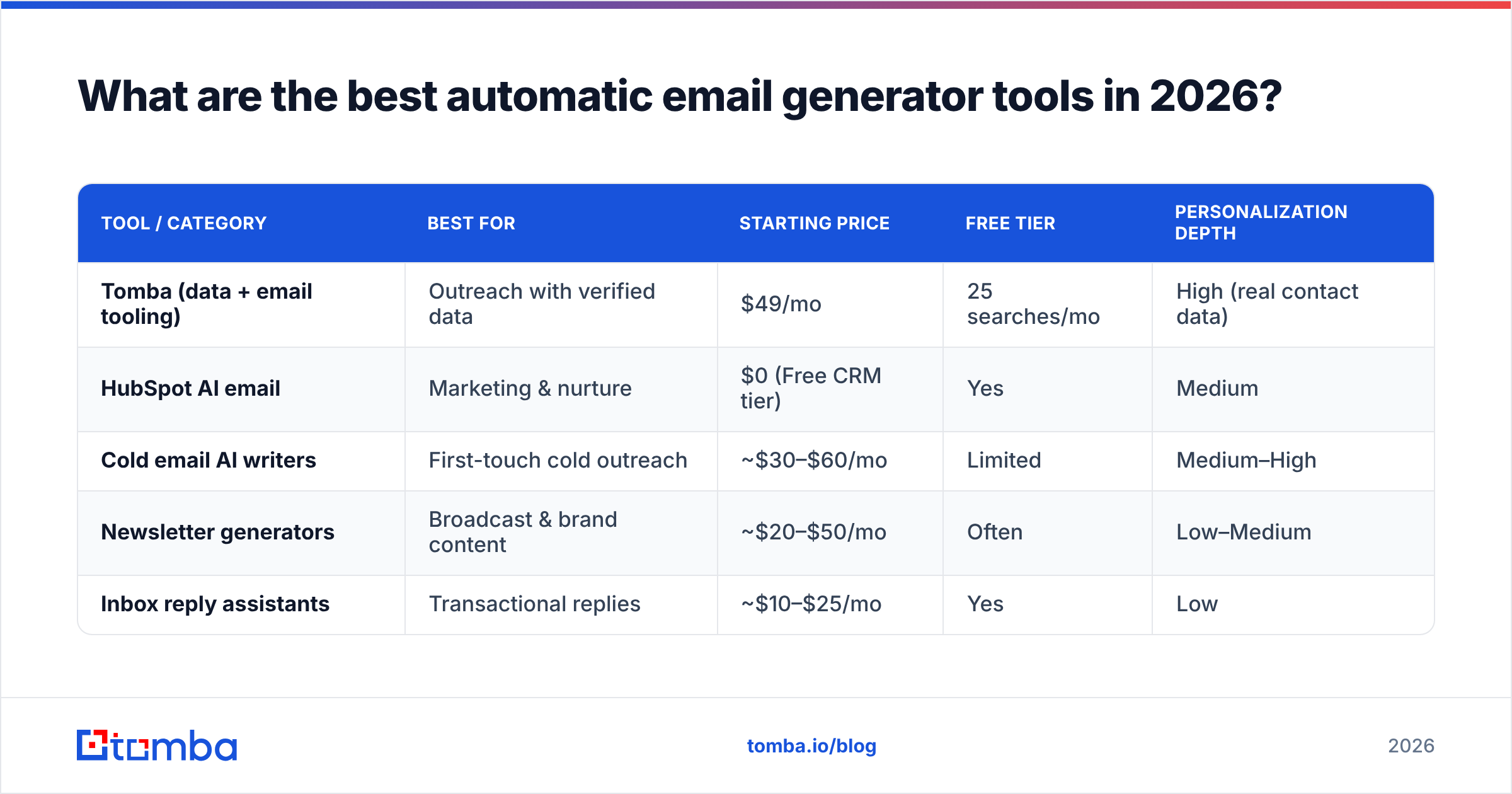
There is no single winner — the right pick depends on whether you are sending cold outreach, newsletters, or inbox replies. The table below compares the categories most teams shortlist, using representative entry pricing and the job each one is built for.
| Tool / Category | Best for | Starting price | Free tier | Personalization depth |
|---|---|---|---|---|
| Tomba (data + email tooling) | Outreach with verified data | $49/mo | 25 searches/mo | High (real contact data) |
| HubSpot AI email | Marketing & nurture | $0 (Free CRM tier) | Yes | Medium |
| Cold email AI writers | First-touch cold outreach | ~$30–$60/mo | Limited | Medium–High |
| Newsletter generators | Broadcast & brand content | ~$20–$50/mo | Often | Low–Medium |
| Inbox reply assistants | Transactional replies | ~$10–$25/mo | Yes | Low |
A few notes on reading this table:
- Free tiers vary wildly. Some give you real generation credits; others gate AI behind a paid upgrade and only free the basic editor.
- "Personalization depth" is about data, not the model. Two tools using the same underlying LLM produce very different results if one has access to verified company and role data and the other only has a first name.
- Pricing is per-seat or per-credit. Bulk personalization engines that write a unique email per row usually meter by generation volume, so model your real send numbers before committing.
For a broader, continuously updated view of user-rated options, browse the email marketing software category on G2 — it is a useful sanity check against vendor marketing claims.
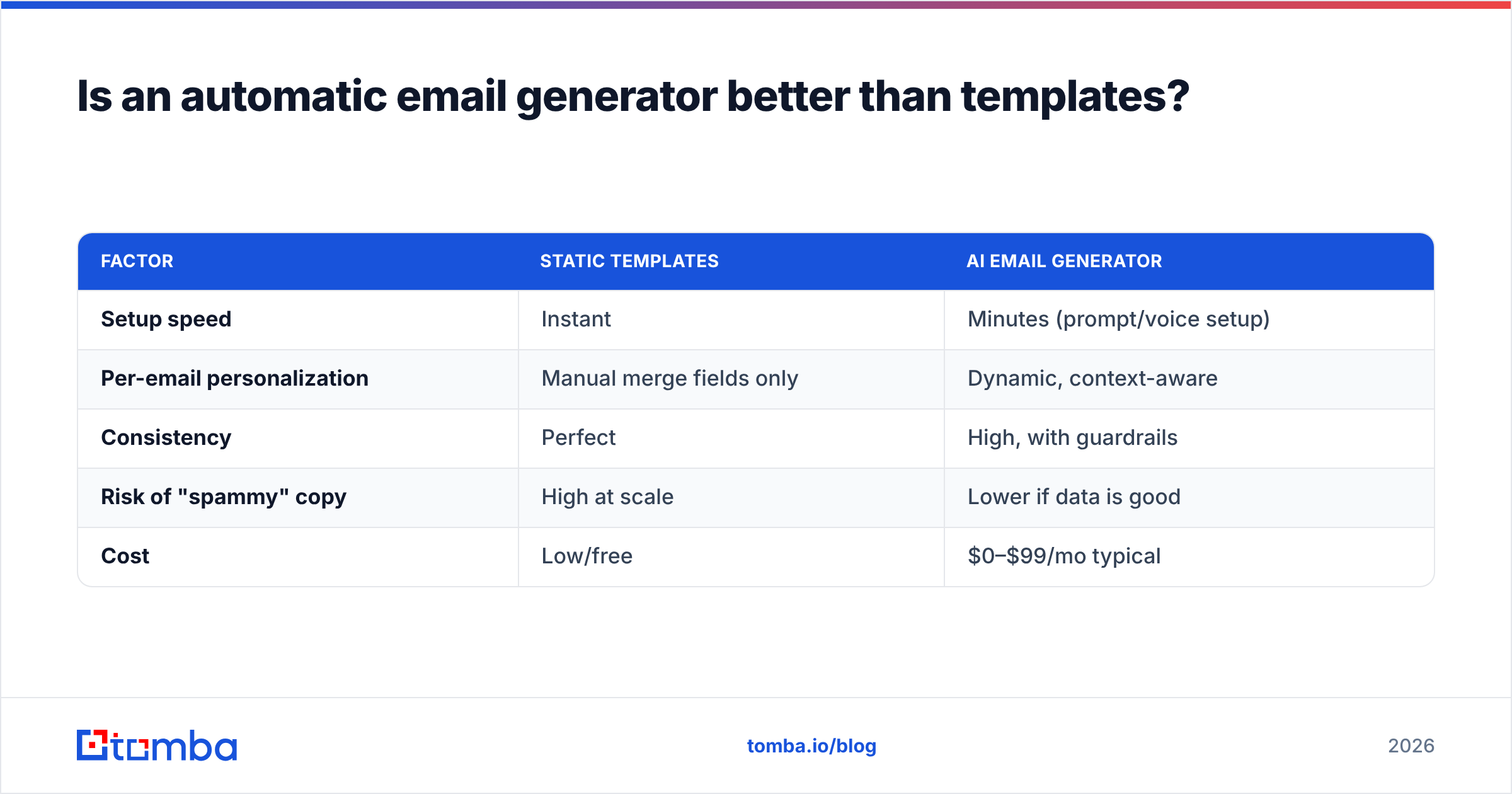
Is an automatic email generator better than templates?#
For most outbound teams, yes — but templates still win for high-volume transactional mail. Static templates are fast and predictable, which is exactly what you want for a password reset or a receipt. They fall apart for outreach, where the same canned paragraph sent to 500 prospects reads as obvious spam and tanks your reply rate.
Here is the honest trade-off:
| Factor | Static templates | AI email generator |
|---|---|---|
| Setup speed | Instant | Minutes (prompt/voice setup) |
| Per-email personalization | Manual merge fields only | Dynamic, context-aware |
| Consistency | Perfect | High, with guardrails |
| Risk of "spammy" copy | High at scale | Lower if data is good |
| Cost | Low/free | $0–$99/mo typical |
The pragmatic answer most teams land on: use a generator to produce the email and a template library to standardize the parts that should never change (legal footer, CTA structure, signature). If you want a starting library, Tomba's free cold email templates pair well with an AI writer — generate the personalized opener, drop it into a proven frame.
What features actually matter when choosing one?#
Prioritize data quality and deliverability controls over the flashy "write my whole campaign" button. A generator that produces gorgeous copy to an unverified or catch-all address still bounces. Here is the checklist that separates a serious tool from a toy:
- Verified data integration — can it pull or validate real contact info before writing? This is the difference between personalized and wrong.
- Brand-voice controls — tone presets, banned-phrase lists, and the ability to train on your past winners.
- Subject-line variants — automatic A/B options, ideally with a built-in subject line tester.
- Bulk + API support — if you send at scale, you need CSV ingestion or an API, not just a one-at-a-time editor.
- Deliverability hygiene — spam-score checking, SPF/DKIM awareness, and integration with verification so you are not writing to dead inboxes.
- Human-in-the-loop review — a clear approval step before anything sends. Fully autonomous sending is where reputations get burned.
If you only optimize one of these, make it the first. Clean input data is the highest-leverage upgrade you can give any AI writer.
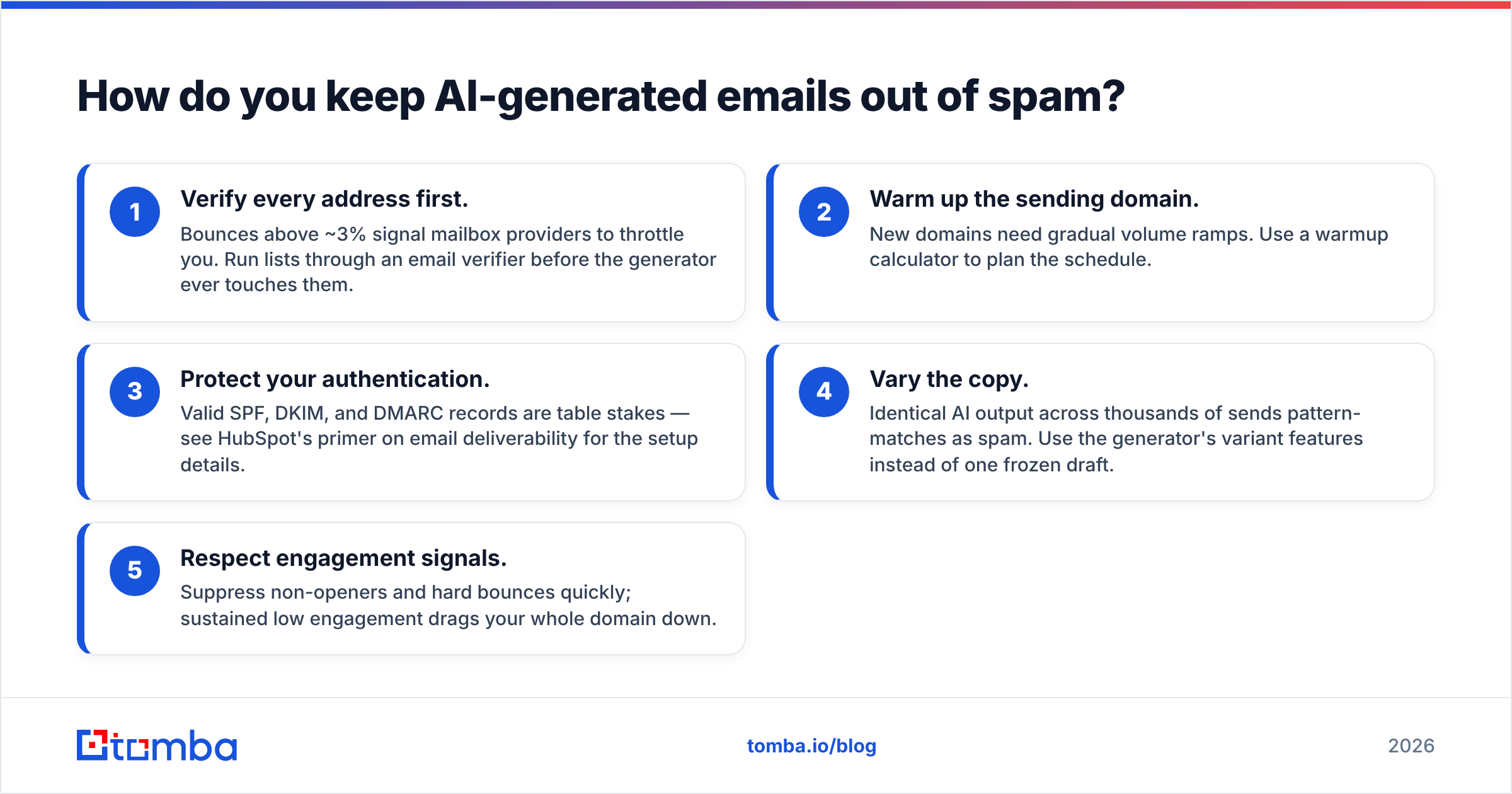
How do you keep AI-generated emails out of spam?#
Generation quality is half the battle; the other half is who you send to and how warm your domain is. Even perfect copy fails if you blast a cold domain or write to addresses that bounce. The fundamentals, in order of impact:
- Verify every address first. Bounces above ~3% signal mailbox providers to throttle you. Run lists through an email verifier before the generator ever touches them.
- Warm up the sending domain. New domains need gradual volume ramps. Use a warmup calculator to plan the schedule.
- Protect your authentication. Valid SPF, DKIM, and DMARC records are table stakes — see HubSpot's primer on email deliverability for the setup details.
- Vary the copy. Identical AI output across thousands of sends pattern-matches as spam. Use the generator's variant features instead of one frozen draft.
- Respect engagement signals. Suppress non-openers and hard bounces quickly; sustained low engagement drags your whole domain down.
Notice that two of the top three items are about data and infrastructure, not writing. The generator is the easy part. For the underlying concepts, the email deliverability glossary entry is a quick reference.
Who should use automatic email generator software?#
Anyone sending more than a handful of personalized emails a week — but the highest ROI is in outbound sales and lifecycle marketing. A quick fit guide:
- SDRs and account executives — generate personalized cold sequences and follow-ups at volume; the time savings are immediate.
- Marketers — draft newsletters, nurture flows, and re-engagement campaigns on-brand and on-schedule.
- Founders and solo operators — punch above your weight without a copywriter on payroll.
- Support and success teams — speed up reply drafting while keeping a human approval step.
- Recruiters — personalize candidate outreach using role and company context.
If your sending is purely transactional (receipts, alerts), a static template engine is cheaper and more predictable — you do not need AI for a shipping confirmation.
Frequently asked questions#
Is automatic email generator software free? Some tools offer genuine free tiers with limited generation credits, and standalone helpers like a free AI cold email writer or subject line generator cost nothing. Full platforms with bulk personalization and data integration typically start around $20–$49/mo.
Will AI-written emails sound robotic? Only if you feed them thin data. With real contact context and a trained brand voice, modern generators produce copy most recipients cannot distinguish from human writing. The robotic feel almost always traces back to missing personalization input, not the model itself.
Can it send emails automatically too? Many integrate with sequencers or your inbox to send, but you should keep a human approval step. Fully autonomous sending magnifies any data or copy error across your entire list.
Does it replace a copywriter? For volume outreach and first drafts, largely yes. For high-stakes brand campaigns and strategy, it is an assistant that accelerates a human, not a replacement.
The bottom line: data first, then generation#
The fastest way to ruin good automatic email generator software is to point it at a bad contact list. The model will happily write a flawless, personalized message to an address that bounces — and your domain reputation pays the price. Quality outreach is a two-part system: accurate, verified contact data feeding a capable writer.
That is exactly where Tomba fits. Start by building a clean prospect list with the Tomba Email Finder — find verified professional emails by name, domain, or company — then run them through verification before any generator touches the copy. Plans begin with a free tier (25 searches/mo) and scale from Tomba pricing at $49/mo, so you can test the data-first workflow before committing. Get the contacts right, and every AI-written email after that has a real shot at the inbox.
// get started
Find, verify and enrich your first contacts today
Start on the free plan with 25 searches a month, then scale when your team is ready.
Free plan · No credit card required · GDPR & CCPA
// about the author