Avaya Pricing, Reviews, Pros and Cons: 2026 Buyer Guide
A neutral 2026 breakdown of Avaya pricing, real user reviews, and the pros and cons sales and support teams should weigh before signing a contract.
Avaya is one of the oldest names in business communications, and in 2026 it still anchors a lot of enterprise phone and contact center stacks. But "old and established" cuts both ways. Before you sign a multi-year contract, you need a clear-eyed view of what Avaya actually costs, what real users say, and where it falls short.
This is a neutral buyer's guide — not a sales pitch. By the end you'll know whether Avaya fits your team, what the pricing really looks like once add-ons land, and how to keep your outbound pipeline full no matter which phone platform you choose.
TL;DR#
- Avaya runs custom, quote-based pricing. Published "starting" figures (often cited around $20–$45 per user/month for Experience Platform tiers) rarely reflect the final bill once seats, channels, and contact center features are added.
- Strengths: enterprise-grade reliability, deep contact center features (Avaya Experience Platform), hybrid/on-prem options, and strong global voice infrastructure.
- Weaknesses: opaque pricing, long contracts, dated admin UX in places, and slower innovation than cloud-native rivals like RingCentral, Zoom, or Genesys.
- Best fit: mid-market to enterprise contact centers that need reliability, compliance, and on-prem/hybrid flexibility — not small teams wanting plug-and-play setup.
- The pipeline gap: Avaya helps you talk to prospects; it does nothing to find them. You still need accurate contact data to dial. That's where a tool like the Tomba Email Finder and phone finder come in.
What is Avaya and who is it for?#
Think of Avaya as the corporate switchboard that grew up. It started in traditional PBX hardware and has spent the last decade migrating customers to cloud and hybrid communications under the Avaya Experience Platform (AXP) and Avaya Cloud Office (its UCaaS offering, powered by RingCentral).
Today Avaya sells into three broad buckets:
- Unified communications (UCaaS) — business phone, video, messaging, typically via Avaya Cloud Office.
- Contact center (CCaaS) — inbound/outbound customer service routing, IVR, workforce engagement, and AI agents through Avaya Experience Platform.
- On-prem and hybrid — for regulated industries (finance, healthcare, government) that can't or won't move everything to public cloud.
The typical Avaya buyer is a mid-market or enterprise organization with 100+ seats, complex routing needs, and a low tolerance for downtime. If you're a five-person startup wanting a phone number in ten minutes, Avaya is overkill — and the sales cycle alone will frustrate you.

How much does Avaya cost in 2026?#
Short answer: it depends, and Avaya won't tell you upfront. Most Avaya products use custom, quote-based pricing negotiated through sales or a reseller. That's standard for enterprise CCaaS, but it makes apples-to-apples comparison hard.
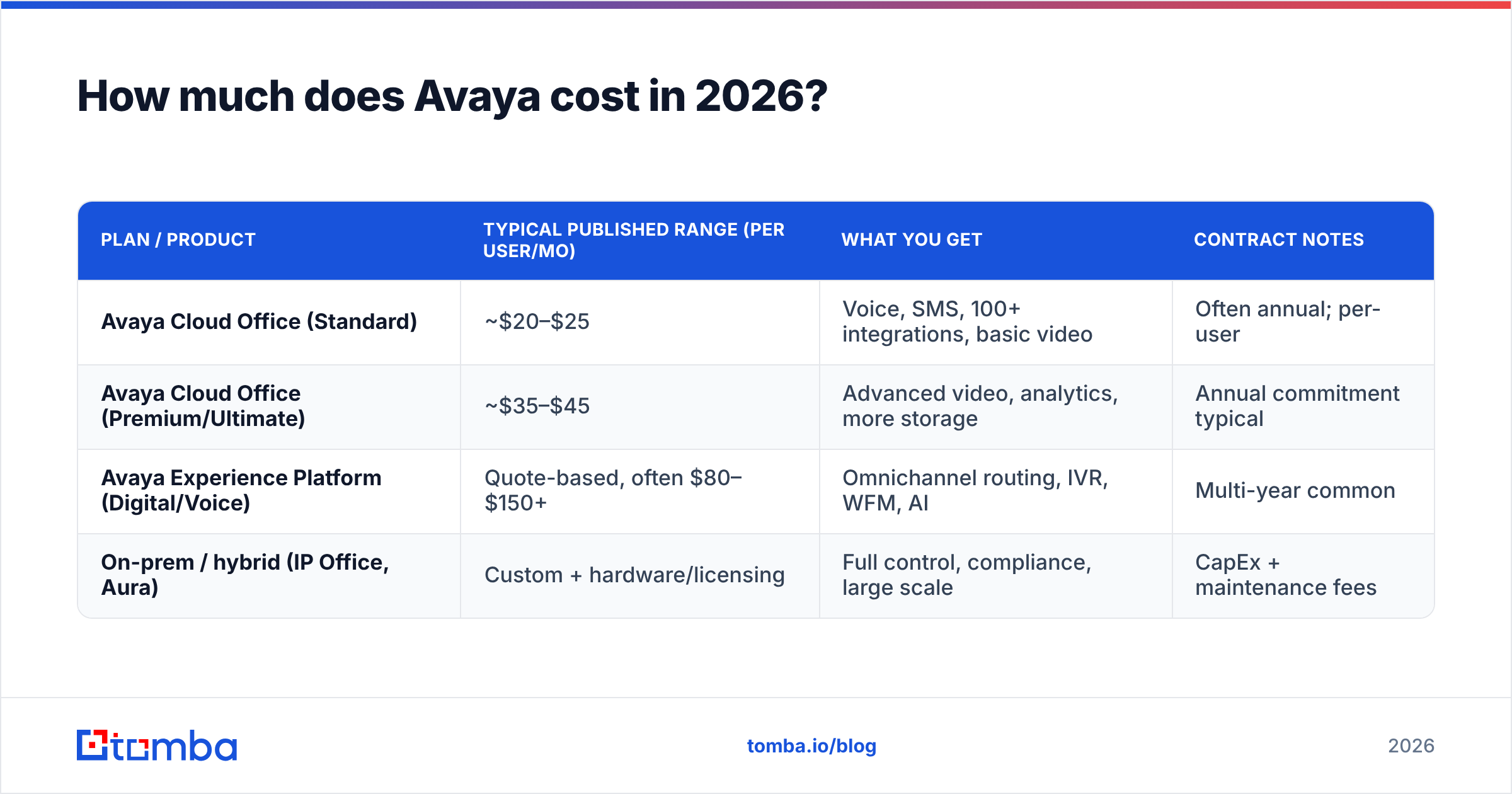
Based on publicly referenced figures and reseller listings, here's the rough landscape. Treat these as directional, not contractual — your real quote will vary with seat count, channels, contract length, and feature mix.
| Plan / product | Typical published range (per user/mo) | What you get | Contract notes |
|---|---|---|---|
| Avaya Cloud Office (Standard) | ~$20–$25 | Voice, SMS, 100+ integrations, basic video | Often annual; per-user |
| Avaya Cloud Office (Premium/Ultimate) | ~$35–$45 | Advanced video, analytics, more storage | Annual commitment typical |
| Avaya Experience Platform (Digital/Voice) | Quote-based, often $80–$150+ | Omnichannel routing, IVR, WFM, AI | Multi-year common |
| On-prem / hybrid (IP Office, Aura) | Custom + hardware/licensing | Full control, compliance, large scale | CapEx + maintenance fees |
A few cost realities that surprise buyers:
- Add-ons stack fast. AI agents, advanced analytics, workforce management, and extra channels are frequently separate line items.
- Implementation and professional services can run into five or six figures for enterprise contact center deployments.
- Contracts are long. One- to three-year terms are common, and early termination fees are real.
- On-prem carries hardware and maintenance costs that cloud buyers forget to model.
For an honest cost comparison, always get the fully loaded quote — seats, channels, services, and support tier — not the headline per-user number. Avaya's own pricing approach is built around tailored quotes, so push for a written breakdown.
What do Avaya reviews actually say?#
Avaya holds solid but not stellar ratings on the major review platforms. On G2, Avaya products generally land in the high-3 to low-4 star range across UCaaS and contact center categories, and analysts like Gartner have historically placed Avaya in or near the Leaders quadrant for contact center thanks to its depth and installed base.
Here's the recurring sentiment, distilled from public reviews:
What reviewers praise:
- Reliability and call quality. Enterprises repeatedly cite uptime and voice clarity as best-in-class.
- Feature depth for contact centers. Routing, reporting, and workforce tools are mature.
- Scalability. Avaya handles thousands of concurrent agents without breaking a sweat.
- Hybrid flexibility. One of the few vendors still serious about on-prem.
What reviewers criticize:
- Pricing opacity and cost. The most common complaint — hard to budget, easy to overspend.
- Dated interfaces. Some admin and agent consoles feel a generation behind cloud-native rivals.
- Support inconsistency. Enterprise support is strong; smaller accounts report slower responses.
- Complex setup. Implementation timelines stretch into months for full contact center rollouts.
The pattern is clear: Avaya rewards organizations that need its depth and have the budget and IT resources to run it, and punishes those who wanted something simple and cheap.
Avaya pros and cons at a glance#
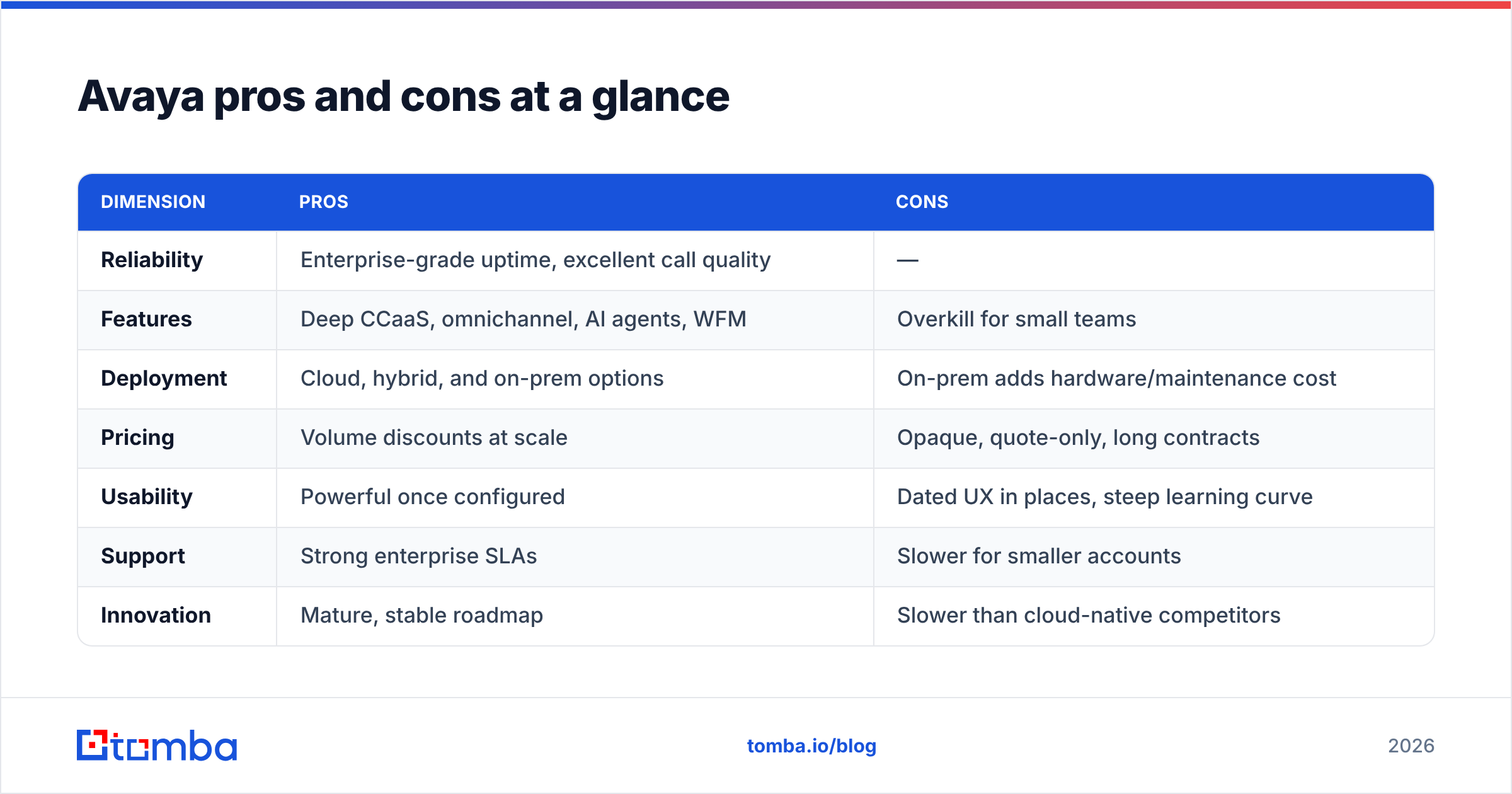
| Dimension | Pros | Cons |
|---|---|---|
| Reliability | Enterprise-grade uptime, excellent call quality | — |
| Features | Deep CCaaS, omnichannel, AI agents, WFM | Overkill for small teams |
| Deployment | Cloud, hybrid, and on-prem options | On-prem adds hardware/maintenance cost |
| Pricing | Volume discounts at scale | Opaque, quote-only, long contracts |
| Usability | Powerful once configured | Dated UX in places, steep learning curve |
| Support | Strong enterprise SLAs | Slower for smaller accounts |
| Innovation | Mature, stable roadmap | Slower than cloud-native competitors |
Is Avaya better than RingCentral, Zoom, or Genesys?#
It depends entirely on your size and use case. Avaya wins on reliability and contact center depth; cloud-native rivals win on speed, price transparency, and modern UX.
| Vendor | Best for | Pricing transparency | UCaaS | Contact center |
|---|---|---|---|---|
| Avaya | Enterprise CCaaS, hybrid/on-prem | Low (quote-based) | Via Cloud Office | Very strong (AXP) |
| RingCentral | Mid-market UCaaS | Medium (published tiers) | Very strong | Strong |
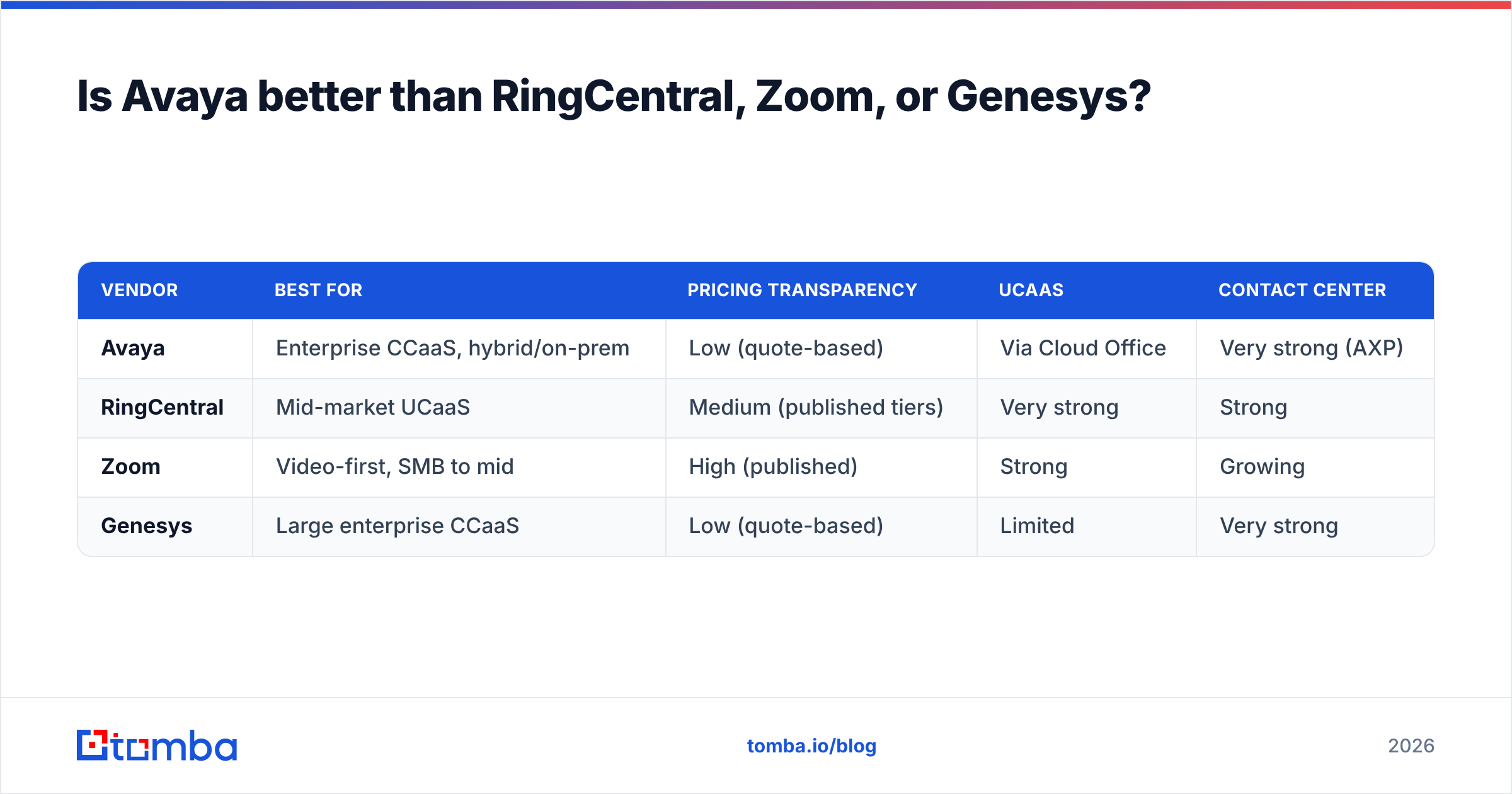
Zoom | Video-first, SMB to mid | High (published) | Strong | Growing | | Genesys | Large enterprise CCaaS | Low (quote-based) | Limited | Very strong |
If your priority is a modern, self-serve phone system with predictable per-seat pricing, RingCentral or Zoom usually win. If you're running a 500-seat contact center with compliance requirements and existing Avaya hardware, ripping it out rarely pencils out — Avaya or Genesys stays in the conversation.
The honest takeaway: don't switch platforms to fix a pipeline problem. A new phone system won't generate leads. The lever most teams actually need is better prospecting data feeding whatever dialer they already own.
What Avaya won't do: fill your pipeline#
Here's the gap no communications platform closes. Avaya, RingCentral, Genesys — they all assume you already have someone to call. They route, record, and report on conversations. They don't tell you which decision-maker to dial, what their direct line is, or what their verified work email is.
That's a data problem, not a telephony problem. And it's where outbound teams quietly lose the most time — reps hunting for contact details instead of having conversations.

A modern outbound stack separates the two jobs:
- Find and verify contacts — build a clean list of the right people with accurate emails and phone numbers.
- Reach them — dial, email, and sequence through your communications platform (Avaya or otherwise).
For step one, tools like Tomba handle the discovery layer:
- Email finder — find professional emails by name, domain, or company.
- Phone finder — surface B2B phone numbers so your Avaya dialer is pointed at real people.
- Data enrichment — fill in missing fields on leads you already have before they hit your CRM.
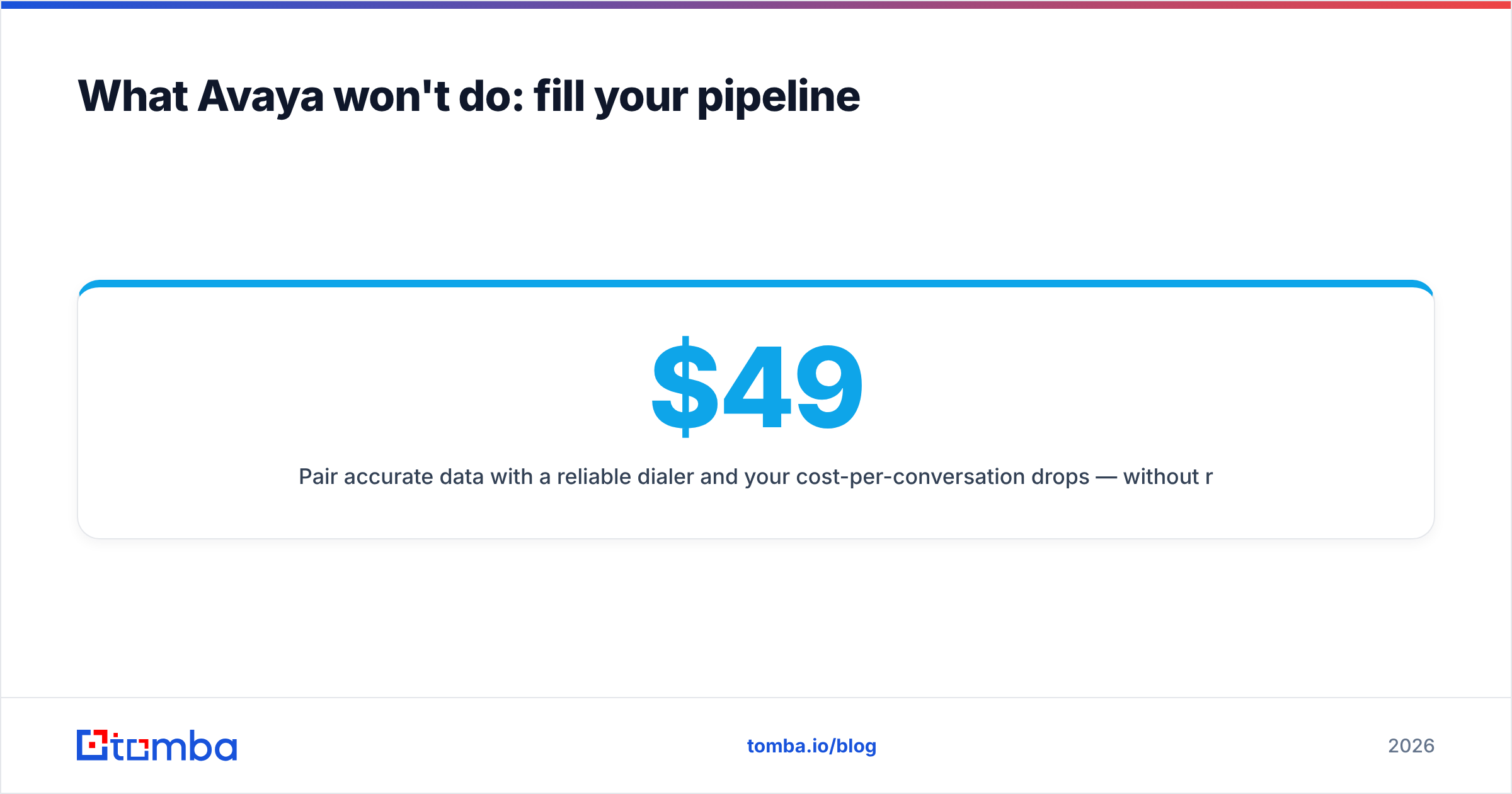
Pair accurate data with a reliable dialer and your cost-per-conversation drops — without renegotiating an enterprise contract. And unlike Avaya's quote-based model, Tomba pricing is published and predictable: a free tier (25 searches/month), Starter at $49/mo, Growth at $99/mo, and Pro at $249/mo.
How to evaluate Avaya before you sign#
If Avaya is on your shortlist, run this checklist before committing:
- Demand a fully loaded quote. Seats, channels, AI add-ons, implementation, and support tier — in writing.
- Model the total contract cost. Multiply by term length and add early-termination exposure.
- Pressure-test the timeline. Ask for a realistic go-live date and reference customers your size.
- Audit integrations. Confirm it connects cleanly to your CRM and existing tooling.
- Separate telephony from data. Decide where your contact data comes from before you choose how you'll dial it.
- Pilot if possible. Run a limited deployment before a full enterprise rollout.
The teams that regret Avaya almost always skipped steps 1 and 2. The teams that love it knew exactly what they were buying and why.
Frequently asked questions#
Is Avaya expensive? Relative to cloud-native UCaaS, yes — especially for contact center deployments. Its value comes from reliability and depth at scale, not low cost.
Does Avaya publish pricing? Avaya Cloud Office has rough published tiers, but Experience Platform and on-prem deployments are quote-based. Always get a written, itemized quote.
Is Avaya good for small businesses? Generally no. The complexity, contracts, and cost favor mid-market and enterprise buyers. Small teams are usually better served by simpler, transparent-priced tools.
Can Avaya find leads for me? No. Avaya is a communications platform. You need a separate data source — like an email finder and phone finder — to build the lists you'll dial and email.
The bottom line#
Avaya remains a credible enterprise choice in 2026 if you need rock-solid reliability, deep contact center features, and hybrid or on-prem flexibility — and you go in with eyes open about quote-based pricing and long contracts. For smaller, price-sensitive teams, the trade-offs rarely justify it.
But whatever platform you land on, remember the real constraint on outbound performance is rarely the phone system — it's whether your reps are calling the right people with accurate data. Stop burning rep hours guessing at contact details. Start a free trial of the Tomba Email Finder, pull verified emails and phone numbers in seconds, and feed your dialer a pipeline worth working — no enterprise contract required.
Ready to find emails that actually work?
Join 150,000+ professionals who stopped guessing and started sending. Free credits on signup — no credit card required.
Get the Tomba newsletter
Practical outbound tactics and product updates — once every two weeks.
About the author