Avaya vs Zoom in 2026: Which UC Platform Wins for B2B?
Avaya vs Zoom compared on price, contact center features, reliability, and AI. A neutral 2026 breakdown to help B2B teams pick the right communications stack.
TL;DR
- Zoom wins on simplicity, video quality, and fast rollout. If your team lives in meetings and wants a modern, self-serve phone and contact center layered on top, Zoom is the easier yes.
- Avaya wins on contact center depth and hybrid control. If you run a large, regulated, or on-premise-heavy operation, Avaya's CCaaS maturity and migration flexibility are hard to beat.
- Price is close at the entry level but diverges at scale. Zoom is transparent and per-user; Avaya is quote-driven and bundles more enterprise services.
- AI is now table stakes for both. Zoom AI Companion and Avaya's AI-powered Experience Platform both ship transcription, summaries, and agent assist.
- Neither tool finds you prospects. A phone system dials numbers; it doesn't source them. Pair whichever you choose with a data layer like Tomba's phone finder so your reps have someone to call.
What are Avaya and Zoom, really?#
Think of it like buying a kitchen. Zoom is the sleek modern kitchen that arrives pre-assembled — you plug it in and start cooking. Avaya is the custom kitchen built by a contractor who has wired enterprise buildings for 20 years — more moving parts, more options, more setup, but it bends to exactly how you operate.
Technically, both are unified communications (UC) platforms that have grown into full contact center (CCaaS) suites. They handle voice, video, messaging, and customer-experience workflows for businesses.
- Zoom started as a video-meeting company and expanded outward into Zoom Phone, Zoom Contact Center, Team Chat, and an events/webinar stack. Its DNA is consumer-grade ease of use applied to business tools.
- Avaya is a telecom incumbent. It powered enterprise phone systems and call centers for decades and has spent recent years pivoting to cloud and hybrid delivery through the Avaya Experience Platform (AXP). Its DNA is deep, configurable, carrier-grade communications.
The short version: Zoom optimizes for the meeting and the easy deployment; Avaya optimizes for the contact center and the complex enterprise. Where you sit on that spectrum decides most of this comparison.

Wait — that placeholder renders as a meme. The point it makes is real, though: the platform you pick only matters if the contacts feeding it are clean. We'll come back to that.
How do Avaya vs Zoom compare at a glance?#
Here's the core breakdown across the attributes most B2B buyers weigh. Pricing reflects publicly listed plans; Avaya is largely quote-based, so treat its figures as directional.
| Attribute |
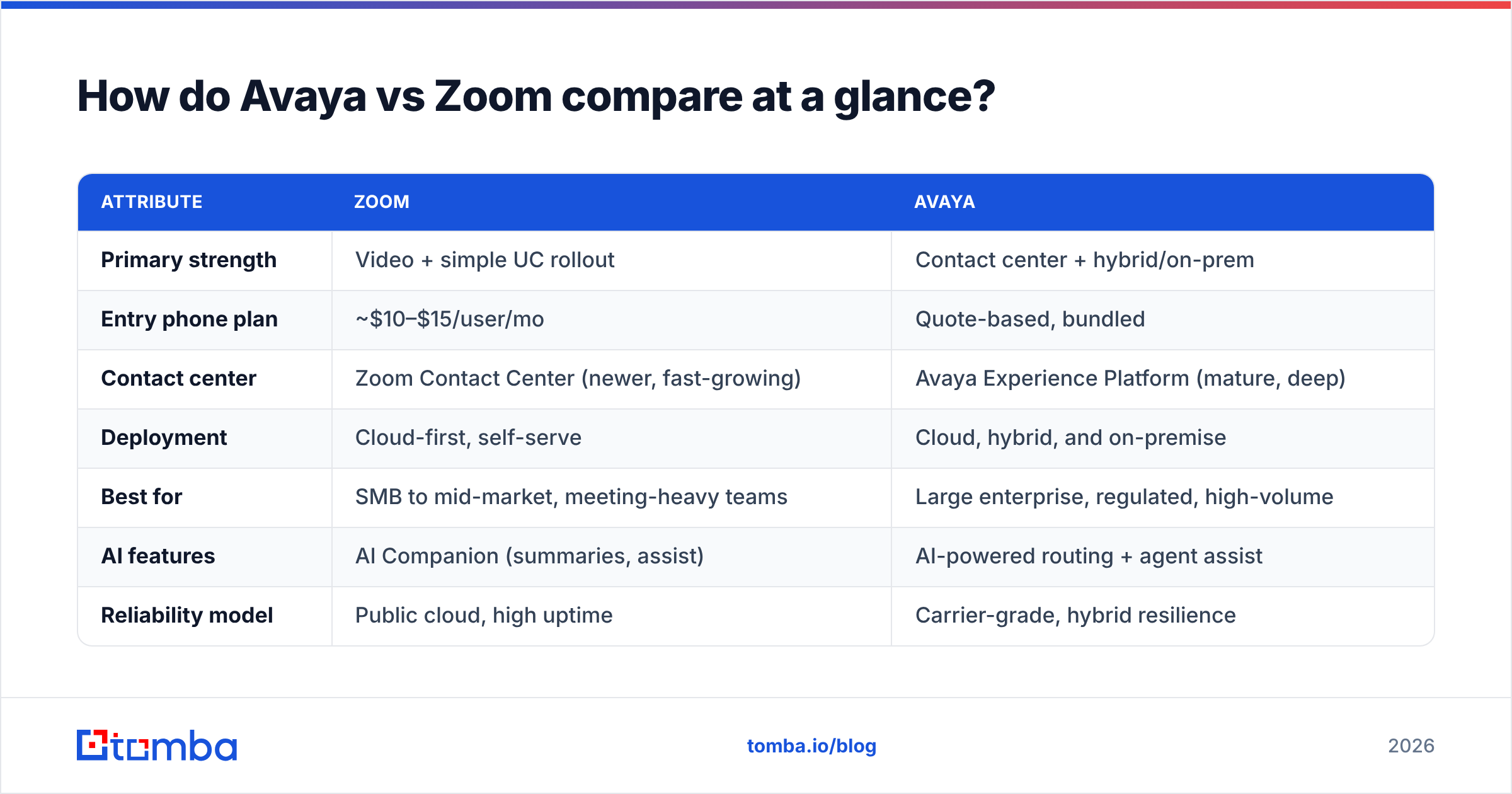
Zoom | Avaya | |---|---|---| | Primary strength | Video + simple UC rollout | Contact center + hybrid/on-prem | | Entry phone plan | ~$10–$15/user/mo | Quote-based, bundled | | Contact center | Zoom Contact Center (newer, fast-growing) | Avaya Experience Platform (mature, deep) | | Deployment | Cloud-first, self-serve | Cloud, hybrid, and on-premise | | Best for | SMB to mid-market, meeting-heavy teams | Large enterprise, regulated, high-volume | | AI features | AI Companion (summaries, assist) | AI-powered routing + agent assist | | Reliability model | Public cloud, high uptime | Carrier-grade, hybrid resilience | | Setup effort | Low — days to weeks | Higher — weeks to months | | Ecosystem | Modern app marketplace + APIs | Deep telephony + legacy integrations |
A few takeaways from the table:
- Zoom is the faster procurement. Transparent pricing and self-serve onboarding mean you can pilot it without a sales call.
- Avaya is the safer bet for complexity. If you have on-premise hardware, strict compliance, or thousands of agents, its hybrid model protects existing investments.
- Contact center is the real battleground. Zoom is closing the gap fast, but Avaya still leads on depth, omnichannel routing, and workforce engagement maturity.
- AI parity is arriving. Both now bundle real-time transcription, call summaries, and agent assist, so AI alone shouldn't be your deciding factor in 2026.
Is Zoom better than Avaya for most teams?#
For most SMB and mid-market teams, Zoom is the better default — and the reason is friction, not features.
Zoom Phone and Zoom Contact Center inherit the interface your team already knows from video calls. Adoption is fast, admin overhead is low, and the pricing is something you can model in a spreadsheet without a procurement cycle. According to reviews aggregated on G2, Zoom consistently scores high on ease of use and setup speed — exactly where younger, leaner teams feel the most pain.
Zoom's advantages stack up clearly when:
- Your team is meeting-heavy and you want phone/contact center to live in one familiar app.
- You want to deploy in days and avoid professional-services fees.
- You're cloud-native with no legacy PBX hardware to protect.
- You value a clean admin console and self-serve scaling.
Where Zoom shows its youth is at the deep end of the contact center: extremely high agent counts, intricate omnichannel routing, workforce optimization, and the kind of regulatory edge cases that telecom incumbents have spent decades solving. You can read more about Zoom's product lineup on zoom.com.
When does Avaya win?#
Avaya wins when complexity, scale, or control are non-negotiable. It's the platform you choose when "rip and replace" is a dirty phrase.
Avaya's strengths concentrate in scenarios
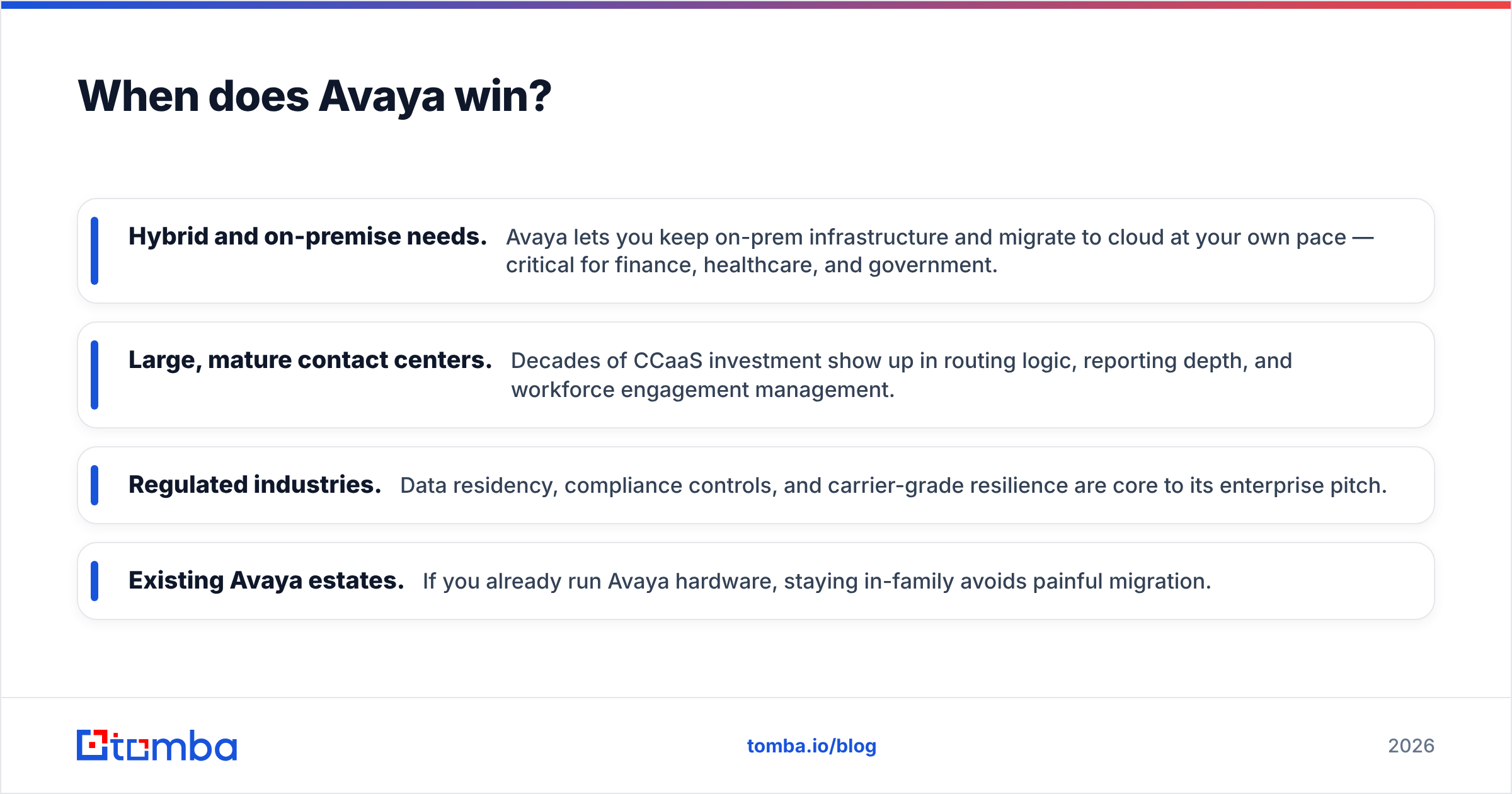
Zoom finds harder:
- Hybrid and on-premise needs. Avaya lets you keep on-prem infrastructure and migrate to cloud at your own pace — critical for finance, healthcare, and government.
- Large, mature contact centers. Decades of CCaaS investment show up in routing logic, reporting depth, and workforce engagement management.
- Regulated industries. Data residency, compliance controls, and carrier-grade resilience are core to its enterprise pitch.
- Existing Avaya estates. If you already run Avaya hardware, staying in-family avoids painful migration.
The Avaya Experience Platform (detailed on avaya.com) is built around customer experience at scale. The trade-off is that this depth comes with longer implementation cycles, quote-based pricing, and more reliance on partners or professional services. For a 30-person startup, that's overkill. For a 4,000-seat support operation, it's the point.
How do pricing models compare?#
The pricing philosophies differ as much as the products.
| Pricing dimension |
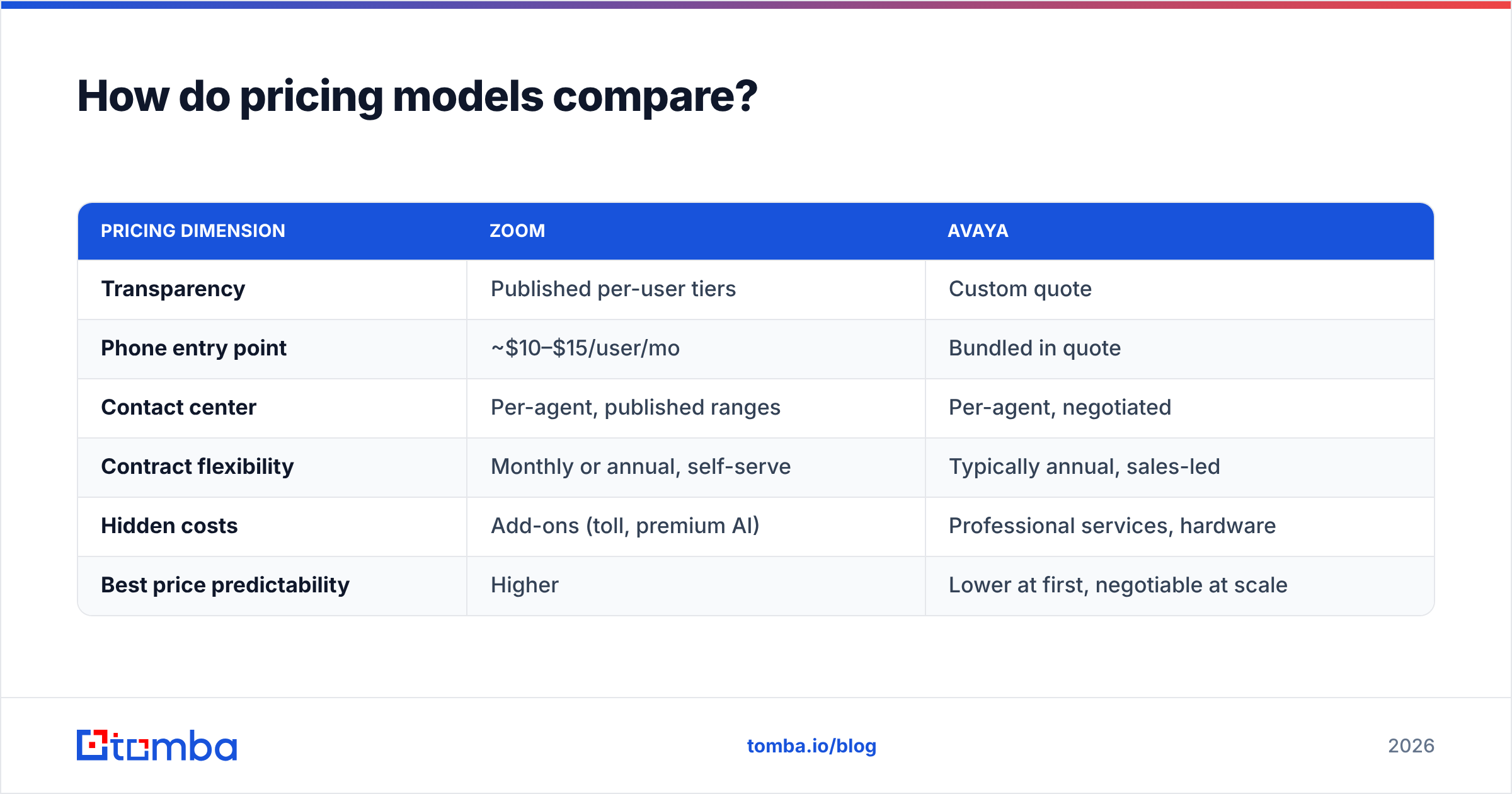
Zoom | Avaya | |---|---|---| | Transparency | Published per-user tiers | Custom quote | | Phone entry point | ~$10–$15/user/mo | Bundled in quote | | Contact center | Per-agent, published ranges | Per-agent, negotiated | | Contract flexibility | Monthly or annual, self-serve | Typically annual, sales-led | | Hidden costs | Add-ons (toll, premium AI) | Professional services, hardware | | Best price predictability | Higher | Lower at first, negotiable at scale |
Zoom is more predictable for budgeting; Avaya is more negotiable at enterprise volume. A 50-seat team will find Zoom cheaper and faster to buy. A 2,000-seat enterprise migrating an existing estate may extract better total value from an Avaya bundle that folds in services, migration, and support.
One honest caveat: published numbers move, and both vendors run promotions and bundle discounts. Always get a current quote for your actual seat count before deciding.
What about reliability, AI, and integrations?#
Reliability: Both are enterprise-grade. Zoom leans on public-cloud scale and a strong uptime track record. Avaya leans on carrier-grade engineering and hybrid resilience — useful when you legally cannot route certain traffic through public cloud. If your risk model demands on-prem fallback, Avaya has the edge; if you trust modern cloud SLAs, Zoom is more than sufficient.
AI: Zoom's AI Companion handles meeting summaries, chat composition, and agent assist, and it's bundled into many paid plans rather than sold as a pricey add-on. Avaya counters with AI-driven routing, real-time agent guidance, and self-service virtual agents inside AXP. In 2026, treat AI as a tie-breaker on how it's delivered (bundled vs. premium) rather than whether it exists.
Integrations: Zoom's app marketplace and modern APIs make it friendly for CRM and helpdesk connections out of the box. Avaya's strength is deep telephony integration and compatibility with legacy enterprise systems. If your stack is modern SaaS, Zoom slots in faster; if it's a mix of old and new, Avaya's flexibility helps.

How does this fit into your sales and support stack?#
Here's the part both vendors quietly assume you've already solved: the contacts.
A communications platform is a pipe. It moves conversations efficiently, routes them intelligently, and records them for coaching. What it does not do is tell your SDR which 200 prospects to call this week, or hand your support team a verified mobile number when a record is stale. That data has to come from somewhere.
This is where a data layer matters more than the phone vendor debate. Before a single call connects through
Zoom or Avaya, someone built the list. If those numbers are wrong, your shiny contact center just dials dead air faster.
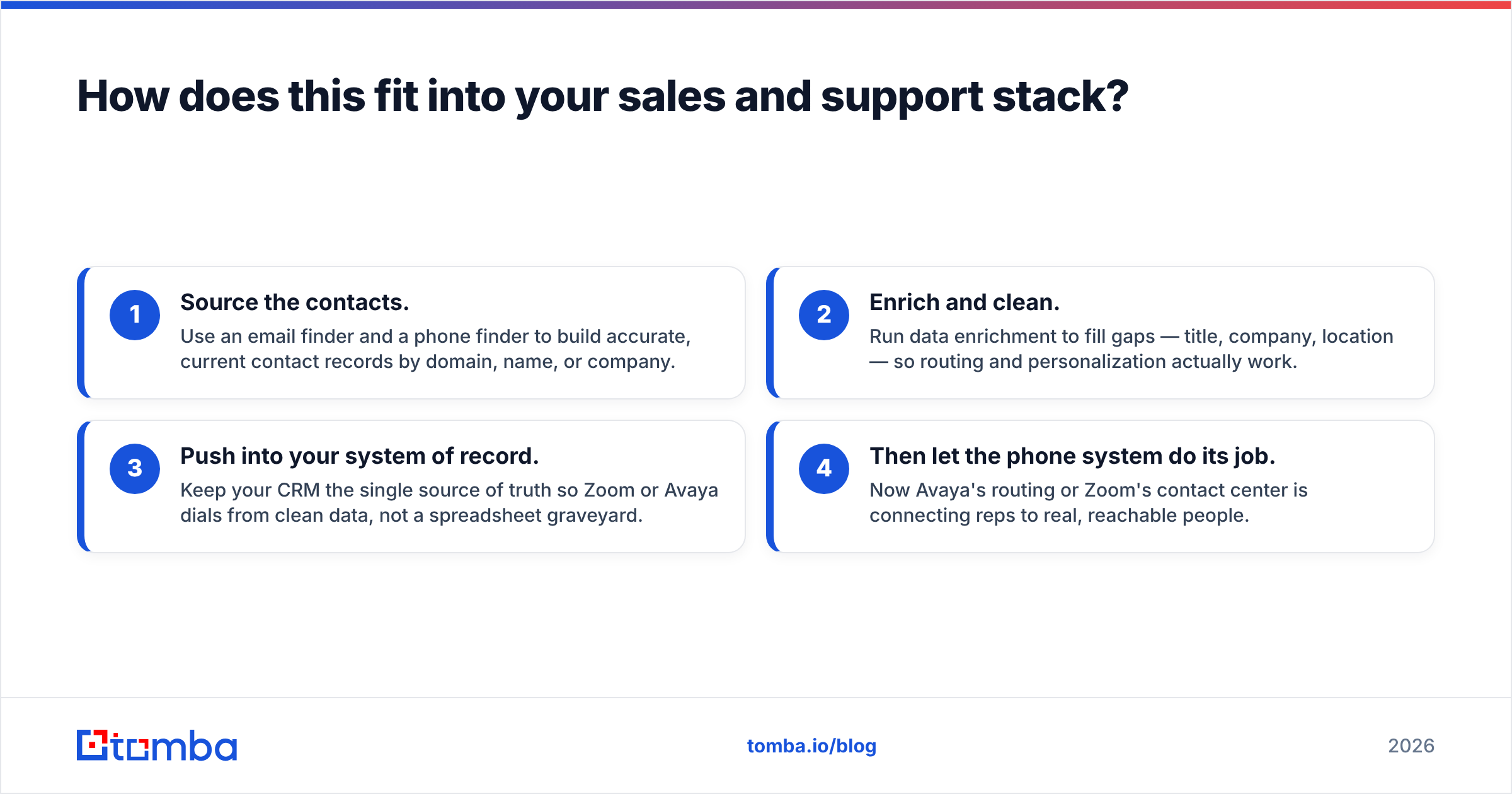
A practical stack looks like this:
- Source the contacts. Use an email finder and a phone finder to build accurate, current contact records by domain, name, or company.
- Enrich and clean. Run data enrichment to fill gaps — title, company, location — so routing and personalization actually work.
- Push into your system of record. Keep your CRM the single source of truth so Zoom or Avaya dials from clean data, not a spreadsheet graveyard.
- Then let the phone system do its job. Now Avaya's routing or Zoom's contact center is connecting reps to real, reachable people.
The platform choice changes how conversations flow. The data choice changes whether they happen at all.
So which should you choose — Avaya or Zoom?#
The honest answer is it depends on your size, complexity, and tolerance for setup — and that's not a cop-out, it's the actual decision tree.
Choose Zoom if:
- You're SMB to mid-market and meeting-heavy.
- You want fast, self-serve deployment and transparent pricing.
- You're cloud-native with no legacy PBX to protect.
- You value adoption and ease over deep configurability.
Choose Avaya if:
- You run a large or high-volume contact center.
- You need hybrid or on-premise deployment for compliance.
- You're protecting an existing Avaya estate.
- Depth of routing, reporting, and workforce engagement outranks setup speed.
For the majority of growing B2B teams reading this in 2026, Zoom is the lower-risk starting point — you can be live in a week and scale into the contact center as you grow. For enterprises with regulatory weight and established telephony, Avaya remains the more defensible long-term platform.
Neither, though, solves the problem upstream of the dial tone. Whichever pipe you pick, fill it with accurate, verified contact data so your reps spend time talking, not chasing wrong numbers. Start with the Tomba Email Finder to build clean, reachable lists by domain or company — then let Zoom or Avaya handle the conversation. You can review plan options on the Tomba pricing page, including a free tier with 25 searches per month to test the data quality before you commit.
Ready to find emails that actually work?
Join 150,000+ professionals who stopped guessing and started sending. Free credits on signup — no credit card required.
Get the Tomba newsletter
Practical outbound tactics and product updates — once every two weeks.
About the author