Average Email Bounce Rate in 2026: Benchmarks & How to Fix
What counts as a healthy bounce rate in 2026, the benchmarks by industry, and a practical playbook to push yours back under 2% before it wrecks your sender reputation.
TL;DR
- The average email bounce rate across industries sits between 0.5% and 2% in 2026. Anything above 2% is a warning sign; above 5% mailbox providers start throttling you.
- Hard bounces (invalid or non-existent addresses) hurt your sender reputation permanently. Soft bounces (full inbox, server down) are usually temporary.
- The single biggest lever is list hygiene: verifying addresses before you send removes most hard bounces before they ever count against you.
- Authentication (SPF, DKIM, DMARC), gradual warmup, and pruning inactive contacts keep your rate low over time.
- A clean list of 5,000 verified contacts beats a dirty list of 50,000 every time — for deliverability, revenue, and your domain's long-term health.
What is email bounce rate?#
Your email bounce rate is the percentage of messages that could not be delivered to a recipient's mailbox, expressed against the total number you sent. The formula is simple:
Bounce rate = (bounced emails ÷ emails sent) × 100
Send 10,000 emails, have 200 come back undelivered, and your bounce rate is 2%. Think of it like mailing physical letters: a bounce is the envelope returned to your door marked "no such address." A few are normal. A pile of them tells the post office something is wrong with your mailing list — and they start treating everything you send with suspicion.
That suspicion is the real cost. Mailbox providers like Gmail and Outlook read bounces as a quality signal. A high bounce rate damages your sender reputation, which then drags down inbox placement for the messages that do reach valid addresses. So bounce rate is rarely just a number — it is an early indicator of how the whole ecosystem views you.
What is the average email bounce rate in 2026?#
The average email bounce rate in 2026 lands between 0.5% and 2% for senders with reasonable list hygiene. Below 1% is excellent. Between 2% and 5% means your list needs attention. Above 5% and you are in territory where providers actively throttle or block delivery.
Benchmarks shift by industry, list source, and how often you mail. Here is what "normal" looks like across common sectors:
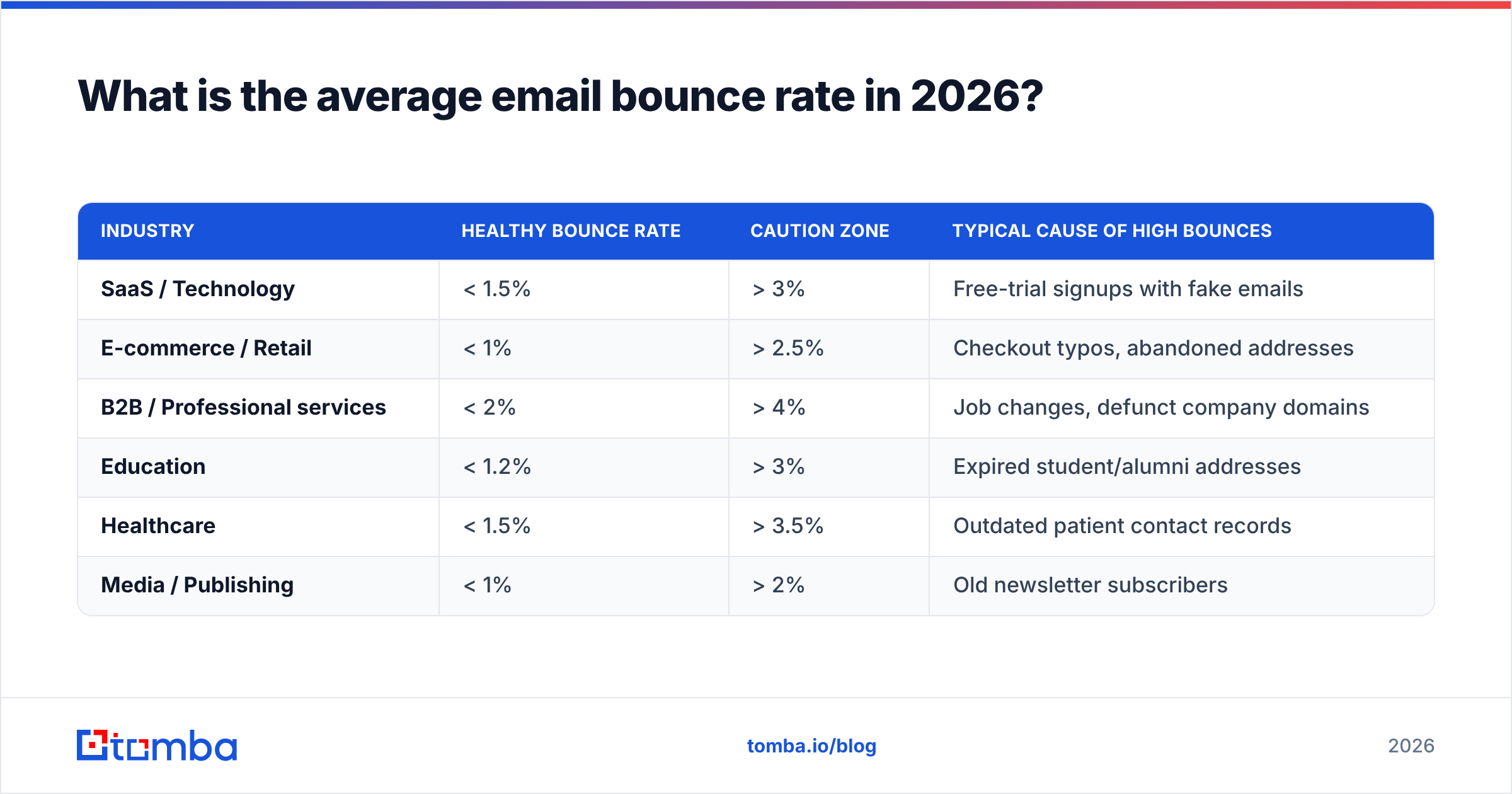
| Industry | Healthy bounce rate | Caution zone | Typical cause of high bounces |
|---|---|---|---|
| SaaS / Technology | < 1.5% | > 3% | Free-trial signups with fake emails |
| E-commerce / Retail | < 1% | > 2.5% | Checkout typos, abandoned addresses |
| B2B / Professional services | < 2% | > 4% | Job changes, defunct company domains |
| Education | < 1.2% | > 3% | Expired student/alumni addresses |
| Healthcare | < 1.5% | > 3.5% | Outdated patient contact records |
| Media / Publishing | < 1% | > 2% | Old newsletter subscribers |
Two patterns explain most of the variance. First, B2B lists decay faster than B2C lists because people change jobs — roughly 30% of business email addresses go stale every year as contacts move companies. Second, how you acquired the list matters more than your industry. Double opt-in subscribers bounce far less than scraped or purchased lists, which can bounce at 10% or higher on the first send.
If your number is creeping up, do not panic — but do not ignore it either. Bounce rate is a leading indicator. By the time it shows up in your dashboard, the underlying list-quality problem has usually been building for weeks.
Hard bounce vs soft bounce: what's the difference?#
Not all bounces are equal, and treating them the same way is how good senders accidentally torch their reputation. A bounce comes back with a category and a reason code, and the category determines how you should respond.
Hard bounce — permanent failure. The address does not exist, the domain is invalid, or the mailbox has been deleted. These will never deliver. Every hard bounce should be removed from your list immediately; resending to it again tells providers you are not maintaining your data.
Soft bounce — temporary failure. The mailbox is full, the recipient's server is down, or the message exceeded a size limit. These can succeed on a retry. Most email platforms automatically retry soft bounces for 24–72 hours before giving up.
Block bounce — reputation failure. The receiving server actively refused your message because your IP or domain looked risky. This is a signal your reputation is already damaged and needs repair.
Auto-reply / challenge — not a true bounce. Out-of-office responses and challenge-response systems sometimes register as bounces in crude tools. Good analytics separate these out so they don't inflate your number.
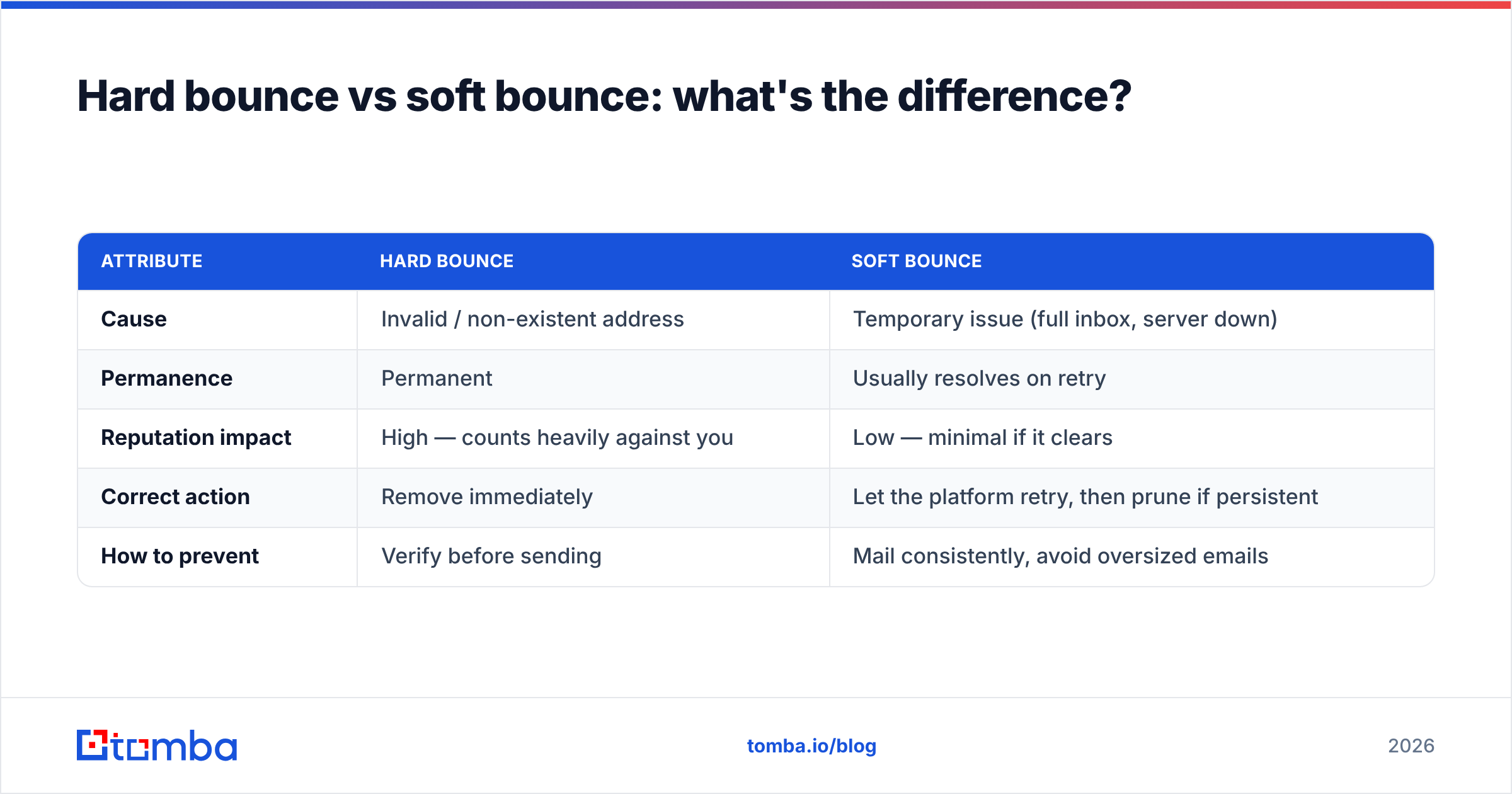
Here is the practical breakdown:
| Attribute | Hard bounce | Soft bounce |
|---|---|---|
| Cause | Invalid / non-existent address | Temporary issue (full inbox, server down) |
| Permanence | Permanent | Usually resolves on retry |
| Reputation impact | High — counts heavily against you | Low — minimal if it clears |
| Correct action | Remove immediately | Let the platform retry, then prune if persistent |
| How to prevent | Verify before sending | Mail consistently, avoid oversized emails |
The takeaway: hard bounces are the ones that wreck your sender reputation, and they are almost entirely preventable. That prevention happens before you hit send — not after the bounce report comes back.
Why does a high bounce rate hurt deliverability so much?#
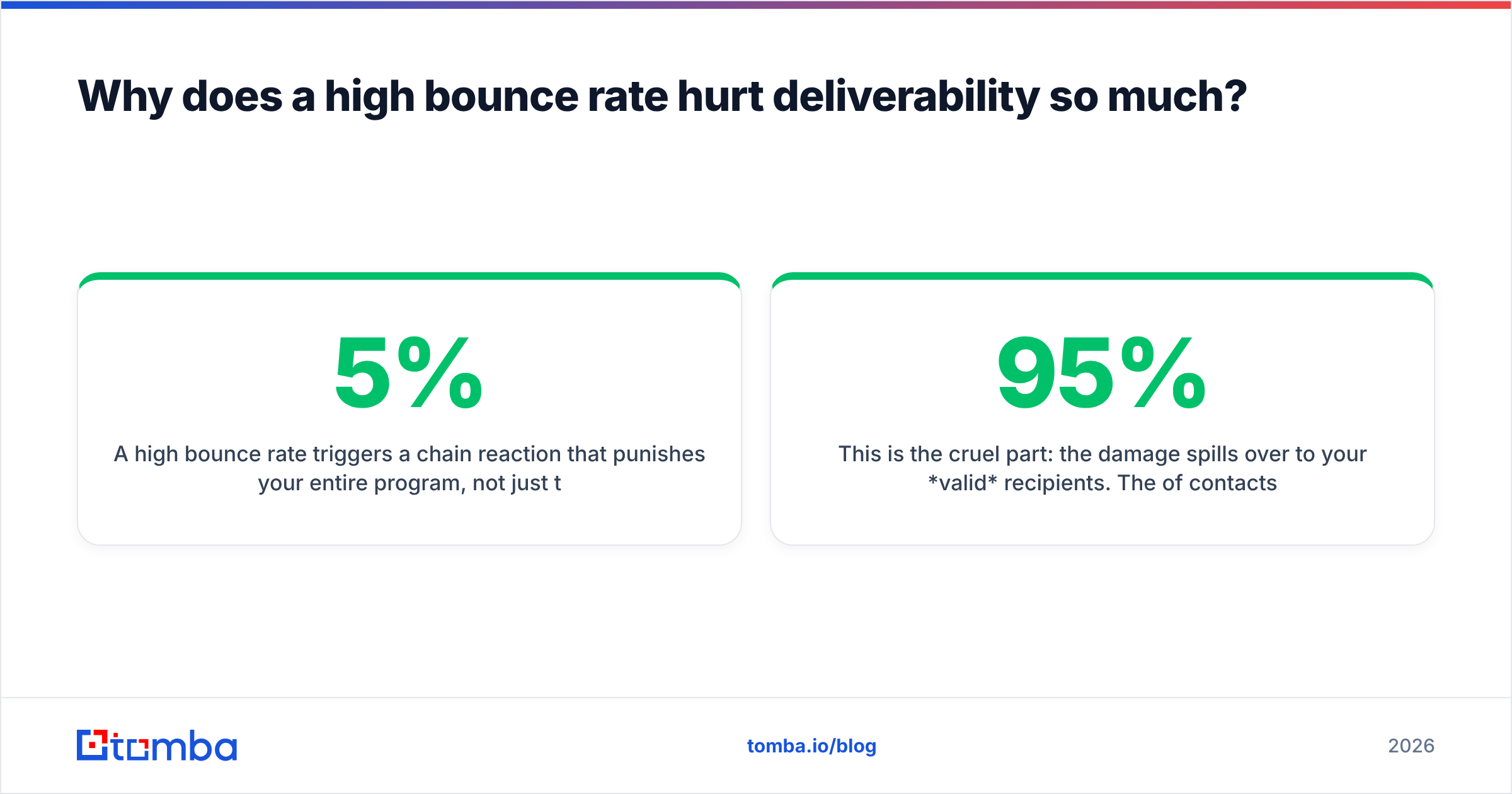
A high bounce rate triggers a chain reaction that punishes your entire program, not just the bad addresses. The mechanics are worth understanding because they explain why a 5% bounce rate feels so disproportionately damaging.
When mailbox providers see a sender hitting invalid addresses repeatedly, they infer one of two things: either you bought a list, or you are not maintaining the one you have. Both are red flags associated with spammers. In response, providers lower your email deliverability — routing more of your mail to spam, throttling your send rate, or in severe cases blocking your domain outright.
This is the cruel part: the damage spills over to your valid recipients. The 95% of contacts with real, engaged addresses now see your emails land in spam because the 5% of dead addresses poisoned the well. Google's own Postmaster Tools guidance is explicit that consistent list hygiene is a prerequisite for good inbox placement.
There is a financial angle too. Most email service providers and cold-outreach platforms charge by volume and penalize high-bounce accounts. Some suspend accounts that cross a bounce threshold. So a dirty list costs you twice — once in wasted send credits, and again in suppressed performance for the contacts who actually matter.
How do you lower your average email bounce rate?#
Lowering your bounce rate comes down to one principle: stop bad addresses from entering your send in the first place. Cleanup after the fact helps, but prevention is where the real gains are. Here is the playbook, roughly in order of impact.
1. Verify every address before you send. This is the highest-leverage move. An email verifier checks syntax, confirms the domain has valid mail servers, and pings the mailbox to confirm it can receive mail — all without sending anything. Running a new list through verification typically removes 5–15% of addresses that would otherwise hard-bounce. For ongoing lists, re-verify quarterly.
2. Use double opt-in for signups. Requiring a confirmation click guarantees the address is real and the person typed it correctly. It slightly reduces signup volume but dramatically improves list quality and bounce rate.
3. Handle catch-all domains carefully. Catch-all servers accept mail for any address, so standard verification can't always confirm a specific mailbox exists. A dedicated catch-all verifier applies deeper checks to estimate whether the address is genuinely deliverable, so you can include or exclude these contacts with confidence.
4. Authenticate your domain. Set up SPF, DKIM, and DMARC records. These don't reduce invalid-address bounces directly, but they prevent block bounces and prove to providers that you are a legitimate sender. Tools like Validity's Everest or your own DNS checks confirm the records are correct.
5. Prune inactive contacts. Subscribers who haven't opened anything in 6–12 months are more likely to have abandoned the address. Sunset them or move them to a low-frequency re-engagement track.
6. Warm up new domains and IPs gradually. Sending 50,000 emails from a brand-new domain on day one looks exactly like a spammer. Ramp volume over several weeks so providers build trust in you. A warmup calculator helps you plan a safe ramp schedule.
7. Verify in bulk before big campaigns. Before any large send, run the entire list through bulk verification. It is far cheaper to clean 50,000 addresses than to recover a damaged sender reputation.
If you want a quick gut-check on a single address before adding it anywhere, a free email checker confirms validity in seconds.
What's a realistic bounce-rate target for your program?#
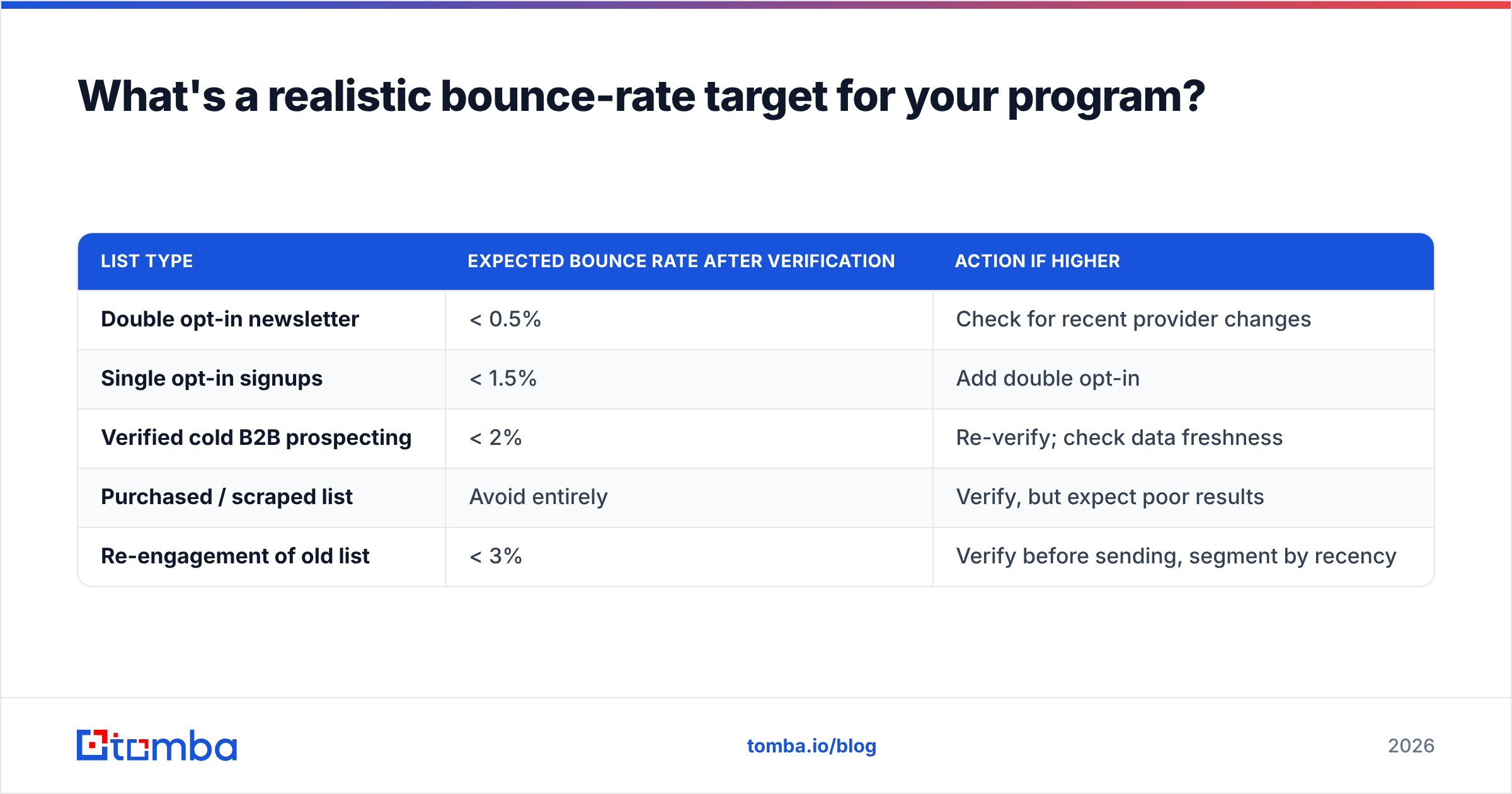
Aim for under 2%, treat 1% as your stretch goal, and investigate anything above 3%. But context matters — a one-time prospecting list to cold B2B contacts will naturally bounce higher than a year-old double opt-in newsletter, and that is fine as long as you verified first.
Here is a simple way to read your number against the source of the list:
| List type | Expected bounce rate after verification | Action if higher |
|---|---|---|
| Double opt-in newsletter | < 0.5% | Check for recent provider changes |
| Single opt-in signups | < 1.5% | Add double opt-in |
| Verified cold B2B prospecting | < 2% | Re-verify; check data freshness |
| Purchased / scraped list | Avoid entirely | Verify, but expect poor results |
| Re-engagement of old list | < 3% | Verify before sending, segment by recency |
The data source underneath your list is what ultimately determines your ceiling. This is why where contacts come from matters as much as how you clean them — you can read about how Tomba sources and validates data to understand the difference between guessed and confirmed addresses. Confirmed data starts low and stays low; guessed data bounces no matter how many filters you run.
How does verifying before sending change the math?#
Verifying before you send flips bounce rate from a reactive metric into a controllable one. Without verification, you discover bad addresses only after they've already bounced and already damaged your reputation. With verification, you remove them while they're still just rows in a spreadsheet — invisible to mailbox providers, costing you nothing.
Consider a 20,000-contact B2B list that's a year old. Realistically, 12–18% of those addresses are now invalid because of job changes and closed accounts. Send to it raw and you bounce at 15% — a number that can get your sending account suspended on the first campaign. Run it through verification first, remove the 3,000 dead addresses, and your actual send bounces at well under 1%. Same list, completely different outcome, decided entirely by one step you took before pressing send.
That is the core argument for building verification into your workflow rather than bolting it on after a bad campaign. It is the difference between managing bounces and preventing them.
Frequently asked questions#
What is a good email bounce rate? Under 2% is good; under 1% is excellent. Above 5% risks throttling and blocks from mailbox providers.
Does bounce rate affect my sender reputation? Yes, significantly. Hard bounces are one of the strongest negative signals mailbox providers use to judge sender quality, and the damage affects deliverability to your valid contacts too.
How often should I clean my email list? Re-verify active lists quarterly, and always verify any new or imported list before its first send. B2B lists decay faster, so monthly checks help for high-volume outbound.
Do soft bounces count against me? Minimally. Soft bounces from temporary issues usually clear on retry. But an address that soft-bounces repeatedly over several sends should be treated as a hard bounce and removed.
Keep your bounce rate low from the first send#
The average email bounce rate is a mirror of your data quality. You can chase it after the fact with suppression lists and apologies to your email provider — or you can prevent it by verifying addresses before they ever enter a campaign. The second path is cheaper, faster, and far kinder to your sender reputation.
Tomba's email verifier and bulk verification do exactly that: confirm syntax, domain, and mailbox validity before you send, so hard bounces never get the chance to count against you. Pair it with the Tomba Email Finder to build lists from confirmed B2B data instead of guesses, and you start every campaign with a clean, deliverable list. Start free with 25 searches a month, then scale on a Tomba plan that fits your volume — and keep your bounce rate where it belongs: under 2%, every send.
// get started
Find, verify and enrich your first contacts today
Start on the free plan with 25 searches a month, then scale when your team is ready.
Free plan · No credit card required · GDPR & CCPA
// about the author