B2B Appointment Setting Tips: Book More Meetings in 2026
Practical B2B appointment setting tips that fill your calendar with qualified meetings — scripts, channels, data, timing, and a no-show playbook for 2026.
Booking a qualified meeting is the hardest, highest-leverage step in B2B sales. Everything downstream — discovery, demo, proposal, close — depends on getting the right person to agree to a time. Yet most teams treat appointment setting as a volume game: blast more contacts, hope a few say yes. That approach is why connect rates keep falling and calendars stay empty.
These B2B appointment setting tips focus on the inputs you actually control: who you target, how you reach them, what you say, and how you stop meetings from evaporating before they happen.
TL;DR#
- Targeting beats volume. A clean, verified list of 200 right-fit contacts books more meetings than 2,000 scraped ones.
- Go multichannel. Phone, email, and LinkedIn together lift connect rates far above any single channel.
- Lead with the prospect's problem, not your product. The only job of an opener is to earn the next 30 seconds.
- Confirm and reduce no-shows with reminders, calendar invites, and a reason to show up.
- Measure the funnel, not just dials. Track contact rate, conversation rate, and show rate separately.
What is B2B appointment setting?#
B2B appointment setting is the process of converting a target contact into a scheduled, qualified meeting with a salesperson. Think of it as the host at a busy restaurant: the kitchen (your closers) can only cook if the host seats the right guests at the right time. The appointment setter's whole job is filling those seats with people who are actually hungry.
It usually sits with SDRs, BDRs, or a dedicated appointment-setting team, and it spans three measurable stages:
- Reach — can you get the contact to pick up, open, or reply? This is a data and channel problem.
- Engage — once you have their attention, can you create enough relevance to earn a slot? This is a messaging problem.
- Commit — will they actually show up? This is a process and trust problem.
Most teams obsess over stage two (scripts) while ignoring stages one and three, which is exactly why their numbers stall.
Why do most B2B appointment setting efforts fail?#
The failure is almost always upstream of the conversation. Bad data means you dial wrong numbers and email dead inboxes. Generic messaging means even the right person tunes out. And no confirmation process means a third of your hard-won meetings ghost you.
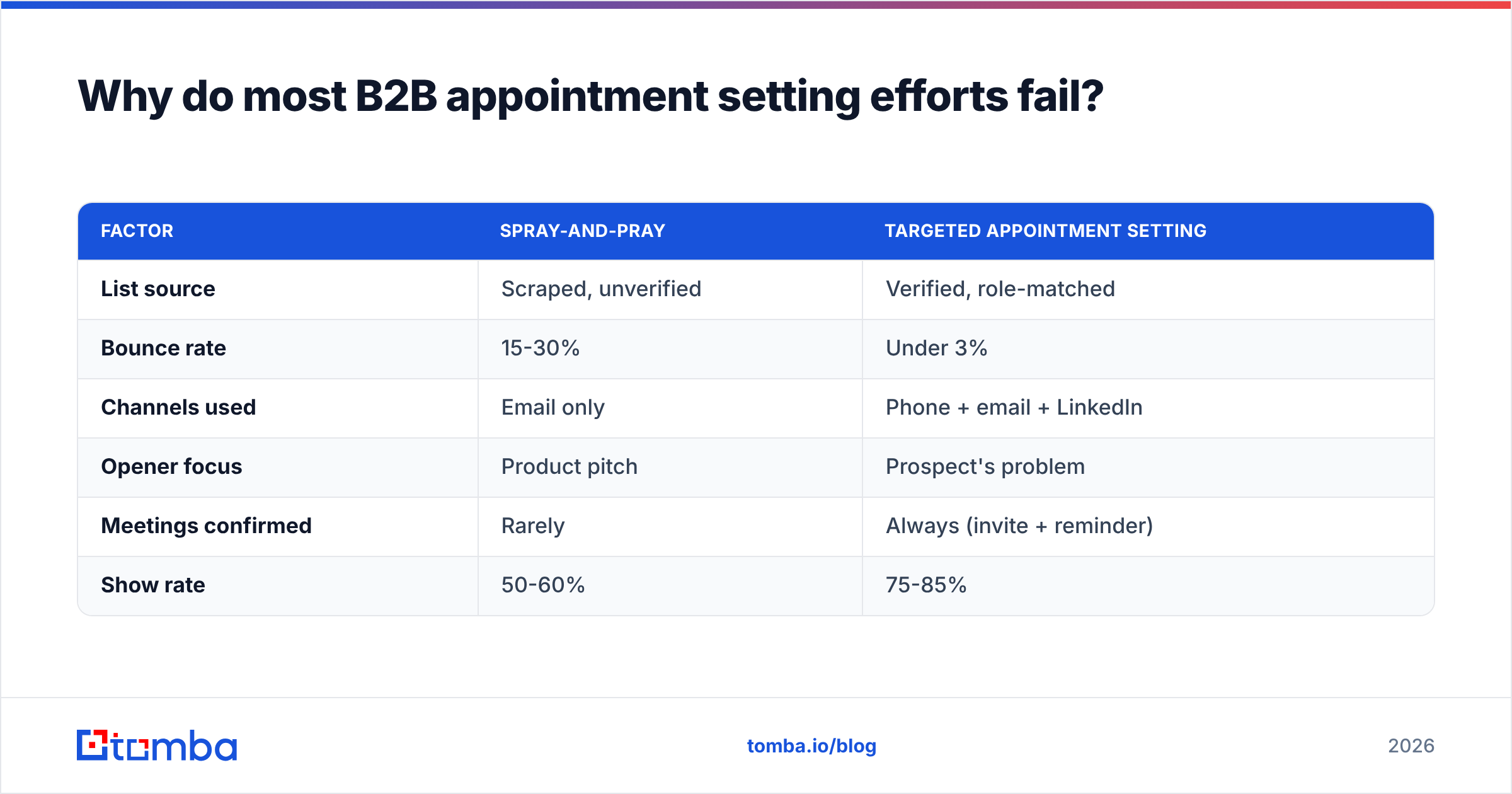
Here is how the common approach stacks up against a disciplined one:
| Factor | Spray-and-pray | Targeted appointment setting |
|---|---|---|
| List source | Scraped, unverified | Verified, role-matched |
| Bounce rate | 15-30% | Under 3% |
| Channels used | Email only | Phone + email + LinkedIn |
| Opener focus | Product pitch | Prospect's problem |
| Meetings confirmed | Rarely | Always (invite + reminder) |
| Show rate | 50-60% | 75-85% |
The right column costs more thought per contact but produces dramatically more booked, attended meetings per hour of rep time.

How do you build a list that actually books meetings?#
Start with fit, not size. Define your ideal customer profile by firmographics (industry, size, region), then identify the two or three job titles that own the problem you solve. A precise list of 200 verified decision-makers will out-book a bloated list every time, because every minute your reps spend is aimed at someone who could genuinely buy.
Quality data is the foundation. Bounced emails and disconnected numbers don't just waste time — they hurt your sender reputation and get your domain throttled. Before any outreach, run your contacts through an email verifier so you're only sending to addresses that resolve.
A practical sourcing stack:
- Find the people. Use domain search to pull every contact at a target company, then filter to the roles that matter.
- Get direct dials. Phone connect rates crater when you call switchboards, so a phone finder for direct numbers is worth its weight.
- Enrich before you reach out. Layer in seniority, department, and tech stack with data enrichment so your personalization has something to work with.
- Verify, then load. Push only verified, deduplicated contacts into your sequencing tool.
Garbage in, ghost town out. The cleanest list is the cheapest meeting you'll ever book.
What does a multichannel appointment-setting cadence look like?#
No single channel wins anymore. Buyers screen calls, ignore unknown emails, and let LinkedIn requests pile up — but they rarely ignore all three at once. A coordinated cadence creates the repetition that turns a cold name into a recognized one.
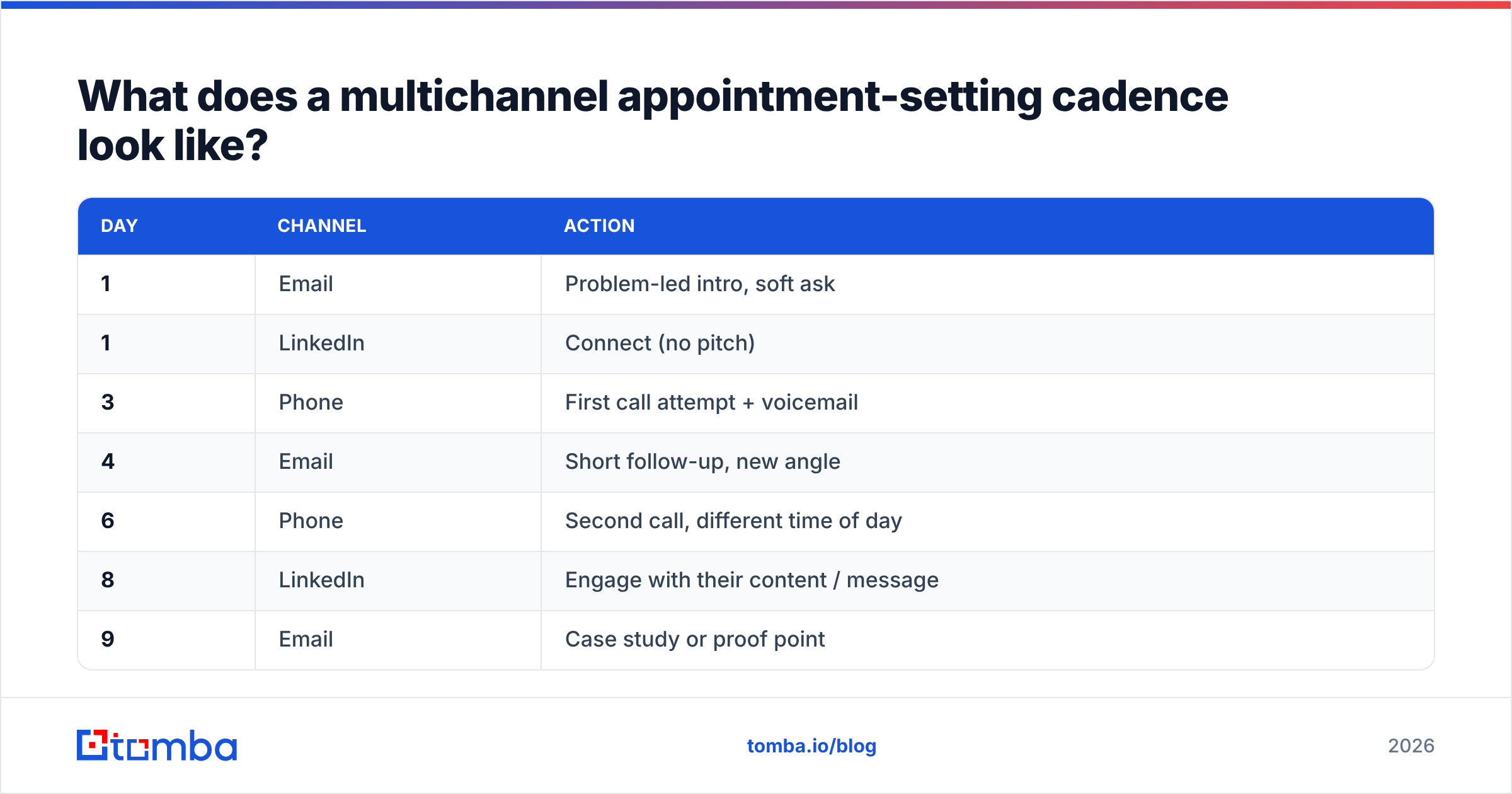
Here's a proven 12-touch, two-week structure:
| Day | Channel | Action |
|---|---|---|
| 1 | Problem-led intro, soft ask | |
| 1 | Connect (no pitch) | |
| 3 | Phone | First call attempt + voicemail |
| 4 | Short follow-up, new angle | |
| 6 | Phone | Second call, different time of day |
| 8 | Engage with their content / message | |
| 9 | Case study or proof point | |
| 11 | Phone | Third call attempt |
| 13 | Break-up email with clear close |
Two rules make this work. First, vary the time of day on calls — the person who never answers at 9 a.m. often picks up at 4:45 p.m. Second, keep the message thread consistent across channels so each touch builds on the last instead of restarting the conversation. If you want to sharpen the LinkedIn side specifically, our guide to LinkedIn outreach pairs well with this cadence.
What should you actually say? Scripts and openers#
The opener has one job: earn the next 30 seconds. It is not the place to pitch. The fastest way to lose a prospect is to sound like every other rep who opened with "How are you today?" and then launched into a feature list.
A phone opener that respects their time:
"Hi [Name], it's [You] from [Company]. I know I'm catching you out of the blue — can I take 30 seconds to tell you why I called, and you can tell me if it's worth continuing?"
That permission-based opener disarms the reflex to hang up. Then you go straight to a problem you know their role faces — not your product.
For email, the structure that books meetings is tight:
- Subject line: specific, lowercase, no hype. Test variations with a subject line generator if you're stuck.
- Line 1: a relevant observation about them, not "I hope this finds you well."
- Line 2-3: the problem and a one-sentence proof you can help.
- The ask: one clear, low-friction question — "Worth a 15-minute call Thursday?"
Keep it under 90 words. The goal of a cold email is not to sell; it's to start a conversation that leads to a slot on the calendar.

How do you handle objections without losing the meeting?#
Objections in appointment setting are rarely real rejections — they're reflexes. "I'm busy," "send me an email," and "we already have a vendor" are autopilot responses, not final answers. Your job is to acknowledge, then redirect to a low-commitment ask.
- "I'm busy." → "Totally fair, that's exactly why I'm asking for 15 minutes, not an hour. Would early next week be easier?"
- "Just send me info." → "Happy to — so I send something useful and not a generic deck, can I ask one quick question?"
- "We already use [competitor]." → "Makes sense, most of the teams I talk to do. The reason they still took a call was [specific gap]. Worth comparing notes?"
Notice that every response ends by steering back to a meeting, not by arguing. You're not trying to win the debate on the call — you're trying to get to the calendar where a closer can take over.
How do you stop no-shows from killing your numbers?#
A booked meeting that doesn't happen is worse than no meeting — you blocked a closer's calendar for nothing. Show rate is the most overlooked metric in appointment setting, and it's the easiest to fix with process.
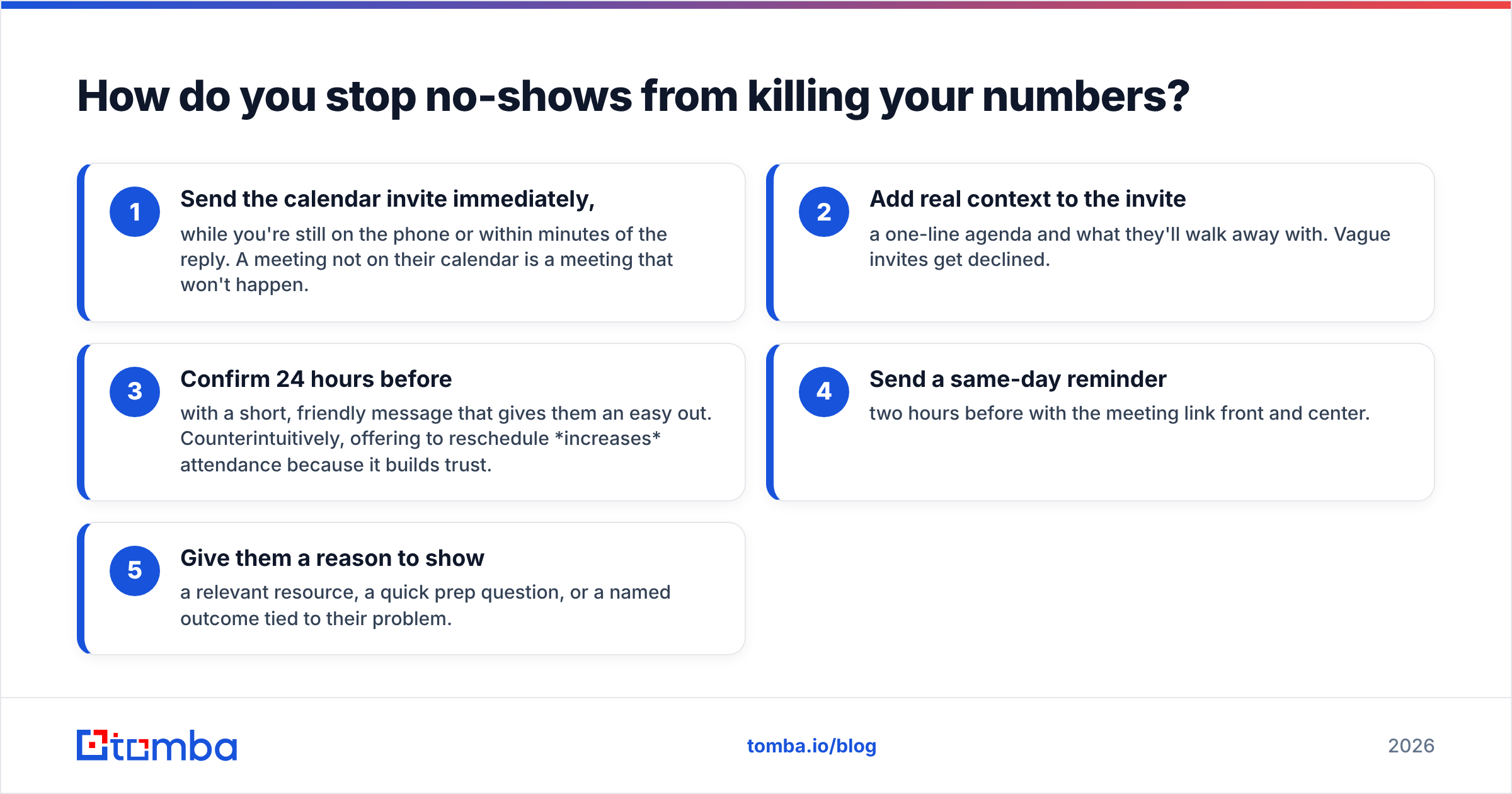
The no-show prevention playbook:
- Send the calendar invite immediately, while you're still on the phone or within minutes of the reply. A meeting not on their calendar is a meeting that won't happen.
- Add real context to the invite — a one-line agenda and what they'll walk away with. Vague invites get declined.
- Confirm 24 hours before with a short, friendly message that gives them an easy out. Counterintuitively, offering to reschedule increases attendance because it builds trust.
- Send a same-day reminder two hours before with the meeting link front and center.
- Give them a reason to show — a relevant resource, a quick prep question, or a named outcome tied to their problem.
Teams that run this consistently push show rates from the 50s into the 80s. That's not more dials; it's the same meetings actually happening.
Which metrics tell you if appointment setting is working?#
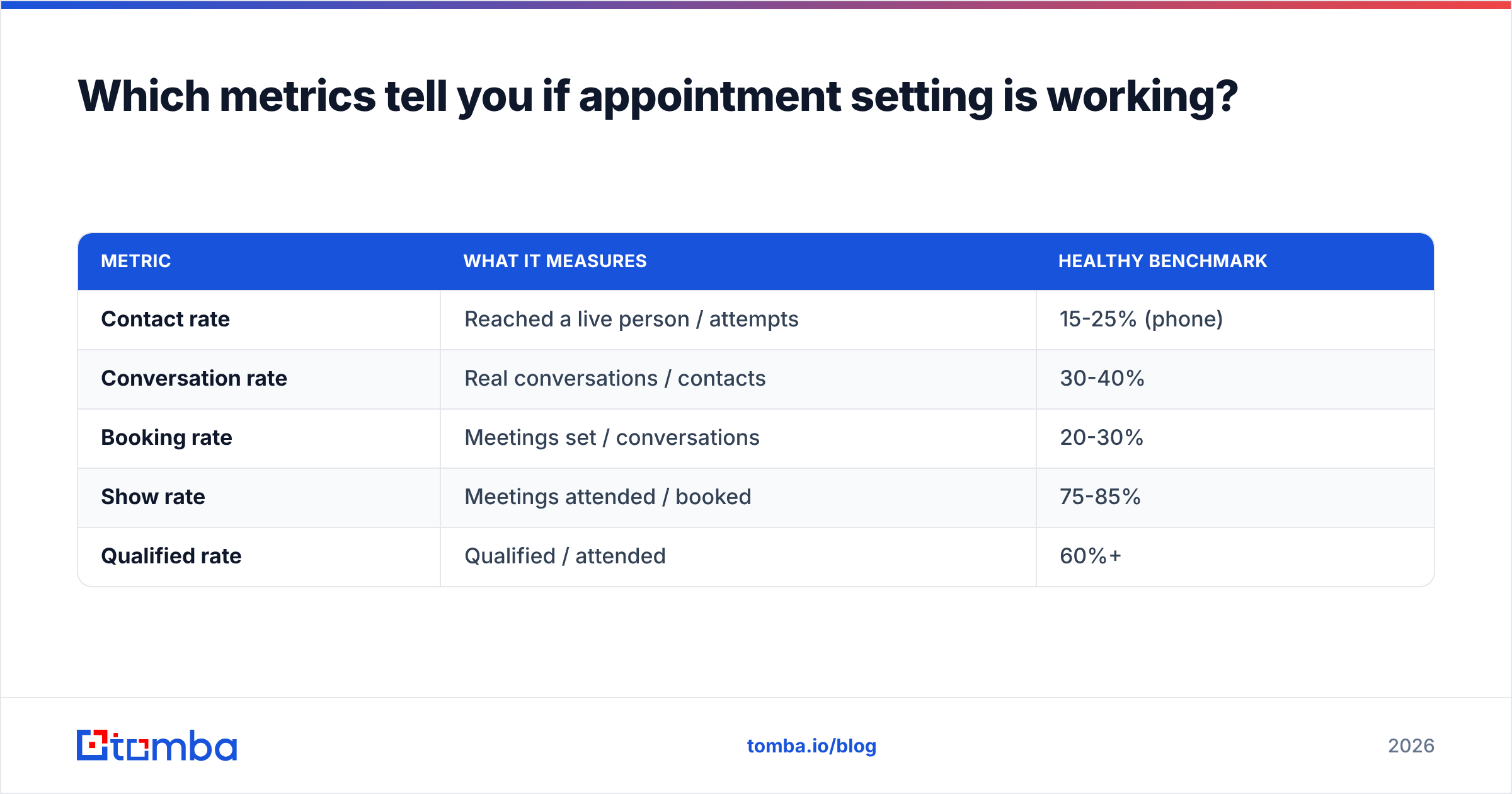
Counting "meetings booked" alone hides where you're losing. Break the funnel into stages so you know whether to fix your data, your script, or your confirmation process.
| Metric | What it measures | Healthy benchmark |
|---|---|---|
| Contact rate | Reached a live person / attempts | 15-25% (phone) |
| Conversation rate | Real conversations / contacts | 30-40% |
| Booking rate | Meetings set / conversations | 20-30% |
| Show rate | Meetings attended / booked | 75-85% |
| Qualified rate | Qualified / attended | 60%+ |
If your contact rate is low, the problem is data and channels — verify your list and add phone touches. If conversations don't convert to bookings, fix the opener and the ask. If show rate sags, tighten confirmation. Diagnosing the right stage stops you from "fixing" a script when the real issue is a list full of dead numbers. For broader context on connect-rate drivers, G2's sales engagement category and HubSpot's sales statistics roundup are useful external benchmarks.
How does data quality multiply every other tactic?#
Every tip above compounds on the quality of your underlying data. The best script in the world fails if it's read to a wrong number. A perfect five-touch cadence is wasted on a bounced inbox. This is the hidden multiplier: improving contact accuracy from 70% to 95% raises the output of every downstream activity by the same margin, for free.
That's why disciplined teams treat list hygiene as a recurring task, not a one-time setup. They re-verify before each campaign, enrich for personalization, and remove anything that bounces. When you're scaling, a bulk email finder lets you process whole target-account lists at once, and the Tomba API can wire verification directly into your CRM so reps never touch a stale record. Compare the Tomba pricing tiers against how many contacts you actually work each month — most teams find the Growth plan pays for itself in recovered rep hours alone.
A 30-day plan to put these B2B appointment setting tips to work#
You don't need to implement everything at once. Sequence it:
- Week 1 — Data. Define your ICP, build a verified list of 200 right-fit contacts, and confirm phone numbers. Fix the foundation first.
- Week 2 — Cadence. Build the 12-touch multichannel sequence and write problem-led openers for each channel.
- Week 3 — Conversations. Run the cadence, log objections, and refine your scripts based on what you actually hear.
- Week 4 — Show rate. Add the confirmation playbook and start tracking the five funnel metrics so you know what to optimize next.
By day 30 you'll have a repeatable system instead of a guessing game — and a calendar that reflects it.
Start with data your reps can trust#
Appointment setting lives or dies on who you reach. If your team is burning hours on bounced emails and dead-end switchboards, no script will save the numbers. Start by building a clean, verified, role-matched list with the Tomba Email Finder — find the right decision-makers by domain, name, or company, verify before you send, and feed your cadence contacts that actually connect. Better data in means more meetings booked, and more of them actually show up. Spin up a free Tomba account, pull your first target-account list, and let your reps spend their time talking to people who can say yes.
// get started
Find, verify and enrich your first contacts today
Start on the free plan with 25 searches a month, then scale when your team is ready.
Free plan · No credit card required · GDPR & CCPA
// about the author